Aiarty Image Matting: Offline AI Background Removal That Keeps the Hair
Aiarty Image Matting is a $109 one-time-purchase Windows program (or $69 a year) that cuts subjects out of photos with AI alpha matting, keeps fine hair, fur, lace and glass semi-transparent, and swaps in a new background, all on your own PC with no uploads. It suits photographers, designers and online sellers who need clean cutouts of many images, and it processes up to 3,000 photos in one batch.
If you have ever traced a portrait with a lasso tool and ended up with a helmet of hair and a grey halo, you know the problem it targets. Aiarty Image Matting produces a soft alpha mask instead of a hard cut, so wispy strands and see-through fabric blend into the new background instead of looking pasted on.
Quick facts
- Version: 2.7 (installer file version 2.7.0.0, dated May 1, 2026)
- Developer: Digiarty Software, Inc., the maker of WinX and MacX DVD tools
- Platform: Windows 10 (1809 or later) and Windows 11, 64-bit. The Mac version is a separate purchase
- Price at checkout: $109 Lifetime (3 PCs), $69 per year Standard (3 PCs), $1,999 per year Commercial (10 PCs)
- Free trial: every tool works, but single exports carry a watermark and batch export is off
- Guarantee: 30-day money-back guarantee (the vendor asks you to contact support first)
- Processing: fully on your PC, on the CPU or an NVIDIA, AMD or Intel GPU
- Output: PNG (8-bit or 16-bit, with alpha) and JPG, up to 10,000 px per side
What we checked: the Windows installer aiarty-image-matting.exe (205,541,624 bytes, about 196 MB, file version 2.7.0.0, signed by Digiarty Software Inc.) downloaded from the vendor, and the order page charged $109 for the Lifetime license, $69 a year for Standard (3 PCs) and $1,999 a year for Commercial on November 12, 2026. We didn't run it on our own photos.
Before you buy
A license works on one platform only. A Windows license can't activate the Mac version, so buy Aiarty Image Matting for Mac separately if you also edit on a Mac. The Standard plan renews every year until you cancel, and the vendor emails you 7 days before each charge. The Lifetime plan is a single payment with free updates for life, so it costs less than two years of Standard. For GPU processing you need a DirectX 12 graphics card with at least 2 GB of video memory.
Download Free TrialBuy Lifetime LicenseBuy Standard (1 Year)Buy Commercial License
Overview
Aiarty Image Matting does one job: it separates a subject from its background and lets you put something else behind it. You drop in a photo, a batch or a whole folder, pick one of four AI models and click Start. The app builds an alpha mask, a greyscale map where every pixel has its own transparency, rather than a simple in-or-out selection. That is the difference between matting and the segmentation most one-click removers do: the edge pixels of a curl of hair end up partly transparent, so they pick up the colour of whatever background you add later.
Once the mask is done you can refine it with an eraser, brush, dodge and burn tools, swap the background for a colour, gradient or picture, add blur, feather, black-and-white or pixel effects, and export. Everything runs locally on your PC, so client photos and unreleased products never leave the machine. The models were trained on 320,000 images at 4K and above, according to Digiarty.
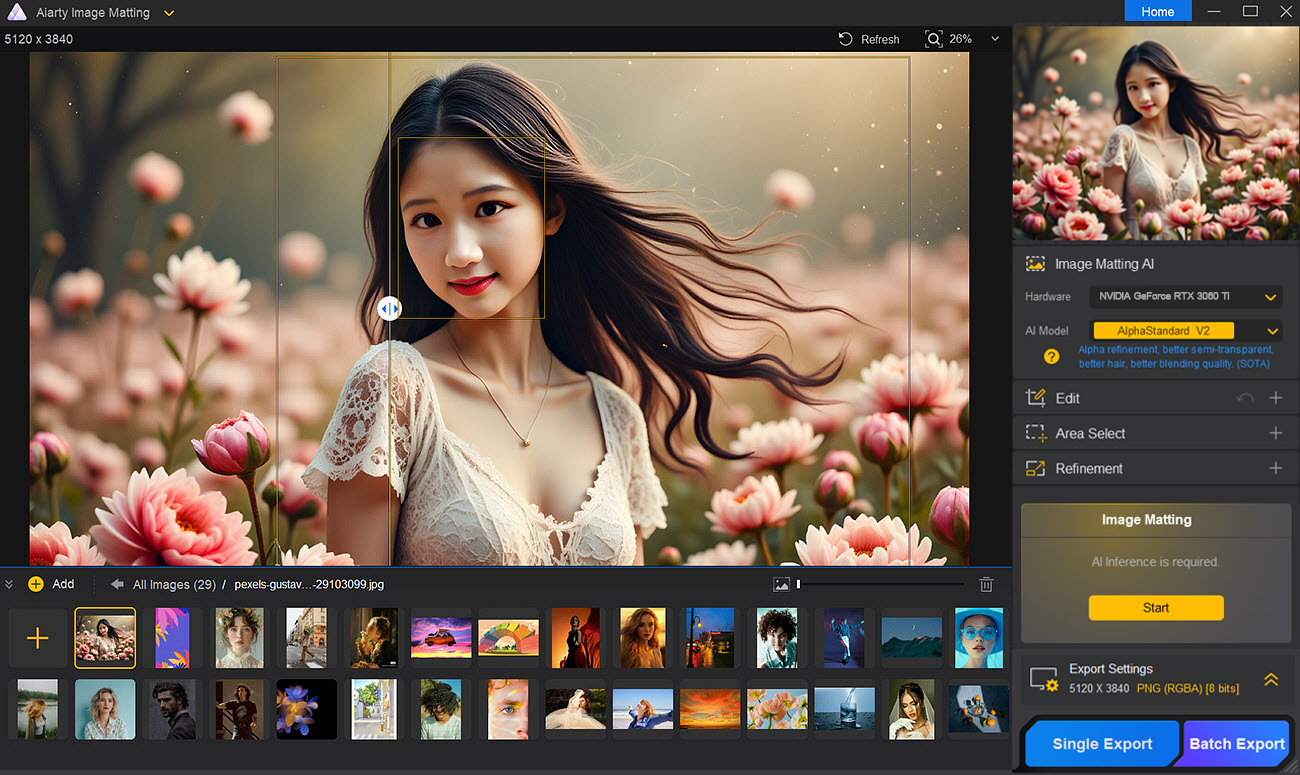
The main window before matting: the image list along the bottom (29 photos loaded), the AI model and hardware choice on the right, and the yellow Start button.
Features
Four AI models for different kinds of subjects
Aiarty Image Matting gives you four matting models, each tuned for a type of image, so you pick the one that fits instead of hoping a single model guesses right:
- AlphaStandard V2: semi-transparent subjects with hair, such as wedding veils, glass, water droplets, people and pets
- AlphaEdge V2: like AlphaStandard but with sharper edges and less transparency, for silhouettes, anime and cartoons, tattoos
- EdgeClear V2: solid objects with fine detail, such as bicycles, cars, bags, jewellery, furniture and birds
- SolidMat V2: solid objects that need the sharpest edges, such as buildings, phones, clothing, shoes and books
True alpha matting for hair, fur, lace and glass
Aiarty Image Matting keeps partial transparency where the subject really is see-through. A tulle skirt stays sheer, a glass keeps its reflections, and stray hairs fade into the new background instead of being chopped off. You can view the result as the RGBA cutout or as the black-and-white mask, and bend the mask with an Alpha curve: lifting the curve softens edges, lowering it makes the subject more solid.
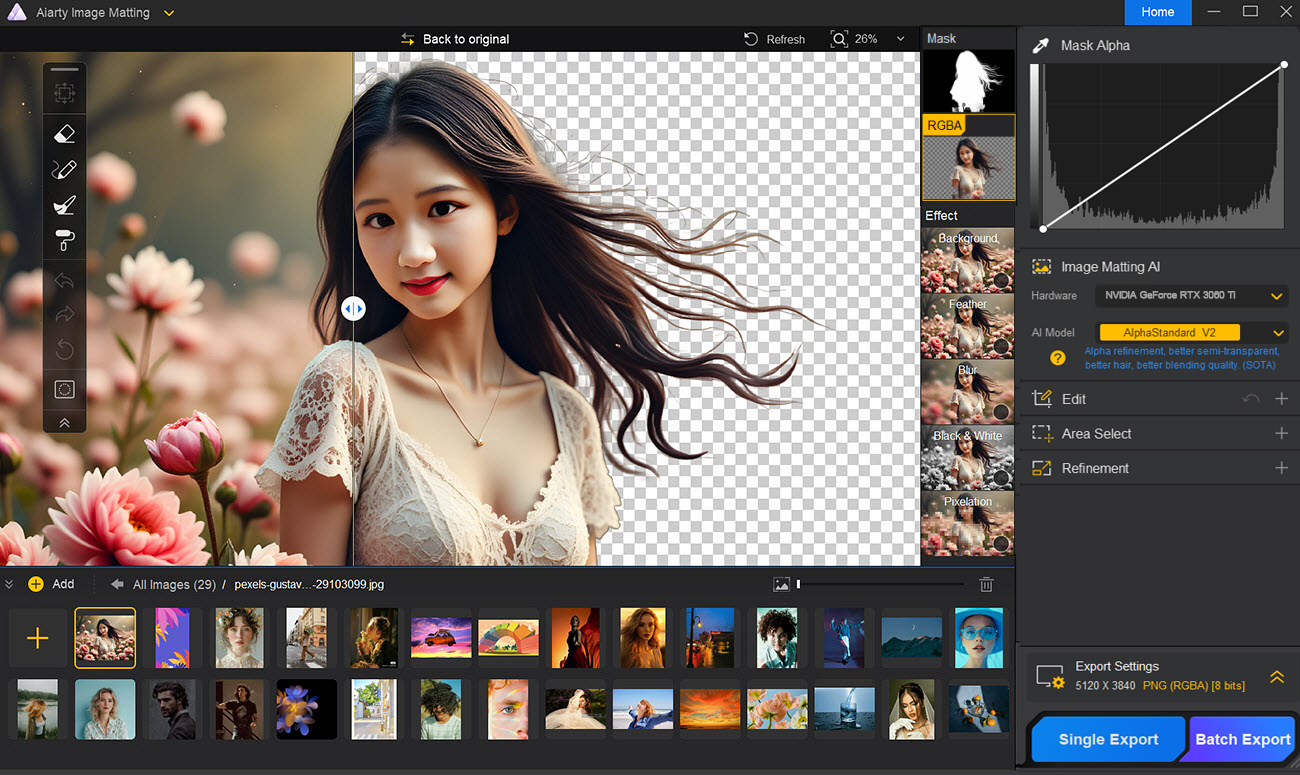
After matting with AlphaStandard V2: the original on the left of the slider, the transparent cutout on the right with individual hair strands kept, and the Mask Alpha curve at the top right.
Refinement tools when the AI misses
Aiarty Image Matting has four drawing tools that work on the mask. The Eraser sets an area to a chosen transparency, the Brush paints opacity back in, and Dodge and Burn lower or raise transparency by a percentage for gradual fixes. A threshold slider limits the eraser and dodge to the pixels you mean to change, you can zoom to 3,000% while a tool is active, and four refinement switches (Smooth Processing, Outline Emphasis, Balance Brightness, Invert Alpha Mask) rerun the AI with different weighting for jagged edges, low-contrast shots or inverse cutouts.
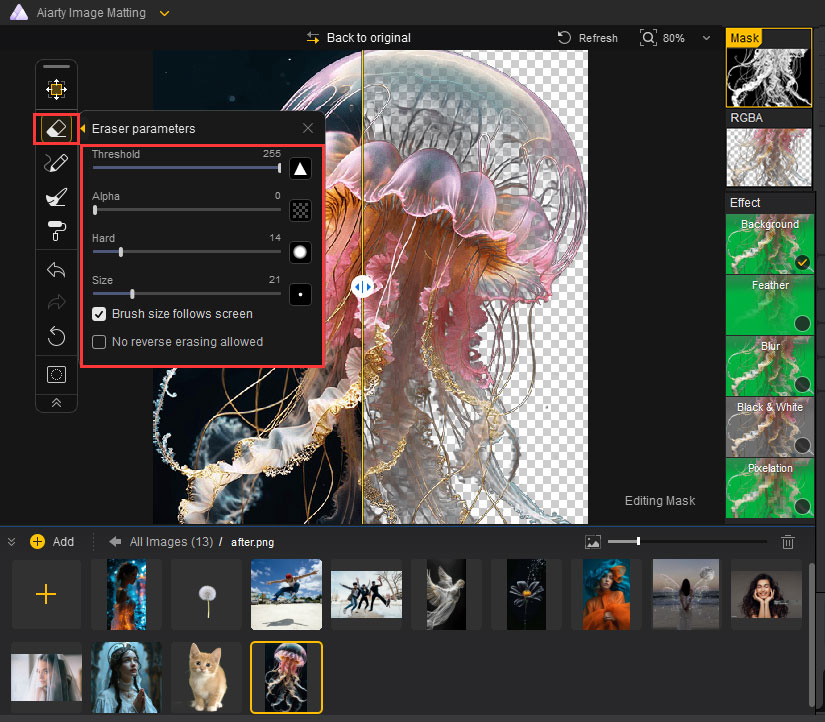
The Eraser's settings (Threshold, Alpha, Hardness, Size) while cleaning up the mask of a jellyfish, a hard semi-transparent subject.
Backgrounds and effects built in
Aiarty Image Matting replaces the background with a solid colour, a gradient or any image, and lets you move and scale the foreground and background separately. Five effects can be applied to the subject, the background or both: Background, Feather, Blur, Black & White and Pixel. Each export can include the transparent RGBA file, the mask and one file per effect, plus a combined image.
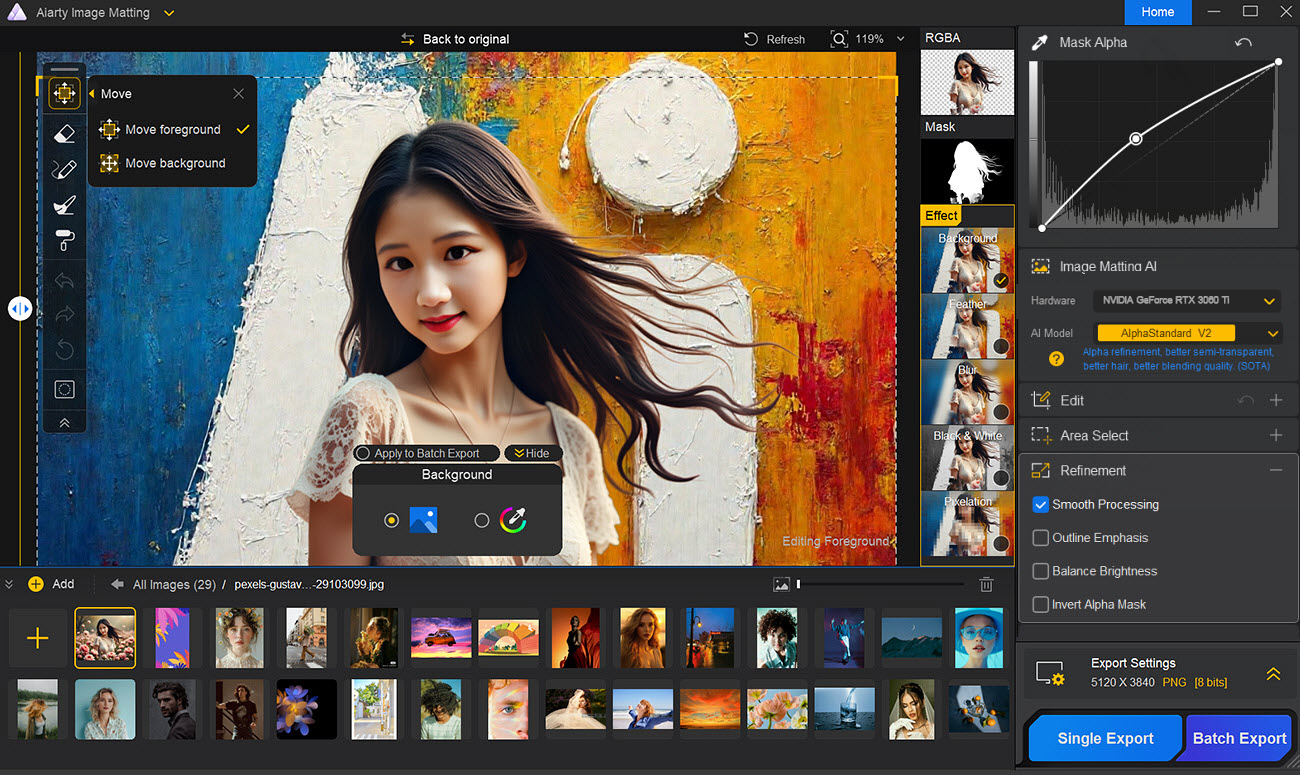
A new painted background behind the same portrait, with Move foreground selected and Smooth Processing switched on in the Refinement panel.
Batch processing up to 3,000 images
Aiarty Image Matting can process up to 3,000 images in one batch, each up to 10,000 pixels on its longest side. AI Detect finds objects in a photo and lets you choose which to keep, and an "Apply to Batch Export" switch copies the current image's object choice and effect settings to the whole batch, which is what makes a folder of product shots on white practical. The trial disables batch export.
AI enhance and basic edits before matting
Aiarty Image Matting can upscale a source image up to 2x with one of three enhancement models (More-detail GAN, Smooth Diff and Real-Photo) to cut noise and blur before matting, which helps with small or soft product photos. It also rotates, flips and crops. It reads JPG, PNG, HEIC, WebP, AVIF, TIFF, JPEG 2000 and RAW files from most camera makers (Canon CR2 and CR3, Nikon NEF, Sony ARW, Fujifilm RAF, Panasonic RW2, Adobe DNG and others).
Benefits
- Less hand tracing. The hours go into the cases the AI gets wrong, not into every image.
- Composites that don't look cut out. Soft alpha edges pick up the new background, so hair and fabric look natural.
- Privacy. Nothing is uploaded, which matters for client work, unreleased products and ID photos.
- No per-image credits. Unlike cloud removers that charge per download, a license covers unlimited exports.
Real-World Uses
- An online store's product shoot: load 200 photos of shoes, pick SolidMat V2, set a white background and batch-export JPGs ready for a marketplace listing.
- Portrait composites: cut a model with flyaway hair out of a busy street scene with AlphaStandard V2 and place her on a studio backdrop, keeping the strands.
- Wedding albums: keep a veil or tulle dress see-through when changing a dull venue background.
- Pet and wildlife photos: separate fur or feathers from grass and foliage for prints, stickers or social posts.
- Design work: use Invert Alpha Mask to keep the background and hollow out the subject for title effects or poster layouts.
Who It's For, and Who Should Skip It
Aiarty Image Matting fits photographers, designers and e-commerce sellers who cut out images often enough that a desktop tool with batch export beats paying per image online, and who care about hair and transparent edges. It also suits anyone who can't upload client photos to a cloud service.
Skip it if you remove a background twice a year: a free online remover or the subject lift built into your phone or Windows Photos and Paint is enough. Skip it too if you need a full photo editor with layers and retouching, since it only does matting, light enhancement and simple effects; Photoshop or Affinity Photo do more. And on a laptop with old integrated graphics, expect slow processing.
Usage Guide
- Download and run the installer, accept the license agreement and click Install, then Open. On first launch it checks your hardware and downloads its AI models.
- To register, open the menu at the top left, choose Register and paste the license email and code from your order email (an internet connection is needed).
- Drag in one image, several files or a whole folder. They appear in the list along the bottom.
- Pick the hardware (GPU if you have one) and an AI model on the right, then click Start.
- Check the edge in RGBA or Mask view. Use the eraser, brush, dodge or burn on any leftover background, or switch on a Refinement option and run it again.
- Open the Effect panel to add a colour, gradient or picture background, blur or other effect.
- Set the format (JPG, PNG 8-bit or PNG 16-bit) and output folder, then click Single Export, or Batch Export for the whole list.
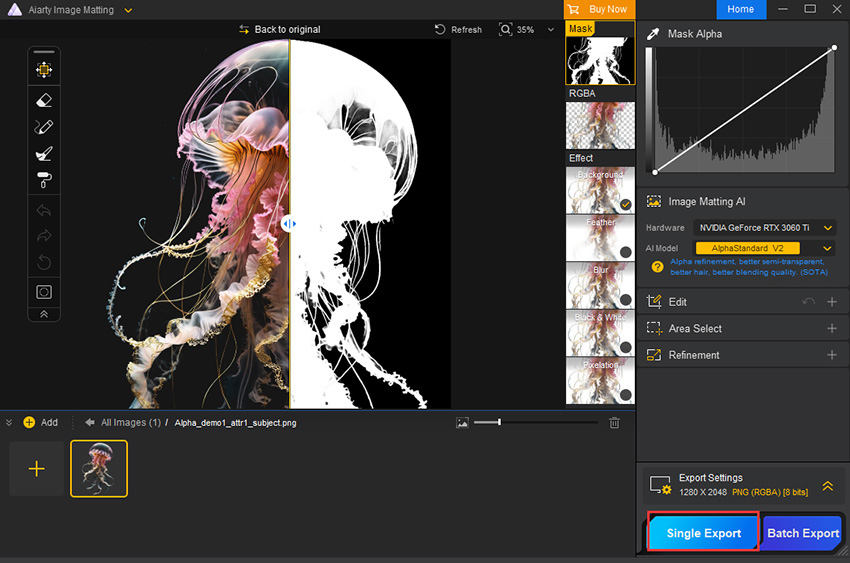
Ready to export: the mask view of the jellyfish, export settings of 1280 x 2048 PNG (RGBA) 8-bit, and the Single Export and Batch Export buttons.
Where it falls short
- Edges that are blurry or close in colour and texture to the background still trip it up, as Larry Jordan found in his test. Expect touch-up work on low-contrast shots.
- It wants a capable machine: GPU processing needs a DirectX 12 card with 2 GB of video memory, and the faster TensorRT path needs an NVIDIA GTX 1050 or newer with 4 GB.
- There's no web or cloud version, so you can't use it from another computer or a phone.
- Exports are limited to JPG and PNG. There's no PSD with layers, TIFF or WebP output.
- The trial watermarks every single export and blocks batch export, so you can't test a real batch before paying.
What Users Say
Aiarty Image Matting has mostly hands-on reviews from photography and tech sites, several of them published alongside vendor giveaways or written with a copy supplied by Aiarty. We kept the critical lines along with the praise.
Independent hands-on reviews
Larry Jordan (larryjordan.com, March 15, 2025, tested on an M2 Max Mac Studio): "I am very impressed with AIarty." "It is fast, with all the common tools you need to create outstanding masks." He adds the main caveat: "It isn’t perfect, it struggles when edges are too blurry or close in texture to the background." His verdict: "Give the free trial a test and see what you think."
TheSweetBits (tested on an M2 MacBook Air with 8 GB): "The app is snappy and feels lightweight, even on an entry-level M2 chip." "We also liked how optimized the Area Select module is." Its cons: "Requires a powerful computer with a high-end GPU for optimal performance" and "Lacks a cloud-based or browser-accessible version, limiting remote accessibility." It concludes that "Aiarty Image Matting is a great investment for professionals out there."
Tech and photography sites
MSPoweruser (Keelan, who notes the site may earn a commission): "In my testing, it had no trouble detecting individual hair strands and semi-transparent materials like lace or tulle." "Most of my test images didn’t require any additional editing." "Overall, Aiarty is straightforward and doesn’t require any traditional image editing skills."
DIYPhotography (launch review run with a giveaway): "This app is very accurate, particularly with intricate and difficult subjects such as bicycle wheels, hair and fur." On a curly-haired portrait: "You can see that it did a fairly decent job at cutting out the hair. Further adjustments with the feathering tool helped as well." And the honest summary: "Does it produce perfect results? Perhaps not quite."
Micro Four Nerds (Emily Lowrey, who discloses "Aiarty sent me a copy of this software and images for this showcase article"): "Aiarty allows you to remove backgrounds in seconds with just one click." "Aiarty Image Matting is lightweight and runs efficiently on Windows and Mac."
TheWindowsClub (Nishant): "Aiarty Image Matting software comes with a clean user interface that makes it easy to use." It singles out the offline processing: "This is not the case with Aiarty Image Matting software, as it operates offline. Hence, it saves all your data on your device locally."
Quoted on the vendor's site
Aiarty's product page carries short excerpts it attributes to PCWorld, Fstoppers, Shotkit, PetaPixel, AppleInsider and Sony Alpha Rumors. The PCWorld one reads: "It excels at complex edges, such as hair, lace, and spider’s webs, and can precisely mask out transparent and semi-transparent items from glass to wedding dresses." The Fstoppers one is from a product photographer: "It enables automated background removal, eliminating the need for the traditional, time-consuming process of manually tracing subjects." These come from the vendor's own selection.
Trustpilot: Aiarty as a company scores 3.9 out of 5 from 22 reviews, but those reviews are about its Video Enhancer and Image Enhancer (complaints include slow upscaling and DNG artifacts), not about Image Matting.
The pattern
Reviewers agree on what it does well: hair, fur and sheer fabric come out cleaner than with typical one-click removers, the interface is easy, and offline batch work is a real time-saver for product photos. The recurring criticisms are low-contrast and blurry edges, the need for a decent GPU, and no cloud or browser version. Many of the published reviews were tied to giveaways or vendor-supplied copies, so treat the most glowing ones with some caution and use the trial on your own hardest images.
Comparisons
Aiarty Image Matting vs online removers (remove.bg, Photoroom)
Online removers are quicker to start and work on any device, and they're fine for occasional cutouts. Aiarty Image Matting costs more up front but has no per-image fees, keeps photos on your computer, processes 3,000 images per batch, and gives you real mask editing and alpha matting for hair and transparency. If you only need a few cutouts a month, an online tool is cheaper; for regular product or portrait work the desktop license pays off.
Aiarty Image Matting vs Photoshop
Photoshop's Select Subject and Select and Mask can match it with patience and do far more besides, but it's a subscription and a steep tool to learn. Aiarty Image Matting is narrower and faster for this one job, and its batch export is simpler than setting up Photoshop actions.
Lifetime vs Standard vs Commercial
All three include every feature. Lifetime and Standard both cover 3 PCs for individuals and families; Lifetime is one payment with free updates for life, Standard is $69 a year with a year of updates and auto-renewal. Commercial is for businesses: 10 PCs, first access to new AI models, customised features and faster support, at $1,999 a year.
Editions and Pricing
| License | Price at checkout, Nov 12, 2026 | Term | PCs | Buy |
|---|
| Lifetime (individual and family) | $109 | One-time payment, lifetime updates | 3 PCs | Buy Lifetime |
| Standard (individual and family) | $69 | Billed yearly, renews automatically | 3 PCs | Buy Standard |
| Commercial (business use) | $1,999 | Billed yearly, renews automatically | 10 PCs | Buy Commercial |
Each Buy button orders that license directly. Prices exclude sales tax, which the order page adds for your location. The vendor's own buy page sometimes shows a holiday coupon price; the prices above are what the order page charged on the date shown. All licenses come with a 30-day money-back guarantee, and non-profit and education buyers can ask the sales team for a discount.
FAQs
Can I use one Aiarty Image Matting license on both Windows and Mac?
No, Aiarty Image Matting licenses are platform-specific. A Windows license activates up to 3 Windows PCs and a Mac license up to 3 Macs, and a code for one platform won't work on the other, so you need two purchases to use both.
Does Aiarty Image Matting upload my photos to a server?
No, Aiarty Image Matting processes images on your own PC. An internet connection is needed only to register the license, download AI models and check for updates.
Does Aiarty Image Matting need a graphics card?
Aiarty Image Matting runs on the CPU, but a GPU is much faster. It supports DirectX 12 graphics with at least 2 GB of video memory, from NVIDIA GTX 600, AMD Radeon HD 7000 or Intel 4th-generation HD Graphics and newer, and can use NVIDIA TensorRT on a GTX 1050 or better with 4 GB.
What happens when the Aiarty Image Matting Standard license expires?
The Aiarty Image Matting Standard license renews every year until you cancel, and you're emailed 7 days before each charge. It includes free updates for the year it covers. If you'd rather not renew, the Lifetime license is a single payment with lifetime updates.
Can Aiarty Image Matting make a white background for product listings?
Yes, Aiarty Image Matting can replace the background with pure white (or any colour) and apply that setting to a whole batch with Apply to Batch Export, then save JPGs ready for a shop listing.
Does Aiarty Image Matting work with RAW photos?
Yes, Aiarty Image Matting opens RAW files from Canon, Nikon, Sony, Fujifilm, Panasonic, Olympus, Pentax, Hasselblad, Phase One, Leica and others, plus DNG. Version 2.7 improved RAW decoding, including colour accuracy for Canon CR3. Results are saved as JPG or PNG.
How large can images be in Aiarty Image Matting?
Aiarty Image Matting accepts images up to 10,000 pixels on the longest side, and its AI Enhance option can upscale a smaller source by up to 2x before matting.
Is Aiarty Image Matting worth it over the free trial?
The Aiarty Image Matting trial is enough to judge the cutout quality on your own photos, since every tool works. What you pay for is watermark-free exports and batch export, which the trial blocks.
Does Aiarty Image Matting come with anything extra?
On November 12, 2026, Aiarty's buy page adds a free Aiarty Image Enhancer license as a bonus: 3 months with Standard and 1 year with Lifetime. Check the order page for the current offer.
System Requirements
- Windows: Windows 10 version 1809 or later (1903 or later for GPU processing), Windows 11, 64-bit
- Processor: Intel or AMD x64
- Memory: 8 GB RAM minimum, 16 GB recommended
- Graphics: DirectX 12 GPU with at least 2 GB VRAM (NVIDIA GTX 600, AMD Radeon HD 7000, Intel 4th-gen HD Graphics or newer); TensorRT needs an NVIDIA GTX 1050 or newer with 4 GB
- Download size: about 196 MB, plus AI models downloaded on first run
- Input: HEIC, JPG, PNG, BMP, WebP, AVIF, TIFF, JPEG 2000 and most camera RAW formats
- Output: PNG (8-bit or 16-bit) and JPG
Conclusion
Aiarty Image Matting is worth buying if you cut out images every week, especially portraits with loose hair, pets, or products photographed against clutter. The one reason to buy it is the alpha matting: hair and sheer fabric come out soft and believable, and you can fix what the AI misses with real mask tools, offline and in batches of thousands. The main reason not to is that it's a single-purpose tool that still struggles with blurry, low-contrast edges, and occasional users will do fine with a free online remover.
The $109 Lifetime license is the better deal than $69 a year for anyone planning to use it beyond a year, and the trial lets you test your hardest images first, with a watermark.
Download Free TrialBuy Lifetime LicenseBuy Standard (1 Year)Buy Commercial License