Movavi Photo Editor: One-Click AI Fixes for Backgrounds, Objects, Portraits and Old Photos
Movavi Photo Editor is a Windows photo editor built around one-click AI tools: it removes or swaps backgrounds, erases unwanted objects and people, retouches portraits, enhances light and color, and restores and colorizes old photos. It costs $49.95 a year or $99.95 for a lifetime license, and it's for home users and social media creators who want good-looking photos fast, not for photographers who need layers and RAW development.
Think of the tourist in the background of your best holiday shot, or the faded, creased print of your grandparents. Those are the jobs Movavi Photo Editor does in a few clicks.
Quick facts
- Current version: Movavi Photo Editor 24.3 (Movavi's page dates the last update January 15, 2024)
- Developer: Movavi
- Runs on: Windows 10 and 11, 64-bit (a Mac version is sold separately)
- Price: $49.95 a year, $99.95 for a lifetime license, or $104.95 a year bundled with Movavi Video Suite
- Free trial: saves up to 10 images, with a watermark
- Refunds: a 14-day money-back guarantee for technical problems that can't be solved
- Hardware: Intel Core i5 or better and 6 GB of RAM
What we checked: Movavi's Photo Editor page (version 24.3, last update January 15, 2024), the Photo Editor order page ($49.95 a year, $99.95 lifetime, $104.95 a year with Video Suite), Movavi's trial limitations page, the installer link (MovaviPhotoEditorSetup.exe, 2,853,696 bytes, an online installer) and the Photo Editor 24 user guide, all on October 31, 2026. We didn't edit photos with it ourselves.
Before you buy
- The lifetime license is the better deal for most people. At $99.95 it costs the same as two years of the subscription and never renews.
- It isn't a RAW developer. It opens most RAW files, but as SLR Lounge put it, editing is a "destructive" workspace, so keep your originals.
- The trial is generous but capped. You can try every tool, but only 10 images save, each with a watermark.
- No layers. If you need layer-based compositing, masks or curves, a full editor such as Photoshop or Affinity Photo fits better.
Download Free TrialBuy Now
Overview
Movavi Photo Editor keeps its interface simple. A column of tool icons runs down the left side, for erasing objects, background removal, text, cropping and the other tools. Clicking one opens its panel next to the photo, and a zoom control, before/after toggle, undo and redo sit under the image, with a yellow Save button at the bottom right. Most tools offer an Auto mode that lets the AI do the work and a Manual mode for touching up the result.
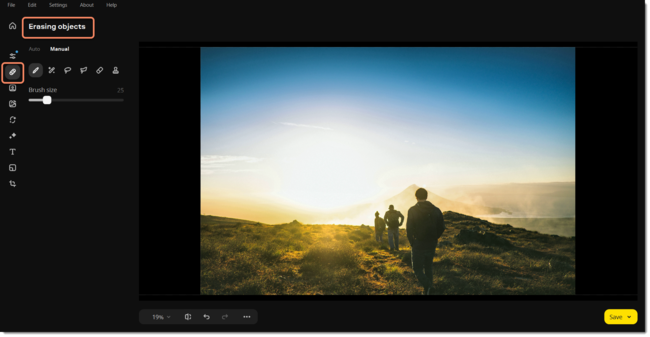
Movavi Photo Editor 24 with the Erasing objects tool selected: Auto and Manual tabs, brush tools and a brush size slider on the left, a photo of hikers on a hillside, and the Save button.
Features
Erase objects and people with AI fill
Movavi Photo Editor removes people, cars, wires or anything else you select, then has its AI generate a natural-looking background to fill the gap. You can select objects automatically or paint over them by hand, and erase several at once or one by one. SLR Lounge found that "Once in a while you might have to hit "undo" and try something a little differently", but that the process is still years ahead of manual retouching.
Remove or replace the background
Movavi Photo Editor selects the background automatically, or you can mark it by hand (just the sky, for example). You can then swap in one of the included backdrops, your own image or a solid color. It's useful for product photos, profile pictures and the occasional cityscape-to-galaxy joke.
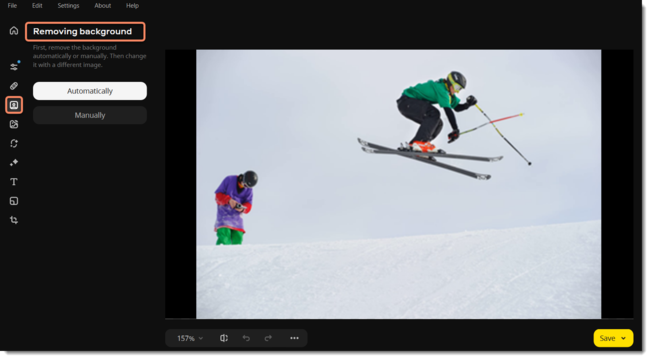
The Removing background panel in Movavi Photo Editor 24, with Automatically and Manually buttons beside a photo of two skiers.
Portrait retouching in one click
Movavi Photo Editor's AI retouch smooths skin, removes dark spots and blemishes, whitens teeth and applies makeup, with the strength adjustable so faces still look like faces.
Restore and colorize old photos
Movavi Photo Editor hides crease lines, scratches and stains on scanned prints, reduces scan noise, and adds natural-looking color to black-and-white pictures. For a family archive, that's the feature most people buy it for.
Automatic enhancement and color presets
Movavi Photo Editor's automatic enhancement balances light and color with one click, and 34 color correction presets give quick looks you can fine-tune. Manual controls cover exposure, color, sharpness and detail, and there are filters, atmospheric effects, text captions, frames, cropping and resizing.
Benefits
- Results without the learning curve. The jobs that take skill in Photoshop, such as cloning out a person or cutting out a subject, become one click plus a quick check.
- Fast on big files. SLR Lounge reported processing times of "a second or less" even on 40 to 60 megapixel images.
- A one-time price is available. The $99.95 lifetime license avoids yet another subscription.
Real-World Uses
- Holiday photos: erase strangers and signposts from landmark shots, then boost the colors with a preset.
- A family archive: scan old prints, remove the scratches and creases, and colorize the black-and-white ones.
- An online shop: cut products out of cluttered backgrounds and place them on white.
- Profile and social posts: retouch a portrait and add a caption before posting.
Who It's For, and Who Should Skip It
Good fit: home users, families digitizing old photos, small sellers and social media creators who want quick AI fixes on a Windows PC.
Skip it if:
- You shoot RAW and want non-destructive editing. Lightroom or darktable keep your originals intact.
- You need layers and fine masks. Photoshop, Affinity Photo or GIMP go much deeper.
- You edit mostly on your phone. SLR Lounge pointed out it's a desktop program, and moving photos back and forth adds steps.
- Your PC is modest. It asks for an Intel Core i5 and 6 GB of RAM, more than Movavi's video tools.
Usage Guide
- Install: run MovaviPhotoEditorSetup.exe, a small online installer that downloads the program (allow 500 MB of disk space).
- Open a photo: launch Movavi Photo Editor and open the image from the File menu.
- Pick a tool: click an icon in the left column, for example Erasing objects or Background removal.
- Let the AI work, then refine: start with Auto, and switch to Manual to touch up what it missed.
- Save: click Save at the bottom right and choose the format.
Where it falls short
- Very large or RAW files. SLR Lounge warned that "Stability or results may be compromised beyond 48 megapixels and/or with raw image files".
- Limited depth for experts. Its cons list starts with "Simplified Interface may not offer enough to highly advanced users".
- Slow update pace. Movavi's page still dates the current version, 24.3, to January 2024, while Movavi Video Suite and Screen Recorder were updated in September 2026.
- Movavi's pricing reputation. Movavi's Trustpilot complaints are mostly about subscriptions and refunds, so note your renewal date if you choose the yearly plan.
What Users Say
Movavi Photo Editor has fewer independent reviews than Movavi's video software.
SLR Lounge (Alice Houstons, July 23, 2024)
SLR Lounge tested it on 40 to 60 megapixel images: "The AI in Movavi Photo Editor works very well, and we are impressed with the results. In fact, the results are almost perfect right out of the box, and only require manual fine-tuning from time to time."
On speed: "Even with larger images, such as 40-60 megapixels, the "Processing" time was only a second or less." And on stability: "even when testing Movavi Photo Editor on 60-megapixel images, I still was able to get good quality results, and the app never crashed!"
Its pros: "Amazing User Interface; very intuitive and fast", "High quality results with almost no learning curve". Its cons: "Simplified Interface may not offer enough to highly advanced users", "Manual Adjustments & presets seem to be either universal or local", "Stability or results may be compromised beyond 48 megapixels and/or with raw image files" and "Limited to computer operating systems; (PC & Mac) unavailable for mobile devices (iOS & Android)". SLR Lounge recommended the lifetime license, which then cost $69.95; it's $99.95 today.
Trustpilot: 3.5 out of 5 from 22,156 reviews (all Movavi products)
Movavi's Trustpilot page showed a TrustScore of 3.5 from 22,156 reviews on October 31, 2026, covering every Movavi product. None of the recent English reviews on its first page named Photo Editor. Across the company, the praise is about ease of use and the complaints about subscriptions and refunds, for example Valentin Mladinescu (3 stars, October 2026): "Dissapointed on the subscription model for payment."
The pattern: reviewers who try the AI tools are impressed by how good the one-click results are and how little there is to learn. The criticism is about depth (no layers, limited control) and RAW or very large files, and buyers should treat it as a quick-fix editor, not a Photoshop replacement.
Comparisons
Movavi Photo Editor vs Adobe Photoshop
Photoshop does everything, with layers, masks and generative fill, but it's subscription-only and takes time to learn. Movavi Photo Editor does the common fixes (object removal, background swaps, retouching, restoration) in far fewer steps and can be bought outright.
Movavi Photo Editor vs GIMP
GIMP is free and powerful but manual: removing an object or cutting out a subject is a skill. Movavi Photo Editor automates those jobs with AI, which is what you pay for.
Editions and Pricing
Movavi's Windows order page showed these options on October 31, 2026:
| Plan | Price | Term | Notes |
|---|
| Free trial | $0 | 10 saved images | Watermark on saved images |
| Photo Editor | $49.95 | 1 year | Updates while subscribed |
| Photo Editor | $99.95 | Lifetime | Minor updates within the version |
| Photo Editor + Video Suite | $104.95 | 1 year | Adds Video Editor, Video Converter and Screen Recorder |
FAQs
Is Movavi Photo Editor free?
Not fully. Movavi Photo Editor's free trial lets you use the tools but saves only 10 images, each with a watermark. Removing the limits costs $49.95 a year or $99.95 once.
Does Movavi Photo Editor edit RAW files?
It opens most RAW files, but Movavi Photo Editor isn't a RAW converter, and its edits aren't non-destructive. Photographers who shoot RAW should develop the files elsewhere first.
Will Movavi Photo Editor run on my laptop?
Movavi Photo Editor needs 64-bit Windows 10 or 11, an Intel Core i5 or better and 6 GB of RAM. Older or budget laptops with 4 GB of RAM fall below that.
Does the lifetime license include future versions?
No. Movavi's store says a lifetime license lets you use the version you bought for as long as you like, with free minor updates, but a newer major version is a paid upgrade.
Is there a Mac version of Movavi Photo Editor?
Yes, Movavi sells Photo Editor for Mac separately. This listing covers the Windows version.
Can I get a refund for Movavi Photo Editor?
Only for problems support can't solve. Movavi's order page offers a complete refund within 14 days "If you experience technical or other problems that cannot be solved", so test the trial on your own photos first.
System Requirements
- Windows: 10 or 11, 64-bit, with current updates
- Processor: Intel Core i5 or higher
- Graphics: Intel HD Graphics 2000, NVIDIA GeForce 8 series, AMD Radeon R600 or better
- RAM: 6 GB
- Disk: 500 MB to install, 5 GB for ongoing work
Conclusion
Movavi Photo Editor is worth buying, ideally as the $99.95 lifetime license, if you want AI to handle object removal, background swaps, retouching and photo restoration for you. SLR Lounge found the results "almost perfect right out of the box", and the tools take minutes to learn.
Skip it if you shoot RAW, need layers or edit mostly on your phone. Also note that Movavi's page dates its last update to January 2024. Try the trial's 10 saves on your own hardest photos before you buy.
Download Free TrialBuy Now