Aiarty Video Enhancer: Upscale, Denoise and Smooth Old or Grainy Video on Your Windows PC
Aiarty Video Enhancer is a Windows program from Digiarty that uses AI models to upscale video to 4K, remove grain and blur, add frames up to 120 fps and clean up the soundtrack, all locally on your PC. The Lifetime License for 3 PCs costs $235.00 on the order page, and a free trial processes 120 seconds of any video so you can judge the results on your own footage first.
It's for the 480p camcorder clip from a birthday party, the noisy phone video of a concert, the 720p AI clip that looks soft on a 4K screen.
Quick facts
- Current version: 3.8 (Windows installer dated September 22, 2026)
- Developer: Digiarty Software, Inc., the company behind WinX DVD Ripper and VideoProc
- Runs on: Windows 10 and 11, 64-bit. The Mac version is a separate purchase.
- Hardware: 8 GB RAM minimum (16 GB recommended) and a DirectX 12 graphics card with 4 GB of video memory or more for GPU processing
- Output: up to 4K (longest side 4,096 pixels), up to 120 fps, MP4, MOV or MKV
- Price: $235.00 for the Lifetime License (3 PCs, lifetime updates)
- Free trial: no sign-up, 120 seconds per video, watermark on exports, no batch export
- Money-back guarantee: 30 days
- What we checked: the installer we downloaded from Aiarty on October 21, 2026 is version 3.8.0.0 (389 MB), digitally signed by Digiarty Software, Inc. The order page showed the Lifetime License for 3 PCs at $235.00 on October 21, 2026, and Aiarty's own buy page showed the same license at $165.00 with its coupon that day. We didn't time an upscale on our own hardware.
Before you buy
Your graphics card decides how pleasant this is. Aiarty Video Enhancer runs on the CPU by default, and AI upscaling on a CPU or a laptop's integrated graphics can take many times the length of the clip. Install the trial, switch Device to your GPU, and time a 30-second piece of your own footage before paying. Also note that the license is Windows-only: a Mac needs its own license, and codes don't carry across platforms.
Download Free TrialBuy Now
Overview
The main window has four areas. A large preview with a before/after slider sits in the middle, a thumbnail strip and task queue run along the bottom, the settings panel is on the right, and two big buttons, Export Current and Batch Export, finish the job. The default settings (moDetail-HQ, 2x upscale, MP4 with H.264) are a sensible starting point, so a first export is three clicks: add the file, select it, export.
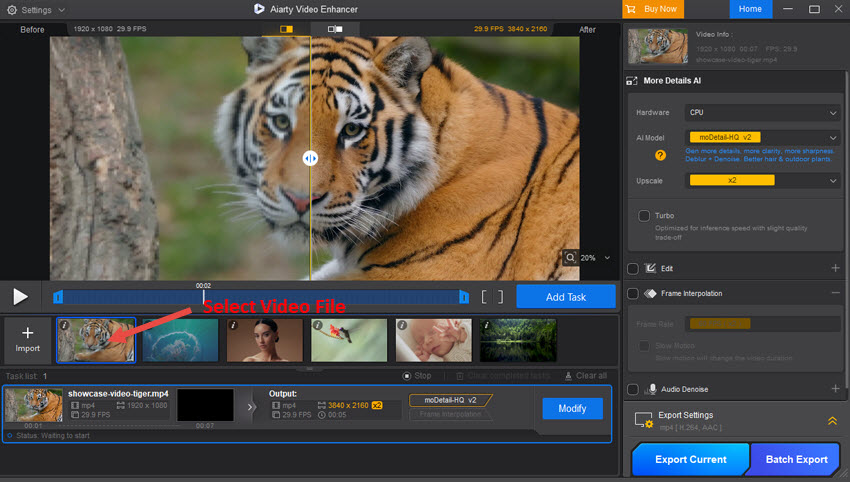
The Windows main window from Aiarty's user guide: a 1920 x 1080 tiger clip being upscaled to 3840 x 2160 with the moDetail-HQ model at 2x, the before/after slider in the preview, imported clips along the bottom and Export Current and Batch Export at the lower right.
Everything happens on your PC. Footage is never uploaded, which matters for client work, and there's no per-minute credit system as with online enhancers. An internet connection is only needed to activate the license.
Features
Three AI models for three kinds of bad footage
Aiarty Video Enhancer gives you a choice of models instead of one generic filter. moDetail-HQ rebuilds fine texture such as hair, skin and foliage and suits daylight and outdoor footage. Smooth-HQ is the gentle one: it deblurs and denoises while keeping colors and texture faithful, which suits indoor and people shots. superVideo vHQ is built for very dark, grainy clips like night streets and dim interiors; it's slower and only upscales 2x. The first two upscale 1x, 2x or 4x, or straight to 720p, 1080p, 2K or 4K, and 1x is there for clips that need cleaning but not enlarging. A Strength slider dials the effect up or down when the result looks too processed.
Turbo mode for speed, Step mode for small graphics cards
Aiarty Video Enhancer has two switches that trade quality, speed and video memory. Turbo cuts processing time with a slight loss of detail. Step Mode processes the video in smaller chunks, which lowers video memory use and avoids failed exports on cards with less than 6 GB, at the cost of speed. Aiarty's own benchmark says Turbo upscales a 25-minute 2K clip to 4K in about 25 minutes on an NVIDIA RTX 5090. Expect much longer on mid-range hardware. NVIDIA owners also get TensorRT acceleration on GeForce 10-series cards and newer.
Side-by-side preview before you export
Aiarty Video Enhancer renders a preview of the current frame so you can compare the original and the enhanced version, either with a sliding divider or in two windows side by side, and zoom in with the mouse wheel. During playback the enhanced side shows the original, so pause to compare. For a real test, trim a few seconds with the timeline handles and export just that.
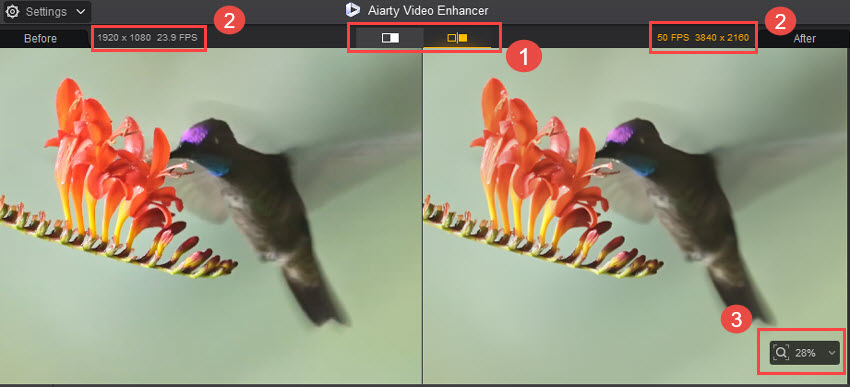
Dual preview mode from the user guide: the original 1920 x 1080 clip at 23.9 fps on the left and the 3840 x 2160, 50 fps output on the right, with the zoom control at the lower right.
Smoother motion and slow motion up to 120 fps
Aiarty Video Enhancer's Frame Interpolation generates new frames so you can raise a clip to 25, 30, 50, 60, 90 or 120 fps. Tick Slow Motion and it stretches the clip instead, turning 30 fps footage into smooth slow motion; the video gets longer accordingly. It works on choppy webcam recordings, game captures and old 24 fps footage that judders on a modern screen.
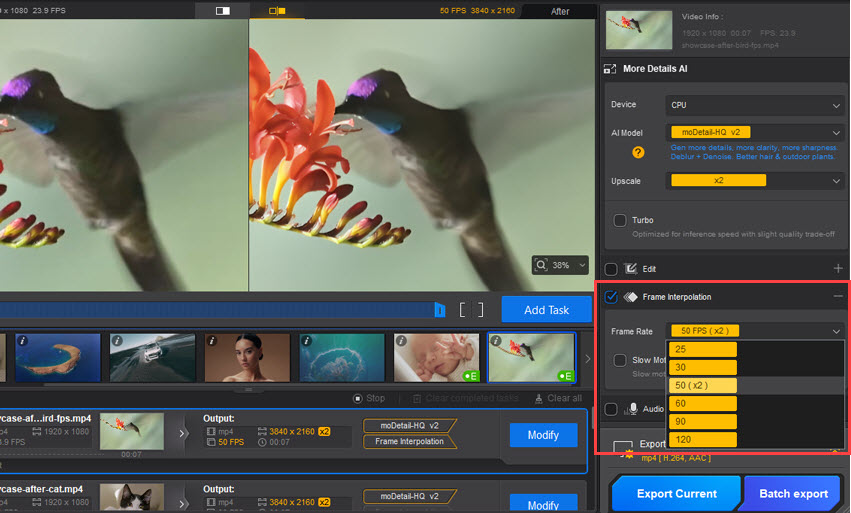
The Frame Interpolation panel open, with the frame rate list from 25 to 120 fps and 50 fps (x2) selected for a 23.9 fps hummingbird clip.
Cleaner sound with AI audio denoise
Aiarty Video Enhancer also cleans the soundtrack. The VoiceFilter model separates speech from noise such as typing, air conditioning, wind and room echo, and the lighter RNNoise model suits slower PCs. An attenuation limit sets how aggressive the cleanup is: around 10 to 15 dB keeps some room sound, 30 dB and above strips more but can distort voices.
Color, SDR-to-HDR and basic edits
Aiarty Video Enhancer includes a color panel with temperature, tint, exposure, contrast, saturation, highlights, shadows, whites and blacks, plus a Restore Color slider that pulls the AI output back toward the original colors. An SDR to HDR option converts 8-bit video to 10-bit HDR with three looks (Neutral, Bright, Graded); you need an HDR display with HDR switched on in Windows to see it. The edit tools cover rotate, flip, crop to preset ratios, Force Deinterlace for old camcorder and TV recordings, and choosing among multiple audio or video tracks.
Batch queue with per-clip settings
Aiarty Video Enhancer can take a whole folder at once. Either apply one set of settings to every clip and click Batch Export, or tune each clip, click Add Task, and run the whole queue overnight. It reads more than 20 input formats, including MP4, MKV, MOV, AVI, WMV, VOB, MTS/M2TS, MXF and FLV, and exports MP4, MOV or MKV with H.264, H.265 or AV1 (the tech specs page also lists ProRes).
Benefits
- No usage meter: once licensed, a two-hour wedding video costs the same as a ten-second clip, just more time.
- One pass instead of four tools: upscaling, denoising, frame interpolation and audio cleanup are set once and exported together.
- Control when the AI overdoes it: the Strength and Restore Color sliders let you keep footage looking like itself.
- A license that doesn't expire: the Lifetime License includes future versions and AI model updates.
Real-World Uses
- Digitized family tapes: deinterlace a VHS or Hi8 capture, denoise it with Smooth-HQ, and upscale to 1080p so it fills a TV without looking smeared.
- Night and indoor phone clips: run superVideo vHQ on a grainy concert or dimly lit party video.
- AI-generated video: take 720p clips from a generator to 4K and 60 fps for a YouTube upload.
- Wildlife and sports slow motion: turn 30 fps footage of a bird or a goal into smooth slow motion with frame interpolation.
- Vlogs and interviews: remove air-conditioner hum and wind from the audio while sharpening a soft webcam image.
Who It's For, and Who Should Skip It
Good fit: Windows users with a reasonably modern NVIDIA, AMD or Intel graphics card who have old, low-resolution or noisy footage worth saving, video creators who upscale regularly and want a one-time price, and anyone who won't upload private video to a web service.
Skip it if: your PC has no dedicated graphics card and little memory, since processing will be painfully slow. Skip it too if you need a full editor (there's no timeline, titles or transitions; it's a pre-processing tool you use before your editor), stabilization or colorizing of black-and-white film, none of which it offers. If you only enhance a clip or two a year, an online enhancer's pay-as-you-go credits may cost less, and if you mostly need a converter with some AI on the side, Digiarty's VideoProc Converter AI covers conversion, editing and AI upscaling in one program.
Usage Guide
- Install: download the Windows installer (389 MB), run it, accept the license agreement and click Install, then Open. The trial starts without a sign-up.
- Add video: click the plus button or drag files or a whole folder onto the window.
- Pick your hardware: in the settings panel, change Device from CPU to your graphics card.
- Choose a model and size: moDetail-HQ for detail, Smooth-HQ for natural restoration, superVideo vHQ for dark, grainy clips. Then pick 2x, 4x or a target resolution and adjust Strength.
- Preview: generate a preview, compare with the slider, and trim a short test section with the timeline handles.
- Add extras: tick Edit, Color, Frame Interpolation or Audio Denoise as needed.
- Export: choose the format, codec and output folder in Export Settings, then click Export Current, or Add Task for each clip and Batch Export.
- Register: after buying, open Settings, Register, and paste the license email and code (internet needed).
Tips
- Upscale only as far as you need. A 2x pass usually looks more natural than 4x on very low-quality sources.
- If faces start to look waxy, lower Strength or switch to Smooth-HQ.
- Update your graphics driver first. NVIDIA's TensorRT acceleration needs a recent CUDA driver, and the program falls back to slower DirectML otherwise.
Where it falls short
- Speed depends entirely on your GPU. One Product Hunt reviewer reported about six hours of rendering for a 14-second clip, which points to weak or misconfigured hardware, but it shows what can happen.
- Preview is limited. Shotkit lists "No preview for some features" as a con, and a Trustpilot reviewer said version 3.8 removed the way they checked partial renders before an export finished. Aiarty replied that it was reverting that change.
- No stabilization or colorizing. Shaky footage stays shaky, and black-and-white stays black-and-white.
- AI can't invent what isn't there. Heavily compressed or tiny sources improve but won't look like native 4K, and strong settings can make skin look smoothed.
What Users Say
Trustpilot: 3.9 out of 5 from 22 reviews
Aiarty's Trustpilot page covers all its products, so only the reviews about Video Enhancer are given here. 82% of all reviews are 5 stars and 14% are 1 or 2 stars. We read these through a summarizer, so treat the wording as close but not guaranteed exact.
William S (5 stars, July 2026) wrote that Video Enhancer "is the best I used" and "doesn't crash", describing a 1080p video enhanced to 4K with HDR, and said they preferred it to Topaz and HitPaw.
Silu Alvarenga (5 stars, August 2026): "Excellent software and amazing customer support!" The reviewer said it "exceeded my expectations" when restoring an important video.
joseph cudone (2 stars, September 2026), titled "not so Good as 3.7": "I am completely unable to preview the quality of my video before the entire rendering process finishes." Aiarty replied that it was reverting the change and offered an updated build through support.
Several other 5-star reviews praise fast replies from Aiarty's support after registration problems, while the remaining 1- and 2-star reviews are about the Image Enhancer, not this product.
Product Hunt: 5.0 from 8 reviews
Product Hunt's reviews are short and mostly positive (read through a summarizer). Julian: "Way faster and more accurate than manual cleanup in Resolve or Premiere." Zenzdesign: "Amazing product, I use it a lot to upscale videos to 4k and get sharper results." Nishant Dubey praised its hardware acceleration on an older Intel Mac. The one sour note came from AVINASH KUMAR, who liked the output quality but reported rendering times "like 6 hours for 14 sec video."
Photography and video sites
Shotkit (Ana Mireles, updated November 2025; Shotkit earns commissions on its links) gave it a "Highly Recommended" badge, listing pros of "Top quality and speed", "Easy-to-use" and "Affordable", and cons of "No preview for some features", "No video colorizer" and "No video stabilization." Her conclusion: "I was overall happy with the speed and performance of the software."
SLR Lounge (Matthew Saville, in a review that came with a license giveaway) called it "a complete AI-driven restoration suite for both video and audio" and "one of the most capable and accessible AI video tools available right now."
Aiarty's review page quotes many more outlets; keep in mind that several of those articles are sponsored or tied to giveaways. Two of the more measured: Make Tech Easier said it "can provide surprisingly accurate guesses of missing data and does a great job of making bad video good – if not good, then much more watchable", and Digital Photography School said "Used thoughtfully, it works well as a pre-processing step or last-resort fix when conditions weren't ideal."
Users quoted by Aiarty
Michelle W.: "I had some old workshop footage shot in 480p—Aiarty upscaled it to 4K beautifully. Crisp details, smooth playback, and no weird artifacts."
The pattern: people like the detail recovery on low-light and old footage, the simple interface, offline processing and responsive support. The complaints are about long render times on weaker hardware, limited preview, and missing tools such as stabilization.
Comparisons
Aiarty Video Enhancer vs. online video enhancers
Aiarty Video Enhancer has no uploads, file-size caps or per-minute credits, but your PC does the work. Online enhancers suit the occasional short clip on a laptop without a graphics card; for regular or long jobs, or private footage, the desktop tool is the better buy.
Aiarty Video Enhancer vs. VideoProc Converter AI
Both come from Digiarty. Aiarty Video Enhancer is the dedicated enhancer, with three restoration models, strength control, audio denoise and SDR-to-HDR. VideoProc Converter AI is a converter, editor, screen recorder and downloader that also has AI Super Resolution and Frame Interpolation. Choose Aiarty if restoration quality is the point, and VideoProc if you mainly convert and edit.
Windows vs. Mac
The Windows and Mac versions have the same features but separate licenses. The Windows version uses NVIDIA, AMD and Intel GPUs (with TensorRT on NVIDIA), and the Mac version needs macOS 13 or later on Apple Silicon or on an Intel Mac with a 4 GB graphics card.
Editions and Pricing
| License (Windows) |
Price |
Term |
PCs |
Updates |
| Lifetime License (the one sold here) |
$235.00 on the order page |
One-time payment |
3 |
Lifetime, including new AI models |
| Standard License |
$99.00 a year list ($79.00 on Aiarty's buy page) |
Renews yearly, cancel anytime |
1 on the plan card |
For 1 year |
Both licenses include commercial use, unlimited exports and a 30-day money-back guarantee, and Aiarty emails a reminder 7 days before a Standard License renews. Prices exclude sales tax, which is added at checkout. Aiarty offers non-profit and education discounts and multi-seat licenses for more than 3 devices through its sales team.
FAQs
Will Aiarty Video Enhancer run on a laptop without a dedicated graphics card?
Aiarty Video Enhancer runs on any 64-bit Windows 10 or 11 PC with 8 GB of RAM, and Intel integrated graphics from the 4th-generation Core (Haswell) on can accelerate it through DirectML. It works, but slowly: dedicated cards need 4 GB of video memory, and 8 GB is recommended. Time a short clip in the trial before buying.
Can I use one Aiarty Video Enhancer license on Windows and Mac?
No. Aiarty Video Enhancer licenses are platform-specific, so the Windows license sold here works on up to 3 Windows PCs only, and a Mac needs a separate Mac license.
Can I sell videos I enhance with Aiarty Video Enhancer?
Yes. Both Aiarty Video Enhancer licenses include commercial rights: selling stock footage, client work, ads and monetized uploads. You still need the rights to the original footage.
Does Aiarty Video Enhancer need an internet connection?
Aiarty Video Enhancer needs the internet only to register the license and download updates. Enhancement runs offline on your PC, and the AI models can be downloaded for offline use.
How do refunds work for Aiarty Video Enhancer?
Aiarty Video Enhancer has a 30-day money-back guarantee, but it's tied to problems: a refund is granted if the software has issues support can't resolve or work around within that period. Contact support with a description of the problem first.
Can Aiarty Video Enhancer stabilize shaky video or colorize black-and-white film?
No. Aiarty Video Enhancer upscales, denoises, deblurs, interpolates frames and adjusts color, but it has no stabilization and no colorization. Use a video editor's stabilizer before or after enhancing.
What's the largest output Aiarty Video Enhancer can make?
Aiarty Video Enhancer outputs up to 4K, with a custom resolution capped at 4,096 pixels on the longest side, and up to 120 fps. It never scales below the source resolution.
System Requirements
- OS: Windows 10 64-bit (version 1809 or later for CPU processing, 1903 or later for GPU) or Windows 11
- CPU: any x86-64 (Intel or AMD) processor
- RAM: 8 GB (16 GB or more recommended)
- GPU (DirectML): AMD Radeon HD 7000 series or later, Intel 4th-gen Core HD Graphics or later, NVIDIA GeForce GTX 600 series or later, with DirectX Feature Level 12.0. Dedicated cards need 4 GB of video memory (8 GB recommended).
- GPU (TensorRT, optional): NVIDIA GeForce 10 series (CUDA driver 11.8 or later) or 20 to 50 series (CUDA driver 12.8 or later)
- Download: 389 MB installer
Conclusion
Aiarty Video Enhancer is worth buying if you have a decent graphics card and a pile of footage that deserves rescuing. The one reason to buy it is quality per dollar: three restoration models, frame interpolation, audio denoise and HDR in a lifetime license with no usage meter and no uploads. The main reason not to is hardware: on a PC without a capable GPU, renders can take hours, and no license price fixes that. Run the free trial on your worst clip, time it, and decide from what you see.
Download Free TrialBuy Now