Short answer: choose Aiarty Video Enhancer if restoring video quality is the job: it has three AI models for different kinds of bad footage, SDR-to-HDR, audio denoise and a lifetime license for 3 PCs ($235 at checkout). Choose Winxvideo AI (listed here under its old name, WinX HD Video Converter Deluxe) if you want an inexpensive all-in-one toolkit: AI upscaling plus stabilization, a fast converter, compressor, downloader and screen recorder, for $34.95 for the first year.
Both come from Digiarty Software and both run on Windows, so the choice comes down to depth of enhancement versus breadth of tools.
At a glance
| Feature |
Aiarty Video Enhancer |
Winxvideo AI |
| Price at checkout | $235 lifetime, 3 PCs | $34.95 first year, then $29.95 a year |
| Version checked | 3.8 (September 22, 2026) | 4.11 (September 20, 2026) |
| Windows | 10 and 11, 64-bit | 7, 8, 8.1, 10 and 11, 64-bit |
| AI video upscaling | ✓ three models, up to 4K | ✓ Super Resolution, up to 4K |
| Frame interpolation | ✓ up to 120 fps, slow motion | ✓ 60/120 fps, slow motion |
| Stabilization | ✗ | ✓ |
| SDR to HDR | ✓ | ✗ |
| Audio cleanup | ✓ AI voice denoise | ✓ noise reduction, vocal remover |
| Photo AI | ✗ (separate Aiarty Image Enhancer) | ✓ |
| Converter, compressor, downloader, recorder | ✗ | ✓ |
| Free trial | 120 seconds per video, watermark, no batch export | 5 watermark-free AI exports, 5-minute limit on converting |
| Minimum hardware for AI | 8 GB RAM, DirectX 12 GPU with 4 GB VRAM | 2 GB RAM, Vulkan 1.2 or OpenCL GPU |
| Money-back guarantee | 30 days | 30 days |
How we picked and what we checked
- We compared the two AI video tools Digiarty sells for Windows, using each product's own pages, user guide and tech specs.
- We downloaded both installers and read their file versions: Aiarty Video Enhancer 3.8.0.0 (389 MB) and Winxvideo AI 4.11.0.0 (293 MB).
- We opened the order page for each license and noted the price and renewal terms.
- We collected reviews from Trustpilot and from photography and tech sites, keeping both praise and complaints.
What we checked: Aiarty Video Enhancer's Lifetime License for 3 PCs at $235.00 on the order page on October 22, 2026, and Winxvideo AI's one-year license at $34.95 on the order page on October 22, 2026, renewing at $29.95. We compared features, prices, trials and requirements, and didn't run our own upscaling tests or time renders on our hardware.
Aiarty Video Enhancer
Aiarty Video Enhancer is a dedicated AI restoration tool: it upscales, denoises and deblurs video, adds frames up to 120 fps and cleans up the soundtrack, all on your PC.
- Price: $235 at checkout, lifetime license for 3 PCs with lifetime updates
- Platform: Windows 10 and 11, 64-bit (the Mac version is a separate purchase)
- Best for: anyone with old, low-resolution, dark or noisy footage worth saving, who wants control over how the AI treats it
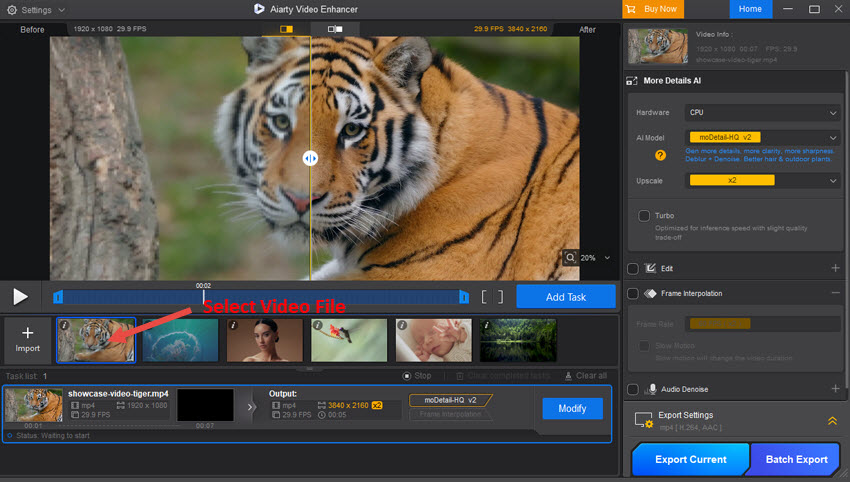
Aiarty Video Enhancer's main window from its user guide: a 1920 x 1080 tiger clip being upscaled to 3840 x 2160 with the moDetail-HQ model at 2x, the before/after slider in the preview, and Export Current and Batch Export at the lower right.
Aiarty Video Enhancer's strength is choice. Instead of one filter, it offers three models: moDetail-HQ rebuilds fine texture in daylight footage, Smooth-HQ deblurs and denoises while keeping faces natural, and superVideo vHQ is built for dark, grainy night clips. A Strength slider and a Restore Color slider pull the result back when the AI overdoes it. It also converts SDR video to 10-bit HDR, has a color panel, deinterlaces old camcorder recordings, and removes background noise from speech with its VoiceFilter model.
Where it falls short: it has no stabilization and no colorizing, it isn't a converter or editor, and speed depends almost entirely on your graphics card. Aiarty's own benchmark (Turbo mode on an RTX 5090) upscales a 25-minute 2K clip to 4K in about 25 minutes, and mid-range hardware will take much longer.
What we like
- Three AI models for different footage problems
- SDR-to-HDR, color tools and audio denoise in the same pass
- Lifetime license covers 3 PCs
- Strength and Restore Color controls
Watch out for
- No stabilization or colorizer
- Needs a DirectX 12 GPU with 4 GB of video memory
- Higher upfront price
- Trial limited to 120 seconds per video, with a watermark
What reviewers say about Aiarty Video Enhancer
Shotkit gave it a "Highly Recommended" badge, with pros of "Top quality and speed", "Easy-to-use" and "Affordable", and cons of "No preview for some features", "No video colorizer" and "No video stabilization." Digital Photography School, as quoted on Aiarty's review page, put it this way: "Used thoughtfully, it works well as a pre-processing step or last-resort fix when conditions weren't ideal."
Aiarty's Trustpilot page shows 3.9 out of 5 from 22 reviews across its products. On Product Hunt, one otherwise happy reviewer reported rendering times "like 6 hours for 14 sec video", a reminder of how much the hardware matters.
Download Aiarty Video Enhancer TrialBuy Aiarty Video Enhancer
Winxvideo AI (WinX HD Video Converter Deluxe)
Winxvideo AI, which grew out of WinX HD Video Converter Deluxe, is a video toolkit: AI enhancement for video, photos and audio, plus a converter, compressor, downloader, screen recorder and basic editor.
- Price: $34.95 at checkout for the first year, renewing at $29.95 a year
- Platform: Windows 7 to 11, 64-bit (the Mac version is sold separately)
- Best for: home users who want AI upscaling and stabilization alongside everyday conversion and compression, on a budget
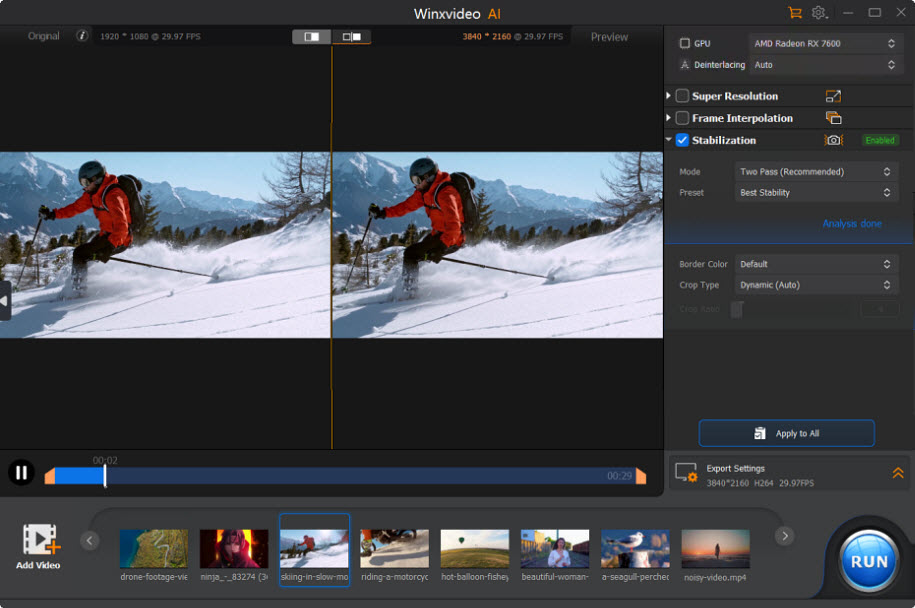
Winxvideo AI's Video AI window with Stabilization on (Two Pass mode, Best Stability preset): the original 1920 x 1080 skiing clip on the left and the 3840 x 2160 preview on the right.
Winxvideo AI covers more jobs. Its Video AI section upscales with Super Resolution, interpolates to 60 or 120 fps and, unlike Aiarty, stabilizes shaky footage with presets such as Best Stability and Minimum Crop. Image AI upscales and restores photos, and Audio AI removes noise and separates vocals. Then the toolbox takes over: a GPU-accelerated converter for hundreds of formats and device profiles, a compressor that shrinks files by up to 90%, a downloader for 1000+ sites and a 4K screen recorder.
Where it falls short: its enhancement controls are simpler than Aiarty's, very poor footage won't become true 4K, and the license is a yearly subscription. Its editing stops at trimming, cropping, merging and subtitles.
What we like
- AI stabilization as well as upscaling
- Converter, compressor, downloader and recorder included
- Low first-year price
- Runs on lighter hardware and older Windows
Watch out for
- Yearly subscription unless you buy lifetime on Digiarty's site
- Fewer AI model choices and controls
- No SDR-to-HDR
- Some buyers report install or audio problems
What reviewers say about Winxvideo AI
Shotkit's India Mantle found that "Everything is sharper, from the fine fibers of the woman's coat to the edges of the iPhone in her hands," and that it could "stabilize the footage and remove motion blur without heavily cropping the content." She also noted that "Even with very low-grade clips, Winxvideo AI wasn't able to bring them up to HD or 4K standard."
Digiarty's Trustpilot page shows 3.8 out of 5 from 419 reviews across its products. A long-time user wrote: "I've used WinX and WinXAI for a number of years and in general terms, I've been very pleased with this software." A 1-star reviewer disagreed: "I bought the AI to help make videos better. It didn't, and in fact, the sound got worse!"
Download Winxvideo AI TrialBuy Winxvideo AI
Enhancement quality and control
Aiarty Video Enhancer wins on enhancement. It's built only for restoration, with three models matched to different problems, Turbo and Step modes to trade speed against memory, SDR-to-HDR, and Strength and Restore Color sliders. Winxvideo AI's Super Resolution does the same basic job, and reviewers found it sharp, but you get fewer ways to tune the result.
The exception is shaky footage: only Winxvideo AI stabilizes. If your clips are handheld phone, GoPro or drone footage, that one feature can matter more than finer upscaling.
Everyday tools
Winxvideo AI wins clearly here. Aiarty Video Enhancer exports MP4, MOV or MKV and that's all; it's a pre-processing step before your editor. Winxvideo AI also converts between hundreds of formats with GPU acceleration, compresses, downloads and records the screen, so for many households it replaces several programs.
Price and licensing
Winxvideo AI is much cheaper to start: $34.95 against $235. Over time the gap narrows, but it doesn't close within three years, as the chart shows. Aiarty's lifetime license also covers 3 PCs, while the Winxvideo AI order includes one license term that renews every year.
Cost over three years at checkout prices (USD)
Aiarty Video Enhancer (lifetime, 3 PCs)$235.00
Winxvideo AI ($34.95, then two renewals at $29.95)$94.85
Checkout prices and renewal terms checked on October 22, 2026. Digiarty's own sites also sell other license types at different prices.
Installer size (MB)
Aiarty Video Enhancer 3.8389
Installer sizes from the files downloaded on October 21 and 22, 2026.
Hardware and trial
Winxvideo AI asks less of your PC: its AI tools need 2 GB of RAM and a Vulkan 1.2 or OpenCL graphics card, and the converter runs on Intel HD Graphics 2000 or newer. Aiarty Video Enhancer wants 8 GB of RAM (16 GB recommended) and a DirectX 12 card with 4 GB of video memory. Both use NVIDIA TensorRT for extra speed on GeForce cards.
The trials differ too. Aiarty processes 120 seconds of any video with a watermark, which is enough to judge quality on your own footage. Winxvideo AI gives 5 watermark-free exports per AI feature, but limits conversion and editing to 5-minute videos.
Which should you choose?
| Your situation |
Pick |
Why |
| Restoring old tapes, dark or grainy clips | Aiarty Video Enhancer | Three models, including one for night footage, plus deinterlacing and finer control |
| Shaky phone, GoPro or drone footage | Winxvideo AI | Only Winxvideo AI stabilizes |
| You also convert, compress or record video | Winxvideo AI | One program replaces several |
| Tight budget or older PC | Winxvideo AI | $34.95 to start and lighter hardware needs |
| Creator upscaling regularly, HDR displays | Aiarty Video Enhancer | SDR-to-HDR, Turbo mode, and a one-time price for 3 PCs |
Who should skip Aiarty Video Enhancer: anyone without a dedicated graphics card, anyone whose main problem is camera shake, and anyone who enhances only a clip or two a year. Who should skip Winxvideo AI: people who need fine control over restoration or HDR output, and anyone who dislikes yearly renewals.
What commonly goes wrong
- Leaving processing on the CPU. Aiarty Video Enhancer starts on the CPU by default; switch Device to your graphics card, or renders can take hours.
- Expecting miracles from tiny files. Both tools improve heavily compressed or very low-resolution video, but reviewers found neither turns it into native 4K.
- Upscaling too far. A 2x pass often looks more natural than 4x on poor sources, and strong settings can make skin look waxy.
- Old graphics drivers. Both programs rely on recent GPU drivers for their fastest modes.
FAQs
Is Winxvideo AI the same as WinX HD Video Converter Deluxe?
Yes. Winxvideo AI is what WinX HD Video Converter Deluxe became: Digiarty's old product page now redirects to Winxvideo AI, and the converter is still inside, with AI tools added.
Are Aiarty Video Enhancer and Winxvideo AI made by the same company?
Yes. Both Aiarty Video Enhancer and Winxvideo AI come from Digiarty Software, Inc., the company behind WinX DVD Ripper.
Which is better for upscaling old VHS videos to 1080p?
Aiarty Video Enhancer is the better pick for VHS: it deinterlaces, and its Smooth-HQ model denoises while keeping faces natural. Winxvideo AI also upscales, so try both trials on the same clip if you're unsure.
Can Aiarty Video Enhancer stabilize shaky video?
No. Aiarty Video Enhancer has no stabilization. Winxvideo AI does, with Best Stability and Minimum Crop presets.
Do I need a powerful graphics card for these AI video enhancers?
For Aiarty Video Enhancer, yes: it calls for a DirectX 12 card with 4 GB of video memory and 8 GB of RAM. Winxvideo AI's AI tools run on more modest Vulkan 1.2 or OpenCL graphics, but both are much faster on a recent NVIDIA, AMD or Intel GPU.
Do these programs upload my videos to the cloud?
No. Aiarty Video Enhancer processes everything on your PC and only needs the internet to activate the license, and Winxvideo AI's AI tools also run locally on your graphics card.
Can I get a refund if the results disappoint me?
Yes. Both Aiarty Video Enhancer and Winxvideo AI come with a 30-day money-back guarantee, but testing the free trials on your own footage first is the better way to decide.
Do the licenses work on a Mac?
No. The Aiarty Video Enhancer and Winxvideo AI licenses here are for Windows. Both have Mac versions sold separately.
Conclusion
Aiarty Video Enhancer is our pick when the footage itself is the problem: old tapes, dark clips and low-resolution video get more careful, more controllable restoration, and the $235 lifetime license covers 3 PCs. Winxvideo AI is the better value for everyone else: for $34.95 you get good upscaling, the stabilization Aiarty lacks, and a converter, compressor, downloader and recorder. Run each trial on the same clip of your own; the one whose result you'd keep is the one to buy.
Download Aiarty Video Enhancer TrialBuy Aiarty Video EnhancerBuy Winxvideo AI