WinX HD Video Converter Deluxe, Now Winxvideo AI: Upscale, Stabilize and Convert Video on Windows
WinX HD Video Converter Deluxe is now sold by Digiarty as Winxvideo AI: a Windows video toolkit that adds AI upscaling, stabilization and frame interpolation to the fast GPU-accelerated converter it started as, plus photo and audio AI, a compressor, a downloader and a screen recorder. The one-year license was $34.95 on the order page, and the free trial gives you 5 watermark-free AI exports.
If you have shaky phone clips, grainy old camcorder footage, or a folder of MKV and HEVC files your TV won't play, this is the kind of tool that fixes them in batches, using your graphics card to keep it quick.
Quick facts
- Developer: Digiarty Software, Inc. (WinXDVD)
- Current name: Winxvideo AI, version 4.11
- Platform: Windows 11, 10, 8.1, 8 and 7 (64-bit). The Mac version is a separate product
- AI tools: video upscaling, stabilization, frame interpolation, photo enhancement, audio noise removal and vocal separation
- Toolbox: converter, compressor, downloader, screen recorder, basic editor
- Price: $34.95 for the first year on the order page, renewing at $29.95 a year
- Free trial: 5 watermark-free AI exports, converting and editing up to 5 minutes of video
- Refunds: 30-day money-back guarantee
What we checked: the installer from Digiarty's download link on October 22, 2026, file version 4.11.0.0 (292.9 MB) with the product name Winxvideo AI, and the one-year license at $34.95 on the order page on October 22, 2026 ($79.95 less a $45 discount), set to renew at $29.95. We didn't run our own upscaling tests.
Before you buy
- The name changed. Digiarty's WinX HD Video Converter Deluxe page now redirects to Winxvideo AI, and the installer is Winxvideo AI. The order page still calls the license "WinX HD Video Converter Deluxe - 1 Year".
- The AI tools need a decent graphics card. Digiarty lists a GPU with Vulkan 1.2 or OpenCL support, such as a GeForce GT 630, Intel UHD 620 or Radeon RX 550, and 2 GB of RAM. The fastest AI mode uses NVIDIA TensorRT and needs a GeForce GTX 1050 or newer.
- It's a yearly plan. This license renews after 12 months ($29.95 when we checked). Digiarty also sells a one-time lifetime license on its own site.
- AI can't invent detail. Very low-quality clips improve, but reviewers found they don't turn into true HD or 4K.
Download Free TrialBuy Now
Overview
Winxvideo AI opens on a launcher with three AI sections (Image AI, Video AI and Audio AI) and four tools underneath: Video Converter, Downloader, Compressor and Recorder. Each opens in its own window, so you can, say, stabilize a clip in Video AI and then convert it for a phone in the converter.
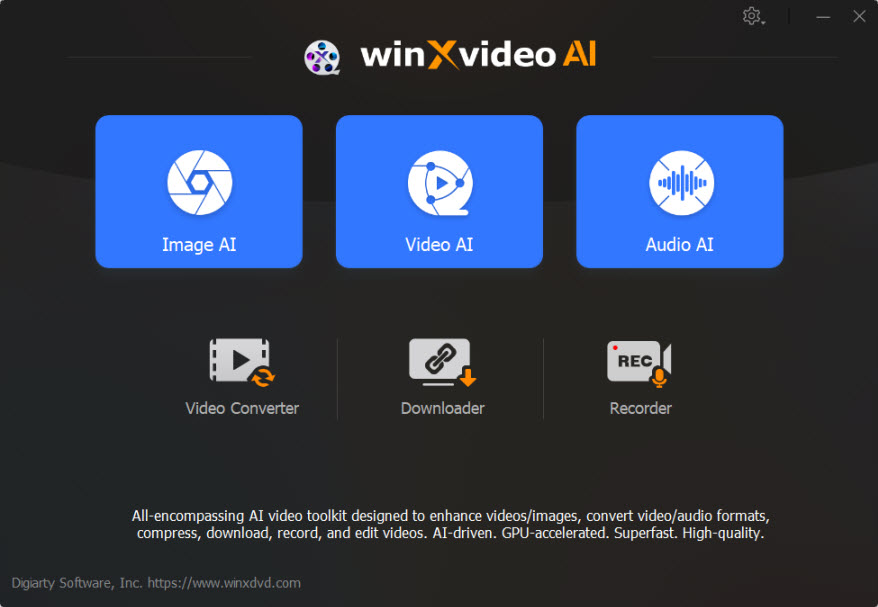
The Winxvideo AI launcher: Image AI, Video AI and Audio AI at the top, and Video Converter, Downloader, Compressor and Recorder below.
The converter is the part long-time WinX HD Video Converter Deluxe users will recognise: it reads almost any format, including AV1, HEVC, MKV, MTS/M2TS camcorder files, MXF and HDR video, and writes MP4, HEVC, MKV, MOV, ProRes, WebM and hundreds of device profiles, from current iPhones to Android phones and TVs.
Features
AI upscaling of old and low-resolution video
Winxvideo AI's Super Resolution upscales low-quality video to 1080p or 4K and removes noise, blur and compression artifacts. Digiarty says the two newest AI models make it 40% to 80% faster than before. It works best on footage that has some detail to start with: DVD rips, old phone clips and 720p video.
Stabilization and smoother motion
Winxvideo AI stabilizes shaky footage from phones, GoPros, drones and handheld cameras, with presets such as Best Stability and Minimum Crop. Frame interpolation raises the frame rate to 60 or 120 fps, which also lets you make smooth slow-motion from normal clips.
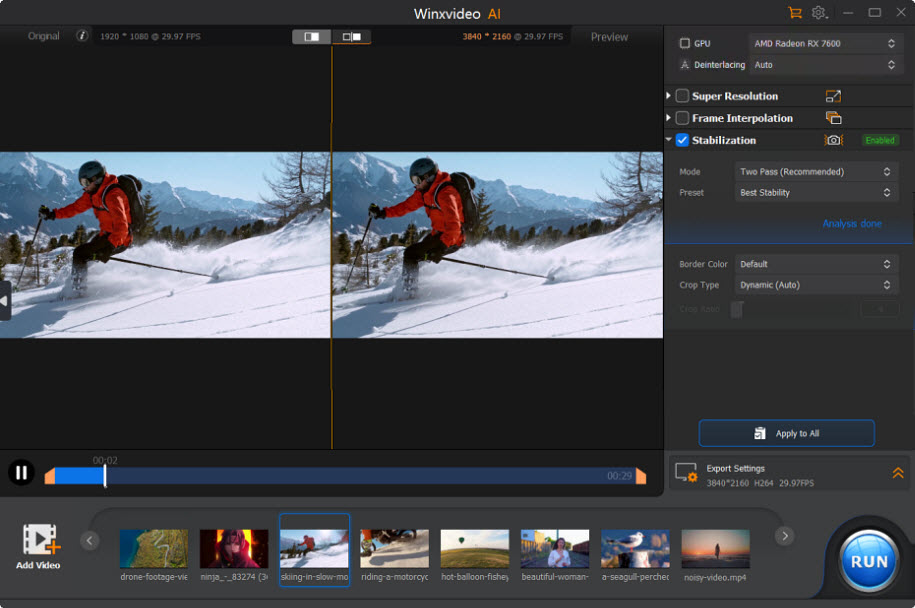
Video AI with Stabilization on (Two Pass mode, Best Stability preset): the original 1920 x 1080 skiing clip on the left and the 3840 x 2160 preview on the right, using an AMD Radeon RX 7600.
Photo and audio AI included
Winxvideo AI also denoises, sharpens and upscales photos (to 4K, 8K or 10K), restores faces and colorises black-and-white pictures. Audio AI removes background noise and separates vocals from music, in audio files or in a video's soundtrack.
A fast converter with GPU acceleration
Winxvideo AI's converter uses NVIDIA, Intel or AMD hardware encoding when your PC has it, handles batches, and merges clips. Each file has Effect, Watermark, Cut, Crop, Rotate and Subtitle buttons for quick edits before you convert.
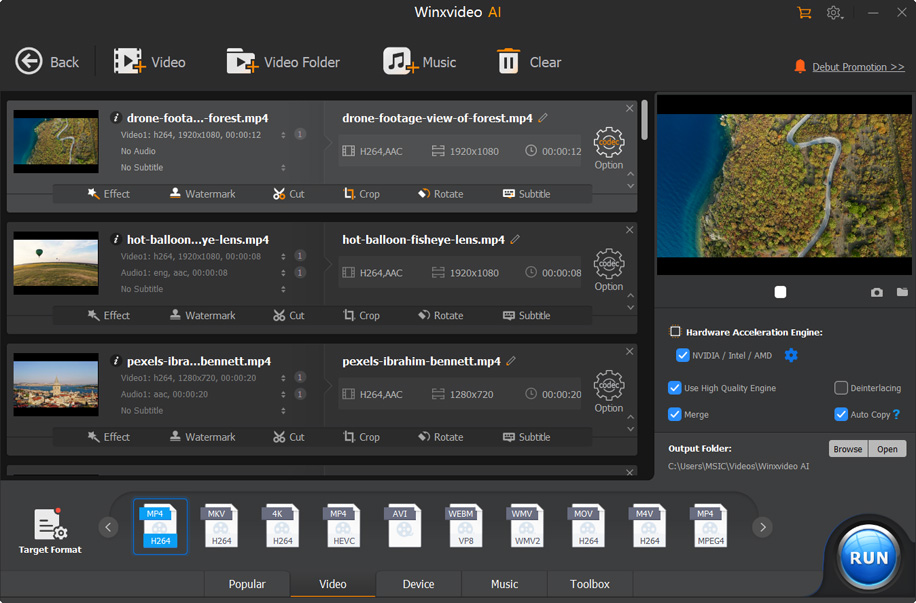
The Video Converter with three clips queued, edit buttons under each, the Hardware Acceleration Engine (NVIDIA/Intel/AMD) and Merge options on the right, and output formats along the bottom.
Compress, download and record
Winxvideo AI compresses videos by up to 90%, downloads video, audio, playlists and live streams from YouTube and 1000+ other sites, and records the screen, webcam or both in picture-in-picture, now at up to 4K and 60 fps.
Benefits
- Rescue old footage. Family videos and early phone clips look cleaner and steadier on today's screens.
- One app instead of four. Converting, compressing, recording and enhancing all live in the same program.
- Quick on modern PCs. GPU acceleration speeds up both conversion and AI processing.
- Cheap for an AI enhancer. The first year costs less than many single-purpose upscalers.
Real-World Uses
- Family archives: upscale digitised camcorder tapes and steady the handheld parts before sharing them.
- Action cameras: stabilize a bumpy bike or ski clip and interpolate it to 60 fps for a smoother edit.
- Playback problems: batch-convert HEVC or MKV files to H.264 MP4 for an older TV or tablet.
- Email and uploads: compress a large 4K phone video to a size you can send.
Who It's For, and Who Should Skip It
Winxvideo AI suits home users and hobbyists on Windows who want AI enhancement and an everyday converter in one inexpensive package, and who have a reasonably recent graphics card.
Skip it if you need frame-by-frame control or professional editing: reviewers note it lacks advanced, manual adjustments, and a full video editor will serve you better. Skip it too on an old PC without a supported GPU, where the AI tools will be slow or won't run. If you only convert files now and then, a free converter may be enough.
Usage Guide
- Install: download the installer (about 293 MB) from Digiarty and run it.
- Register: enter the license code from your order email. The trial runs without one.
- Enhance: open Video AI, add a clip, tick Super Resolution, Frame Interpolation or Stabilization, check the before/after preview, and click RUN.
- Convert: open Video Converter, add files, pick a target format or device profile, make sure hardware acceleration is ticked, and click RUN.
- Compress or record: use Compressor to shrink a file, or Recorder to capture the screen and webcam.
Where it falls short
- Limits of AI upscaling. Shotkit found that "Even with very low-grade clips, Winxvideo AI wasn't able to bring them up to HD or 4K standard," though it still improved them.
- Hardware hungry. AI processing time depends heavily on your GPU. Shotkit suggests switching from High Quality Mode to Fast Mode on slower machines.
- Not a real editor. Editing stops at trimming, cropping, merging, subtitles and effects.
- Downloader no longer works on Windows 7. Digiarty's specs say the video downloader isn't supported there anymore.
- Mixed support stories. A few 1-star Trustpilot reviews describe problems getting the AI version to install or audio getting worse.
What Users Say
Shotkit
India Mantle, Content Manager at Shotkit, tested the upscaler on a low-resolution clip: "Everything is sharper, from the fine fibers of the woman's coat to the edges of the iPhone in her hands and even the buttons on her collar." On stabilization: "It was able to stabilize the footage and remove motion blur without heavily cropping the content."
Her verdict: "The ease of use and efficiency of this tool are second to none, and its results speak for themselves." She adds that "Some users may long for more advanced editing tools, for example, or the ability to make more manual, precise adjustments to individual frames."
Hongkiat
Karrar Haider, reviewing Winxvideo AI for Hongkiat in March 2024, concluded: "Overall, if improving video quality for various purposes is your goal, Winxvideo AI could be a worthy investment, provided you have the hardware to support its demands."
Trustpilot: 3.8 out of 5 from 419 reviews
Digiarty's Trustpilot page covers all its products, and opinions split: 76% five-star, 17% one-star. Reviews that mention the AI product:
"I've used WinX and WinXAI for a number of years and in general terms, I've been very pleased with this software." William, 5 stars
"This is a great product and the support from Adam was quick and prompt. Interface is easy to use" Michael M, 5 stars
"I bought the AI to help make videos better. It didn't, and in fact, the sound got worse!" Dr. Carol Clark, 1 star
"Gave me the ai upgrade. Wouldn't even download the computer with that version!!" Kruzey Kymbo, 1 star
The pattern
Reviewers agree that Winxvideo AI is easy to use and genuinely sharpens and steadies ordinary footage, and long-time WinX users stick with it. The complaints are about expectations and setup: very poor footage won't become true 4K, results depend on your GPU, and some buyers had trouble installing or getting the result they wanted. The trial's 5 free AI exports are the way to find out on your own clips.
Comparisons
Winxvideo AI vs the old WinX HD Video Converter Deluxe
The converter, downloader and editing tools of WinX HD Video Converter Deluxe are still there. Winxvideo AI adds the Video AI, Image AI and Audio AI sections, the compressor, and a screen recorder that now reaches 4K at 60 fps.
Winxvideo AI vs WinX DVD Ripper Platinum
Digiarty's WinX DVD Ripper Platinum rips DVDs to digital files. Winxvideo AI works on video files you already have. You can use both together: rip a DVD with one, then upscale it with the other.
Editions and Pricing
| License | Price | Term | Where |
|---|
| Free trial | $0 | 5 AI exports, 5-minute limit on converting and editing | Download button |
| 1 Year | $34.95 | 12 months, renews at $29.95 | Buy Now on this page |
| Lifetime, 1 PC | $54.95 | One-time payment | Digiarty's site |
| Family, 3-5 PCs | $79.95 | One-time payment | Digiarty's site |
Prices are from the order page and Digiarty's buy page on October 22, 2026. Digiarty runs frequent sales, so prices change.
FAQs
Is WinX HD Video Converter Deluxe the same as Winxvideo AI?
Yes. WinX HD Video Converter Deluxe grew into Winxvideo AI: Digiarty's old product page now redirects to Winxvideo AI, and the same converter is inside with the AI tools added.
Will Winxvideo AI run on my laptop's integrated graphics?
Winxvideo AI's converter runs on Intel HD Graphics 2000 or newer. The AI tools need at least Intel UHD Graphics 620 or Graphics 510 with Vulkan 1.2 or OpenCL support, and they'll be much slower than on a dedicated NVIDIA or AMD card.
Does the Winxvideo AI trial add a watermark?
Winxvideo AI's trial gives 5 watermark-free exports for each AI feature, while screen recordings made in the trial carry a watermark. Converting and editing are limited to videos up to 5 minutes long.
Is there a Mac version of Winxvideo AI?
Yes, but Winxvideo AI for Windows and the Mac version are sold separately on different sites (winxdvd.com and macxdvd.com). This license is for Windows.
What happens when the Winxvideo AI one-year license ends?
Winxvideo AI's one-year license is set to renew for another year at checkout. If it lapses, you lose the full version, but the videos you've already processed are yours to keep.
Can I get a refund on Winxvideo AI?
Yes. Digiarty gives every Winxvideo AI order a 30-day money-back guarantee, and the license code arrives by email about 10 minutes after purchase.
System Requirements
- Windows 11, 10, 8.1, 8 or 7, 64-bit
- 1 GHz Intel or AMD processor
- 1 GB RAM (2 GB or more recommended, and required for the AI tools)
- 200 MB of disk space for installation, 1 GB or more for the AI tools
- For AI tools: Vulkan 1.2 or OpenCL GPU, such as NVIDIA GeForce GT 630, Intel UHD 620 or AMD Radeon RX 550 or newer
- For the fastest AI mode: NVIDIA GeForce GTX 1050 or newer with driver 452.39 or later
Conclusion
WinX HD Video Converter Deluxe, now Winxvideo AI, is worth $34.95 a year if you want to clean up and stabilize ordinary home footage and still need a fast everyday converter, and you have a reasonably modern GPU. Reviewers found it easy and effective, and the 30-day refund window makes it low-risk. The main reasons to hold back are realistic limits on very poor footage and the lack of fine manual control. Run your own clips through the 5 free AI exports first, and if you'll use it for years, compare the lifetime license on Digiarty's site.
Download Free TrialBuy Now