Short answer: an iPhone can't read a disc, so you convert the DVD on a computer, then copy the file over. Rip the DVD to an MP4 with H.264 video and AAC audio, using the iPhone / iPad profile in WinX DVD Ripper Platinum ($59.95, Windows) or WinX DVD Ripper for Mac ($45.95). Then send the file to the phone with Apple's free sync tools or iCloud Drive. AnyMP4 DVD Ripper ($54.96) is the slightly cheaper Windows alternative, and WinX MediaTrans ($49.95) is the paid shortcut if Apple's route on Windows feels like too many apps. Rip five minutes with a free trial and test it on your iPhone before you pay.
DVD to iPhone converters at a glance
| Fact |
WinX DVD Ripper Platinum |
WinX DVD Ripper for Mac |
AnyMP4 DVD Ripper |
| Price at checkout | $59.95 | $45.95 | $54.96 |
| License | Lifetime, 1 PC | Lifetime | Lifetime, 1 PC |
| Runs on | Windows 11, 10, 8, 7 | macOS 10.13 or later, Apple Silicon or Intel | Windows 11, 10, 8, 7 |
| Free trial | 5 minutes of video, no advanced features | 5 minutes of video, no advanced features | 5 minutes of each title, 5 discs in 30 days |
| iPhone profile | ✓ | ✓ | ✓ |
| Also reads ISO and DVD folders | ✓ | ✓ | ✓ |
| Version | 8.22.4 | 6.9.0 | 8.1.56 |
What we checked
- The price of each product on its order page, read in a fresh session for each one.
- The trial limits and the Output Profile, title and settings screens in each vendor's user guide and product pages.
- The installer files: WinX DVD Ripper Platinum 33.2 MB (dated May 2, 2026), WinX DVD Ripper for Mac 99.0 MB (dated June 15, 2026).
- Apple's current iPhone 17 specifications and its guides to the Apple Devices app, the Apple TV app and syncing in the Finder.
- Each vendor's own statement on copying DVDs, quoted below.
What we checked: all prices above at checkout on November 6, 2026, along with the installer files, trial limits and Apple's guides that same day. We didn't install these programs, rip a disc or sync a movie to an iPhone, so the steps come from the vendors' guides and Apple's documentation, and speed and disc-support claims are the vendors' own.
Copy protection and the law, briefly
Home videos and other unprotected discs you made yourself are the simple case. Commercial movie DVDs are different. Many use encryption, and copying one raises two separate legal questions: making the copy, and getting past the protection. Owning the disc doesn't settle either.
Digiarty's own summary of the law says that in the US the DMCA restricts getting around protection, with limited, temporary exemptions; that the UK's Intellectual Property Office treats circumventing a DVD's protection as illegal; and that Canada's private-copy exception and Japan's private-use exception both exclude copies made by circumventing protection. Rules differ elsewhere, so check where you live.
The vendors' words are worth reading. Digiarty advertises handling CSS, region codes and ARccOS discs, while its legal statement says the software "is only permitted for backing up or digitizing content from discs that the user has legally purchased or owns, and which are unprotected or for which explicit authorization has been obtained." AnyMP4's FAQ is blunter: "If you rip a commercial DVD, then it is illegal." The steps below assume a disc you have the right to copy. This isn't legal advice.
What you need to copy DVDs to iPhone
- A DVD drive. Many laptops and most Macs no longer have one, so plan on a USB external drive. If the movie is already an ISO image or a VIDEO_TS folder on your computer, you can skip the drive.
- A DVD to iPhone converter. WinX DVD Ripper Platinum on Windows, or WinX DVD Ripper for Mac. The steps are the same in both, and they're close in AnyMP4 DVD Ripper.
- A way to reach the phone. A USB or USB-C cable for Apple's sync route, or enough iCloud storage for the cloud route.
- Disk space. A couple of GB per movie on the computer and the same on the iPhone.
Step 1: Load the DVD
Install the trial, put the disc in the drive and start the program. In WinX DVD Ripper Platinum or the Mac edition, click Disc, leave the file system on Auto Detect and click OK. Use Folder for a VIDEO_TS folder or Image for an ISO file. If a disc won't load, come back and try Force UDF or Force ISO in the same dialog.
WinX then lists every title on the disc and ticks the one it detects as the main movie. Look at the running time before you go on: it should match the film. TV series and workout discs hold several titles worth keeping, so tick each one you want.
Step 2: Convert the DVD to an iPhone format
An Output Profile window opens by itself. Under General Profiles, choose iPhone / iPad, which makes an MP4 with H.264 video and AAC audio. You'll also find Apple Device further down the list if you'd rather pick your exact model. Click OK (Done on a Mac).
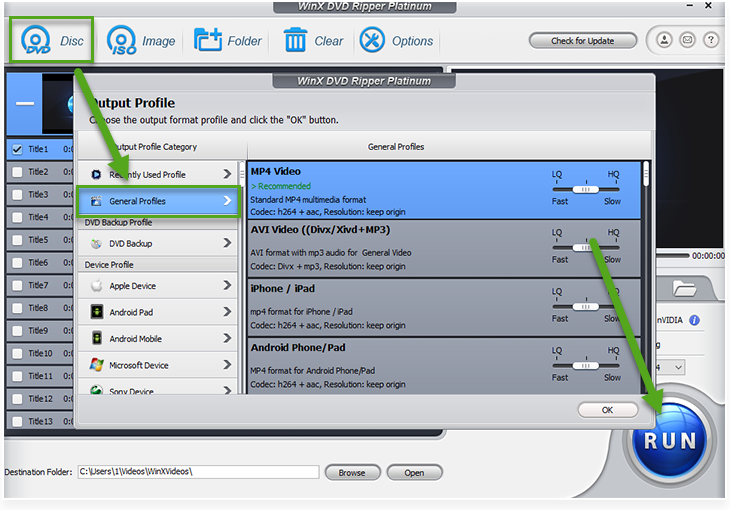
WinX DVD Ripper Platinum's Output Profile window with General Profiles open, listing MP4 Video and iPhone / iPad (both h264 + aac) with the disc's titles behind it. The arrows are from Digiarty's user guide.

The same window in WinX DVD Ripper for Mac: General Profiles lists MP4 Video, iPhone / iPad and MOV Video. The red marks and numbers are from Digiarty's user guide.
Step 3: Set the best iPhone format and quality
The iPhone / iPad profile works as it comes, so this step is optional. Click the gear next to the profile to change it. These are the settings that matter for a phone:
| Setting |
Use |
Why |
| Format | MP4, H.264 video, AAC audio | The safe choice. It's what the iPhone / iPad profile makes |
| HEVC instead of H.264 | Optional, when space is tight | Apple lists HEVC, H.264 and AV1 for iPhone 17 playback. HEVC gives smaller files at similar quality but takes longer to encode |
| Resolution | Keep the original | A DVD frame is 720 x 480 (NTSC) or 720 x 576 (PAL). Raising it grows the file without adding detail |
| Video bit rate | Start around 1,200 kbps | About 1.2 GB for a 2-hour movie. Raise it if the test clip looks blocky |
| Audio | AAC, 2 channels, 128 kbps | Fine for iPhone speakers and earphones |
| Deinterlacing | Tick it for older or TV-sourced discs | Removes the comb-like lines interlaced video shows on a phone |
| High Quality Engine | Tick it if you can wait | Digiarty lists it for better image quality, at some cost in speed |
| Hardware Accelerator | On, if your graphics hardware is listed | Speeds up the rip |
| Subtitles | Pick one under Edit | Choose a track from the disc, or add your own .srt file. Forced subtitles are supported too |
Digiarty also suggests two ways to shrink a file further: drop the bit rate by 200 to 500 kbps, or set a custom resolution such as 720 x 405 or 640 x 360 to get rid of black bars. Both are worth a try if storage is the problem. The chart shows how bit rate turns into file size.
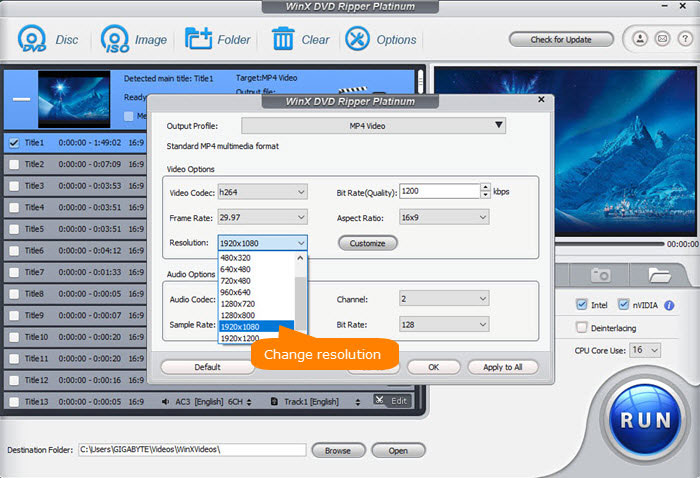
WinX DVD Ripper Platinum's settings dialog for the MP4 Video profile: h264 codec, 29.97 frame rate, 1200 kbps bit rate, with the Resolution list open. The "Change resolution" label is Digiarty's.
File size of a 2-hour movie, by video bit rate (GB)
A full single-layer DVD, for scale4.70 GB
Worked out from bit rate x 7,200 seconds, with 128 kbps audio added. These are calculations, not test results.
Step 4: Rip a test clip first
Pick a destination folder with Browse and click RUN. The WinX trials stop at 5 minutes of video, which is exactly what you want at this stage: a short clip you can carry through Step 5 and watch on the phone. If the disc loads, the right title is picked and the clip plays well, you know the whole job will work before you spend anything. The trial can also rip your own short videos in full if they run under 5 minutes.
This matters because the money-back guarantee isn't a free try. Digiarty's 30-day guarantee applies when a product doesn't work because of an error or bug that it can't solve, so the trial is your real test.
When you're happy, buy the license, enter the code under Register and rip the whole movie. Disc-read and encoding time depend on your drive and computer, so expect anything from minutes to much longer. If the rip stops partway or the order of the video goes wrong, tick Safe Mode and try again.
Step 5: Put the movie on your iPhone
You now have an MP4 on the computer. Three routes get it to the phone, all free apart from any iCloud storage.
On a Mac: the Apple TV app and the Finder
- In the Apple TV app, choose File > Import and select the MP4. It appears under Home Videos.
- Connect the iPhone by cable and select it in the Finder sidebar.
- Click Movies, tick the sync box, tick the titles you want and click Apply.
- Click Eject in the sidebar before unplugging. On the iPhone, look in the Apple TV app's Library.
On Windows: the Apple TV and Apple Devices apps
- Install both apps from the Microsoft Store. The Apple TV app has to be there for movie sync to work.
- In the Apple TV app, open the menu at the top of the sidebar and choose Add Files To Library. The MP4 appears under Home Videos.
- Connect the iPhone and open it in the Apple Devices app.
- Select Movies, tick Sync movies onto your device, tick the titles you want and select Apply.
- Select Eject in the sidebar before unplugging.
Without a cable: iCloud Drive or a USB drive
Upload the MP4 to iCloud Drive, then open the Files app on the iPhone and download it. That needs iCloud space for the movie, and the free 5 GB fills quickly. On a Mac, AirDrop also works. An iPhone can also read a USB flash drive through its charging port (formatted exFAT or FAT32, with an adapter if needed). Open the drive under Browse in the Files app and copy the movie across before you travel.
Unticking a movie and syncing again removes it from the iPhone only, and deleting an automatically synced movie from the computer removes it from the phone at the next sync. So keep your tick list deliberate.
WinX DVD Ripper Platinum (Windows)
WinX DVD Ripper Platinum: $59.95 at checkout for a lifetime license on one PC. Windows only. Best for Windows users who want a ready iPhone profile and a program that picks the main title for them.
WinX DVD Ripper Platinum is the pick for Windows because the whole job fits on one screen: one list of titles, one profile, one RUN button. Its window also has the deinterlacing and Safe Mode switches this guide relies on. TechRadar's roundup of free DVD rippers named it best for beginners, testing the Platinum Edition in trial mode. The weak spot is discs that refuse to rip, which is the main complaint in user reviews, and it doesn't read Blu-ray.
What we like
- Ready iPhone / iPad and Apple Device profiles
- Marks the main title for you
- Lifetime license with free updates
- Reads discs, ISO images and DVD folders
Watch out for
- A Windows license doesn't cover a Mac
- Some users report discs that won't rip
- Refunds depend on a fault support can't fix
- No Blu-ray support
TechRadar (Christian Guyton): "During testing, we found it an utter delight to use, with an easy-to-understand interface that shouldn't feel intimidating to even beginner users."
Digiarty scores 3.8 out of 5 from 420 reviews on Trustpilot, across all its products, and opinions split sharply. Harold Patton (September 2026): "I'm in the process of ripping my dvd collection of movies and personal recordings to put on my Plex server."
Leone Moffat (April 2026): "I was unable to get WinX DVD Rip to work on either my PC or my IMAC."
Download WinX DVD Ripper Platinum TrialBuy WinX DVD Ripper Platinum
WinX DVD Ripper for Mac
WinX DVD Ripper for Mac: $45.95 at checkout for a lifetime license. macOS 10.13 or later on Apple Silicon or Intel. Best for Mac owners who want the same three-step routine at the lowest price here.

WinX DVD Ripper for Mac's main window: Disc, Folder and Image buttons along the top, the three Getting Started steps, and the Hardware Encoder, High Quality Engine, Deinterlacing and Safe Mode options beside the RUN button.
WinX DVD Ripper for Mac has the same Output Profile window and the same iPhone / iPad profile as the Windows program, and $45.95 at checkout makes it the cheapest ripper in this guide. A Mac also gives you the shortest route to the phone, since the Apple TV app and the Finder are already there. You'll need an external drive on nearly any current Mac. Independent reviews of the Mac edition are thin, which is one more reason to run the trial first.
What we like
- Lowest price of the rippers here
- Same iPhone / iPad profile as on Windows
- Runs on Apple Silicon and Intel Macs
- Lifetime license, no renewal at checkout
Watch out for
- Few independent reviews of this edition
- Trial leaves out the advanced features
- Mixed reports on Digiarty's support
On Trustpilot, Michael M (five stars, August 2026) wrote: "This is a great product and the support from Adam was quick and prompt."
Dr. Carol Clark (one star, July 2026) wrote: "Terrible product and support is useless." Reviews on Digiarty's Trustpilot page don't always say which product they're about.
Download WinX DVD Ripper for Mac TrialBuy WinX DVD Ripper for Mac
AnyMP4 DVD Ripper (Windows alternative)
AnyMP4 DVD Ripper: $54.96 at checkout for a lifetime license on one PC. Windows only. Best for Windows users who want to save $4.99, or whose disc failed in the WinX trial.
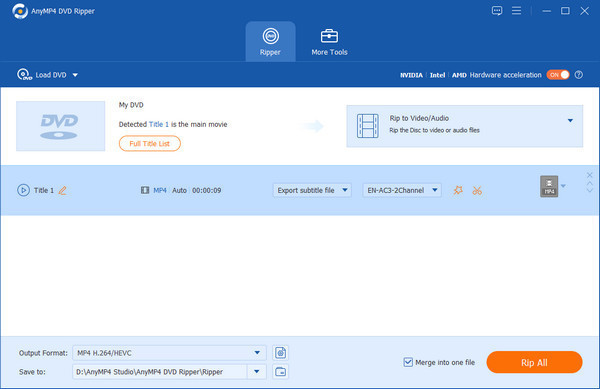
AnyMP4 DVD Ripper with a DVD loaded: Title 1 detected as the main movie, MP4 H.264/HEVC as the output format, subtitle and audio menus, and the Rip All button.
AnyMP4 DVD Ripper does the same job in the same order: Load DVD, check the Full Title List, choose an output format (it has presets for recent iPhones, or MP4 H.264/HEVC), then Rip All. Its trial gives you 5 minutes of each title for 5 discs in 30 days, which suits the test clip in Step 4. The complaints are about the business side rather than the output, so buy the lifetime license and not a monthly plan.
What we like
- $4.99 less than WinX DVD Ripper Platinum
- Presets for recent iPhones
- Can merge titles into one file
Watch out for
- This listing is the Windows version
- Monthly plans renew, and users report trouble finding the cancel setting
- Few detailed independent tests
AnyMP4 scores 4.2 out of 5 from 237 reviews on Trustpilot, with 66% five-star and 24% one-star. Paul Meijer (4 stars, January 2026, about DVD Ripper): "A program that does exactly what I expect from it."
Tom Schoute (3 stars, May 2026): "I sent support a message almost 2 weeks ago with the request to release my registration code."
Download AnyMP4 DVD Ripper TrialBuy AnyMP4 DVD Ripper
WinX MediaTrans (the Windows transfer shortcut)
WinX MediaTrans: $49.95 at checkout for a lifetime license on one PC. Windows only. Best for Windows users who'd rather drop a file onto the phone than use two Apple apps. Trial: 10 videos a day.
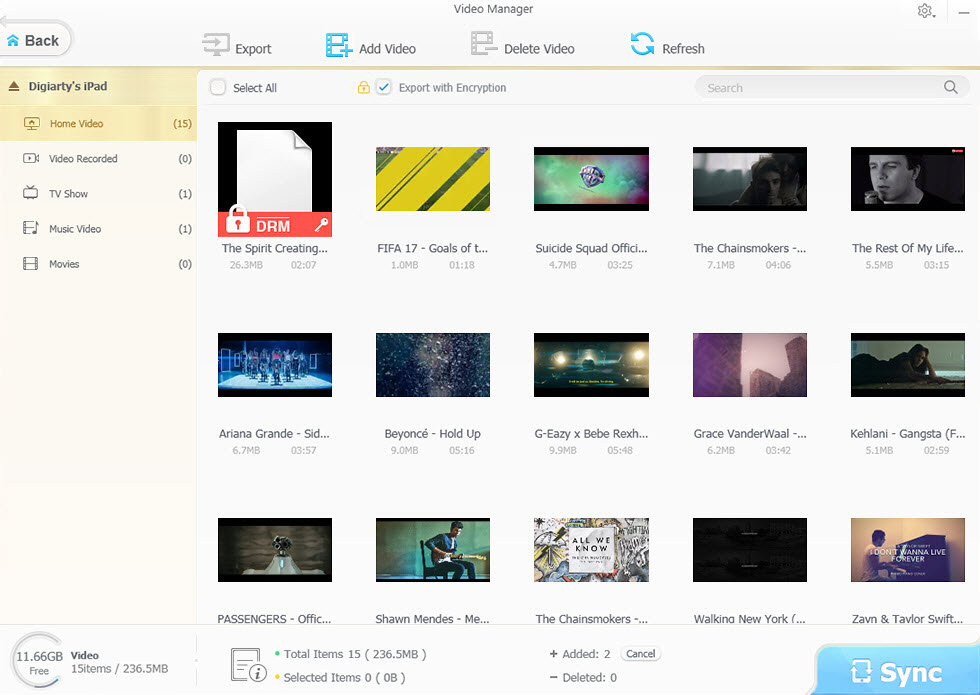
WinX MediaTrans Video Manager connected to an iPad: Home Video, Video Recorded, TV Show, Music Video and Movies on the left, Add Video at the top and Sync at the bottom right.
WinX MediaTrans skips the Apple TV app and any library sync: connect the iPhone by USB, open Video Manager, click Add Video, pick the file and hit Sync. It also converts files the iPhone can't play, such as MKV and AVI, while it copies them. For a single movie you don't need to buy it: Apple's route is free, and the MediaTrans trial allows 10 videos a day. It earns its price if you'll move many files, because a sync in Apple's apps makes the phone match your tick list. If iTunes is installed, tick the option MediaTrans asks for on first launch so iTunes doesn't sync over the device.
What we like
- Add and Sync, no library to manage
- Converts MKV and AVI as it copies
- The trial alone covers a few movies a day
Watch out for
- Costs nearly as much as the ripper
- Most in-depth reviews are years old
- Windows only
groovyPost (Jack Busch, October 2016): "If there's one feature that's going to make you buy this software, it's the video transfer feature. ... WinX MediaTrans makes it stupidly simple to get videos onto your phone." The same review called it "a convenience rather than a necessity", which is the right way to think about it here.
Download WinX MediaTrans TrialBuy WinX MediaTrans
Which DVD to iPhone converter should you choose?
On Windows, start with WinX DVD Ripper Platinum. On a Mac, start with WinX DVD Ripper for Mac. Here is how the choice changes with your situation, and what each ripper costs.
Ripper price at checkout, lifetime license (USD)
WinX DVD Ripper Platinum (Windows)$59.95
AnyMP4 DVD Ripper (Windows)$54.96
WinX DVD Ripper for Mac$45.95
Checkout prices checked on November 6, 2026.
| Your situation |
Pick |
Why |
| Windows PC, a shelf of DVDs | WinX DVD Ripper Platinum | Ready profile, main-title detection, Safe Mode for awkward discs |
| Any Mac | WinX DVD Ripper for Mac | Cheapest here, and the Apple TV app and Finder handle the rest |
| Windows PC, WinX trial failed on your disc | AnyMP4 DVD Ripper | A second engine to try, free, on the same disc |
| Home clips under 5 minutes | A free trial | AnyMP4's 5 minutes per title may be all you need |
| Windows, moving lots of files to the phone | Add WinX MediaTrans | No library or tick list to manage |
Who should skip these: skip all of them if your discs are Blu-ray, because WinX DVD Ripper Platinum and the Mac edition don't read them. Skip WinX MediaTrans if you're moving one or two movies, since Apple's route is free. For a commercial release, read the copy protection section above first: these vendors limit their software to discs you own and personal use, and the rules differ by country.
What commonly goes wrong
- The disc won't rip. This is the top complaint in Digiarty's user reviews. Try Force UDF or Force ISO, then Safe Mode, then the other trial. Every ripper here shares this limit: a badly damaged disc can defeat any of them.
- The wrong title gets ripped. A disc with dozens of titles can fool you. Check the running time before you press RUN.
- The movie isn't in the sync list. It has to be in the Apple TV app's library first. Add the MP4 there, then return to the Finder or Apple Devices.
- Lines across moving images. That's interlaced video. Tick Deinterlacing and rip again.
- It looks soft on a big screen. A DVD is standard definition, and the same file sent to a TV shows that. On a phone screen it's far less obvious.
- The file is an MKV. The Apple TV app wants an iPhone-friendly file. Rip again with the iPhone / iPad profile, or let WinX MediaTrans convert it.
FAQs
Can I play a DVD directly on my iPhone?
No, an iPhone can't play a DVD, so a disc has to be converted on a computer first. WinX DVD Ripper Platinum or WinX DVD Ripper for Mac makes the MP4, and the iPhone plays that file.
How many DVD movies fit on an iPhone?
About 200 movies would fill a 256 GB iPhone at the 1.2 GB size in the chart, if nothing else were on it. In practice, a 128 GB or 256 GB phone with photos and apps on it holds a few dozen comfortably, and that's plenty for a trip.
Does the WinX DVD Ripper Platinum license work on a Mac?
No, WinX DVD Ripper Platinum is the Windows product and WinX DVD Ripper for Mac is sold separately at $45.95. If you own both kinds of computer, buy the one you'll keep the DVD drive on.
Is MP4 or MOV better for iPhone?
Neither looks better, because WinX DVD Ripper's MP4 and MOV profiles both use H.264 video with AAC audio. MP4 is the one to choose, since it also plays on most other phones, tablets and TVs if you ever move the file.
Do I need Wi-Fi to watch the movie on the plane?
No, once the file is on the iPhone itself it plays offline. With iCloud Drive, make sure you've downloaded the file in the Files app first, or it will still be in the cloud when you take off.
Will the same file work on my iPad or TV?
Yes, the WinX iPhone / iPad profile makes one file for both, and Apple lists AirPlay to Apple TV or an AirPlay-enabled smart TV for iPhone 17. On a big screen, though, you'll see the DVD's standard-definition picture.
Can I keep subtitles and a second language?
Yes for subtitles: WinX DVD Ripper Platinum lets you pick a subtitle from the disc or add an .srt file. Pick the audio track you want before ripping, since a single phone file is simplest with one language.
How do I move videos the other way, from iPhone to PC?
WinX MediaTrans works in both directions, and our guide to moving photos, music and videos from iPhone to PC covers that job, free options first.