AnyMP4 DVD Ripper: Turn DVDs into MP4, MKV and Other Digital Files on Windows
AnyMP4 DVD Ripper is a Windows 7-11 program that converts DVD discs, DVD folders and ISO images into MP4, MKV, AVI, MOV, MP3 and hundreds of other formats, or copies a disc 1:1 to an ISO image. The Buy Now button on this page orders the lifetime licence for one PC at $54.96, paid once (AnyMP4 also sells a $31.20 monthly plan on its own store), and the free trial rips the first 5 minutes of each title.
DVD drives are disappearing from laptops, and the discs in the cupboard won't play on a phone, a tablet or a media server. A ripper turns each disc into a file you can copy anywhere, and this one adds an editor and a set of extra tools on top.
Quick facts
- Developer: AnyMP4 Studio
- Version: 8.1.56 (Windows)
- Platforms: Windows 11, 10, 8.1, 8 and 7, 32- and 64-bit. A Mac edition is sold separately.
- Input: DVD discs, DVD folders (VIDEO_TS) and DVD ISO files
- Output: MP4, HEVC MP4, MKV, AVI, MOV, WMV, ProRes, WebM and more, audio such as MP3, FLAC, WAV and AAC, animated GIF, and lossless DVD ISO or folder copies
- Price: $54.96 once for a lifetime licence on 1 PC (our Buy Now button); a 1-month plan at $31.20 that auto-renews is also sold on AnyMP4's store
- Free trial: rips 5 minutes of each title, up to 5 discs in 30 days; the extra tools handle 5 files
- Refund: 30-day money-back guarantee, subject to AnyMP4's refund policy
- What we checked: the installer from AnyMP4's download server reports file version 8.1.56 (2.2 MB) on November 3, 2026, and on November 4, 2026 the order page behind our Buy Now button showed the 1-PC lifetime licence at $54.96 (down from $68.70); the 1-month plan was $31.20 on November 3, 2026. We didn't rip a disc with it.
Before you buy
- Check the law where you live. AnyMP4's own FAQ says ripping homemade DVDs is legal and ripping commercial ones is not, its tech specs list "Homemade DVD" as the input, and it asks you not to copy rental DVDs. In many countries, breaking a disc's copy protection is illegal even for a personal backup.
- If you buy the monthly plan on AnyMP4's store, it renews at $31.20. Two months cost more than the $54.96 lifetime licence, which is the one-time licence our Buy Now button orders and doesn't renew.
- AnyMP4's own buy page adds a Blu-ray Player trial. It's selected by default: 7 days free, then $31.20 a month. Switch it off if you don't want it. The order page behind the Buy Now button on this page holds only the DVD Ripper.
- DVD only. Blu-ray discs need AnyMP4 Blu-ray Ripper, a separate program.
Overview
Insert a disc, click Load DVD, and AnyMP4 DVD Ripper reads it and marks the main movie (you can open the Full Title List for the extras and episodes). Each title gets a row where you pick the audio track and subtitles, open the editor or the cutter, and choose an output format. A switch at the top turns on NVIDIA, Intel and AMD hardware acceleration, and Rip All converts everything to the folder you chose. A second tab, More Tools, holds a compressor, GIF maker, 3D maker, video enhancer and metadata editor that work on any video file, not just ripped ones.
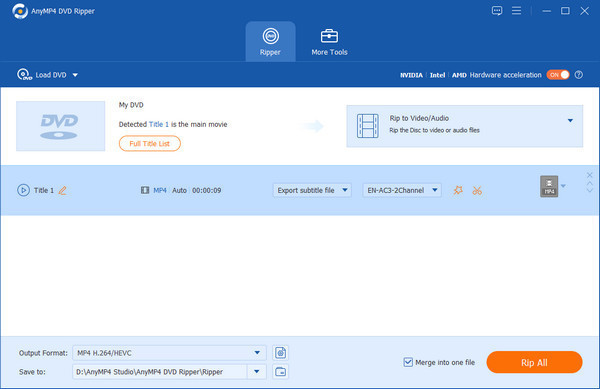
A loaded DVD with Title 1 detected as the main movie, the Rip to Video/Audio mode, the hardware acceleration switch, the output format (MP4 H.264/HEVC) and the Rip All button.
Features
Rips to 500+ formats and device presets
AnyMP4 DVD Ripper converts a DVD to MP4, HEVC MP4, MKV, AVI, MOV, ProRes, WMV and other video formats at resolutions from 480p up to 4K, or pulls just the soundtrack to MP3, FLAC, WAV or AAC. Ready-made profiles cover iPhone, iPad, Apple TV, Android phones, PlayStation and other devices, and each profile's encoder, resolution and bitrate can be changed.
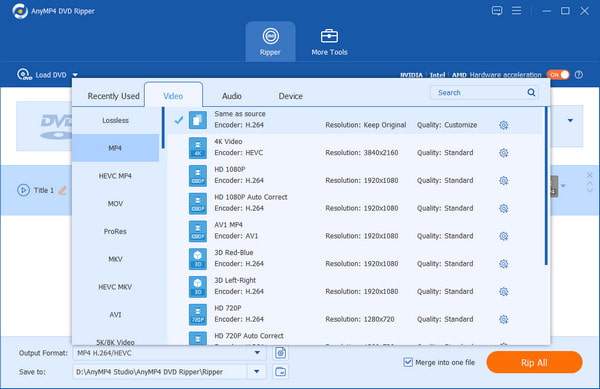
The format picker: Lossless, MP4, HEVC MP4, MOV, ProRes, MKV, HEVC MKV, AVI and 5K/8K Video on the left, with 4K, HD 1080p, AV1 and 3D presets for MP4.
1:1 copies to ISO or a DVD folder
AnyMP4 DVD Ripper can also back a disc up without re-encoding: it writes an uncompressed ISO image or DVD folder that keeps the original menus, chapters, audio tracks and subtitles. You can later play that ISO in a media player or burn it back to a blank DVD. For a smaller file that still looks like the disc, there are lossless MPG and MKV options.
GPU acceleration for faster rips
AnyMP4 DVD Ripper uses NVIDIA, Intel and AMD graphics hardware and multi-core processors to speed up encoding; AnyMP4 claims up to 50 times faster ripping than competing products, a figure we haven't tested. The switch sits in the top bar, so you can turn it off if a particular graphics driver causes trouble.
An editor for each title
AnyMP4 DVD Ripper lets you fix a title before ripping: crop away black bars and rotate, adjust contrast, saturation, brightness and hue or apply a filter, deinterlace old video, stamp a text or image watermark, add SRT or ASS subtitles, swap or add audio tracks and shift their delay. A side-by-side preview shows the original and the result.
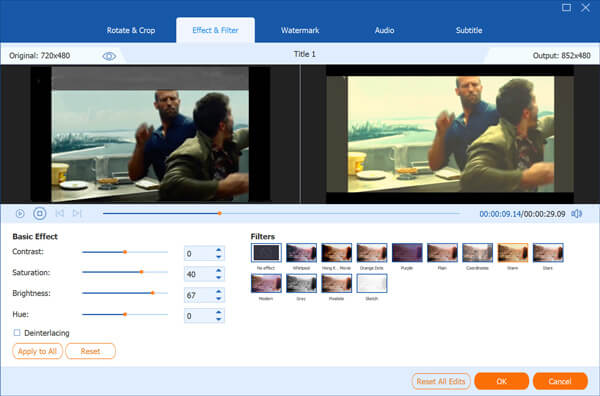
The editor's Effect & Filter tab: original (720x480) and output (1920x1080) previews, contrast, saturation, brightness and hue sliders, a deinterlacing box and filter presets.
Trim, split and merge
AnyMP4 DVD Ripper's cutter sets start and end points, adds extra segments or splits a title with Fast Split, and has fade-in and fade-out options. A Merge into one file box joins all the selected titles, handy for a disc that stores one film as several titles or a TV series you want as one file.
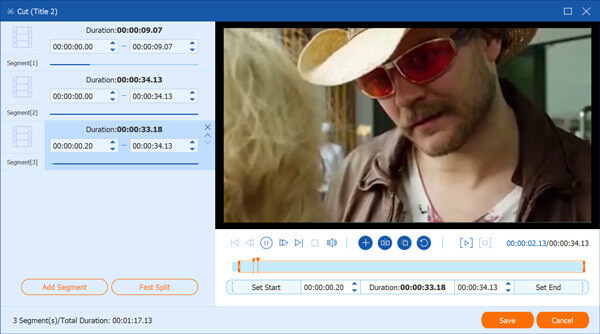
The Cut window: Set Start and Set End, Add Segment, Fast Split, and fade-in/fade-out options.
A toolbox for the files you've ripped
AnyMP4 DVD Ripper's More Tools tab adds a Video Compressor (shrink a rip to fit an email or a phone), a GIF Maker, a 3D Maker (red-blue or side-by-side 3D from a 2D film), a Video Enhancer to improve picture quality, and a Media Metadata Editor for titles, artists and covers. The same tab advertises other AnyMP4 programs, which are bought separately.
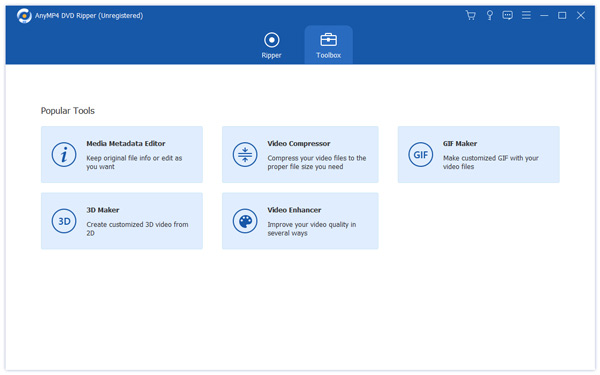
More Tools: Media Metadata Editor, Video Compressor, GIF Maker, 3D Maker and Video Enhancer, plus tiles for AnyMP4 Blu-ray Player, Blu-ray Ripper, Video Converter Ultimate and DVD Creator.
Benefits
- Your films stop depending on a disc drive. Once ripped, a movie plays on a phone, a smart TV, Plex or a laptop with no optical drive.
- Space back on the shelf. A box of home-video DVDs becomes a folder on a hard drive or a cloud backup.
- Less fiddling afterwards. Because you can crop, deinterlace, add subtitles and merge titles before the rip, you don't need a second editing program.
- A choice between small and exact. HEVC MP4 for space, a lossless ISO when you want a perfect copy.
Real-World Uses
- Preserving family videos. Wedding and camcorder DVDs from the 2000s go to MP4 before the discs start to fail, with the interlacing cleaned up on the way.
- Feeding a media server. Rip your own discs to MKV with every audio track and subtitle kept, and drop them into a Plex or Jellyfin library.
- Video for a trip. Convert a few titles with the iPad or Android preset and copy them to a tablet for the train or a long flight.
- Clips for teaching or a presentation. Cut a short segment from a training DVD you made and save it as MP4 or a GIF.
Who It's For, and Who Should Skip It
Good fit: Windows users with a stack of their own DVDs to digitise who want presets, an editor and GPU speed in one window, and who would rather pay once than learn a free tool's settings.
Skip it if: you only need to rip an occasional unprotected DVD. HandBrake does that for free, though with fewer one-click presets. Skip it too if your discs are Blu-ray (you need AnyMP4 Blu-ray Ripper or a Blu-ray-capable ripper), or if you're on a Mac, where you'll need the separate Mac edition.
Usage Guide
- Install. Download the free installer, follow the setup steps and launch AnyMP4 DVD Ripper.
- Register (optional). The first window compares the free and registered versions. After buying, click Register and enter the purchase email and the registration code from your order confirmation.
- Load the disc. Insert the DVD and click Load DVD (or pick a DVD folder or ISO from the same menu). Click Full Title List if you want more than the main movie.
- Pick tracks and edits. In each title's row, choose the audio track and subtitle, and use the star (edit) and scissors (cut) icons for any changes.
- Choose the format. Open Output Format and pick MP4, MKV, a device preset or Lossless; or switch the mode to copy the disc to an ISO or folder.
- Rip. Set Save to, tick Merge into one file if needed, turn on hardware acceleration and click Rip All.
Where it falls short
- The free trial can't finish a film. Five minutes per title is enough to check quality and speed, not to digitise anything.
- Subscription cancellation isn't obvious. One reviewer on AnyMP4's own site found it "a bit difficult to find the cancelation setting in the user portal".
- Activation hiccups. Several reviews on AnyMP4's site and on Trustpilot mention asking support to reset or release a registration code after moving to a new computer; one Trustpilot reviewer had waited almost two weeks.
- Dated in places. FileHorse lists "Installation process can be lengthy" and "Interface design appears outdated" among its cons, and many device presets are for long-gone players.
What Users Say
On AnyMP4's site
AnyMP4 shows a 4.9 rating from 1,422 reviews. The vendor collects these itself, but a few include real complaints:
- "Very good application, easy and powerful. I've used it daily for over a year to convert discs for my media server. The AI enhancement feature that upscales old DVDs to 1080p is actually surprisingly effective." (Alberto Ghezzi, August 2025)
- "The output quality is excellent and the tool is very easy to use. My only gripe is the automatic renewal system; it was a bit difficult to find the cancelation setting in the user portal. The software itself is 5 stars, though." (Hub Groeneveld, June 2025)
- "Awesome product! I recommend it to everyone looking to rip DVDs without losing quality. The hardware acceleration is a lifesaver—it's significantly faster than the free alternatives I've tried in the past." (Kjell H., May 2025)
- "For a non-technician like me, this is the easiest ripper I've found. The interface is clean and doesn't overwhelm you with buttons. It just works." (Dennis Enderson, September 2025)
- "I have been using this app for several years now to digitize my old movie collection. It remains my go-to for speed and reliability. The recent updates have only made the conversion process smoother on my Windows 11 machine." (Donald Helsel, February 2025)
- "What really impressed me was the outstanding customer service when I needed help transferring my license to a new laptop." (Ted Klarso, April 2025)
Trustpilot (AnyMP4 as a company)
AnyMP4 scores 4.2 out of 5 from 237 reviews, but the spread is wide: 66% five-star and 24% one-star. The text below came to us through a page summarizer.
- "A program that does exactly what I expect from it." (Paul Meijer, 4 stars, January 2026, about DVD Ripper)
- "I sent support a message almost 2 weeks ago with the request to release my registration code." (Tom Schoute, 3 stars, May 2026)
- "customer service was very efficient and helpful to reset the license keys" (Andrew, 5 stars)
FileHorse
FileHorse's editor credits it with "Supports 500+ output formats", "Comprehensive editing tools", "User-friendly interface" and "High-quality output preservation", and lists as cons "Installation process can be lengthy", "Free trial has feature limitations", "Interface design appears outdated", "Higher cost compared to some competitors" and "Limited support for Blu-ray discs". Its user rating is 8.34 out of 10 from 6 votes.
The pattern: users praise the speed, the output quality and how easy it is, and several have used it for years on large collections. The complaints are about the business side: registration codes after a computer change, finding where to cancel the monthly plan, and a trial too short to judge a whole film. Detailed independent tests are scarce.
Comparisons
AnyMP4 DVD Ripper vs HandBrake
HandBrake is free and open source and converts unprotected DVDs very well, but it has no 1:1 ISO copy, no GIF, 3D or metadata tools, and its many settings take time to learn. AnyMP4 DVD Ripper costs money and in return gives you device presets, a simpler title list, an editor with a live preview and one-click GPU acceleration.
AnyMP4 DVD Ripper vs AnyMP4 Video Converter Ultimate
Video Converter Ultimate, from the same company, also rips homemade DVDs and adds conversion of 4K and HD video files. If you only have discs to convert, the DVD Ripper is the cheaper, narrower choice.
Editions and Pricing
| Licence | Price at checkout | Computers | Updates |
|---|
| 1 Month | $31.20, renews monthly (AnyMP4 store) | 1 PC | While subscribed |
| Lifetime | $54.96 once (list $68.70), our Buy Now button | 1 PC | Free lifetime upgrades |
Prices are in US dollars as shown on the order page on November 3-4, 2026. AnyMP4 also sells business licences for more computers.
FAQs
Is AnyMP4 DVD Ripper free?
No. AnyMP4 DVD Ripper has a free trial that rips only the first 5 minutes of each title, for up to 5 discs in 30 days. Ripping whole films needs a paid licence.
Can AnyMP4 DVD Ripper rip Blu-ray discs?
No. AnyMP4 DVD Ripper handles DVDs, DVD folders and DVD ISO files only. For Blu-ray you need AnyMP4 Blu-ray Ripper, sold separately.
Does a lifetime licence include future versions?
Yes. The AnyMP4 DVD Ripper lifetime licence includes free lifetime upgrades for one PC, so new versions don't cost extra. The 1-month plan gets updates only while you keep paying.
Can I move my licence to a new computer?
Yes, but you may need help. The AnyMP4 DVD Ripper licence covers one PC at a time, and reviewers report contacting AnyMP4 support to release or reset their code when they changed computers.
Does the Windows licence work on a Mac?
No. AnyMP4 DVD Ripper for Mac (macOS 10.12 or later) is a separate product with its own licence.
Will the ripped files play on my iPhone or smart TV?
Yes. AnyMP4 DVD Ripper has presets for recent iPhones, iPads, Apple TV, Samsung Galaxy and other phones, game consoles and TVs, and a plain H.264 MP4 plays on almost any device.
How do I get a refund?
AnyMP4 DVD Ripper is covered by AnyMP4's 30-day money-back guarantee. Whether a purchase qualifies for a full refund depends on AnyMP4's refund policy.
System Requirements
- Operating system: Windows 11, 10, 8.1, 8 or 7 (32-bit or 64-bit)
- Processor: 1 GHz Intel or AMD CPU or faster
- Memory: 2 GB RAM or more
- Drive: a DVD drive (internal or USB) for discs
- Optional: an NVIDIA, Intel or AMD GPU for hardware acceleration
Conclusion
AnyMP4 DVD Ripper is worth it if you have a pile of your own DVDs to digitise and want it done quickly, with presets and an editor rather than a manual. The Buy Now button below orders the $54.96 lifetime licence, paid once; AnyMP4's $31.20 monthly plan would cost more than that by the second month. The one reason to buy is speed and convenience on a large collection; the main reason not to is that HandBrake does a single unprotected disc for free. Run the 5-minute trial on one of your discs first to check quality and speed on your PC.
Download Free TrialBuy Now