AnyMP4 iPhone Unlocker: Get Back Into an iPhone or iPad When You've Forgotten the Passcode
AnyMP4 iPhone Unlocker is a Windows program that removes a forgotten lock screen passcode, the signed-in Apple ID, a Screen Time passcode or MDM management from your own iPhone, iPad or iPod touch over a USB cable. It costs $49.95 a year for one PC and up to 6 iOS devices, and most of its unlock modes erase the device in the process.
It's for a bad day: your iPhone says "iPhone Unavailable" after too many wrong guesses, the screen is cracked so you can't type the code, or a parent set a Screen Time code years ago and nobody remembers it. Apple's own fix for a forgotten passcode is to erase the iPhone in recovery mode with a computer. AnyMP4 iPhone Unlocker wraps that kind of job in a guided, three-step program and adds a few modes Apple doesn't offer.
Quick facts
- Version: 3.0.8 or later (AnyMP4 asks buyers to run at least 3.0.8 for its current license system)
- Developer: AnyMP4 Studio
- Runs on: Windows 11, 10, 8.1, 8, 7, Vista and XP SP2. The Mac version is a separate product
- Works with: iPhone, iPad and iPod touch on iOS 5 and later, up to the current iPhone models
- Needs: iTunes installed, a USB cable and an internet connection for the iOS firmware download
- Price: $49.95 for one year, 1 PC and up to 6 iOS devices, renewing yearly until you cancel
- Guarantee: 30-day money-back guarantee on yearly and lifetime plans, for quality-related problems
What we checked: on October 17, 2026 we confirmed the $49.95 one-year price on the order page, downloaded the Windows installer from AnyMP4 (a 2.2 MB online installer, digitally signed by Keysun Software Co., Ltd), and read AnyMP4's tech specs, tutorials, purchase FAQ and refund terms. We didn't unlock an iPhone with it.
Before you buy
- Use it only on a device you own or are authorized to manage. It's a tool for owners who are locked out, not a way into someone else's phone.
- Your data will be erased by Wipe Passcode, Remove Apple ID and Bypass MDM. Only the Screen Time and iTunes backup modes keep your data. Without a backup, the photos and messages on a locked iPhone are gone.
- Remove Apple ID has conditions. On iOS 11.4 and later with Find My turned on, two-factor authentication must be enabled on the device.
- It's a subscription. The $49.95 license renews every year. Most people need an unlocker once, so cancel the renewal after you're done unless you manage many devices.
- Second-hand iPhones: a used iPhone that's still locked to the previous owner's Apple ID is a warning sign. Ask the seller to remove it from their account first.
Download Free TrialBuy Now
Overview
AnyMP4 iPhone Unlocker opens on a dashboard of unlock modes. The large Unlock iOS Screen tile is the main job. Around it sit Remove Apple ID, Bypass MDM, Unlock Screen Time, Remove iTunes Backup Encryption Settings and Unlock SIM Card, plus a Bypass iCloud Activation Lock tile. Each mode is a short wizard: connect the device, confirm its model, and press Start Now.
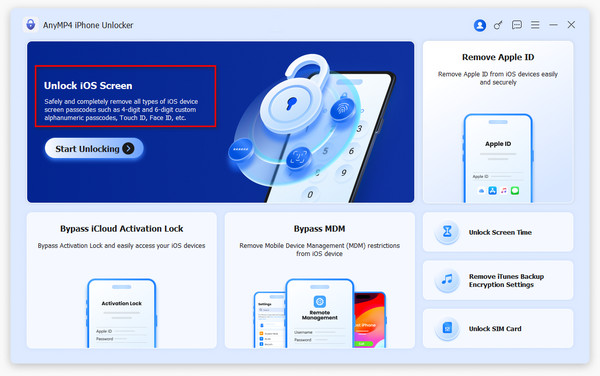
The current main window: Unlock iOS Screen with its Start Unlocking button, and tiles for Remove Apple ID, Bypass iCloud Activation Lock, Bypass MDM, Unlock Screen Time, Remove iTunes Backup Encryption Settings and Unlock SIM Card.
AnyMP4's own tutorial for this program refers to it in one place as Aiseesoft iPhone Unlocker, a similar product sold under the Aiseesoft name.
Features
Remove any lock screen passcode
AnyMP4 iPhone Unlocker wipes a forgotten 4-digit, 6-digit or custom alphanumeric passcode, and works when Face ID or Touch ID has stopped working, when the iPhone is disabled after too many wrong attempts, or when a cracked screen won't take input. It downloads the matching iOS firmware package for your model, verifies it, and installs it, which removes the passcode along with everything else on the device. You then set the iPhone up again and restore a backup if you have one.
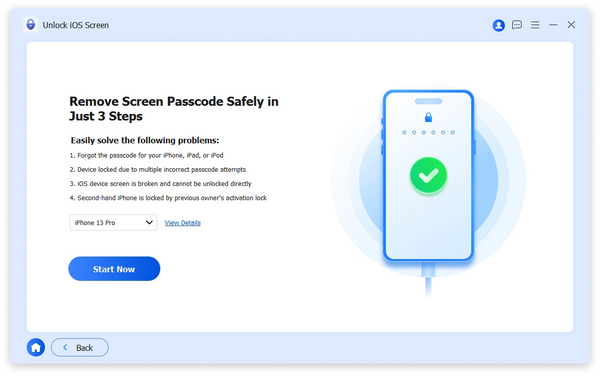
The Unlock iOS Screen step: the problems it covers (forgotten passcode, too many attempts, broken screen, second-hand device), the device model menu set to iPhone 13 Pro, and Start Now.
Remove the Apple ID from the device
AnyMP4 iPhone Unlocker removes the Apple ID and iCloud account signed in on an iPhone or iPad when you've forgotten the password, so you can sign in with another Apple ID. The process erases the device. On iOS 11.4 and later with Find My on, two-factor authentication must already be enabled. AnyMP4 warns not to use "Erase All Content and Settings" or an iTunes restore afterwards, because the device would ask for the old Apple ID again.
Clear a Screen Time passcode without losing data
AnyMP4 iPhone Unlocker removes a forgotten Screen Time passcode, or retrieves the older Restrictions passcode, without erasing the device. Find My must be turned off first. This is the most low-risk mode in the program and a common reason to buy it: the device still works, but a forgotten Screen Time code blocks settings and app limits.
Remove MDM management
AnyMP4 iPhone Unlocker removes a Mobile Device Management (MDM) profile without the administrator's password. Find My must be off, the device is erased, and it needs a restart afterwards. This is meant for devices you own outright, such as a former school or company iPad that was never released from management. On a device your employer or school still owns, ask their IT team instead.
Turn off iTunes backup encryption
AnyMP4 iPhone Unlocker's Remove iTunes Backup Encryption Settings mode clears the "Encrypt local backup" setting on the iPhone when you've forgotten that password, so you can make new, unencrypted backups and get at your backups without that password. It needs Find My turned off.
Benefits
- Guided steps: each mode tells you what to switch off and what will happen, which matters when one wrong click erases a phone.
- Several lock problems in one tool: passcode, Apple ID, Screen Time and MDM, for up to 6 devices on one license.
- No Apple Store visit: you can fix a locked device at home with a Windows PC and a cable.
Real-World Uses
- A child's iPad: the Screen Time code set years ago is forgotten, and you want to change the limits without wiping the tablet.
- "iPhone Unavailable": too many wrong guesses have locked you out of your own phone, and you have an iCloud backup to restore afterwards.
- A broken display: the iPhone works but the touch screen can't register your passcode, and you want to reset it for resale.
- An old family iPhone in a drawer: nobody remembers its code, and you want to reuse it.
- A retired school iPad you bought: it still shows a management profile that the old owner never removed.
Who It's For, and Who Should Skip It
AnyMP4 iPhone Unlocker suits iPhone and iPad owners on Windows who are locked out of their own device and want a guided tool, and families or small offices with several devices.
Skip it if:
- You only forgot your iPhone passcode once. Apple's free method, erasing the iPhone in recovery mode with a Mac or the Apple Devices app on Windows, gives the same result: an erased phone without the passcode.
- You want your data back. No mode here unlocks a passcode-protected iPhone with its data intact. Only a backup saves it.
- The device isn't yours. A phone still tied to someone else's Apple ID or an organization's MDM should go back to its owner or administrator.
- You use a Mac. You'll need AnyMP4 iPhone Unlocker for Mac, which is licensed separately.
Usage Guide
- Install: download the installer from AnyMP4, which fetches the program, and make sure the latest iTunes is installed.
- Choose a mode: launch the program and pick Unlock iOS Screen, Remove Apple ID, Unlock Screen Time, Bypass MDM or Remove iTunes Backup Encryption Settings.
- Connect the device: plug it in with a USB cable. Tap Trust on the device if you can, and turn off Find My when the mode asks for it.
- Confirm and start: check the detected model and click Start Now. For a passcode wipe, the program downloads and verifies the firmware package and asks you to confirm before it erases the device.
- Set up again: when it finishes, set the device up as new or restore from your iCloud or computer backup.
Tips
- Check for an iCloud backup at icloud.com from another device before you wipe anything.
- Try the Screen Time mode before anything else if the device still unlocks. It's the only main mode that keeps your data.
- After buying, log in inside the program with your purchase email. AnyMP4 sends a verification code and activates the license, and older versions won't recognize new licenses.
Where it falls short
- Activation can trip people up. AnyMP4's own FAQ says the most common activation failure is running an older version, which uses a different license system. One Trustpilot reviewer waited months for AnyMP4 to release a blocked registration code.
- Unclear trial. AnyMP4 doesn't say what the free download does before you pay, so expect to buy before you can unlock anything.
- No version history. AnyMP4 publishes no change log, so there's no way to check when support for a new iOS release arrived.
- Bold claims for SIM and Activation Lock. The app also shows Unlock SIM Card and Bypass iCloud Activation Lock tiles. Carrier locks are set by the carrier, and Activation Lock is Apple's anti-theft protection, so treat these as unproven and don't buy the program for them alone.
What Users Say
On AnyMP4's product page
AnyMP4's page shows a 4.9 out of 5 rating from 1,839 reviews collected on its own site, with three short user stories. These are hosted by the vendor, so read them as examples rather than an independent score.
"This iPhone Unlocker helped me a lot. I tried several times and couldn't access my iPhone. Then I used this iPhone Unlocker, and it wiped the passcode easily." Mario
"AnyMP4 iPhone Unlocker helps me remove my old Apple ID successfully. I forgot the password and can't get it without questions. Now I can set up a new Apple ID and use my FaceTime again." Colin
On Trustpilot (AnyMP4 as a company)
AnyMP4's Trustpilot profile covers all its products and showed 4.2 out of 5 from 235 reviews in October 2026, mostly about its video tools. The criticism we found there was about licensing, not unlocking. Tom Schoute gave 3 stars in May 2026: "I find it unbelievable that something so simple (releasing a blocked registration code) needs to take months!" AnyMP4 replied in July 2026 that the code had been reset.
Independent, hands-on reviews of this specific program are hard to find. Many "reviews" online come from sites selling competing unlockers, so we haven't quoted them. The pattern in what we could verify: buyers who needed a passcode or Apple ID removed report success, and the complaints are about license activation.
Editions and Pricing
| License | Price | Term | Covers |
|---|
| 1 Year (this listing) | $49.95 at checkout | Renews yearly, cancel any time | 1 PC, 6 iOS devices, 1 year of upgrades |
| 1 Month | $37.45 list ($18.72 on AnyMP4's store) | Renews monthly, cancel any time | 1 PC, 6 iOS devices |
| Lifetime | $62.45 list ($49.96 on AnyMP4's store) | One payment | 1 PC, 6 iOS devices, lifetime upgrades |
Store prices were checked on October 17, 2026 and change with AnyMP4's promotions. Team and business licenses are quoted on request.
FAQs
Can AnyMP4 iPhone Unlocker unlock my iPhone without losing my photos?
No, not for a lock screen passcode. AnyMP4 iPhone Unlocker removes the passcode by reinstalling iOS, which erases everything on the iPhone. Your photos come back only if they're in iCloud or a computer backup. The Screen Time mode is the exception and keeps your data.
Does AnyMP4 iPhone Unlocker work with the latest iPhone and iOS?
AnyMP4 iPhone Unlocker lists support for iOS 5 and later, including iOS 26 and 27, and current iPhone models through the iPhone 18 series, plus all iPad Pro, Air, mini and standard iPads.
Do I need iTunes to use AnyMP4 iPhone Unlocker?
Yes. AnyMP4 iPhone Unlocker needs iTunes installed and up to date on your Windows PC so it can detect and communicate with the connected device.
Is AnyMP4 iPhone Unlocker a one-time purchase?
The AnyMP4 iPhone Unlocker license sold here is a one-year subscription that renews automatically. AnyMP4 also sells a monthly plan and a lifetime license on its own store.
Can I get a refund if AnyMP4 iPhone Unlocker doesn't unlock my device?
AnyMP4 offers a 30-day money-back guarantee on yearly and lifetime plans when the request meets its refund policy. Refunds are generally not given for non-quality reasons such as a change of mind.
How do I activate AnyMP4 iPhone Unlocker after buying it?
To activate AnyMP4 iPhone Unlocker, run version 3.0.8 or later, click Log In at the top of the program, enter the email you bought with and type the verification code AnyMP4 emails you. The license then activates automatically.
Is there a Mac version of AnyMP4 iPhone Unlocker?
Yes. AnyMP4 iPhone Unlocker for Mac runs on Mac OS X 10.7 and later, including Apple silicon Macs, and is bought separately from the Windows version.
System Requirements
- Windows: Windows 11, 10, 8.1, 8, 7, Vista or XP (SP2 or later)
- Processor: 1 GHz Intel or AMD CPU or faster
- Memory: 1 GB RAM or more
- Devices: iOS 5 and later, iPadOS 13 and later
- Other: latest iTunes, a USB cable and an internet connection
Conclusion
AnyMP4 iPhone Unlocker is worth $49.95 mainly if you're locked out of your own device by something Apple's free tools won't fix: a forgotten Screen Time passcode you want to clear without erasing the device, an Apple ID whose password is lost, or leftover MDM management on a device you own. The one reason to buy it is that it handles these cases in one guided program. The main reason not to is that for a simple forgotten iPhone passcode it does what Apple's free recovery-mode reset does, erase the phone, and it charges a yearly fee for it. Have a backup, use it only on your own devices, and cancel the renewal once you're done.
Download Free TrialBuy Now