AnyMP4 4K Converter: Shrink 4K Footage to Files Every Player Opens
AnyMP4 4K Converter is a Windows program, $62.45 for a one-PC lifetime license, that converts 4K (3840 x 2160 and 4096 x 2160) HEVC, H.264, MKV and WebM video down to 1080p, 720p or SD for older TVs, players and editors, and can also scale smaller video up to 4K.
The typical case: a drone, GoPro, phone or 4K camcorder hands you 100 Mbps H.265 files that stutter on a laptop, won't open in an older version of your editor, and are far too large to email. Converting them to a 1080p H.264 MP4 fixes all three.
Quick facts
- Developer: AnyMP4 Studio
- Version: 7.2.50 (installer dated January 24, 2024)
- Platform: Windows 11, 10, 8 and 7
- 4K input: H.265/HEVC, H.264/MPEG-4 AVC, TS, AVI, MKV, VP8 and VP9 WebM, FLV, plus ordinary HD and SD video
- Output: 4K, HD and SD MP4, MOV, MKV, AVI, WMV, TS, WebM, audio only, phone, tablet and console presets
- Price at checkout: $62.45 one-time for 1 PC, free lifetime updates
- Trial: converts the first 5 minutes of each video
- What we checked: the installer, version 7.2.50 (43 MB), downloaded from AnyMP4, and AnyMP4's own store, which listed the lifetime license at $49.96 with its current offer, both on November 4, 2026, and the order page on November 4, 2026, which listed "AnyMP4 4K Converter" at $62.45 as a lifetime license with no renewal. We didn't run 4K conversions or time them.
Before you buy
- Compare it with AnyMP4 Video Converter. That program also has 4K H.265 and H.264 profiles, uses the same window and costs $49.95 at checkout, $12.50 less than this one. 4K Converter's selling point is its focus and its 4K-first profile list, not a feature the cheaper program lacks.
- Our order page charges list price. AnyMP4's own store sold the same lifetime license for $49.96 on November 4, 2026.
- Your PC matters more than the software. Decoding 4K HEVC is heavy work. Without a recent NVIDIA, Intel or AMD graphics chip, expect long conversions. Use the trial to time a 5-minute clip.
Download Free TrialBuy Now
Overview
AnyMP4 4K Converter opens to a short "Getting Started" panel: add files, edit them, pick an output profile, click Convert. Once you add clips, each row shows the source name, resolution and length, the output file on the right, and audio-track and subtitle menus. The Profile menu at the bottom applies to all rows unless you change one, and Settings beside it sets the exact resolution, bitrate, frame rate and encoder.
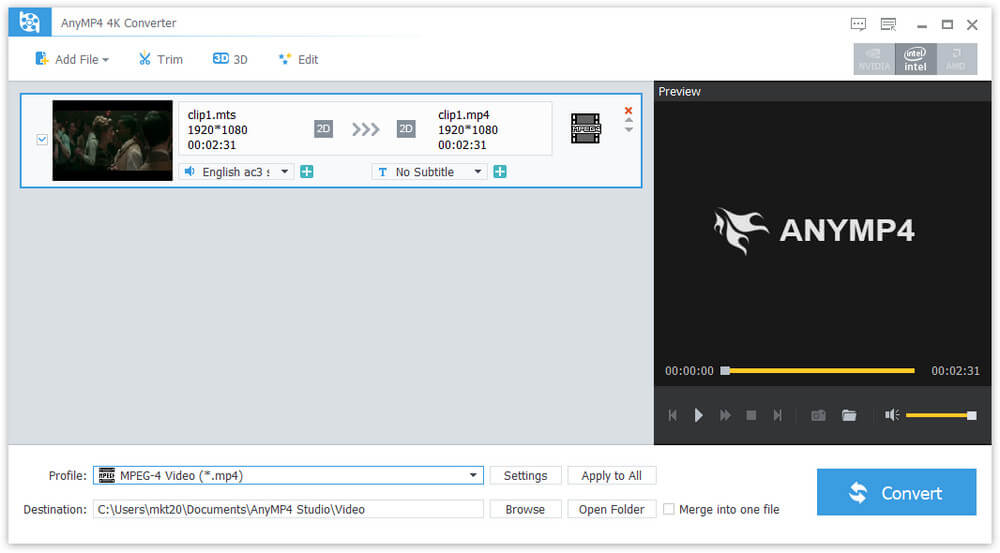
The main window: a clip queued for MPEG-4 output, the audio-track and subtitle menus, and the preview player.
Features
Down from 4K, or up to it
AnyMP4 4K Converter turns 4K footage into 1080p or 720p HD, or SD, so it plays on a non-4K TV, an older media player or a phone. It works the other way too: an SD or HD clip can be written at 3840 x 2160 for a 4K TV, though scaling up adds pixels, not detail.
4K profiles in H.265 and H.264
AnyMP4 4K Converter's 4K Video category writes 4K H.265/HEVC MP4, 4K H.264 MP4, 4K TS, 4K AVI, 4K MKV and VP8 or VP9 WebM at 3840 x 2160 or 4096 x 2160. Converting H.264 4K to HEVC can roughly halve the file size, which is the usual reason to keep 4K but re-encode it.

The Profile menu: 4K Video, HD Video, General Video, Lossless Audio and device categories on the left, H.265, H.264, MOV and AVI profiles on the right.
Output for editors and devices
AnyMP4 4K Converter writes formats that editors such as Adobe Premiere Pro and Sony Vegas accept, and has presets for iPhone, iPad, Apple TV, Samsung and other Android phones, Surface, PlayStation and Xbox. It can also save just the soundtrack as MP3, AAC, AC3, FLAC, OGG, WAV or WMA.
Trim, crop and fix before converting
AnyMP4 4K Converter's Trim window cuts a clip into segments and can merge them, or several clips, into one file. The Edit window rotates and flips, crops with a choice of zoom modes, adjusts brightness, contrast, saturation, hue and volume, adds a text or image watermark and converts 2D video to anaglyph or split-screen 3D. Cropping is handy when you downscale a 4K shot and want to reframe it at the same time.
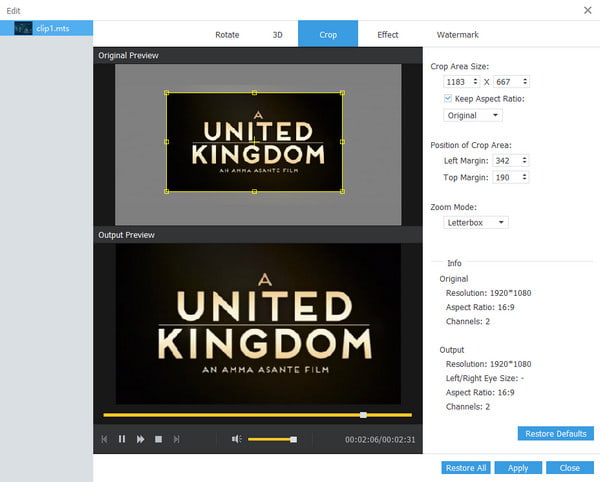
The Crop tab: original and output previews, crop size and position fields, and the Letterbox zoom mode.
GPU acceleration and parallel jobs
AnyMP4 4K Converter's Preferences let you turn on NVIDIA, Intel and AMD acceleration, set which CPU cores the program may use, and choose how many conversions run at once. That's where the speed for big 4K batches comes from.
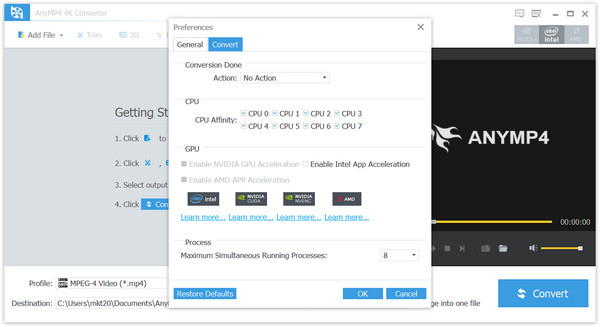
The Convert tab of Preferences: CPU affinity checkboxes, GPU acceleration options and the maximum number of simultaneous processes.
Benefits
4K footage is everywhere now, but plenty of the screens and software around it aren't 4K. A one-time converter means you can keep shooting in 4K and still hand a client, a relative or an old smart TV a file it can play. Downscaling also saves real disk space: a 1080p H.264 copy of a 4K HEVC clip is easier to share and edit on a modest laptop.
Real-World Uses
- Drone and action-camera clips. Turn 4K HEVC files into 1080p MP4 that an older laptop and TV can play smoothly.
- Editing on an older suite. Convert 4K H.265 to H.264 so an older editor imports it without proxy files.
- Freeing up storage. Re-encode a 4K H.264 archive to 4K HEVC to save space while keeping the resolution.
- Phone-ready copies. Batch-convert a day's 4K footage to an iPhone or Android preset for quick sharing.
Who It's For, and Who Should Skip It
A good fit for Windows users who shoot 4K with a camera, phone or drone and need regular, simple batch conversions to HD formats, with a GPU that can speed them up.
Skip it if you also convert DVDs or want more editing tools (AnyMP4 Video Converter Ultimate covers those), if you mainly need general format conversion at a lower price (AnyMP4 Video Converter has 4K profiles for $49.95), or if you're happy with a free, technical tool such as HandBrake. It has no Mac version on AnyMP4's site.
Usage Guide
- Download and install AnyMP4 4K Converter, then start it. The trial needs no registration.
- Open Preferences and switch on GPU acceleration if your graphics chip is listed.
- Click Add File to load your 4K clips, or drag them in.
- Use Trim, 3D or Edit on any clip that needs it, and preview the result.
- Choose a profile, for example HD Video > H.264 1080p MP4, and use Settings to adjust bitrate or frame rate.
- Pick a destination folder and click Convert. To register, choose Register in the Help menu and enter your email address and code.
Where it falls short
- Priced above its own sibling. At $62.45 at checkout it costs more than AnyMP4 Video Converter, which converts 4K too.
- Slow on weak hardware. 4K HEVC decoding without a supported GPU can take several times the clip's length.
- No new features lately. The installer dates from January 2024, and the interface is AnyMP4's older design.
- Upscaling is just scaling. Converting SD to 4K makes a bigger file, not a sharper picture. There's no AI upscaler in this product.
What Users Say
We couldn't find an independent review of AnyMP4 4K Converter, and AnyMP4 has no separate review page for it, so here is what is available.
Testimonials on AnyMP4's product page
These are AnyMP4's own picks, shown without dates or ratings.
Charlotte: "AnyMP4 4K Converter is exactly what I'm looking for. The conversion is fast and maintains the original quality. I can still watch it on my computer clearly."
Camila: "Excellent! The tons of output formats meet my need. I can convert my videos directly to my other devices. It's good to use."
Jack: "It's the best 4K converter I've ever used. The page is so intuitive that I have no difficulty in operation. Highly recommend."
Trustpilot, AnyMP4 as a company (4.2 out of 5, 237 reviews)
Trustpilot covers the whole company. The recent reviews are mostly 5-star praise for support, often after a reinstall on a new computer. Daniel Åhs, who converted 224 MOV files to MP4 with an AnyMP4 converter: "I think it is working very well." J. C., who reported a problem with AnyMP4 4K Converter on a Mac mini M4: "The support was quick on replying which I was really surprised." The 3-star exception, Tom Schoute, waited weeks for a blocked registration code to be released after he changed laptops, before AnyMP4 reset it. Trustpilot blocks automated reading, so we read these through a summarizing tool.
The pattern: owners praise the speed and the wide choice of output formats; the complaints we found are about licenses when you change PCs, not about conversion quality. With so few reviews, the trial is your best evidence.
Comparisons
AnyMP4 4K Converter vs AnyMP4 Video Converter
Same window, same editing tools, same GPU options. Video Converter costs $49.95 at checkout and also lists 4K H.265 and H.264 profiles plus an Enhance tab for upscaling and denoising. 4K Converter costs $62.45 and is organized around 4K and HD output. For most buyers the cheaper program does the same job.
AnyMP4 4K Converter vs HandBrake
HandBrake is free and has excellent H.265 and H.264 encoders with hardware support, but it has no device menu as broad as this one, no AVI or WMV output and a more technical interface. If you're comfortable with presets and bitrates, try HandBrake first.
Editions and Pricing
| License | Where | Price on November 4, 2026 | Term | PCs |
|---|
| Lifetime | Order page (Buy Now) | $62.45 | One-time, free updates | 1 |
| Lifetime | AnyMP4 store, with its offer | $49.96 | One-time, free updates | 1 |
| 1 Month | AnyMP4 store | $15.60 | Renews automatically | 1 |
| 5-User | AnyMP4 store | $99.96 | One-time, free updates | 5 |
System Requirements
- Windows 11, 10, 8 or 7
- 2 GHz Intel or AMD processor or faster
- 2 GB of RAM or more (more helps with 4K)
- A recent NVIDIA, Intel or AMD graphics chip for hardware acceleration (optional)
FAQs
Can AnyMP4 4K Converter convert iPhone HEVC video for a Windows PC?
Yes. AnyMP4 4K Converter reads H.265/HEVC MP4 and MOV files and can write H.264 MP4, which any Windows PC plays without the paid HEVC extension. Pick an H.264 profile at 4K or 1080p.
Does AnyMP4 4K Converter make SD video look like real 4K?
No. AnyMP4 4K Converter can output an SD or HD clip at 3840 x 2160, but that only scales the picture. It won't add detail the original didn't have.
Is there a Mac version of AnyMP4 4K Converter?
AnyMP4's site sells AnyMP4 4K Converter for Windows only. Mac users would look at AnyMP4's Mac converters instead.
Is the AnyMP4 4K Converter license a subscription?
No. The license sold at checkout is a lifetime license for one PC, with free updates and no renewal. AnyMP4 also offers a 1-month plan on its own store, which renews automatically.
Will AnyMP4 4K Converter convert protected 4K movies?
No. AnyMP4 4K Converter works on unprotected video files. Purchased streaming downloads and 4K Blu-ray discs are copy-protected, and AnyMP4 sells separate disc rippers.
What if AnyMP4 4K Converter doesn't work for me after I buy it?
AnyMP4's 30-day money-back guarantee covers cases such as a technical fault support can't solve within 30 days, a duplicate purchase or a code that never arrives. It doesn't cover a change of mind, and AnyMP4 may keep 20% of the price on a refund it grants.
Conclusion
AnyMP4 4K Converter does what its name says, simply and in batches, and it's a reasonable buy for a Windows user who regularly turns 4K camera, phone or drone footage into HD files that play everywhere.
The reason to hesitate is price. At $62.45 at checkout it costs more than AnyMP4's own Video Converter, which also converts 4K, and AnyMP4's store sells this same license for about 20% less. Time a 4K clip in the 5-minute trial on your own PC before you decide.
Download Free TrialBuy Now