AnyMP4 MTS Converter: Make Camcorder AVCHD Footage Play Anywhere
AnyMP4 MTS Converter is a $49.95 Windows program (one PC, lifetime license) that turns the MTS, M2TS and TS files recorded by Sony, Panasonic, Canon and JVC camcorders into MP4, MOV, AVI, WMV or ready-made phone and TV presets, with trimming, merging and basic picture fixes along the way.
If you've copied a camcorder's AVCHD folder to your PC and found a pile of 00001.MTS files that your phone, your TV's USB port or your editor refuses to open, this is the problem it was built for.
Quick facts
- Developer: AnyMP4 Studio
- Version: 7.2.38 (installer dated January 24, 2024)
- Platform: Windows 11, 10, 8 and 7. AnyMP4 sells a separate MTS Converter for Mac
- Input: MTS, M2TS, TS, TP, TRP, MOD, TOD, MXF and most common video and audio files
- Output: MP4 (H.264 and H.265/HEVC), MOV, MKV, AVI, WMV, FLV, WebM, ProRes, HD profiles, audio only, device presets
- Price at checkout: $49.95 one-time for 1 PC, free lifetime updates
- Trial: converts the first 5 minutes of each video
- Refunds: 30-day guarantee for listed problems only, not a change of mind
- What we checked: the installer, version 7.2.38 (40 MB), downloaded from AnyMP4, and AnyMP4's own store, which showed the same license at $39.96 with its current offer, both on November 4, 2026, and the order page on November 4, 2026, which listed "AnyMP4 MTS Converter" at $49.95 as a lifetime license with no renewal. We didn't convert camcorder footage with it.
Before you buy
- AnyMP4 Video Converter costs the same and reads MTS too. Both are $49.95 lifetime licenses with the same list-style window. MTS Converter's profiles and guides are tuned for camcorder files, but if you also convert other kinds of video, compare the two in their trials first.
- Watch the price. Our order page charges the $49.95 list price. AnyMP4's own store showed $39.96 for the same lifetime license on November 4, 2026, and its 1-month license ($15.60 there) renews automatically.
- Test your footage in the trial. The 5-minute limit is enough to check that a 1080i or 1080p 50 fps clip comes out smooth. AnyMP4 may deduct 20% even from a refund it approves.
Download Free TrialBuy Now
Overview
AnyMP4 MTS Converter uses AnyMP4's classic converter layout: each clip gets a row showing its name, resolution and length, with the output name and size on the right and audio-track and subtitle menus underneath. A preview player sits on the right. One Profile menu at the bottom sets the output for every row, Destination picks the folder, and Convert runs the queue.

The main window: a 1920 x 1080 TS clip set to H.265/HEVC MP4 output, the preview player, and the GPU acceleration buttons at the top right.
The program doesn't care whether the file came straight from the camera's STREAM folder or from a TS recording. It reads the clip, shows its true frame size, and lets you decide what it should become.
Features
Camcorder formats in, everyday formats out
AnyMP4 MTS Converter reads AVCHD MTS and M2TS, transport streams (TS, TP, TRP), older JVC and Panasonic MOD/TOD files and broadcast MXF. It writes H.264 or H.265 MP4, MOV, MKV, AVI, WMV and more, Apple ProRes (Proxy, LT, Standard and HQ) for Final Cut and Premiere, and audio-only MP3, FLAC, WAV or AAC.
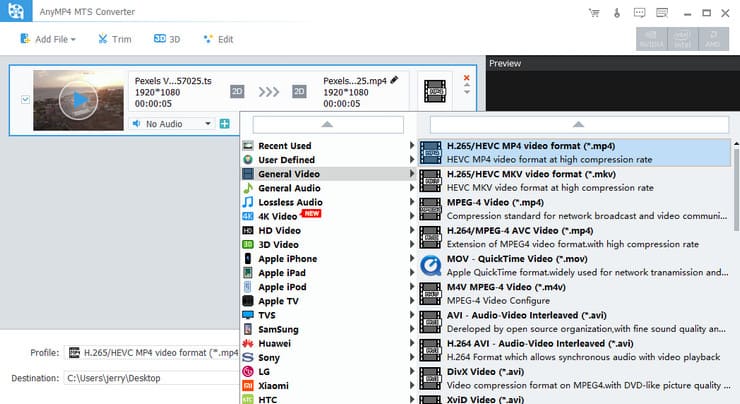
The Profile menu: categories for general, 4K, HD and lossless output on the left, and HEVC, H.264, MOV and AVI profiles on the right.
Presets for phones, TVs and consoles
AnyMP4 MTS Converter has device profiles for iPhone and iPad models up to the newest ones, Samsung Galaxy phones and tablets, Apple TV, PlayStation and Xbox. Picking a device sets the frame size and codec for you, so you don't need to know what an iPad accepts.
Trim the dull parts and merge the rest
AnyMP4 MTS Converter's Trim window marks start and end points by dragging or typing times and lets you add several segments from one clip. Tick Merge into one file and the segments, or several whole clips, come out as a single video. Camcorders split long recordings into separate MTS files, so merging is the quickest way to rebuild one continuous recital or wedding.

The Trim window with three segments cut from one clip and "Merge into one file" ticked.
Crop, rotate and correct the picture
AnyMP4 MTS Converter's Edit window crops by area or by margins, with Letterbox, Medium, Pan & Scan and Full zoom modes, rotates and flips sideways footage, and adjusts brightness, contrast, saturation, hue and volume. A Deinterlacing checkbox helps with 1080i camcorder footage, which shows comb lines on a computer screen if you leave it alone.
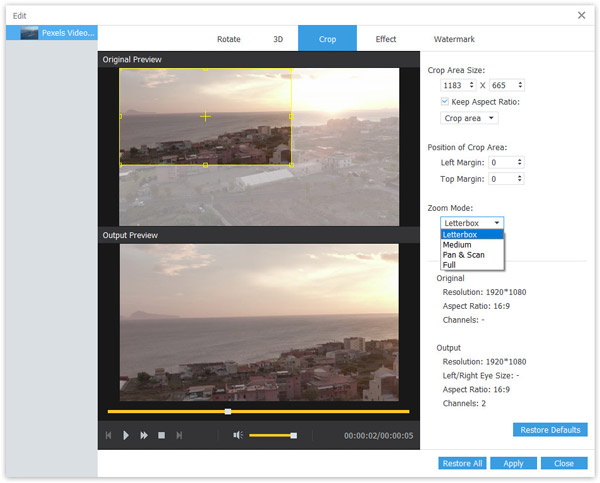
The Crop tab: original and output previews, crop area size and position, and the zoom mode menu.
Watermarks, 3D, audio tracks and subtitles
AnyMP4 MTS Converter adds a text or image watermark with its own position and transparency, converts 2D footage to 3D, lets you choose which audio track to keep or add another, and attaches external subtitle files. The preview player can also save a still frame as a snapshot.
GPU acceleration
AnyMP4 MTS Converter shows NVIDIA, Intel and AMD acceleration buttons in the toolbar. On a PC with a supported graphics chip they speed up H.264 and HEVC encoding, which matters when a single day of filming produces an hour of high-bitrate AVCHD.
Benefits
MTS files are an odd fit for modern devices: phones and smart TVs often won't play them, cloud photo services treat them as unknown files, and some editors stutter on interlaced AVCHD. Converting once to MP4 gives you files that play on everything and take less space. Doing it in a tool that lists each clip with its real length and resolution saves you from guessing which 00012.MTS holds the birthday cake.
Real-World Uses
- Archiving an old camcorder's memory card. Convert the whole AVCHD folder to H.265 MP4 to shrink it before it goes on a backup drive.
- Sharing a school play. Merge the five MTS files the camera split the evening into, trim the intermission, and send relatives one MP4.
- Editing on a colleague's Mac. Turn M2TS clips into ProRes or MOV so Final Cut opens them without fuss.
- Watching on a TV. Pick a TV or Apple TV preset so a USB stick of holiday clips plays without a computer.
Who It's For, and Who Should Skip It
A good fit if you own or inherited an AVCHD camcorder, work on Windows, and want a one-time purchase that converts clips in batches with simple trimming.
Skip it if you only convert a few files a year (the free HandBrake reads MTS too, with a steeper learning curve), if you need real editing with transitions and titles (a video editor is the better buy), or if you convert many kinds of video besides camcorder files (AnyMP4 Video Converter covers those at the same price). On a Mac you need the separate Mac version.
Usage Guide
- Download and run the installer, then start AnyMP4 MTS Converter. The trial runs straight away.
- Click Add File and select your MTS, M2TS or TS clips, or a whole folder.
- Check each row's audio track and subtitle, and use Trim or Edit on any clip that needs it.
- Open Profile and choose a format or device. Settings next to it changes resolution, bitrate and frame rate.
- Set Destination, tick Merge into one file if you want a single video, and click Convert.
- To register, choose Register from the Help menu and enter your email address and registration code.
Where it falls short
- Dated interface. The window looks much as AnyMP4's converters did a decade ago, and one reviewer on AnyMP4's own site wrote that "The UI feels a bit outdated."
- Updates have slowed. The current installer is from January 2024. It handles today's MTS files, but don't expect new features.
- Occasional audio quirks. Two of the recent reviews on AnyMP4's site mention audio problems: one an audio-sync issue that support took a while to fix, one an unexpected change in audio bitrate.
What Users Say
Independent coverage of this niche tool is thin, so here is what we could find, source by source. None of it is from an editorial review.
AnyMP4's review page for MTS Converter (23 reviews)
AnyMP4 hosts these reviews itself, so read them as the vendor's selection. The recent ones are more mixed than the older praise.
Ryan Phillips (July 2025): "Used it for converting old camcorder footage. The quality preservation was excellent, especially with 1080p files."
Amanda Brooks (February 2025): "The interface is simple and clean. I figured out how to convert my videos within minutes. Very beginner‑friendly."
Laura Mitchell (April 2025): "I like the built‑in editing tools. Being able to trim and merge clips before converting saves me time. Wish there were more advanced options though."
Kevin Ramirez (March 2025): "It works fine, but the free version has too many limitations. Still, the batch conversion feature is helpful."
Samuel Bennett (October 2025): "I had an audio‑sync problem after conversion. Support eventually helped me fix it, but the process took longer than expected."
Chloe Anderson (June 2025): "Conversion speed is fast, but sometimes the audio bitrate changes unexpectedly. Not a huge issue, but noticeable."
Bruce (December 2013), on iPad playback: "Other similar ones I've tried have 90% of the time resulted in the inability to play the entire file on my iPad."
Trustpilot, AnyMP4 as a company (4.2 out of 5, 237 reviews)
Trustpilot rates the company, not this product, and most recent reviews praise support for resetting registration codes after a new PC. One owner of AnyMP4's general converter, pripol: "I’ve been using AnyMP4 Video Converter for a long time, fast, easy and simple, has saved me too many times." The main 3-star complaint, from Tom Schoute, was a code blocked after moving to a new laptop: "The product worked fine but I recentenly switched to a new laptop." His later update says AnyMP4 reset it. Trustpilot blocks automated reading, so we read these through a summarizing tool.
The pattern: users like the speed, the simple batch workflow and the output quality from 1080p camcorder files. The complaints are a dated look, the trial's limits, occasional audio issues and license resets when you change computers.
Comparisons
AnyMP4 MTS Converter vs AnyMP4 Video Converter
Both are $49.95 lifetime licenses for one PC with the same queue, editing and GPU options. MTS Converter is pitched and documented around camcorder footage; Video Converter adds an Enhance tab (upscaling, denoise, deshake) and a broader general focus. If you're unsure, install both trials and convert the same clip.
AnyMP4 MTS Converter vs HandBrake
HandBrake is free and converts MTS to MP4 or MKV very well, but it has fewer output targets (no AVI, WMV or ProRes), no merging of separate clips and a more technical interface. MTS Converter is the easier route for people who want presets, a merge checkbox and a familiar Convert button.
Editions and Pricing
| License | Where | Price on November 4, 2026 | Term | PCs |
|---|
| Lifetime | Order page (Buy Now) | $49.95 | One-time, free updates | 1 |
| Lifetime | AnyMP4 store, with its offer | $39.96 | One-time, free updates | 1 |
| 1 Month | AnyMP4 store | $15.60 | Renews automatically | 1 |
| 5-User | AnyMP4 store | $79.96 | One-time, free updates | 5 |
System Requirements
- Windows 11, 10, 8 or 7
- Intel Core 2 Duo or AMD Athlon processor at 2 GHz or faster
- 2 GB of RAM or more
- About 40 MB for the installer, plus space for your converted videos
FAQs
Does AnyMP4 MTS Converter work on a Mac?
No. AnyMP4 MTS Converter is a Windows program. AnyMP4 sells a separate MTS Converter for Mac with its own license, so a Windows license won't activate the Mac version.
Can AnyMP4 MTS Converter handle 1080p 50/60 fps AVCHD Progressive files?
AnyMP4 MTS Converter reads AVCHD MTS and M2TS files at 1080p, and its profile settings let you keep the original frame rate. Convert a short clip in the trial and check the motion before buying, since frame-rate settings matter most with 50 and 60 fps footage.
Is the AnyMP4 MTS Converter license really one-time?
Yes. The license sold at checkout is a lifetime license for one PC with free updates and no renewal. The 1-month license on AnyMP4's own store is a different, auto-renewing plan.
Can I move my AnyMP4 MTS Converter license to a new computer?
AnyMP4 MTS Converter's license covers one PC at a time. Several Trustpilot reviewers who changed computers had AnyMP4 support reset their code, usually within a day, so email support with your order details.
Does AnyMP4 MTS Converter handle copy-protected Blu-ray M2TS files?
No. AnyMP4 MTS Converter works on unprotected files such as camcorder recordings. M2TS files inside a commercial Blu-ray are encrypted, and AnyMP4 sells its Blu-ray Ripper for those.
Can I get a refund on AnyMP4 MTS Converter if it doesn't suit me?
AnyMP4's 30-day money-back guarantee covers specific cases, such as a duplicate purchase, a registration code that never arrives, or a technical fault support can't fix within 30 days. A change of mind isn't covered, and AnyMP4 may keep 20% of the price on a refund it grants.
Conclusion
AnyMP4 MTS Converter is worth it if you have a stack of AVCHD camcorder clips on a Windows PC and want to batch-convert, trim and merge them without learning a technical tool. It's simple, it reads every camcorder container you're likely to have, and the license is a one-time payment.
The main reason to hesitate is value: AnyMP4's own store sells the same license for about 20% less, its general Video Converter costs the same and does more, and HandBrake is free for occasional jobs. Run the 5-minute trial on your own footage, and buy only if the result looks right.
Download Free TrialBuy Now