AnyMP4 DVD Ripper for Mac: Turn Your Home DVDs Into Files Your Mac, iPhone and TV Can Play
AnyMP4 DVD Ripper for Mac is a $54.96 Mac app (lifetime license for one Mac) that converts homemade DVD discs, DVD folders and ISO images into MP4, MOV, MKV, MP3 and dozens of other formats, with presets for iPhone, iPad, Apple TV and Android. It's for Mac owners who want their family videos and old disc collection off the shelf and onto a drive, and it runs natively on both Intel and Apple silicon Macs with macOS 10.12 or later.
Maybe it's a stack of wedding and school-play DVDs from a camcorder, or discs you burned years ago that only an old DVD player can read. Modern Macs don't even have a disc drive. This app reads the disc once through an external drive, lets you pick the right title, audio track and subtitle, and saves a file you can play anywhere.
Quick facts
- Version: 9.1.6 for Apple silicon and 9.0.98 for Intel (app packages dated June 2026)
- Developer: AnyMP4 Studio
- Runs on: macOS 10.12 Sierra to macOS 15 Sequoia, with separate native builds for Intel and Apple silicon Macs
- Reads: homemade DVD discs, DVD folders (VIDEO_TS) and DVD ISO files
- Writes: MP4, HEVC MP4, MOV, MKV, AVI, WMV, WebM, MPG and more, audio such as MP3, FLAC, WAV, AAC and M4A, or a full DVD folder or ISO copy
- Extras: trim and split, rotate and crop, filters, watermarks, subtitle and audio track control, plus a Toolbox with a video enhancer, compressor, GIF maker, 3D maker and metadata editor
- Price: $54.96 lifetime for one Mac (list price $68.70), or $24.96 for a one-month license
- Trial: free download that rips only about 5 minutes of each title and doesn't batch-rip
- Guarantee: 30-day money-back guarantee, with conditions
What we checked: on October 18, 2026 we confirmed the $54.96 lifetime price on the order page ($68.70 less a $13.74 discount), downloaded the 4.2 MB installer from AnyMP4, and read the two app packages it installs (155.8 MB for Apple silicon, 138.9 MB for Intel): version 9.1.6 with true arm64 code in the Apple silicon build, and version 9.0.98 in the Intel build. We read the trial limits from the app's own settings file. We didn't install it or rip a disc on a Mac ourselves.
Before you buy
- It's made for homemade DVDs. AnyMP4 lists "Homemade DVD" as the supported input and asks you not to rip rental DVDs or make backups for commercial use. In many countries, including the US, getting around a disc's copy protection is illegal even when you own the disc, so check your local law before ripping store-bought movies.
- DVD only, no Blu-ray. Blu-ray discs need AnyMP4 Blu-ray Ripper for Mac, sold separately or in a $83.19 bundle with this app.
- You need a DVD drive. Current Macs don't have one, so plan on a USB DVD drive unless you're ripping DVD folders or ISO files you already have.
- The refund promise is narrow. AnyMP4's policy refunds wrong or double purchases and unsolved technical problems, but not a change of mind, and it may keep 20% if you insist on a refund. Use the trial first.
Download Free TrialBuy Now
Overview
AnyMP4 DVD Ripper for Mac has two tabs: Ripper and Toolbox. On the Ripper tab you click Load DVD, and the app reads the disc and marks the title it thinks is the main movie. Each title gets its own row with its length, an audio track menu, a subtitle menu, and buttons for editing and cutting. A Rip All to menu at the top right sets the output format, and a big orange Rip All button at the bottom starts the job.
It's a single-purpose tool. AnyMP4 also sells Mac Video Converter Ultimate, which rips DVDs too but adds general video conversion. If all you have is discs, this is the smaller, cheaper option.
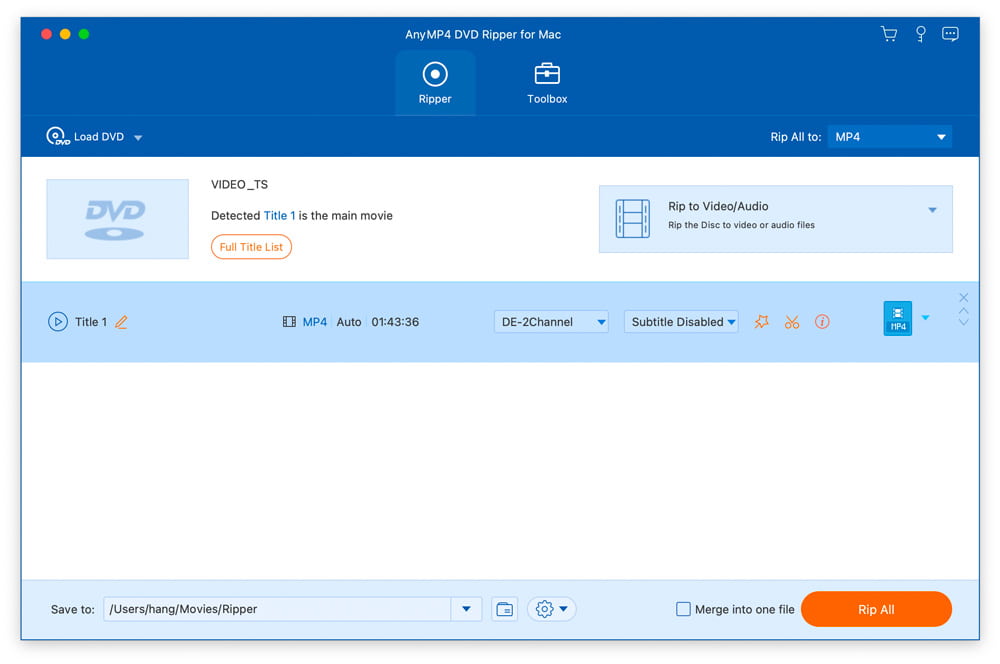
The Ripper tab with a VIDEO_TS disc loaded: Title 1 is detected as the main movie (1:43:36), with its audio track and subtitle menus, Rip to Video/Audio selected, MP4 as the output, and the Rip All button at the bottom right.
Features
Three ways to save a disc: as a video file, a DVD folder or an ISO
AnyMP4 DVD Ripper for Mac can save a disc in three ways. Rip to Video/Audio turns titles into ordinary files like MP4 or MP3. Rip to DVD Folder and Rip to DVD ISO File copy the full disc structure, so you can burn it again or play it in a player that reads ISO files. For a file with no quality loss, AnyMP4 recommends the MPG Lossless format, which keeps the original DVD video as it is (the edit tools are switched off for that format).
Pick the exact titles, audio track and subtitle you want
AnyMP4 DVD Ripper for Mac shows a Full Title List with every title's length, audio tracks and subtitles, so you can tick only the main movie or only the episodes you want. Each title can get its own output format, for example MP4 for one and MP3 for another. You can switch the audio track, add an external subtitle file, move or restyle subtitles, and fix audio that's out of sync with a delay setting.
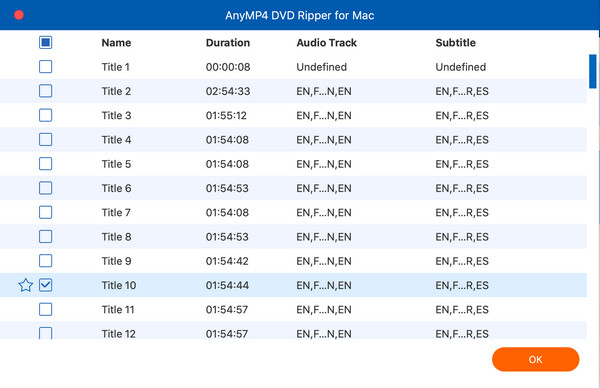
The Full Title List: twelve titles with their durations, audio tracks and subtitle languages, with Title 10 ticked and starred as the main movie.
Output formats and device presets
AnyMP4 DVD Ripper for Mac sorts its output choices into Video, Audio and Device tabs. Under Video you'll find MP4 (H.264), HEVC MP4, MOV, MKV, HEVC MKV, AVI, WMV, WebM and more, each with presets from "Same as source" up to 4K and HD 1080p, plus 3D red-blue and side-by-side versions. The Audio tab covers MP3, FLAC, WAV, AAC, AC3, AIFF, M4A and OGG. The Device tab has presets for iPhone, iPad, Apple TV, Samsung and other phones, game consoles, and editing apps like iMovie and Final Cut Pro. A gear icon next to each preset opens the encoder, resolution, bitrate and frame-rate settings.
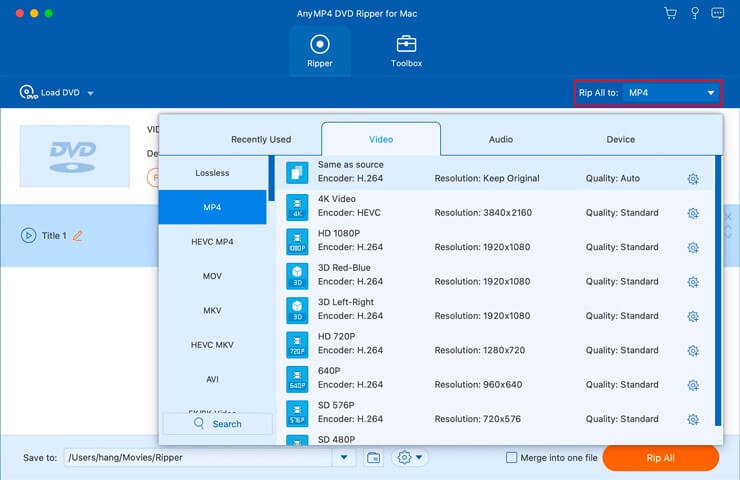
The Rip All to menu on the Video tab, with MP4 selected and presets from Same as source and 4K HEVC down to SD 480P.
Trim, crop and clean up each title before ripping
AnyMP4 DVD Ripper for Mac has an edit window with tabs for Rotate & Crop, Effect & Filter, Watermark, Audio and Subtitle, with the original and output side by side. Cropping is the useful one for DVDs: drag the frame to cut off black bars, and set the aspect ratio and zoom mode. A separate cut window splits a long title into segments, handy for a camcorder disc with several events on it. Tick Merge into one file to join several titles into one video.
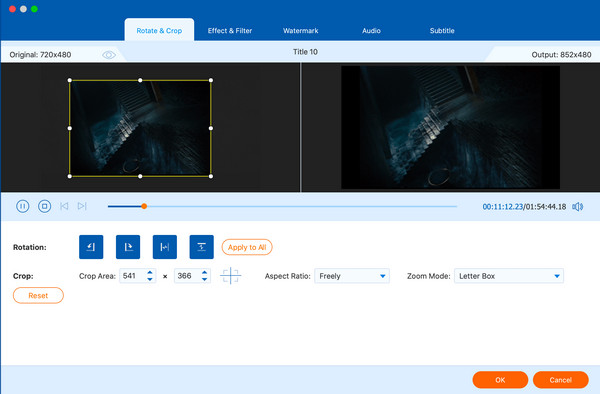
The Rotate & Crop tab with a 720x480 source on the left and the cropped 852x480 output on the right, plus the rotation buttons, crop size, aspect ratio and zoom mode settings.
A Toolbox for after the rip
AnyMP4 DVD Ripper for Mac adds five tools on its second tab. The Video Enhancer upscales resolution, optimizes brightness and contrast, removes video noise and reduces shaking, which suits grainy old camcorder footage. The Video Compressor shrinks a file for sharing or a small USB stick. There's also a GIF Maker, a 3D Maker (anaglyph or split-screen) and a Media Metadata Editor for adding a title and cover picture.
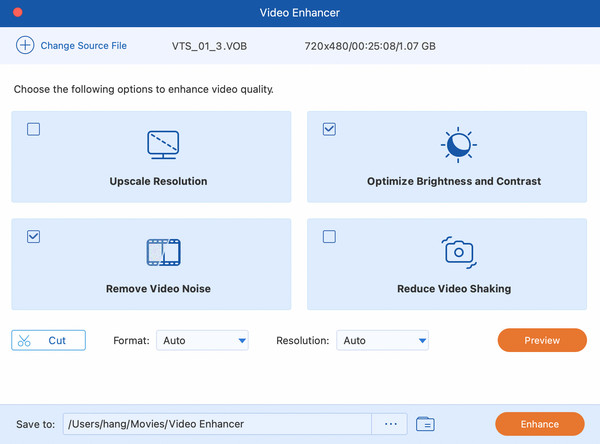
The Video Enhancer with a 720x480 VOB file loaded and Optimize Brightness and Contrast and Remove Video Noise ticked.
Native on Apple silicon, with GPU acceleration
AnyMP4 DVD Ripper for Mac installs a separate build for Apple silicon Macs, with real arm64 code rather than Intel code running through Rosetta. The Preferences window has a GPU acceleration setting, a default audio and subtitle language, and the folders for output files and snapshots. The app can check for updates itself, and registered users get them free.
Benefits
- Your discs outlive your drives. Once a DVD is a file, it doesn't matter that your next Mac, TV or car has no disc slot.
- You choose between small and perfect. MP4 or HEVC for a phone, MPG Lossless or an ISO when you want the exact original kept.
- No second app for the basics. Cutting black bars, trimming the start of a tape, fixing out-of-sync audio and joining titles all happen before the rip.
- It stays fast on new Macs. The native Apple silicon build matters for a long batch of discs.
Real-World Uses
- Family camcorder discs. Rip a Mini DVD from an old camcorder, split it into one file per event, run the Video Enhancer's noise removal, and drop the files into Photos or a shared album.
- Burned discs you made yourself. Turn the slideshow or wedding DVD you authored years ago back into an MP4 you can send by message or upload.
- An archive copy before the disc fails. Save a scratched-but-still-readable homemade disc as an ISO, so you can burn a new copy later.
- Audio from a concert or lecture disc. Rip only the audio to MP3 or FLAC for listening in the car or on a walk.
- Clips for an iMovie or Final Cut Pro project. Use the editing-app presets to pull footage from an old disc into a new edit.
Who It's For, and Who Should Skip It
It's a good fit if you have a box of homemade DVDs, a Mac and an external drive, and you want a guided app with presets instead of learning encoder settings. It also suits you if you want an ISO or DVD folder copy and a compressed MP4 from the same tool.
Skip it if:
- You have Blu-ray discs. This app reads DVDs only. Look at a Blu-ray ripper instead, such as AnyMP4's own Blu-ray Ripper for Mac.
- You're on Windows. The Mac license doesn't cover the Windows version, AnyMP4 DVD Ripper, which is sold separately.
- You only have a few unprotected discs and don't mind settings. HandBrake is free, runs on Mac, and converts a DVD folder or disc to MP4 or MKV well. You give up the guided presets, the editing tabs and the Toolbox.
- You also convert lots of other video. AnyMP4 Mac Video Converter Ultimate rips DVDs and converts any video file, for not much more money.
Usage Guide
- Install and launch. Download the installer from AnyMP4 and run it. It fetches the full app (about 156 MB on Apple silicon) and installs it in your Applications folder. Launch it from there.
- Register if you bought it. A comparison window opens on launch. Click Register, enter the email address you used to buy and the registration code from your order email, and click Activate. Your Mac needs an internet connection for this.
- Load the disc. Insert the DVD, click Load DVD and choose Load DVD Disc, Load DVD ISO or Load DVD Folder. You can also drag a DVD folder or ISO onto the window.
- Pick your titles. The app marks the main movie. Click Full Title List to tick other titles, then set the audio track and subtitle for each one.
- Choose how to save it. Use the menu on the right to choose Rip to Video/Audio, Rip to DVD Folder or Rip to DVD ISO File. For a file, open Rip All to and pick a format or device preset.
- Edit if you need to. Click the star icon on a title for the edit window (crop, filters, watermark, audio, subtitle) or the scissors for trimming and splitting.
- Rip. Set the Save to folder at the bottom and click Rip All.
Tips
- Look at the title lengths first. Discs often hold short extras next to the main movie, and a camcorder disc may split one event across titles. The Full Title List shows the lengths so you rip only what you need.
- Use the trial on your hardest disc. The trial's 5-minute rips are enough to see whether a particular disc loads and how the output looks.
- Keep the internet on while ripping. AnyMP4's guide says an internet connection is required during the process to handle encrypted DVD files.
- Turn on GPU acceleration in Preferences before a big batch.
Where it falls short
- Licenses are tied to a machine. Trustpilot reviewers report registration codes that stopped working after a Windows reinstall or a new motherboard. On a Mac, expect to contact support when you replace your computer.
- Refunds are hard to get. AnyMP4's own policy rules out "change of mind" refunds, and several 1-star reviews describe long back-and-forth over refund requests.
- The installer is only a downloader. The 4.2 MB file fetches the real app during setup, so you need a working internet connection to install it.
- The two Mac builds aren't in step. In our check the Apple silicon build was version 9.1.6 and the Intel build 9.0.98, so Intel Macs may get fixes later.
- No independent reviews. We couldn't find a magazine or lab review of the Mac version, so most of the praise you'll read comes from AnyMP4 itself.
What Users Say
There's no independent review of AnyMP4 DVD Ripper for Mac from a magazine or tech site that we could find, so the opinions below come from AnyMP4's own product page and from Trustpilot, where reviews cover AnyMP4 as a company and all its products.
On AnyMP4's product page
AnyMP4 shows a 4.8 rating from 1,396 reviews for the Mac version. The quotes are chosen by AnyMP4, so treat them as the vendor's selection:
"Amazing! Besides the DVD ripper, AnyMP4 offers multiple practical tools to help me compress and enhance the output video. I can even make 3D movies and GIF images without any hassle." — Phoebe, rated 4.9
"I just ripped all my DVD collections with this ripping software. Now I can enjoy playing those movies on my Mac without a physical DVD player." — Daisy
On Trustpilot (AnyMP4 as a company)
AnyMP4 scores 4.2 out of 5 on Trustpilot from 235 reviews: 65% five-star and 25% one-star, with little in between. The reviews cover all AnyMP4 products. These excerpts are short quotes from longer reviews.
Praise, mostly for support:
- "Support is fast and efficient." — patrick raous, 5 stars, September 30, 2026
- "I replaced my MacBook and teh customer service was very efficient and helpful" — Andrew, 5 stars, August 29, 2026
- "I own DVD Ripper, DVD Copy and DVD Creator." — Daniel Wright, 5 stars, May 8, 2026
Criticism, mostly about licenses and refunds:
- "After reinstalling Windows 11 on my devices, I was unable to reactivate the software." — Thanks Memorial, 1 star, February 26, 2026
- "After requesting a refund they want copies of computer files and logs." — zzzaggg, 1 star, August 9, 2025
- "their key wasn't working anymore on my new board" — Hazlia Dark-Shepherd, 1 star, July 11, 2024, about DVD Ripper
- "downloaded and paid for the product, only to discover that Blu-Ray is not an option for Mac." — John Morogiello, 1 star, August 14, 2023
The pattern is clear: people who get the app working like how easy it is and how quickly support answers, and the unhappy reviews are about license keys after a hardware change, refunds, and buying the wrong product for their discs. Check the trial on your own discs and drive, and keep your order email and registration code somewhere safe.
Comparisons
AnyMP4 DVD Ripper for Mac vs HandBrake
HandBrake is a free, open-source video transcoder for Mac that also converts DVDs. It's excellent at encoding, with fine control over quality and file size. AnyMP4 DVD Ripper for Mac costs money but adds what HandBrake doesn't: ISO and DVD folder copies, a lossless MPG option, device presets organized by brand, watermarks, 3D output and the Toolbox. If you just want MP4 files from a few homemade discs and don't mind a more technical app, try HandBrake first.
AnyMP4 DVD Ripper for Mac vs AnyMP4 Mac Video Converter Ultimate
AnyMP4 Mac Video Converter Ultimate rips DVDs too and also converts any video file you already have. Its lifetime license lists at $74.95 (AnyMP4's own store showed $59.96 on October 18, 2026). Pick DVD Ripper if discs are all you need, and Video Converter Ultimate if you also convert downloads, phone videos or camera files.
Editions and Pricing
AnyMP4 DVD Ripper for Mac is sold as a one-month license or a lifetime license, each for one Mac. Prices are from the order page and AnyMP4's purchase page on October 18, 2026.
| License |
Price |
List price |
Macs |
Updates |
| Lifetime License |
$54.96 |
$68.70 |
1 |
Free lifetime updates |
| 1 Month License |
$24.96 |
$31.20 |
1 |
Renews automatically, cancel any time |
| DVD Ripper + Blu-ray Ripper (Mac) bundle |
$83.19 |
$138.65 |
1 |
Free lifetime updates |
The lifetime license costs about two months of the monthly plan, so the monthly plan only makes sense for a single weekend of ripping. Our Buy Now button goes to the lifetime license.
FAQs
Does AnyMP4 DVD Ripper for Mac run natively on Apple silicon Macs?
Yes. AnyMP4 DVD Ripper for Mac installs a separate Apple silicon build with native arm64 code (version 9.1.6 in our check), so it doesn't need Rosetta 2 on M-series Macs. Intel Macs get an Intel build.
Can AnyMP4 DVD Ripper for Mac rip Blu-ray discs?
No. AnyMP4 DVD Ripper for Mac reads DVD discs, DVD folders and DVD ISO files only. For Blu-ray you need AnyMP4 Blu-ray Ripper for Mac, which is also sold in a bundle with the DVD Ripper.
What does the free trial of AnyMP4 DVD Ripper for Mac let me do?
The AnyMP4 DVD Ripper for Mac trial rips only about 5 minutes of each title, and batch ripping is locked until you register. That's enough to test whether a disc loads and how the output looks, but not to finish a movie.
Can I use my AnyMP4 DVD Ripper for Mac license on Windows?
No. AnyMP4 DVD Ripper for Mac and the Windows program AnyMP4 DVD Ripper are sold separately, and each license covers one computer on its own platform.
Does AnyMP4 DVD Ripper for Mac work with an external USB DVD drive?
Yes. AnyMP4 DVD Ripper for Mac loads any disc your Mac can see in the Load DVD menu, and Macs without a built-in drive need an external one. If you already have DVD folders or ISO files on a drive, you don't need a disc drive at all.
Why is the AnyMP4 DVD Ripper for Mac download so small?
The AnyMP4 DVD Ripper for Mac download is a 4.2 MB installer that fetches the real app during setup: about 156 MB for Apple silicon Macs or 139 MB for Intel Macs. Keep your Mac online while it installs.
What happens to my AnyMP4 DVD Ripper for Mac license when I get a new Mac?
AnyMP4 DVD Ripper for Mac licenses cover one Mac, and Trustpilot reviewers say they had to contact AnyMP4 support to move a license after replacing a computer. Keep your order email and registration code, and write to support@anymp4.com before you retire the old Mac.
Can I cancel the AnyMP4 DVD Ripper for Mac monthly license?
Yes. The AnyMP4 DVD Ripper for Mac one-month license renews automatically, and you can cancel it any time. If you paid through 2Checkout, you cancel from your 2Checkout account, and otherwise by writing to AnyMP4 support. The lifetime license doesn't renew.
System Requirements
- Operating system: macOS 10.12 Sierra to macOS 15 Sequoia
- Processor: 1 GHz or faster Intel or Apple silicon processor
- Memory: 2 GB RAM or more
- Disk space: about 156 MB (Apple silicon) or 139 MB (Intel) for the app, plus room for your ripped files
- Drive: a built-in or external DVD drive for discs
- Internet: needed to install, to register, and while ripping encrypted discs
Conclusion
AnyMP4 DVD Ripper for Mac is worth its $54.96 lifetime price if you have a shelf of homemade DVDs and want them turned into files with as little fuss as possible. The one reason to buy it is the guided workflow: it finds the main title, offers sensible presets, and lets you crop, trim and clean up old footage on a native Apple silicon app. The main reason not to is that free HandBrake already does the core job for unprotected discs, and AnyMP4's strict refund policy means you should be sure before you pay. Run the trial on your own discs and drive first, and buy the lifetime license only if it handles them well.
Download Free TrialBuy Now