AnyMP4 iOS Cleaner: Free Up iPhone Space and Wipe an iPhone from Your Windows PC
AnyMP4 iOS Cleaner is a $37.45 Windows program (lifetime license for one PC) that connects to your iPhone, iPad or iPod touch over USB, finds junk files, unused apps, large videos and photos you can remove, and can permanently erase private data or the whole device before you sell it. It's for iPhone owners who'd rather clean up from a computer screen than tap through Settings, and for anyone handing an old phone on.
The "Storage Almost Full" warning pops up just as you try to film something, or you're about to list an old iPhone on eBay and want your messages and photos gone for good. iOS Cleaner puts both jobs in one window on your PC: a scan that shows where the space went, and an eraser with three security levels.
Quick facts
- Version: 1.0.30 (program package dated December 18, 2024)
- Developer: AnyMP4 Studio
- Runs on: Windows 11, 10, 8.1, 8, 7, Vista and XP (SP2 or later), with iTunes installed
- Works with: iPhone, iPad and iPod touch on iOS 5 or later and iPadOS 13 or later
- Main tools: Erase Junk Files, Uninstall Applications, Delete Large Files, Clean up Photos, Erase Private Data and Erase All Data
- Price: $37.45 for a lifetime license on one PC, with free lifetime updates
- Free trial: scans and previews everything, cleans junk for 30 days and uninstalls up to 3 apps. Large files, photos and the full wipe need a license
- Guarantee: 30-day money-back guarantee
What we checked: on October 18, 2026 we confirmed the $37.45 lifetime price on the order page, downloaded AnyMP4's 2.1 MB online installer and the 38.9 MB program package it fetches, and read version 1.0.30 from both files (both carry valid digital signatures). The program package is dated December 18, 2024. We didn't connect an iPhone, run a cleanup or wipe a device ourselves.
Before you buy
- You need iTunes on the PC. AnyMP4's guide says iOS Cleaner needs the latest iTunes installed to reach the device's settings and data.
- Apple already gives you some of this for free. Settings > General > iPhone Storage lists apps by size and can offload unused ones, and Erase All Content and Settings wipes the phone. The cleaner's extras are the junk-file scan, photo compression with a backup on your PC, and selective erasing of private data.
- The program hasn't changed since December 2024. AnyMP4's specs page lists support for the newest iPhones and iOS versions, but there's no change log. Run the free trial with your own device before you pay.
- Erasing is permanent. Back up anything you want to keep before you use Erase All Data or Erase Private Data.
Download Free TrialBuy Now
Overview
AnyMP4 iOS Cleaner has a dark sidebar with three sections, Free up Space, Erase All Data and Erase Private Data, and the connected device's name in a drop-down at the top. Plug in your iPhone, tap Trust on the phone, and the main window shows the device's capacity, used space and free space. One green Quick Scan button then works out how much you could free in each of four areas, with an Erase button next to each.
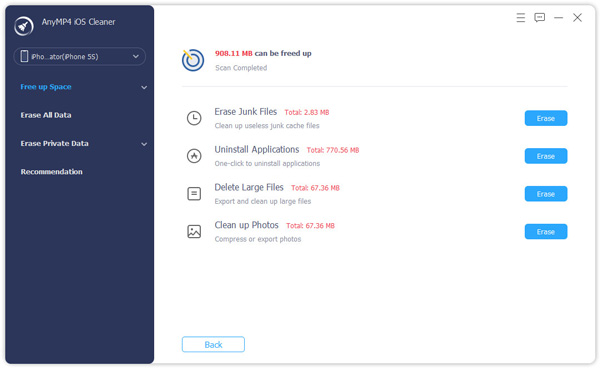
Quick Scan finished on an iPhone 5S: 908.11 MB can be freed, split into junk files (2.83 MB), apps (770.56 MB), large files (67.36 MB) and photos (67.36 MB), each with its own Erase button.
Those numbers tell you something useful before you buy: on AnyMP4's own test phone, junk files were the smallest slice by far. Most of the space comes back from removing apps and moving photos and videos off the phone, so think of iOS Cleaner as a faster way to do that from your PC rather than a tool that finds gigabytes of hidden rubbish.
Features
Clear five kinds of junk files
AnyMP4 iOS Cleaner's Erase Junk Files screen lists image cache, iTunes cache, invalid files, downloaded temporary files and crash log files, each with its size and a checkbox. You tick what to remove and click Erase. These are leftovers from previews, interrupted iTunes syncs and crashed apps, so removing them doesn't touch your photos, messages or documents.
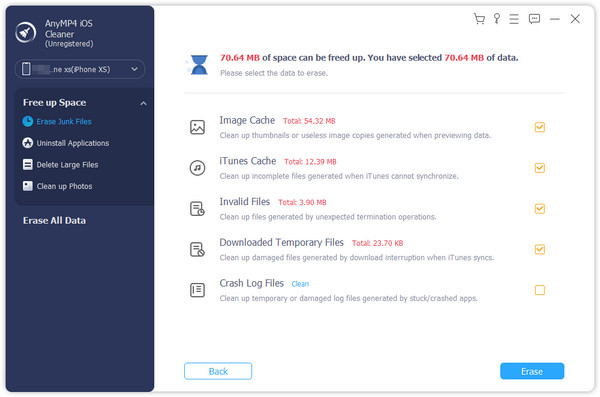
The unregistered copy connected to an iPhone XS, with 70.64 MB of junk selected: 54.32 MB image cache, 12.39 MB iTunes cache, 3.90 MB invalid files and 23.70 KB of temporary files.
See every app with its size, and uninstall from the PC
AnyMP4 iOS Cleaner's Uninstall Applications list shows each installed app with its version number and size and an Uninstall button. Scrolling a table on a big screen is quicker than hunting through iPhone Storage, and you see the heavy apps side by side.
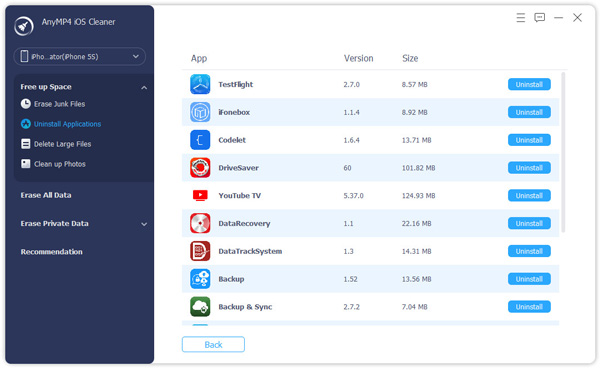
The app list with version and size columns, from TestFlight (8.57 MB) to YouTube TV (124.93 MB), each with an Uninstall button.
Find large files and back them up before deleting
AnyMP4 iOS Cleaner's Delete Large Files screen lists files above a size you choose (in MB) and lets you filter by file type. Tick the files, turn on Backup before erasing if you want a copy on your PC, and click Erase. It's the quickest way to clear out a few long 4K videos.
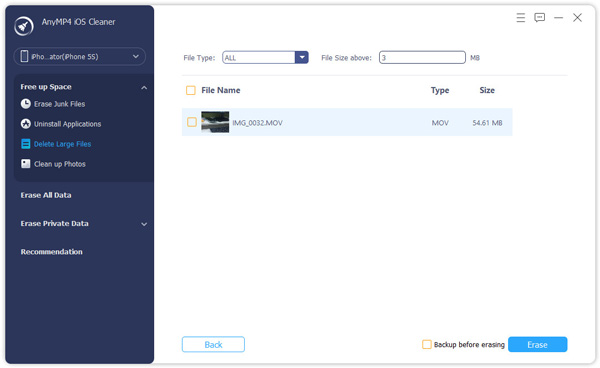
Large files above 3 MB: one 54.61 MB MOV video, with the Backup before erasing checkbox next to Erase.
Compress photos, or export them and delete
AnyMP4 iOS Cleaner's Clean up Photos tool offers two routes. Backup & Compress shrinks your HEIF, JPG and PNG photos (AnyMP4 says by about 75% of the album's space) and can keep the originals on your PC first. Export & Delete copies the photos to your computer and then removes them from the phone. AnyMP4 calls the compression lossless, but tick the backup option anyway if the full-size originals matter to you.
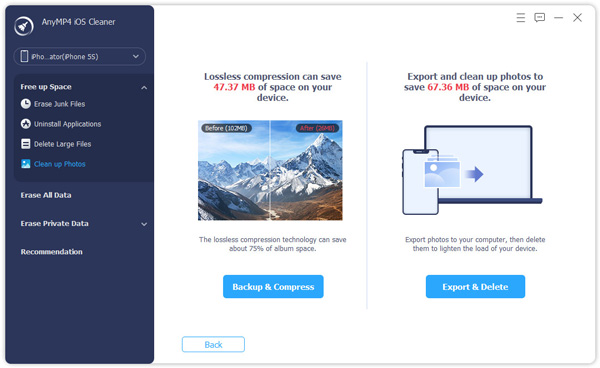
Clean up Photos: compression could save 47.37 MB on this device, while exporting and deleting would free 67.36 MB.
Erase private data selectively, with a preview
AnyMP4 iOS Cleaner's Custom Erase scans the device and lists messages and attachments, contacts, call history, notes, photos, calendar, voice memos, Safari bookmarks and history, and app content such as WhatsApp, with a count for each. You preview the items, filter to show all, deleted only or existing only, and erase just what you pick. One-click Erase clears the content of the apps you tick in one go.
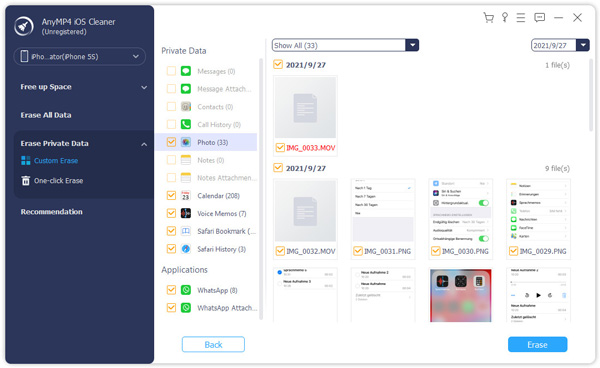
Custom Erase in the unregistered copy: private data and apps on the left with item counts, photo thumbnails grouped by date on the right.
Wipe the whole device at three security levels
AnyMP4 iOS Cleaner's Erase All Data offers Low (the quickest, about twice as fast as the others), Middle (overwrites deleted data so recovery tools can't bring it back) and High (the DoD 5220.22-M overwrite standard). You may need to turn off Find My first, and you type 0000 to confirm before the wipe starts.
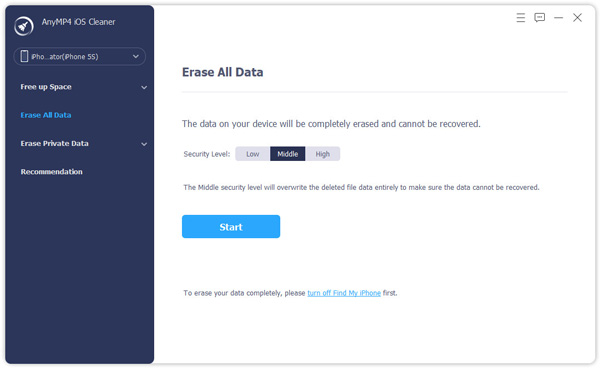
Erase All Data with the Middle level selected, a Start button, and a reminder to turn off Find My iPhone first.
Benefits
- You see the whole picture at once. One scan shows whether your space problem is apps, videos or photos, so you fix the right thing instead of deleting at random.
- Nothing has to be lost to free space. The photo and large-file tools copy to your PC before removing, which is the step people skip when they delete in a hurry on the phone.
- Selective privacy cleanup. Clearing one app's chats or your Safari history before lending a phone is something iOS doesn't do in one place.
- One payment. The lifetime license is a single $37.45 purchase that covers future updates, with nothing to renew.
Real-World Uses
- Selling an old iPhone. Copy the photos off with Export & Delete, sign out of iCloud and Find My, then run Erase All Data at the High level before you post the listing.
- Making room before an iOS update. The update needs several gigabytes free. A Quick Scan shows which big apps and videos to move or remove.
- Handing a phone to a child. Use Custom Erase to remove your messages, call history and browsing history while leaving the apps in place.
- Clearing a phone full of travel videos. Delete Large Files with Backup before erasing moves the long clips to your PC in one pass.
Who It's For, and Who Should Skip It
AnyMP4 iOS Cleaner suits Windows users who manage an iPhone from their PC, especially before selling or passing on a device, and people who want their photos backed up on the computer as part of the cleanup. It also helps families who look after several older iPhones and iPads.
Skip it if:
- You only need to wipe a phone once. Apple's Erase All Content and Settings is free and works on the phone itself.
- Your photos already live in iCloud Photos. Turning on Optimize iPhone Storage in Settings does much of what Clean up Photos does.
- You use a Mac. This is the Windows program. AnyMP4 sells iOS Cleaner for Mac as a separate product with its own license.
- You don't want iTunes on your PC. The program depends on it.
Usage Guide
- Install. Download the installer from AnyMP4, run it and follow the prompts. It's a small online installer that downloads the 38.9 MB program. Install iTunes too if it isn't already on the PC.
- Connect your device. Plug in the iPhone, iPad or iPod with a USB cable, tap Trust on the device and enter its passcode. The main window then shows its capacity, used and free space, with a More Info link for details.
- Scan. Click Quick Scan. After a few minutes you see how much each of the four areas can free.
- Clean. Click Erase next to Erase Junk Files, Uninstall Applications, Delete Large Files or Clean up Photos, pick what to remove, and confirm. Turn on the backup options when you're deleting photos or videos.
- Erase private data (optional). Open Erase Private Data, choose Custom Erase to preview and pick items, or One-click Erase to clear the content of chosen apps.
- Wipe the device (optional). Open Erase All Data, pick Low, Middle or High, click Start, turn off Find My if asked, type 0000 and click Erase. Keep the cable connected until it finishes.
- Register. Click the key icon at the top right and enter your order email and registration code. Registration needs an internet connection.
What the free trial lets you do
AnyMP4 iOS Cleaner shows a comparison window when you open the unregistered copy. It's a fair trial for the scanning side and a limited one for cleaning:
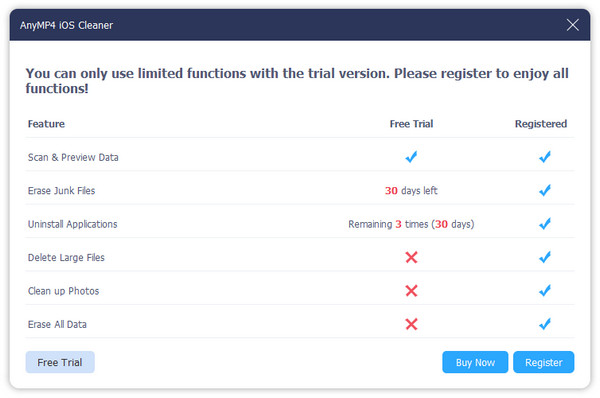
The trial window: Scan & Preview Data included, Erase Junk Files for 30 days, Uninstall Applications 3 times within 30 days, and Delete Large Files, Clean up Photos and Erase All Data for registered users only.
So you can see exactly how much space a scan finds on your own phone before paying, but you can't test the full wipe or the photo tools. This window comes from AnyMP4's user guide and doesn't list Erase Private Data, so check how the trial treats it when you open the program.
Where it falls short
- Erase All Data doesn't erase everything. AnyMP4's own note says it leaves data in the Files app, passwords in Settings, Wi-Fi passwords, the device passcode and Voice Mail. Before selling a phone, finish with Apple's Erase All Content and Settings as well.
- Overwrite levels matter less on an iPhone. iPhones encrypt their storage, and Apple's own erase makes the old data unreadable by removing the encryption keys. The DoD 5220.22-M level takes longer without adding much for most people.
- Junk cleaning frees little space. In AnyMP4's own screenshots the junk totals are 2.83 MB and 70.64 MB, and apps rebuild their caches as you use them.
- No independent reviews. We couldn't find a magazine test or user reviews of this specific program on Trustpilot, G2 or AlternativeTo, so the only product reviews are the ones AnyMP4 picked.
- Refund complaints about the company. A quarter of AnyMP4's Trustpilot reviews are 1-star, mostly about refused refunds and license activation after changing computers (see below).
What Users Say
Reviews of AnyMP4 iOS Cleaner itself are scarce. The program's page shows a 4.8 rating from 1,249 reviews, but only AnyMP4's chosen quotes are visible, and we found no user reviews of it on G2 or AlternativeTo, or any naming it on Trustpilot. Here's what is out there.
On AnyMP4's product page (chosen by AnyMP4)
Chris Orr: "Though my iPhone can do a photo clean-up, this tool does a pretty decent job of erasing my selected photos on my iPhone quickly. What's important, it can compress and backup my iPhone pictures to computer for a copy."
Dane Joyce: "The Other system file take up a massive capacity on my iPhone, but I have no clue of it. With this iOS cleaning wizard, I can remove that storage from Other, and some system junk files. Bravo."
Sammy Blanchard: "The download and installation work perfectly for me. I got it from a giveaway offer for free. It wipes all the content and settings on my iPhone in simple clicks and now I can put it on eBay for a sale safely. Sincerely, thank you!"
AnyMP4 as a company on Trustpilot
AnyMP4 has a TrustScore of 4.2 from 235 reviews, but the split is lopsided: 65% five-star and 25% one-star, with little in between. None of the reviews we read mentions iOS Cleaner, so these describe the company's support and refunds, not this program. The text below came through a summarizing tool, so it's paraphrased except where quoted.
- Praise is mostly for support. patrick raous (5 stars, September 30, 2026): "Support is fast and efficient." Several others, such as Andrew (August 29, 2026) and Seven (July 7, 2026), say support quickly reset their registration codes after they moved to a new computer.
- Activation after a new PC is a recurring problem. Tom Schoute (3 stars, May 2026) couldn't activate their license for weeks after changing laptops until the code was reset. A reviewer in February 2026 reported "Error 4104" after reinstalling Windows 11.
- Refunds are the main complaint. Most 1-star reviews from 2023 to 2026 say refunds were refused or came with demands for files and logs. These concern AnyMP4's video and Blu-ray products.
- Auto-renewal. Reviewers in March 2026 and July 2023 complained that a subscription renewed without their agreement or was hard to cancel. The lifetime license sold through our Buy Now button doesn't renew.
The recurring themes: people who used iOS Cleaner liked the photo backup and the one-step wipe before selling a phone. The complaints are about AnyMP4 as a seller: refunds are hard to get, and moving a license to a new PC can need a support ticket. Treat the free trial as your test, because a refund may not be easy.
Comparisons
AnyMP4 iOS Cleaner vs Apple's built-in tools
Apple's free tools cover the basics. iPhone Storage in Settings lists apps by size and can offload unused apps while keeping their data, Optimize iPhone Storage keeps smaller photo copies on the phone when you use iCloud Photos, and Erase All Content and Settings wipes the device. AnyMP4 iOS Cleaner adds a single scan across junk, apps, large files and photos, backups to your PC instead of iCloud, and selective erasing of messages, history and app data. If you pay for iCloud storage, Apple's tools may be all you need. If you don't, the PC backup is the real reason to buy.
Windows edition vs iOS Cleaner for Mac
AnyMP4 sells a separate iOS Cleaner for Mac (Mac OS X 10.7 or later, Intel and Apple M-series) at the same list prices. The two have the same cleaning and erasing tools, but a license covers one platform only, so buy the edition for the computer you'll plug the phone into.
Editions and Pricing
| License |
Price |
Term |
PCs |
Updates |
| Lifetime License |
$37.45 on the order page |
Lifetime, no renewal |
1 |
Free lifetime updates |
| 1 Month License |
$18.00 list on AnyMP4's store |
1 month, auto-renews |
1 |
Free updates for 1 month |
| 5-User License |
$187.25 list on AnyMP4's store |
Lifetime |
5 |
Free lifetime updates |
The lifetime license is the sensible buy: it costs about two months of the monthly plan and never renews. AnyMP4 also sells iOS Cleaner inside a six-program Mobile Pro Bundle (with Video Converter Ultimate, iOS System Recovery, iPhone Transfer Pro, iPhone Data Recovery and Android Data Recovery), which only makes sense if you need those too.
FAQs
Does AnyMP4 iOS Cleaner work without iTunes?
No. AnyMP4 iOS Cleaner needs the latest iTunes installed on your Windows PC so it can access the device's settings and data. You don't need to open iTunes or sync with it, but it must be installed.
Can AnyMP4 iOS Cleaner remove an Apple ID or Activation Lock?
No. AnyMP4 iOS Cleaner's Erase All Data may ask you to turn off Find My first, which takes your Apple ID password. It's a tool for wiping your own phone, not for unlocking someone else's. AnyMP4 sells a separate iPhone Unlocker for locked devices.
Can data be recovered after AnyMP4 iOS Cleaner erases it?
AnyMP4 says data erased at the Middle or High level can't be recovered, even with recovery software. That's why you should back up first: there's no undo. Remember that Erase All Data skips a few things, such as the Files app and saved Wi-Fi passwords.
Does AnyMP4 iOS Cleaner support the newest iPhones and iOS versions?
AnyMP4's specs page lists support for current iPhones and iOS releases, but the program itself was last rebuilt in December 2024. Connect your phone to the free trial and check that the scan works before you buy.
Can I use one AnyMP4 iOS Cleaner license on a new computer?
Yes, but the standard license covers one PC at a time. Several AnyMP4 customers on Trustpilot say they had to ask support to reset their registration code after changing computers, so keep your order email handy.
Does AnyMP4 iOS Cleaner need an internet connection?
Only for installing and registering. The installer downloads the program from AnyMP4, and registration needs a stable connection. Scanning and cleaning happen over the USB cable.
What's AnyMP4's refund policy for iOS Cleaner?
AnyMP4 iOS Cleaner comes with a 30-day money-back guarantee. Trustpilot reviewers report that AnyMP4 often refuses refunds or asks for logs and files first, so use the trial to decide rather than counting on a refund.
System Requirements
- Windows: Windows 11, 10, 8.1, 8, 7, Vista or XP (SP2 or later)
- Processor: 1 GHz Intel or AMD CPU or faster
- Memory: 1 GB RAM or more
- Software: the latest iTunes
- Devices: iPhone, iPad and iPod touch on iOS 5 or later and iPadOS 13 or later, connected by USB cable
Conclusion
AnyMP4 iOS Cleaner is worth $37.45 if you use a Windows PC, don't pay for iCloud storage, and want your photos and videos backed up on the computer as part of freeing space, or if you prepare old iPhones for sale and like a selective, preview-first eraser. The one reason to buy it is that it turns cleanup into a single scan with a backup built in. The main reason not to is that Apple's free tools already offload apps and wipe the phone, and the program hasn't been updated since December 2024. Run the free trial's scan on your own device first: if the space it finds is mostly apps and photos you could move yourself, you don't need it.
Download Free TrialBuy Now