AnyMP4 DVD Converter: Turn Homemade DVDs into MP4 Files on Windows
AnyMP4 DVD Converter is a Windows program that converts homemade DVDs (discs, DVD folders and IFO files) and ordinary video files into MP4, MKV, MOV, AVI, audio-only files or phone and tablet presets, with trimming, merging and simple edits on the way. The Buy Now button sells a one-PC lifetime license for $62.45.
Its home turf is the shoebox of wedding, school-play and camcorder DVDs that no laptop can play any more. Load the disc, pick MP4, and each title becomes a file you can keep on a drive or a phone.
Quick facts
- Developer: AnyMP4 Studio
- Version: 7.2.36 (installer dated January 24, 2024)
- Platform: Windows 11, 10, 8.1, 8 and 7 (a Mac edition is sold separately)
- Input: homemade DVD discs, DVD folders and IFO files, plus common video and audio files
- Output: MP4, MOV, M4V, MKV, AVI, WMV, MPG, MTS, FLV, ProRes, HD formats, audio (MP3, AAC, AC3, FLAC, M4A, OGG, WAV, WMA), device presets
- Price via Buy Now: $62.45 one-time, 1 PC, free lifetime updates
- Trial: converts only 5 minutes of each title or file
- What we checked: the installer, version 7.2.36 (41 MB), downloaded from AnyMP4 on November 4, 2026, AnyMP4's DVD Ripper page and price for comparison, and the order page on November 4, 2026, which listed "AnyMP4 DVD Converter" at $62.45 as a lifetime license with no renewal. We didn't convert a disc with it.
Before you buy
- It's sold for homemade discs. AnyMP4 describes this product as a converter for "homemade DVDs" and lists only homemade discs as input. For store-bought movies, AnyMP4's DVD Ripper is the product it markets for commercial, 99-title and damaged DVDs.
- The DVD Ripper costs less. On November 4, 2026 AnyMP4 DVD Ripper's lifetime license was $54.96 on the order page, against $62.45 here. Unless you specifically want this product, compare the two.
- Test a disc in the trial. AnyMP4's refund policy excludes a change of mind and buying without trying, and may deduct 20% even when it refunds.
Download Free TrialBuy Now
Overview
Click Load Disc and AnyMP4 DVD Converter reads the DVD into a list of titles, each with its length, resolution (720 x 480 for an NTSC disc), audio track and subtitle choice, and a preview player on the right. One Profile setting at the bottom applies to every title, and Convert writes the files to your chosen folder.

AnyMP4 DVD Converter with a disc loaded: Title_3, Title_2 and Title_4 at 720 x 480 with English AC3 audio, set to MPEG-4 output, and the Intel acceleration button active.
Features
Two ways to read a disc
AnyMP4 DVD Converter asks how to load each DVD: DVD Navigator Mode (recommended) or DVD Parser Mode, and suggests trying the other one if a disc fails to load or decode. In Preferences you can also choose to list chapters instead of whole titles.
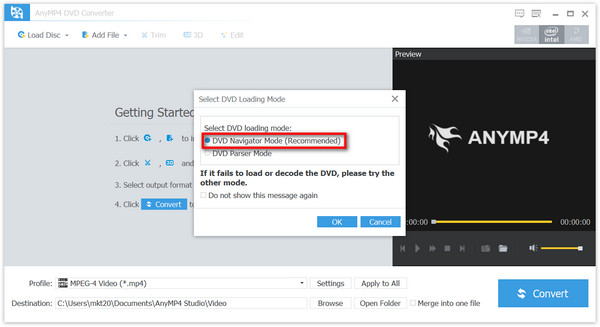
The Select DVD Loading Mode dialog: DVD Navigator Mode (Recommended) or DVD Parser Mode, with the hint to try the other mode if loading fails.
Cut a long title into the parts you want
AnyMP4 DVD Converter's Trim window sets start and end points by dragging or typing times, adds further segments from the same title, and can merge the segments into one file. It's how you lift the vows out of a two-hour wedding disc, or join three short titles into one video.
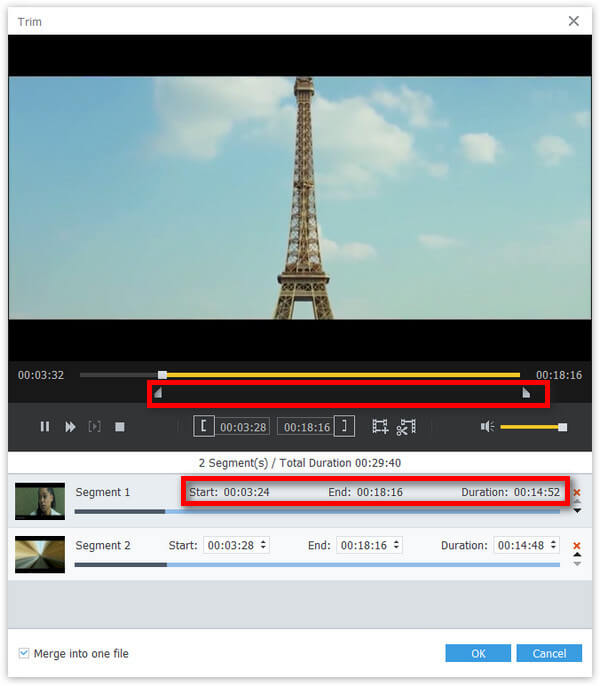
The Trim window: two segments with start, end and duration fields, and "Merge into one file" ticked.
Choose the soundtrack and add subtitles
AnyMP4 DVD Converter lets you pick which of a disc's audio tracks goes into the file, change channels, sample rate and audio encoder in the profile settings, and add an external subtitle file from your computer. You can also save only the audio, for example a recital DVD as MP3 or FLAC.
Fix the picture before converting
AnyMP4 DVD Converter's Edit window crops black bars, rotates and flips, adjusts brightness, contrast, saturation, hue and volume, adds a text or image watermark, and can convert to 3D. The profile settings set resolution, bitrate, frame rate, encoder and aspect ratio, useful for scaling a 4:3 home video sensibly.
Benefits
DVD-R discs don't last forever, and fewer computers have a drive to read them. Converting the family's homemade discs once gives you files that play on any phone or TV, back up to the cloud, and can be cut down to the moments worth keeping. Doing it with a disc-aware tool saves you from hunting through VOB files by hand.
Real-World Uses
- Digitizing camcorder DVDs. Convert each title of a MiniDVD camcorder disc to MP4 before the disc becomes unreadable.
- Sharing a wedding or graduation DVD. Trim the ceremony into one MP4 and send it to relatives.
- Keeping a performance as audio. Save a choir or recital DVD as MP3 for the car.
- Cleaning up old video files. The same program converts VOB, MPG, AVI or WMV files already on your PC.
Who It's For, and Who Should Skip It
Good fit: Windows users with a stack of homemade DVDs who want simple title-by-title conversion with trimming and a one-time price.
Skip it if: your discs are store-bought movies (AnyMP4 markets its cheaper DVD Ripper for those); you want a free route and don't mind a learning curve (HandBrake converts unprotected DVDs at no cost); or you need Blu-ray, which this product doesn't read.
Usage Guide
- Install the trial and start AnyMP4 DVD Converter. Insert your DVD.
- Click Load Disc and choose the disc, a DVD folder or an IFO file. Keep DVD Navigator Mode unless the disc fails to load.
- Untick titles you don't need, and set each title's audio track and subtitle.
- Optional: Trim to cut segments, Edit to crop or adjust the picture, 3D for 3D output.
- Pick a format or device in Profile, set the Destination folder, and tick Merge into one file if you want one video.
- Click Convert. To register, click the key icon and enter your email address and registration code.
Where it falls short
- Overlap with AnyMP4's own range. DVD Ripper reads more kinds of discs for less money, and Video Converter Ultimate rips DVDs too, which makes this product hard to recommend on price alone.
- No Blu-ray. It reads DVDs only.
- Older interface. It uses AnyMP4's earlier design and the installer dates from January 2024; it does the job, but sees few new features.
- Damaged discs. A scratched or failing DVD-R may not load in either mode; no converter can rescue unreadable sectors.
What Users Say
We found no independent reviews of AnyMP4 DVD Converter itself, so this is what we could verify, source by source.
Trustpilot, AnyMP4's DVD tools (company rating 4.2 out of 5, 237 reviews)
Owners of AnyMP4's DVD software are mostly positive. Paul Meijer (4 stars, January 2026) on the sister DVD Ripper: "A program that does exactly what I expect from it." Daniel Wright (5 stars, May 2026), who uses DVD Ripper, DVD Copy and DVD Creator: "I love their products and think it's the best DVD software available."
The complaints: John Lee (1 star, August 2025) owns several AnyMP4 DVD tools and the converter on a Mac and wrote, "They crash once in a while even though I have the latest versions of them and Mac OS." Tee Parekh (1 star) said AnyMP4 "refused to give refund despite the product not doing what is says on the label."
AnyMP4's product page (1,289 ratings)
The vendor's own testimonials. Emma: "Excellent! The converter allows me to convert homemade DVD to my iPhone so that I can watch it anywhere." Lucas: "I have little knowledge about computer. The interface of AnyMP4 DVD Converter is so intuitive that I can handle it well."
Taken together: AnyMP4's DVD tools are seen as easy and dependable for everyday discs, with quick support; the negatives are occasional crashes and a strict refund policy.
Comparisons
AnyMP4 DVD Converter vs AnyMP4 DVD Ripper
Both turn DVDs into video files with trimming and editing. AnyMP4 markets DVD Ripper for homemade, commercial and 99-title discs regardless of region code, and its lifetime license was $54.96 on the order page on November 4, 2026, cheaper than DVD Converter's $62.45. DVD Converter's niche is that it's explicitly a homemade-disc tool that also converts ordinary video files.
AnyMP4 DVD Converter vs HandBrake
HandBrake is free and converts unprotected DVDs to MP4, MKV or WebM with excellent quality, but it has no audio-only output, no watermark and more settings to learn. AnyMP4 DVD Converter is simpler and has device presets and more formats.
Editions and Pricing
| License | Price | Term | PCs |
|---|
| Lifetime (Buy Now button) | $62.45 at checkout | One payment, free updates | 1 |
| 1 Month (AnyMP4 store) | $31.20 list, $15.60 with the store's offer | Renews monthly | 1 |
| 5-User (AnyMP4 store) | $312.25 list, $99.96 with the store's offer | Lifetime | 5 |
AnyMP4's own store page showed the lifetime license at $49.96 with a promotion on November 4, 2026.
FAQs
Can AnyMP4 DVD Converter convert store-bought movie DVDs?
AnyMP4 DVD Converter is sold for homemade DVDs, and AnyMP4 asks buyers not to use it on rentals or for commercial copying. For commercial discs, try them in the trial first, or look at AnyMP4 DVD Ripper, which the vendor markets for them.
Does AnyMP4 DVD Converter work with a USB DVD drive?
AnyMP4 DVD Converter reads any DVD drive Windows sees, including external USB drives, which most laptops now need. It also converts a DVD folder or IFO files copied to your hard drive.
What does the AnyMP4 DVD Converter trial limit?
AnyMP4 DVD Converter's trial converts only the first 5 minutes of each title or file, enough to check picture, sound and the loading mode on your discs.
Can AnyMP4 DVD Converter make one file from a whole disc?
Yes. AnyMP4 DVD Converter's "Merge into one file" option joins all selected titles, or the trimmed segments of a title, into a single video.
Is AnyMP4 DVD Converter a subscription?
Not when bought through the Buy Now button here: that's a lifetime license for one PC. AnyMP4 also sells a monthly plan that renews automatically, which some Trustpilot reviewers bought without noticing.
Does the Windows license also cover the Mac version?
No. AnyMP4 DVD Converter for Mac is a separate product with its own license.
System Requirements
- Windows 11, 10, 8.1, 8 or 7
- Intel Core 2 Duo or AMD Athlon at 2 GHz or faster
- 2 GB RAM or more recommended
- A DVD drive (internal or USB) for discs
- Optional NVIDIA, Intel or AMD graphics for hardware acceleration
Conclusion
AnyMP4 DVD Converter does what it promises for homemade DVDs: load, pick titles, trim, convert, with a one-time license. The reason to buy it is a simple, disc-aware workflow for family DVDs that also handles ordinary video files. The reason to think twice is AnyMP4's own DVD Ripper, which the vendor markets for more kinds of discs and which cost about $7.50 less on the order page when we checked. If all your discs are homemade and you like this interface in the trial, it's a reasonable buy; otherwise, compare the Ripper first.
Download Free TrialBuy Now