AnyMP4 Blu-ray Creator: Burn Your Own Videos to a Blu-ray Disc with a Menu
AnyMP4 Blu-ray Creator is a Windows program, $49.95 for a one-PC lifetime license, that burns MP4, MKV, MOV, MTS and other video files to BD-25 or BD-50 Blu-ray discs, or saves them as a Blu-ray folder or ISO image, with a menu you design from templates.
It's for people who still want a disc in hand: a wedding video for grandparents who use a Blu-ray player, a 4K travel film to keep on a shelf, or a season of a family YouTube channel archived off the computer.
Quick facts
- Developer: AnyMP4 Studio
- Version: 1.1.82 (installer dated January 25, 2024)
- Platform: Windows 11, 10, 8 and 7. There's no Mac edition
- Discs: BD-25 (BD-R, BD-RE) and BD-50 (BD-R DL, BD-RE DL), or a Blu-ray folder or ISO file on your drive
- Input: MP4, MKV, MOV, AVI, WMV, FLV, MTS, M2TS, TS, MXF, VOB and more, in 4K, HD or SD; audio tracks in MP3, AAC, AC3, FLAC and others; SRT, SSA and ASS subtitles
- Price at checkout: $49.95 one-time for 1 PC, free lifetime updates
- Trial: adds a watermark to the discs and files it creates, and can't use downloadable menu templates
- What we checked: the installer, version 1.1.82 (44 MB), downloaded from AnyMP4, and AnyMP4's own store, which listed the lifetime license at $39.96 with its current offer, both on November 4, 2026, and the order page on November 4, 2026, which listed "AnyMP4 Blu-ray Creator" at $49.95 as a lifetime license with no renewal. We didn't burn a disc.
Before you buy
- You need a Blu-ray burner. A DVD drive can't write Blu-ray. Without a burner you can still make an ISO or Blu-ray folder and burn it elsewhere later.
- 4K goes on as 1080p. Blu-ray Creator accepts 4K files, but a standard BD-25 or BD-50 Blu-ray disc is a 1080p format. It makes discs for ordinary Blu-ray players, not Ultra HD Blu-ray.
- Same license, two prices. Our order page charges $49.95; AnyMP4's own store listed $39.96 on November 4, 2026.
- Watermarked trial. Burn an ISO in the trial and play it on your computer before buying, rather than wasting a blank disc.
Download Free TrialBuy Now
Overview
AnyMP4 Blu-ray Creator's window has a list of your videos on the left, each with its resolution, length, audio track and subtitle, and a menu preview on the right. A capacity bar along the bottom shows how much of a 25 GB or 50 GB disc the project fills. Below it you choose the Target (a disc drive, a folder or an ISO), the Volume Label, the number of Copies and the disc Type, then click Create.
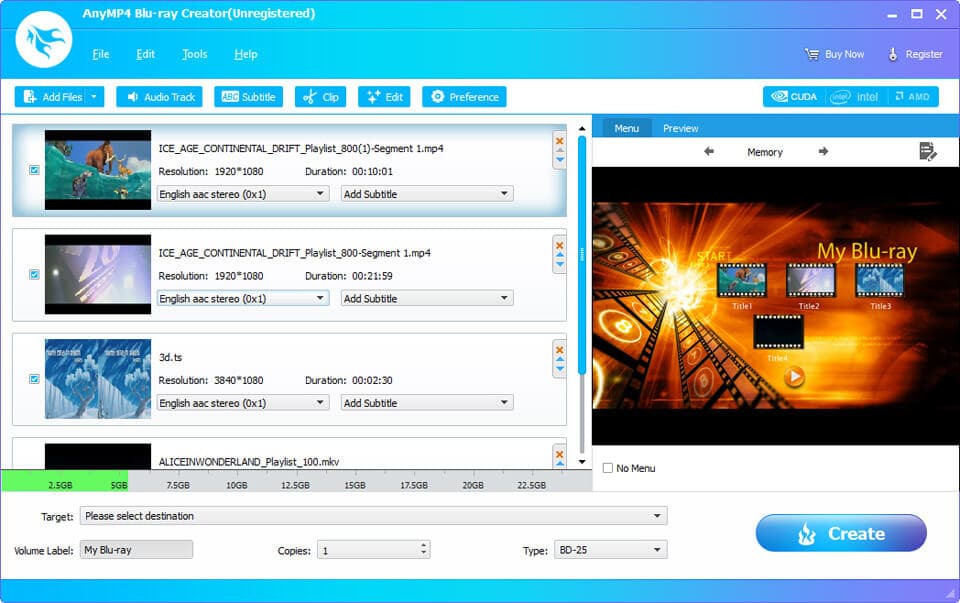
The main window: four videos with resolution, duration, audio and subtitle settings, the disc capacity bar, and the "My Blu-ray" menu preview.
Features
Disc, folder or ISO
AnyMP4 Blu-ray Creator writes straight to a blank BD-R or BD-RE in a Blu-ray burner, single or dual layer, and can make several copies in one run. If you'd rather keep a digital master, it saves a Blu-ray folder (BDMV) or an ISO image that plays in Blu-ray software and can be burned later.
Menus from templates
AnyMP4 Blu-ray Creator's Edit Menu window offers menu templates in Classic and Festival groups, plus an Online group of templates you can download. You choose frames and buttons, rename each title and change the font, color and size of the text, and add background music and a background picture with a loop length. Tick No Menu if you want the disc to start playing straight away.

The Edit Menu window: a cartoon template with title buttons, the Classic, Festival and Online template groups, and background music, picture and loop settings.
Audio tracks and subtitles you control
AnyMP4 Blu-ray Creator adds extra audio tracks (MP3, AAC, AC3, FLAC, WAV and more), each with a language, volume and latency setting, and SRT, SSA or ASS subtitle files with their own language, position, delay, font and size. That's enough to give a family film a second-language track or a commentary.
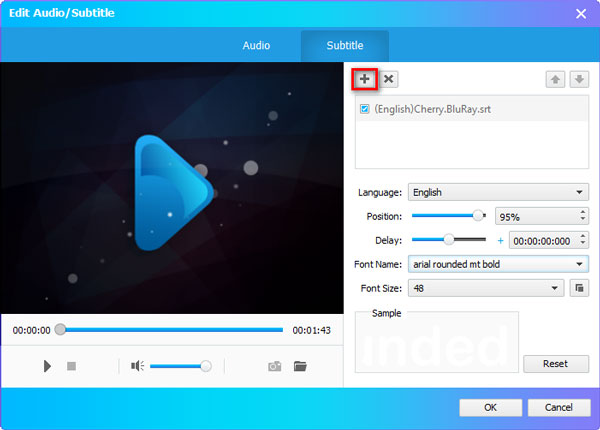
The Subtitle tab: an SRT file added, with language, position, delay, font name and font size settings.
Trim, crop and adjust each video
AnyMP4 Blu-ray Creator's Clip window cuts a video into segments or splits it at a point, and can combine several videos into one title. The Edit window crops black bars (keeping the aspect ratio, or 16:9 or 4:3), adjusts brightness, contrast, saturation and hue, and adds a text or picture watermark with adjustable size, position and transparency.
Hardware-accelerated encoding
AnyMP4 Blu-ray Creator uses NVIDIA CUDA, AMD APP and Intel Quick Sync acceleration when it re-encodes video to Blu-ray format, which shortens the wait on a long project.
Benefits
A Blu-ray disc is still the easiest way to give a non-technical relative a long, high-quality video: it goes in the player, the menu comes up, and it plays at full HD. A burned disc also makes a durable offline copy that ransomware, an expired cloud plan or a dead hard drive can't touch. Blu-ray Creator keeps the job to a few windows instead of a full authoring suite.
Real-World Uses
- Wedding and event films. Put the ceremony and the reception on one BD-25 with a menu that lets guests jump to either.
- Travel footage in high definition. Gather 4K and phone clips from a trip into a 1080p disc for the living-room player.
- Copies for family. Burn five copies of a reunion film in one run with the Copies setting.
- A shelf archive. Save the finished project as an ISO to keep on a drive and burn again whenever a disc is needed.
Who It's For, and Who Should Skip It
A good fit for Windows users with a Blu-ray burner who want menu discs of their own videos without learning professional authoring software.
Skip it if you only need DVDs (AnyMP4 DVD Creator is the matching product), if you want to copy or rip existing Blu-ray movies (that takes a Blu-ray copy or ripper tool), if you need detailed menu and navigation control or Ultra HD Blu-ray (look at professional authoring software), or if you use a Mac.
Usage Guide
- Install AnyMP4 Blu-ray Creator from the trial download and start it.
- Click Add Files and choose your videos. Watch the capacity bar so the project fits the disc type.
- Use Audio Track and Subtitle to add tracks, and Clip or Edit to trim and adjust each video.
- Click Edit Menu to pick a template, rename titles and add background music, or tick No Menu.
- Insert a blank BD-R or BD-RE, choose it as the Target (or pick a folder or ISO), set the Volume Label, Copies and disc Type.
- Click Create. To register, click Register at the top right and enter your email address and code.
Where it falls short
- Template-based authoring. Menus come from AnyMP4's templates with text, music and a background picture. It isn't a professional authoring tool with fine control over menus and navigation.
- No Ultra HD Blu-ray. It makes regular 1080p Blu-rays, not 4K UHD discs.
- Windows only. There's no Mac version.
- Older program. The installer dates from January 2024, so don't count on new menu templates or features soon.
What Users Say
We found no independent review of AnyMP4 Blu-ray Creator. AnyMP4 has no separate review page for it, and its "best Blu-ray burning software" article that ranks it first is the vendor's own marketing, so we don't count it.
Testimonials on AnyMP4's product page
AnyMP4 selects these and shows them without dates.
Alfa: "I purchased this software last week and burned 5 MOV video clips to a blank Blu-ray disc. Luckily, I got my unique Blu-ray file and customized the entire menu with the built-in themes, frames and buttons."
Andreas: "The program has been designed for beginner users and you can easily move on from one section to another. It also helps crop the video to get rid of the edges, add effect and watermark."
Ella: "This Blu-ray creator helps convert my 4K videos to a black BD-25/50 disc. Much to my surprise, the quality is not compromised."
Trustpilot, AnyMP4 as a company (4.2 out of 5, 237 reviews)
Cristiano Ricciarelli, who bought AnyMP4 software in spring 2025, reported menu, playback and audio/video setting problems, and said support and an engineer responded promptly: "I purchased AnyMP4 in the spring of 2025." Tom Schoute's 3-star review was about a registration code blocked when he moved to a new laptop, later reset. Trustpilot blocks automated reading, so we read these through a summarizing tool.
The pattern: buyers describe it as easy and the menu templates as the main draw. There's too little independent feedback to judge reliability, so test a burn to ISO in the trial first.
Comparisons
AnyMP4 Blu-ray Creator vs free burners (ImgBurn, BurnAware Free)
Free burning tools can write a ready-made Blu-ray folder or ISO to disc, but they don't convert MP4 or MKV files into Blu-ray format or build menus. Blu-ray Creator does the conversion and the menu, then burns. If you already have a BDMV folder, a free burner is enough.
AnyMP4 Blu-ray Creator vs AnyMP4 DVD Creator
DVD Creator makes standard-definition DVDs that any DVD player reads, and blank DVDs are cheaper. Blu-ray Creator gives full HD and 25 or 50 GB per disc but needs a Blu-ray burner and player. Pick by the player your audience owns.
Editions and Pricing
| License | Where | Price on November 4, 2026 | Term | PCs |
|---|
| Lifetime | Order page (Buy Now) | $49.95 | One-time, free updates | 1 |
| Lifetime | AnyMP4 store, with its offer | $39.96 | One-time, free updates | 1 |
| 1 Month | AnyMP4 store | $12.50 | Renews monthly | 1 |
| 5-User | AnyMP4 store | $79.96 | One-time, free updates | 5 |
System Requirements
- Windows 11, 10, 8 or 7
- 2 GHz Intel or AMD processor or faster
- 2 GB of RAM or more
- A Blu-ray burner to write discs, and at least 10 GB of free disk space
FAQs
Will a disc made with AnyMP4 Blu-ray Creator play on a PS4, PS5 or home Blu-ray player?
AnyMP4 Blu-ray Creator makes standard Blu-ray discs, which AnyMP4 says play on mainstream Blu-ray players and the PlayStation 3. Test one disc in your player before burning a batch, since some players are fussy about BD-RE media.
Can AnyMP4 Blu-ray Creator burn 4K Ultra HD Blu-ray discs?
No. AnyMP4 Blu-ray Creator accepts 4K files but makes regular Blu-ray discs, folders and ISO images, which are a 1080p format.
How much video fits on a disc made with AnyMP4 Blu-ray Creator?
It depends on quality, but AnyMP4 Blu-ray Creator's capacity bar shows the fill level as you add videos, so you can see whether a project fits a 25 GB BD-25 or needs a 50 GB BD-50.
Can AnyMP4 Blu-ray Creator copy a Blu-ray movie?
No. AnyMP4 Blu-ray Creator burns your own video files. Copying a disc, especially a protected commercial one, needs different software.
Is the AnyMP4 Blu-ray Creator license permanent?
Yes. The license sold at checkout is a lifetime license for one PC with free updates. AnyMP4's own store also sells a 1-month license that renews monthly.
Does AnyMP4 Blu-ray Creator refund a purchase if a disc won't play?
AnyMP4's 30-day guarantee covers a technical problem its support can't fix within 30 days, a duplicate purchase or a code that never arrives. A change of mind isn't covered, and AnyMP4 may keep 20% of the price on a refund it grants.
Conclusion
AnyMP4 Blu-ray Creator is worth it if you own a Blu-ray burner and want quick, good-looking menu discs of your own videos on Windows. It handles almost any input format, adds tracks and subtitles, and gets you from a folder of MP4s to a playable disc in a few steps.
The reason to think twice is how simple it is: template menus only and no Ultra HD Blu-ray, and the last update was in January 2024. If that's enough, buy it; if not, you need a professional authoring tool.
Download Free TrialBuy Now