AnyMP4 Video Repair: Fix Unplayable MP4, MOV and 3GP Files With a Sample Clip
AnyMP4 Video Repair is a $39.96 Windows tool (lifetime license, one PC) that repairs corrupted or unplayable MP4, MOV and 3GP videos by borrowing the missing technical details from a healthy sample clip recorded on the same device. It's meant for phone, drone, dashcam, camcorder and security-camera footage that suddenly won't open, plays as a black screen or loses its sound.
You know the situation: the camera battery died mid-recording, a card reader was pulled out too early, or a transfer stopped halfway, and now the one clip you needed throws a playback error or simply won't load. The video data is often still in the file, but the part that tells a player how to read it is gone. That's the part this program rebuilds.
Quick facts
- Developer: AnyMP4 Studio
- Version: 1.0.22 (Windows)
- Platform: Windows 11 and 10. A separate Mac version is sold under its own license.
- Formats: MP4, MOV and 3GP with H.264 or H.265 video
- How it works: needs a working sample video from the same camera, phone or app
- Price: $39.96 lifetime for 1 PC (list price $49.95), $59.96 lifetime for 3 PCs, or $29 a month
- Guarantee: 30-day money-back guarantee with conditions (see below)
- What we checked: the download is a 2 MB web installer that fetches a 65.5 MB x64 package, both carrying version 1.0.22, downloaded from anymp4.com on November 17, 2026; prices of all three licenses on the order page on November 17, 2026. We didn't run a repair on a damaged file.
Before you buy
- You need a sample video. AnyMP4 Video Repair can't fix a file on its own: it needs a healthy clip shot by the same device, at the same settings, ideally with the same resolution, bitrate, encoder and frame rate. If you can't record or find one, this tool isn't for you.
- Only MP4, MOV and 3GP. AVI, MKV and WMV aren't supported yet; AnyMP4 lists them as coming later.
- Try it on your own file first. The download is free, and AnyMP4's refund policy says its trial versions have no functional limitation. The refund policy also says refunds aren't given for a change of mind, for a wrong purchase made without trying the product, or when lost data isn't recovered completely, and a refund it does grant can be reduced by a 20% fee.
Download Free TrialBuy Lifetime (1 PC)Buy Lifetime (3 PCs)Buy 1 Month
Overview
AnyMP4 Studio makes a long line of converters, Blu-ray and DVD tools and phone utilities, and Video Repair is one of its newer, narrower programs. It does one job. The window has two boxes: the left one takes the broken video, the right one takes a sample. When you add the damaged file, the program shows which properties it can't read (size is usually known, while duration, resolution, bitrate, encoder and frame rate show as "Missing"). The sample fills in those blanks, the program rebuilds the file, and you get a preview before anything is saved.
This sample-based approach is common among MP4 repair tools, because a clip that lost its index (the "moov atom" in MP4 and MOV files) has no record of how its frames were encoded. A clip from the same camera supplies that record. It works well for the most common failure, an interrupted recording, and much less well for a file whose actual picture data is damaged or overwritten.
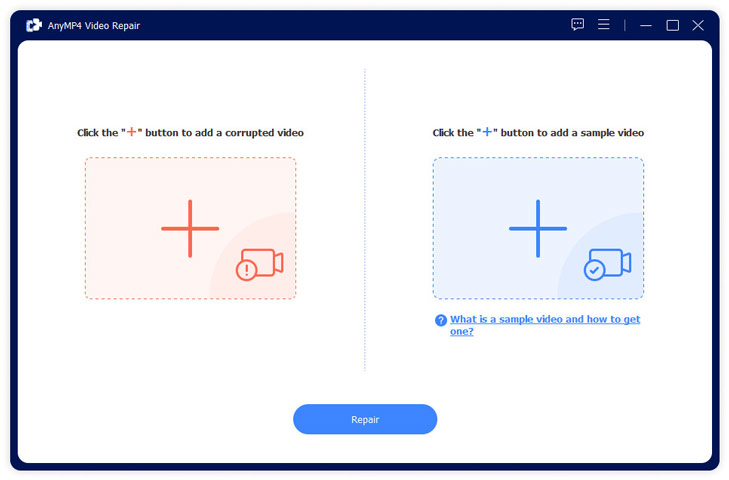
The start screen: the corrupted video goes on the left, the sample video on the right, then you click Repair.
Features
Rebuilds the missing video details from a sample
AnyMP4 Video Repair compares the broken file with a working clip and restores the duration, resolution, bitrate, encoder and frame rate the broken file lost. The results screen marks each restored value as "(Recovered)", so you can see what was rebuilt rather than guess.
Fixes the common playback symptoms
AnyMP4 Video Repair targets videos that won't load at all, show a black screen, play with no sound or with sound out of sync, stutter or freeze on one frame, or stop with player error codes such as 5, 150, 3553 or 232011. All of these come down to a damaged header or index in an MP4, MOV or 3GP file.
Works with footage from many kinds of devices
AnyMP4 Video Repair accepts clips from phones, DJI and other drones, dashcams, Sony, Canon, Nikon, Panasonic and GoPro cameras, CCTV and security cameras, and videos downloaded or shared online. Resolution isn't a barrier: AnyMP4 says it handles HD and 4K up to 8K and beyond, in H.264 and H.265 (HEVC).
Preview before you save
AnyMP4 Video Repair plays the repaired clip in its own preview window first, with a timeline you can scrub. If the result isn't right, you can go back and try a different sample instead of saving a bad file.
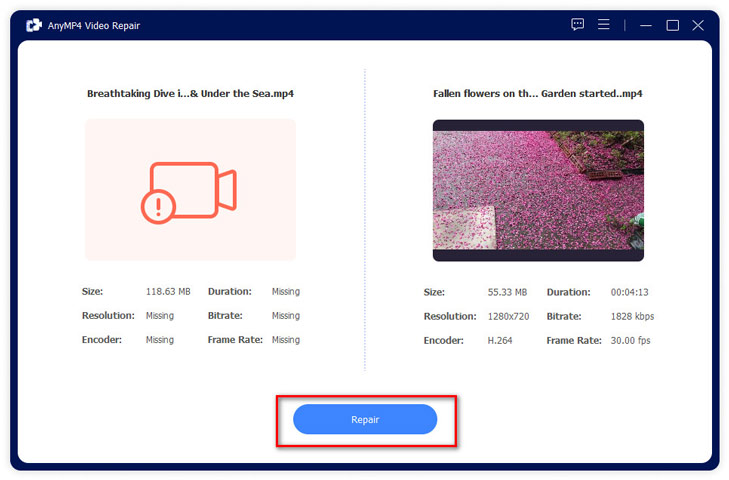
Both files loaded: the broken clip's duration, resolution, bitrate, encoder and frame rate read "Missing", while the sample shows 1280x720, H.264, 1828 kbps and 30 fps.
Benefits
- A one-time price. The lifetime license includes free upgrades, so you aren't renting a tool you might need twice a year.
- You see the evidence. The before-and-after property list shows exactly which details were missing and which were rebuilt, so you can judge a result before you rely on it.
- Little to learn. There are no settings to tune: two files in, one click, then preview.
Real-World Uses
- Dashcam clip after a crash: the camera lost power on impact and the last file won't open. Any other clip from the same dashcam serves as the sample.
- Drone flight cut short: the battery warning ended the recording abruptly. A short test clip recorded at the same resolution and frame rate makes a good sample.
- Phone video copied badly: a cable came loose during a transfer and the copy on the PC plays as a black screen. If the phone still has other videos, you have your sample.
- CCTV export that won't play: an exported MP4 from a security camera won't load in any player. Export a second clip from the same camera to use as the reference.
Who It's For, and Who Should Skip It
It's for Windows users with a damaged MP4, MOV or 3GP clip and access to the camera, phone or app that recorded it, who want a simple tool they own outright.
Skip it if your broken files are AVI, MKV or WMV, since those aren't supported. Skip it too if you no longer have the device and can't find any other clip it recorded, because without a sample there's nothing to rebuild from. Mac users need AnyMP4 Video Repair for Mac, a separate purchase. And if the file was deleted rather than damaged, you need a data recovery program first; a repair tool only works on a file you still have.
Usage Guide
- Install and launch: run the downloaded installer. It's a small web installer that fetches the full program (about 65 MB) during setup. To register a license, click Register and enter your email address and registration code.
- Add the broken video: click the plus button on the left and choose the file that won't play.
- Add a sample: click the plus button on the right and choose a working clip from the same device. The closer its duration, resolution, bitrate, encoder and frame rate are to the original, the better the repair.
- Repair: click Repair and wait. Vijay, quoted below, saw a 20-minute video repaired in about 5 minutes.
- Preview and save: check the result with Preview, then click Save. "Repair Other Videos" starts the next file.
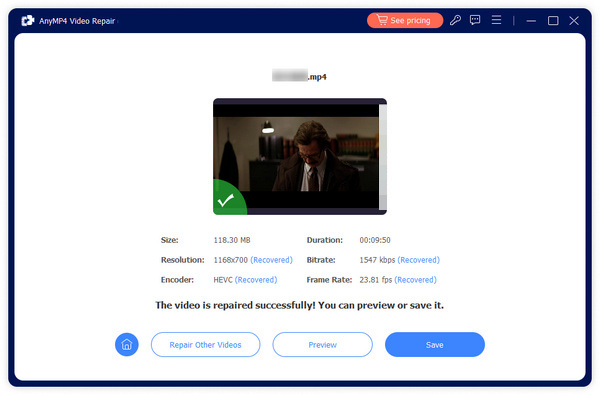
After a repair: the restored resolution (1168x700), bitrate, HEVC encoder and 23.81 fps frame rate are each marked "Recovered", with buttons to preview, save or repair another video.
Tips for a better repair
- Record the sample with the same camera mode as the broken clip: same resolution, frame rate and codec (H.264 vs HEVC). Many phones switch codec in their camera settings.
- Work on a copy of the damaged file and keep the original untouched, so you can try again with another sample.
- If the clip came from a memory card that's acting up, copy it to your PC before repairing it.
Where it falls short
- Three formats only. MP4, MOV and 3GP. A user quoted on AnyMP4's own page asks for WMV, MKV and AVI support.
- No sample, no repair. Footage from a camera you've since lost or sold may be impossible to fix with this tool.
- The success rate is the vendor's claim. AnyMP4 advertises "up to 99.99%" with a sample. No repair tool can restore video frames that were never written or were overwritten, and AnyMP4's refund policy excludes refunds when data isn't recovered completely.
- Few independent reviews. The product is newer than AnyMP4's converters, and most "reviews" online are AnyMP4's own articles or competitors' comparison pages.
What Users Say
On AnyMP4's product page
AnyMP4's page for Video Repair shows three user comments (these are chosen by the vendor):
Danielle: "When I try to play a video from TikTok, it cannot play this video error. I download this software and try it, and it does work. The free trial option is a great opportunity for those like me who need to check if the video repair programs work."
Lauren: "In just 3 clicks, this video repair utility can help me fix the unplayable MP4 video from my iPhone recorder. There are multiple plans available, and the pricing is actually affordable, which is really nice. Thumb up!"
Vijay: "This software is exactly what I want. Upload the MP4 video, add a video sample, then it will start repairing. And the repairing process is quick. Twenty minutes' video can be repaired in 5 minutes. But it could support more formats like WMV, MKV, AVI, etc."
AnyMP4 as a company, on Trustpilot
Trustpilot rates AnyMP4 4.2 out of 5 from 239 reviews. These cover all of AnyMP4's products and its support, not Video Repair specifically.
Karmenu Vella (5 stars, November 2026): "AnyMP4 is a great app with superb support."
Tom Schoute (3 stars, "Release my blocked registration code - support please contact me"): "Can someone please contact me so I can get my lifetime license back to use?!"
The pattern: users like how quickly a sample-based repair works and how simple the program is, and the main wish is for more formats. At the company level, support gets more praise than complaints, though license-activation problems do come up. Independent, hands-on tests of this particular program are still scarce, which is one more reason to run the free download on your own file before paying.
Comparisons
AnyMP4 Video Repair vs free untrunc
The open-source tool untrunc uses the same idea, a working reference file from the same camera, to rebuild truncated MP4 and MOV files, and it costs nothing. AnyMP4 Video Repair adds a point-and-click window, a side-by-side view of what's missing, and a preview before saving. If you're comfortable with a technical tool, try untrunc first; if you want a guided program, AnyMP4's is the easier path.
AnyMP4 Video Repair vs bigger repair suites
Larger repair products from other vendors cover more formats (AVI, MKV and others) and often bundle photo or document repair. AnyMP4's tool is narrower and cheaper, with a lifetime license under $40. Pick it when your files are MP4, MOV or 3GP and you have a sample; pick a broader suite when your formats are outside that list.
Editions and Pricing
| License | Price at checkout, Nov 17, 2026 | Term | PCs | Buy |
|---|
| Lifetime License | $39.96 (list $49.95) | One-time payment, lifetime free upgrades | 1 PC | Buy 1 PC |
| 3-User License | $59.96 | One-time payment, lifetime free upgrades | 3 PCs | Buy 3 PCs |
| 1 Month License | $29.00 a month | Renews monthly until cancelled | 1 PC | Buy 1 Month |
Each Buy button orders that license. Prices exclude sales tax, which the order page adds for your location. At these prices the monthly plan costs almost as much as the lifetime license, so the lifetime license is the better buy for nearly everyone. The registration code arrives by email right after payment.
FAQs
Can AnyMP4 Video Repair fix a video without a sample file?
No. AnyMP4 Video Repair needs a working sample video from the same device or app to rebuild the broken file's missing details. The repair succeeds most often when the sample matches the original's resolution, bitrate, encoder and frame rate.
Does AnyMP4 Video Repair work on Mac?
Not this version. AnyMP4 Video Repair is Windows-only; AnyMP4 Video Repair for Mac is a separate program with its own license at the same price.
Can AnyMP4 Video Repair fix AVI or MKV files?
No. AnyMP4 Video Repair handles MP4, MOV and 3GP files. AnyMP4 says AVI, MKV and WMV support will come in a later update.
Can AnyMP4 Video Repair recover a deleted video?
No. AnyMP4 Video Repair fixes video files you still have but can't play. To get back a deleted clip, use a data recovery program first, then repair the recovered file if it won't play.
What does the AnyMP4 refund guarantee cover?
AnyMP4's 30-day money-back guarantee covers buying the wrong product by mistake (when you then buy the right one), duplicate purchases, a registration code that doesn't arrive or doesn't work, and serious technical problems support can't solve within 30 days. It doesn't cover a change of mind or a repair that doesn't recover everything, and AnyMP4 may deduct a 20% fee from a refund.
System Requirements
- Windows 11 or Windows 10
- 1 GHz Intel or AMD processor or faster
- 1 GB of RAM or more
- About 65 MB for the program download
- Input: MP4, MOV, 3GP; video encoders H.264 and H.265
Conclusion
AnyMP4 Video Repair is worth $39.96 if you have an MP4, MOV or 3GP clip that won't play and you can get a healthy clip from the same camera or phone. That's the one reason to buy it: for the most common kind of damage, an interrupted recording or transfer, a sample-based rebuild is the right fix, and this program makes it a two-click job with a preview before you commit. The main reason not to is the narrow scope: other formats, files with no possible sample, and footage that was never fully written are beyond it, and the refund policy won't help you then. Run the free download on your file first, and buy the lifetime license only once the preview shows your video playing.
Download Free TrialBuy Lifetime (1 PC)Buy Lifetime (3 PCs)Buy 1 Month