AnyMP4 iPhone Unlocker for Mac: Get Back Into Your Own iPhone When the Passcode Is Gone
AnyMP4 iPhone Unlocker for Mac is a macOS app, $49.96 for a lifetime license, that removes a forgotten iPhone or iPad screen passcode, signs a device out of an Apple ID whose password is lost, and clears a forgotten Screen Time passcode, an MDM profile or an iTunes backup password. You connect the device to your Mac with a USB cable and pick the mode.
It's a last resort for owners: the iPhone that says "iPhone Unavailable" after a child tried too many codes, the iPad bought second-hand that still has the seller's passcode, or a Screen Time code nobody remembers. The passcode and Apple ID modes erase the device, so you get a working phone back, not the data on it.
Quick facts
- Developer: AnyMP4 Studio
- Version: 1.3.68, released August 20, 2025
- Platform: macOS 10.7 or later, including Tahoe 26, on Intel and Apple M-series Macs. A Windows edition is sold separately
- Devices: iPhone, iPad and iPod touch on iOS 5 or later
- Modes on the Mac: Wipe Passcode, Remove Apple ID, Screen Time, Remove MDM, Remove Backup Encryption Settings
- Price at checkout: $49.96 one-time ($62.45 less 20%), free lifetime updates
- Trial: a limited trial; a license unlocks the full modes
- What we checked: the installer (4 MB disk image, dated June 17, 2026), AnyMP4's program information file for version 1.3.68 and its Mac user guide, all on November 4, 2026, and the order page on November 4, 2026, which listed the license as "AnyMP4 iMobieKit for Mac - Lifetime/6 iOS Devices" at $62.45 with a 20% discount to $49.96, a lifetime license with no renewal and the same price as AnyMP4's own store. We didn't unlock a device with it.
Before you buy
- Your data will be erased. Wiping a screen passcode installs fresh iOS firmware, updating the device to the latest iOS and deleting everything on it. Removing an Apple ID also erases the device. Only the Screen Time mode keeps your data.
- It doesn't bypass Activation Lock. If Find My is on, the Apple ID mode needs two-factor authentication turned on (iOS 11.4 and later), and after a passcode wipe the device still asks for the Apple ID it was set up with. It's for owners, not for phones you can't prove are yours.
- The order page uses a store name. At checkout the product appears as "AnyMP4 iMobieKit for Mac - Lifetime/6 iOS Devices". That's the same lifetime license AnyMP4's own buy page sells for iPhone Unlocker for Mac.
- Use the official route first. If you know your Apple ID password, Apple's own Recovery Mode restore and Apple ID account recovery cost nothing.
Download Free TrialBuy Now
Overview
AnyMP4 iPhone Unlocker for Mac is a small, single-purpose app. Its home screen shows big buttons for the unlocking modes, starting with Wipe Passcode, Remove Apple ID and Screen Time. Each mode walks you through a few numbered steps: connect the device, confirm its model and iOS version, download the matching firmware if needed, and start.
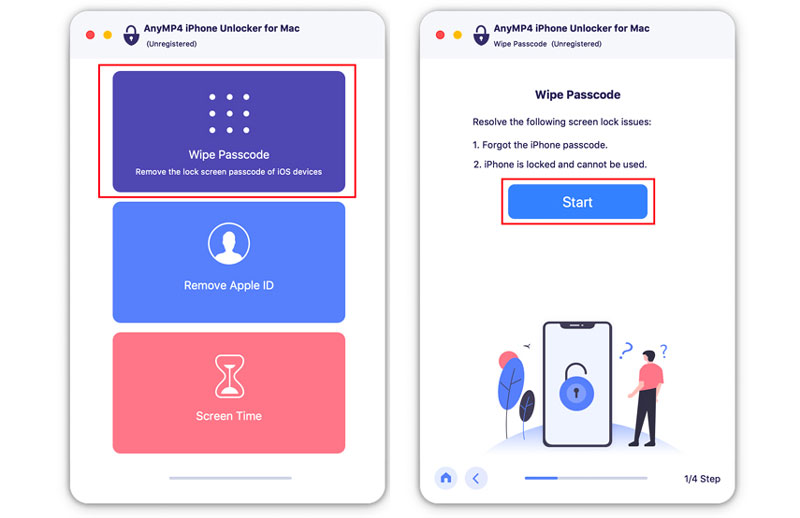
Left: the home screen with Wipe Passcode, Remove Apple ID and Screen Time. Right: the first Wipe Passcode step for a forgotten passcode or a locked, unusable iPhone.
Features
Wipe Passcode: past a forgotten screen lock
AnyMP4 iPhone Unlocker for Mac removes a 4-digit or 6-digit passcode, or a Face ID or Touch ID lock, from a device that's disabled, has a broken screen or came second-hand with a passcode. It checks the device's model, downloads the matching firmware and reinstalls it, which removes the lock along with all data and leaves the device on the latest iOS.
Remove Apple ID: sign out an account you can't recover
AnyMP4 iPhone Unlocker for Mac signs the iPhone or iPad out of an Apple ID and iCloud account whose password you've lost, so you can set it up with a new Apple ID. With Find My off it removes the account directly. With Find My on, older iOS versions need Reset All Settings first, and iOS 11.4 or later needs two-factor authentication turned on. The device must be unlocked and trust the Mac.
Screen Time: remove the passcode without losing data
AnyMP4 iPhone Unlocker for Mac recovers or removes a forgotten Screen Time or Restrictions passcode without erasing the device. Find My must be off, AnyMP4's guide asks for an up-to-date iTunes for the scan, and AnyMP4 suggests resetting the device afterwards.
Remove MDM and backup encryption
AnyMP4 iPhone Unlocker for Mac removes a Mobile Device Management profile from an iPhone or iPad after Find My is turned off, erasing the device's settings and data. AnyMP4 warns that restoring an older backup can bring the profile back. Its Remove Backup Encryption Settings mode clears the password on iTunes backups so you can make new unencrypted backups; existing encrypted backups aren't changed.

AnyMP4's guide image for turning off Find My iPhone in Settings, required before the Screen Time and MDM modes.
Benefits
Apple's official fix for a forgotten passcode is a Recovery Mode restore through Finder, which works but is confusing for many people and fails for some with error codes. A guided app that detects the model and fetches the right firmware makes that job simpler. The Screen Time mode, which keeps your data, has no free equivalent from Apple short of erasing the device.
Real-World Uses
- A child locked the family iPad. Wipe the passcode and set the iPad up again from an iCloud backup.
- A second-hand iPhone with the seller's passcode. Remove the passcode, then sign in with your own Apple ID, provided the seller removed theirs from Find My.
- A forgotten Screen Time code. Clear it without erasing a teenager's phone.
- An old company iPad you now own. Remove the leftover MDM profile once the company has released it.
- An encrypted iTunes backup with a lost password. Turn off backup encryption to start fresh backups.
Who It's For, and Who Should Skip It
A good fit for Mac owners locked out of their own iPhone, iPad or iPod, or stuck with a Screen Time or backup password, who want a guided tool instead of Recovery Mode.
Skip it if you want to recover the data on a locked phone (no unlocker can do that without the passcode), if the device is Activation Locked to an Apple ID you can't access (only Apple, with proof of purchase, can remove that), if you know your Apple ID password (Apple's free reset is enough), or if you're on Windows (buy the Windows edition).
Usage Guide
- Download the disk image and install AnyMP4 iPhone Unlocker for Mac in Applications.
- Connect the iPhone, iPad or iPod with a USB cable. For Apple ID, Screen Time and MDM modes, unlock it and tap Trust.
- For Screen Time and MDM, turn off Find My first in Settings > your name > Find My.
- Choose the mode, check the detected device information, and click Start.
- For Wipe Passcode, let it download the firmware, type 0000 to confirm, and keep the cable connected until it finishes.
- Register from the app's menu with the email address and registration code from your order.
Where it falls short
- Data loss is part of the deal. Three of the five modes erase the device. Make sure your photos are in iCloud or a backup before you start.
- Firmware downloads are large. Wipe Passcode downloads a full iOS package, several gigabytes, so allow time and keep the Mac awake.
- Conditions apply. Find My, two-factor authentication and Trust prompts decide which modes will work, and AnyMP4's guide lists them mode by mode.
- Activation Lock remains. No mode removes Apple's Activation Lock from a device signed into someone else's Apple ID.
What Users Say
We found no independent review of the Mac edition. Unlocking tools attract fake review sites, so we only use what we could check.
Testimonials on AnyMP4's product page (1,839 reviews counted)
AnyMP4 picks these for its shared Windows and Mac page, without dates.
Mario: "I tried several times and couldn’t access my iPhone. Then I used this iPhone Unlocker, and it wiped the passcode easily."
Colin: "AnyMP4 iPhone Unlocker helps me remove my old Apple ID successfully. I forgot the password and can’t get it without questions. Now I can set up a new Apple ID and use my FaceTime again."
Juliana: "I got a second-hand iPhone last week. This iPhone unlocker software helps me delete the 4-digit lock screen passcode. I can open it normally."
Trustpilot, AnyMP4 as a company (4.2 out of 5, 237 reviews)
Trustpilot rates AnyMP4 as a company and none of the recent reviews we read are about the unlocker. Mac owners there mostly praise support: Andrew wrote that support efficiently reset his license keys for a replacement MacBook. The one 3-star review, from Tom Schoute, was about a registration code blocked after he changed laptops, later reset. Trustpilot blocks automated reading, so we read these through a summarizing tool.
The pattern: satisfied users describe getting back into a locked phone; nobody we found reports recovering data, which matches what the tool does. With no independent testing available, treat the conditions in AnyMP4's guide as the real specification.
Comparisons
AnyMP4 iPhone Unlocker for Mac vs Apple's Recovery Mode
Apple's free method erases a locked iPhone through Finder on a Mac, with the same result for the passcode: an erased device on the latest iOS. AnyMP4 adds a guided interface, Screen Time removal without data loss, MDM removal and backup-encryption removal, which Apple doesn't offer.
AnyMP4 iPhone Unlocker for Mac vs its Windows edition
Both editions share the same core modes. AnyMP4's product page also describes SIM unlocking for the Windows edition, while the Mac guide covers the five modes listed here. Buy the edition for the computer you'll connect the iPhone to.
Editions and Pricing
| License | Where | Price on November 4, 2026 | Term | Macs |
|---|
| Lifetime | Order page (Buy Now) | $49.96 | One-time, free updates | 1 |
| Lifetime | AnyMP4 store | $49.96 | One-time, free updates | 1 |
| 1 Month | AnyMP4 store | $18.72 | Renews monthly | 1 |
| 5-User | AnyMP4 store | $99.96 | One-time, free updates | 5 |
System Requirements
- macOS 10.7 or later, including macOS Tahoe 26
- Intel processor or Apple M-series chip, 1 GHz or faster
- 1 GB of RAM or more
- A USB cable for the iPhone, iPad or iPod (iOS 5 or later), and free disk space for firmware downloads
FAQs
Will AnyMP4 iPhone Unlocker for Mac keep my photos and messages?
Only in Screen Time mode. AnyMP4 iPhone Unlocker for Mac's Wipe Passcode, Remove Apple ID and Remove MDM modes erase the device. Restore your data afterwards from an iCloud or computer backup.
Can AnyMP4 iPhone Unlocker for Mac remove iCloud Activation Lock?
No. AnyMP4 iPhone Unlocker for Mac removes an Apple ID only under the conditions in its guide, such as Find My being off or two-factor authentication being on. A device Activation Locked to someone else's account still needs that account or Apple's help.
Does AnyMP4 iPhone Unlocker for Mac work with the newest iPhones and iOS versions?
AnyMP4 lists iPhone models up to the iPhone 18 series and iOS versions up to iOS 27 for AnyMP4 iPhone Unlocker. Check your model in the trial before buying.
How many devices can I unlock with one AnyMP4 iPhone Unlocker for Mac license?
The order page names the license "Lifetime/6 iOS Devices", so plan on up to six iPhones, iPads or iPods, on one Mac. AnyMP4's own buy page describes it as a license for one Mac.
Why does the order page say "iMobieKit" instead of iPhone Unlocker?
"AnyMP4 iMobieKit for Mac" is the store name AnyMP4's checkout uses for this product. AnyMP4's own Lifetime License button for iPhone Unlocker for Mac leads to the same product and price.
Can I get a refund on AnyMP4 iPhone Unlocker for Mac if it doesn't unlock my device?
AnyMP4's 30-day guarantee covers a technical problem its support can't fix within 30 days, but not a change of mind, and AnyMP4 may keep 20% of the price on a refund. Check your device's conditions (Find My, two-factor authentication) against the guide before buying.
Conclusion
AnyMP4 iPhone Unlocker for Mac is worth $49.96 for an owner who's locked out and has a Mac, especially for the Screen Time and MDM cases that Apple's free tools don't cover. It's guided, it supports current iPhones, and the lifetime license costs the same at checkout as on AnyMP4's store.
The main reason not to buy: for a forgotten screen passcode it does what Apple's free Recovery Mode restore does, erasing the phone, and nothing gets past Activation Lock. If that's your situation, try Apple's route first.
Download Free TrialBuy Now