Short answer
For most people, the best DVD ripper for Mac is WinX DVD Ripper for Mac: $45.95 once at checkout, it reads protected and 99-title discs, and version 6.9.0 runs natively on Apple silicon. Choose MDRP ($49.95) if you want AI subtitles and upscaling and a trial that does 5 full rips, Tipard DVD Ripper for Mac ($60) if you edit in ProRes, or Leawo DVD Ripper for Mac ($39.95) if the lowest price matters most. Skip MacX DVD Ripper Pro: it's the same app as WinX for $20 more at checkout. Most Macs have no DVD drive, so budget for a USB one as well.
At a glance: six Mac DVD rippers compared
| Product | One-time price | Newest macOS the vendor names | Reads protected DVDs | Free trial |
|---|
| WinX DVD Ripper for Mac | $45.95 | 27 Golden Gate (same build as MacX) | ✓ | First 5 minutes |
| MDRP | $49.95 | Says 11.0 or higher, no newest version named | Not claimed on its site | 15-minute previews plus 5 full rips |
| Leawo DVD Ripper for Mac | $39.95 (or $29.95 a year) | 27 Golden Gate | ✓ | First 5 minutes of each title |
| Tipard DVD Ripper for Mac | $60.00 | 27 Golden Gate | ✓ | First 5 minutes of each title |
| AnyMP4 DVD Ripper for Mac | $54.96 | 15 Sequoia | ✗ Homemade discs only | About 5 minutes of each title |
| MacX DVD Ripper Pro | $65.95 | 27 Golden Gate | ✓ | First 5 minutes of each DVD |
How we picked and what we checked
- Price and term. We opened each product's order page and read the billing settings, because a license named "Lifetime" can still renew. Leawo sells from its own pricing page, so its price comes from there.
- Today's Macs. We compared each vendor's macOS list with Apple's current release, and looked for Apple silicon code in the downloads.
- The WinX and MacX question. We downloaded both disk images and compared what's inside them.
- Trial limits and reviews. We took the trial limits from each vendor and the reviews from Trustpilot, MacUpdate and the vendors' own pages.
What we checked: order page prices and billing terms for all six on November 6, 2026 (prices before sales tax or VAT). The WinX 6.9.0 and MacX 6.9.0 disk images on November 6, 2026, reading their Info.plist files and program code. Leawo's Apple-chip installer on November 6, 2026. The Apple silicon packages of Tipard on November 4, 2026 and AnyMP4 on October 18, 2026.
We didn't install these apps or rip a disc on a Mac, so speed, quality and disc-support claims are the vendors', not our results. This page compares what you buy. It isn't a step-by-step ripping guide.
First: most Macs need a USB DVD drive
To copy a DVD on a Mac you need a disc drive, and no current Mac has one. Every product here reads the disc through whatever drive your Mac can see, so a ripper alone won't do it. Digiarty's own Mac guide says the same: you'll need Apple's USB SuperDrive or a compatible third-party USB DVD drive.
- Plug it straight into the Mac. Apple's support page says to connect a SuperDrive to a USB port on the Mac itself if it doesn't respond through a display or USB hub.
- Allow for an adapter. The SuperDrive has a USB-A plug, so a USB-C-only Mac needs an adapter, such as Apple's USB-C to USB Adapter.
- Don't count on sharing a drive. MDRP's FAQ says ripping from a remote DVD through DVD sharing isn't supported.
- Think about region if you own imported discs. MDRP needs the disc's region to match the drive's, and suggests a cheap second USB drive set to the other region.
Already have the disc as an ISO image or a VIDEO_TS folder? WinX, MDRP, Tipard, AnyMP4 and Leawo all open those without any drive.
Which DVD rippers still work on today's Macs?
All six have Apple silicon code, but only some vendors name macOS 27 Golden Gate. That matters more than usual, because Golden Gate runs only on Apple silicon, so Intel Macs stop at macOS 26 Tahoe. Digiarty also says Apple has announced that Intel apps needing Rosetta won't open in macOS 28, so an old copy of any ripper has a limited life on a new Mac.
| Product | macOS the vendor lists | Apple silicon | Latest build |
|---|
| WinX DVD Ripper for Mac | 10.13 and later, Tahoe named on its pages | ✓ One app with both Intel and Apple silicon code, native since 6.9.0 | 6.9.0, June 2026 |
| MacX DVD Ripper Pro | 10.13 to Tahoe in its specs, macOS 27 in its FAQ | ✓ One app with both Intel and Apple silicon code, native since 6.9.0 | 6.9.0, June 2026 |
| MDRP | 11.0 or higher | ✓ Apple silicon and Intel | 14.2.1, April 2026 |
| Tipard DVD Ripper for Mac | 10.12 or above, Golden Gate named on its buy page | ✓ Separate native builds | 10.0.88, June 2026 |
| AnyMP4 DVD Ripper for Mac | 10.12 to 15 in its specs, "10.12 or later" on its download button | ✓ Separate native builds | 9.1.6, June 2026 |
| Leawo DVD Ripper for Mac | 10.13 to 27 Golden Gate | ✓ Separate Apple-chip download | 13.0.8 (Intel), Apple-chip build July 2026 |
Two entries need a note. WinX's pages stop at Tahoe, but it's the same 6.9.0 build that Digiarty's MacX FAQ says supports macOS 27. AnyMP4 DVD Ripper for Mac is the one that lists no macOS newer than 15 on its specs page, so if you're on Tahoe or Golden Gate, run its trial before you pay. MDRP's April release came before Golden Gate, and its promise is simply that it works on every macOS since 11.0.
Copy protection and the law, briefly
Homemade DVDs are never a problem. Commercial DVDs are a legal question. Most store-bought discs use copy protection such as CSS. WinX, MacX, Tipard and Leawo all say they can read those discs, AnyMP4 lists homemade DVDs only, and MDRP's site doesn't make the claim. Getting around copy protection isn't legal everywhere, even for discs you own, and that includes the United States. The vendors themselves limit their tools to personal, lawful use, so check the rules where you live.
Price chart: the one-time price for one Mac
One-time license for one Mac (USD)
Leawo DVD Ripper for Mac$39.95
WinX DVD Ripper for Mac$45.95
MDRP (up to 3 Macs)$49.95
AnyMP4 DVD Ripper for Mac$54.96
Tipard DVD Ripper for Mac$60.00
MacX DVD Ripper Pro$65.95
Prices checked on November 6, 2026, before sales tax or VAT. Five are order page prices with no renewal; Leawo's is from its pricing page. AnyMP4 is $68.70 less a $13.74 discount.
1. WinX DVD Ripper for Mac: best for most people
WinX DVD Ripper for Mac from Digiarty costs $45.95 once at checkout for one Mac, runs on macOS 10.13 and later on Apple silicon and Intel, and suits anyone with a mixed shelf of films, TV sets and family discs.

WinX DVD Ripper for Mac's main window: Disc, Folder and Image buttons along the top, three Getting Started steps, and the hardware encoder, Safe Mode and CPU core settings next to the RUN button.
WinX DVD Ripper for Mac does the two jobs people mean by "rip" and "copy". It can convert a DVD to MP4, HEVC or MOV, with more than 350 device profiles, or clone it 1:1 to an ISO image or DVD folder with no quality loss. Digiarty aims it at awkward discs: new releases, 99-title discs, region-coded discs and damaged ones. It also claims a full DVD in about 5 minutes and up to 47 times real-time speed, which is a best case. Your USB drive and the disc's condition set the real pace.
It wins this comparison on value. Among the products that say they read protected discs, only Leawo costs less, and Leawo's app is a much larger suite. The window is plain too: load the disc, pick a target, press RUN.
What we like
- One-time $45.95 with no renewal at checkout
- MP4, HEVC and MOV files, or a 1:1 ISO backup
- Safe Mode for stubborn discs
- Both Intel and Apple silicon code in one app
Watch out for
- Native Apple silicon support is new, arriving only in 6.9.0
- The trial stops at 5 minutes, so it can't prove a whole disc rips
- Refunds depend on a fault support can't fix
- DVD only, no Blu-ray, no AI upscaling in this app
What users say
Few reviews cover the Mac version alone, and Digiarty's Trustpilot page mixes all its products. On November 6, 2026 winxdvd.com had a TrustScore of 3.8 from 420 reviews, the lowest of the companies here. Michael M, five stars, August 2026: "This is a great product and the support from Adam was quick and prompt." Kruzey Kymbo, one star, September 2026: "They have just run me around in circles asking to confirm what I have already done." Dr. Carol Clark, one star, July 2026: "Terrible product and support is useless."
Download WinX DVD Ripper for Mac TrialBuy WinX DVD Ripper for Mac
WinX DVD Ripper for Mac vs MacX DVD Ripper Pro: the same app
MacX DVD Ripper Pro and WinX DVD Ripper for Mac are effectively one product under two names, so buy WinX. Digiarty sells both, on winxdvd.com and macxdvd.com, and we compared the two downloads. Both are version 6.9.0, build 20260615, both need macOS 10.13, both hold Intel and Apple silicon code, and the two disk images were posted within a minute of each other on June 15, 2026. About 96% of the data blocks inside them are identical. The differences we found are the name and branding, the gift on Digiarty's own store, and the price.
| WinX DVD Ripper for Mac | MacX DVD Ripper Pro |
|---|
| Order page price, lifetime | $45.95 | $65.95 |
| Vendor store price, lifetime for 1 Mac | $55.95 | $54.95 |
| Gift on the vendor's lifetime plan | None listed | 6-month Macxvideo AI license |
| Version and build | 6.9.0, 20260615 | 6.9.0, 20260615 |
| Trial | 5 minutes | 5 minutes |
On the MacX pages you'll also see "AI Enhance" and upscaling to 4K. That's a separate product, Macxvideo AI, and not part of the ripper. If you already own MacX DVD Ripper Pro, there's no reason to switch. If you're buying new, WinX at checkout is the cheapest way to get this app.
Download MacX DVD Ripper Pro TrialBuy MacX DVD Ripper Pro
2. MDRP: best for AI subtitles and upscaling
MDRP, long sold as Mac DVDRipper Pro, costs $49.95 once at checkout, runs on macOS 11.0 or higher, covers up to 3 Macs you own, and suits Apple silicon owners who want more than a plain rip. It comes from DVDSuki Software and has nothing to do with MacX despite the similar name.
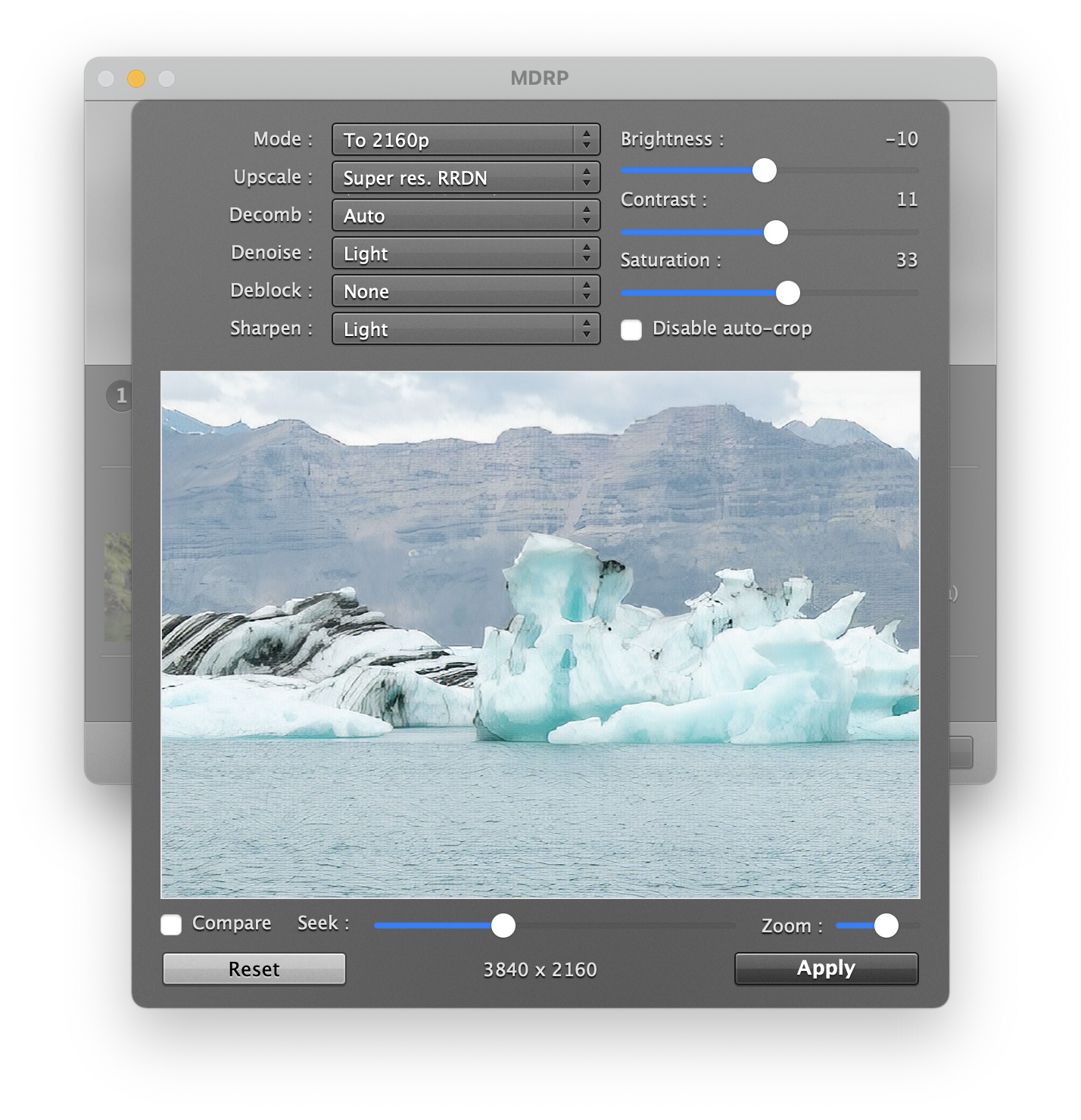
MDRP's processing window set to upscale to 2160p with the Super res. RRDN mode, with decomb, denoise, sharpen and color controls above a preview.
MDRP is the only Mac-only product here, and it shows in what it adds. Version 14 generates subtitles from a film's audio in 99 languages, translates them into 23, and upscales old footage to HD or 4K, all on your Mac with no cloud service and no subscription. Those AI features want an Apple silicon Mac with 16 GB of memory. It also rips to .iso, makes lossless copies and can burn a backup disc.
The trial is the best of the six: unlimited 15-minute previews plus 5 full rips, so you can prove that your hardest discs finish. Be clear about the limits, though. MDRP doesn't advertise reading protected discs, can't remove region coding, and makes you pay $24.95 for major version upgrades.
What we like
- Five full rips in the trial
- On-device AI subtitles, translation and upscaling
- Up to 3 Macs on one license
- Long record on macOS, with frequent updates through April 2026
Watch out for
- Disc region must match the drive's region
- Major upgrades cost $24.95
- Some DVDs can take hours and look frozen
- The trial button below delivers older version 13.3.5, which then offers the update
What users say
MDRP rates 4.4 out of 5 from 278 reviews on MacUpdate. Wassup, reviewing version 12.0 in October 2024: "This was clearly the best app for simple ripping of one's DVD collection." mswartzbeck, one star on version 11.0.3 in December 2023: "I couldn't tell you what I think of it because it's been trying to rip one track off this one DVD for nearly 45 minutes." Most of these reviews predate version 14, so the AI features have little independent feedback so far.
Download MDRP TrialBuy MDRP
3. Leawo DVD Ripper for Mac: lowest price
Leawo DVD Ripper for Mac costs $39.95 for a lifetime license or $29.95 for one year on one Mac, runs on macOS 10.13 through 27 Golden Gate, and suits buyers who want the lowest one-time price and don't mind a large app.
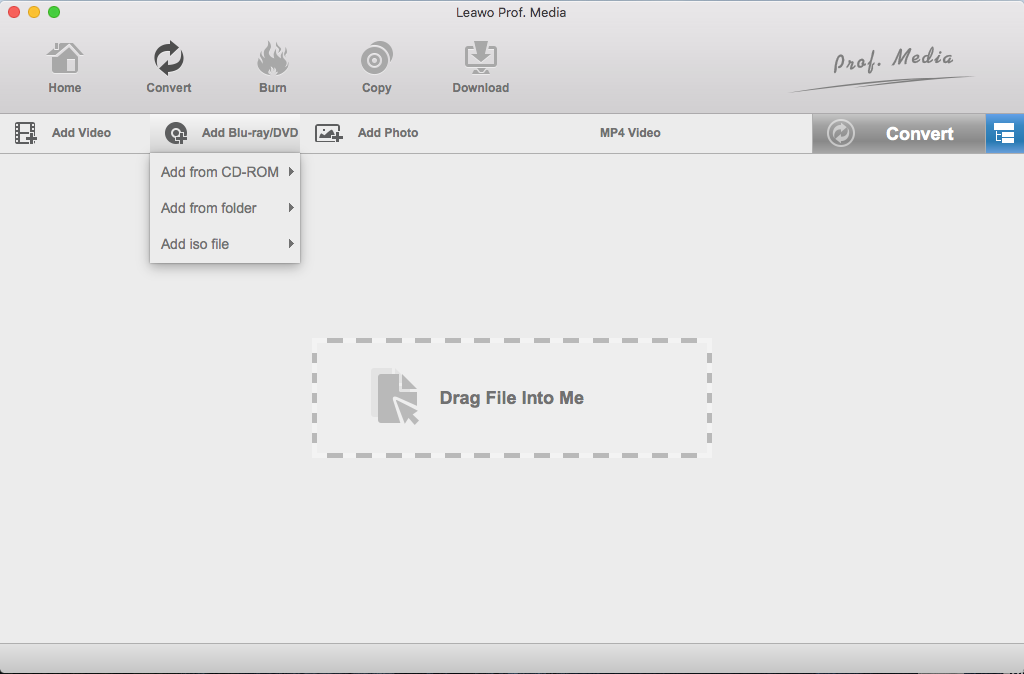
Leawo Prof. Media on a Mac with the Add Blu-ray/DVD menu open, offering a disc, a folder or an ISO file. This is an older look of the window.
Leawo DVD Ripper for Mac is one module of a bigger program, Leawo Prof. Media, and your registration code switches it on. That's why the download is 241 MB for Intel and 316 MB for Apple chips, against 99 MB for WinX. It handles CSS-protected discs from regions 1 to 6 and writes more than 180 video and audio formats. Leawo lists macOS 27 and offers a separate Apple-chip download, and we confirmed that the installer in that download is Apple silicon code.
Take the lifetime plan. The $29.95 yearly plan renews automatically and saves you only $10. Its refund windows are also the shortest here: 14 days on lifetime and 5 days on the yearly plan, and only for faults Leawo can't fix.
What we like
- Lowest lifetime price in this comparison
- Names macOS 27 on its product page
- Same price for Mac and Windows editions
Watch out for
- Pick the Mac edition at checkout: Leawo won't refund "the wrong software"
- Large install for one job
- Blu-ray is a separate purchase
- Reviews of the Mac version are few and mostly old
What users say
leawo.org scores 4.4 from 151 reviews on Trustpilot, across all Leawo products. S W Tan, on Leawo's own review page, December 2022: "Ripped all my DVDs without fuss in Mac OS "Monterey"." HNWDZT, five stars on Trustpilot, March 2024: "When I purchased a new Mac, they were most helpful in transferring my license to the new machine." Ad Libitum Audiovisuals, one star, May 2022: "I CAN NOT INSTALL their software in my Mac and the company refuse to give me a refund."
Download Leawo DVD Ripper for Mac TrialBuy Leawo DVD Ripper for Mac
4. Tipard DVD Ripper for Mac: best for editors
Tipard DVD Ripper for Mac costs $60 once at checkout for one Mac, runs on macOS 10.12 or above including Golden Gate, and suits people who'll edit their footage or want the most output options.
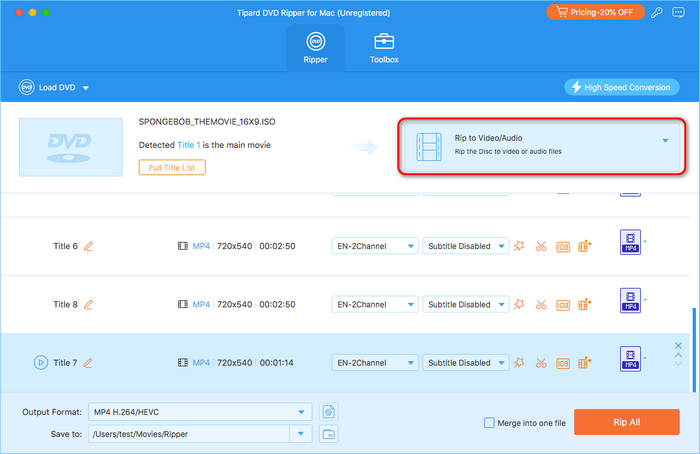
Tipard DVD Ripper for Mac with a DVD ISO loaded: it has detected the main movie, lists the titles with audio and subtitle choices, and offers Rip to Video/Audio with Rip All at the bottom.
Tipard DVD Ripper for Mac reaches further on output than the others. It writes MP4, MOV, MKV, WebM and ProRes, can keep a lossless MKV or MPG, and copies a disc to ISO or a VIDEO_TS folder. Tipard says it handles CSS, APS, ARccOS and 99-title protection and region codes 1 to 8, and it's the most explicit vendor about current Macs, naming M1 through M5 chips and Golden Gate. A built-in enhancer can upscale DVDs, and Tipard says ripped videos carry no watermark.
The price is the catch. At $60 it costs about $14 more than WinX for a similar job, so it earns that only if you'll use ProRes or lossless output. Tipard's own store sells the same lifetime license for less with a coupon ($48 on November 6, 2026), but that store also offers a monthly plan and a 7-day DVD Creator trial that renews at $30 a month, so read the order before paying.
What we like
- ProRes and lossless MKV output
- Names current chips and macOS 27
- One-time $60 with no renewal at checkout
Watch out for
- Most expensive of the main picks
- One Mac per license; Windows and Mac licenses can't be swapped
- Refunds cover technical problems only
- Trustpilot buyers complain about Tipard subscriptions renewing
What users say
Tipard scores 4.5 out of 5 from 91 Trustpilot reviews, across all its products. Andrzej Zet, five stars, June 2025: "I recently had the pleasure of using Tipard DVD Ripper for Mac, and I must say, it exceeded my expectations." On Tipard's own site, Donna, August 2025: "Even the scratched ones ripped fine." The one-star reviews focus on refunds and subscriptions, which is another reason to buy the one-time license.
Download Tipard DVD Ripper for Mac TrialBuy Tipard DVD Ripper for Mac
5. AnyMP4 DVD Ripper for Mac: for homemade discs only
AnyMP4 DVD Ripper for Mac costs $54.96 once at checkout for one Mac, runs on macOS 10.12 to 15 by its specs page, and suits people with camcorder and home-burned DVDs who like a guided window.
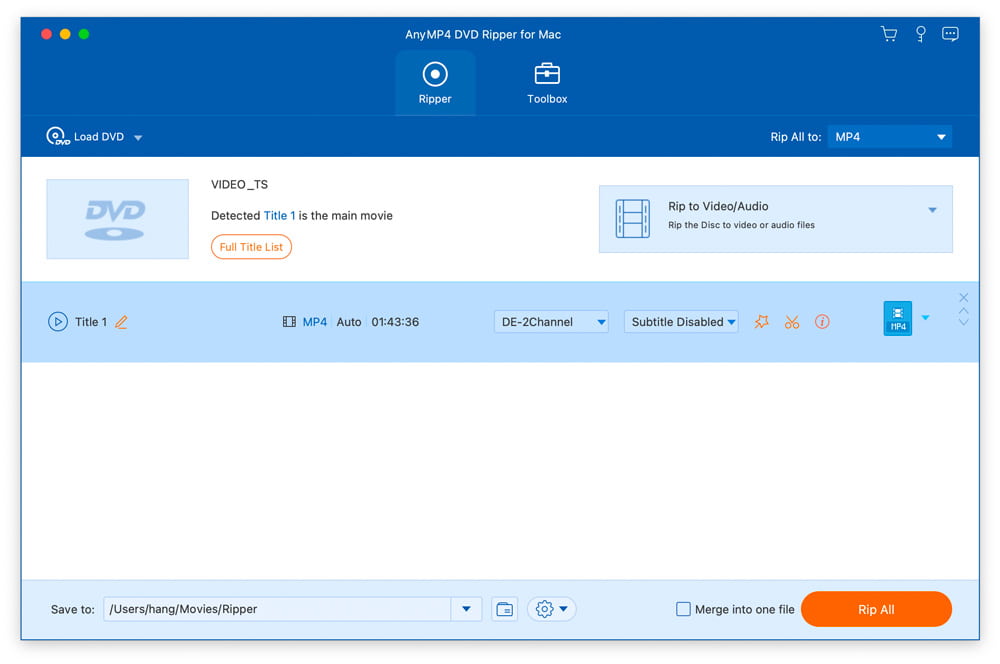
AnyMP4 DVD Ripper for Mac's main window with a VIDEO_TS folder loaded, Title 1 detected as the main movie, and MP4 chosen under Rip All to.
AnyMP4 DVD Ripper for Mac is the simplest-looking app here. It finds the main title, offers presets for iPhone, iPad, Apple TV and Android, and can convert a DVD to MP4, HEVC, MOV, MKV or MP3, or copy it to a folder or ISO. A Toolbox adds a video enhancer, compressor and metadata editor.
We rank it last for a reason: it's limited to homemade DVDs and costs more than WinX, which covers those discs too. Its specs page also stops at macOS 15. It's a fair choice only if you already use AnyMP4's other apps, or you try the trial and prefer its window.
What we like
- Clean, guided window
- Presets by device brand
- One-time $54.96 with no renewal at checkout
- Native Apple silicon build
Watch out for
- Lists homemade DVDs only
- Specs page stops at macOS 15
- The trial doesn't batch-rip
- Trustpilot complaints about license keys after a hardware change
What users say
AnyMP4 scores 4.2 out of 5 from 235 Trustpilot reviews across all its products: 65% five-star and 25% one-star. patrick raous, five stars, September 2026: "Support is fast and efficient." Hazlia Dark-Shepherd, one star, July 2024, about DVD Ripper: "their key wasn't working anymore on my new board". John Morogiello, one star, August 2023: "downloaded and paid for the product, only to discover that Blu-Ray is not an option for Mac."
Download AnyMP4 DVD Ripper for Mac TrialBuy AnyMP4 DVD Ripper for Mac
Trustpilot score by company (out of 5)
Leawo, leawo.org (151 reviews)4.4
Digiarty, winxdvd.com (420 reviews)3.8
Scores cover each company's whole range, read between October 18 and November 6, 2026. MDRP isn't on this chart; it has 4.4 out of 5 from 278 reviews on MacUpdate.
Which DVD ripper for Mac should you choose?
| Your situation | Pick | Why |
|---|
| A mixed shelf of films and family discs | WinX DVD Ripper for Mac | Reads protected discs and costs $45.95 once |
| You want subtitles, translation or 4K upscaling | MDRP | All of it runs on your Mac, with 5 full trial rips |
| Lowest one-time price | Leawo DVD Ripper for Mac | $39.95 lifetime, and it names macOS 27 |
| You edit in Final Cut Pro or want ProRes | Tipard DVD Ripper for Mac | The widest output choice here |
| You own 2 or 3 Macs | MDRP | The license covers up to 3 Macs you own |
| Only home-burned discs and you like its window | AnyMP4 DVD Ripper for Mac | Simple and guided, but try it first |
| You're deciding between WinX and MacX | WinX DVD Ripper for Mac | It's the same app for $20 less at checkout |
Who should skip each one
- Skip WinX DVD Ripper for Mac if you want AI features in the same app, or if reliable support matters most, since Digiarty's reviews are split on it.
- Skip MDRP if you own imported discs from another region, or you're on an older Intel Mac and only want plain copies.
- Skip Leawo DVD Ripper for Mac if you want a small app with one job.
- Skip Tipard DVD Ripper for Mac if MP4 is all you need, since it costs about $14 more than WinX.
- Skip AnyMP4 DVD Ripper for Mac if you have any store-bought discs or you're on macOS Tahoe or Golden Gate and don't want to test first.
- Skip MacX DVD Ripper Pro if you haven't bought yet, unless you want the Macxvideo AI gift from Digiarty's own store.
What commonly goes wrong
- Buying the ripper before testing the drive. A drive on a hub or weak adapter can look like a software fault. Connect it directly first.
- Judging a ripper from 5 minutes. WinX, Tipard, AnyMP4 and Leawo trials stop early, so a disc that fails near the end won't show up. MDRP's full trial rips are the exception.
- Trusting the word "Lifetime". We found order pages that label a license Lifetime and still set it to renew every 12 months. The Buy Now buttons here go to one-time licenses, but check the order summary on any store.
- Running an old copy. WinX and MacX builds from before June 2026 are Intel apps that need Rosetta on Apple silicon.
- Stopping a slow rip. MDRP warns that some DVDs take a few hours and may seem to hang, and suggests disc image mode for hard discs.
- Expecting vendor speeds. Claims such as 47 times real time depend on your disc, your drive and your Mac.
FAQs
Can I copy a DVD on a Mac without buying anything?
Yes, for an unprotected disc, macOS's built-in Disk Utility can make a disc image of a homemade DVD. It can't copy protected discs, and it makes an image rather than an MP4, which is where a ripper such as WinX DVD Ripper for Mac comes in.
Which of these can convert a DVD to MP4 on a Mac?
All six can convert a DVD to MP4. WinX DVD Ripper for Mac, Tipard, AnyMP4 and Leawo also offer HEVC (H.265), which makes smaller files, and every trial lets you see the result on a short clip first.
Is MDRP the same as MacX DVD Ripper Pro?
No, MDRP and MacX DVD Ripper Pro are different products from different companies. MDRP comes from DVDSuki Software and MacX from Digiarty. MDRP's FAQ warns that serials starting "BD" belong to another product with a similar name.
Will these Mac DVD rippers run on an Intel Mac?
Yes, all six still support Intel Macs, but they stop at macOS 26 Tahoe because macOS 27 Golden Gate is Apple silicon only. MDRP's AI features are aimed at Apple silicon, so an Intel owner gets the least extra value from it.
Are the lifetime licenses really one-time payments?
Yes, every price in our chart is a one-time payment: the order pages for WinX, MacX, MDRP, Tipard and AnyMP4 showed no renewal on November 6, 2026. WinX and MacX also sell a yearly plan on their own stores, and Leawo sells one for $29.95, and those renew.
Do any of these DVD rippers for Mac rip Blu-ray?
No, none of the six rips Blu-ray in the version we compared. MDRP's FAQ says DVDs only, and Leawo, Tipard and AnyMP4 each sell a separate Blu-ray product.
Can I move a Mac DVD ripper license to a new Mac?
It depends on the vendor, and it's a common complaint. MDRP covers up to 3 Macs you own, a Trustpilot reviewer says Leawo moved a license to a new Mac, and AnyMP4 reviewers report keys failing after a hardware change. Keep your order email, and ask support before you replace the old Mac.
Can I use my Mac license on Windows?
No, Tipard says its licenses are platform-specific and can't be moved between Windows and Mac, and WinX, Leawo and AnyMP4 also sell separate Windows editions. MDRP has no Windows version at all.