Tipard DVD Ripper for Mac: Turn a DVD Collection into Files Your Mac and iPhone Can Play
Tipard DVD Ripper for Mac converts DVDs, DVD folders and DVD ISO files on a Mac into MP4, MOV, MKV and other video files, or into a lossless copy or ISO backup, with native support for Apple silicon. Our Buy Now button sells a true one-time lifetime license for one Mac at $60, with no renewal.
Most Macs haven't had a DVD slot for years, but a lot of households still have boxes of DVDs: films, kids' shows, exercise programs, wedding videos. Ripping them once, with a USB DVD drive, puts them in the TV app, on a NAS or on an iPad, and lets the discs go to the attic. That's this app's single job, and it covers every step from reading the disc to shrinking the file.
Quick facts
- Version: 10.0.88 for Apple silicon (June 17, 2026) and 10.0.86 for Intel (June 15, 2026)
- Developer: Tipard Studio
- Runs on: macOS 10.12 Sierra or later, 1 GHz Intel or Apple silicon, 2 GB RAM. A separate Windows edition exists.
- Reads: DVD discs (DVD-5, DVD-9, ±R, ±RW, DL, RAM), VIDEO_TS folders and DVD ISO images
- Writes: MP4, MOV, MKV, ProRes, WebM and 500+ formats and presets; lossless MKV or MPG; DVD ISO or folder; MP3, FLAC, ALAC and other audio
- Price on our order page: $60 once for one Mac, a lifetime license with no renewal
- Trial: converts the first 5 minutes of each title; Tipard says ripped videos carry no watermark
- What we checked: the 4 MB online installer and the two app packages it downloads, whose Info.plist files show 10.0.88 (Apple silicon) and 10.0.86 (Intel), and the order page, which showed $60.00 for "Tipard DVD Ripper for Mac" as a one-time lifetime license with no renewal, rechecked on November 6, 2026. Tipard's buy page also lists macOS Golden Gate as supported that day. We didn't rip a disc with it.
Before you buy
The license on our order page is a one-time lifetime purchase for one Mac. Tipard refunds only for technical problems it can't fix, so run the 5-minute trial first.
Ripping copy-protected commercial DVDs is not legal everywhere, including in the United States. Tipard asks you to rip only within your local law; home-made DVDs are never a problem.
Download Free TrialBuy Now
Overview
The app has two tabs, Ripper and Toolbox. Load DVD (with options for a folder or ISO) analyzes the disc and asks whether to show just the main title or the full title list. Each title then gets a row with its format, resolution, length, audio track and subtitle, plus edit, cut and metadata buttons. A drop-down at the top chooses between ripping to video and audio or copying the disc as an ISO or folder, and Rip All starts the batch.
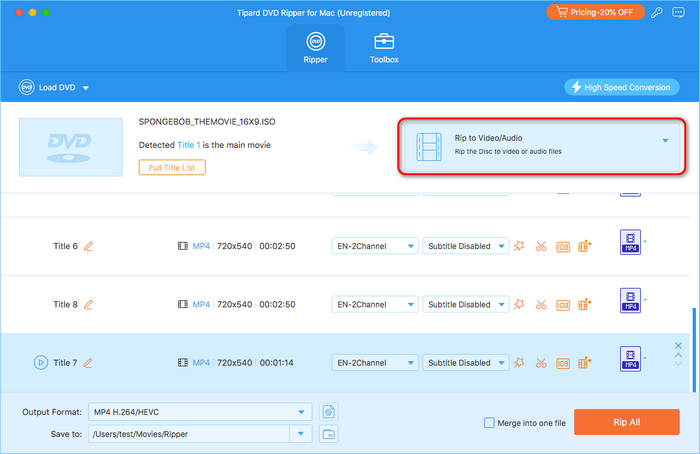
A DVD ISO loaded in the unregistered app: Title 1 detected as the main movie, 720x540 titles set to MP4 with English stereo audio, and the Rip to Video/Audio menu highlighted.
Features
Commercial, region-locked and scratched discs
Tipard DVD Ripper for Mac says it handles CSS, APS, ARccOS and "99-title" protection, the decoy-title trick some discs use to confuse rippers, and region codes 1 to 8. It also reads around bad sectors on scratched discs to save as much as it can, and handles home-burned DVD-Video discs with unusual codecs or structures.
Main title or every title
Tipard DVD Ripper for Mac analyzes the disc and asks whether to show the main title or the full title list, with an option to show movies split by chapter. That matters for series discs, where each episode is a separate title, and for exercise or concert DVDs whose content is split up. Titles can also be merged into one file.
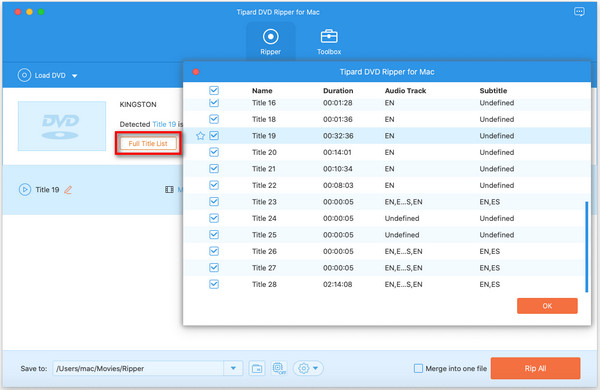
After analyzing a disc: Title 1 is identified as the main movie, with the choice of Main Title or Full Title List and a "Show movies based on chapters" box.
Small files, perfect copies or ISO backups
Tipard DVD Ripper for Mac re-encodes to H.264 or HEVC (Tipard's example: an 8.5 GB dual-layer DVD to about 1.5 GB with HEVC), remuxes to lossless MKV or MPG with the original streams and tracks, or copies the disc 1:1 as an ISO image or DVD folder with menus and extras. Tipard recommends MOV or ProRes for the Apple ecosystem, and audio can be extracted on its own as MP3, FLAC, ALAC or AAC.
Making 480p look better on a Retina screen
DVD video is 480p (or 576p), which looks soft on a Retina display. Tipard DVD Ripper for Mac can upscale to 1080p or 4K, and its toolbox Video Enhancer upscales resolution, optimizes brightness and contrast, removes video noise and reduces shaking. Tipard also mentions AI frame interpolation to 60fps and SDR-to-HDR10 conversion. Upscaling can't add detail the disc never had, but it can clean up noise and edges.
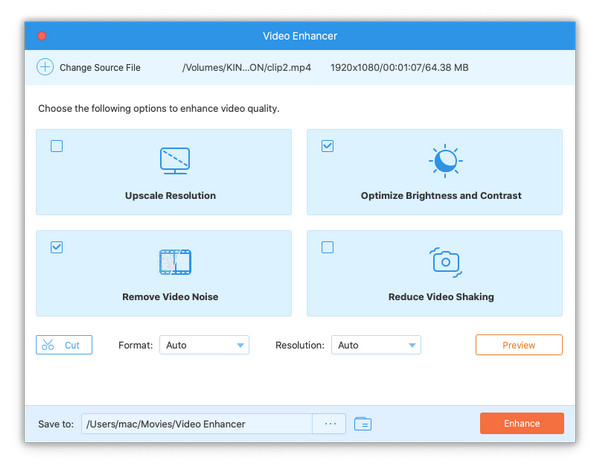
The toolbox's Video Enhancer on a 1080p clip: Upscale Resolution, Optimize Brightness and Contrast (ticked), Remove Video Noise (ticked) and Reduce Video Shaking, with Preview and Enhance buttons.
Tracks, subtitles and metadata
Tipard DVD Ripper for Mac keeps the audio track you choose (or several, in lossless MKV), adds your own audio and subtitle files, and can save a DVD subtitle in one language as an SRT file. The metadata editor fills in the title, genre and description, so ripped films show properly in Plex, Infuse or the TV app.
Benefits
- Shelves cleared: a hundred DVDs fit on a small SSD as HEVC files.
- Old home videos preserved before the discs fail, with the noise cleaned up.
- Kids' DVDs on an iPad for car trips, with no player or disc to scratch.
- Apple-friendly output (MOV, ProRes, Apple TV presets) without extra conversion.
Real-World Uses
- Digitizing a family archive of camcorder DVDs, with the main title per disc merged and tagged by year in the metadata editor.
- A TV series box set ripped from the full title list, one file per episode.
- An exercise DVD split by chapter so each workout is its own file on an iPad.
- Disc-for-disc backup of rare DVDs as ISO images that keep the original menus.
Who It's For, and Who Should Skip It
It's for Mac owners with a USB DVD drive and a pile of DVDs they want as files, who'd rather click Rip All than learn HandBrake's settings.
Skip it if:
- Your discs are unprotected home DVDs and you don't mind a learning curve: HandBrake is free and excellent.
- You also have Blu-rays. Tipard Blu-ray Converter for Mac rips both Blu-rays and DVDs for a little more.
- You want disc copies, not files. Tipard DVD Cloner for Mac makes DVD-to-DVD copies.
Usage Guide
- Install. Open the 4 MB disk image and run the installer; it downloads the Apple silicon or Intel build. Connect a USB DVD drive and insert the disc.
- Load the DVD. Click Load DVD (or pick a folder or ISO from its menu), then choose Main Title or Full Title List.
- Choose the output. Keep Rip to Video/Audio and pick a format such as MP4 H.264/HEVC, MOV or MKV Lossless, or switch to an ISO or DVD folder copy.
- Set tracks and edits. Choose audio and subtitles for each title, and use edit, cut or metadata if needed.
- Rip. Choose the save folder, tick Merge into one file if wanted, and click Rip All.
Where it falls short
- Protection claims vary by disc. Tipard lists the schemes it handles, but newer or unusual protections can still trip any ripper; the 5-minute trial is your test.
- Tipard also sells monthly plans. Trustpilot shows buyers annoyed by unexpected renewals of Tipard subscriptions. The license behind our Buy Now button doesn't renew, but the monthly plan and the 7-day DVD Creator trial on Tipard's own store do.
- Online installer. The small DMG needs an internet connection to fetch the 123 to 151 MB app.
- Upscaling isn't magic. A 480p source upscaled to 4K is a bigger file, not a 4K film.
What Users Say
We didn't find a recent hands-on review from an independent publication; the review sites that cover it mostly sell competing rippers. Here's what buyers say.
Trustpilot: a DVD Ripper for Mac buyer
Andrzej Zet (June 2025, 5 stars): "I recently had the pleasure of using Tipard DVD Ripper for Mac, and I must say, it exceeded my expectations." "The software is incredibly user-friendly", and "their support team responded promptly and effectively". He concludes: "I highly recommend Tipard DVD Ripper for Mac for anyone looking to rip DVDs efficiently".
Tipard overall scores 4.5 out of 5 from 91 Trustpilot reviews (82% five-star, 10% one-star). Mike (June 2026, 5 stars), "Great DVD Ripper", praised easy, lossless ripping. On the other side, Steven Thompson's one-star "Never buy anything from this company" (May 2018) concerned a lifetime DVD Ripper registration on Windows. Trustpilot blocks direct downloads, so these quotes were read through a summarizing tool and are excerpts.
Reviews on Tipard's site (4.9 from 1,888 reviews)
The reviews page shows 4.9 out of 5 from 1,888 reviews, hosted by the vendor.
Donna (August 30, 2025), "Worked on my old DVDs.": "Even the scratched ones ripped fine."
Mason (January 25, 2026): "Finally digitized my old DVD collection."
Toby (April 10, 2019): "It has many features. I can compress my videos here to free up more space on my Mac."
Geraldine, on the product page: "Tipard DVD Ripper for Mac can upscale DVDs to 4K, 5K, and even 8K. My DVD movies now look great on my MacBook's high-resolution screen!"
The recurring themes
Buyers like the ease of use, speed and success with old or scratched discs, and the one named Trustpilot review also praises support. The complaints aimed at Tipard generally are about refunds and subscriptions, which is why the plan you choose matters.
Comparisons
Tipard DVD Ripper for Mac vs HandBrake
HandBrake is free, open source and runs natively on Apple silicon, but it doesn't remove copy protection, doesn't make ISO backups, and its settings take some learning. Tipard adds protection handling, a title browser that finds the main movie, lossless remux, ISO copies, an enhancer and simple presets.
Tipard DVD Ripper for Mac vs Tipard Blu-ray Converter for Mac
Same company and a very similar window, but the Blu-ray Converter also reads Blu-rays and has a Converter tab for ordinary files. If you'll ever rip a Blu-ray, buy that one instead; if it's DVDs only, the DVD Ripper is all you need.
Editions and Pricing
| License | Price | Term | Macs | Where |
|---|
| Lifetime License | $60.00 | One-time payment, no renewal | 1 | Our Buy Now button |
| 1 Month License | $25.60 a month with store coupon | Renews monthly until cancelled | 1 | Tipard's store |
| Lifetime License | $48.00 with store coupon | One-time payment, no renewal | 1 | Tipard's store |
| Lifetime License, 3 Macs | $80.00 | One-time payment | 3 | Tipard's store |
US dollar prices from November 6, 2026, before sales tax or VAT. Tipard's store adds a 7-day trial of its DVD Creator for Mac to orders, which renews at $30 a month unless you cancel it.
FAQs
Does Tipard DVD Ripper for Mac work on M-series Macs and macOS Golden Gate?
Yes. Tipard DVD Ripper for Mac installs a native Apple silicon build (10.0.88 when we checked), and Tipard says it supports M1 to M5 chips and current macOS versions including Sequoia, Tahoe and Golden Gate, as well as Intel Macs.
Does the trial add a watermark?
No. Tipard says DVD Ripper for Mac leaves no watermark on ripped video. The trial's limit is length: it converts only the first 5 minutes of each title.
Which format should I rip DVDs to on a Mac?
For the TV app, iPhone and iPad, Tipard DVD Ripper for Mac's MP4 or MOV with H.264 or HEVC works everywhere; Tipard itself recommends MOV and ProRes for the Apple ecosystem. For an exact archive with all tracks, use MKV Lossless or an ISO copy.
Can it rip a DVD I've already copied to my Mac?
Yes. Tipard DVD Ripper for Mac loads a VIDEO_TS folder or a DVD ISO image directly, analyzes its titles, chapters, audio and subtitles, and rips it like a disc. You can also convert individual VOB files from a folder.
Does the Tipard DVD Ripper for Mac license renew?
No, the Tipard DVD Ripper for Mac license behind our Buy Now button is a one-time $60 payment with no renewal. Only Tipard's monthly plan renews. Videos you've ripped are normal files and keep playing whatever happens to the license.
Can I use my Mac license on Windows?
No. Tipard's licenses are tied to one platform; the Windows DVD Ripper is a separate purchase.
System Requirements
- macOS: 10.12 Sierra or later
- Processor: 1 GHz Intel or Apple silicon (native builds for both)
- RAM: 2 GB or more
- Drive: internal or USB DVD drive for discs
- Download: 4 MB installer that fetches a 123 MB (Intel) or 151 MB (Apple silicon) app
Conclusion
Tipard DVD Ripper for Mac is a well-maintained, native Mac ripper (Apple silicon build from June 2026) that finds the main movie, handles common DVD protections and scratched discs, and outputs anything from a 1.5 GB HEVC file to a full ISO backup. The one reason to buy it is getting an entire DVD collection onto your Mac and devices quickly, with almost no settings to learn. The main reason not to is that free HandBrake does the conversion part well for unprotected discs, and at $60 it costs more than some rivals. Our verdict: a good buy for a digitizing project, as a one-time purchase, once the 5-minute trial has ripped your trickiest disc.
Download Free TrialBuy Now