Tipard HD Converter for Mac: Camcorder and Recorded-TV HD Files Into Formats Your Mac Plays
Tipard HD Converter for Mac is a $45 one-time converter for macOS that turns high-definition video (camcorder MTS and M2TS, HD TS, H.264 and QuickTime HD MOV) into everyday formats like MP4, AVI and WMV, and turns standard-definition files into 720p or 1080p HD copies. It suits Mac owners with a drawer of old camcorder cards, recorded TV or mixed-format home video.
The classic case: AVCHD clips from a Sony or Canon camcorder that iMovie only half understands, a few Windows Media Center recordings from an old PC, and a stack of DVD-era VOB files. This app reads all of them and writes one consistent format.
Quick facts
- Developer: Tipard Studio
- Version: 9.1.30 (build 97409), installer dated April 2025
- Runs on: Mac OS X 10.7 and later; Intel code only, so Apple silicon Macs use Rosetta 2
- Reads: MTS, M2TS, TS, TP, TRP, MXF, MP4, MOV, MKV, AVI, WMV, WTV, DVR-MS, VOB, FLV, WebM and more
- Writes: HD H.264, HD MP4, HD MOV, HD AVI, HD TS, HD WMV, HD ASF and HD MPG, plus standard video, audio and device profiles
- Price: $45, lifetime license for one Mac
- Trial: converts only the first 5 minutes of files longer than 5 minutes
- What we checked: the hd-converter.dmg installer (51 MB, dated April 18, 2025), whose app reports version 9.1.30.97409, requires Mac OS X 10.7 and has Intel-only binaries, the 5-minute trial rule written in the app's registration text, and the $45.00 price on the order page, all on November 4, 2026. We didn't convert sample files.
Before you buy
- Updates have been sparse. The current installer is from April 2025, and the product page's What's New only says "Update the kernel", "Optimize some parameters" and "Fix minor bugs".
- HD means up to 1080p here. For 4K output presets, Tipard sells the separate 4K Video Converter for Mac.
- No refunds for a change of mind. Tipard's 30-day guarantee covers problems such as a code that never arrived or a technical fault support can't fix, so convert a few of your own clips in the trial first.
Download Free TrialBuy Now
Overview
Tipard HD Converter for Mac does two opposite jobs. It takes HD sources that other apps struggle with, the transport-stream files camcorders and TV tuners write, and makes ordinary MP4, MOV or AVI files from them. And it takes SD sources and writes them as HD, so a 480p clip comes out at 1280x720 or 1920x1080 for a modern editing project or TV.
The window is the familiar Tipard layout: a file list, a preview player, a Profile menu and a big Convert button. A separate Edit window handles cropping, effects and watermarks.
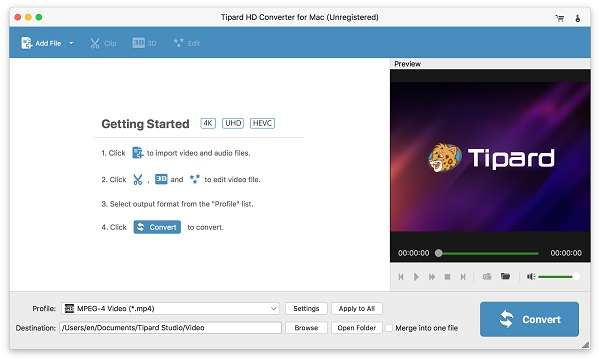
Tipard HD Converter for Mac at launch, unregistered: Add File, Clip, 3D and Edit buttons on top, four getting-started steps, a preview player, and the Profile and Destination fields above the Convert button.
Features
Camcorder AVCHD and broadcast files in, MP4 out
Tipard HD Converter for Mac reads the HD formats that come off camcorders and TV equipment, including MTS, M2TS, TS, TP and TRP, Sony and Panasonic MXF, and HD H.264, MPEG-2 and WMV files, and converts them to MP4, MOV, AVI, MKV or WMV at HD or standard resolution.
Recorded TV from old Windows PCs
Tipard HD Converter for Mac accepts WTV and DVR-MS, the recording formats of Windows Media Center, along with OGM, Bink video, DAT and VOB, which many Mac players won't open at all.
An HD profile for each format
Tipard HD Converter for Mac groups its HD output in an HD Video category: HD MPEG-4, HD H.264/MPEG-4 AVC, HD MOV, HD AVI, HD ASF, HD WMV, HD VOB, HD MKV, MPEG-2 PS and TS, DivX and XviD HD. Under Settings you choose the video encoder, resolution, frame rate and bitrate, and the audio encoder, sample rate, channels and bitrate (for example 128 or 192 kbps).

The profile list in an older version of the app, with the HD Video category open: HD MPEG-4, HD H.264, HD MOV, HD AVI, HD ASF, HD WMV, HD VOB, HD MKV and MPEG-2 HD formats, with device categories on the left.
Pick the audio track and subtitle
Tipard HD Converter for Mac lets you choose which audio track and which subtitle stream goes into the output, or no subtitle at all, which matters for TV recordings and discs with several languages.
Crop, effects, watermark and merge
Tipard HD Converter for Mac's Edit window crops black bars, with a zoom mode such as Letterbox, adjusts brightness, contrast, saturation and volume, and adds a text or image watermark with your own font and color. In the main list you can trim clips and merge several into one file.
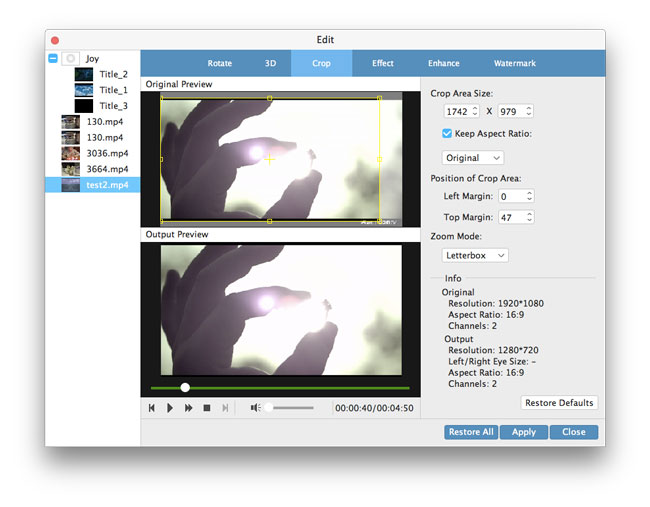
The Crop tab: original and output previews, crop size and margins, Keep Aspect Ratio, a Letterbox zoom mode, and an info panel showing a 1920x1080 source going to 1280x720.
Snapshots and audio extraction
Tipard HD Converter for Mac saves a still frame from the preview player as an image, and exports a video's soundtrack to MP3, AAC, WAV, FLAC and other audio formats.
Benefits
The value here is breadth of input. A Mac handles MP4 and MOV well on its own, but camcorder transport streams, MXF and Windows TV recordings are where Apple's apps give up. Tipard HD Converter for Mac turns that mixed archive into one format you can edit in iMovie or Final Cut, stream from Plex or copy to an iPad, without a monthly fee.
Real-World Uses
- Old AVCHD camcorder cards. Convert the BDMV folder's M2TS clips to 1080p MP4 for iMovie and Photos.
- Windows Media Center recordings. Turn WTV files copied from a retired PC into MP4 you can play on a Mac or Apple TV.
- Standard-definition home video. Write 480p clips as 720p HD so they sit at the right size in an HD project.
- Multi-language recordings. Keep only the English audio track and drop the subtitles before archiving.
Who It's For, and Who Should Skip It
It's a good fit for Mac users digitizing or tidying a home-video archive full of camcorder and TV formats, who want presets rather than encoder settings.
- Skip it if your files are already MP4 or MOV. QuickTime Player can export those to smaller sizes for free.
- Skip it if you shoot in 4K. Tipard 4K Video Converter for Mac has 4K presets in HEVC and VP9.
- Skip it if you want one Tipard app for everything. Tipard pitches Mac Video Converter Ultimate (listed at $70) as the "Pro version", with DVD ripping and upscaling to 5K and 8K.
- Skip it if you're comfortable with free tools. HandBrake (free, native on Apple silicon) reads MTS and M2TS too, but it has no watermark or merge tool.
Usage Guide
- Install. Open hd-converter.dmg, drag the app into Applications and launch it. An Apple silicon Mac asks to install Rosetta the first time.
- Load your videos. Click Add File, or for camcorder footage add the MTS or M2TS files from the card's STREAM folder.
- Choose the output. Under Profile, open HD Video and pick a format, such as HD H.264/MPEG-4 AVC Video (*.mp4). Use Settings to set 1280x720 or 1920x1080.
- Pick audio and subtitles. Set the audio track and subtitle for each file in the list.
- Edit and convert. Open Edit for cropping, effects or a watermark, choose a destination folder, then click Convert.
Where it falls short
- Not native on Apple silicon. The binaries are Intel-only, and Apple has said full Rosetta 2 support ends after macOS 27.
- A dated device list. Profiles for the Zune, PSP, Palm Pre and Windows Phone 7 take up much of the menu.
- Thin release notes. Tipard doesn't say what each update changes, so you can't tell whether a given camera's files are newly supported.
- Same engine as its siblings. Tipard's 4K and TS converters for Mac share this interface and much of the format list, so buying more than one of them gets you little extra.
What Users Say
User comments on Tipard's product page (4.8 from 125 ratings)
These are short comments that Tipard chose to show; the page dates Jude's comment to 2018.
Jude: "This HD Converter for Mac has finished the task to convert HD videos without any problem. It is incredible that this HD Video Converter works so well on my Mac."
Jessica: "It is the best HD video converting software. I am extremely satisfied with it for its simple interface and convenient operation."
William: "It is really practical and very thoughtful design! This Converter helped me convert HD videos. It's so simple that I can finish the converting progress with few clicks."
Tipard on Trustpilot (4.5 from 91 reviews, all products)
Trustpilot reviewers rarely name the product, but their comments on buying from Tipard apply here. Darryl C (US), a customer since 2015, had trouble with Tipard's new registration process and wrote that "Irene was able to correct the issue." A reviewer named Guest asked how to move the software to another PC and got a fast answer.
The low ratings center on activation: one 2-star reviewer described "Such a complicated and incomprehensible activation" in Tipard's Screen Capture, where the program kept showing as unregistered.
In short, people who use it say it's simple, and Tipard's support is well liked. Independent, hands-on reviews of this particular Mac app are hard to find, which fits a small single-purpose tool that hasn't had a major update in years.
Comparisons
Tipard HD Converter for Mac vs Tipard TS Converter for Mac
Both cost $45 and share an engine. The TS Converter is pitched at transport streams and adds DVD and VCD MPEG output; the HD Converter's list is broader on the input side (MXF, WTV, DVR-MS, Bink) and centers on HD output. If your files are mostly camcorder or TV recordings in mixed formats, the HD Converter is the more general choice.
Tipard HD Converter for Mac vs QuickTime Player
QuickTime Player, built into macOS, exports MP4 and MOV at 480p, 720p, 1080p or 4K for free, but only from formats macOS already plays. Tipard's converter is worth paying for when your sources are MTS, M2TS, MXF, WTV or other files QuickTime won't open.
Editions and Pricing
| Product | Price | License | What it adds |
|---|
| Tipard HD Converter for Mac | $45 | Lifetime, 1 Mac, lifetime updates | HD and SD conversion, editing |
| Tipard Mac Video Converter Ultimate | $70 list | Lifetime, 1 Mac | DVD ripping, 4K to 8K, upscaling |
There's no monthly plan for the HD Converter: one payment covers the app for good on one Mac. Tipard's store often shows a coupon price below list.
FAQs
Can Tipard HD Converter for Mac open AVCHD files from a Sony or Canon camcorder?
Yes. Tipard HD Converter for Mac reads the MTS and M2TS files that AVCHD camcorders record. Add the clips from the card's PRIVATE/AVCHD/BDMV/STREAM folder, or copy them to the Mac first.
Does Tipard HD Converter for Mac work on macOS Sequoia, Tahoe or an M-series Mac?
Tipard HD Converter for Mac needs Mac OS X 10.7 or later and runs on current macOS. On an M-series Mac it runs through Rosetta 2 because the app contains only Intel code.
How long can I test Tipard HD Converter for Mac for free?
The Tipard HD Converter for Mac trial converts files of any length but stops after the first 5 minutes of a longer file. That's enough to judge quality on your own camcorder or TV files before paying.
Will reinstalling the app lose my registration?
It can. Tipard notes that uninstalling and reinstalling a registered Tipard program makes it unregistered again, so keep the registration email with your code.
Can Tipard HD Converter for Mac rip DVDs or Blu-rays?
No. Tipard HD Converter for Mac converts video files, including VOB files already copied off an unprotected DVD, but it doesn't read discs. Tipard's DVD Ripper for Mac and Mac Video Converter Ultimate do that.
Is the license good for a Windows PC as well?
No. Tipard's licenses are tied to one platform, and it won't refund a Mac user who bought the Windows version or the reverse.
System Requirements
- Mac OS X 10.7 or later
- Intel Mac, or Apple silicon with Rosetta 2
- 512 MB RAM, 800x600 display, 16-bit graphics or better
- About 51 MB for the installer
Conclusion
Tipard HD Converter for Mac earns its $45 if you have an archive of camcorder AVCHD, MXF or Windows TV recordings and want them all in one Mac-friendly format with a few clicks. That wide input list is the reason to buy it. The reason to hesitate is age: it's an Intel-only app that was last updated in April 2025, with no 4K presets. If your sources already play on a Mac, QuickTime or HandBrake will do the job for free; if they don't, try a 5-minute test conversion of your hardest file first.
Download Free TrialBuy Now