Tipard Mac Video Converter Ultimate: Native on Apple Silicon, With ProRes, HEVC and DVD Ripping
Tipard Mac Video Converter Ultimate is an all-in-one media app for macOS: it converts between hundreds of formats (including ProRes, HEVC and AV1), rips DVDs, shrinks files to a target size and upscales old clips, and it ships a native Apple silicon build. Through the Buy Now button here it costs $56 for a lifetime license, paid once with no renewal.
Think of the Mac owner with an iPhone full of HEVC, a camcorder that writes MTS, a client who wants ProRes, and a cupboard of home DVDs. Apple's own tools cover some of that; this app covers all of it from one window.
Quick facts
- Developer: Tipard Studio
- Version: 10.3.6 for Apple silicon; the Intel build is 10.2.98
- macOS: 10.12 Sierra or later, through current releases
- Codecs: H.264, HEVC, AV1, VP9, ProRes 422 and 4444, DNxHD; ALAC, FLAC, AAC, AC3
- Discs: DVD discs, ISO images and DVD folders (no Blu-ray)
- Price via Buy Now: $56 one-time for a lifetime license (20% off the $70 list price)
- Trial: 5 minutes per file, one file at a time
- What we checked: the 3.9 MB DMG installer and the two app packages it downloads, the Apple silicon one (162 MB, arm64, version 10.3.6.28535, dated June 16, 2026) and the Intel one (version 10.2.98.28081, dated June 12, 2026), the trial limits written in the app, and the order page, rechecked on November 4, 2026, showing "Tipard Mac Video Converter Ultimate" at $56.00 (down from $70) as a lifetime license with no renewal. We didn't rip a DVD or benchmark conversions.
Before you buy
- It's a one-time purchase. The Buy Now button sells the lifetime license at $56, so there's no subscription to cancel. For more than one Mac, Tipard's store sells a 3-Mac lifetime license.
- Mac licenses stay on the Mac. Tipard doesn't convert a Mac license into a Windows one, and a Mac user who bought the Windows version by mistake isn't refunded.
- Protected downloads are out of scope. Copy-protected iTunes and store purchases won't convert, and that isn't grounds for a refund.
Download Free TrialBuy Now
Overview
The installer is small because it's a downloader: it fetches the right package for your Mac, a native arm64 app on M-series machines and an Intel app on older ones. Once open, Tipard Mac Video Converter Ultimate shows five tabs across the top (Converter, Ripper, MV, Collage and More Tools) and a hardware acceleration switch that uses the Mac's media engine through VideoToolbox.
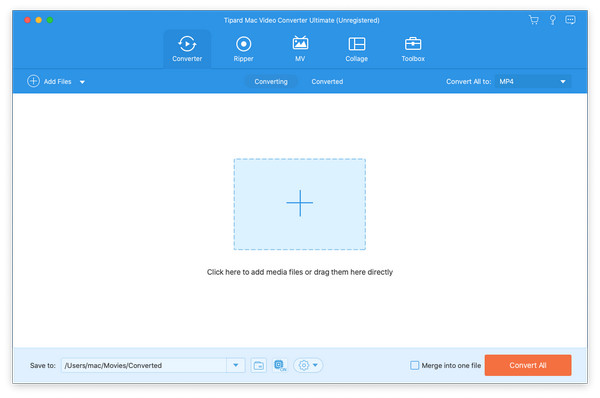
Tipard Mac Video Converter Ultimate (Trial Version) on first launch: the five tabs, the Hardware acceleration switch, three getting-started steps, "5K/8K Video MP4 8K Video" as the output format, a 120x Faster Conversion toggle and Convert All.
Features
Apple-friendly formats in and out
Tipard Mac Video Converter Ultimate turns MKV, AVI, WMV, FLV, MTS and other formats that QuickTime won't open into MOV, MP4 or M4V, and writes ProRes 422 and 4444 for Final Cut Pro, HEVC for small iPhone-friendly files and AV1 for the web. Presets target iPhone, iPad, MacBook and Apple TV, and you can set bitrate, frame rate, resolution and aspect ratio yourself. Tipard says HDR10, HDR10+ and Dolby Vision metadata are kept.
Pull out audio and subtitles
Tipard Mac Video Converter Ultimate extracts a video's soundtrack to MP3, AAC, FLAC, AC3, OGG, WAV or WMA, can add or swap audio tracks and subtitles, and changes caption size and color before export.
DVD ripping on a Mac without a disc app
Tipard Mac Video Converter Ultimate's Ripper reads DVD discs from a USB drive, DVD ISO files, DVD folders and AVCHD discs, detects the main title, and converts it to MP4, MOV, MKV or audio, or copies it losslessly to MKV or MPG.
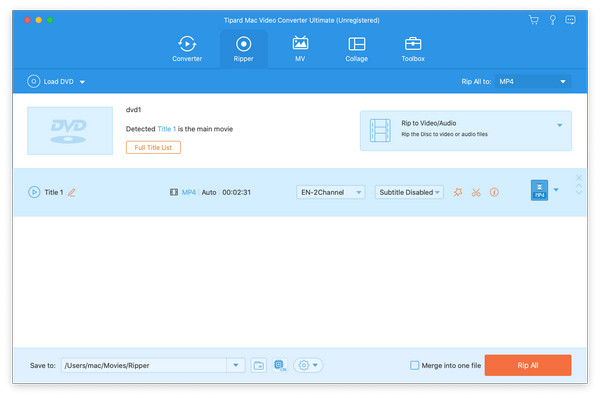
The Mac Ripper tab with a disc loaded: "Detected Title 1 is the main movie", Rip to Video/Audio, a 2-channel audio track, subtitles disabled, MP4 H.264/HEVC output and Rip All.
Compress to the size you need
Tipard Mac Video Converter Ultimate's Video Compressor shows the current size, format, resolution and bitrate, then lets you drag a slider or type a target size and preview the result, which is handy for AirDrop limits, email attachments and nearly full MacBook drives.
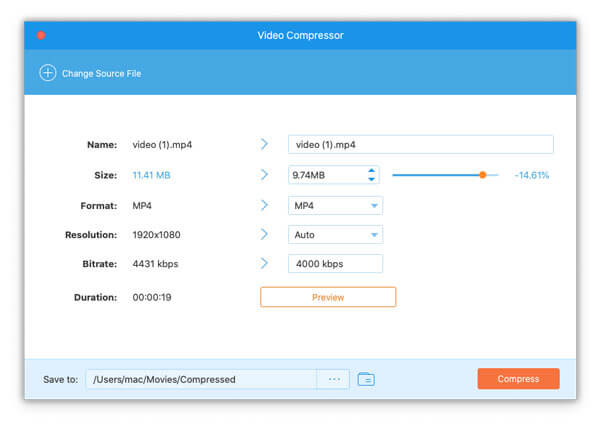
The Video Compressor on macOS: an 11.41 MB 1080p MP4 set to 9.74 MB (-14.61%) at 4000 kbps, with Preview and Compress buttons.
AI enhancer and creative extras
Tipard Mac Video Converter Ultimate's Video Enhancer upscales to 4K, 5K or 8K, cuts noise, corrects color and steadies shaky footage. The MV tab builds music videos from themes like Happy, Christmas or Snowflake, Collage has more than 40 split-screen templates, and More Tools adds a GIF maker, 3D maker, watermark adder and remover, speed changer, reverser, audio sync, metadata editor and image converter.
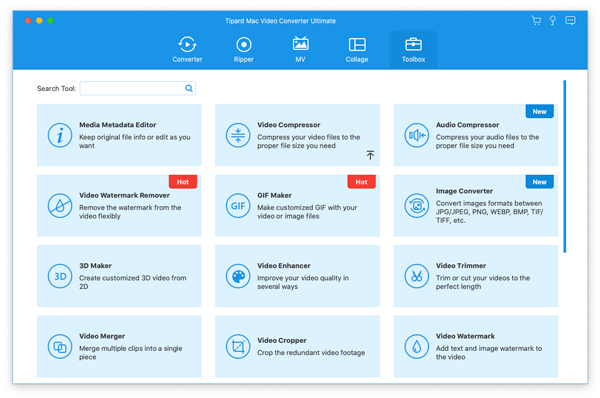
More Tools on the Mac: Video Compressor, Watermark Remover, GIF Maker, 3D Maker, Video Enhancer, Trimmer, Merger, Cropper, Watermark and Color Correction, plus tiles for Tipard Blu-ray Player for Mac and Blu-ray Converter for Mac, which are separate products.
Benefits
- Runs natively on M-series Macs, so long 4K jobs don't depend on Rosetta, which Apple is winding down after macOS 27.
- Bridges Mac and non-Mac formats: MKV and AVI in, ProRes and HEVC out, without learning ffmpeg.
- One app instead of several for converting, ripping, compressing and fixing clips.
Real-World Uses
- Editing prep. Convert a client's MKV and MTS footage to ProRes 422 so Final Cut or iMovie edits it smoothly.
- CCTV and dashcam files. Turn odd recorder formats into MP4 that QuickTime plays.
- DVD memories on a MacBook. Rip family DVDs from an external drive to MP4 for the Photos library.
- Freeing space. Batch-compress a year of 4K iPhone videos with HEVC.
Who It's For, and Who Should Skip It
It's a good fit for Mac users who regularly meet files Apple's apps won't take, or who still have DVDs, and want menus and presets rather than command lines.
- Skip it if your files are all MOV and MP4. QuickTime Player and Photos export and trim those for free.
- Skip it if you only need one thing. HandBrake (free, native) converts well, and Tipard's own single-purpose Mac apps cost less than the suite.
- Skip it for Blu-ray. The Ripper handles DVDs; Blu-ray ripping is Tipard's separate Blu-ray Converter for Mac.
Usage Guide
- Download and install. Open mac-video-converter-ultimate.dmg and run the installer; it downloads the Apple silicon or Intel app for your Mac.
- Add media. Click Add Files on the Converter tab, or Load DVD on the Ripper tab.
- Choose a format. Click Output Format and pick a device preset or a codec such as ProRes or HEVC; open Settings for bitrate and resolution.
- Fix what's needed. Trim, crop, add filters, subtitles or watermarks, or run the Enhancer.
- Export. Leave Hardware acceleration on, choose the save folder and click Convert All.
Where it falls short
- Intel Macs get an older build. The Intel package is version 10.2.98 while Apple silicon has 10.3.6, so new features may reach Intel later.
- Promotions inside the app. A "50% OFF to Get VIP" button sits in the title bar, and some More Tools tiles open other Tipard products for sale.
- Trial is tight. Five minutes per file and no batch work make it hard to judge the full workflow before paying.
- Registration hiccups. Trustpilot reviewers of Tipard report needing support to finish activation.
What Users Say
On Tipard's Mac product page (4.9 from 2,007 ratings, chosen by Tipard)
Mignon: "So magnificent! I used it to convert my CCTV videos to MP4. I can create funny videos from my recordings. This converter has so many practical features."
Daphne, a student: "I find this video converter can maintain high video quality output... I can convert a 4k movie video and enjoy it on my Mac."
Gerald: "I made a very fascinating collage video of a daily vlog of me and my friends! That looks so cool! It also offers many collage templates."
Tipard's Trustpilot profile (4.5 from 91 reviews)
The company-wide reviews mostly praise support and ease of use. MFrisch (Germany): "Super satisfied with the program and the customer support." Kurt (Switzerland) had a license reactivated after a drive replacement, once he noticed Tipard's reply had gone to spam. Herve DELEBOIS (France) titled his review "True lifetime account… that's great !"
The critical reviews are about registration: Pablo (Czech Republic, 2 stars) described "Such a complicated and incomprehensible activation" after a Tipard program wouldn't accept his code.
The overall picture: buyers like the format range and the help they get, and the friction is in licensing, not conversion. Independent hands-on reviews of the Mac edition are few; it's mostly covered by download sites and coupon pages.
Comparisons
Tipard Mac Video Converter Ultimate vs HandBrake for Mac
HandBrake is free and native on Apple silicon, and handles most conversions, but it can't copy a DVD to ISO, and has no compressor-by-size, enhancer, collage or GIF tools. Tipard costs money and adds those conveniences.
Mac Video Converter Ultimate vs Tipard's single-purpose Mac converters
Tipard also sells narrower Mac apps such as 4K Video Converter, HD Converter and TS Converter for Mac. Those are older, Intel-only programs; the Ultimate suite is the one with a native Apple silicon build, DVD ripping and the toolbox.
Editions and Pricing
| Plan | Price | Billing | Macs |
|---|
| Lifetime (Buy Now on this page) | $56 (list $70) | Once | 1 |
| Lifetime, 3 Macs (Tipard's store) | $100 list | Once | 3 |
| With Screen Capture for Mac (Tipard's store) | $131.25 list | Once | 1 |
Coupon prices on Tipard's store are usually lower than these list prices.
FAQs
Is Tipard Mac Video Converter Ultimate native on M1 to M5 Macs?
Yes. Tipard Mac Video Converter Ultimate's installer downloads a separate arm64 build for Apple silicon, so it doesn't need Rosetta. Intel Macs get an Intel build.
Can Tipard Mac Video Converter Ultimate make ProRes files for Final Cut Pro?
Yes. Tipard Mac Video Converter Ultimate lists ProRes profiles including ProRes 422 and ProRes 4444 among its outputs, alongside HEVC and H.264.
Will the license keep charging me?
No. The Tipard Mac Video Converter Ultimate license on our Buy Now button is a lifetime license: the order page charges $56 once and sets no renewal.
Do I need an external drive to rip DVDs on a Mac?
For physical discs, yes, since current Macs have no optical drive; any USB DVD drive works. Tipard Mac Video Converter Ultimate also rips DVD ISO files and DVD folders already on your disk.
What does the free trial allow?
Tipard Mac Video Converter Ultimate's trial converts up to 5 minutes of each file, one file at a time, and some MV themes are locked.
Which macOS versions are supported?
Tipard lists macOS 10.12 Sierra and later for Tipard Mac Video Converter Ultimate, including the newest macOS releases.
System Requirements
- macOS 10.12 or later
- Apple silicon (native) or Intel processor, 1 GHz or faster
- 2 GB RAM, 1024x768 display, 2 GB free disk space
- A USB DVD drive to rip physical discs
Conclusion
Tipard Mac Video Converter Ultimate is the strongest of Tipard's Mac converters: actively updated, native on Apple silicon, and broad enough to replace several tools for anyone who regularly deals with odd formats, ProRes or DVDs. That combination is the reason to buy it. The reason to hesitate is overlap with free tools: if HandBrake and QuickTime already cover your files, $56 buys little. The button here sells a $56 lifetime license, paid once. Try the trial first to make sure it handles your formats and discs.
Download Free TrialBuy Now