Tipard Screen Capture Pro: A Recorder, PowerPoint Converter, Video Converter and Disc Burner in One Windows Bundle
Tipard Screen Capture Pro is an $87 lifetime Windows bundle of four Tipard programs: a screen recorder, a PowerPoint-to-video and DVD converter, a video converter and a DVD and Blu-ray creator. It's meant for teachers, trainers and presenters who record lessons, turn slide decks into videos and hand the results out on disc. Its installer dates from April 2021.
The idea is a production line on one PC: record a software demo, convert last year's PowerPoint into a narrated video, tidy both up, and burn them to a DVD with a menu for a room that still has a disc player.
Quick facts
- Developer: Tipard Studio
- Version: 8.0.20 (installer from April 2021)
- Platform: Windows 7, 8, 10 and 11; no Mac version
- Included: Screen Recorder, PPT Converter Pro, Video Converter, DVD Creator (DVD and Blu-ray)
- Disc output: DVD disc, folder or ISO; Blu-ray disc, folder or ISO
- Price: $87 lifetime license; Tipard also sells a 1-year license
- Requirements: 1.2 GHz Intel or AMD CPU, 1 GB RAM
- What we checked: the screen-capture-pro.exe installer (293 MB, file version 8.0.20, dated April 1, 2021, with Tipard Studio named in its version info) and the $87.00 lifetime price at checkout, both on November 4, 2026. We didn't install the bundle or test its trial.
Before you buy
- This bundle hasn't been updated since April 2021. The programs inside are 2021 versions, while Tipard keeps updating the same tools when sold on their own. If you mainly want the screen recorder, the standalone Tipard Screen Capture is the current one.
- Windows only. There's no Mac edition, and Tipard doesn't move licenses between platforms.
- Try it first. Tipard's 30-day guarantee doesn't cover a change of mind or a program that turned out not to fit your needs.
Download Free TrialBuy Now
Overview
Screen Capture Pro installs a small launcher with four tiles, each opening a separate Tipard program. They don't share a timeline or project file: you record in one, save the file, and open it in the next. What you get is four licenses for the price of one bundle, not an integrated editor.
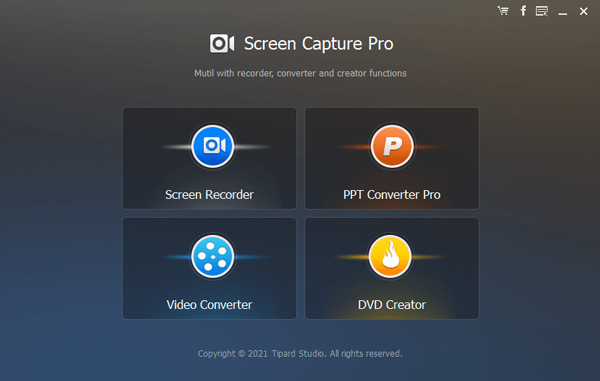
The Screen Capture Pro launcher: four tiles for Screen Recorder, PPT Converter Pro, Video Converter and DVD Creator, with a 2021 copyright line.
What's in the Bundle
Screen Recorder: screen, webcam and audio
Tipard Screen Capture Pro's recorder captures the full screen or a region you drag out, with system sound, your microphone or both, and can also record audio on its own. While recording you can draw rectangles, arrows and text on the screen, and take a screenshot.
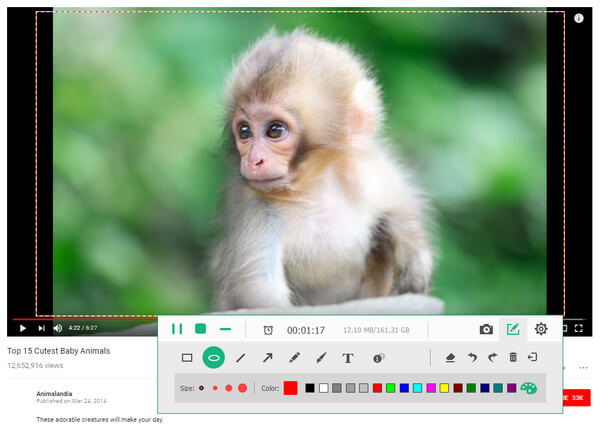
Tipard's recorder during a capture (from Tipard's Screen Capture guide): a dashed recording area, pause and stop buttons, elapsed time and file size, and a drawing bar with shapes, lines, arrows, pen, text and colors.
PPT Converter Pro: PowerPoint to video or DVD
Tipard Screen Capture Pro's PowerPoint converter turns PPT, PPTX, PPS and ODP files into video (MP4, WMV, AVI and others) or into a DVD with a menu. Auto Mode advances slides on a timer and needs PowerPoint 2010 or later on the PC; Advanced Mode lets you click through the deck yourself and can keep the narration recorded in the deck.
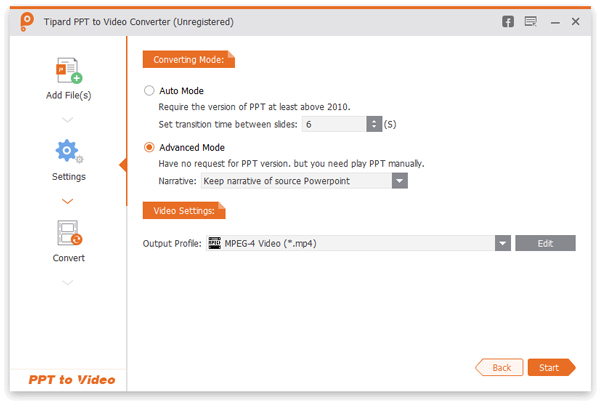
The PowerPoint converter's Settings step: Auto Mode with a 6-second slide transition, Advanced Mode with "Keep narrative of source PowerPoint", and MPEG-4 Video as the output profile.
Video Converter: formats, devices and quick edits
Tipard Screen Capture Pro's converter changes video and audio between common formats, including 4K and HD MP4, MKV, MOV, AVI, WMV and WebM, with profiles for iPhone, iPad and Android, and trims, crops, rotates and adds watermarks. It's the tool for shrinking a long recording or making a phone-friendly copy.
DVD Creator: burn DVDs and Blu-rays with menus
Tipard Screen Capture Pro's disc tool burns MP4, MOV, MKV, AVI, FLV, WMV, MTS, M2TS, TS and other videos to a DVD or Blu-ray disc, or saves a disc folder or ISO file. It has menu templates in themes such as Scenery, Festival and City, and you can use your own background picture and music.
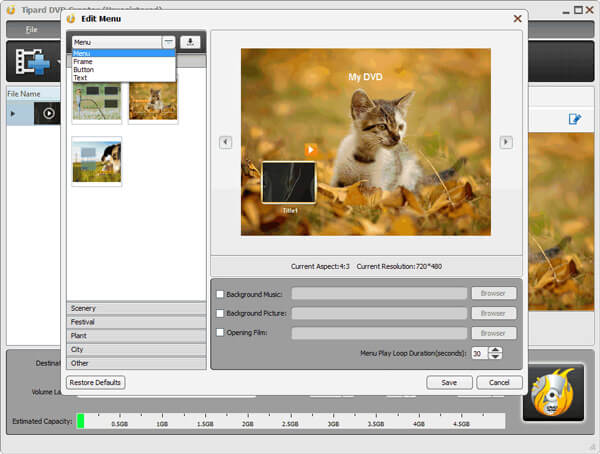
The disc creator's Edit Menu window: template thumbnails by theme, a "My DVD" menu preview at 720x480, and options for background music, a background picture and an opening film.
Benefits
The point of the bundle is coverage of a whole workflow for someone who still delivers on disc. Free tools can record your screen, and PowerPoint can export a video, but authoring a DVD or Blu-ray with a menu is where most people get stuck, and here it comes alongside the recorder and converters for one price.
Real-World Uses
- Classroom DVDs. Convert a term's lecture slides to video and burn them to a DVD with a chapter menu for students without reliable internet.
- Software training. Record a walkthrough with arrows and callouts drawn on screen, then make an MP4 copy for the intranet.
- Kiosk or trade-show loops. Turn a sales deck into an auto-advancing MP4 for a screen that has no PowerPoint.
- Event archives. Burn recorded webinars to Blu-ray or save them as ISO files for long-term storage.
Who It's For, and Who Should Skip It
It's a good fit for a Windows user who needs all four jobs, especially the PowerPoint-to-DVD and disc-burning parts, and prefers one purchase to four.
- Skip it if you only need a screen recorder. Buy the current standalone Tipard Screen Capture, or use OBS Studio, which is free.
- Skip it if your slides only need to become an MP4. PowerPoint's own File > Export > Create a Video does that for free.
- Skip it if you never burn discs. Most of the bundle's value is the DVD and Blu-ray tools.
- Skip it if you're on a Mac. The bundle is Windows-only.
Usage Guide
- Install. Run screen-capture-pro.exe (about 293 MB) and open Screen Capture Pro from the Start menu.
- Record. Click Screen Recorder, drag the capture area, choose system sound and/or microphone, and click REC. Click Stop to preview and save.
- Convert slides. Click PPT Converter Pro, choose video or DVD, add your PowerPoint files, pick Auto or Advanced Mode and start.
- Convert or trim video. Open Video Converter, add the files, choose a profile and convert.
- Burn. Open DVD Creator, add your videos, pick a menu template, insert a blank disc (or choose folder or ISO) and burn.
Where it falls short
- Frozen in 2021. Five years without an installer update means none of the newer recording, editing or format work in Tipard's standalone apps.
- Four programs, not one. Each tool has its own window and settings, and files move between them by saving and reopening.
- Big download. The installer is nearly 300 MB because it carries all four programs.
- Auto Mode needs PowerPoint. Timed slide conversion requires PowerPoint 2010 or later installed on the same PC.
- Activation friction. Recent Trustpilot complaints about Tipard concern registration codes not taking, so keep your purchase email.
What Users Say
Tipard's Screen Capture on Trustpilot
Tipard holds 4.5 stars from 91 Trustpilot reviews. None names the Pro bundle, but several review Tipard's screen recorder, the tool this bundle is named after.
Simon (US), 5 stars, "Best screen capture product": he "found it is the most powerful screen capture product".
Irv Brenner (US), 5 stars, "I use Tipard Screen Capture": he praises easy recording, trimming and compression, capturing system and microphone audio together, and adds that "Tipard's support is timely, knowledgeable".
Pablo (Czech Republic), 2 stars, "Activate Screen capture…": after entering his code the program still showed as unregistered and asked for payment, and he lost an hour-long recording. He called it "Such a complicated and incomprehensible activation".
Other Tipard customers
Ravi Kumar (India) uses Tipard's video recording regularly and notes that "Tipard is constantly improving and adding newer features", which is true of the standalone apps but not of this 2021 bundle. Mike (Australia) called Tipard's DVD software "Great DVD Ripper. Easy to use. Great lossless ripping." Tipard's own product page shows 4.8 from 154 ratings for Screen Capture Pro.
The recurring themes: the recorder is easy and capable, support answers quickly, and the pain point is activation. Test a long recording during the trial, and register before relying on it for anything you can't redo.
Comparisons
Tipard Screen Capture Pro vs the standalone Tipard Screen Capture
The standalone Screen Capture is Tipard's current recorder, updated on its own schedule, and costs less ($61.25 list for a lifetime license). Screen Capture Pro adds a PowerPoint converter, a video converter and a DVD/Blu-ray burner, but in 2021 versions. Buy Pro only if you'll use the disc and PowerPoint tools.
Tipard Screen Capture Pro vs OBS Studio
OBS Studio is free and far more powerful for streaming and multi-source recording, but it has a steeper learning curve and no drawing tools, PowerPoint converter or disc burner. Tipard is simpler for a one-click lesson recording.
Editions and Pricing
| License | List price | Term |
|---|
| Lifetime (Buy Now on this page) | $87 | Use it forever, with free updates |
| 1 Year | $62 | One year of use |
Tipard's store usually shows a 20% coupon on both. With no updates since 2021, the lifetime license's "free updates" are worth little; buy it for what the programs do today.
FAQs
Does Tipard Screen Capture Pro work on Windows 11?
Yes. Tipard lists Windows 7, 8, 10 and 11 for Tipard Screen Capture Pro. Bear in mind the programs date from 2021, before some later Windows 11 updates.
Is Tipard Screen Capture Pro the same as Tipard Screen Capture?
No. Tipard Screen Capture is the stand-alone, current screen recorder. Tipard Screen Capture Pro is an older bundle that includes a recorder together with a PowerPoint converter, a video converter and a DVD/Blu-ray creator.
Do I need PowerPoint installed to convert slides with Tipard Screen Capture Pro?
For Auto Mode, yes: Tipard Screen Capture Pro needs PowerPoint 2010 or later to play the slides on a timer. Advanced Mode works without that version requirement, but you advance the slides by hand while it records.
Can it burn a Blu-ray disc?
Yes. Tipard Screen Capture Pro's DVD Creator also writes Blu-ray discs, folders and ISO files, provided your PC has a Blu-ray burner for disc output.
Can I use the license on more than one PC?
Tipard's standard licenses cover one computer. For several PCs, Tipard sells multi-user licenses through its support team.
Will Tipard refund the bundle if I don't use all four programs?
No. Tipard's 30-day guarantee covers problems like a code that never arrived, a duplicate purchase or a technical fault it can't fix, not a change of mind. Use the trial download first.
System Requirements
- Windows 7, 8, 10 or 11
- 1.2 GHz Intel or AMD processor or faster
- 1 GB RAM or more
- About 300 MB for the installer, plus space for recordings; a DVD or Blu-ray burner for disc output
Conclusion
Tipard Screen Capture Pro makes sense for one kind of buyer: a Windows user who records lessons or demos and turns PowerPoint decks into DVDs or Blu-rays with menus. For that, $87 once for four tools is fair. For everyone else it's hard to recommend, because the bundle hasn't been updated since 2021. If you mainly want a screen recorder, the standalone Tipard Screen Capture or free OBS Studio is the better choice.
Download Free TrialBuy Now