Tipard Video Converter Ultimate: GPU-Accelerated Converting, DVD Ripping and a Big Toolbox for Windows
Tipard Video Converter Ultimate is a Windows video converter that also rips DVDs, compresses large files, upscales video with an AI enhancer and packs about two dozen small editing tools. It handles AV1, HEVC, H.264 and ProRes and uses NVIDIA, AMD or Intel graphics to speed things up. The Buy Now button on this page sells a 1-month plan at $36 that renews monthly; Tipard also sells lifetime licenses on its own store.
It's built for the PC owner whose video problems pile up: a phone clip that won't play on the TV, a shelf of home DVDs, a 4 GB recording that needs to fit in an email, a drone video that needs trimming. One window covers all of it.
Quick facts
- Developer: Tipard Studio
- Version: 10.5.18
- Platform: Windows 11, 10, 8.1, 8 and 7, 32- or 64-bit (a separate Mac version exists)
- Tabs: Converter, Ripper (DVD), MV, Collage, More Tools
- Acceleration: NVIDIA, AMD and Intel GPUs
- Price via Buy Now: $36 for one month on one PC, renewing monthly until you switch auto-renewal off
- Trial: 5 minutes of each file, no batch conversion
- What we checked: the online installer (2.1 MB) and the full 64-bit package it downloads (153 MB, file version 10.5.18, dated January 2, 2026), and the order page on November 4, 2026, which showed "Tipard Video Converter Ultimate - 1 Month" at $36.00 with automatic monthly renewal ticked. We didn't rip a disc or time a GPU conversion.
Before you buy
- The Buy Now button is a monthly subscription. Automatic renewal is ticked on the order page; untick it if you only need one month. If you'll use the program for more than two months, Tipard's lifetime license ($70 list on its store) works out cheaper.
- Protected downloads aren't covered. Tipard won't refund a license bought to convert copy-protected iTunes or other store purchases. Copying commercial DVDs is also restricted by law in some countries.
- Refunds are narrow. Tipard's 30-day guarantee excludes a change of mind, so run the trial on your own files first.
Download Free TrialBuy Now
Overview
Tipard Video Converter Ultimate is laid out in five tabs. Converter is the main list where files are re-encoded or, when the codec already fits, remuxed into a new container without re-encoding. Ripper handles DVD discs, ISO images and VIDEO_TS folders. MV and Collage are light creative tools for slideshows and split-screen videos. More Tools is a grid of single-purpose utilities.
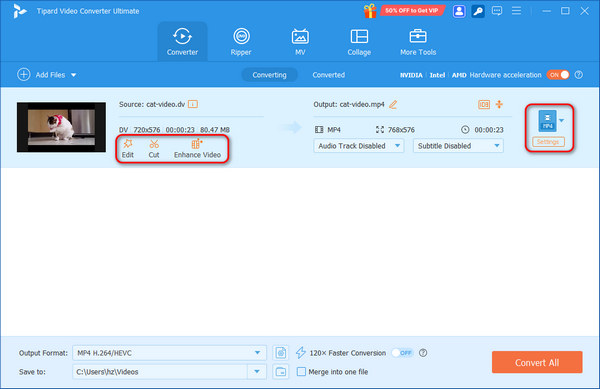
The Converter tab on Windows: a 720x576 DV clip set to come out as MP4, with Edit, Cut and Enhance Video under the source, audio-track and subtitle menus, the NVIDIA/Intel/AMD hardware acceleration switch at top right, and Convert All at the bottom.
Features
Modern codecs and device presets
Tipard Video Converter Ultimate reads and writes MP4, MKV, MOV, WebM, AVI, WMV, TS, MTS and many more, with H.264, HEVC, AV1, VP9, ProRes, DNxHD and MPEG-2 video and FLAC, ALAC, AAC, AC3 and Opus audio. Presets cover iPhone, Samsung Galaxy, smart TVs, PS5, Steam Deck, Plex and upload targets like YouTube, and you can set bitrate, resolution, frame rate and audio channels by hand.
GPU acceleration on Windows
Tipard Video Converter Ultimate offloads decoding and encoding to NVIDIA NVENC/NVDEC, AMD AMF or Intel Quick Sync when your PC has one of them, which keeps the CPU free for other work during long 4K jobs. Tipard's "120x faster" figure is a marketing best case; real gains depend on your graphics card and codec.
DVD ripping and 1:1 backups
Tipard Video Converter Ultimate's Ripper converts DVDs, ISO files and VIDEO_TS folders to MP4, MKV, MOV or audio formats, or makes a lossless copy as MKV or MPG with the original streams, or as a DVD ISO or folder. You choose the main title, audio track and subtitle before ripping.
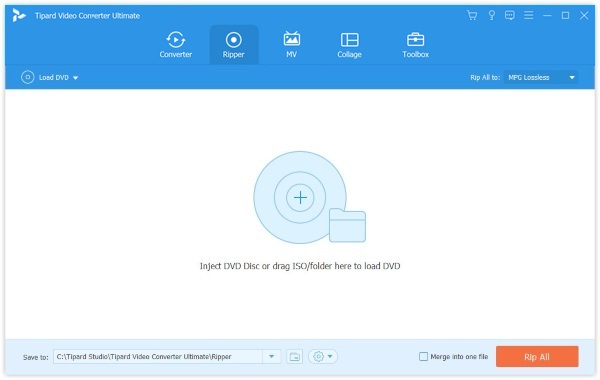
The Ripper tab before a disc is loaded: Load DVD, a three-step getting-started panel, MP4 H.264/HEVC as the output format and a Rip All button.
Video Enhancer: upscale, denoise, steady
Tipard Video Converter Ultimate's Video Enhancer has four switches: upscale resolution, optimize brightness and contrast, remove video noise and reduce shaking. Tipard describes the upscaler as AI-based and offers targets up to 4K and 8K. It helps soft, grainy old clips; it can't recover detail that was never recorded.
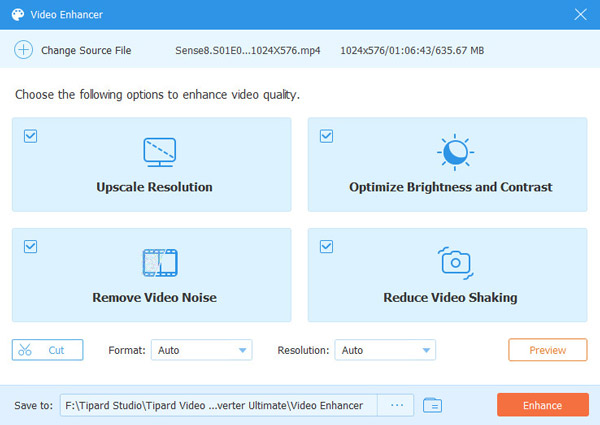
The Video Enhancer on a 1024x576 episode: Upscale Resolution, Optimize Brightness and Contrast, Remove Video Noise and Reduce Video Shaking all ticked, with Cut, Format, Resolution and Preview below.
Compressor to a target size
Tipard Video Converter Ultimate's Video Compressor lets you type the file size you need, and it picks the bitrate, optionally switching to HEVC or AV1 for better quality at that size. It works in batches for a folder of 4K clips.
More Tools: the small jobs
Tipard Video Converter Ultimate's More Tools tab adds a GIF maker, 3D maker, watermark remover, trimmer, merger, cropper, rotator, speed controller (0.125x to 8x), reverser, volume booster, noise remover, audio sync, metadata editor, file date changer and image converter, plus MV (themed music videos) and Collage (split-screen) tabs.
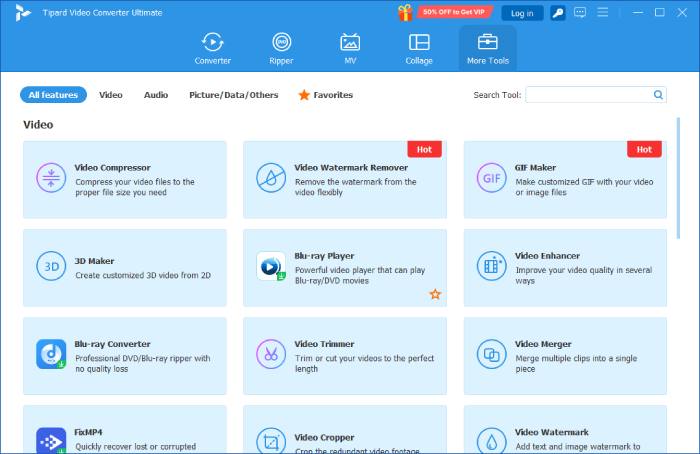
The More Tools grid: Video Compressor, Video Watermark Remover, GIF Maker, 3D Maker, Video Enhancer, Trimmer, Merger, Cropper and Watermark, alongside tiles for Tipard's separate Blu-ray Player, Blu-ray Converter and FixMP4 apps.
Benefits
The appeal is not needing five programs. HandBrake converts, MakeMKV rips, a GIF site makes GIFs, and a separate app fixes audio sync. Tipard puts those jobs behind one interface with presets, so a non-expert can get a working file without learning codecs, and a GPU-equipped PC gets through large batches quickly.
Real-World Uses
- Home DVD archive. Rip a box of family DVDs to MP4 for Plex, or keep 1:1 ISO backups.
- Emailing a big clip. Compress a 1.2 GB 4K recording to a size your mail service accepts.
- Old footage refresh. Upscale, denoise and stabilize a 480p camcorder video before sharing it.
- Social posts. Turn a highlight into a GIF, a reversed clip or a split-screen collage.
Who It's For, and Who Should Skip It
It's a good fit for Windows users who want converting, DVD ripping and simple fixes in one paid tool with presets and GPU speed.
- Skip the monthly plan if you'll keep it. At $36 a month, the lifetime license pays for itself within two months.
- Skip it if you need Blu-ray ripping. The Ripper handles DVDs; Blu-ray is Tipard's separate Blu-ray Converter.
- Skip it if you're comfortable with free tools. HandBrake (converting) and MakeMKV (ripping) cover the core jobs at no cost, without the toolbox.
- Skip it if you need a real editor. Trimming and filters are basic; for timelines and titles use a proper video editor.
Usage Guide
- Install. Run video-converter-ultimate.exe; the small online installer downloads the full program (about 150 MB) and installs it.
- Turn on acceleration. Check the hardware acceleration switch on the Converter tab is on if you have an NVIDIA, AMD or Intel GPU.
- Add files or a disc. Click Add Files in Converter, or Load DVD in Ripper.
- Pick the output. Choose a format or device preset under Output Format; use Edit, Cut or Enhance Video for fixes.
- Convert. Set the Save to folder and click Convert All (or Rip All).
Where it falls short
- Upsell clutter. A "50% OFF to Get VIP" banner sits in the title bar, and the More Tools grid mixes in tiles for other Tipard products you'd have to buy separately.
- Large-file failures. The single G2 review (3.5 of 5) liked the speed and ease of use but reported failed conversions on large files.
- Online installer. The 2 MB download fetches the real 150 MB package, which doesn't suit offline or locked-down PCs.
- Activation complaints. Recent Trustpilot reviews of Tipard mention registration codes not being recognized until support stepped in.
What Users Say
Tipard's product page (4.9 from 2,133 ratings, testimonials chosen by Tipard)
Kayla, an editor: "I'm impressed that Tipard Video Converter Ultimate keeps my camera videos in original 4K, 60 fps quality with accurate colors. It makes saving and watching my footage on different devices much easier."
ChaosCreator: "I've successfully compressed 5 4K movies with AV1 codec! Tipard Video Converter Ultimate is so amazing! It works so stably during the entire process."
lowkeyevil, a product manager: "I enhanced a simple video to 4K 4Mbps, and it quickly did it for me. I think it works better than Shutter Encoder and Video2X."
Independent review sites
G2 lists a single review of Tipard Video Converter Ultimate, rated 3.5 of 5: the reviewer found it easy to use and fast, but some large-file conversions failed with errors. Other independent hands-on reviews are scarce; most "reviews" in search results are coupon pages selling licenses.
Tipard on Trustpilot (4.5 from 91 reviews, all products)
Support gets the most praise. JS (Germany): "Excellent customer support, fast and customer focused!" Brian Fisher (New Zealand) couldn't sign in or register at first, and after several exchanges Tipard sent a file that fixed it: "You have a winner here!"
On the negative side, Pablo (Czech Republic, 2 stars) lost a recording when a Tipard program stayed unregistered after he entered his code, calling it "Such a complicated and incomprehensible activation".
Summed up: owners like the speed, the codec range and the support team, while the complaints are about activation and occasional failures on very large files. Keep your order email and test your biggest file during the trial.
Comparisons
Tipard Video Converter Ultimate vs HandBrake
HandBrake is free, an excellent encoder and can convert unprotected DVDs, but it can't make ISO or folder backups, has no compressor-to-size, GIF maker, watermark tools or enhancer, and its settings assume some knowledge. Tipard trades money for convenience and extras.
Tipard Video Converter Ultimate vs Tipard Video Converter
Tipard's plain Video Converter covers format conversion and basic editing. Ultimate adds the DVD Ripper, the AI enhancer and the More Tools grid. If you have no discs and don't need the extras, the plain converter is enough.
Editions and Pricing
| License | Price | Term | PCs |
|---|
| 1 Month (the Buy Now button on this page) | $36 | Renews monthly until cancelled | 1 |
| Lifetime (Tipard's store) | $70 list | One-time, lifetime updates | 1 |
| Lifetime, 3 PCs (Tipard's store) | $100 list | One-time | 3 |
| Bundle with Screen Capture (Tipard's store) | $131.25 list | Lifetime | 1 |
Tipard's store usually shows coupon prices well below these list prices. Licenses are platform-specific: a Windows license won't register the Mac version.
FAQs
How do I stop the Tipard Video Converter Ultimate monthly plan from renewing?
Untick automatic renewal on the order page when you buy; the order page also says auto-renewal can be disabled at any time afterwards. Otherwise Tipard Video Converter Ultimate's 1-month plan renews at the same $36 each month.
Can Tipard Video Converter Ultimate rip Blu-ray discs?
No. Tipard Video Converter Ultimate's Ripper handles DVDs, DVD ISO images and VIDEO_TS folders. Blu-ray ripping is Tipard's separate Blu-ray Converter, which appears as a tile in More Tools but is a different product.
Does Tipard Video Converter Ultimate work without an NVIDIA card?
Yes. Tipard Video Converter Ultimate also accelerates with AMD and Intel graphics, and without any of them it converts on the CPU, just more slowly.
Is there a file size limit?
Tipard says Tipard Video Converter Ultimate has no file size limit, including 4K, 5K and 8K video. The free trial, though, only converts 5 minutes of each file.
Can I install it on a second PC?
Not with the 1-month or single lifetime license, which cover one computer. Tipard sells a 3-PC lifetime license for that.
Does it still support Windows 7?
Yes. Tipard lists Windows 7, 8, 8.1, 10 and 11, in 32-bit and 64-bit, for Tipard Video Converter Ultimate, and ships separate x86 and x64 packages.
System Requirements
- Windows 11, 10, 8.1, 8 or 7 (32-bit or 64-bit)
- 1 GHz Intel or AMD processor, 2 GB RAM
- 1024x768 display, 2 GB free disk space
- Optional: NVIDIA, AMD or Intel GPU for acceleration; a DVD drive for ripping
Conclusion
Tipard Video Converter Ultimate is a capable, current all-rounder for Windows: modern codecs, GPU speed, DVD ripping and a genuinely useful compressor and enhancer in one place. The reason to buy it is that breadth with presets, which saves you juggling free tools. The reason to think twice is the price model behind this page's button: $36 a month is good for a one-off project, but anyone who'll use it for longer should look at a lifetime license instead. Start with the trial and convert your largest file.
Download Free TrialBuy Now