Tipard DVD Cloner: Copy DVDs to Disc, ISO or Folder on Windows
Tipard DVD Cloner is a $45 Windows program that copies a DVD to a blank DVD, an ISO image or a VIDEO_TS folder, either whole, as just the main movie, or with only the titles and languages you pick. Our Buy Now button sells the lifetime license for one PC, a one-time payment.
DVDs age badly. Kids' favorites get scratched, rental-era discs start skipping, and a shelf of cases takes up room you'd rather use. DVD Cloner is the simple fix for a Windows PC with a DVD drive: make a spare disc, or turn the collection into ISO files you can burn again whenever one fails. If you want MP4 files for a phone or Plex instead, that's a ripper's job, not a cloner's.
Quick facts
- Version: 6.3.6 (installer dated August 13, 2026)
- Developer: Tipard Studio
- Runs on: Windows 7, 8, 10 and 11. A separate Mac edition exists.
- Copies from: DVD discs (DVD-5, DVD-9, DVD±R, DVD±RW, DVD±R DL), DVD folders and ISO images
- Copies to: a blank DVD, an ISO image or a DVD folder
- Copy modes: Full Copy, Main Movie and Customize
- Price: $45 one-time on the order page (lifetime license for 1 PC; $56.25 list with a 20% discount)
- Trial: free download; third-party reviews describe a 15-day trial limited to 3 discs
- What we checked: the 36.1 MB installer from Tipard's download server, file version 6.3.6, and the order page, which charged $45.00 for the lifetime 1-PC license with no renewal, both on November 4, 2026. We didn't copy a disc with it.
Before you buy: buy dual-layer blanks for full-quality copies
A 1:1 copy needs a blank as big as the original: DVD-5 to DVD-5, or a dual-layer DVD-9 movie to a DVD+R DL blank. If you squeeze a DVD-9 onto a single-layer disc, the program has to re-encode it, and that's where an independent test found DVD Cloner at its weakest (see What Users Say). So budget for DL blanks, or use Main Movie to drop the extras.
Tipard's 30-day guarantee covers technical problems it can't fix, not a change of mind, so try the free download on your own discs first. Copying commercial, copy-protected DVDs is restricted by law in some countries, including the United States.
Download Free TrialBuy Now
Overview
DVD Cloner fits on one screen. The top half lists the disc's titles with chapter counts and lengths, its audio tracks and its subtitles, with a preview player on the right. Below that are three big buttons for the copy modes, and at the bottom the Source and Target boxes, volume label, writing speed, number of copies, target size (D5 or D9) and a color bar showing how full the target will be. Click Next for a second screen of options, then Start.
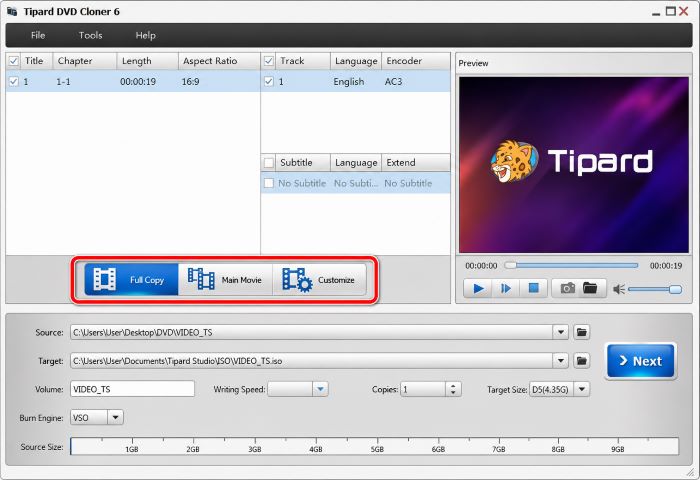
The main window with a VIDEO_TS folder as the source and an ISO file as the target: the three copy modes are highlighted, with writing speed, copies, target size (D5, 4.35 GB) and the VSO burn engine below.
Features
Three copy modes
Tipard DVD Cloner's Full Copy keeps everything, including menus, extras and every title, as a 1:1 disc, ISO or folder. Main Movie finds the feature film (the longest title) and drops the menus and trailers while keeping your chosen audio and subtitles. Customize lets you tick individual titles, chapters, audio tracks and subtitle languages, so a TV-series disc can keep just the episodes and the English track.
Disc, ISO and folder in every direction
Tipard DVD Cloner copies a disc to another disc, to an ISO or to a VIDEO_TS folder, and also works the other way: an ISO or folder you saved earlier can be burned to a blank DVD without the original. That makes it a simple archive tool. Back up the collection to a hard drive once, then burn replacements on demand.
Skip the menu, remove the region code, keep one angle
Tipard DVD Cloner's options screen can remove the menu entirely or skip it so the disc starts straight into the movie, loop the titles, keep only one angle on a multi-angle disc, and remove the region code so the copy plays on players from other regions. The same screen shows the compression ratio and lets the program delete its temp folder or close itself after burning.
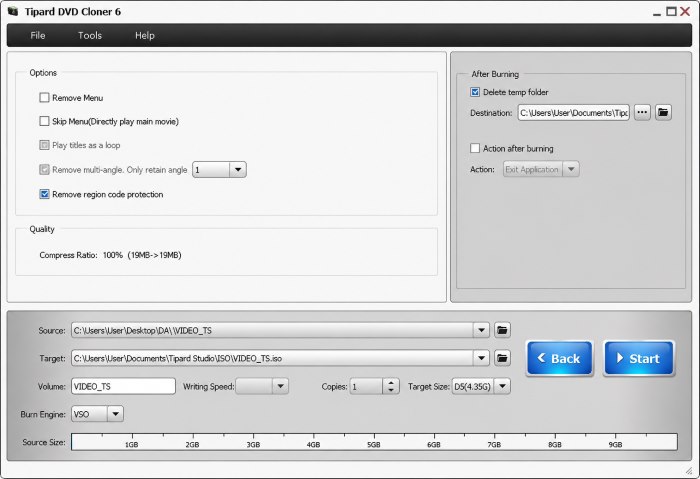
The options screen: Remove Menu, Skip Menu, Play titles as a loop, Remove multi-angle and Remove region code protection (ticked), the 100% compress ratio, and the After Burning settings.
DVD-9 to DVD-5 compression
Tipard DVD Cloner can shrink a dual-layer DVD-9 (up to 8.5 GB) onto a single-layer DVD-5 (4.7 GB) blank. The Source Size bar shows how far over the target you are before you start. Expect some quality loss when the ratio is large; Main Movie or Customize, which drop the extras, keep the squeeze smaller.
Several copies, writing speed and three burning engines
Tipard DVD Cloner burns several copies in one job and prompts you to swap blanks between them. You can set the writing speed (a slower burn often helps with cheap blanks or older players) and switch between the VSO, CdrTool and IMAPI burning engines if one doesn't work with your drive.
Benefits
- Originals stay safe. The copy goes in the car or the kids' room; the original stays on the shelf.
- A collection in a folder. ISO files of every disc on one external drive, ready to burn again or play in a media player.
- Region-free copies of discs bought abroad, for a player locked to your region.
- One payment. The license sold through our Buy Now button doesn't expire or renew.
Real-World Uses
- A road-trip disc of a children's movie with Skip Menu ticked, so it starts playing as soon as it's in the car player.
- Home videos from a DVD camcorder copied three times for relatives with the Copies setting.
- A TV box set trimmed with Customize to the episodes and one language, so each disc fits a DVD-5 with no squeezing.
- Archiving a hundred discs to ISO before selling the cases.
Who It's For, and Who Should Skip It
It's for Windows users with a DVD drive who want exact DVD backups, as discs or ISO files, in a program that takes three clicks.
Skip it if:
- You want MP4 or MKV files. A ripper such as Tipard DVD Ripper or the free HandBrake converts DVDs to video files; DVD Cloner doesn't.
- You mostly shrink DVD-9 to DVD-5. That's the one job reviewers say it does poorly. Buy dual-layer blanks or pick another tool.
- You have Blu-rays. DVD Cloner reads DVDs only; Tipard Blu-ray Copy is the Blu-ray version.
- Your PC has no DVD drive. You'll need an external USB DVD writer.
Usage Guide
- Install and launch. Run the 36.1 MB installer and open Tipard DVD Cloner. Insert the source disc first if you're copying from a disc.
- Pick the source. Choose the disc, a DVD folder or an ISO in the Source box.
- Pick the target. Choose a DVD folder, an ISO or a burner in the Target box. For disc-to-disc copying, insert a blank first.
- Choose the mode and size. Full Copy, Main Movie or Customize, then set the volume label, D5 or D9 target size, writing speed and number of copies. Click Next.
- Set the options and start. Tick Skip Menu, Remove Menu or Remove region code protection as needed, and click Start.
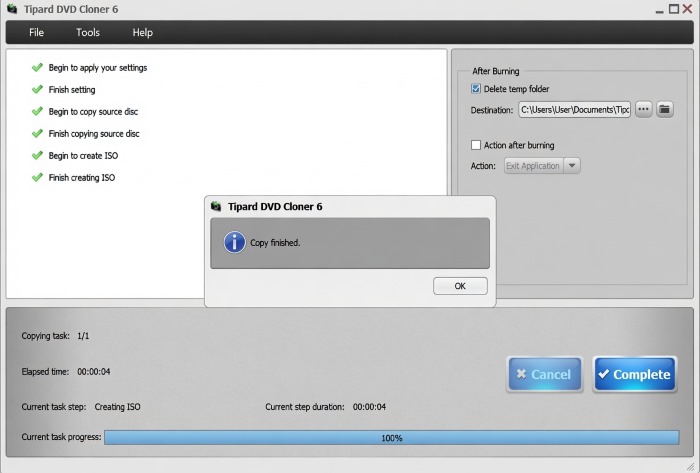
A finished job: the step log (copy source disc, create ISO), the "Copy finished." message, elapsed time and the progress bar at 100%.
Tip: the ISO isn't in the temp folder
The folder button on the progress screen opens the temp folder (Documents\Tipard Studio\DVDCopy), which is emptied when the job ends. Your finished ISO is in Documents\Tipard Studio\ISO, the path in the Target box. A Giveaway of the Day user thought the copy had failed until they spotted this.
Where it falls short
- Weak DVD-9 to DVD-5 compression. Best Review Guide's test found "near-constant distortion, pixelation and compression artifact" on a compressed copy, and called the loss the highest in its comparison.
- Not every protection. Asked whether it handles commercial copy protection, a Giveaway of the Day commenter answered "Some protection schemes, not all." The only protection option in the interface is region-code removal.
- Not fast. Reports range from 25-45 minutes (Best Review Guide) to 54 minutes for a full copy.
- One PC per license. Reinstalling Windows or changing computers means unbinding the device in your Tipard account or asking support for a reset.
What Users Say
DVD Cloner has been around for well over a decade, so there's a mix of independent tests, giveaway-site comments and vendor testimonials, and they don't all agree.
Best Review Guide (8.6/10, updated September 2021)
Tamara's review scores DVD Cloner 8.6 out of 10 and lists "You can save ISO files", "Three operating modes" and "Great for novice users" as pros, with "Extensive quality loss during compression" and "No live chat support" as cons.
On ease of use: "It's exceptionally easy to use. All of the features are either located on, or accessible from the primary display screen." A complete copy took "between 25 and 45 mins".
On compression: "When we evaluated a compressed copy of our own test disc, we observed near-constant distortion, pixelation and compression artifact. These flaws make the new discs unwatchable." The summary still calls it "a great value for money product". The site notes it may earn money from links.
TrishTech (February 2020) and Giveaway of the Day (August 2021)
TrishTech: "Tipard DVD Cloner is very easy-to-use and fast software for backing up your DVDs, making ISO images from DVDs and also cloning them. It does not confuse the user with too many options which makes it ideal for both beginners and advanced users."
When DVD Cloner was a Giveaway of the Day, Gary commented: "Worked well for me - not the fastest (took 54 minutes), but did a good job." Another commenter, after the ISO mix-up described in the tip above, concluded: "The program is working as promised."
Testimonials on Tipard's site (4.9 from 563 reviews)
Tipard's product page shows 4.9 from 563 reviews. Read them as testimonials, since they're on the vendor's own site.
Wilson: "Not only is the quality excellent, but it only takes less than an hour to copy a full-length movie."
Fionnar: "I can copy DVD-5 to DVD-5 and DVD-9 to DVD-9 in a 1:1 ratio using this cloner."
Trustpilot: Tipard Studio (4.5 from 91 reviews)
Trustpilot rates Tipard as a company 4.5 out of 5 from 91 reviews (82% five-star, 10% one-star). Most praise quick help with moving licenses to new PCs. The one-star reviews are about refunds and subscriptions, for example Steven Thompson's "Never buy anything from this company" about a lifetime DVD Ripper registration (May 2018), and Amberly Wiggin's "pretty crap" (August 2025), who says support wouldn't process a refund until "they tried every solution."
Trustpilot blocks direct downloads, so these quotes were read through a summarizing tool and are excerpts.
The recurring themes
Everyone agrees it's easy and that 1:1 copies and ISO backups work. The criticism is specific: DVD-9 to DVD-5 compression quality, speed that's acceptable rather than quick, and copy protection that isn't universally handled. On the company side, refunds are hard to get, so test before paying.
Comparisons
Tipard DVD Cloner vs Tipard DVD Ripper
DVD Cloner keeps the DVD format (disc, ISO, VIDEO_TS) so you can burn it again; DVD Ripper converts the movie to MP4, MKV and other files for phones, tablets and media servers. Choose by what you want at the end: a disc or a file.
Tipard DVD Cloner vs free tools (ImgBurn, HandBrake)
ImgBurn makes and burns ISO images for free but has no Main Movie or Customize modes and no DVD-9 compression. HandBrake converts DVDs to MP4 rather than copying them. DVD Cloner's value is the three copy modes and menu/region options in one simple window.
Editions and Pricing
| License | Price | Term | PCs | Where |
|---|
| Lifetime License | $45.00 (list $56.25) | One-time payment | 1 | Our Buy Now button and Tipard's store |
| 1 Month License | $15.00 a month | Renews monthly until cancelled | 1 | Tipard's store |
| Lifetime License, 3 PCs | $70.00 | One-time payment | 3 | Tipard's store |
| DVD Cloner + Blu-ray Copy | $71.25 | One-time payment | 1 | Tipard's store |
Prices in US dollars as shown on November 4, 2026, before sales tax or VAT. Orders on Tipard's own store come with a 7-day Blu-ray Player trial that renews at $30 a month unless cancelled.
FAQs
Can Tipard DVD Cloner copy a DVD with only one drive?
Yes. Tipard DVD Cloner can use the same drive as source and target: it reads the disc into a temp folder, asks for a blank, and burns it. You can also save to ISO first and burn later.
Will copies made with Tipard DVD Cloner play in any DVD player?
Tipard says copies play in DVD player hardware and software, with the caveat that some players only accept certain blank types such as DVD-R. If an old player rejects a disc, try a different blank type or a slower writing speed.
Does Tipard DVD Cloner make MP4 files?
No. Tipard DVD Cloner outputs only DVD formats: a disc, an ISO image or a VIDEO_TS folder. VLC and most media players can open the ISO or folder on a computer, but for MP4 files you need a ripper.
What happens when the trial ends?
Third-party reviews describe Tipard DVD Cloner's trial as 15 days and 3 discs. After that you need a registration code, which you enter in the program or activate by signing in with the email you bought it with.
Can I use my Windows license on a Mac?
No. Tipard licenses are platform-specific. Mac users need Tipard DVD Cloner for Mac, a separate purchase.
Is the lifetime license really lifetime?
Tipard's purchase page says the lifetime license includes lifetime access, upgrades and support with a one-time payment, and the order page charged it with no renewal. It covers one PC; Tipard sells a 3-PC version separately.
System Requirements
- Windows: 11, 10, 8 or 7
- Processor: 1.2 GHz Intel or AMD CPU or faster
- RAM: 1 GB or more
- Drive: a DVD drive to read discs, a DVD burner to write them
- Disk space: room for a full disc in the temp folder (up to about 8.5 GB for a DVD-9)
- Download: 36.1 MB installer
Conclusion
Tipard DVD Cloner does exact DVD copies and ISO backups well, in an interface anyone can follow, for a one-time $45. The one reason to buy it is quick, menu-intact 1:1 backups of the DVDs you own, with handy extras like Skip Menu and region-code removal. The main reason not to is its DVD-9 to DVD-5 compression, which an independent test rated the worst in its group. Our verdict: worth it if you'll copy to dual-layer blanks, ISO files or Main Movie copies; look elsewhere if squeezing dual-layer movies onto single-layer discs is your main goal.
Download Free TrialBuy Now