Tipard DVD Ripper: Rip, Upscale or Copy Your DVDs on Windows
Tipard DVD Ripper is a Windows program that turns DVDs, ISO images and DVD folders into MP4, MKV and 500+ other formats and presets, or copies them 1:1 to an ISO image, with GPU acceleration and AI upscaling to 1080p or 4K. On our order page it costs $60.00 for a lifetime license on one PC, a one-time purchase with lifetime upgrades.
If you have a shelf of films, TV box sets or old home recordings on disc and nothing left to play them on, a ripper gets them onto your PC, phone, TV or Plex server for good. Tipard DVD Ripper does that in three clicks: load the disc, choose a format, press Rip All.
Quick facts
- Version: 10.1.56
- Developer: Tipard Studio
- Platform: Windows 11, 10, 8.1, 8 and 7, 32-bit and 64-bit. A separate Tipard DVD Ripper for Mac runs on macOS 10.12 or later
- Input: DVD discs (DVD-5, DVD-9, DVD±R, DVD±RW, DVD-RAM), ISO images, VIDEO_TS folders and AVCHD discs and folders
- Output: MP4, MKV, MOV, AVI, WMV, ProRes, WebM, MPG and many more, with H.264, H.265, AV1 and VP9, lossless MKV or MPG, ISO image or DVD folder, plus device presets
- Price: $60.00 on our order page for a lifetime license on one PC, a one-time purchase with lifetime upgrades. A 3-PC lifetime license and a monthly license are also sold
- Free trial: rips 5 minutes of each title, and ISO or DVD folder copies are limited to 5 discs per 30 days
- Money-back: 30 days on lifetime licenses
- What we checked: installer version 10.1.56 (2.1 MB online installer) downloaded from Tipard on October 15, 2026, and the lifetime license for one PC at $60.00 on the order page on October 15, 2026
Before you buy
- It's a one-time purchase. The license on our order page is a lifetime license for one PC with lifetime upgrades and support, so there is nothing to cancel later.
- Don't uninstall it. Tipard says that uninstalling and reinstalling the registered program makes it unregistered again, and a license covers one computer.
- Try your own discs first. The trial rips 5 minutes of each title, which is enough to check that your discs load and the quality suits you.
Download Free Trial
Buy Now
Overview
Tipard DVD Ripper has two tabs. Ripper is where the work happens: a Load DVD button, a hardware acceleration switch for NVIDIA, Intel and AMD graphics, and an output format and folder at the bottom next to a big Rip All button. More Tools holds five extras: a metadata editor, video compressor, GIF maker, 3D maker and video enhancer.
Once a disc is loaded, Tipard DVD Ripper shows either the main movie or the full title list, and on the right you choose between ripping to video or audio, to a DVD folder, or to an ISO file. Each title row has its own subtitle and audio track menus, edit and trim buttons, and output format, so one disc can produce a 4K MP4 of the film and MP3s of the soundtrack in the same run.
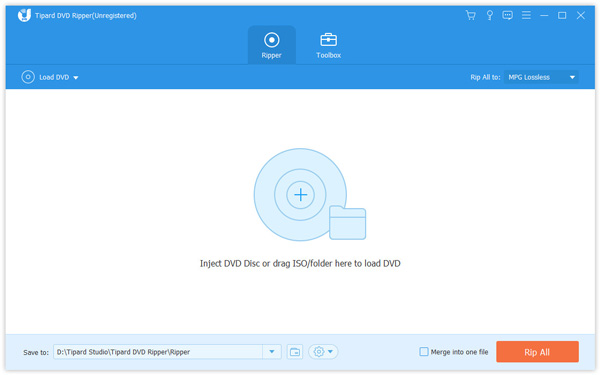
The Ripper tab before a disc is loaded: the three Getting Started steps, the NVIDIA, Intel and AMD hardware acceleration switch at the top right, and the output format, Save to folder and Rip All button at the bottom.
Features
Rips copy-protected and region-coded DVDs
Tipard DVD Ripper bypasses CSS, APS, CPRM, Sony ARccOS and 99-title protection when it loads a disc, and handles discs from any region, 1 to 6, so imports from Japan or Australia play like local ones. It also reads burned DVD±R, DVD±RW, DVD-RAM and dual-layer discs, and Tipard says its sector scanning gets through scratched or smudged discs that make other rippers freeze. Tipard asks users to respect copyright law and not to use it commercially.
500+ formats and device presets
Tipard DVD Ripper groups its output into Recently Used, Video, Audio and Device tabs. Video covers MP4, HEVC MP4, MOV, ProRes, MKV, HEVC MKV, AVI, 5K/8K video, WebM, WMV, MPG and more, each with presets such as 4K, HD 1080p and 720p, while Device has presets for iPhone, iPad, Samsung, Android, TVs, Xbox and PS5. A gear icon opens a custom profile where you set the codec (H.264, H.265, MPEG-4 or AV1 for MP4), resolution, bitrate and frame rate.
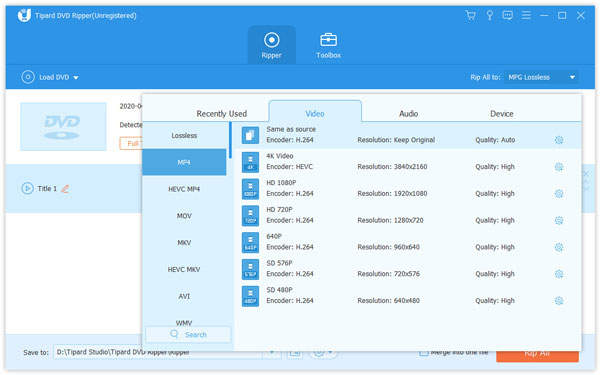
The format picker open on the Video tab: MP4 is selected on the left, with presets from Same as source and 4K Video down to HD 1080p, 3D and 720p, each showing its encoder, resolution and quality.
Lossless MKV, ISO and DVD folder copies
Tipard DVD Ripper can keep a disc exactly as it is. The Lossless category remuxes a DVD to MKV or MPG with the original video, every audio track and the subtitles, without re-encoding, and the Rip to DVD ISO File and Rip DVD to DVD Folder options copy the whole disc with its menus and chapters, ready to burn again later. In the trial, ISO and folder copies are limited to 5 discs per 30 days.
GPU acceleration for fast rips
Tipard DVD Ripper encodes on NVIDIA NVENC, AMD and Intel Quick Sync graphics as well as multi-core CPUs, and can rip several titles in one batch. In Tipard's own test, an 8.5 GB dual-layer DVD took 4 to 5 minutes on a Windows 11 PC with an NVIDIA RTX 4070 SUPER, with CPU use under 7%. Tipard's guide recommends leaving acceleration on, since without it the CPU runs flat out for the whole rip.
AI upscaling, deinterlacing and noise removal
Tipard DVD Ripper can upscale 480p DVD video to 1080p or 4K at bitrates up to 40 Mbps, deinterlace old 480i footage to remove the comb lines on motion, and remove video noise with its AI enhancer. Codec upgrades to H.265 or AV1 shrink files a lot: Tipard gives the example of an 8.5 GB dual-layer disc compressed to a 1.7 GB MP4 or MKV for phone viewing.
Editing, subtitles and audio before you rip
Tipard DVD Ripper's editor crops (16:9, 4:3, 1:1 or 9:16), rotates and flips, adjusts contrast, saturation, brightness and hue, applies filters, adds text or image watermarks, and trims scenes. For subtitles you can keep chosen tracks, burn one into the picture, export them as separate files, add your own or search for them online, and you can swap the audio track or fix audio delay. Selected titles or chapters can be merged into one file, or chapters ripped as separate files.
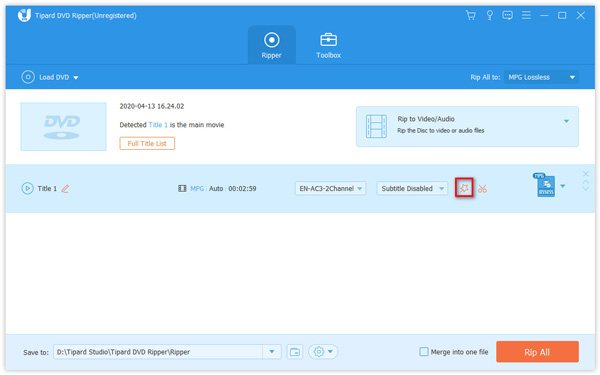
A loaded disc: Tipard has detected Title 1 as the main movie, the right panel is set to Rip to Video/Audio, and the title row has Subtitle and audio track menus with the edit (magic wand) button highlighted.
More Tools: compressor, GIF maker, 3D and metadata
Tipard DVD Ripper's More Tools tab adds five small utilities for the files you rip: a Media Metadata Editor for titles and tags, a Video Compressor, a GIF Maker, a 3D Maker that turns 2D video into 3D, and a Video Enhancer. A Task Schedule setting can shut down or sleep the PC when a long batch finishes. In the trial, each tool handles 5 files.
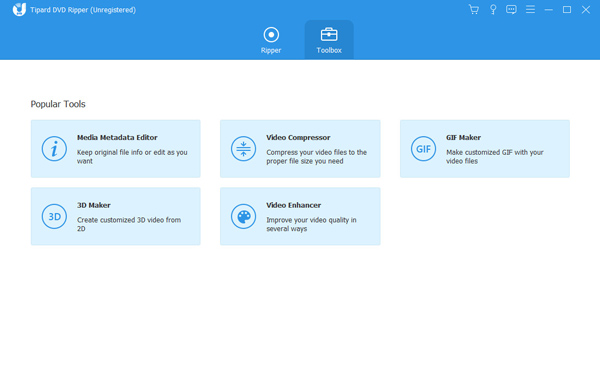
The More Tools tab with its five tools: Media Metadata Editor, Video Compressor, GIF Maker, 3D Maker and Video Enhancer.
Benefits
The appeal of Tipard DVD Ripper is that one program covers both ways people want their discs: small, modern files for everyday watching, and exact lossless copies for safekeeping. You don't need one tool to decrypt, another to back up and a third to compress. And because it upscales and cleans up 480p video, old DVDs look less soft on a big 4K TV than a straight rip would.
The lifetime license also suits the way people rip DVDs: a big push to convert a collection, then the odd new disc years later. You pay once, and later versions are included.
Real-World Uses
- Building a Plex or NAS library: rip each film to lossless MKV with every audio track and subtitle, copy the files to the NAS, and stream them to every screen in the house.
- Bringing old discs up to date on a 4K TV: upscale a favorite 480p film to 1080p or 4K and deinterlace it, so it looks cleaner than the DVD player ever managed.
- Backing up a rare disc: save an out-of-print DVD as an ISO image with its menus, and burn a fresh copy if the original gets scratched.
- Clips for a video project: rip only the chapters you need, trim them and drop them into your editor, or make a GIF from a scene.
- Language and fitness DVDs on a phone or TV: rip lesson or workout discs to MP4 presets so they play without a disc drive.
Who It's For
Tipard DVD Ripper is for Windows users who want a full-featured ripper with lossless backup and upscaling in one place: collectors moving to a media server, families with a stack of children's DVDs, and people who want to reuse DVD footage in their own videos. It isn't for Blu-ray (Tipard sells a separate Blu-ray Converter).
Usage Guide
- Download and run the installer. It is a small online installer that downloads the rest of the program, so stay connected while it finishes.
- Launch Tipard DVD Ripper, insert a disc and click Load DVD, or use the arrow next to it to pick a drive, an ISO image, a DVD folder or an AVCHD disc or folder.
- Choose Main Movie to get just the film, or Full Title List to see extras and episodes. Turn on "Show movies based on chapters" if you want individual chapters.
- On the right, choose Rip to Video/Audio, Rip DVD to DVD Folder or Rip to DVD ISO File. Check that Hardware Acceleration is on.
- Pick an output format at the bottom (or per title), for example MP4 HD 1080p or MKV Lossless, and set subtitles and audio tracks on each title row.
- Choose a Save to folder and click Rip All. Tick "Merge into one file" first if you want the selected titles joined.
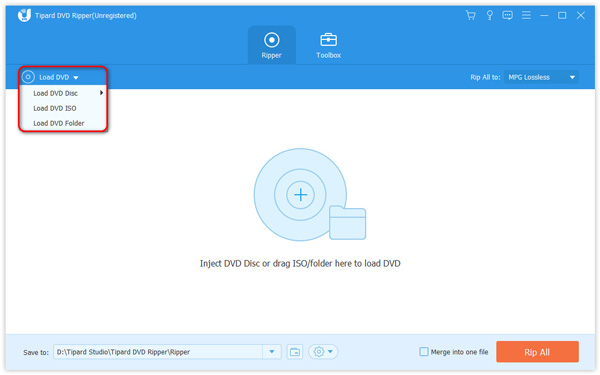
The Load DVD menu open: Load DVD Disc (with drive F: holding a disc), Load DVD ISO, Load DVD Folder, Load AVCHD Disc and Load AVCHD Folder. The red outline is Tipard's.
Tips
- Choose MKV Lossless for a media server or archive, and an MP4 preset for phones and older TVs. Editing needs a format other than MPG Lossless.
- If a disc shows several titles of almost the same length, switch to the Full Title List and preview them before ripping.
- Set Task Schedule in Preferences to shut down the PC when an overnight batch is done.
- Keep the program installed after registering, since reinstalling it unregisters it.
What Users Say
There is less independent coverage of Tipard DVD Ripper than of the best-known rippers, and most of it is short. What exists is broadly positive about speed and ease of use, with complaints about price, the limited trial and an older review's gaps that have since been filled.
Trustpilot
Tipard Studio has a TrustScore of 4.5 out of 5 from 91 reviews on Trustpilot, and many of them praise Tipard's support team more than any one program. Two reviews talk about ripping DVDs:
"Great DVD Ripper. Easy to use. Great lossless ripping."
Mike, Australia, 5 stars, June 2026
"I had really a lot DVD movies. With Tipard studio I ripped all of them to NAS and now I have home theatre :)"
Tomas CZ, 5 stars, April 2025
Download sites and G2
Softpedia rates Tipard DVD Ripper 4.0 out of 5. Its reviewer found it fast and light on system resources, while noting that speed depends on the disc and your settings.
FileHorse lists "High-Quality DVD Conversion", "Wide Format Support", "User-Friendly Interface", "Fast Ripping Speed" and "Built-in Editing Tools" as pros, and "Limited Free Version Features", "No Blu-ray Support", "Occasional Minor Bugs" and "Resource-Intensive on PCs" as cons. On resource use it disagrees with Softpedia, which likely comes down to whether GPU acceleration is available.
G2 has only two reviews, averaging 4.5 out of 5. Between them, the reviewers praise the graphics card acceleration, call the price relatively high compared with other rippers, and find the features a lot to take in for a non-technical user.
An older review: dotTech
Ashraf reviewed version 6.2.19 for dotTech in September 2013 and liked how easy it was and its batch processing, but concluded:
"Tipard DVD Ripper is good… but not great."
Ashraf, dotTech
The review's main complaint was that it couldn't back up a disc to a DVD folder or ISO. Version 10 does both, so that criticism no longer applies. The other complaint, that it couldn't get past Disney X-Project DRM, is worth noting, since Disney's scheme still isn't on Tipard's list of supported protections.
On Tipard's own page
Tipard's product page quotes customers, including:
"I use it to rip my movie DVD. There's no encryption alert anymore. Moreover, I can upscale my movie to 4K and watch it on my TV. That's so exciting to rip and convert it so quickly!"
Sunny, quoted by Tipard
"I chose MKV Lossless, and the ripping speed was insanely fast! Now my entire legacy movie collection is ready to stream on my Plex. Highly recommend!"
Glitchdoll, quoted by Tipard
The recurring themes
What people like: easy three-step ripping, fast GPU-accelerated rips, lossless MKV output for Plex and NAS libraries, and responsive support. What they complain about: the price, a trial that only shows 5 minutes per title, no Blu-ray, and heavy resource use on PCs without a supported graphics card.
Comparisons
Tipard DVD Ripper vs WonderFox DVD Ripper Pro
Tipard DVD Ripper and WonderFox DVD Ripper Pro do the same core job on Windows: rip protected DVDs to modern formats with GPU acceleration and copy them 1:1 to ISO. Tipard adds AMD acceleration, AVCHD input, AI upscaling and noise removal, lossless MKV remuxing, a Mac version and extra tools such as a GIF maker. WonderFox lists Disney X-Project DRM and Cinavia among the protections it handles, has a longer 15-minute trial, and costs $39.95 on our order page against $60.00 for Tipard's lifetime license.
Tipard DVD Ripper vs Tipard Video Converter Ultimate
Tipard DVD Ripper is only for discs. Tipard Video Converter Ultimate also rips DVDs, but adds conversion of ordinary video files and upscaling to 5K or 8K, so it's the better buy if you also convert downloads, phone videos or camera footage.
Tipard DVD Ripper vs HandBrake
Tipard DVD Ripper handles copy-protected commercial discs on its own and can make ISO and DVD folder backups, while HandBrake, the free open-source converter, doesn't remove copy protection and only converts. HandBrake runs on Windows, Mac and Linux and suits homemade discs and people who like tuning encoder settings.
Editions and Pricing
| License | Price | Computers | Term | Money-back |
|---|
| Lifetime (our order page) | $60.00 | 1 PC | One-time purchase, lifetime upgrades | 30 days |
| Lifetime, 3 PCs | Sold on Tipard's store | 3 PCs | One-time purchase, lifetime upgrades | 30 days |
| 1 Month | Sold on Tipard's store | 1 PC | Renews monthly until cancelled | 7 days |
The registration code is emailed when the order is confirmed. Tipard DVD Ripper for Mac is a separate product with its own license, and larger multi-user licenses are available from marketing@tipard.com.
FAQs
Is Tipard DVD Ripper free?
Tipard DVD Ripper is free to download and try, but the unregistered version rips only 5 minutes of each title, limits ISO and DVD folder copies to 5 discs per 30 days, and shows a reminder screen. Ripping whole films needs a paid license.
Is Tipard DVD Ripper a subscription?
Not the license on our order page. That Tipard DVD Ripper license is a one-time $60.00 purchase for one PC with lifetime upgrades and a 30-day money-back guarantee. Tipard also sells a one-month license that renews monthly until you cancel, which has a 7-day money-back guarantee.
Can I move my Tipard DVD Ripper license to a new computer?
A Tipard DVD Ripper license is for one computer, and Tipard warns that uninstalling and reinstalling the registered program makes it unregistered again. Contact Tipard support before you switch PCs.
Can Tipard DVD Ripper rip Blu-ray discs?
No. Tipard DVD Ripper reads DVDs, DVD ISO images and folders and AVCHD discs only. Tipard sells Blu-ray ripping as a separate product, Tipard Blu-ray Converter.
Is there a Mac version of Tipard DVD Ripper?
Yes, Tipard DVD Ripper for Mac is a separate program for macOS 10.12 or later with its own license. The Windows license doesn't cover it.
Is it legal to rip DVDs with Tipard DVD Ripper?
It depends on where you live. Tipard DVD Ripper is legal software, but in some countries, including the United States, breaking a DVD's copy protection is restricted even for discs you own, while others allow a private copy. Tipard asks users to respect copyright law and not use it commercially.
Does Tipard DVD Ripper work without a graphics card?
Yes. Tipard DVD Ripper can encode on the CPU alone, but rips take much longer and the processor runs at full load. With an NVIDIA, AMD or Intel graphics chip that supports hardware encoding, it uses the GPU and the rest of the PC stays usable.
Will Tipard DVD Ripper read discs I burned myself?
Yes. Tipard DVD Ripper reads DVD-R, DVD+R, dual-layer DVD±R DL, DVD-RW, DVD+RW and DVD-RAM discs as well as pressed DVD-ROM movies, and it handles non-standard homemade discs with unusual frame rates or bitrates.
System Requirements
- Operating system: Windows 11, 10, 8.1, 8 or 7, 32-bit or 64-bit
- Processor: 1 GHz Intel or AMD CPU or faster
- Memory: 2 GB RAM or more
- Display: 1024 x 768 or higher
- Disk space: 2 GB or more recommended, plus room for your rips
- Optional: an NVIDIA, AMD or Intel graphics chip for hardware acceleration, and a DVD drive for discs
Conclusion
Tipard DVD Ripper is one of the more complete DVD rippers for Windows: it decrypts most protected discs, rips them quickly on a modern graphics card, keeps lossless MKV or full ISO backups, and can upscale and clean up old 480p video for a 4K TV. Its weak spots are a short 5-minute trial, no Blu-ray, and a price above simpler rippers, though the $60.00 lifetime license is a one-time cost with free upgrades. With a good graphics card it will clear a whole shelf of discs in an evening or two. Try it on a few of your own DVDs first.
Download Free Trial
Buy Now