Tipard Blu-ray Converter: Rip Blu-rays and DVDs to MP4, MKV or ISO on Windows
Tipard Blu-ray Converter is a Windows ripper that turns Blu-ray discs, Blu-ray ISO files and DVDs into MP4, MKV and other video files for a phone, TV or Plex server, or into a lossless MKV or ISO copy. Our Buy Now button sells the 1-month license at $40, which renews every month until you cancel; Tipard's own store also sells a lifetime license.
A Blu-ray only plays where there's a Blu-ray drive, and fewer devices have one every year. Ripping turns the disc into a file that plays anywhere, from a laptop on a plane to a smart TV streaming from a NAS. This program handles the whole chain on Windows: reading the disc, picking titles, tracks and subtitles, converting with GPU acceleration, and saving the result.
Quick facts
- Version: 10.1.78 (program package dated January 13, 2026; the online installer was updated October 13, 2026)
- Developer: Tipard Studio
- Runs on: Windows 7, 8, 8.1, 10 and 11, 32- or 64-bit. A separate Mac edition exists.
- Reads: Blu-ray discs (BD-25, BD-50, BDXL, 4K UHD, 3D), BDMV folders, Blu-ray ISO files, DVDs and AVCHD
- Writes: MP4, MKV, MOV, AVI, WMV, WebM, ProRes and more with H.264, HEVC or AV1; lossless MKV; Blu-ray ISO; audio-only files; device presets
- Price on our order page: $40 for one month on one PC, renewing monthly
- Trial: converts only the first 5 minutes of each video (half of videos shorter than that)
- What we checked: the 2.1 MB online installer (version 10.1.86) and the 105 MB program package it downloads (version 10.1.78) from Tipard's servers, and the order page, which charged $40.00 for "Tipard Blu-ray Converter - 1 Month" with a one-month renewal, all on November 4, 2026. We didn't rip a disc with it.
Before you buy: monthly or lifetime?
The license behind our Buy Now button is a subscription: $40 now and $40 a month after that until you cancel. That's sensible if you have a stack of discs to rip this month and then you're done; set a reminder to cancel. If you'll rip discs now and then for years, Tipard's own store sells a lifetime license for $60 (with its store coupon), which costs less than two months of the subscription. Monthly plans carry a 7-day money-back guarantee, lifetime licenses 30 days, and either way Tipard refunds only for technical problems it can't fix, not a change of mind.
Ripping copy-protected discs, even ones you own, isn't legal everywhere (in the United States it falls foul of the DMCA). Tipard says the program is for personal fair use and asks you to follow your local law.
Download Free TrialBuy Now
Overview
Despite the name, this is a three-in-one program. The Ripper tab loads a Blu-ray or DVD, the Converter tab converts ordinary video and audio files, and More Tools holds extras such as a compressor, GIF maker, metadata editor and 3D maker. The Ripper opens to a three-step "Getting Started" panel: load a disc, pick an output format, press Rip All. A switch in the top-right corner turns NVIDIA, Intel and AMD hardware acceleration on or off.
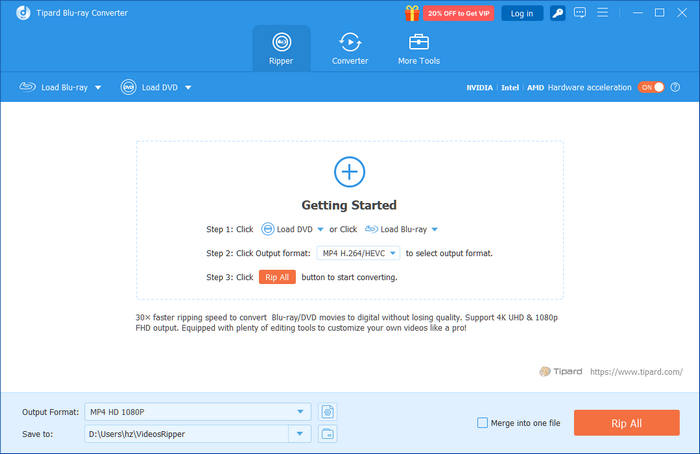
The Ripper tab before a disc is loaded: Load Blu-ray and Load DVD at the top left, the hardware acceleration switch at the top right, and the output format, save folder, Merge into one file and Rip All at the bottom.
Features
Reads discs, ISO files and BDMV folders
Tipard Blu-ray Converter loads a Blu-ray from a drive, a Blu-ray ISO image or a BDMV folder without a virtual drive, plus DVDs, DVD folders and AVCHD camcorder discs. Tipard lists BD-25, BD-50, BDXL, 4K UHD and 3D discs, and says the program handles AACS, BD+, BD-J and Cinavia protection and region codes. After loading, it marks the main movie or shows the full title list, so you can rip one film or every episode on a series disc.
Lossless MKV or a full ISO backup
Tipard Blu-ray Converter can remux a Blu-ray to "MKV Lossless": the original video and audio streams, chapters and subtitles in one file, with no re-encoding and no quality loss. A drop-down at the top of the title list switches between "Rip to Video/Audio" and "Rip to Blu-ray ISO File", which copies the whole disc 1:1 as an image.
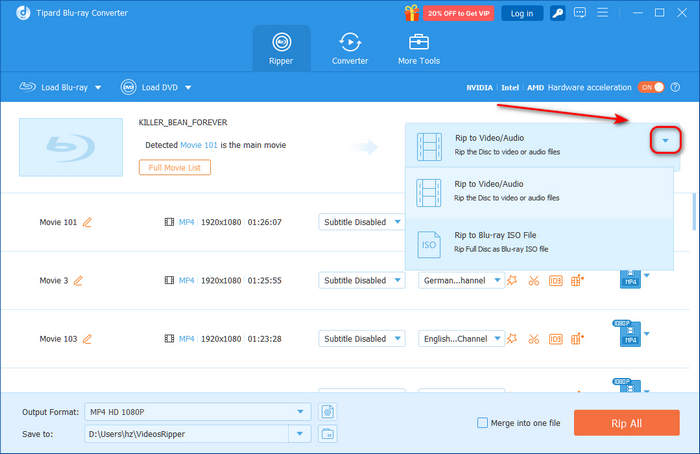
A Blu-ray loaded with "Movie 101" detected as the main movie, the title list with audio and subtitle choices, and the menu that switches between Rip to Video/Audio and Rip to Blu-ray ISO File.
Smaller files with HEVC and AV1
Tipard Blu-ray Converter's format list groups presets by container and codec (MP4, HEVC MP4, MOV, ProRes, MKV, HEVC MKV, AVI, 5K/8K) with resolutions from SD to 4K, and a gear button opens a custom profile where you pick the encoder (including AV1), resolution, frame rate and bitrate. A 30 to 40 GB Blu-ray re-encoded to HEVC typically ends up a fraction of the size.
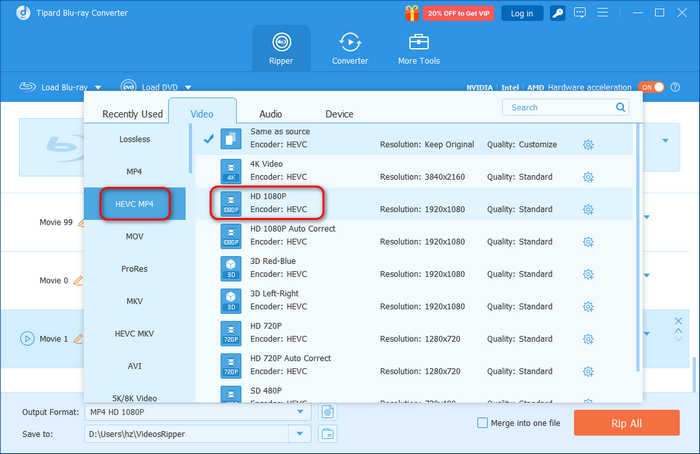
The format picker on the HEVC MP4 category: Same as source, 4K, HD 1080P (highlighted), 3D Red-Blue, 3D Left-Right, 720P and SD 480P presets.
Audio tracks, subtitles and OCR
Tipard Blu-ray Converter lets you choose the audio track and subtitle for each title, add your own audio or subtitle file, and, according to Tipard, pass through Dolby TrueHD, Atmos, DTS-HD Master Audio and DTS:X. It can burn forced subtitles into the picture, and its OCR engine converts the image-based PGS subtitles used on Blu-rays into editable SRT text files.
An editor, a converter and a toolbox
Tipard Blu-ray Converter trims and merges titles, crops black bars (16:9, 4:3 or 21:9), rotates, flips, adds filters and watermarks, and can upscale SDR video to 4K HDR or turn 2D into side-by-side or anaglyph 3D. The Converter tab handles everyday files, MP4 to MOV, FLAC to MP3 and so on, in batches. Note that edits need a re-encoded format: "MKV Lossless" can't be edited.
Benefits
- Your discs on every screen. Ripped files play on phones, tablets, smart TVs and Plex, Kodi, Emby or Jellyfin servers.
- DVDs too. One program covers both disc formats and ordinary video conversion.
- A choice between perfect and practical. Lossless MKV for a home theater, HEVC MP4 for a phone with limited storage.
- Speed. GPU acceleration does the heavy encoding on a modern graphics card instead of the CPU.
Real-World Uses
- Building a Plex library: remux a shelf of Blu-rays to lossless MKV on a NAS, keeping every audio track and subtitle.
- Travel copies: rip a few films to 1080p HEVC MP4 for a tablet, small enough to fit dozens.
- A TV box set: load the full title list, tick the episodes and rip them in one batch.
- Foreign films: OCR the Blu-ray's PGS subtitles to SRT so they work on any player.
Who It's For, and Who Should Skip It
It's for Windows users with a Blu-ray drive who want a single paid tool that rips Blu-rays and DVDs to whatever format a device needs, with good defaults and hardware acceleration.
Skip it if:
- You only want lossless MKV files. MakeMKV does that for free while it's in beta, and HandBrake can compress the result.
- You want a playable disc copy. Tipard Blu-ray Copy keeps the disc structure for burning; this program makes files (or an ISO).
- You don't want a subscription. Our order page sells the monthly plan; buy the lifetime license on Tipard's store instead.
- You're in a country where breaking disc protection is illegal and your discs are commercial ones.
Usage Guide
- Install. Run the 2.1 MB installer; it downloads the full program (about 105 MB) and installs it. Keep the PC online.
- Load the disc. Insert the Blu-ray, open the Ripper tab and click Load Blu-ray, or use its arrow to open an ISO or BDMV folder. Choose Main Movie or Full Title List.
- Pick an output. Choose "Rip to Video/Audio" or "Rip to Blu-ray ISO File". For video, pick a format for all titles at the bottom left, or per title.
- Set tracks. Choose the audio track and subtitle for each title; use Cut or Edit if needed (not with MKV Lossless).
- Rip. Pick the save folder, tick Merge into one file if you want a single file, and click Rip All.
Tip: check which title is the movie
Tipard's own guide warns that Main Movie simply picks the longest title, and many Blu-rays contain several long titles (different cuts, or decoy playlists on some protected discs). Before ripping, play the start of the selected title in the preview and compare lengths in the Full Title List.
Where it falls short
- Updates can break things. A Trustpilot buyer's lifetime copy stopped working after an update; Tipard fixed it, but it "took quite a while".
- Protection claims you can't verify in advance. dotTech criticized Tipard years ago for not saying which protections it handles. The page now names AACS, BD+, BD-J and Cinavia, but new discs change, so test yours in the trial.
- Trial output is cut to 5 minutes, so you can test quality and compatibility but not rip a full movie before paying.
- A small installer that needs the internet. The download is a stub that fetches the 105 MB program during setup.
What Users Say
Blu-ray Converter has a long history, so there's an old independent review, a much larger set of testimonials, and a few Trustpilot reviews that mention it by name.
dotTech (March 2013, version 6.3.38)
dotTech's review called the program "nothing special but is a good program nonetheless", with the selling point that "it is a Blu-ray ripper, DVD ripper, and video/audio converter under one roof for one price (instead of three)." Its pros included "Performs well (fast and good output quality)" and "Easy to use".
The main complaint was disclosure: "until the developer tells us explicitly what types of DRM protection the program can bypass, you are pretty much gambling by buying this program". It also missed a way to rip to a Blu-ray folder or ISO, which the current version now offers. The review is more than a decade old and covers a much older version.
Trustpilot: Tipard Studio (4.5 from 91 reviews)
FDAbbott (November 2025, 4 stars), "Tipard Blu-ray Converter stood by it's word": bought a $75 lifetime license in July 2025; "The software worked for 3 months, then it was updated and will no longer work." "It took quite a while to straighten this issue out", but "to Tipard Studio's credit, they did finally fix the issue."
skouyoum (October 2025, 5 stars) praised "great solid software programs for Blu-Ray and Video WITH a lifetime purchase". On the other side, Maarten Laurent (1 star) wrote: "Just wanted the one month try-out, got an subscription instead." Worth remembering if you buy the monthly plan.
Tipard scores 4.5 out of 5 from 91 reviews overall: 82% five-star, 10% one-star. Trustpilot blocks direct downloads, so these quotes were read through a summarizing tool and are excerpts.
Reviews on Tipard's site (4.9 from 1,729 reviews)
The product's reviews page shows 4.9 out of 5 from 1,729 reviews, posted on the vendor's site.
Natalie (January 11, 2026): "Popped in the Blu-ray, clicked convert, done."
Anthony (November 16, 2025), "Quality stayed sharp": "Honestly expected some loss, but it looks great."
Daniel (May 25, 2025): "Used it a few times now and it hasn't crashed or failed once."
The recurring themes
People like the simple three-step workflow, the speed and the output quality. The recurring doubts are about which discs it can decrypt, updates that occasionally break a working copy, and subscription billing. Support tends to resolve problems, but not always quickly.
Comparisons
Tipard Blu-ray Converter vs MakeMKV + HandBrake
The free route is MakeMKV to remux the disc to MKV, then HandBrake to compress it. It works well but takes two programs and more know-how, and MakeMKV doesn't make ISO files or device presets. Tipard does both steps in one window with GPU acceleration and extras like PGS-to-SRT OCR.
Tipard Blu-ray Converter vs Tipard Blu-ray Copy
Blu-ray Copy makes disc-style backups (disc, BDMV folder, ISO) for burning; Blu-ray Converter makes video files and can also produce an ISO. If you want to watch movies on devices, choose the converter; if you want spare discs, the copier.
Editions and Pricing
| License | Price | Term | PCs | Where |
|---|
| 1 Month License | $40.00 a month | Renews monthly until cancelled | 1 | Our Buy Now button |
| 1 Month License | $32.00 a month with store coupon | Renews monthly until cancelled | 1 | Tipard's store |
| Lifetime License | $60.00 (list $75.00) | One-time payment | 1 | Tipard's store |
| Lifetime License, 3 PCs | $85.00 | One-time payment | 3 | Tipard's store |
Prices in US dollars as shown on November 4, 2026, before sales tax or VAT. Tipard's store adds a 7-day Blu-ray Player trial to orders that renews at $30 a month unless you cancel it; our order page doesn't include it.
FAQs
How do I cancel the monthly Tipard Blu-ray Converter subscription?
The monthly Tipard Blu-ray Converter license renews automatically until you cancel it. The order is processed by 2Checkout, whose order emails usually link to an account page where automatic renewal can be switched off; Tipard support (support@tipard.com) can also cancel it. Do it a few days before the next billing date.
Can Tipard Blu-ray Converter rip 4K UHD Blu-rays?
Tipard says Blu-ray Converter rips 4K UHD discs while keeping 4K resolution and HDR10, HDR10+ and Dolby Vision. UHD ripping also depends on your drive, since many Blu-ray drives can't read UHD discs at all, so test a UHD disc in the trial first.
How long does it take to rip a Blu-ray?
Tipard says a full-length Blu-ray typically converts in under 25 minutes on a modern PC with hardware acceleration switched on. A lossless MKV remux is limited mainly by how fast the drive reads the disc.
Which format should I choose?
Tipard recommends MKV for Blu-rays because it keeps all titles, audio tracks and subtitles. Use MKV Lossless for a home theater or Plex server, and HEVC MP4 at 1080p when you need small files for phones and tablets.
Does the Windows license work on a Mac?
No. Tipard licenses are platform-specific. Tipard Blu-ray Converter for Mac is a separate product with its own license.
What do I need to rip Blu-rays?
A Blu-ray drive (internal or USB), Windows 7 or later, 2 GB of RAM and enough disk space for the output: up to 50 GB for a lossless copy of a dual-layer disc.
System Requirements
- Windows: 11, 10, 8.1, 8 or 7 (32- or 64-bit)
- Processor: 1 GHz Intel or AMD CPU or faster
- RAM: 2 GB or more
- Graphics: NVIDIA, AMD or Intel GPU for hardware acceleration (optional); 1024x768 display or higher
- Disk space: 2 GB or more for the program, plus room for your rips
- Drive: a Blu-ray drive for Blu-ray discs
Conclusion
Tipard Blu-ray Converter is a capable all-in-one ripper: lossless MKV and ISO backups, HEVC and AV1 compression, subtitle OCR, DVDs and ordinary video conversion in a three-step interface with GPU acceleration. The one reason to buy it is turning a Blu-ray and DVD collection into files for every screen with one program. The main reason not to is the licensing on offer here: a $40 monthly subscription only makes sense for a short ripping project, and free tools (MakeMKV and HandBrake) cover the basics if you're patient. Our verdict: worth it if your discs pass the 5-minute trial test; buy the monthly plan for a one-off project and cancel, or the lifetime license on Tipard's store if you'll keep using it.
Download Free TrialBuy Now