Tipard Blu-ray Copy: Back Up a Blu-ray to Disc, Folder or ISO on Windows
Tipard Blu-ray Copy is a $50 Windows program that makes backup copies of Blu-ray discs: to a blank Blu-ray, to a BDMV folder, or to an ISO image on your hard drive, and back to disc again later. Our Buy Now button sells the lifetime license for one PC, a one-time payment.
Blu-ray discs scratch, crack and occasionally stop loading in the player, and a dual-layer BD-50 movie won't fit on the cheaper single-layer BD-25 blanks most people have. Blu-ray Copy is built for exactly those two problems: keep a spare copy of the disc you own, and squeeze it onto whatever blank media you have. It doesn't convert movies to MP4 or MKV; that's a different kind of tool (a ripper).
Quick facts
- Version: 7.2.18 (installer dated January 9, 2026)
- Developer: Tipard Studio
- Runs on: Windows 7, 8, 10 and 11. There's no Mac edition of Blu-ray Copy.
- Copies from: Blu-ray discs (BD-25, BD-50, BD-R, BD-ROM), Blu-ray folders and Blu-ray ISO files
- Copies to: a blank Blu-ray disc, a Blu-ray folder or an ISO image
- Copy modes: Full Disc, Main Movie, Clone and Write Data
- Price: $50 one-time on the order page (lifetime license, 1 PC; listed at $62.50 with a 20% discount applied)
- Refunds: 30-day money-back guarantee, limited to the cases in Tipard's refund policy (see Before you buy)
- What we checked: the 44.6 MB installer from Tipard's download server, file version 7.2.18, and the order page, which charged $50.00 for the lifetime 1-PC license with no renewal, both on November 4, 2026. We didn't copy or burn a disc with it.
Before you buy
Try the free download on the discs you actually own first. Tipard's refund policy is narrower than "30-day money back" suggests: it refunds for a technical problem it can't solve within 30 days, a duplicate purchase or a missing registration code, but not for a change of mind, and not when the product simply doesn't do what you assumed without trying the demo. If you insist on a refund outside those cases, Tipard says it deducts 20% as a fee.
You'll need a Blu-ray drive to read discs, and a Blu-ray burner plus blank BD-R discs if you want a physical copy. Copying commercial, copy-protected discs is restricted by law in some countries, so check the rules where you live.
Download Free TrialBuy Now
Overview
Blu-ray Copy is an old-school, single-window Windows utility. The four copy modes sit down the left side; the Source and Target drop-downs sit at the top; and the options for the chosen mode fill the middle: volume label, target size (BD-25 or BD-50), number of copies and the "Remove HD Audio" box. A big Start button runs the job. There's no media library, no editor and no format conversion. You pick a disc, pick where it goes, and press Start.

Full Disc mode: a Blu-ray in one drive as the source, a USB Blu-ray burner as the target, BD-50 as the target size and one copy.
Features
Four copy modes for different jobs
Tipard Blu-ray Copy gives you four ways to copy. Full Disc copies every title on the disc, including extras. Main Movie lets you tick only the titles, audio tracks and subtitles you want. Clone makes a 1:1 duplicate of the disc to another disc or an ISO file. Write Data burns a Blu-ray folder or ISO you already have to a blank disc.
Pick only the titles, languages and subtitles you want
Tipard Blu-ray Copy's Main Movie mode lists every title on the disc with its duration, chapters, aspect ratio and resolution, plus the audio tracks and subtitles with their languages and formats. Tick what you need, preview it in the small built-in player, and leave the trailers and bonus features behind. A movie with two foreign-language dubs you'll never use gets noticeably smaller.

Main Movie mode: the title list (title 14, 41 minutes, 1080p, ticked), three Japanese DTS-HD audio tracks, three English subtitles and the preview player.
Fit a BD-50 movie on a BD-25 blank
Tipard Blu-ray Copy compresses a dual-layer BD-50 disc down to a single-layer BD-25, and shows the compression ratio next to the target size (for example "34.95GB -> 34.95GB" at 100%). Tipard says it uses GPU acceleration for this step. Compression means re-encoding, so the BD-25 copy won't be bit-for-bit identical to the original; use Clone or a BD-50 blank when you want an exact copy.
Drop the HD audio to save space
Tipard Blu-ray Copy's "Remove HD Audio" option converts DTS-HD Master Audio, LPCM and Dolby TrueHD soundtracks to standard Dolby AC3. Lossless audio tracks can take several gigabytes, so this is often what lets a long film fit on a BD-25 without squeezing the video as hard. You lose the lossless surround track, which matters only if you have a home-theater receiver that decodes it.
3D discs, multiple copies and three burning engines
Tipard Blu-ray Copy copies 3D Blu-rays with the 3D intact, or turns a 3D disc into a 2D one. You can set the number of copies so it burns the same disc several times in one job, and choose between three burning engines (VSO, CdrTool and IMAPI) so you can switch if one doesn't get along with your burner.
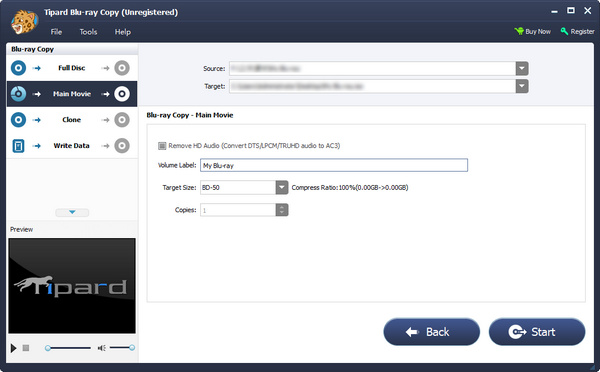
The second Main Movie step in the unregistered program: volume label, target size, the Remove HD Audio box, and Back and Start buttons. Buy Now and Register sit in the top-right corner.
Benefits
- The original disc stays on the shelf. Kids and car players get the copy, and the disc you paid for doesn't get scratched.
- Cheaper blanks. BD-25 discs cost less than BD-50s, and BD-50 to BD-25 compression lets you use them.
- A digital archive that can become a disc again. An ISO or BDMV folder on a NAS takes no shelf space, and Write Data burns it back whenever you need a disc.
- Pay once. The license sold through our Buy Now button is a lifetime license, not a subscription.
Real-World Uses
- A box set for the car or the cottage: copy the main movies of a children's series to BD-25 blanks with Main Movie, so the originals stay home.
- Clearing shelves: clone a collection to ISO files on an external drive, then play them with a Blu-ray player app or burn one back when needed.
- Home video on Blu-ray: make three copies of a wedding or concert disc in one job for the family, using the Copies setting.
- A failing disc: copy a disc that's starting to skip to a fresh blank while the drive can still read it.
Who It's For, and Who Should Skip It
It's for Windows users with a Blu-ray drive who want their discs backed up as discs or disc images, in their original Blu-ray structure, and who'd rather click Start than learn a complicated tool.
Skip it if:
- You want movies on your phone, tablet or Plex server. You need a ripper that makes MP4 or MKV files (Tipard's own Blu-ray Converter, or the free MakeMKV), not a copier.
- You're on a Mac. Blu-ray Copy is Windows-only.
- You're backing up 4K UHD Blu-rays. Tipard lists BD-25 and BD-50 discs and doesn't mention UHD (BD-66/BD-100) support.
- You only have DVDs. Tipard's DVD Cloner is the DVD tool and costs less.
Usage Guide
- Install and launch. Download the 44.6 MB installer, run it, and open Tipard Blu-ray Copy. Connect your Blu-ray drive first if it's external.
- Load the source. Insert the disc, then use File > Load Blu-ray Disc or Load Blu-ray Folder, or choose it from the Source drop-down.
- Choose a mode. Full Disc for everything, Main Movie to pick titles and tracks, Clone for a 1:1 copy, Write Data to burn a folder or ISO.
- Set the target. Pick a burner, Blu-ray folder or ISO in the Target drop-down, rename the volume label, and choose BD-25 or BD-50 as the target size.
- Start. Click Start (or Next, then Start, in Main Movie mode).
Tip: choose speed or quality once, in Preferences
Under Tools > Preference > Blu-ray Copy you can set the default target size and the encoding setting: Fast speed/Normal quality (the default) or Slow speed/High quality. If you compress BD-50 to BD-25 regularly, switch to the high-quality setting and let it run longer. The General tab sets the temp folder (which needs room for a whole disc) and whether temp files are deleted afterwards.

The Blu-ray Copy preferences: default target size, log folder, and the Fast speed/Normal quality or Slow speed/High quality choice.
Where it falls short
- The license is tied to one PC. Uninstalling, reinstalling Windows or moving to a new computer can leave the code unregistered, and buyers on Trustpilot describe having to ask support to reset it. Tipard's account center now has a Change Device button for this.
- No list of supported copy protections. Tipard's pages say it decrypts discs but don't say which protection schemes it handles, so new releases are a test-it-yourself matter.
- 3D to 3D only one way. A buyer's review on Tipard's own site notes it can turn 3D into 2D but not 2D into 3D.
- Dated interface. The window and preview player look much as they did a decade ago, and the trial's limits aren't stated anywhere before you install it.
What Users Say
There's no recent hands-on review from an independent magazine, so most of what's out there comes from buyers: on Tipard's own site, on Trustpilot, and in the press quotes Tipard publishes.
Reviews on Tipard's site (4.8 from 849 reviews)
The Blu-ray Copy reviews page shows 4.8 out of 5 from 849 reviews. These are posted on the vendor's own site, so read them as testimonials.
Scott (January 10, 2026), "Good copy quality!": "No quality drop that I can see."
Jake (September 29, 2025), "Nice for making backups.": "I compared the original disc and the backup, and honestly couldn't see much difference."
Amy (August 5, 2024): "I love the Main Movie part. It allows me to select the audio track and subtitle I want to copy."
Cosmo (March 10, 2014), "BD 50 to BD 25": "It save less space but it can compress BD 50 to BD 25. I like it very much."
Vic (February 6, 2013), "3D Blu-ray is okey": "Wow, it can copy 3D Blu-rays. But it can only copy 3D Blu-ray to 2D Blu-ray. It would be better if I can copy 2D Blu-ray to 3D Blu-ray."
Trustpilot: Tipard Studio (4.5 from 91 reviews)
Trustpilot rates Tipard Studio as a company at 4.5 out of 5 from 91 reviews: 82% five-star and 10% one-star. Two reviews are about Blu-ray Copy:
Graham (June 2025, 5 stars), "Good software and very helpful Support": he'd used Blu-ray Copy "for some time" and was pleased with it, but after changing PCs "the original registration code did not work"; "within just a few hours they had replied and reset the required code."
石田昌幸 (May 2025, 5 stars), "Reliable Blu-ray Copy Software with Outstanding Support": "This copy software can handle most Blu-ray discs without any issues." The drawback he names is the one-computer license: after reinstalling the OS "you need to contact the support center to have the ID reactivated."
The one-star reviews are mostly about refunds and subscriptions on other Tipard products, for example "Just wanted the one month try-out, got an subscription instead." (Maarten Laurent, January 2024). Trustpilot blocks direct downloads, so these quotes were read through a summarizing tool and are excerpts.
Press quotes on Tipard's page
Tipard's product page quotes Windows Report: "Burning a 1.21GB Blu-ray video to disc (Write Data mode) took 6 minutes and 41 seconds. CPU and RAM usage was minimal in both cases."
It also quotes TopTenReviews: "Tipard Blu-ray Copy offers flexible options for Blu-ray copying. With its simple interface, it's easy for beginners to use." We couldn't find the original articles to check their date or context.
The recurring themes
Buyers like the Main Movie selection, BD-50 to BD-25 compression and copies they can't tell from the original. The friction is almost all about the license: one PC, and a reset from support whenever you change computers or reinstall Windows. Support gets consistent credit for doing that quickly.
Comparisons
Tipard Blu-ray Copy vs Tipard Blu-ray Converter
Blu-ray Copy keeps the disc structure (disc, BDMV folder or ISO) so it can be burned again. Blu-ray Converter rips the movie into a video file such as MP4 or MKV for phones, TVs and media servers. Tipard sells the two together as a bundle on its store.
Tipard Blu-ray Copy vs DVDFab Blu-ray Copy
DVDFab is the best-known name in Blu-ray copying and offers more modes and output options. Tipard covers the four everyday jobs (full disc, main movie, clone, burn an ISO) with a simpler window and a one-time $50 license. Since disc support is what really separates copiers, try both free versions on the same disc.
Tipard Blu-ray Copy vs MakeMKV
MakeMKV is free while in beta and makes lossless MKV files of the movie, which is ideal for Plex but doesn't give you a disc or ISO you can burn back. If your goal is a playable physical copy, Blu-ray Copy is the right type of tool.
Editions and Pricing
| License | Price | Term | PCs | Where |
|---|
| Lifetime License | $50.00 (list $62.50) | One-time payment | 1 | Our Buy Now button |
| 3 Month License | $35.00 | Renews every 3 months until cancelled | 1 | Tipard's store |
| Lifetime License, 3 PCs | $80.00 | One-time payment | 3 | Tipard's store |
| Blu-ray Copy + Blu-ray Converter | $78.37 | One-time payment | 1 | Tipard's store |
Store prices are the discounted prices Tipard showed on November 4, 2026, in US dollars before any sales tax or VAT. Tipard's store also offers a 7-day trial of its Blu-ray Player with each purchase that then renews at $30 a month unless you cancel it, so read the order page before you pay there.
FAQs
Can Tipard Blu-ray Copy copy a disc with only one Blu-ray drive?
Yes. Tipard Blu-ray Copy can copy the disc to an ISO file or a Blu-ray folder on your hard drive first, and then burn it to a blank disc in the same drive with Write Data. Two drives just let you go straight from disc to disc.
Will a copy made by Tipard Blu-ray Copy play in a standard Blu-ray player?
Tipard says discs made by Blu-ray Copy, including BD-50 movies compressed to BD-25, play in standard Blu-ray players. Older players can be picky about BD-R media, so burn one test disc before doing a whole collection.
Can I move my Tipard Blu-ray Copy license to a new computer?
Yes, but the lifetime license works on one computer at a time. Tipard's Account Center has a Change Device button that releases the code from its old PC, and Trustpilot reviewers report that support also resets codes within hours. Avoid uninstalling the registered program, since Tipard warns that reinstalling makes it unregistered again.
Does Tipard Blu-ray Copy work with DVDs?
No. Tipard Blu-ray Copy's tech specs list only Blu-ray discs, Blu-ray folders and Blu-ray ISO files as input and output. For DVDs, Tipard sells DVD Cloner separately.
Do I get updates with the lifetime license?
Yes. Tipard's purchase page says the lifetime license includes lifetime upgrades and support. To update, you download the new version from Tipard's site and install it over the old one.
Can a Windows license of Tipard Blu-ray Copy be used on a Mac?
No. Tipard licenses are platform-specific, and Blu-ray Copy has no Mac version at all, so Mac owners need a different tool.
System Requirements
- Windows: 11, 10, 8 or 7
- Processor: 1.2 GHz Intel or AMD CPU or faster
- RAM: 1 GB or more recommended
- Drives: a Blu-ray drive to read discs, a Blu-ray burner to write them
- Disk space: enough free space in the temp folder for a full disc (up to about 50 GB for a BD-50)
- Download: 44.6 MB installer
Conclusion
Tipard Blu-ray Copy does one job and keeps it simple: four clear copy modes, BD-50 to BD-25 compression, and output to disc, folder or ISO, for a one-time $50. The one reason to buy it is a cheap, no-subscription way to keep physical or ISO backups of the Blu-rays you own. The main reason not to is uncertainty about newer copy protection, since Tipard doesn't publish what it can decrypt, combined with a refund policy that won't cover a change of mind. Our verdict: worth it for Windows users who want disc-style backups, once the free download has handled a couple of their own discs. If you want MP4 files instead, buy a ripper.
Download Free TrialBuy Now