Tipard Blu-ray Creator: Turn Your Own Videos into a Blu-ray with a Menu
Tipard Blu-ray Creator is a Windows program that burns your own video files, such as phone clips, camcorder footage and downloaded MP4 or MKV movies, to a Blu-ray disc that plays in a living-room Blu-ray player, complete with a menu and chapters. It can also save the result as a Blu-ray folder or ISO image. Our Buy Now button sells the lifetime license for one PC at $56.25, a one-time payment.
Windows can burn files to a Blu-ray as data, but a TV's Blu-ray player won't play an MP4 sitting on a data disc. It needs a properly authored disc with the Blu-ray folder structure. That's the gap this program fills, and it's aimed at home video: wedding films, travel footage, a year of family clips, a 4K drone video for a relative without a smart TV.
Quick facts
- Version: 1.0.60 (installer dated August 13, 2026)
- Developer: Tipard Studio
- Runs on: Windows 7, 8, 10 and 11
- Input: MP4, MOV, MKV, AVI, WMV, FLV, MPEG, camcorder MTS/M2TS/TOD/MOD and other common formats, from SD up to 4K
- Output: Blu-ray disc (BD-25 or BD-50), Blu-ray folder or Blu-ray ISO
- Price: $56.25 one-time on the order page (lifetime license, 1 PC)
- Refunds: 30-day money-back guarantee for the cases in Tipard's refund policy, which excludes a change of mind
- What we checked: the 72.5 MB installer from Tipard's download server, file version 1.0.60, and the order page, which charged $56.25 for the lifetime 1-PC license with no renewal, both on November 4, 2026. We didn't burn a disc with it.
Before you buy
Check Tipard DVD Creator first. Tipard's DVD Creator has the same interface and also burns Blu-rays (BD-25, BD-50 and BD-100) as well as DVDs, and its lifetime license was $45 on its order page when we checked. Unless you specifically want the Blu-ray-only program, it's the better buy. Tipard's own store was also selling Blu-ray Creator's lifetime license for $45 with a store coupon, against $56.25 on our order page. Its store also adds a 7-day Blu-ray Player trial to orders that turns into a $30 monthly subscription unless you cancel it, so read the order carefully wherever you buy.
Burn a test disc with the free download first and play it on your own Blu-ray player. Tipard refunds for unsolved technical problems, not because the product turned out to be the wrong fit, and one Trustpilot buyer had support swap Blu-ray Creator for DVD Creator when it didn't work for them.
Download Free TrialBuy Now
Overview
Blu-ray Creator works in three screens. The first is your clip list: add videos, see each one's resolution and length, pick audio and subtitle tracks, and use the tool panel on the right to edit videos and chapters. Along the bottom you set the disc type, aspect ratio and video quality, and a capacity bar shows how full the disc will be. The second screen is the menu designer. The third chooses where it all goes (disc, folder or ISO) and starts the burn. You can save the whole thing as a project and come back to it later.
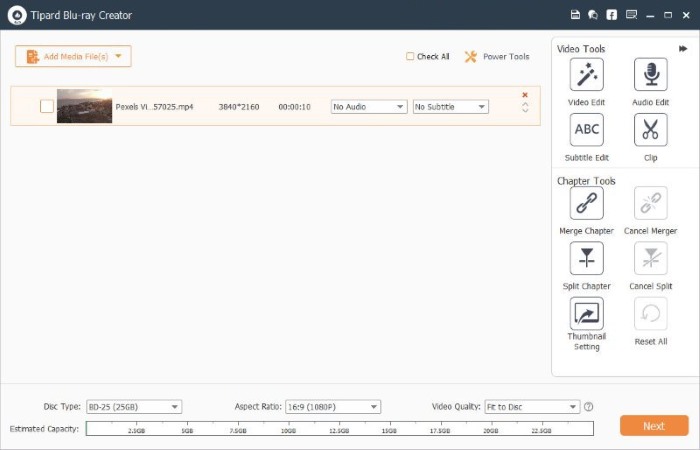
The main window: a 3840x2160 MP4 clip in the list, Video Tools and Chapter Tools on the right, and Disc Type (BD-25), Aspect Ratio, Video Quality and the Estimated Capacity bar at the bottom.
Features
Almost any video becomes a playable Blu-ray
Tipard Blu-ray Creator converts whatever you add, from old AVI and WMV files to 4K MP4 and camcorder MTS clips, into Blu-ray-compatible video (H.264 with Dolby or DTS-family audio, according to Tipard) during the burn. You don't have to convert anything first. Several clips go onto one disc as separate titles, and the output can be a BD-25 or BD-50 disc, a Blu-ray folder (BDMV and CERTIFICATE) or an ISO image.
Disc menus from templates or your own pictures
Tipard Blu-ray Creator's menu screen has template sets grouped as Holiday, Family, Wedding, Travel and more, each with Play and Scene (chapter) buttons. You can change the title text, use your own photo as the background, add background music and an opening film, or tick No Menu so the disc just starts playing. A layout you like can be saved as a custom template.
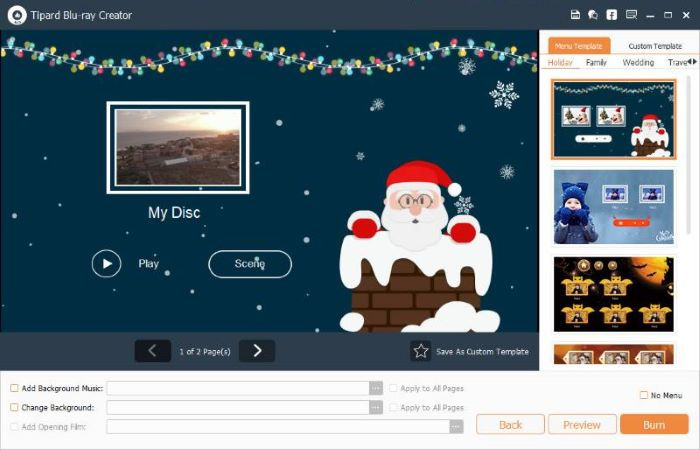
The menu editor with a Holiday template ("My Disc", Play and Scene buttons), the template categories on the right, and background music, background picture and opening film options below.
Chapters, audio tracks and subtitles
Tipard Blu-ray Creator's Chapter Tools merge or split chapters and set the thumbnail each chapter shows in the Scene menu. Audio Edit adds an external audio track (a commentary, a music bed, a second language) with its own volume and delay, and Subtitle Edit adds a subtitle file with language, position, transparency and delay settings, which also fixes audio that's out of sync with the picture.
Basic video editing before you burn
Tipard Blu-ray Creator's Video Edit window rotates and flips clips (handy for sideways phone video), clips off the start and end, crops black bars with Letterbox, Pan & Scan or Full zoom modes, applies effects, adjusts brightness, contrast, saturation, hue and volume, and adds a text or image watermark. Each change shows an original and an output preview side by side, and Apply to All repeats it on every clip.
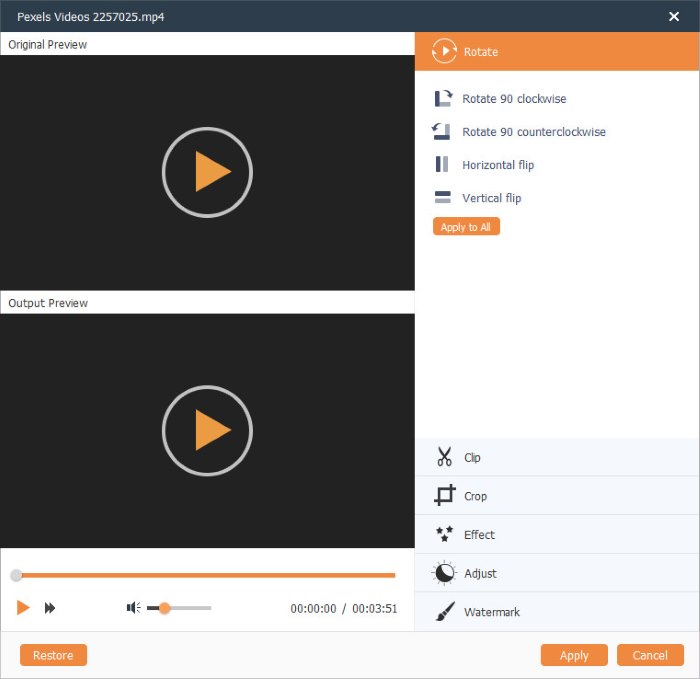
The Video Edit window: original and output previews on the left, and Rotate, Clip, Crop, Effect, Adjust and Watermark on the right.
Capacity check, several copies and GPU speed-up
Tipard Blu-ray Creator's capacity bar shows whether your clips fit before you burn, and the Video Quality setting (such as Fit to Disc) trades quality for space. The burn screen sets the number of copies, the burning engine and the playback mode (start from the menu or straight into the video), and Tipard says NVIDIA, AMD and Intel Quick Sync acceleration speed up the encoding.
Benefits
- Home video for anyone. Grandparents put a disc in a player and press Play: no apps, no streaming, no USB sticks.
- Full HD that DVDs can't hold. A Blu-ray keeps 1080p footage sharp where a DVD would drop it to standard definition.
- A finished look. Menus, chapters and an opening film make a wedding or travel video feel like a real disc.
- A long-term copy. An ISO or Blu-ray folder can be archived now and burned later, as many times as you need.
Real-World Uses
- Wedding videographers burning a few menu-driven BD-25 copies for the couple and their parents in one job.
- A family year-in-review: dozens of phone clips, rotated and trimmed, with each month as a chapter and music under the menu.
- Travel footage: 4K camera files from a trip, fitted to one BD-50 with the Fit to Disc quality setting.
- School or church events: a recorded concert with a subtitle file for the lyrics and copies for the performers.
Who It's For, and Who Should Skip It
It's for Windows users with a Blu-ray burner who want to hand someone a disc of their own videos that "just plays", with a menu, without learning professional authoring software.
Skip it if:
- You want to copy a Blu-ray movie. This makes discs from video files; copying an existing Blu-ray is Tipard Blu-ray Copy's job.
- You might ever need a DVD. A Blu-ray won't play in a DVD player. Tipard's DVD Creator makes both DVDs and Blu-rays and costs less.
- You only need data backups. It authors video discs; it doesn't burn ordinary files to disc.
- You need professional authoring. Pop-up menus, multiple angles and detailed bitrate control are beyond it.
- You're on a Mac. Blu-ray Creator is Windows-only.
Usage Guide
- Install and launch. Run the 72.5 MB installer, open the program and choose Blu-ray Disc on the start screen (or open a saved project).
- Add your videos. Click Add Media File(s), then use Video Edit, Audio Edit, Subtitle Edit and the Chapter Tools on the right as needed.
- Set the disc. Choose BD-25 or BD-50, the aspect ratio and the video quality, and check the capacity bar. Click Next.
- Design the menu. Pick a template, add music or a background picture, and click Preview to try it. Click Burn.
- Burn. Tick Burn to disc, Save as ISO or a folder path, set the copies and playback mode, and click Start.
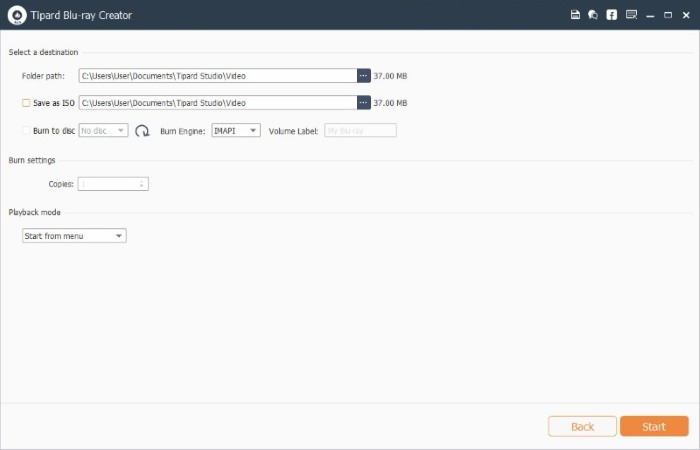
The last step: folder path, Save as ISO and Burn to disc options, the IMAPI burn engine and volume label, the number of copies, and the playback mode (Start from menu).
Where it falls short
- Not every setup works. A Trustpilot buyer wrote that Blu-ray Creator "did not work for me" and had support exchange it for DVD Creator. Test with the free version on your own burner before paying.
- The license is tied to one PC. Moving to a new computer or reinstalling Windows means unbinding the old device in your Tipard account or asking support for a reset.
- Template-driven menus. You can change text, background and music, but not build a menu layout from scratch.
- No stated trial limits. Tipard doesn't say what the free version holds back, so you find out when you install it.
What Users Say
Blu-ray Creator is a niche product and there are no recent independent magazine reviews of it. Here's what buyers have said.
Testimonials on Tipard's site (4.9 from 711 reviews)
Tipard's product page shows a 4.9 rating from 711 reviews. These are on the vendor's own site, so read them as testimonials.
Tim, a student: "I record some videos with my Sony camcorder and want to burn them to Blu-ray disc. This fantastic software does me a great favor."
Doisy, an IT engineer: "In just a few clicks, I make Blu-ray folders with some of my movie collections. When I get Blu-ray discs, I will burn these Blu-ray folders to Blu-ray discs."
Sam, a photographer: "I use it to create Blu-ray with MP4 videos. The creating speed is fast and the Blu-ray quality is also good."
Trustpilot: Tipard Studio (4.5 from 91 reviews)
Trustpilot rates Tipard Studio as a company at 4.5 out of 5 from 91 reviews: 82% five-star, 10% one-star. One review is about this product. Hoogendoorn (June 2025, 5 stars), "change a program": "I first bought the program bue-ray creator, but that did not work for me." After contacting support, "within 2 days it was converted to dvd creator." The reviewer's verdict: "Now that is what I call a service".
Most other five-star reviews praise fast help with registration codes on new PCs. The one-star reviews mainly concern refunds and unexpected subscriptions on other Tipard products, such as "Just wanted the one month try-out, got an subscription instead." (Maarten Laurent, January 2024).
Trustpilot blocks direct downloads, so these quotes were read through a summarizing tool and are excerpts.
The recurring themes
People who get it working like how quickly it turns camcorder and MP4 footage into a disc, and the option to make Blu-ray folders now and burn later. The one specific complaint is that it didn't work at all for one buyer, which support resolved by swapping the product. With so little independent feedback, your own test burn counts for more than the ratings.
Comparisons
Tipard Blu-ray Creator vs Tipard DVD Creator
Tipard DVD Creator's start screen offers both DVD Disc and Blu-ray Disc, and its disc types run from DVD-5 to BD-100, with the same menu templates, chapter tools and editor as Blu-ray Creator. It costs $45 lifetime on its order page against $56.25 here. We found no Blu-ray feature that Blu-ray Creator has and DVD Creator lacks, so for most people DVD Creator is the better value.
Tipard Blu-ray Creator vs free burners (ImgBurn, tsMuxeR)
Free tools can produce a Blu-ray structure, but you'd convert the video yourself, build the folder with tsMuxeR and burn it with ImgBurn, with no menu designer. Blu-ray Creator does conversion, menu and burning in one window, which is what the $56.25 pays for.
Editions and Pricing
| License | Price | Term | PCs | Where |
|---|
| Lifetime License | $56.25 | One-time payment | 1 | Our Buy Now button |
| Lifetime License | $45.00 with store coupon | One-time payment | 1 | Tipard's store |
| 1 Month License | $15.00 a month | Renews monthly until cancelled | 1 | Tipard's store |
| Lifetime License, 3 PCs | $70.00 | One-time payment | 3 | Tipard's store |
Store prices are as Tipard showed them on November 4, 2026, in US dollars before sales tax or VAT. The store also sells Blu-ray Creator with Blu-ray Player as a lifetime bundle for $78.74.
FAQs
Will a disc made with Tipard Blu-ray Creator play on my Sony, Samsung or LG Blu-ray player?
Tipard says discs from Blu-ray Creator play on popular Blu-ray players including Panasonic, Sony, Samsung and LG models. Players vary in how they handle BD-R media, so burn and test one disc before making a batch.
Can Tipard Blu-ray Creator make a Blu-ray without a Blu-ray burner?
Yes, as a file. Tipard Blu-ray Creator saves a Blu-ray folder or ISO image to your hard drive with no burner attached, which you can play on a PC or burn to disc later on a machine that has one.
Does Tipard Blu-ray Creator keep 4K resolution?
No. Tipard Blu-ray Creator accepts 4K videos as input, but it authors standard Blu-ray discs, with output resolutions from SD up to 1080p. It doesn't make 4K UHD Blu-ray discs.
How much video fits on one disc?
It depends on the quality setting. Tipard Blu-ray Creator's Estimated Capacity bar shows how much of a 25 GB (BD-25) or 50 GB (BD-50) disc your clips will use, and the Fit to Disc quality option squeezes them to fit.
Do I need a Tipard account to use it?
Tipard Blu-ray Creator has a Log in button that ties your purchase to a Tipard account by email code, which is one of two ways to activate it. The other is entering the registration code from your purchase email.
Is there a Mac version of Tipard Blu-ray Creator?
No. Tipard Blu-ray Creator runs on Windows only, and Tipard's licenses can't be moved between Windows and Mac.
System Requirements
- Windows: 11, 10, 8 or 7
- Processor: 1.2 GHz Intel or AMD CPU or faster
- RAM: 1 GB or more recommended
- Drive: a Blu-ray burner and blank BD-R or BD-RE discs to make discs (not needed for folders and ISO files)
- Download: 72.5 MB installer
Conclusion
Tipard Blu-ray Creator is a straightforward way to put your own videos on a Blu-ray that plays on a TV, with templates for the menu, chapter tools, simple editing and a capacity check, and it's actively updated (version 1.0.60, August 2026). The one reason to buy it is getting a finished, menu-driven Blu-ray from a pile of MP4 and camcorder files without learning authoring software. The main reason not to is Tipard's own DVD Creator, which makes the same Blu-rays plus DVDs for $45 against $56.25 here; little independent feedback exists for either, and at least one buyer couldn't get Blu-ray Creator working. Our verdict: a capable tool, but most home videographers with a Blu-ray burner get more for less from DVD Creator. Whichever you choose, burn a test disc with the free download and play it on your own player first.
Download Free TrialBuy Now