Leawo DVD Ripper for Mac: Turn a Shelf of DVDs Into MP4 and MOV Files on macOS
Leawo DVD Ripper for Mac is a macOS app that removes DVD copy protection and region codes and converts discs, VIDEO_TS folders and ISO images into MP4, MOV, MKV and other video or audio files. It costs $29.95 a year or $39.95 for a lifetime license on one Mac, runs on macOS 10.13 High Sierra through macOS 27, and comes in separate Intel and Apple-chip downloads.
The catch on a Mac is hardware, not software. No current Mac has a disc slot, so you'll be ripping through a USB DVD drive. If you still have one, or a box of discs you've been meaning to deal with, this is a low-cost way to get the films into your Movies folder, your iPad or a Plex library.
Quick facts
- What you install: Leawo Prof. Media for Mac, version 13.0.8 in the Intel installer (the Apple-chip installer is dated July 7, 2026). DVD Ripper is one module of it, switched on by your registration code.
- Downloads: an Intel build (ltmcu_setup.dmg, 241 MB) and a separate Apple-chip build (ltmcu_setup_arm64.dmg, 316 MB). The download page asks which chip your Mac has.
- macOS: 10.13 High Sierra through 15 Sequoia, 26 Tahoe and 27
- Reads: DVD discs, DVD folders and DVD ISO files, including CSS-protected discs from regions 1 to 6. Not Blu-ray.
- Writes: 180+ video and audio formats and device presets, including MP4, MOV, MKV, H.265, MP3 and AAC
- Price on the order page: $29.95 for 1 year (renews automatically) or $39.95 lifetime, one Mac
- Trial: free, converts only the first five minutes of each title, with no free support while you're on the trial
- Money-back window: 5 days on the yearly plan, 14 days on lifetime, for faults Leawo can't fix
- What we checked: both Mac installers on Leawo's DVD Ripper for Mac download page (the Intel DMG, 252,961,353 bytes, dated June 10, 2026, whose installer package reads Leawo Prof. Media 13.0.8 for x86_64 with a macOS 10.13 minimum and about 580 MB installed, and the Apple-chip DMG, 331,793,186 bytes, dated July 7, 2026), Leawo's trial limits and refund policy, and the "Leawo DVD Ripper for Mac" order page, which charged $29.95 for one year and $39.95 for the lifetime license on November 1, 2026. We didn't install it on a Mac or rip a disc.
Before you buy
- Pick the Mac version at checkout. Leawo sells Windows and Mac as separate products at the same price, and its refund policy rules out refunds for "the wrong software". Make sure the product name on the order page ends in "for Mac".
- Take the lifetime license. It's $10 more than one year, and the yearly plan renews itself until you cancel.
- Download the build that matches your chip. Apple menu > About This Mac tells you whether it's Apple silicon (M1 and later) or Intel.
- Have a drive ready. You need an external USB DVD drive. Leawo's requirements also list an internet connection.
- Only for discs you own. Leawo's terms limit its software to content "that you have lawfully obtained". Whether removing DVD protection is legal depends on your country.
Download Free TrialBuy Now
Overview
There's no app called "DVD Ripper" in your Applications folder after installing. The installer puts Leawo Prof. Media.app in /Applications, and every Leawo disc tool lives inside it as a tile on the home screen. Your DVD Ripper code switches on the DVD Ripper tile and the Convert tab; tiles you haven't paid for stay in trial mode. The upside is that adding Blu-ray Ripper or DVD Copy later is just another code, not another app.
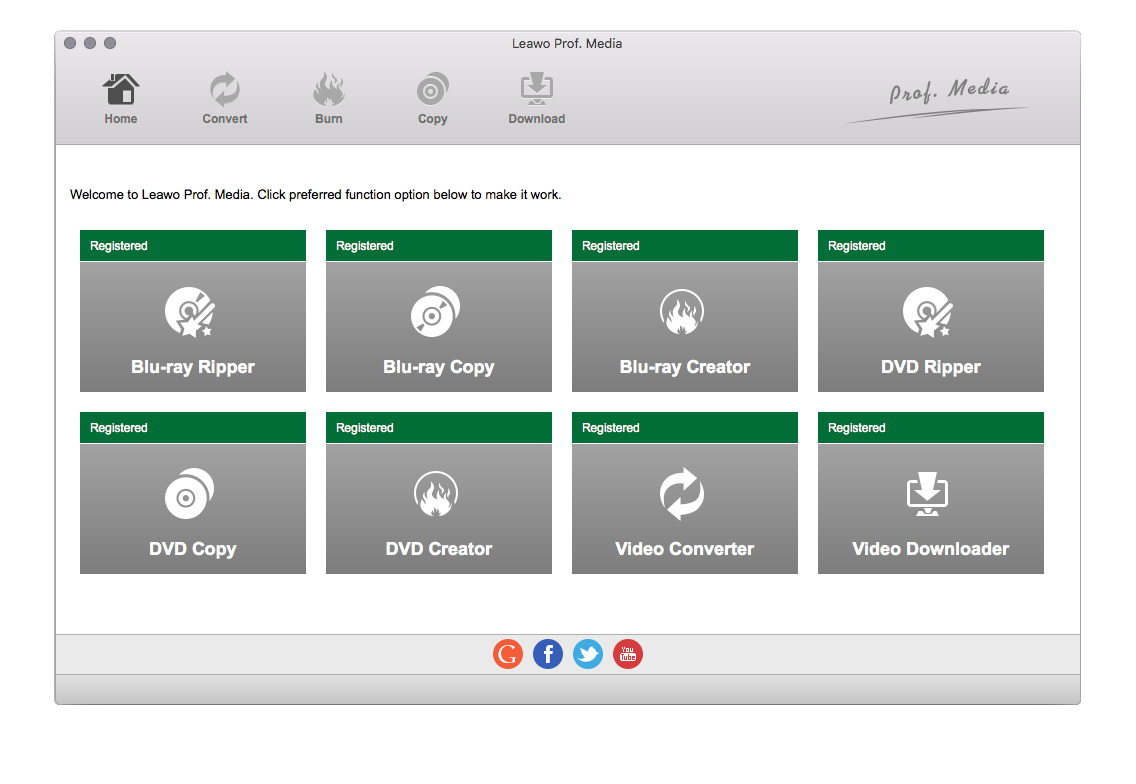
Prof. Media's home screen on a Mac (an older release): eight module tiles, including DVD Ripper, each marked Registered, under the Home, Convert, Burn, Copy and Download tabs.
Features
Load a disc, a VIDEO_TS folder or an ISO
Leawo DVD Ripper for Mac reads from three sources: the DVD in your USB drive, a DVD folder copied to disk earlier, or an ISO image. It decrypts CSS and ignores the region code, so a region 2 disc from a UK trip rips on a US Mac without touching the drive's region setting, which macOS lets you change only a few times. You can also drag files onto the window.
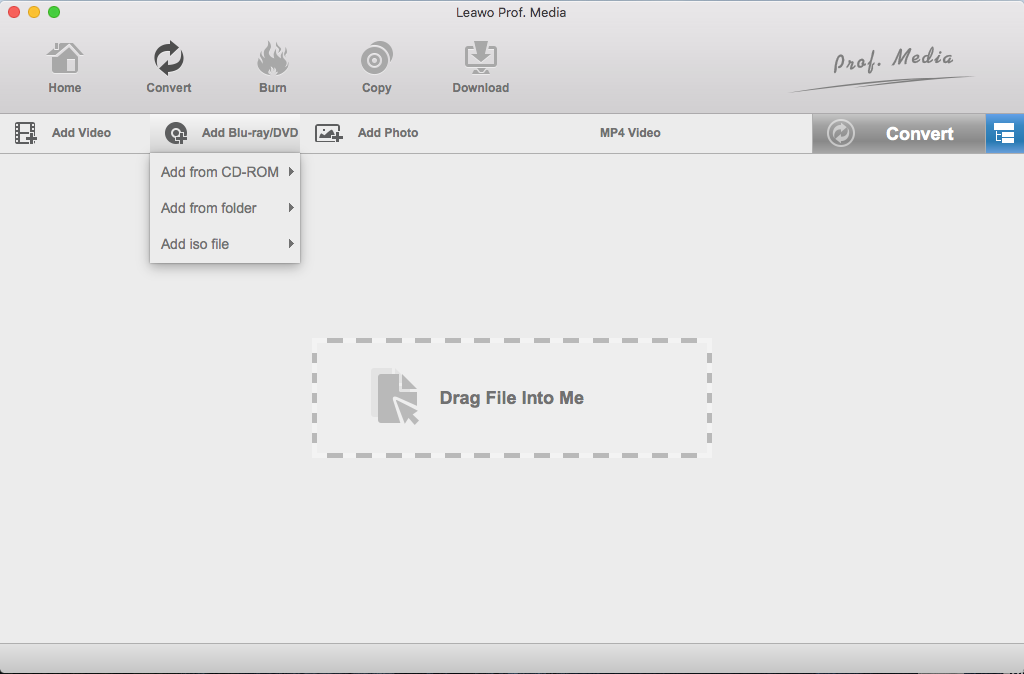
The Mac Convert tab with the Add Blu-ray/DVD menu open: Add from CD-ROM, Add from folder and Add iso file, plus a "Drag File Into Me" area (older Mac release).
Formats that suit Apple devices
Leawo DVD Ripper for Mac sorts its output profiles into Common Video, Common Audio, HD Video and 4K Video, plus a Device tab. For a Mac household, MP4 (H.264) plays in QuickTime, Photos, the TV app and on every iPhone and iPad, MOV drops straight into iMovie or Final Cut, and H.265 halves the file size for a nearly full MacBook. Audio-only MP3 or AAC pulls the soundtrack of a concert DVD into Music.
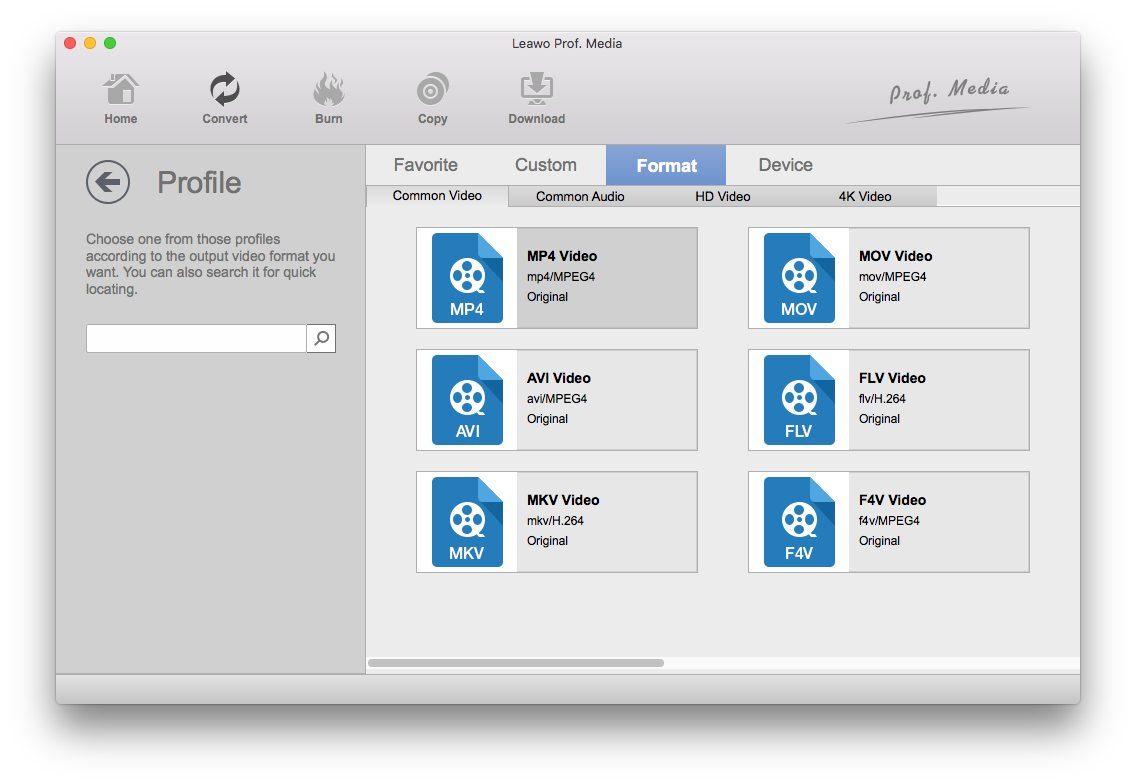
The Mac Profile window: Favorite, Custom, Format and Device tabs, with MP4, MOV, AVI, FLV, MKV and F4V under Common Video and a search box on the left (older Mac release).
Pick the main movie, subtitles and audio track
Leawo DVD Ripper for Mac offers Full Movie, Main Movie and Custom Mode when it loads a disc. Main Movie grabs only the feature, Custom Mode lets you tick episodes on a TV box set. Each title then gets its own subtitle and audio menu, and an angle menu on multi-angle discs. A built-in player previews titles and takes snapshots before you start.
Simple edits, merging and 2D to 3D
Leawo DVD Ripper for Mac includes a small editor: trim a title, crop black bars, add a text or image watermark, and adjust brightness, contrast and saturation. It can merge several titles into one file and turn a 2D film into anaglyph or side-by-side 3D. It isn't an editor in the iMovie sense, but it saves a round trip for simple cuts.
Fine control over codec and bit rate
Leawo DVD Ripper for Mac lets you edit any profile: video codec, bit rate, resolution, frame rate and aspect ratio, and audio codec, bit rate, sample rate and channels. Setting resolution and frame rate to "Original" keeps the DVD's own picture. You can save the result as a custom profile for the next disc.

The Mac conversion sidebar: the default output folder inside the user's Movies folder (Movies/com.leawo.tmcu), the disk space the job needs and what's free, and the Convert button (older Mac release).
Benefits
- A drive you use once. Rip the collection in one weekend, then put the USB drive back in the drawer and keep only the files.
- Room on the bookshelf, not the SSD. H.265 output keeps a DVD film to a size a MacBook's internal drive can live with.
- Files that play everywhere Apple does. MP4 and MOV need no extra player on macOS, iOS or Apple TV.
Real-World Uses
- Home videos into iMovie. Convert DVDs from an old camcorder or wedding videographer to MOV, then cut them together in iMovie.
- Kids' films for the iPad. Rip once with Main Movie, add the MP4 files to the TV app, and keep the discs out of small hands.
- A Plex or Jellyfin library on a Mac mini. Rip each season with Custom Mode so every episode is its own file.
- Old ISO backups. Turn ISO images saved years ago into one MP4 per film, then delete the 4-8 GB images.
Who It's For, and Who Should Skip It
A good fit if you're on a Mac, own only DVDs (including discs from other regions), and want a menu-driven tool you can learn in ten minutes.
Skip it if:
- You also have Blu-rays. Leawo Blu-ray Ripper for Mac ($99.95 lifetime) includes DVD Ripper, so you'd pay twice otherwise.
- Your discs aren't copy-protected. Home-burned DVDs without CSS can be converted by free tools such as HandBrake.
- You want a 1:1 disc copy. That's Leawo DVD Copy, which writes an ISO or burns a blank DVD.
- You need styled or external subtitles. The ripper burns in or keeps the disc's own subtitle tracks and has no subtitle font settings.
Usage Guide
- Install. On the download page, choose "Mac with Apple Chip" or "Mac with Intel Chip". Open the DMG and run the installer, which places Leawo Prof. Media in Applications. Plug in the USB DVD drive and insert the disc.
- Open the Convert tab and click Add Blu-ray/DVD (Add UHD/Blu-ray/DVD in version 13), then Add from CD-ROM, Add from folder or Add iso file.
- Choose what to load: Full Movie, Main Movie or Custom Mode. Then set the subtitle and audio track on each title.
- Choose the output. Click the profile box next to the green Convert button (MP4 Video by default), then Change to pick a format or Edit to adjust settings.
- Convert. Click the green Convert button, check the "Save to" folder, and click Convert at the bottom.
- Register. Click the key icon at the top right to open the activation center and paste your code. That removes the five-minute limit.
Where it falls short
- The Mac build trails Windows. The Intel Mac installer is 13.0.8 from June 2026 and the Apple-chip one is dated July 2026, while Windows got 13.0.1.6 in October 2026. Leawo publishes no change log for either, so you can't see what each update fixed.
- Old device presets. Leawo's device list stops at the iPhone XR, iPad Air and iPad mini 2. For newer devices, use a generic MP4 or H.265 profile, which plays on all of them.
- The speed claims are written for PCs. The DVD Ripper page bases its "50X faster" figure on NVIDIA, AMD and Intel Quick Sync acceleration and a Windows graphics card. On a Mac, Prof. Media's Performance settings offer Apple's VideoToolbox hardware encoding and decoding instead, and Leawo's own Mac screenshot notes that the decode option doesn't work on Apple silicon, so treat the speed figures as a PC number.
- Few Mac screenshots in Leawo's guide. The user guide behind the Mac switch shows the Windows window, and Leawo's Mac screenshots show an older interface. The steps match, but some buttons have moved.
- Installs can fail on some Macs. A 1-star Trustpilot review (below) reports that the software wouldn't install and that no refund was given. Run the trial on your Mac first.
What Users Say
Independent reviews of the Mac DVD Ripper are hard to find, and most "reviews" online come from companies selling a rival ripper, so we left those out. Leawo's own review pages are moderated by Leawo and most entries are from 2013 and 2014, so read them with that in mind.
Leawo's review page for DVD Ripper for Mac (5.0 out of 5, 3 reviews)
"Ripped all my DVDs without fuss in Mac OS "Monterey"." S W Tan, 5 stars, December 2022
"Great DVD Ripper works great each and every time" Ignacio Villegas, 5 stars, December 2017
"Best Ripper come from Leawo" Roger Gag, 5 stars, December 2017
Leawo's main DVD Ripper review page (5.0 out of 5, 78 reviews, 75 of them 5 stars)
These don't say which platform the reviewer used. The program is the same on both. The detailed ones mix praise with complaints:
"I tried the giveaway licensed version of Leawo and they RIPPED ALL THE DISNEY formats, 100%. This is the one ripper i want to own and will pay for the lifetime version." Francis Kang, 5 stars, October 2020
"My primary use is for backing up concert DVDs that I have collected over the years and I have to say it is extremely fast, smooth, and the playback works like a charm." Dustin L., 5 stars, January 2018
"A very good product. It would be an ideal program if there was some means of compressing the video while ripping to save space on the hard drive." good2go7, 4 stars, February 2019
"Compared to my regular dvd converter (Catalyst 4) i found Leawo to be quite slow. Apart from that I think it is a good quality program." John, 5 stars, June 2013
"In fairness this product it started again after freezing and did rip the file but it took over ten hours." Jay Quinlan, 4 stars, July 2013, who added that a second attempt finished within an hour
"Installation and usage of the program is pretty easy and the results are of good quality. But I would prefere to have DVD and Blu-ray rippers in one tools and not to pay twice for them." Vera Muster, 5 stars, June 2013
Trustpilot: Mac owners on Leawo (leawo.com 4.3 from 158 reviews, leawo.org 4.4 from 151)
Trustpilot rates Leawo as a company across all its products. Mac owners mostly write about support and licenses:
"When I purchased a new Mac, they were most helpful in transferring my license to the new machine." HNWDZT, 5 stars, March 2024
"I recently updated to the full version of LeawoProf.Media for Mac" Frans Vandenburg, 5 stars, October 2023, in a review titled "Postive Postive 10 Star Experience"
"It works seamlessly, converting DVDs into other formats that I can use in iMovie." Dee, 4 stars, December 2014, about Leawo's Mac converter
"I CAN NOT INSTALL their software in my Mac and the company refuse to give me a refund." Ad Libitum Audiovisuals, 1 star, May 2022
The recurring themes
People like that it's easy to learn, handles protected and Disney discs, and that Leawo's support helps with licenses and macOS upgrades. The complaints are speed on some discs, the odd freeze, paying separately for DVD and Blu-ray, and, on the Mac, an install that failed with no refund. The Mac-specific review count is tiny, so the trial is your best test.
Comparisons
Mac vs Windows version
|
DVD Ripper for Mac |
DVD Ripper for Windows |
| Current build |
13.0.8 Intel build (June 2026), Apple-chip build dated July 2026 |
13.0.1.6 (October 2026) |
| Download |
241 MB Intel DMG or 316 MB Apple-chip DMG |
209 MB installer |
| Systems |
macOS 10.13 to 27 |
Windows 7 to 11 |
| GPU acceleration |
Apple VideoToolbox encode/decode settings |
NVIDIA, AMD, Intel |
| Price |
$29.95 a year, $39.95 lifetime |
$29.95 a year, $39.95 lifetime |
The features and workflow are the same. A license works only on the platform you bought it for.
DVD Ripper vs HandBrake on a Mac
HandBrake is free and converts very well, but it doesn't remove CSS protection, so most shop-bought DVDs won't open in it without extra software. Leawo decrypts and converts in one app with simple menus. For unprotected home DVDs, HandBrake is enough.
DVD Ripper vs Blu-ray Ripper for Mac
Leawo Blu-ray Ripper for Mac reads Blu-rays and DVDs and its $99.95 lifetime license includes DVD Ripper. If you'll never own a Blu-ray drive, DVD Ripper saves you $60.
Editions and Pricing
| Mac plan |
Price |
Modules |
Money-back window |
| DVD Ripper for Mac, 1 year (auto-renews) |
$29.95 |
DVD Ripper |
5 days |
| DVD Ripper for Mac, lifetime |
$39.95 |
DVD Ripper |
14 days |
| Blu-ray Ripper for Mac, lifetime |
$99.95 |
Blu-ray Ripper, DVD Ripper, Blu-ray Recorder Ripper |
14 days |
| DVD Media Bundle for Mac, lifetime |
$99.94 |
DVD Ripper, DVD Copy, DVD Creator, Video Converter, CleverGet Video Downloader |
14 days |
All plans cover one Mac and include free upgrades. The bundle price is the order page's $199.88 list price after a 50% discount code that the product page applies.
FAQs
Does Leawo DVD Ripper for Mac run natively on M1, M2, M3 and M4 Macs?
Leawo DVD Ripper for Mac has a separate Apple-chip download (ltmcu_setup_arm64.dmg) next to the Intel one. The Intel package we checked is built for x86_64 only, so on an Apple silicon Mac pick the Apple-chip build rather than running the Intel one through Rosetta.
Will Leawo DVD Ripper work with Apple's USB SuperDrive or another USB DVD drive?
Leawo DVD Ripper for Mac doesn't name particular drives: its requirements ask only for a "DVD drive", and it reads the disc through the drive macOS mounts. The trial is the quickest way to confirm your drive and disc work together.
Can I move my Leawo DVD Ripper license to a new Mac?
Leawo DVD Ripper for Mac licenses one Mac at a time. Trustpilot reviewers describe Leawo's support moving their license when they replaced a Mac, so contact support with your order details when you upgrade.
Can I use the same Leawo license on Mac and Windows?
No. Leawo DVD Ripper for Mac and the Windows version are separate products with separate codes, so a family with one of each needs two licenses.
Do I get a refund if Leawo DVD Ripper doesn't work on my Mac?
Leawo DVD Ripper for Mac is refundable within the plan's window (5 or 14 days) only when support confirms a bug or hardware incompatibility it can't fix, and only if you've worked with support on it. Buying the wrong product or simply not using it doesn't qualify.
How much disk space does ripping a DVD on a Mac need?
Leawo DVD Ripper for Mac installs about 580 MB of program files, and Leawo's specs ask for 5 GB free for DVD work. The conversion sidebar shows the space each job needs before you start.
System Requirements
- macOS: 10.13 High Sierra, 10.14 Mojave, 10.15 Catalina, 11 Big Sur, 12 Monterey, 13 Ventura, 14 Sonoma, 15 Sequoia, 26 Tahoe, 27
- Processor: 1 GHz or faster Intel, or Apple silicon with the Apple-chip download
- Memory: 512 MB RAM, 1 GB or more recommended
- Drive: a DVD drive (external USB on current Macs)
- Disk space: about 580 MB for the app, 5 GB+ free for ripping
- Other: internet connection
Conclusion
Leawo DVD Ripper for Mac is worth $39.95 lifetime if you have a stack of shop-bought DVDs and a USB drive to read them. It decrypts CSS and region codes that free Mac tools won't touch, writes MP4 and MOV files that play everywhere in the Apple world, and has a native Apple-chip build.
The reason to buy it: protected DVDs to Mac-friendly files in one app, for less than many rivals charge for a year. The reason to hesitate: the Mac build lags the Windows one, Mac-specific reviews are scarce, and refunds aren't easy, so rip your trickiest disc with the five-minute trial before paying. If any Blu-rays are in the pile, buy Blu-ray Ripper for Mac instead.
Download Free TrialBuy Now