MDRP (Mac DVDRipper Pro): Rip Your DVDs on a Mac, With AI Subtitles and 4K Upscaling
MDRP, the DVD ripper long sold as Mac DVDRipper Pro, is a $49.95 one-time purchase for macOS 11 or later that turns the DVDs you own into MP4, M4V or MKV files, lossless copies or .iso disc images, and can add AI-generated subtitles, translate them and upscale old footage to HD or 4K, all on your Mac. It suits anyone with a shelf of DVDs and a Mac, and the free trial gives you 5 full rips before you pay.
Picture the box of DVDs in the closet: films, a TV series, a homemade wedding DVD, each one scratch away from being unplayable. MDRP is built for the afternoon you plug in a USB DVD drive and get all of it onto your Mac, iPhone and Apple TV.
Quick facts
- Version: 14.2.1, released April 26, 2026
- Developer: DVDSuki Software. The app was called Mac DVDRipper Pro and is being rebranded as MDRP.
- Platform: macOS 11 Big Sur or later, on Apple Silicon and Intel Macs. No Windows or Linux version.
- Input: DVDs, VIDEO_TS folders, .iso images and over 100 video file formats. No Blu-ray discs.
- Output: .mp4, .m4v or .mkv video, lossless .dvdmedia folders, full .iso disc images, .m4a audio, .srt subtitles, or a burned DVD copy
- AI features: speech-to-text subtitles in 99 languages, translation into 23 languages, super-resolution upscaling to 4K, all on-device
- Price: $49.95 one-time (the vendor shows it reduced from $99.95). Major-version upgrades cost $24.95.
- License: up to 3 Macs you own, free minor updates
- Free trial: unlimited 15-minute preview rips plus 5 full rips with no watermark
What we checked: the trial download from the vendor's site is version 14.2.1, a 220.5 MB zip, and needs macOS 11.0 or later (downloaded November 2, 2026). The download behind the trial button below is the older version 13.3.5, and its update feed offers version 14.2. MDRP cost $49.95 on the order page on November 2, 2026. We didn't rip a disc or run the AI subtitle and upscaling features ourselves.
Before you buy
- Use the trial on your own discs first. The preview rips show whether a given DVD, drive and macOS version work together, which matters more with DVD rippers than any feature list.
- Update the trial after installing. If the app opens as version 13.x, accept the update (or use Check for updates in the MDRP menu). A version 14 serial number only works in version 14.
- Check your RAM before counting on the AI features. They run comfortably on 16 GB. On an 8 GB Mac, plan on one AI subtitle track at a time and no translation (details in the FAQs).
- Know the rules where you live. Copying commercial DVDs, even ones you own, isn't clearly legal everywhere. Rip only discs you own.
Download Free TrialBuy Now
Overview
MDRP has been around for a long time: its release notes go back to version 1.6.4 in November 2010. The idea has stayed simple: insert a disc, pick what you want out of it, click Rip. What you pick is a ripping action, and you can queue several in one go, for example one action per episode on a TV series disc. Each action shows its title, audio and subtitle language and running time, and a progress bar fills as it works.
Version 14, updated through April 2026, added AI models that run locally on your Mac. Nothing is uploaded and there's no subscription.
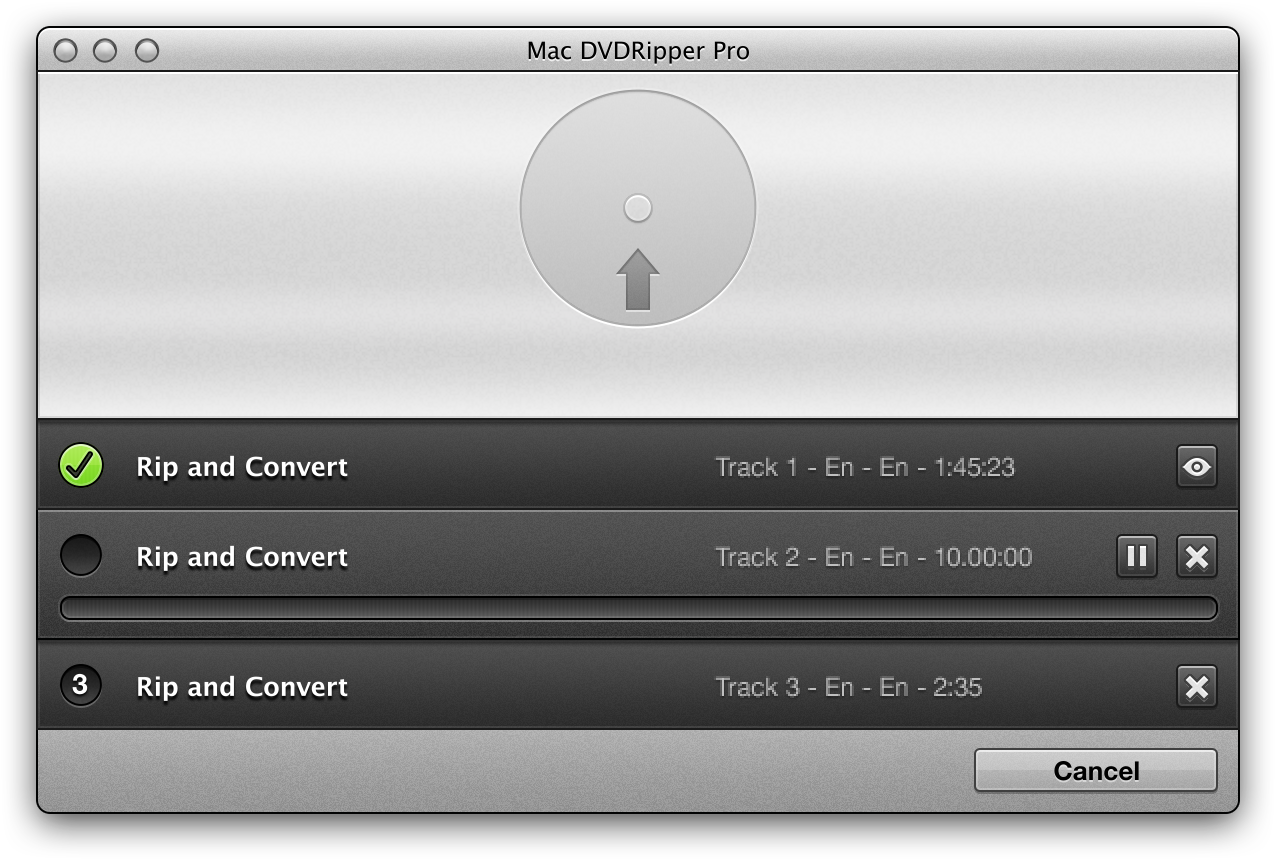
The main window with three Rip and Convert actions queued: track 1 is done, track 2 is in progress and track 3 waits its turn. This screenshot from the vendor's site shows the older interface under the Mac DVDRipper Pro name.
Features
Six ripping modes, from a phone-ready file to a perfect archive
MDRP gives you a different output for each job. Rip and Convert, the default, turns a DVD title into an .m4v, .mp4 or .mkv file that plays on iPhone, iPad, Apple TV, Plex and most players. Main movie only makes a lossless .dvdmedia copy of just the film, and the manual calls it the most resilient mode for awkward discs. Full disc image saves the whole DVD, menus and extras included, as an .iso file. All videos and bonuses keeps the full VIDEO_TS structure, Re-encode converts an ordinary video file, and Extract Audio saves one soundtrack as an .m4a file.
You choose the mode in the main window, while container, quality preset and encoder (x264, x265, VP9 or the Mac's hardware encoder) are set once in Preferences.
Pick the right title with the built-in player
MDRP's Select With Player button opens a DVD player inside the app. You click through the disc's menus until the film is actually playing, then click Select Current, and MDRP rips that title. It's the practical answer to discs that hide the real movie among dozens of decoy titles, and the FAQ recommends it for picking the right forced-subtitle track for foreign-language scenes too. For a TV series, Clear and convert all titles in the Edit menu queues every title on the disc at once.
AI subtitles in 99 languages, even for discs without any
MDRP can transcribe a DVD's audio track into a soft subtitle track, in 99 languages, and you pick it from the subtitle menu where the audio tracks appear marked "(AI)". That helps with older discs that never had subtitles, family videos and anyone hard of hearing. A second menu adds post-processing: Fix typos and errors, or translate the subtitles into one of 23 languages, from French and Japanese to Hindi, Korean and Ukrainian. Subtitles burned into the picture are still read with OCR, and any subtitle track can be saved as an .srt file.
Upscaling to 720p, 1080p or 4K, with an A/B comparison
MDRP's Image Settings dialog upscales 480p DVD video to 720p, 1080p or 2160p. Besides normal upscaling there are several neural-network models (Super Resolution, RRDN, SRResNet, and photo or anime variants) that run on the Apple Neural Engine. A Compare checkbox and a seek slider let you check the result against the original before you commit to a long rip.
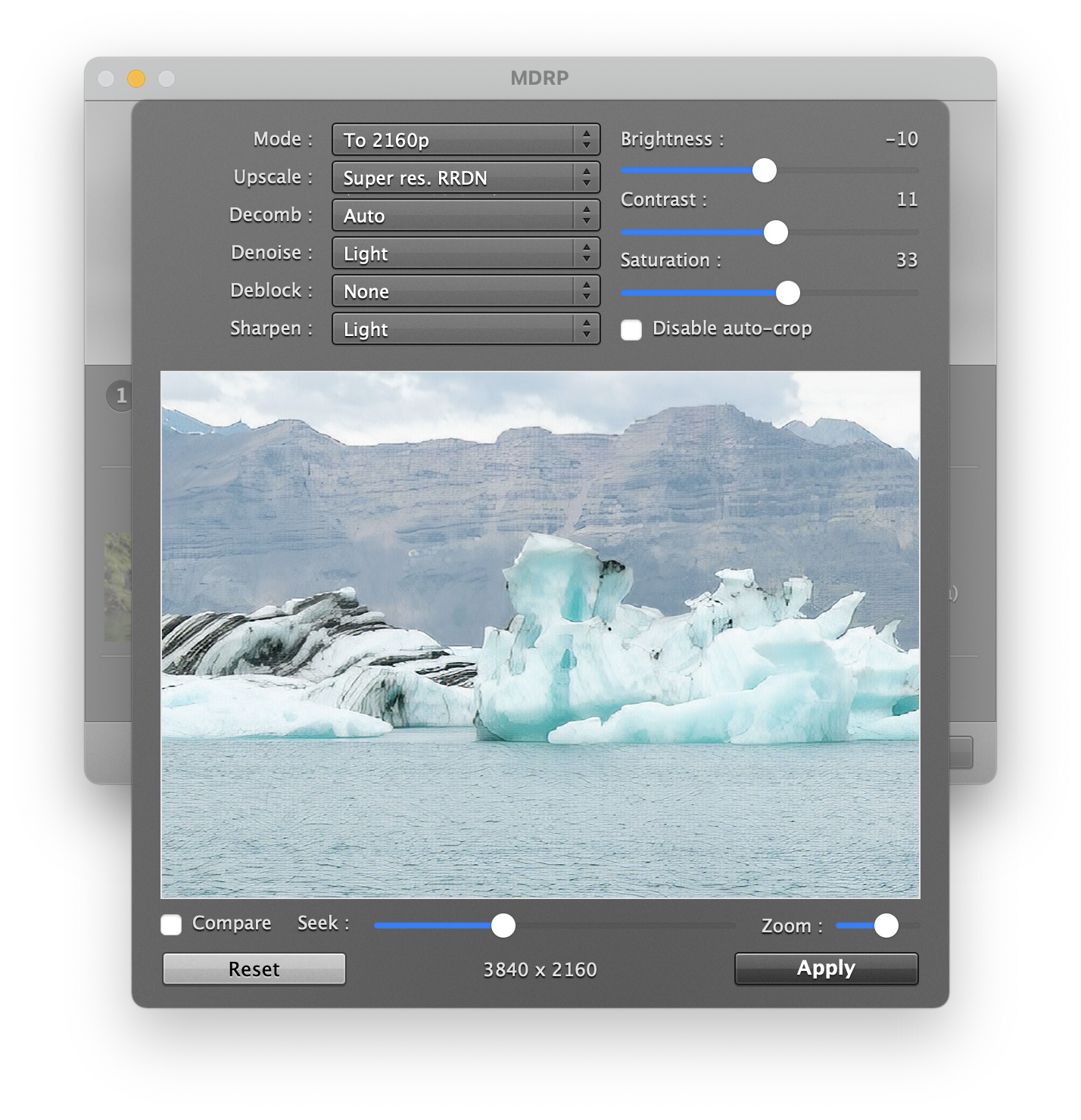
The Image Settings dialog set to To 2160p with the Super res. RRDN model, light denoise and sharpening, and adjusted brightness, contrast and saturation. The preview shows the 3840 x 2160 result.
Clean-up tools for old and VHS footage
The same dialog has Decomb (deinterlacing), Denoise, Deblock and Sharpen settings plus brightness, contrast and saturation sliders, and MDRP crops black bars automatically unless you turn that off. Drop a digitized VHS recording onto the app and you can work on it like a disc.
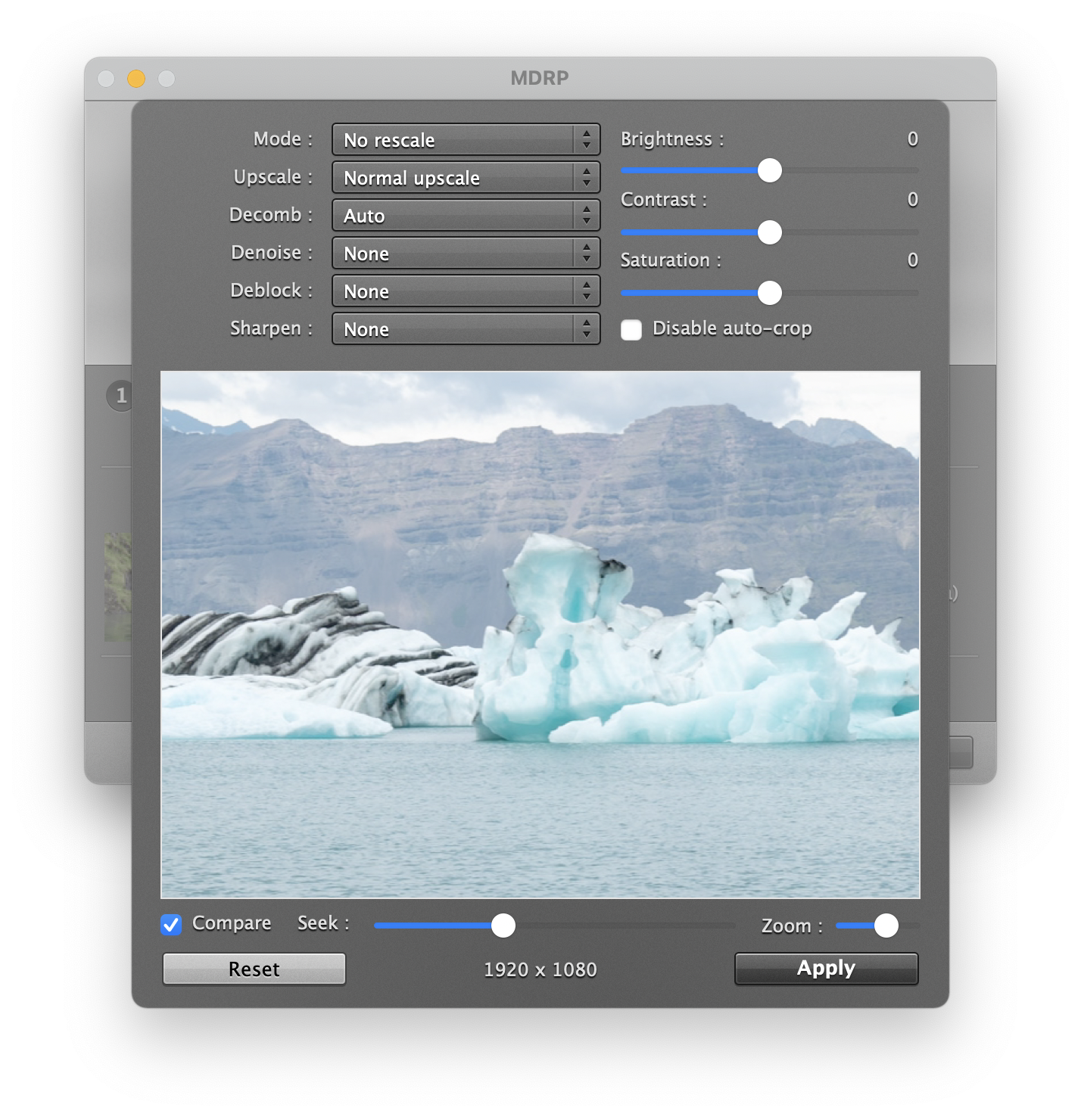
The same dialog at its defaults (No rescale, Normal upscale, Auto decomb) with Compare turned on, previewing the 1920 x 1080 source.
Backups, burning and sharing
MDRP's Full disc image and burn a copy mode rips a DVD to .iso and then asks for a blank double-layer disc to burn a backup, and you can burn any existing .iso later from the MDRP menu. When a rip finishes, a Share button sends the file by AirDrop, Mail or Messages, which is the quickest way onto an iPhone. With the Keep AC3 option, a rip keeps the original surround track next to the stereo one.
A command-line mode for batch work
Registered MDRP users can drive the app from Terminal with --mode flags: disc image, main movie, convert, extract audio or a listing of titles and tracks, with options for chapters, audio and subtitle tracks, AI translation, upscaling and metadata tags. It's marked beta, and it reads your saved Preferences for anything without a flag, but it lets you script a whole shelf of discs.
Benefits
- You pay once. Unlike online transcription or translation services, there are no per-minute or per-word fees and no monthly quota, and the AI keeps working years later.
- Your videos stay private. Home movies and family DVDs never leave your Mac, which matters for exactly the footage people most want to subtitle and restore.
- One app covers the whole job. Ripping, converting, subtitling, translating, upscaling and burning a backup happen in one place, where the usual free route takes two or three separate tools.
Real-World Uses
- Digitizing a film collection before the discs fail: queue Rip and Convert for each film and get .m4v files for the TV app or Plex, or keep a full .iso of the special editions you care about.
- Ripping a TV box set: use Clear and convert all titles to queue every episode, and MDRP names the files "Show - 1", "Show - 5" and so on by title number.
- Subtitling a family DVD for a hard-of-hearing relative: select the audio track as the subtitle source, rip, and the new subtitle track plays by default in most players.
- Watching a foreign film with no subtitles in your language: translate the disc's own subtitle track into one of 23 languages during the rip.
- Restoring a digitized VHS tape: denoise, sharpen, fix the colors and upscale to HD, checking each setting against the original with the A/B compare.
Who It's For, and Who Should Skip It
MDRP is for Mac owners with a DVD collection who want a guided, one-app workflow rather than learning a chain of free tools. It's especially good value if you'll use the subtitle, translation or upscaling features, and on an Apple Silicon Mac with 16 GB of RAM or more, where those features run comfortably.
Skip it if:
- Your collection is mostly Blu-ray. MDRP only rips DVDs, so you need a Blu-ray ripper such as MakeMKV.
- You're on Windows or Linux. MDRP is Mac-only.
- You have an Intel Mac and want AI upscaling. The manual calls super-resolution "impractical" on Intel Macs, and speech-to-text is much slower there.
- You only need a straight copy of a few discs. A free ripper that saves MKV files does that, and MDRP's extras would go unused.
Usage Guide
- Install: download the zip, double-click it and drag MDRP.app to your Applications folder. Launch it and accept any update it offers.
- Stop DVD Player from interfering: in System Settings, set video DVDs to "Ignore" and quit DVD Player if it opens. MDRP and DVD Player can't use a disc at the same time.
- Insert the DVD: MDRP detects it. For a video file or VIDEO_TS folder, drag it onto the window or use Select source.
- Choose the mode and title: keep Rip and Convert for a playable file, and use Select With Player to pick the film.
- Pick audio and subtitles: choose a subtitle track, or an audio track marked (AI) to generate one, and a translation if you want it.
- Optional image work: open Image Settings to upscale or clean up the picture, and check it with Compare.
- Set the destination and click Rip. Files go to your Movies folder by default. If a disc fails, rip a Full disc image first and convert from the mounted image, and let scratched discs run overnight.
- Register: after buying, paste the serial number (it starts with MDRP14) into Registration in the MDRP menu. Copy and paste it rather than typing it.
Where it falls short
- No Blu-ray, no DRM files. MDRP rips DVDs only, and it can't read protected purchases from Apple TV or streaming downloads.
- Region must match. A disc from another region needs a drive set to that region. MDRP can't remove region coding, and the vendor suggests a cheap second USB drive.
- AI jobs can stall instead of failing. When the AI models need more memory than the Mac has, the manual says a rip can sit at about 3% indefinitely with no error. MDRP warns before starting, but doesn't stop you.
- A large first download. The first AI subtitle job downloads a model of about 4.5 GB.
- Some discs still take hours or fail. Heavily protected or damaged DVDs can make a rip look frozen. MacUpdate reviews include both smooth experiences and rips that crawled.
- Each title is one file. MDRP doesn't join titles together, so multi-part films need iMovie or ffmpeg afterwards.
- Email-only support, with no phone or chat, though users praise how quickly the developer answers.
What Users Say
MDRP has a long track record on Mac download sites, under both of its names. On MacUpdate it rates 4.4 out of 5 from 278 reviews, and on StackSocial, which ran deals on it, 4.7 out of 5 from 3 reviews. Opinions range from devoted long-time users to people who hit a disc that wouldn't rip.
MacUpdate (4.4/5, 278 reviews)
Wassup, reviewing version 12.0 in October 2024, found it the one that finally worked:
"This was clearly the best app for simple ripping of one's DVD collection. It has great options for lossless preservation and also for phone friendly versions. Many processes can be automated, which is a real time saver. It gave rock solid performance. I got confused a couple of times about how various features worked and the developer got right back to me. It honestly couldn't have been better and I feel so lucky that I finally found this app after lots of dead ends elsewhere"
ermaher1984 (version 10.1, May 2022) uses it for accessibility:
"Like many of the comments, this program made my nearly blind life a lot better. After getting the movie into Apple TV I'm able to manipulate it so I can read it on a fifty-inch tv monitor. And I can watch a movie while working on my book. With few exceptions, it has been there ready to do its job."
Macinman (5 stars, version 10.0.1, December 2021), a user of several years, questioned whether upgrades were still worth it on an Intel iMac:
"I have always appreciated the reliability of the software, and have usually paid the upgrade price on new versions. This year I'm a bit hesitant though to pay because it looks like the main features are geared to improved performance on Apple Silicon Macs, and I have an older Intel based iMac." The same post says MakeMKV now handles most of the reviewer's Blu-ray and DVD ripping, and that "the only feature that MDRP really still offers me over MakeMKV is the ability to create an .iso from a DVD for duplicating purposes."
mswartzbeck (1 star, version 11.0.3, December 2023) had the opposite experience with one disc: "I couldn't tell you what I think of it because it's been trying to rip one track off this one DVD for nearly 45 minutes. After testing out the trial version, I stumped down $30 for the paid version, which has been godawful."
StackSocial (4.7/5, 3 reviews)
Jeff Miller (5 stars, May 2021) praised how it copes with copy protection:
"Outstanding! It rips to DVD VTS format easily and even handles videos from the Gate of the Lion which confuses Handbrake with its many fake title sets. I guess some people think that the interface is dull and outdated. ... I just want something that easily rips my DVD's to a folder on my drive without choking on on goofy copy protection schemes and Mac DVDRipper Pro does that."
Baruch Tessler (5 stars, March 2021) wrote that "The software is very simple and clear and easy to operate" and "The installation went without any problem".
Macworld (Christopher Breen, May 2010)
Macworld reviewed an early version, then a $10 app that only made disc copies. The verdict: "Mac DVDRipper Pro is a reasonably capable and affordable tool for those who want to create archives of the DVDs they own." Breen liked the built-in disc burning and the Rip As Disc Image option for difficult discs, but found that one protected disc (Pixar's Wall-E) only ripped as a disc image, and wrote that RipIt "has more success with difficult-to-rip discs, but at twice the cost."
His main complaint, "Can't extract main feature or episodes", no longer applies: main-movie extraction arrived in version 2, and today's version rips individual titles and whole TV series discs.
The recurring themes
People who like MDRP mention the same things: reliability over many years, a simple one-click workflow, good handling of discs with fake title sets, and a developer who answers email quickly. The complaints are about individual discs that rip slowly or not at all, an interface some find dated, and paying for major upgrades, especially for Intel Mac owners who can't make full use of the newer AI features. Most user reviews predate version 14, so the AI subtitle and translation features have little independent feedback so far.
Comparisons
MDRP vs MakeMKV
MakeMKV, free for DVD ripping, is where many Mac users start, and it reads Blu-ray discs, which MDRP can't. It saves MKV files and does little else, so you then need a converter for Apple-friendly formats. MDRP rips DVDs only, but it gives you .iso images, lossless folders, finished .m4v or .mp4 files, AI subtitles, translation and upscaling in one pass. The two also work together: MDRP's own manual suggests ripping Blu-rays with MakeMKV and then dropping the .mkv file onto MDRP for subtitles, translation or upscaling.
MDRP vs MacX DVD Ripper Pro
The names are confusingly close, but these are different products from different companies. MacX DVD Ripper Pro is made by Digiarty and sold on macxdvd.com, while MDRP (Mac DVDRipper Pro) comes from DVDSuki Software on macdvdripperpro.com. Serial numbers aren't interchangeable: an MDRP serial starts with "MDRP".
Editions and Pricing
There's a single edition with every feature included. The price is a one-time payment, and the current major version gets free minor updates.
| Option | Price | License | What you get |
|---|
| Free trial | $0 | No time limit | Unlimited 15-minute preview rips and 5 full rips, no watermark. No command-line mode. |
| MDRP (full version) | $49.95 one-time | Up to 3 Macs you own | All features, free updates within version 14, email support |
| Upgrade from an older version | $24.95 | Existing owners | A version 14 serial. You can skip versions, for example from 9 straight to 14. |
FAQs
Do I have to pay again when MDRP 15 comes out?
MDRP charges for major versions: version 12, 13 and 14 each need their own serial, and the upgrade costs $24.95. Updates within a version, such as 14.0 to 14.2, are free, and you can keep using the version you paid for indefinitely. The vendor also gives a free upgrade to people who bought shortly before a new major version: anyone who bought on or after May 31, 2025 got version 14 included.
Can MDRP rip a DVD from another region?
MDRP needs the disc's region to match your DVD drive's region. A mismatched disc might still rip, but it isn't supported, and MDRP can't remove region coding. The vendor's suggestion is a cheap external USB DVD drive set to the other region.
Do MDRP's AI subtitles need an internet connection?
MDRP's AI subtitles, translation and upscaling run entirely on your Mac. The first time you generate subtitles it downloads a model of about 4.5 GB, and after that it works offline, on a plane or anywhere else.
How much RAM does MDRP need for AI subtitles and translation?
MDRP's manual puts one transcribed audio track at about 6 GB in total, fine on an 8 GB Mac, and transcription plus translation at about 11 GB, which needs a 16 GB Mac. Each extra transcribed audio track adds about 3 GB: five transcribed tracks plus translation need about 23 GB, a job for a 32 GB Mac.
Will MDRP work on an older Mac that can't run macOS 11?
The current MDRP needs macOS 11 Big Sur or later. Version 12.x supports macOS 10.13 High Sierra, and the vendor keeps older versions available for download, but a version 14 serial won't work in them.
Can I get a refund for MDRP?
MDRP's pricing on the product's newer mdrp.app site lists a 30-day money-back guarantee, while the FAQ on macdvdripperpro.com answers the refund question by pointing to the free trial. Use the 5 full trial rips on your own discs before buying, and contact the vendor by email if something goes wrong after purchase.
System Requirements
- macOS 11 Big Sur or later
- Apple Silicon or Intel Mac with a Metal GPU (Apple Silicon recommended for AI features)
- 8 GB RAM minimum, 16 GB for AI subtitles, translation and 4K upscaling
- 2 GB free disk space, plus about 4.5 GB for the AI model and room for your rips
- A built-in or USB DVD drive for disc rips
Conclusion
MDRP is worth $49.95 if you own a Mac, a stack of DVDs and want them as files without stitching together free tools. The one reason to buy it is that it does the whole job in one app, from a lossless .iso to a subtitled, translated, upscaled .m4v, with private, on-device AI and no subscription. Its years of steady updates and a developer who answers email back that up.
The main reason not to: it rips DVDs only, so a Blu-ray collector needs another ripper first, and the AI features really want an Apple Silicon Mac with 16 GB of RAM. Intel Mac owners who only need plain copies will get less for their money. Use the 5 free full rips on your hardest discs before you decide.
Download Free TrialBuy Now