WinX DVD Ripper for Mac: Rip DVDs to MP4 or Back Them Up for a One-Time $45.95
WinX DVD Ripper for Mac by Digiarty turns your DVDs into MP4, HEVC or MOV files, or makes a 1:1 backup, on Apple Silicon and Intel Macs. It costs $45.95 once at checkout for a lifetime license, and it's for people with a shelf of discs who no longer have a DVD drive in daily use.
If your MacBook has no disc drive and the kids' movies are getting scratched, this is the job it does. You plug in a USB drive, load the disc, pick a format and click Run. The fair question is whether you need to pay at all, since free tools handle unprotected discs. See the comparisons below.
Quick facts
- Developer: Digiarty Software, Inc.
- Version: 6.9.0, released June 4, 2026, with native Apple Silicon support
- Platform: macOS 10.13 and later. An older build is available for 10.12 and earlier
- Input: DVD discs, ISO images and DVD folders
- Output: MP4, HEVC, MOV, device profiles, audio, plus ISO, MPEG2 and MKV backups
- Price: $45.95 for a lifetime license for one Mac at checkout
- Trial: converts only 5 minutes of video
- Guarantee: 30 days, for software that fails and can't be fixed
- What we checked: the Mac download is 99.0 MB, last updated June 15, 2026, and the order page showed $45.95 as a lifetime license with no renewal on November 6, 2026. Digiarty's own store showed $55.95 for its lifetime plan after a coupon that day. We didn't install it or rip a disc ourselves, so speed and disc support are Digiarty's claims, not our results.
Before you buy
Check the law where you live. Digiarty says it can read copy-protected DVDs, and the order page says DVD rippers are for personal use only. Getting around copy protection isn't legal everywhere, even for discs you own, and that includes the United States. It's your call, and it's worth a minute's thought.
Expect the refund to depend on a fault. Digiarty's guarantee covers software that doesn't work and that support can't fix in a reasonable time. Use the 5-minute trial on your hardest disc first.
Download Free TrialBuy Now
Overview
The window has big buttons along the top for Disc, Folder and Image, a preview pane on the right, and a large RUN button. Digiarty keeps it to three steps: load, choose an output, run. The screenshots here come from Digiarty's product page, and they predate version 6.9.0, so the current look may differ.
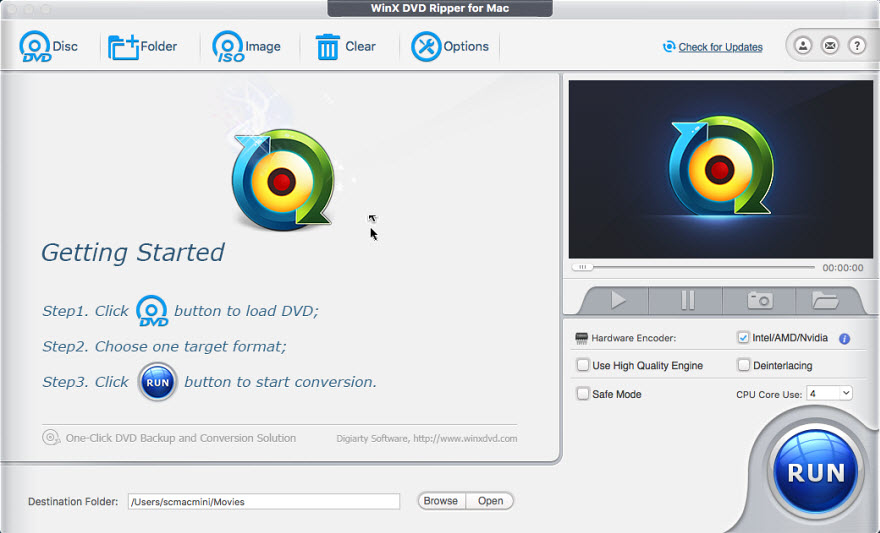
The main window, with its three-step prompt, hardware encoder options and RUN button.
Features
WinX DVD Ripper for Mac converts discs to modern formats
WinX DVD Ripper for Mac rips to MP4 and MOV in H.264 or HEVC, with ready-made profiles for iPhone, iPad, Android, TVs and web video. It can also pull out the audio as MP3, AAC or AC3. HEVC is the choice if you care about file size, and H.264 if you want it to play everywhere.
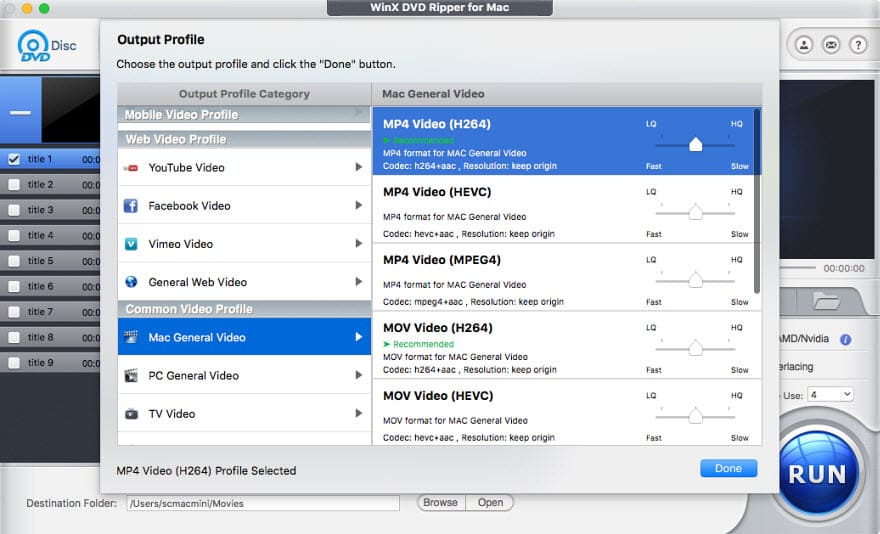
The Output Profile window, with MP4 and MOV choices for Mac.
WinX DVD Ripper for Mac makes 1:1 backups
WinX DVD Ripper for Mac clones a DVD to an ISO image or DVD folder, and its backup modes copy the main title, the full title or a full title to MKV. Version 6.9.0 added HEVC and AV1 encoding for MKV backups, which can shrink an archive. This is the mode to use if you want to keep menus and extras rather than just the movie.
WinX DVD Ripper for Mac finds the right title
WinX DVD Ripper for Mac automatically checks the title that holds the main movie, including on discs padded with up to 99 titles and on TV series and workout DVDs. Digiarty also says it handles region-coded, damaged and new-release discs, and the full version gets updates for newly released DVDs.
WinX DVD Ripper for Mac uses your Mac's hardware
WinX DVD Ripper for Mac uses hardware encoding, and version 6.9.0 is the first to run natively on Apple Silicon. Digiarty claims a full DVD can rip in about 5 minutes. Your drive's read speed and disc condition will decide the real time, so treat that as a best case.
WinX DVD Ripper for Mac does simple edits
WinX DVD Ripper for Mac can trim, crop, merge titles, change volume and rotate video. It lets you choose or burn in a subtitle track, or add an external .srt file, and adjust the codec, resolution, frame rate and bitrate if the defaults don't suit you.
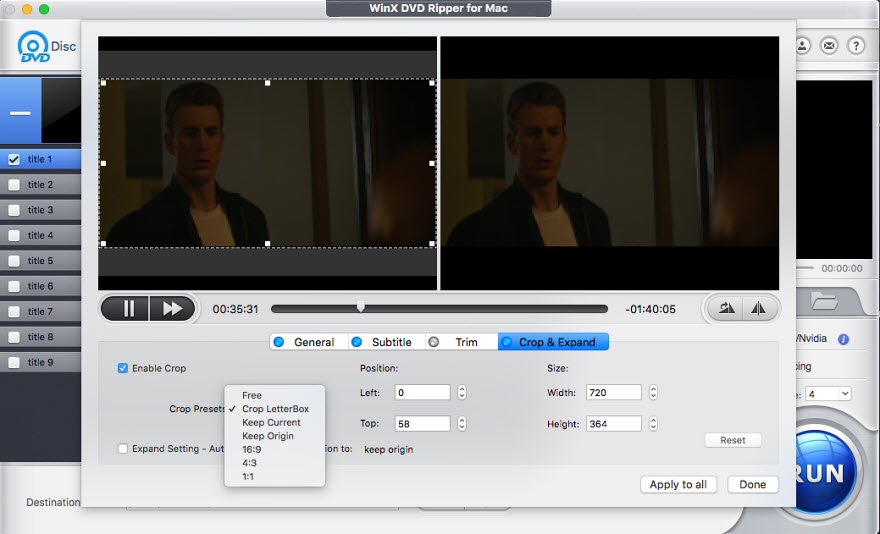
The Crop & Expand tab, with presets for removing letterbox bars.
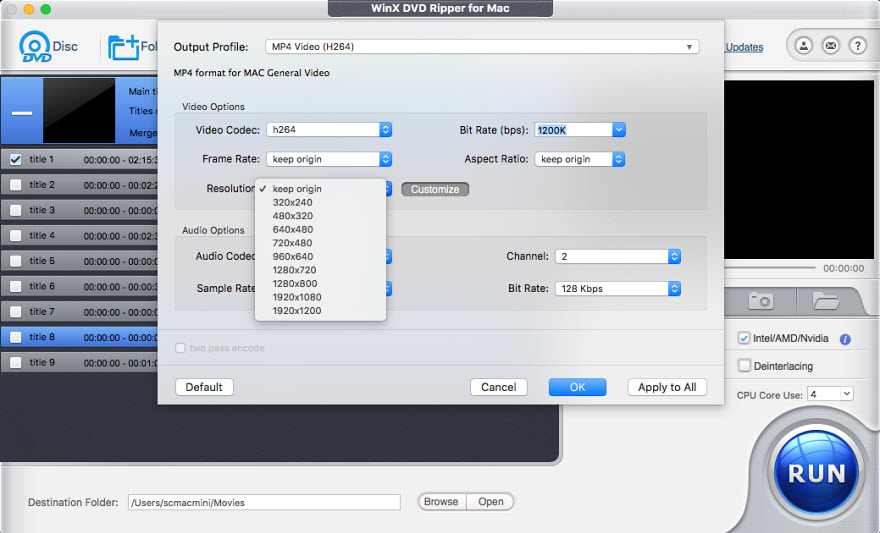
Output settings for codec, bitrate, frame rate and resolution.
Benefits
- Your movies stop depending on a drive. Files play on phones, TVs and a NAS.
- A one-time cost. The lifetime license has no yearly fee, and Digiarty says it includes future updates.
- Little to learn. The default profiles mean you can ignore every setting.
Real-World Uses
- Saving the family DVD collection: rip each disc to H.264 MP4 and keep the originals in a box.
- Loading an iPad for a trip: pick the iPad profile and copy the files over.
- Archiving wedding or home DVDs: make a 1:1 ISO before the discs age.
- Stocking a media server: rip a TV series DVD to HEVC so it takes less space on your NAS.
Who it's for, and who should skip it
Buy it if you have many discs, and you want a simple tool that picks the right title and keeps getting updates. Skip it if your discs are homemade and unprotected, because the free HandBrake rips those well. Skip it too if you want lossless files with all audio tracks, where MakeMKV fits better, or if you're ripping Blu-ray, which this doesn't do. It's also the wrong download on a PC: Digiarty's Windows product is WinX DVD Ripper Platinum.
Usage Guide
- Download the .dmg, open it and drag the app into Applications.
- After you buy, click Register and paste the license code from your email. There should be no space before or after it.
- Click Disc, Folder or Image to load your DVD. If a disc won't load, try the Force UDF or Force ISO file system setting.
- Choose an output in the Output Profile window. The right title is checked for you.
- Optionally set subtitles, trim or crop, and pick a destination folder.
- Click RUN.
Where it falls short
- A very limited trial. You only get 5 minutes of video and no advanced features, so you can test a disc loads but not that a full movie finishes.
- DVD only. There's no Blu-ray support.
- Native Apple Silicon support is recent. It arrived only in version 6.9.0, and we found no independent test of it.
- Mixed support reports. Digiarty's Trustpilot page mixes thanks for quick help with sharp one-star complaints.
- A confusing price list. Digiarty sells yearly, lifetime and limited licenses of the same product, so read what you're buying. A yearly plan renews automatically.
What Users Say
Independent reviews of the Mac edition are thin. Most press coverage is about the Windows version, so we've kept to what's about the company or this product, and the Trustpilot quotes reached us through a summarizing reader.
Trustpilot (Digiarty as a company)
On November 6, 2026 winxdvd.com had a TrustScore of 3.8 from 420 reviews. Much of the praise is for quick support. Michael M, five stars, August 2026: "This is a great product and the support from Adam was quick and prompt." Jim, five stars, October 2026: "Their response turnaround time was fantastic."
The one-star reviews are as blunt. Kruzey Kymbo, September 2026: "They have just run me around in circles asking to confirm what I have already done." Dr. Carol Clark, July 2026: "Terrible product and support is useless." Reviews don't always say which Digiarty product they're about.
AlternativeTo
The page has 18 likes. kitsuneae wrote in August 2017: "The WinX DVD Ripper can not rip any video longer than 5 minutes unless you get the paid version." jbbarnes replied: "Then buy it." A guest added in 2021: "worth noting they almost always have a free giveaway license kicking about somewhere on their site."
Quoted on Digiarty's review page
Digiarty collects older press coverage of the Mac version, including one writer who liked its control over CPU use: "I found it nice that they tried to keep it simple (Mac philosophy), yet gave the user full control." It's old and vendor-chosen, so give it little weight.
The themes: people find it simple, and opinions on Digiarty's support are split. Few reviewers discuss the Mac version on its own, which is another reason to run the trial first.
Comparisons
WinX DVD Ripper for Mac vs HandBrake
HandBrake is free and open source, with far more encoding control. It doesn't get past copy protection by itself. For unprotected discs, HandBrake is the better value. WinX is for people who want a simpler app that also reads protected discs, where that's legal.
WinX DVD Ripper for Mac vs MakeMKV
MakeMKV copies DVD content into MKV files without re-encoding, so quality is identical but files stay large. WinX converts to smaller files and has device profiles. Choose by whether you want an archive or something for a phone.
WinX DVD Ripper for Mac vs WinX Free DVD Ripper for Mac
Digiarty also offers a free Mac ripper with its own page. If your needs are modest, try that before paying.
Editions and Pricing
| Plan | Price | Term | Macs |
|---|
| Lifetime license (this listing) | $45.95 at checkout | One payment | 1 |
| Ultimate on Digiarty's store | $55.95 with its coupon | One payment | 1 |
| Premium on Digiarty's store | $34.95 first year, then $39.95 | Renews every year | 3 |
FAQs
Does WinX DVD Ripper for Mac work on Apple Silicon Macs?
Yes, WinX DVD Ripper for Mac has run natively on Apple Silicon since version 6.9.0, released in June 2026. Digiarty lists macOS 10.13 and later as supported.
Does the WinX DVD Ripper for Mac license expire?
No, the WinX DVD Ripper for Mac lifetime license doesn't expire and has no yearly fee. Digiarty says lifetime licenses include future updates and upgrades.
Can I use WinX DVD Ripper for Mac on two Macs?
The WinX DVD Ripper for Mac lifetime plan is sold for one Mac. If you have more, Digiarty's yearly Premium plan covers three Macs, but it renews each year.
Does WinX DVD Ripper for Mac rip Blu-ray discs?
No, WinX DVD Ripper for Mac handles DVD discs, ISO images and DVD folders only. For Blu-ray you need a different program.
Do I need a DVD drive to use WinX DVD Ripper for Mac?
You need an internal or USB DVD drive to read a physical disc with WinX DVD Ripper for Mac. An ISO image or DVD folder already on your Mac doesn't need one.
Can I get a refund on WinX DVD Ripper for Mac?
Digiarty offers refunds on WinX DVD Ripper for Mac within 30 days when the software fails with an error or bug that support can't solve in a reasonable time. Contact support first.
How does the WinX DVD Ripper for Mac free trial differ from the free ripper?
The WinX DVD Ripper for Mac trial is the paid product limited to 5 minutes of video, while WinX Free DVD Ripper for Mac is a separate download with its own page. Compare both if you only have a few discs.
System Requirements
- macOS 10.13 or later on Apple Silicon or Intel. A separate older build covers macOS 10.12 and earlier
- An internal or USB DVD drive for physical discs
- Free disk space for your ripped files
Conclusion
Worth $45.95 if you have a stack of DVDs and want it done simply. The price is a one-time payment, $10 under Digiarty's own lifetime price, and the app removes nearly all of the decisions. The one reason to buy it is how little you have to think. The main reason not to is that free tools do the job for unprotected discs, and the 5-minute trial tells you little about a full movie. Try a free tool first if your discs are homemade.
Download Free TrialBuy Now