At a glance
| Product | Price at checkout | License | Platforms | Free trial |
|---|
| Aiarty Image Enhancer | $155 ($109 with code VIPOFFER) | Lifetime, 3 computers, free updates for life | Windows and Mac (separate licenses) | Every feature; Windows exports are watermarked and batch export is off |
| HitPaw FotorPea | $90.39 a year (Windows), $99.99 (Mac) | Subscription, auto-renews; perpetual $130.39 / $159.99 | Windows and Mac (separate licenses) | Previews only, no export |
| Nero AI Image Upscaler PRO 2027 | $49.95 a year | Subscription, auto-renews; 100 cloud credits a year | Windows only | 7 days, no credit card |
| AKVIS Magnifier AI | $89 (Home) | Lifetime, 2 computers; later updates $19.95 a year | Windows, Mac, Linux; Photoshop plugin | 10 days, all features |
| AKVIS Noise Buster AI | $49 (Home) | Lifetime, 2 computers; later updates $19.95 a year | Windows, Mac, Linux; Photoshop plugin | 10 days, all features |
| Vovsoft Batch Image Upscaler | $19 | Lifetime, free updates | Windows only (64-bit) | Free to try with nag screen and ads, personal use only |
| Job | Aiarty | HitPaw FotorPea | Nero PRO | AKVIS Magnifier AI | AKVIS Noise Buster AI | Vovsoft |
|---|
| Largest upscale | 8x, up to 32K px (16K on Mac) | 8x | 8x, up to 32K px | 800% | ✗ | 4x |
| Noise removal | ✓ | ✓ | No separate model (Reconstruct cleans compressed photos) | Universal mode removes some noise | ✓ (three AI levels) | ✗ |
| Blur repair | ✓ | ✓ (lens, motion, compression) | ✓ (Sharpen, Unblur run in the cloud) | ✗ | ✗ | ✗ |
| Face restoration | ✓ | ✓ | ✓ | ✗ | ✗ | ✗ |
| Colorize old photos | ✗ | ✓ | ✗ | ✗ | ✗ | ✗ |
| Batch processing | ✓ | ✓ | ✓ (100 images) | ✓ | ✓ | ✓ |
| Works offline | ✓ | ✓ (cloud optional) | ✓ (cloud optional) | ✓ | ✓ | ✓ |
| Camera RAW input | ✓ | ✓ (NEF, RAW) | ✗ | ✓ | ✓ | ✗ |
How we picked and what we checked
- We looked at every desktop AI photo enhancer and upscaler listed on this site and kept the ones that are sold and updated today. Video enhancers are a different job and aren't covered here.
- We read each vendor's feature, pricing, trial and refund pages, and each program's version history.
- We read the price of every product on its order page today, in US dollars, including the Black Friday codes running now and what they bring the price down to.
- We checked the Aiarty and Nero downloads on the vendors' servers (file size and date), confirmed that every download link serves an installer, and looked at every screenshot below, all taken from the vendors' own guides.
- We gathered independent reviews and user ratings, including the critical ones, and HitPaw's Trustpilot status.
What we checked: order-page prices for all eight listings on November 23, 2026 (Aiarty $155 and $109 with VIPOFFER, Nero $49.95, AKVIS $89 and $49, and $62.30 and $34.30 with code BFAKV-2026, Vovsoft $19.00), HitPaw's plan prices on its order page the same day, and the Windows installers on the vendors' servers that day (Aiarty 319 MB, dated September 30, 2026; Nero 9.4 MB web installer dated October 16, 2026). We compared features, prices and trials; we didn't run our own before-and-after tests, so judge image quality with the free trials on your own photos.
What each one costs
Prices range from $19 to $155 for the first year, but the cheapest first year isn't always the cheapest over time. Two of these six are subscriptions that renew automatically, so the three-year cost changes the order.
Cost of the first year, one computer (USD)
Aiarty Image Enhancer (lifetime)$155.00
HitPaw FotorPea for Windows (yearly)$90.39
AKVIS Magnifier AI (Home, lifetime)$89.00
Nero AI Image Upscaler PRO 2027 (yearly)$49.95
AKVIS Noise Buster AI (Home, lifetime)$49.00
Vovsoft Batch Image Upscaler (lifetime)$19.00
Regular prices on the order pages on November 23, 2026, before tax. Aiarty is $109 with its standing code VIPOFFER.
Cost over three years, one computer (USD)
HitPaw FotorPea for Windows (yearly plan x 3)$271.17
Aiarty Image Enhancer (lifetime)$155.00
Nero AI Image Upscaler PRO 2027 (yearly x 3)$149.85
HitPaw FotorPea for Windows (perpetual)$130.39
AKVIS Magnifier AI (Home, lifetime)$89.00
AKVIS Noise Buster AI (Home, lifetime)$49.00
Vovsoft Batch Image Upscaler (lifetime)$19.00
Three years of renewals at today's regular prices; renewal prices can change. AKVIS licenses keep working forever, but new versions after the update period cost $19.95 a year, which isn't included here.
1. Aiarty Image Enhancer: the best all-round pick
- Product page: Aiarty Image Enhancer (Windows) and Aiarty Image Enhancer for Mac
- Price: $155 for a lifetime license on 3 PCs (or 3 Macs), with free updates for life; $109 with code VIPOFFER, which Aiarty's own buy page applies. A yearly Standard license is $85 ($59 with the code)
- Version: 3.14, released September 22, 2026
- Platforms: Windows 10 (1809 or later) and 11, 64-bit; macOS 10.15 or later on Intel, macOS 11 or later on Apple silicon. Each platform has its own license; a lifetime license for 1 PC plus 1 Mac costs the same $155
- Best for: anyone who enhances photos regularly and wants natural results, done offline, for a one-time price
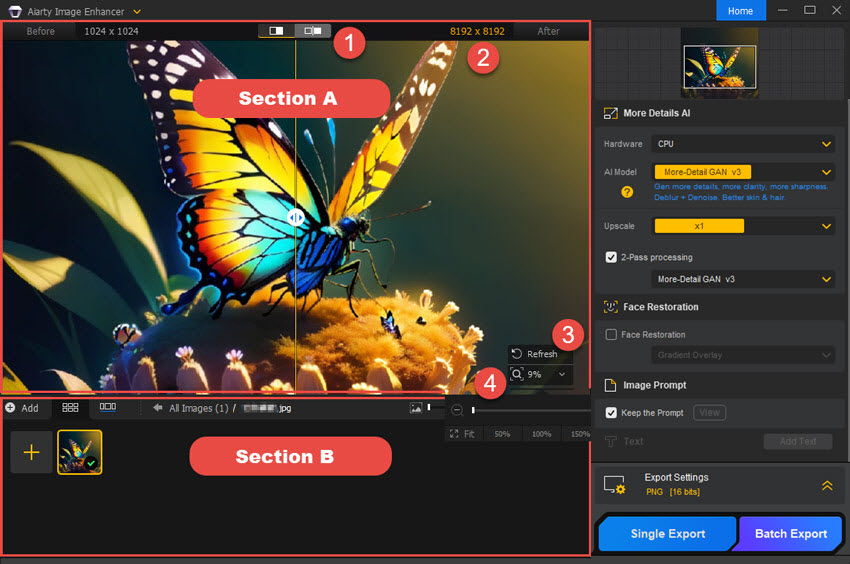
Aiarty Image Enhancer on Windows: an old 1024 x 761 portrait on the left, the 2048 x 1522 result from the Real-Photo v3 model on the right, the settings panel with Hardware, AI Model, Upscale and Strength, and the Single Export and Batch Export buttons.
Aiarty Image Enhancer does the four jobs most people buy an AI enhancer for, upscaling, noise removal, blur repair and face restoration, and it does them on your own graphics card with nothing uploaded. Once the AI models have downloaded, it works without an internet connection.
What sets it apart is control. Instead of one magic button you choose a model for the picture: Real-Photo v3 for real photographs and old prints, which stays closest to the original; More-Detail GAN v3 for skin, hair, fur and other fine textures; and AIGCsmooth v3 for AI art, anime and line art. A Strength slider from 0 to 1 tones the effect down when it starts to look artificial, and 2-pass processing runs an extra cleanup before upscaling badly degraded files. You can enlarge 2x, 4x or 8x, to 4K or 8K presets, or to a custom size up to 32,000 pixels on Windows (16,000 on a Mac).
It reads JPG, PNG, TIFF, WebP, HEIC and RAW files from most camera makers, saves to JPG, PNG, TIFF or DNG at up to 1000 DPI, and processes whole folders. Its weak spot is speed on modest hardware: without a recent graphics card, a large upscale can take a long time.
What we like
- Runs offline; photos never leave your computer
- Lifetime license with free updates for life, on 3 computers
- Several models plus a Strength slider, so results can stay natural
- RAW input and DNG or 16-bit output for photographers
- Upscales to 32K on Windows
Watch out for
- Slow on PCs without a good graphics card
- Windows and Mac licenses are separate unless you buy the 1 PC + 1 Mac license
- The 30-day guarantee doesn't cover a change of mind
- Large upscales on soft originals can look artificial at 100%
- Windows installer is 319 MB, plus the AI models
What reviewers say about Aiarty Image Enhancer
- Michael Breitung, landscape photographer, Fstoppers (January 2026): “80% of the time, I don't do any cleanup on top of it because the results are free of artifacts.” His limit: “As long as you don't upscale beyond 1.5 times the original resolution, you'll need nearly no additional work.”
- Rick, Ricks Reviews (March 2026): “The results from Aiarty can be very impressive,” but “When zooming in to 100% the smallest details may look a little artifical.”
- E. Geertsema, Trustpilot, 2 stars: “All in all it took me more than an hour to produce a 2 x upscaled photo.”
Aiarty's Trustpilot page, which covers all its products, showed 3.9 out of 5 from 22 reviews when we last checked it on October 24, 2026. Some of the positive magazine reviews were written with a license Aiarty supplied.
Download Aiarty Image Enhancer (Windows)
Buy Aiarty Image Enhancer (Windows)
Download Aiarty for Mac
Buy Aiarty for Mac
2. HitPaw FotorPea: the easiest fix for old family photos
- Product page: HitPaw FotorPea (Windows) and HitPaw FotorPea for Mac
- Windows price: $22.39 a month, $90.39 a year, or $130.39 perpetual
- Mac price: $25.59 a month, $99.99 a year, or $159.99 perpetual
- Black Friday: until November 30, 2026, code HP-BFS-30 takes 30% off the yearly and perpetual plans ($63.27 and $91.27 on Windows, $69.99 and $111.99 on Mac); the monthly plan isn't included
- Version: 6.0.0 for Windows (November 12, 2026); 5.7.0 for Mac (September 23, 2026)
- Best for: families digitizing albums who want colorizing, scratch repair and face restoration without learning an editor
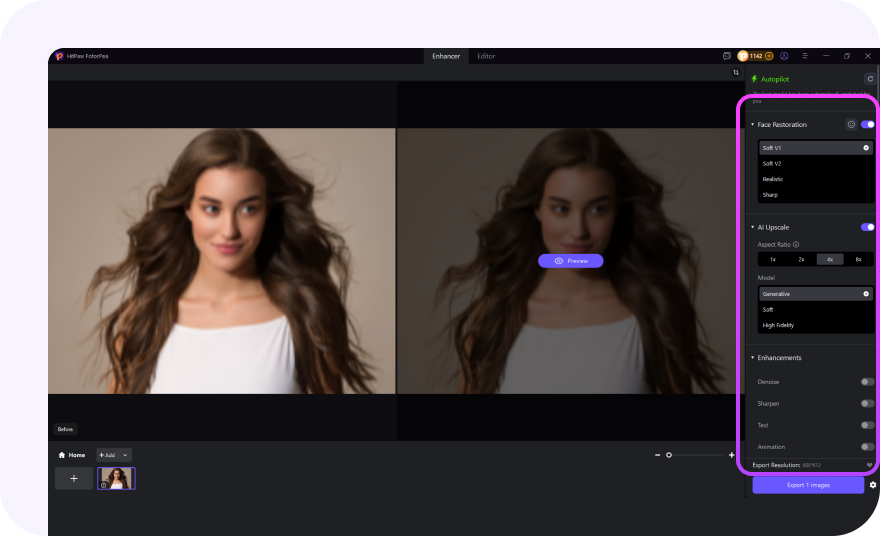
HitPaw FotorPea on Windows: AI Upscale switched on at 4x with the High Fidelity model, turning a 1244 x 864 portrait into a 4976 x 3456 export, with the original and the preview side by side.
HitPaw FotorPea (formerly HitPaw Photo Enhancer) is built for people who don't want sliders. You drag photos in, switch on the models a picture needs, preview and export. An Auto tab even picks the combination for you.
Its range of repair models is the widest here: Face Restoration, AI upscaling to 2x, 4x or 8x (Generative, Soft or High Fidelity), three blur fixes (lens blur, motion blur and compression blur), denoise with a stronger Denoise-Max setting in version 6, a low-light model, colorizing for black-and-white prints, scratch and crease removal, and color calibration for faded prints. That makes it the strongest pick in this list for a box of scanned family photos. The Mac edition trails Windows by a version and lacks some 6.0 features such as Natural Upscale.
Before you buy HitPaw FotorPea
- Trustpilot has suspended HitPaw's rating. The hitpaw.com page shows no TrustScore because of a breach of Trustpilot's guidelines, and Trustpilot says it removed fake reviews.
- Plans renew automatically, and HitPaw doesn't refund a renewal you forgot to cancel. The 30-day guarantee covers technical problems HitPaw can't solve, not a change of mind.
- Credits. Plans include 100 credits a month, 500 a year or 800 with the perpetual license, spent on the AI generator, background tools and other extras. Plan credits expire at the end of the period; only bundles bought separately keep.
- Perpetual means this version. The one-time license gets updates within the current version; the next major version is a paid upgrade.
- The free version can't save. It previews results; exporting needs a paid plan.
What we like
- Widest set of repair models: face, blur, noise, low light, colorize, scratches
- One-click workflow with an Auto mode
- Cheaper first year than Aiarty
- Reads NEF and other RAW files
Watch out for
- Subscription that auto-renews, with credits that expire
- Trustpilot rating suspended
- Free version can't export, so you can't fully test before paying
- No manual tools to fix one area by hand
- Mac version is a release behind
What reviewers and buyers say about HitPaw FotorPea
- Tirupati Rao, itirupati.com (January 2026, 4.3 out of 5): “The workflow is intentionally simple, which is part of its appeal.” On the downside: “There are no layers, brushes, or compositing tools.”
- Danetsoft (August 2026): “HitPaw FotorPea is a practical AI image enhancer for improving low-resolution, blurry, old, and portrait photos.”
- William Yong, Trustpilot, 1 star (November 2026): “I bought the software but everytime I want to use a feature it tells me I have to buy credits.”
- Stephen Carey, Trustpilot, 1 star (November 2026): “This company took automatic payment which did not know was turned on”
The pattern: people who judge the output like the face restoration and sharpening; the complaints are about money, meaning credits, auto-renewal and what a perpetual license includes.
Download HitPaw FotorPea (Windows)
Buy HitPaw FotorPea (Windows)
Download FotorPea for Mac
Buy FotorPea for Mac
3. Nero AI Image Upscaler PRO 2027: the cheapest yearly upscaler, with print sizing
- Product page: Nero AI Image Upscaler PRO 2027
- Price: $49.95 a year at checkout, renewing automatically; includes 100 Nero AI credits a year
- Version: 29.5.24.0, released October 27, 2026
- Platform: 64-bit Windows 10 and 11
- Trial: 7 days, no credit card
- Best for: Windows users who enlarge photos for print and want the option of fast cloud processing

Nero AI Image Upscaler (version 28.5 in the title bar, from Nero's guide): a 640 x 360 photo upscaled 4x to 2560 x 1440 in split view, with the Upscale Options panel and the Save image button.
Nero AI Image Upscaler PRO 2027 is a focused upscaler. It enlarges 1x, 2x, 4x or 8x, to a 2K-32K target, to a custom size, or to a print size in inches, centimeters or millimeters at the DPI you choose, with outputs up to 1,024 megapixels. That print-size setting is handy when you know you want an A4 or poster print rather than a pixel count.
Five models cover different images: Standard (scenery and products), Photograph (portraits and everyday photos), Anime, Iris for very small or compressed images, and Reconstruct, which regenerates texture in heavily compressed or vintage photos. Face Recovery and Skin Retouch sit on top of any model, and batches run up to 100 images. You can process on your own PC (an NVIDIA card with 4 GB of video memory for acceleration) or press Cloud to send the job to Nero's servers, which costs credits. Nero's notes say Sharpen and Unblur currently run in the cloud only.
What we like
- Lowest yearly price of the full-featured tools
- Print-size output at a chosen DPI
- Cloud button for speed without a new graphics card
- 7-day trial with no credit card
Watch out for
- Subscription that renews automatically
- Sharpen and Unblur use cloud credits; 100 a year go fast
- Local acceleration needs an NVIDIA card; AMD and Intel fall back to CPU
- Windows only, and no RAW input
What users say about Nero AI Image Upscaler
- Dee, Trustpilot, 5 stars (October 2026): “Nero AI Image Upscaler is an absolute game-changer for anyone looking to restore and enhance their digital photos.”
- Craig, Trustpilot (Nero), 2 stars, on Nero's automatic renewals: “Be very wary”
Nero's desktop AI apps page on Trustpilot showed 4.6 out of 5 from 31 reviews on November 13, 2026, most of them about the video upscaler; Nero's main Trustpilot page scores 3.0, with renewal complaints a recurring theme.
Download Nero AI Image Upscaler
Buy Nero AI Image Upscaler PRO 2027
4. AKVIS Magnifier AI: for Photoshop users, Linux and big enlargements
- Product page: AKVIS Magnifier AI
- Price: Home $89 (plugin or standalone), Home Deluxe $99 (both), Business $199 (commercial use); lifetime licenses for 2 computers
- Black Friday: until December 1, 2026, code BFAKV-2026 takes 30% off (Home $62.30 on the order page)
- Version: 13.0, which added the Universal AI mode
- Platforms: Windows 10 and 11, macOS 10.15 and later, Linux (standalone only); plugin for Photoshop and Photoshop Elements
- Best for: photographers and designers who want an upscaler inside Photoshop, or on Linux, with a one-time price

AKVIS Magnifier AI 13.0 on Windows: a 512 x 512 photo enlarged 400% in Universal mode at 300 dpi, before on the left and after on the right.
AKVIS Magnifier AI does one thing, enlargement, and it's the only tool here that runs as a Photoshop plugin and on Linux. It enlarges up to 800%, by percent or to an exact print size and dpi, in three AI modes: Standard for clean photos, Universal for natural detail with some noise removal, and Intensified for drawings, text, screenshots and compressed web images. It can also shrink images with sharpening, and it handles RGB, CMYK, Lab and Grayscale at 8, 16 or 32 bits, which matters for print work.
It doesn't restore faces or invent generative detail; it enlarges what's there. For a damaged family photo, Aiarty or HitPaw fit better. For a clean photo or a logo you need at poster size, it's a good one-time buy.
What we like
- Photoshop and Photoshop Elements plugin
- Runs on Windows, Mac and Linux; 2 computers per license
- Up to 800% with an Intensified mode for text and line art
- CMYK and 16/32-bit support for print
Watch out for
- No face restoration, denoise-only or blur tools
- Home licenses are non-commercial and cover plugin or standalone, not both
- New versions after the update period cost $19.95 a year
- Most published reviews cover older versions
What reviewers say about AKVIS Magnifier AI
- Geetesh Bajaj, Indezine (October 2021, version 11): “best suited for images that are older”, with “minimal quality regression” in his enlargements.
- Duncan Evans, Macworld (2012): “The previews are quick, but processing a large image takes a while.”
Download AKVIS Magnifier AI
Buy AKVIS Magnifier AI (Home)
5. AKVIS Noise Buster AI: a cheap specialist for grainy photos
- Product page: AKVIS Noise Buster AI
- Price: Home $49, Home Deluxe $55 (plugin and standalone, plus Smart Blur), Business $89; lifetime licenses for 2 computers
- Black Friday: until December 1, 2026, code BFAKV-2026 takes 30% off (Home $34.30 on the order page)
- Version: 13.2
- Platforms: Windows 10 and 11 (64-bit), macOS 10.15 and later, Linux (standalone only); plugin for Photoshop and other editors
- Best for: hobby photographers with high-ISO, low-light or old compact-camera photos who don't need upscaling

AKVIS Noise Buster AI 13.1: a penguin photo before and after in Weak Noise mode, with the Edge Intensity and Sharpness post-processing sliders on the right.
AKVIS Noise Buster AI is the only tool in this list made just for noise. You pick a noise level, Weak Noise, Strong Noise or Strong Compression with Noise, each with its own trained network, and press Run. Post-processing sliders add edge contrast and sharpness back, Blend with Original mixes in some of the source to keep texture, and a History Brush restores the original where you want it left alone. It runs on the GPU through DirectML on Windows and Core ML on a Mac, and it processes folders in batches.
It doesn't enlarge photos or fix blur. If noise is your only problem, it's the cheapest one-time fix here; if you also need upscaling, Aiarty or HitPaw do both.
What we like
- $49 once, and Deluxe with both editions only $6 more
- Three AI noise levels plus a classic algorithm
- Manual History Brush for areas the AI shouldn't touch
- Windows, Mac and Linux
Watch out for
- Denoise only, no upscaling or blur repair
- Too much Sharpness brings noise back, as AKVIS warns in the program
- We found no independent test of version 13
- Home licenses are non-commercial
What reviewers say about AKVIS Noise Buster AI
- Michael Kleper, The Kleper Report: “AKVIS Noise Buster, available both as a standalone app and Photoshop-compatible plug-in, is a highly effective tool for reducing noise and grain in digital images.”
- gimpguy, Snapfiles, 3 stars (version 8.5, September 2012): “yes, it works well and yes, it's a very sluggish plugin.”
Both reviews predate the AI engine; the current version runs on the graphics card.
Download AKVIS Noise Buster AI
Buy AKVIS Noise Buster AI (Home)
6. Vovsoft Batch Image Upscaler: the $19 budget pick for whole folders
- Product page: Vovsoft Batch Image Upscaler
- Price: $19 once, lifetime license with free updates
- Version: 1.3, released May 31, 2026
- Platform: Windows 7 to 11, 64-bit, with a Vulkan-capable graphics card (Intel, AMD or NVIDIA)
- Trial: free to try, with a nag screen and ads, personal use only
- Best for: enlarging a folder of scans, product photos or artwork up to 4x for as little as possible

Vovsoft Batch Image Upscaler: the Images tab with eight JPG files queued, the Add Files and Add Folder buttons, and Next to go to the options.
Vovsoft Batch Image Upscaler is a queue, not an editor: add files or a folder, choose Artwork mode (illustrations, anime, sharp edges) or Photo mode (natural texture), and run. It enlarges JPG, PNG and WEBP up to 4x with a Real-ESRGAN model that ships inside the program, so there's nothing to set up, and it runs offline on any Vulkan graphics card. A portable edition runs without installing.
There's no face restoration, denoise or blur repair, and little control over output size. For $19, it does the one job well enough that it's worth trying before paying more.
What we like
- $19 once, lifetime updates
- Batch-first design with a Status column
- Works with Intel, AMD and NVIDIA graphics
- Portable edition included
Watch out for
- 4x maximum, upscaling only
- Little control over output size
- Windows only
- No refunds for a change of mind
What buyers say about Vovsoft Batch Image Upscaler
- Richard Watts, on Vovsoft's page: “Great software which does what it claims!”
- Eugene Holdcroft, on Vovsoft's page: “The product does what it claims, but I wish there was more fine control of the upscaling.”
Vovsoft's page for the program showed 4.5 out of 5 from 6 reviews, and Vovsoft's Trustpilot profile 4.6 out of 5 from 410 reviews across all its products, on November 9, 2026.
Download Vovsoft Batch Image Upscaler
Buy Vovsoft Batch Image Upscaler
Which should you choose?
| Your situation | Pick | Why |
|---|
| You enhance photos often and want the best results for a one-time price | Aiarty Image Enhancer | Offline, several models with a strength control, lifetime updates, 32K output |
| You're on a Mac | Aiarty Image Enhancer for Mac | Same lifetime license and models; HitPaw for Mac is the one-click alternative |
| A box of old black-and-white or faded family prints | HitPaw FotorPea | Colorizing, scratch repair and face restoration in one place |
| You want prints at a set size and the lowest yearly price | Nero AI Image Upscaler PRO 2027 | Print-size output at a chosen DPI for $49.95 a year |
| You work in Photoshop or on Linux | AKVIS Magnifier AI | Plugin for Photoshop, Linux standalone, CMYK and 16/32-bit |
| Grainy indoor or night photos, no enlarging needed | AKVIS Noise Buster AI | Three AI noise levels for $49 once |
| A folder of images to enlarge on a tight budget | Vovsoft Batch Image Upscaler | 4x batch upscaling for $19 |
Who should skip each one
- Aiarty Image Enhancer: skip it on an older PC without a DirectX 12 graphics card, where large upscales are slow, or if you only need one picture fixed.
- HitPaw FotorPea: skip it if you dislike subscriptions and credits, or if you want to test exports before paying.
- Nero AI Image Upscaler PRO: skip it on a Mac, with RAW files, or if you'd forget to cancel a yearly renewal.
- AKVIS Magnifier AI: skip it for blurry faces or damaged prints; it enlarges but doesn't restore.
- AKVIS Noise Buster AI: skip it if your RAW developer already has good AI noise reduction.
- Vovsoft Batch Image Upscaler: skip it if you need per-photo control, face restoration or a Mac.
What commonly goes wrong
- AI invents detail. Every upscaler here predicts missing pixels. On a badly damaged photo a face can come out plausible but not quite the person, and colorizing can guess wrong colors. Keep the original, and use high-fidelity settings (Aiarty's Real-Photo, HitPaw's High Fidelity) for photos of people you know.
- Pushing the enlargement too far. Fstoppers' reviewer needed almost no cleanup up to about 1.5x but added work beyond that. An 8x upscale of a tiny, blurry file won't look like a photo taken at that size.
- Stacking every model. Extra denoise on a clean image smooths texture away, and extra sharpening brings noise back. Turn on only what the photo needs.
- Buying before testing on your hardware. Speed depends on the graphics card. Aiarty, HitPaw and Vovsoft refuse refunds for a change of mind, so run the trial on your hardest photo first.
- Forgetting the renewal. HitPaw and Nero plans renew automatically. Turn renewal off after buying if you only want one year.
- Buying the wrong platform. Aiarty and HitPaw sell separate Windows and Mac licenses. AKVIS licenses cover 2 computers on any of its platforms.
- Using a Home license for paid work. AKVIS Home and Home Deluxe are non-commercial; paid jobs need Business.
FAQs
What is the best AI photo upscaler for Windows?
Aiarty Image Enhancer is the best all-round AI photo upscaler for Windows in this list: it upscales to 32K, removes noise and blur, restores faces and works offline, for $155 once ($109 with code VIPOFFER). For the lowest yearly cost, Nero AI Image Upscaler PRO 2027 is $49.95 a year, and for $19 once, Vovsoft Batch Image Upscaler enlarges folders up to 4x.
What is the best AI photo enhancer for Mac?
Aiarty Image Enhancer for Mac is the best pick for a Mac: the same models as on Windows, upscaling to 16,000 pixels, on Apple silicon and Intel Macs, for a $155 lifetime license. HitPaw FotorPea for Mac ($99.99 a year) is easier for old family photos, and AKVIS Magnifier AI and Noise Buster AI also run on macOS.
Is there a one-time purchase AI photo enhancer with no subscription?
Yes. Aiarty Image Enhancer ($155 lifetime with free updates for life), AKVIS Magnifier AI ($89) and AKVIS Noise Buster AI ($49), and Vovsoft Batch Image Upscaler ($19) are all one-time purchases. HitPaw FotorPea also sells a perpetual license ($130.39 on Windows), but it covers the current major version only.
Which AI enhancer is best for restoring old family photos?
HitPaw FotorPea has the most tools for old photos: face restoration, colorizing black-and-white prints, scratch and crease removal and color calibration for faded prints. Aiarty Image Enhancer's Real-Photo model and face restoration are the alternative if you want a one-time license and don't need colorizing.
Can AI upscaling make a small photo big enough to print?
Yes, within limits. Nero AI Image Upscaler PRO sets the output by print size and DPI, and AKVIS Magnifier AI enlarges up to 800% at a chosen dpi. A moderately soft photo enlarges well, but a tiny, blurry file gains invented detail rather than real detail, so check the result at 100% before printing.
Do these programs upload my photos?
No, not by default. Aiarty Image Enhancer, both AKVIS programs and Vovsoft Batch Image Upscaler process everything on your computer. HitPaw FotorPea and Nero AI Image Upscaler also work locally but offer optional cloud processing, and Nero's Sharpen and Unblur run in the cloud.
Do I need a graphics card for AI photo enhancement?
A graphics card is strongly recommended for all of these programs. Aiarty Image Enhancer needs a DirectX 12 card for acceleration on Windows, Nero accelerates locally only on NVIDIA cards with 4 GB of memory, HitPaw names an NVIDIA GTX 950 or AMD Radeon 460 as the minimum, and Vovsoft needs a Vulkan-capable card. Without one, large upscales are very slow.
Can I get a refund if I don't like the results?
Usually not. Aiarty and HitPaw offer 30-day guarantees for technical problems they can't fix, not for a change of mind, and Vovsoft doesn't refund change-of-mind orders. Use the free trials: Aiarty, AKVIS and Nero let you test every feature, while HitPaw's free version only previews.
Conclusion
Buy Aiarty Image Enhancer if you'll enhance photos more than once in a while: it covers upscaling, noise, blur and faces, keeps your photos on your own computer, and the lifetime license costs less than two years of HitPaw. Its one real drawback is speed on a PC without a good graphics card, so run the trial first. Pick HitPaw FotorPea instead for a one-time family-album project that needs colorizing, but read its renewal, credit and refund terms before you pay. For a single job, Nero's $49.95 year or Vovsoft's $19 license costs less.
Download Aiarty Image Enhancer
Buy Aiarty Image Enhancer
Buy Aiarty for Mac