HitPaw FotorPea: One-Click AI Photo Repair for Blurry, Noisy and Old Pictures
HitPaw FotorPea (formerly HitPaw Photo Enhancer) is a Windows program that uses AI models to upscale photos up to 8x, sharpen blur, restore faces, remove noise and colorize old black-and-white prints. The yearly license is $90.39, a month is $22.39 and a perpetual license is $130.39; the free version shows previews but doesn't export.
Think of the photo that matters but came out wrong: a soft portrait from a dim party, a scanned print of your grandparents, a product shot from an old phone. FotorPea is built for exactly that, with a sliders-free workflow. What it isn't is a photo editor, and its newer AI tools run on credits, so the license isn't always the whole bill.
Quick facts
- Developer: HitPaw
- Version: 6.0.0 for Windows, released November 12, 2026 (Natural Upscale, AI Denoise, My Gallery)
- Platform: Windows 10 and 11, 64-bit. The Mac edition is sold separately
- Price: $22.39 a month, $90.39 a year, or $130.39 perpetual
- Credits included: 100 a month, 500 a year, or 800 with the perpetual license
- Formats: reads PNG, JPG, WebP, TIFF, TGA, BMP, JFIF, NEF and RAW; exports PNG, JPG, WebP, TIFF, TGA, BMP, JFIF
- Refunds: 30-day guarantee for technical problems HitPaw can't solve, not for a change of mind
- What we checked: the Windows download is a 2.9 MB web installer (Last-Modified August 7, 2026); the plan prices on HitPaw's order page, and the same $90.39 yearly price in a copy of that page from October 18, 2026, before the holiday sale; prices checked on November 23, 2026. We didn't enhance photos with it ourselves.
Before you buy
- Black Friday: until November 30, 2026, code HP-BFS-30 takes 30% off: the yearly plan is $63.27 and the perpetual license $91.27. The monthly plan isn't included.
- Subscriptions renew automatically, and HitPaw doesn't refund a renewal you forgot to cancel.
- Unused credits expire at the end of the month or subscription year. Only separately bought credit bundles keep.
- Perpetual means this version. The one-time license gets updates within the current version; the next major version is a paid upgrade.
- Trustpilot has suspended HitPaw's rating for breaching its guidelines and says it removed fake reviews.
Download Free TrialBuy Now
Overview
FotorPea opens on an Enhancer tab: drag photos in, and a panel on the right lists what it can do to them, Face Restoration, AI Upscale, Enhancements (denoise, sharpen), AI Color, and a generative Repair & Colorize mode for old photos. You switch models on, preview, and export one image or the whole batch. An Auto tab picks a model combination for you, and a separate Editor tab holds the credit-based AI tools.
It runs on your own PC, and a graphics card from the last several years (HitPaw names an NVIDIA GTX 950 or AMD Radeon 460 as the minimum) does the work. Large images can also go to HitPaw's cloud renderer.
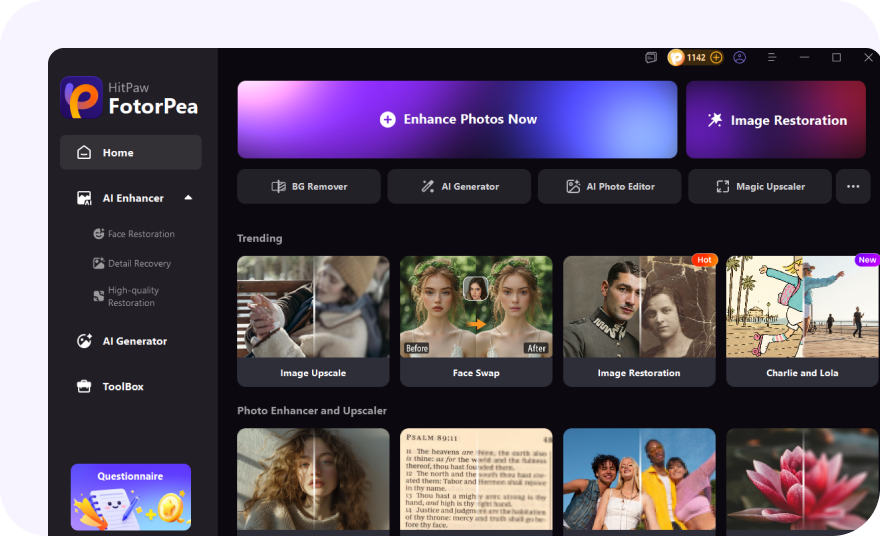
The FotorPea Enhancer tab before you add photos: a drag-and-drop area with three sample images, and the panel with Face Restoration, AI Upscale, Enhancements, AI Color and the generative Repair & Colorize mode.
Features
AI upscaling to 2x, 4x or 8x
HitPaw FotorPea enlarges a photo by 2x, 4x or 8x with three upscale modes: Generative, which invents fine detail, Soft, and High Fidelity, which stays closest to the original. Version 6 adds Natural Upscale for low-resolution photos and an AI Upscale mode for AI art, anime, illustrations and line art that keeps their drawn style.
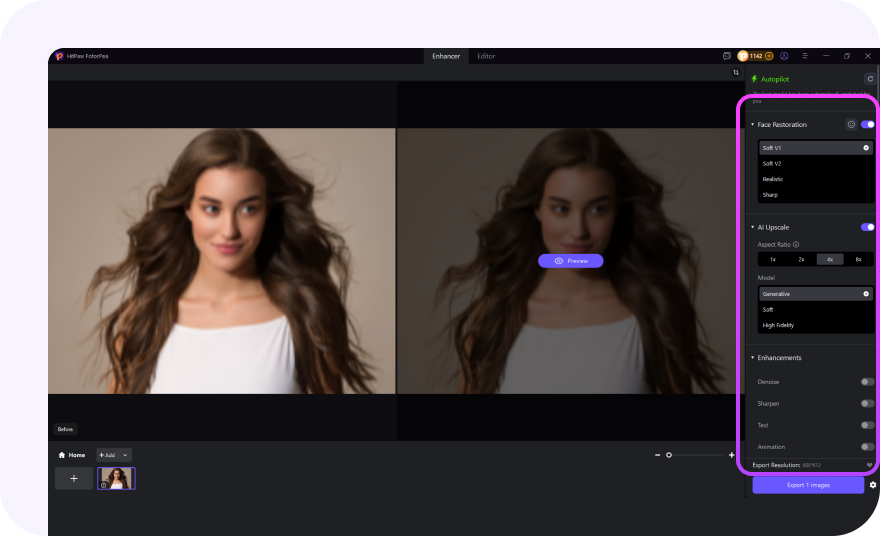
AI Upscale switched on with a 4x scale multiplier and the High Fidelity model, turning a 1244x864 portrait into a 4976x3456 export, with the original and the preview side by side.
Face restoration
HitPaw FotorPea's Face model rebuilds eyes, skin and hair in soft or blurry portraits, including group photos and old prints, while the rest of the picture is handled by the upscaler. It's the model most reviewers single out.
Blur repair: lens, motion and compression
HitPaw FotorPea's Sharpen model has three modes, Repair Lens Blur for missed focus, Repair Motion Blur for shaky hands and moving subjects, and Repair Compression Blur for soft, over-compressed JPEGs.
Denoise and low light
HitPaw FotorPea removes digital noise, film grain and JPEG artifacts from night and indoor shots, with a stronger Denoise-Max setting added in version 6, and a Low-light model brightens underexposed photos.
Colorize and scratch repair for old photos
HitPaw FotorPea colorizes black-and-white photos, removes scratches and creases from scanned prints, and has a Color Calibration model for faded or yellowed color photos.
Credit-based AI extras
HitPaw FotorPea's Editor side adds an AI image generator, AI portrait generator, background remover, AI background generator, face swap, ID photo maker, an AI chat editor and object removal. These spend credits from your plan or from bundles you buy.
Benefits
- Rescues photos you'd otherwise delete. Focus misses and motion blur are the commonest reasons a good moment ends up unusable.
- Batch processing. Fixing a whole folder of event or product shots takes one export, not an evening in an editor.
- Print-size output. A 4x or 8x upscale turns a small scan or phone photo into something you can print large.
- No editing skills. You choose models, not masks and layers.
Real-World Uses
- Family archives: scanned prints colorized, scratches removed and faces restored before you share them.
- Events: sports-day and concert photos with motion blur or high-ISO noise cleaned up.
- Online stores: product photos from an older phone upscaled for 4K displays and zoom views.
- AI art and illustrations: low-resolution generator output enlarged for print with the AI Upscale mode.
Who It's For, and Who Should Skip It
It's for people with photos to fix and no interest in learning Photoshop: families digitizing albums, small sellers, and hobby photographers who want a one-click rescue for soft shots.
Skip it if you need manual control. As one reviewer puts it, there are no layers, brushes or compositing tools. Photographers already paying for Lightroom or Photoshop get denoise and super-resolution there. If you only have a handful of photos, a single month or an online enhancer is cheaper than a year.
Usage Guide
- Download the web installer from HitPaw, run it and let it fetch the program, then open FotorPea.
- Drag one or more photos into the Enhancer tab, or click Add.
- Switch on the models you need in the right panel, or use the Auto tab for a recommended combination.
- Click Preview and compare the result with the original using the side-by-side view and zoom.
- Pick the export resolution and click Export. A paid plan is needed to save.
- After buying, sign in with the email you used at checkout; the license is tied to your HitPaw account.
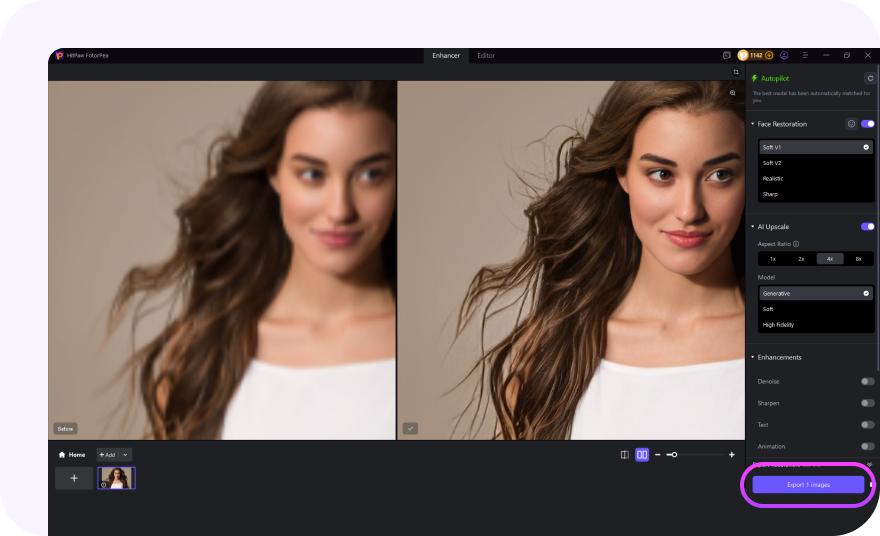
Preview before export: the 1244x864 original on the left, the enhanced 4976x3456 result on the right, and the Export 1 images button under the model panel.
Tips
- Use High Fidelity for real photos of people you know. Generative modes add convincing detail that may not be what was really there.
- Don't stack every model. Turn on only what the photo needs; extra denoise on a clean image just smooths texture away.
- Spend credits before they expire. Monthly and yearly credits don't roll over.
- Test your hardest photo first, like a badly damaged print, during the free preview.
Where it falls short
- Heavily damaged photos. Tears, missing areas and extreme fading are the hardest cases for any AI enhancer; colorization can also guess wrong colors.
- No manual editing. There's no way to fix one area by hand when the AI gets it wrong.
- Credits creep. Trustpilot reviewers complain that features they expected in a paid plan ask for credits.
- Speed depends on your PC. Large images on modest hardware take a while.
- Strict refunds. No refund for change of mind, for a renewal you didn't cancel, or after you've finished the job.
What Users Say
Independent reviews
Tirupati Rao (itirupati.com, January 2026) rates FotorPea 4.3 out of 5 and says "The workflow is intentionally simple, which is part of its appeal." On the downside: "There are no layers, brushes, or compositing tools," and so "it is not ideal for designers who need precise manual control."
Danetsoft (August 2026) found that "FotorPea successfully upscales the low-resolution image, making details sharper and the overall image clearer," warned that "Processing performance may vary depending on image size and computer hardware," and concluded: "HitPaw FotorPea is a practical AI image enhancer for improving low-resolution, blurry, old, and portrait photos."
Trustpilot (all HitPaw products)
Trustpilot shows no TrustScore for hitpaw.com: the rating is unavailable because of a breach of its guidelines, and Trustpilot says it removed a number of fake reviews. Of the 2,762 reviews left, 80% are 5-star and 17% are 1-star. The complaints are mostly about money:
- Mike Andrew (1 star, October 2026), titled "AVOID", about FotorPea: "I paid $191.99 for FotorPea AI software download."
- William Yong (1 star, November 2026): "I bought the software but everytime I want to use a feature it tells me I have to buy credits."
- Stephen Carey (1 star, November 2026), "Beware auto payment is turned on by default": "This company took automatic payment which did not know was turned on"
- Louis Loong (5 stars, October 2026): "The tech support was fantastic. They usually replied to my email within 24 hours."
The pattern: reviewers who judge the output like FotorPea's face restoration, sharpening and upscaling, and praise how simple it is. Its weak spots are badly damaged originals and the lack of manual tools. Buyers' complaints center on credits, auto-renewal and what a "lifetime" purchase really includes, so read the plan details before you pay.
Comparisons
HitPaw FotorPea vs Topaz Photo
Topaz Photo is aimed at photographers, with RAW workflows and more control over each model. FotorPea is simpler and adds family-photo tools Topaz doesn't focus on, such as colorizing and scratch repair. Pick Topaz for a photography workflow, FotorPea for quick fixes and old prints.
HitPaw FotorPea vs Leawo Photo Enhancer
Leawo Photo Enhancer is another one-click Windows and Mac enhancer for upscaling, denoising and sharpening. FotorPea has more models (face, colorize, scratch repair, low light) and the credit-based extras; if you only need upscaling, compare both on the same photo.
Editions and Pricing
| Plan | Price | Black Friday (to Nov 30) | Includes |
|---|
| 1 Month License | $22.39/month | no discount | 1 PC, 100 credits a month |
| 1 Year License | $90.39/year | $63.27 | 1 PC, 500 credits, major upgrades while subscribed |
| Perpetual License | $130.39 once | $91.27 | 1 PC, 800 credits, updates within the current version |
Prices exclude tax. HitPaw also sells business plans for 5, 10 or 100 PCs with 4,000 to 25,000 credits, and a cross-platform FotorPea Studio plan. The Buy Now button opens the order page with every plan.
FAQs
Is HitPaw FotorPea the same as HitPaw Photo Enhancer?
Yes. HitPaw FotorPea is the new name of HitPaw Photo Enhancer, and it now includes more models and AI tools than the original program.
Can I use HitPaw FotorPea for free?
HitPaw FotorPea's free version lets you try the enhancement models and preview results, plus a few free uses of tools like the background remover, but saving enhanced photos needs a paid plan.
Does my HitPaw FotorPea license work on a Mac?
No. HitPaw FotorPea accounts sign in on both platforms, but a Windows license and its premium features work only on Windows. A Mac needs the Mac license.
What are HitPaw FotorPea credits used for?
HitPaw FotorPea credits pay for the AI creation tools, such as the image generator, portrait generator and AI editing. Plans include 100 credits a month, 500 a year or 800 with the perpetual license; plan credits expire, while bought bundles don't.
Does the HitPaw FotorPea perpetual license include version 7?
No. HitPaw FotorPea's perpetual license covers updates to the version you bought; a future major version costs an upgrade fee.
Can HitPaw FotorPea open RAW files?
HitPaw FotorPea reads NEF and RAW files along with PNG, JPG, WebP, TIFF and BMP, but it exports to standard image formats such as PNG, JPG and TIFF, not back to RAW.
Can I get a refund on HitPaw FotorPea?
HitPaw FotorPea has a 30-day money-back guarantee for cases like an unsolved technical problem or a duplicate order. HitPaw refuses refunds for a change of mind, for renewals you didn't cancel, and after you've finished your task with the program.
System Requirements
- OS: Windows 10 or 11, 64-bit
- Processor: Intel i3 (4th generation) or AMD Ryzen 3 or better
- RAM: 8 GB or more
- Graphics: NVIDIA GTX 950 or AMD Radeon 460 or better, OpenGL 3.3, DirectX 12
- Disk: 2 GB free
- Display: 1366x768 or higher
Conclusion
HitPaw FotorPea is a good buy if you have a stack of photos to rescue and want results without learning an editor: upscaling, face restoration and blur repair are its strengths, and at $90.39 a year, or $63.27 until November 30, it's cheaper than the professional tools. The perpetual license at $130.39 is the better deal if you'll use it for more than a year and a half.
The reason to pause is HitPaw's billing: credits that expire, auto-renewal you have to switch off, and a strict refund policy. Preview your worst photo in the free version first, then buy the plan that matches the job.
Download Free TrialBuy Now