HitPaw VikPea for Mac: AI Video Upscaling on Apple Silicon, at a Mac Price
HitPaw VikPea for Mac (formerly HitPaw Video Enhancer for Mac) is a macOS app that uses AI models to upscale videos to 4K or 8K, remove noise and grain, sharpen blurry faces and restore old or damaged clips, on Apple silicon (M1 and later) and Intel Macs. The Mac yearly license is $110.39, a month is $70.39 and a perpetual license is $350.39; the free version previews results without exporting.
If you have digitized tapes, old phone videos or soft AI clips sitting in Photos and want them to hold up on a Retina screen or a 4K TV, VikPea is one of the simpler ways to do it on a Mac. Note that the Mac subscriptions cost more than the Windows ones, and a Mac license doesn't work on a PC.
Quick facts
- Developer: HitPaw
- Version: 6.0.0 for Mac, released November 11, 2026
- Platform: macOS 10.15 or later; Intel Macs from 2015 or later and Apple silicon. macOS 13 and an M-series chip recommended
- Price: $70.39 a month, $110.39 a year, or $350.39 for a perpetual license (1 Mac)
- Free version: previews only; exporting needs a paid plan, and some models need credits
- Formats: MP4, MOV, AVI and ProRes among others; output up to 8K
- Refunds: 30-day guarantee, but not for a change of mind or after more than 5 minutes or 100 MB of enhancement
- What we checked: the Mac download is a 9.6 MB zipped installer app (version 1.1.6, minimum macOS 10.13) that fetches VikPea, last modified November 11, 2026; the Mac plan prices on HitPaw's order page, the same as a copy of that page from August 1, 2026; checked on November 23, 2026. We didn't run an enhancement on a Mac.
Before you buy
- Black Friday: until November 30, 2026, code HP-BFS-30 brings the Mac yearly plan to $77.27 and the perpetual plan to $245.27. The monthly plan isn't discounted.
- Mac only. HitPaw licenses aren't cross-platform: this license won't activate VikPea on Windows. Only the separate VikPea Studio plan covers Mac, Windows and mobile with one account.
- Credits are extra. The AI Generative and Portrait models, the AI video generator and cloud export use credits. The yearly plan includes 500 bonus credits and the perpetual plan 800.
- Auto-renewal is on for monthly and yearly plans, and HitPaw doesn't refund renewals you didn't cancel.
- Trustpilot has suspended HitPaw's rating for breaching its guidelines; see What Users Say.
Download Free Trial for MacBuy Now
Overview
On a Mac, VikPea runs as a regular app: you drag videos in, pick one of its AI models, preview a few seconds side by side and export. The AI does the heavy lifting on your Mac's graphics hardware, which is why HitPaw recommends an Apple silicon Mac with 16 GB of memory for 4K work. Older Intel Macs are supported but slow, and for those HitPaw offers cloud export, which runs the job on its servers for credits.
The Mac version follows the Windows one by a few weeks. Version 6.0.0 reached Windows on October 27, 2026 and the Mac on November 11, 2026, with the same headline feature: an AI Enhancement Agent that suggests three models and previews them for you.

HitPaw VikPea running on a Mac: the home screen with Choose File, the sidebar (Video Enhancer, AI Color, Video Repair and the AI Toolbox with BG Remover, Stabilization and Frame Interpolation) and upscale scenarios such as TV Series & Film, DVD & Downloaded Video, Close-Up Face, Old Home Movies, Anime Videos, AI-Generated Video and Game Recording. The red arrow is HitPaw's, pointing at the account icon.
Features
Upscale SD and HD video to 4K or 8K on a Mac
HitPaw VikPea for Mac enlarges low-resolution video to HD, 4K or 8K while trying to keep edges and textures natural, which is what separates it from simply scaling up in QuickTime or iMovie. Models include General Denoise and General Restoration for everyday footage, UHD Restoration for the sharpest 4K, Detail Recovery, Video Quality Repair, and an Animation model for cartoons and anime.
Faces, low light and color
HitPaw VikPea for Mac has a Face model that sharpens out-of-focus close-ups, a Low-Light Enhancement model (upgraded in 6.0 for sharper detail and truer color), a Color Enhancement model for dull or badly exposed clips, and a Colorize model that adds color to black-and-white footage.
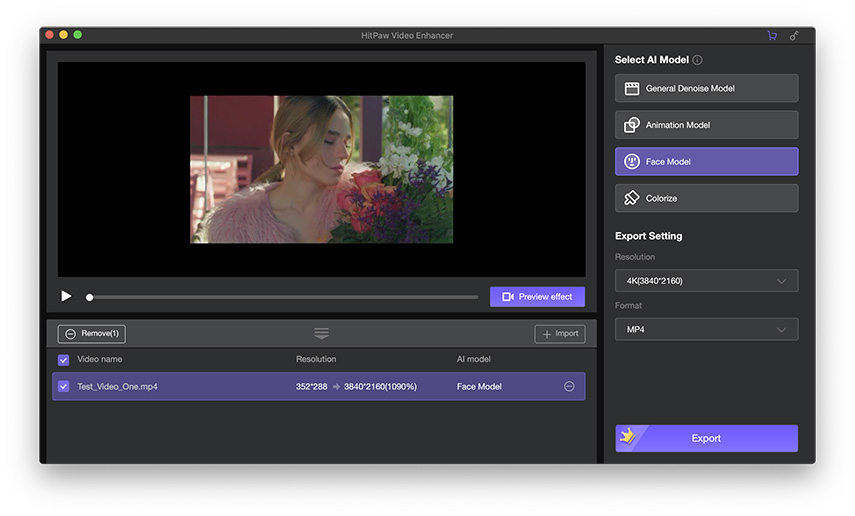
The Video Enhancer screen on a Mac: a 2560x2206 portrait clip in the source list, the model list on the right (HD Sharpening Model V2, HD Sharpen, Fast Sharpen, Animation, AI Pilot, Portrait Restoration and Portrait Generation), the export resolution, and the Cloud Export and Export buttons.
Repair, deinterlace, stabilize and interpolate
HitPaw VikPea for Mac fixes corrupted files with pixelation, frame drops or color distortion, removes interlacing lines from old TV and camcorder captures, steadies shaky footage and raises frame rates with frame interpolation for smoother motion.
AI Enhancement Agent, cloud export and credit records
HitPaw VikPea for Mac 6.0 adds the AI Enhancement Agent, which analyzes a clip and recommends three models with previews; one-click acceleration for cloud export; a Credit Records page that shows where your credits went; and a Gemini Omni model in the AI video generator.
Batch processing and preview without watermark
HitPaw VikPea for Mac queues several videos with one model and shows the preview without a watermark, so you judge the real result before paying for an export.
Benefits
- Makes good use of Apple silicon. An M-series Mac with 16 GB handles 4K upscaling locally, so your videos stay on your Mac.
- Simpler than pro tools. Pick a model, preview, export; no node graphs or parameter tuning.
- Covers more than upscaling. Color, face, low-light, repair and stabilization are in the same app.
- Same features as Windows. Mac users get the 6.0 release, not a cut-down port.
Real-World Uses
- Family archives: MiniDV and VHS transfers on a MacBook, deinterlaced, denoised and upscaled for a 4K TV.
- iPhone zoom shots: blurry 5x or 8x zoom clips from concerts or school events sharpened with the Face or General models.
- Editors on Final Cut Pro: soft B-roll or AI-generated clips upscaled before they go on the timeline.
- Anime and cartoons: older episodes you own upscaled with the Animation model.
Who It's For, and Who Should Skip It
It's for Mac users with an Apple silicon Mac who want to rescue old or low-quality videos without learning a professional tool.
Skip it if you're on an old Intel Mac and don't want to pay for cloud credits, if you also need it on a Windows PC (buy the Studio plan or the Windows edition instead), or if you have only a clip or two: at $70.39, even one month on the Mac costs more than a Windows month. Professionals who want manual control will prefer Topaz Video.
Usage Guide
- Download the zip from HitPaw, open the HitPaw VikPea Installer app and let it download VikPea into Applications.
- Launch VikPea, click Video Enhancer and drag your videos in.
- Choose a model on the right, or let the AI Enhancement Agent recommend three.
- Click Preview to render a few seconds and compare the original with the result.
- Click Export. To enable exporting after buying, sign in with the email you used at checkout.
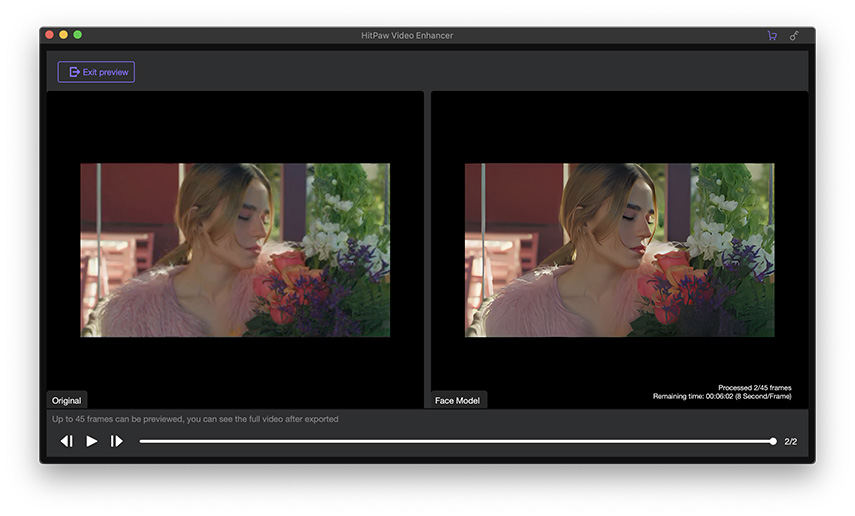
The preview on a Mac: the original 2560x2206 frame next to the Portrait Generation Model (Sharpen) result at 5120x4412 (2x upscale), with the frames processed and the time remaining at the top right.
Tips
- Preview the hardest part of the clip, a dark or fast-moving section, before exporting the whole thing.
- Keep the Face model for close-ups. On whole scenes it can create odd textures outside faces.
- Watch your disk space. 4K and 8K exports are large; HitPaw recommends 8 GB free on a Mac.
- Buy the perpetual license on sale if you'll use it for years: $245.27 with the Black Friday code versus $110.39 every year.
Where it falls short
- Mac pricing is higher. The Mac month ($70.39) and year ($110.39) cost more than the Windows month ($43.19) and year ($99.99); only the perpetual price is the same.
- Intel Macs are slow. HitPaw's minimum covers 2015 Intel Macs, but its recommended setup is Apple silicon with 16 GB.
- Credits on top of the license for the generative and portrait models, the video generator and cloud export.
- It can't recover what was never recorded. Badly compressed footage still shows blocks after enhancement, only bigger.
- Strict refunds: no refund for a change of mind, uncancelled renewals, or after more than 5 minutes or 100 MB of enhanced video.
What Users Say
Reviews of VikPea's enhancement
VikPea's models are the same on Mac and Windows, so reviews of the output apply to both. DIY Video Editor found that "there has been no loss of definition and in fact the image quality overall has improved," warned that the Face model "can create some pretty bizarre effects on non-facial areas," and concluded: "It's a solid piece of software that does what it says on the tin."
Kossi Adzo at FontsArena (August 2026) praised the "Beginner-friendly interface," noted that "High-resolution processing can take time" and that "Some advanced features require paid plans," and called it "a powerful and all-in-one AI video enhancer suitable for both casual users and content creators."
Trustpilot (all HitPaw products)
Trustpilot shows no TrustScore for hitpaw.com because of a breach of its guidelines, and says it removed a number of fake reviews. Of 2,762 remaining reviews, 80% are 5-star and 17% are 1-star, and the 1-star ones are mostly about billing:
- Stephen Carey (1 star, November 2026), "Beware auto payment is turned on by default": "This company took automatic payment which did not know was turned on"
- William Yong (1 star, November 2026): "I bought the software but everytime I want to use a feature it tells me I have to buy credits."
- Gleon (1 star, November 2026): "I have to buy tokens on an ongoing basis to continue using my lifetime purchase."
- Louis Loong (5 stars, October 2026): "The tech support was fantastic. They usually replied to my email within 24 hours."
The pattern: the enhancement itself gets good marks for ease and natural-looking results, with the Face model as the main quirk. The complaints are about HitPaw's credits, auto-renewal and refunds. Budget for credits if you want the generative models, and turn off auto-renewal if it's a one-off job.
Comparisons
HitPaw VikPea for Mac vs Topaz Video
Topaz Video is the professional choice on the Mac, with more models and manual controls. VikPea is simpler and adds colorizing, repair and an AI video generator in the same app. Choose Topaz to fine-tune, VikPea to get a good result quickly.
HitPaw VikPea for Mac vs the Windows edition
The two editions share features and version numbers (the Mac usually gets each release a few weeks later), but they are separate licenses. The Mac subscriptions cost more; the perpetual license is $350.39 on both.
Editions and Pricing
| Mac plan | Price | Black Friday (to Nov 30) | Includes |
|---|
| 1 Month License | $70.39/month | no discount | 1 Mac, all models, renews monthly |
| 1 Year License | $110.39/year | $77.27 | 1 Mac, 500 bonus credits, major upgrades while subscribed |
| Perpetual License | $350.39 once | $245.27 | 1 Mac, 800 bonus credits, updates within the current major version |
Prices exclude tax. Team plans for 5 or more Macs and the cross-platform VikPea Studio plan are on the same order page, which the Buy Now button opens.
FAQs
Does HitPaw VikPea run natively on Apple silicon Macs?
Yes. HitPaw VikPea for Mac supports Apple silicon from M1 onward as well as Intel Macs from 2015 or later, and HitPaw recommends Apple silicon with macOS 13 and 16 GB of memory.
Which macOS versions does HitPaw VikPea for Mac support?
HitPaw VikPea for Mac needs macOS 10.15 Catalina or later; macOS 13 Ventura or later is recommended.
Can I use my HitPaw VikPea Mac license on Windows?
No. HitPaw VikPea licenses are tied to one platform, so a Mac license won't activate the Windows version. The VikPea Studio plan is the only one that covers both.
Why does HitPaw VikPea cost more on Mac than on Windows?
HitPaw VikPea for Mac is priced separately: $70.39 a month and $110.39 a year, against $43.19 and $99.99 on Windows. The perpetual license is $350.39 on both platforms.
Is the HitPaw VikPea for Mac free version watermarked?
HitPaw VikPea for Mac shows previews without a watermark, but the free version can't export the enhanced video at all; exporting needs a paid license.
Can I get a refund on HitPaw VikPea for Mac?
HitPaw VikPea for Mac comes with a 30-day guarantee for cases like an unsolved technical problem or a duplicate order. HitPaw refuses refunds for a change of mind, uncancelled renewals, and once more than 5 minutes or 100 MB of video has been enhanced.
System Requirements
- OS: macOS 10.15 or later (macOS 13 or later recommended)
- Processor: Intel (2015 or later) or Apple silicon M1 or later (Apple silicon recommended)
- RAM: 8 GB minimum, 16 GB recommended
- Disk: 4 GB free minimum, 8 GB recommended
- Internet: needed to install, sign in and use credit-based or cloud features
Conclusion
HitPaw VikPea for Mac is a good choice for Apple silicon owners with a backlog of old or soft videos: the models do a natural-looking job, the 6.0 release is current, and the workflow takes minutes to learn. The yearly plan at $110.39 (or $77.27 until November 30) is fair if you'll keep using it.
The reasons to hesitate are the higher Mac subscription prices, credits for the most advanced models, and HitPaw's strict refunds. Test the free preview on your worst clip, and if you'll use it for years, the perpetual license on sale is the better deal.
Download Free Trial for MacBuy Now