HitPaw FotorPea for Mac: AI Photo Enhancement on Apple Silicon and Intel Macs
HitPaw FotorPea for Mac (formerly HitPaw Photo Enhancer for Mac) is a macOS app that uses AI models to upscale photos up to 8x, unblur faces and screenshot text, remove noise and colorize old black-and-white photos. The Mac yearly license costs $99.99, a month is $25.59 and a perpetual license is $159.99, all a little more than the Windows edition; the free version previews but doesn't export.
Apple's Photos app can brighten and crop, but it can't rebuild a blurry face or turn a 600-pixel scan into a print. That's the gap FotorPea fills on a Mac. Two things to know up front: the Mac edition trails the Windows one by a version, and HitPaw's credits and auto-renewal deserve a careful read before you subscribe.
Quick facts
- Developer: HitPaw
- Version: 5.7.0 for Mac, released September 23, 2026 (Windows is at 6.0.0)
- Platform: macOS 10.15 Catalina or later, Apple silicon or Intel
- Price: $25.59 a month, $99.99 a year, or $159.99 perpetual
- Credits included: 100 a month, 500 a year, or 800 with the perpetual license
- License: Mac only; a Windows license doesn't work in it
- Refunds: 30-day guarantee for technical problems HitPaw can't solve, not for a change of mind
- What we checked: the Mac download is a 9.5 MB installer app (version 1.1.6, Last-Modified October 20, 2026, set for macOS 10.13 and later) that fetches FotorPea; the Mac plan prices on HitPaw's order page, and the same $99.99 yearly price in a copy of that page from September 24, 2026, before the holiday sale; prices checked on November 23, 2026. We didn't run enhancements on a Mac ourselves.
Before you buy
- Black Friday: until November 30, 2026, code HP-BFS-30 takes 30% off the Mac yearly plan ($69.99) and perpetual license ($111.99). The monthly plan isn't included.
- Buy the Mac license. HitPaw accounts sign in on both platforms, but premium features don't cross over.
- Not all Windows 6.0 features are on Mac yet, such as Natural Upscale, My Gallery and the credit history view.
- Subscriptions renew automatically and plan credits expire at the end of each period.
- Trustpilot has suspended HitPaw's rating for breaching its guidelines and says it removed fake reviews.
Download Free TrialBuy Now
Overview
FotorPea for Mac opens on a home screen with two big entry points, Enhance Photos Now and Image Restoration, plus shortcuts to the background remover, AI generator, AI photo editor and Magic Upscaler. Under AI Enhancer you'll find face restoration, detail recovery and high-quality restoration, and the trending presets underneath (image upscale, face swap, image restoration) show what each tool does before you try it.
The workflow is the same as on Windows: add photos, choose an AI model or let Auto pick, preview against the original and export one photo or a batch. On Apple silicon the processing runs on the Mac's own GPU; HitPaw's minimum is an M1 or an Intel Mac with Intel UHD 630 graphics.
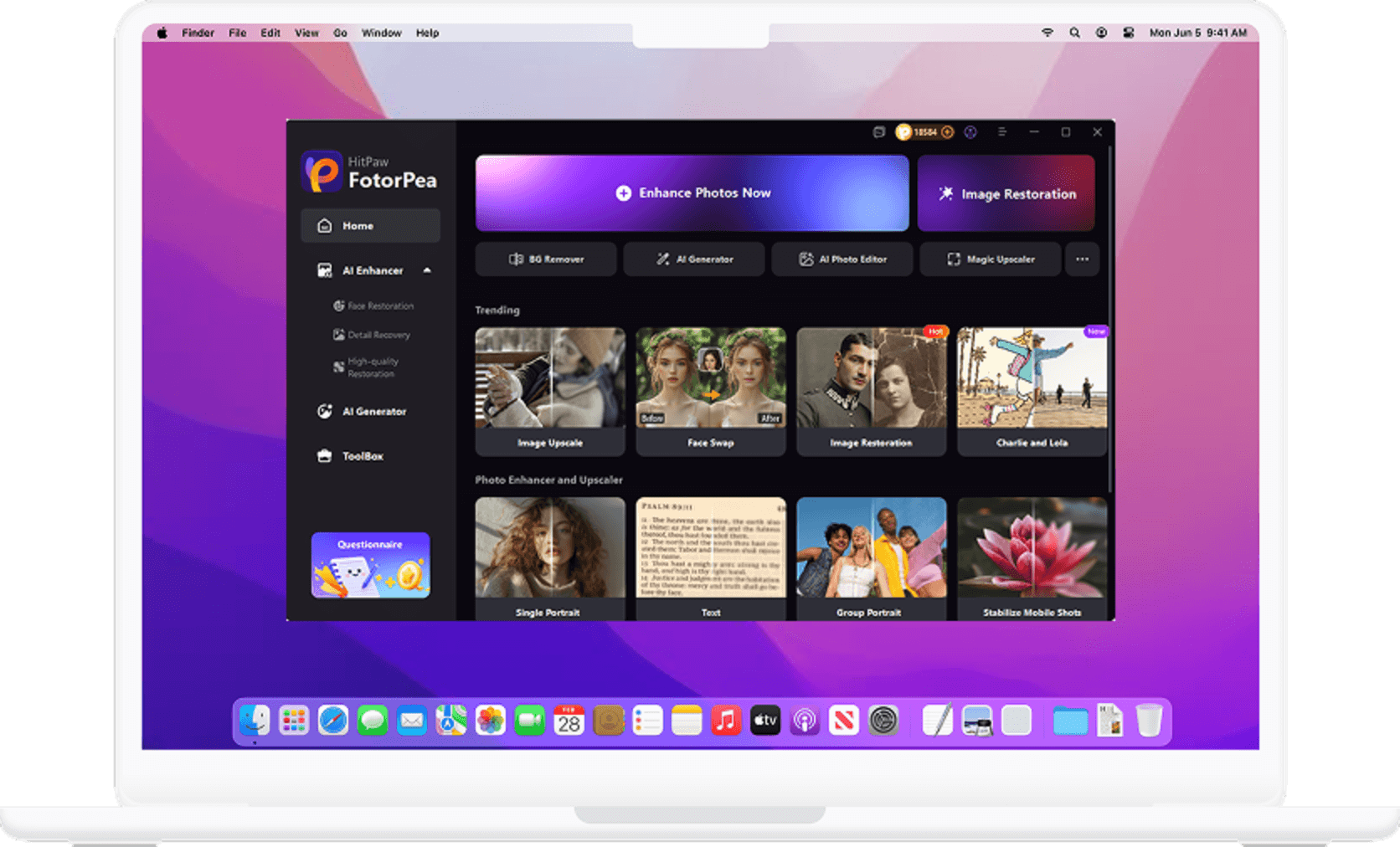
FotorPea on macOS: Enhance Photos Now and Image Restoration at the top, BG Remover, AI Generator, AI Photo Editor and Magic Upscaler shortcuts, and trending and enhancer presets below.
Features
Models for each kind of photo
HitPaw FotorPea for Mac picks from separate AI models: a General model for everyday photos, a Face model with Soft and Sharp modes, a Denoise model, a Text model for blurry screenshots and documents, an Animation model for cartoons and AI art, a Low-light model, and Colorize, Color Calibration and Scratch Repair for old photos. Multi-model processing combines, for example, the Face and Colorize models in one pass.
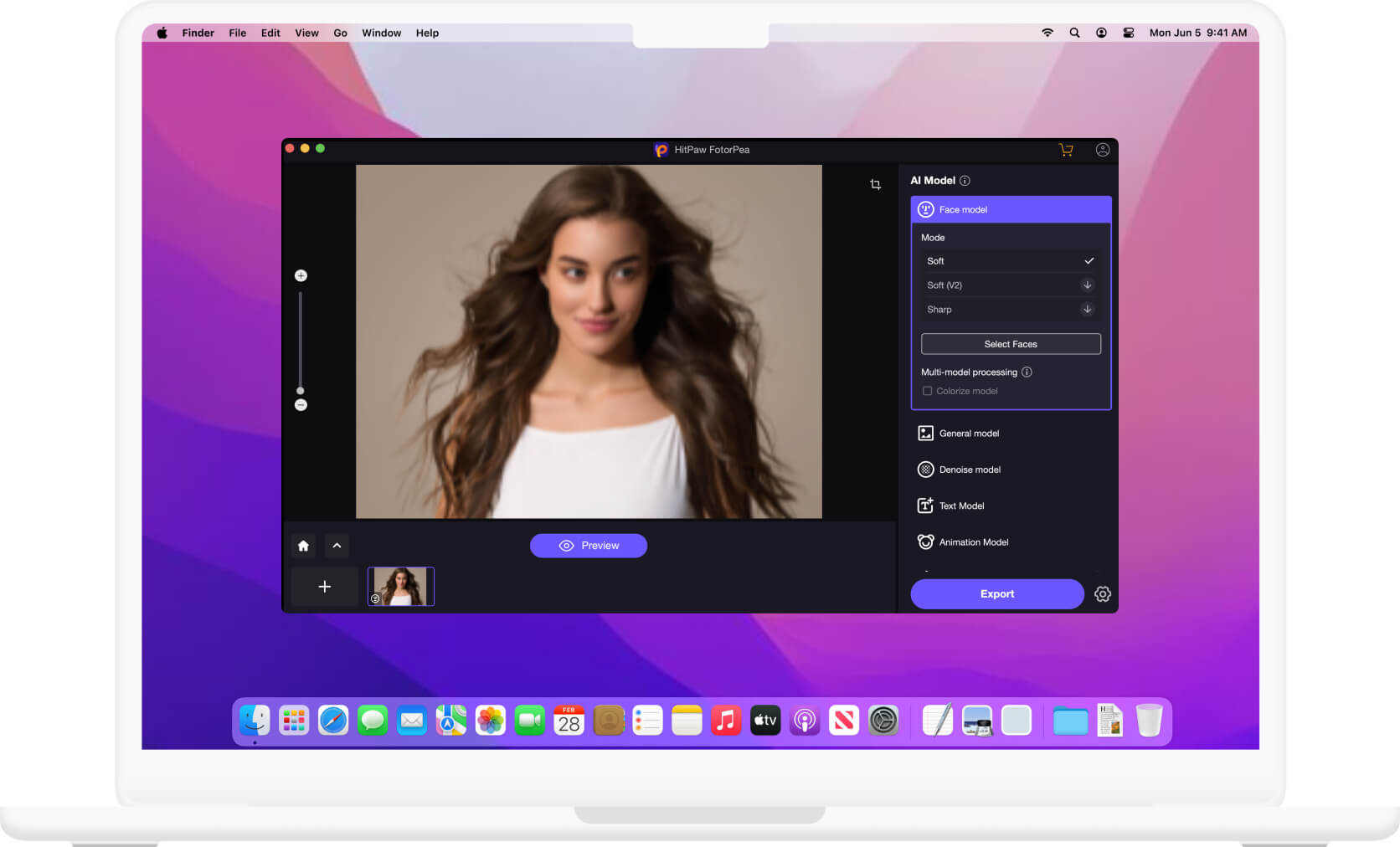
Choosing a model on macOS: the Face model opened with its Soft and Sharp modes, Select Faces and multi-model processing, and the General, Denoise, Text and Animation models below. This is an earlier version of the Mac interface.
Upscaling up to 8x
HitPaw FotorPea for Mac enlarges photos by up to 8x, so a small scan or a cropped phone photo can be printed large, and the Animation model keeps line art clean when you upscale anime or AI-generated images.
Blurry text made readable
HitPaw FotorPea for Mac has a Text model for blurred screenshots, photographed documents and handwriting. One Mac App Store reviewer called it "Definitely the best at text unblurring of the 4-5 Mac apps I tried."
New in 5.6 and 5.7: reflections, low light and reframing
HitPaw FotorPea for Mac 5.6 added one-click removal of reflections from eyeglasses, glass and windows, better low-light enhancement and 4K export for group-photo restoration. Version 5.7 added Recompose for reframing a subject, Pro Look for perspective and lighting, natural portrait beautification and better restoration of small faces in old group photos.
Credit-based AI tools
HitPaw FotorPea for Mac also includes an AI chat drawing assistant, AI image generator, background remover, AI outpainting in the image editor and an anti-AI-look model for generated faces. These spend credits.
Benefits
- Fixes what Apple Photos can't: missed focus, soft faces and tiny scans.
- Batch work on a Mac: the same model can run across a folder of product or event photos.
- Native on Apple silicon: runs on M-series Macs as well as Intel models from macOS Catalina on.
- Simple: no layers or masks to learn.
Real-World Uses
- Family albums on a MacBook: scanned prints colorized and scratches removed before a slideshow.
- Screenshots and documents: a blurry screenshot of an invoice or a photographed letter made readable.
- Concert and night photos: grainy phone shots cleaned up with the Denoise model.
- Online sellers: blurred product photos fixed in a batch for a store page.
Who It's For, and Who Should Skip It
It's for Mac users who want one-click fixes for blurry, noisy or old photos without learning Photoshop or Pixelmator Pro, and for anyone who needs readable text from blurry screenshots.
Skip it if you want manual control; FotorPea has no layers or brushes. Pixelmator Pro owners already have ML Super Resolution and denoise. If you need the newest models now, the Windows edition gets them first. And if you only have a few photos, a single month at $25.59 is cheaper than a year.
Usage Guide
- Download the installer from HitPaw, open the zip and run HitPaw FotorPea Installer; it downloads the app into Applications.
- Open FotorPea and click Enhance Photos Now, then drag photos in.
- Choose a model in the AI Model panel, or let Auto recommend one.
- Click Preview and compare the result with the original side by side.
- Click Export to save. A paid Mac license is needed here.
- After buying, sign in with the email you used at checkout.
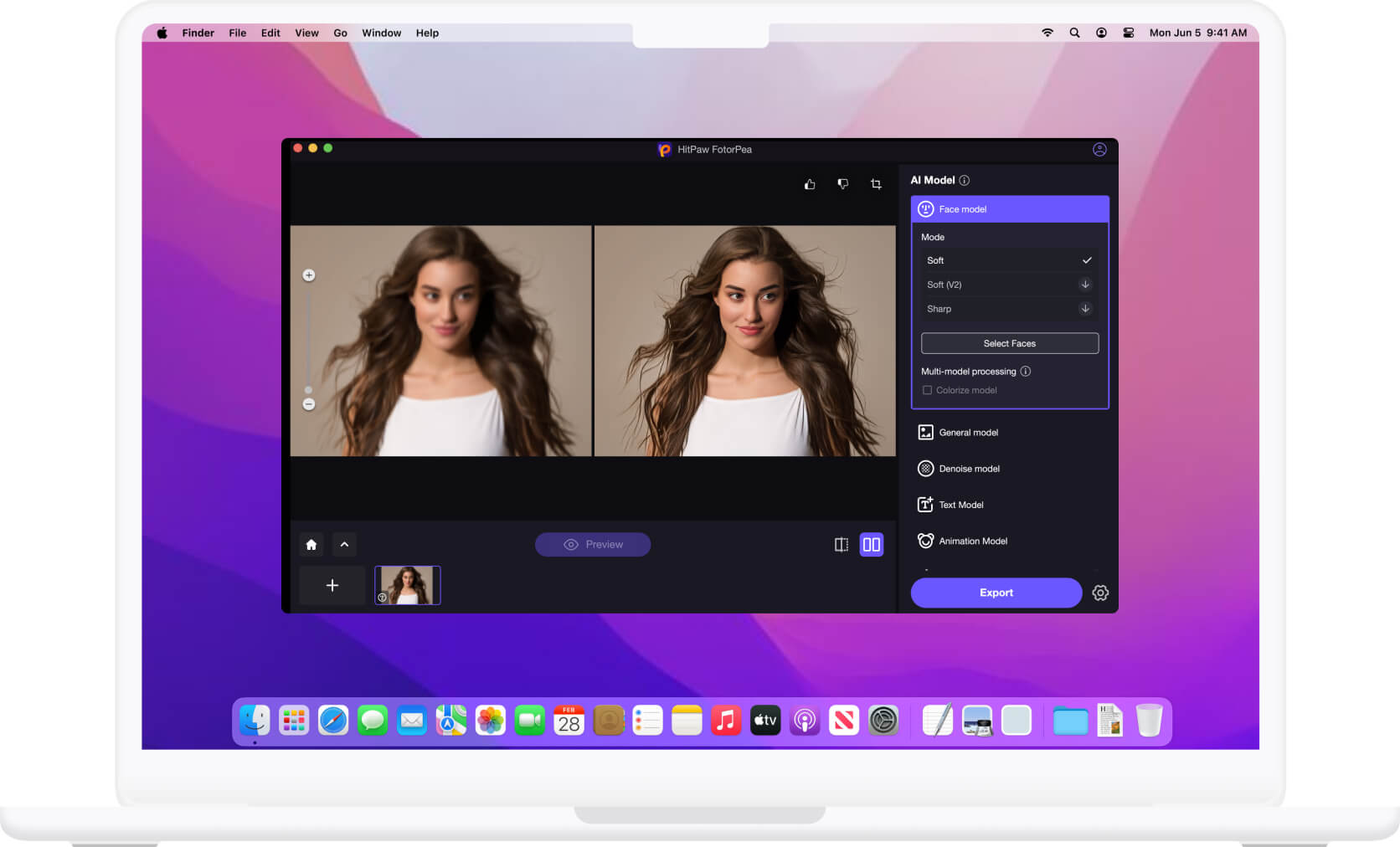
The preview on macOS: the original portrait on the left, the Face model result on the right, and the Export button under the model panel.
Tips
- Use the Text model for screenshots, not the General model; it's trained to keep letter shapes.
- Preview a face close up before a batch export. Faces are where AI enhancement goes most visibly wrong.
- Download from HitPaw's site. The Mac App Store listing of FotorPea showed version 4.5.1 from July 2025.
- Switch off auto-renewal in your HitPaw account if you're buying for one project.
Where it falls short
- Mac updates lag Windows. Version 6.0's Natural Upscale and My Gallery reached Windows in November 2026 but not the Mac.
- Trial is thin. The free version previews only; an App Store reviewer asked whether the trial offers only 2 images.
- No manual editing tools to fix an area the AI got wrong.
- Credits and renewals. Trustpilot complaints about HitPaw center on credits for features buyers expected to own and on automatic renewal.
- Strict refunds: none for a change of mind or after the job is done.
What Users Say
Mac App Store and MacUpdate
The Mac App Store listing has too few ratings to show an average. Its reviews:
- Ron (April 2024): "It just works! Simple and fast!"
- Tulippxxx (May 2024): "Definitely the best at text unblurring of the 4-5 Mac apps I tried."
- webbolt (July 2024): "Did I understand that the trial of this software offers 2 images?"
- Caripatua (April 2025): "it's an app that confuses and keeps your money and there's no way to solve issues"
MacUpdate shows 3.0 from two ratings. The 1-star one, from waryuser in January 2025, says "The description has obvious copy/paste from their other apps."
Independent reviews (FotorPea on any platform)
Danetsoft (August 2026) found that "FotorPea successfully upscales the low-resolution image, making details sharper and the overall image clearer," and called it "a practical AI image enhancer for improving low-resolution, blurry, old, and portrait photos." Tirupati Rao (itirupati.com, January 2026) rated it 4.3 out of 5 for its simple workflow but noted "There are no layers, brushes, or compositing tools."
Trustpilot (all HitPaw products)
Trustpilot shows no TrustScore for hitpaw.com because of a guidelines breach, and says it removed fake reviews. Of 2,762 reviews, 80% are 5-star and 17% 1-star.
- Mike Andrew (1 star, October 2026), titled "AVOID": "I paid $191.99 for FotorPea AI software download."
- William Yong (1 star, November 2026): "I bought the software but everytime I want to use a feature it tells me I have to buy credits."
- Louis Loong (5 stars, October 2026): "The tech support was fantastic. They usually replied to my email within 24 hours."
The pattern: Mac users who like FotorPea praise its speed and simplicity, and its text unblurring stands out. The complaints are about the business side, credits, a thin trial and support that some buyers couldn't get to solve their problem, plus the thin review base on Mac stores.
Comparisons
FotorPea for Mac vs Pixelmator Pro
Pixelmator Pro is a full Mac image editor that also has ML Super Resolution and denoise. FotorPea does more specialized repair, such as face restoration, colorizing and scratch removal, but can't edit. If you already own Pixelmator Pro, try its upscaling first; if you're restoring old photos, FotorPea goes further.
FotorPea for Mac vs the Windows edition
The Windows edition costs less ($90.39 a year against $99.99) and is a version ahead. The Mac edition has the same core models. The licenses are separate, so pick the platform you'll use.
Editions and Pricing
| Mac plan | Price | Black Friday (to Nov 30) | Includes |
|---|
| 1 Month License | $25.59/month | no discount | 1 Mac, 100 credits a month |
| 1 Year License | $99.99/year | $69.99 | 1 Mac, 500 credits, major upgrades while subscribed |
| Perpetual License | $159.99 once | $111.99 | 1 Mac, 800 credits, updates within the current version |
Prices exclude tax. The Buy Now button opens the Mac order page with all three plans.
FAQs
Does HitPaw FotorPea run natively on Apple silicon?
Yes. HitPaw FotorPea for Mac supports Apple silicon from the M1 on, as well as Intel Macs with a 4th-generation i3 or better, on macOS 10.15 Catalina or later.
Can I use my Windows FotorPea license on a Mac?
No. HitPaw FotorPea licenses and premium features are tied to one platform, so a Mac needs the Mac license even though the same HitPaw account signs in on both.
Should I buy HitPaw FotorPea from the Mac App Store or from HitPaw?
HitPaw FotorPea's Mac App Store listing showed version 4.5.1 from July 2025, while HitPaw's own download is at 5.7.0, so the direct version is the current one. This page's prices are HitPaw's own order page prices.
Can HitPaw FotorPea for Mac export for free?
No. HitPaw FotorPea for Mac's free version lets you preview the models on your own photos, but exporting enhanced images needs a paid Mac plan.
Do HitPaw FotorPea credits carry over?
No. HitPaw FotorPea's plan credits expire at the end of the month or subscription year; only credit bundles bought separately keep their value.
Can I get a refund on HitPaw FotorPea for Mac?
HitPaw FotorPea for Mac has a 30-day money-back guarantee for unsolved technical problems and duplicate orders, but no refunds for a change of mind, for renewals you didn't cancel, or after you've finished your task with it.
System Requirements
- OS: macOS 10.15 Catalina or later
- Processor: Apple M1 or later, or Intel i3 (4th generation) or better
- RAM: 8 GB or more
- Graphics: Apple M1 or Intel UHD 630 or better, OpenGL 3.3
- Disk: 2 GB free
- Display: 1366x768 or higher
Conclusion
HitPaw FotorPea for Mac is worth it for Mac users with old, blurry or noisy photos to rescue who don't want a full editor; the face, text and colorize models do what Apple's own tools can't. At $99.99 a year, or $69.99 until November 30, it's fairly priced, and the $159.99 perpetual license pays off after about a year and a half.
The reasons to hesitate: the Mac version is a step behind Windows, the free version won't export, and HitPaw's credits and auto-renewal need watching. Preview your hardest photo first and buy the Mac license only once you've seen the result.
Download Free TrialBuy Now