HitPaw VikPea: AI Video Upscaling to 4K and 8K, With a Credit Meter Running Beside It
HitPaw VikPea (called HitPaw Video Enhancer until October 2024) is a Windows program that uses AI models to upscale videos to 4K or 8K, remove noise, sharpen soft or over-compressed footage and restore old tapes. The yearly license costs $99.99, a month costs $43.19, and a perpetual license is $350.39; the free version only previews results.
If you've ever played an old camcorder transfer or a 480p download on a 4K TV and watched it turn to mush, this is the kind of tool that tries to rebuild the missing detail. It does that well on the right footage. It also sells AI credits on top of the license, and HitPaw's billing has a long trail of complaints, so read the buying notes before you subscribe.
Quick facts
- Developer: HitPaw
- Version: 6.0.0, released October 27, 2026 (adds the AI Enhancement Agent)
- Platform: Windows 10 and 11, 64-bit. The Mac edition is a separate product with its own license
- Price: $43.19 a month, $99.99 a year, or $350.39 for a perpetual license
- Free version: previews only; exporting needs a paid plan, and some models need credits
- Output: up to 8K; reads MP4, MOV, MKV, AVI, FLV, WMV and more
- Refunds: 30-day guarantee, but not for a change of mind or after more than 5 minutes or 100 MB of enhancement
- What we checked: the Windows download is a 2.9 MB web installer (Last-Modified March 9, 2026) that fetches the program; the plan prices on HitPaw's order page, and the same $99.99 yearly price in a copy of that page from October 1, 2026, before the holiday sale; prices checked on November 23, 2026. We didn't run an enhancement ourselves.
Before you buy
- Black Friday: until November 30, 2026, code HP-BFS-30 brings the yearly plan to $69.99 and the perpetual plan to $245.27 (30% off). The monthly plan isn't included.
- Subscriptions renew automatically. Cancel before the renewal date if you only need it for one project; HitPaw won't refund a renewal you didn't cancel.
- Credits are extra. The AI Generative and Portrait models, the AI video generator and cloud rendering spend credits. The yearly plan includes 500 bonus credits and the perpetual plan 800.
- Windows only. A Windows license doesn't work in the Mac version.
- Trustpilot has suspended HitPaw's rating for breaching its guidelines and says it removed fake reviews. More below.
Download Free TrialBuy Now
Overview
VikPea works like most AI upscalers: you load one or more videos, choose a model trained for a kind of footage, preview a few seconds side by side with the original, then export the whole clip. The difference from a simple resize is that the model invents plausible detail, so faces, fabric and foliage come back sharper instead of just bigger.
The home screen opens on the Video Enhancer, with shortcuts to the AI Colorist, watermark removal, video repair and background removal, and a second tab for the AI video generator. Processing runs on your own graphics card by default. If your PC is slow, cloud rendering does the work on HitPaw's servers for credits.
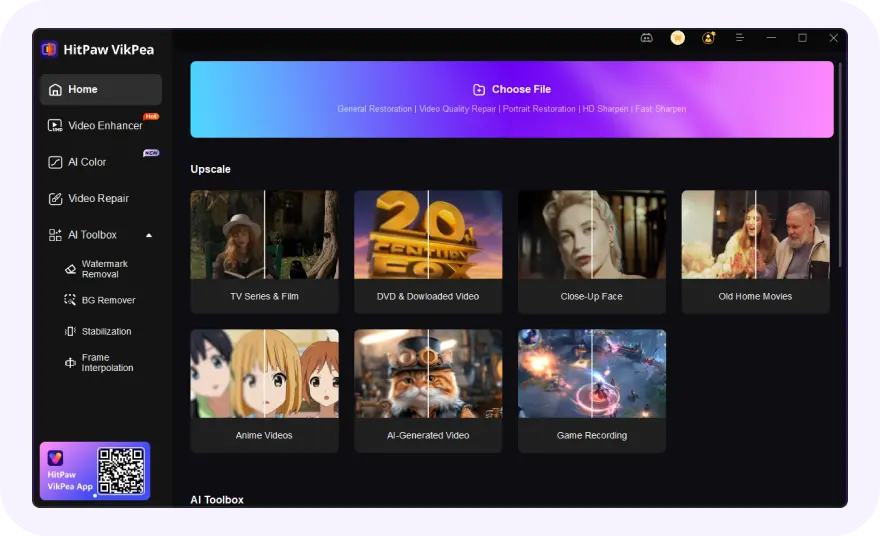
The VikPea home screen: Video Enhancer and AI Video Generator at the top, shortcuts for AI Colorist, Watermark Removal, Video Repair and Background Removal, and preset enhancement scenarios below.
Features
Upscaling to 4K and 8K with footage-specific models
HitPaw VikPea upscales 480p, 720p and 1080p video to 4K or 8K with a set of models you pick per clip: General Restoration for everyday footage, UHD Restoration for the sharpest 4K result, Video Quality Repair for damaged files, HD Sharpen and Fast Sharpen, an Animation model for cartoons and anime, and Portrait models for faces. The AI Generative model rebuilds detail more aggressively and uses credits.
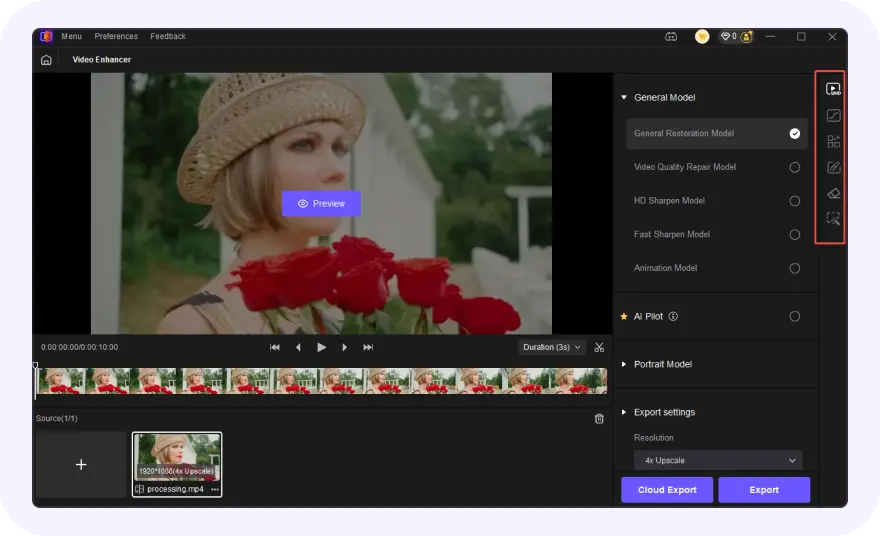
Choosing a model: the clip in the player, a thumbnail strip below it, and the General Model list on the right with UHD Restoration selected, above AI Pilot and the Portrait models.
AI Enhancement Agent picks the model for you
HitPaw VikPea 6.0 adds an AI Enhancement Agent that looks at your clip, recommends three models and shows a preview of each, so you compare results instead of guessing which model suits a dark concert video or a scanned film reel.
Smoother motion: frame interpolation and stabilization
HitPaw VikPea's Frame Interpolation model turns 15 or 30 fps footage into 60 fps, and the Stabilize model calms shaky handheld shots. It also has a slow-motion mode. Both help action and travel clips more than a resolution bump does.
Color: colorize, low light and SDR to HDR
HitPaw VikPea can colorize black-and-white footage, brighten dark low-light video, correct dull color and convert SDR clips to HDR. The AI Colorist is credit-based on every plan.
Repair, background removal and watermark removal
HitPaw VikPea includes a Video Repair tool for corrupted or glitchy MP4, MOV, AVI and MKV files, an AI background remover that swaps or blurs the background, and a watermark remover for timestamps and text overlays. The advanced watermark export uses credits.
Batch processing and cloud rendering
HitPaw VikPea queues several videos with the same model, which matters when you're digitizing a box of tapes. Cloud acceleration sends the job to HitPaw's GPUs for credits; HitPaw quotes a 4-GPU cloud render at 18 minutes against 3 hours 16 minutes on one GPU for its sample job.
Benefits
- Old footage you can watch on a big screen. Upscaling plus noise removal is the main reason people buy it, and it's what the program does best.
- No editing skills needed. Pick a model, preview, export. Reviewers keep calling it beginner-friendly.
- One license covers several jobs. Stabilizing, frame interpolation, colorizing and repair sit in the same app, so you don't buy three tools.
- Local processing. With a decent GPU your videos never leave your PC.
Real-World Uses
- Family tapes: VHS, Hi8 or MiniDV transfers cleaned up with General Restoration and upscaled so they don't look blocky on a TV.
- AI-generated clips: 720p output from Kling, Sora, Veo or Seedance upscaled to 4K before it goes into an edit.
- Anime and cartoons: the Animation model keeps line art clean when you upscale older episodes you own.
- Product and social video: soft, re-compressed clips sharpened before you post them again.
- Action and travel: shaky 30 fps phone footage stabilized and interpolated to 60 fps.
Who It's For, and Who Should Skip It
It's for home users with old videos to rescue, creators who upscale AI or phone footage, and anyone who wants good upscaling without learning a professional tool. A PC with a recent NVIDIA, AMD or Intel graphics card makes a big difference.
Skip it if you have a weak laptop and don't want to pay for cloud credits, if you need fine control over every parameter (Topaz Video is the more technical choice), or if you only have one short clip: a month at $43.19, or an online upscaler, costs less than a year. Mac users need the separate Mac edition.
Usage Guide
- Download the installer from HitPaw, run it and let it fetch the program, then launch VikPea.
- Click Video Enhancer and import one or more videos.
- Choose a model in the right panel, or let the AI Enhancement Agent suggest three.
- Click Preview. VikPea renders a few seconds and shows the original and the result side by side.
- Set the output resolution and click Export. A paid license is needed here.
- To activate after buying, sign in with the email you used at checkout; the license is tied to your HitPaw account.
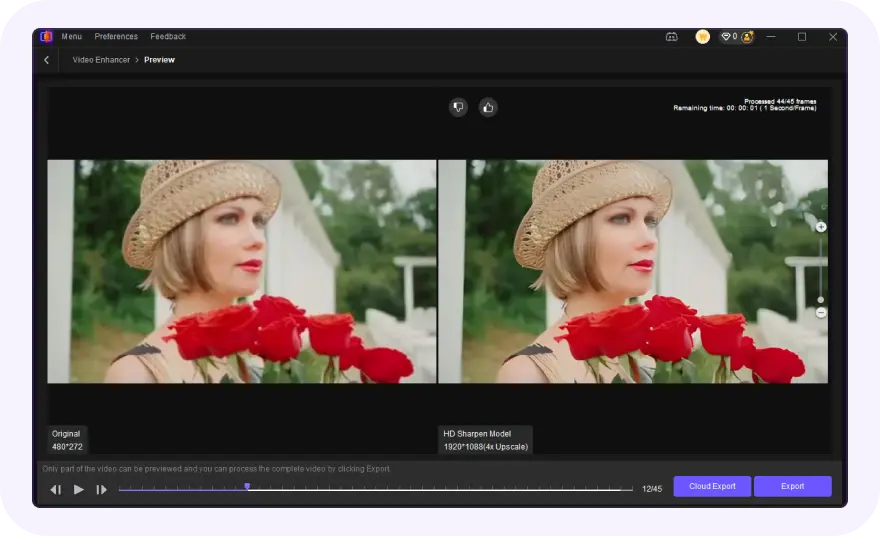
The preview screen: the original frame (2560x1482) next to the UHD Restoration result (3840x2160, 4K), the processing progress and the Export button. Only part of the video is previewed before export.
Tips
- Preview on the worst section, such as a dark scene or fast motion, not the opening seconds. That's where models differ.
- Don't use the Portrait model on whole videos. It's tuned for faces and can produce odd textures elsewhere.
- Upscale only as far as you need. 4K exports take far longer and use more disk space than 1080p; 8K is rarely worth it for old footage.
- Turn off auto-renewal in your HitPaw account right after buying if the job is a one-off.
Where it falls short
- It can't invent what was never there. The models rebuild plausible detail, but footage that was badly compressed at the source still shows blocks and smearing after enhancement, just at a higher resolution.
- Slow without a GPU. CPU-only processing is painfully slow, and HitPaw's answer, cloud rendering, costs credits.
- Credits on top of the license. Several buyers on Trustpilot complain that features they expected in a paid plan ask for credits.
- Strict refunds. HitPaw refuses refunds after more than 5 minutes or 100 MB of enhanced video, for change of mind, and for renewals you didn't cancel.
- Lifetime means the current major version. Perpetual licenses get free updates only within the current big version.
What Users Say
Independent reviews
DIY Video Editor tested the upscaling and found that "there has been no loss of definition and in fact the image quality overall has improved." On hardware, the same review notes: "The software leverages GPU acceleration and that certainly makes all the difference." Its warning about the Face model: "you wouldn't want to use this for general footage as it can create some pretty bizarre effects on non-facial areas." Its verdict: "It's a solid piece of software that does what it says on the tin."
Kossi Adzo at FontsArena (August 2026) liked the "Beginner-friendly interface" but listed as cons that "High-resolution processing can take time" and "Some advanced features require paid plans." His conclusion: "HitPaw VikPea is a powerful and all-in-one AI video enhancer suitable for both casual users and content creators."
Trustpilot (all HitPaw products)
Trustpilot doesn't show a TrustScore for hitpaw.com: the rating is unavailable because of a breach of its guidelines, and Trustpilot says it removed a number of fake reviews. Of the 2,762 reviews left, 80% are 5-star and 17% are 1-star, which is a split worth noticing. The 1-star reviews are mostly about money, not video quality:
- Stephen Carey (1 star, November 2026), "Beware auto payment is turned on by default": "This company took automatic payment which did not know was turned on"
- William Yong (1 star, November 2026): "I bought the software but everytime I want to use a feature it tells me I have to buy credits."
- Gleon (1 star, November 2026), "Lifetime subscription switched to pay-as-you-go": "I have to buy tokens on an ongoing basis to continue using my lifetime purchase."
- Louis Loong (5 stars, October 2026): "The tech support was fantastic. They usually replied to my email within 24 hours."
Product Hunt
HitPaw Video Enhancer, VikPea's old name, has a 3.0 rating from just two Product Hunt reviews, one at each extreme. Joshua Hill: "HitPaw Video Enhancer AI has a very good effect on upscaling video quality." Khalid Nazmus Sakib: "This is a dangerous fraud company! Be aware of them. Do NOT buy their product."
The pattern: people who judge VikPea on its output are mostly happy, especially with restoration of old footage and animation, and they like how simple it is. The complaints are about the business around it: auto-renewal, credits for features buyers thought they'd paid for, and refunds. Treat the license price as the floor, not the total, if you plan to use the generative models or cloud rendering.
Comparisons
HitPaw VikPea vs Topaz Video
Topaz Video is the tool professionals reach for, with more models and more manual settings. VikPea is simpler, and adds extras Topaz doesn't have, such as colorizing, background removal and an AI video generator. If you want to tune every parameter, Topaz; if you want a good result in three clicks, VikPea.
HitPaw VikPea vs Aiarty Video Enhancer
Aiarty Video Enhancer is another one-click Windows and Mac upscaler focused on upscaling and denoising. VikPea has more tools around the upscaler (colorize, repair, stabilization, generator), but some of them cost credits. If upscaling and denoising are all you need, compare both trials on the same clip.
Editions and Pricing
| Plan | Price | Black Friday (to Nov 30) | Includes |
|---|
| 1 Month License | $43.19/month | no discount | 1 PC, all models, renews monthly |
| 1 Year License | $99.99/year | $69.99 | 1 PC, 500 bonus credits, major upgrades while subscribed |
| Perpetual License | $350.39 once | $245.27 | 1 PC, 800 bonus credits, updates within the current major version |
| Team plans | $459.95/year (5 PCs), $859.95 (10 PCs), $1,099.95 (100 PCs) | not listed | company use, multi-user control |
All plans are sold on the same order page; prices exclude tax. HitPaw also sells a VikPea Studio plan that works across Windows, Mac, iPhone and Android with one account. The Buy Now button opens the order page with every plan.
FAQs
Is HitPaw VikPea the same as HitPaw Video Enhancer?
Yes. HitPaw renamed Video Enhancer to VikPea on October 29, 2024 and has kept developing it under the new name; version 6.0.0 arrived on October 27, 2026.
Can I use HitPaw VikPea for free?
HitPaw VikPea's free version lets you import videos and preview the enhancement on part of a clip, but you can't export the result without a paid license, and the credit-based models allow only a few free previews.
Does a HitPaw VikPea license work on both Windows and Mac?
No. HitPaw VikPea licenses aren't cross-platform: a Windows license can't be used in the Mac version, and the reverse. Only the separate Studio plan covers both.
Do I need a graphics card for HitPaw VikPea?
HitPaw VikPea runs on an Intel i3 or Ryzen 3 with 8 GB of RAM, but processing is far faster on a dedicated GPU; HitPaw recommends an i5 or Ryzen 5 with 16 GB. Without one, plan on cloud rendering, which costs credits.
Can I get a refund on HitPaw VikPea?
HitPaw VikPea has a 30-day money-back guarantee, but only for cases such as an unsolved technical problem or a duplicate purchase. HitPaw refuses refunds for a change of mind, for renewals you didn't cancel, and once you've enhanced more than 5 minutes or 100 MB of video.
What happens to HitPaw VikPea when the yearly plan ends?
HitPaw VikPea subscriptions renew automatically. If you cancel, you lose export access at the end of the paid period; the perpetual license is the only option that keeps working without payments.
Is HitPaw VikPea safe to install?
HitPaw VikPea's installer from hitpaw.com is a small web installer that downloads the program from HitPaw's own servers. Avoid copies from other sites.
System Requirements
- OS: Windows 10 or 11, 64-bit
- Processor: Intel i3 or AMD Ryzen 3 minimum; Intel i5 or AMD Ryzen 5 recommended
- RAM: 8 GB minimum, 16 GB recommended
- Disk: 4 GB free
- Internet: needed to install, sign in and use credit-based or cloud features
Conclusion
HitPaw VikPea is worth it if you have a real pile of footage to restore and a PC with a decent graphics card: the models do a convincing job on old tapes, animation and soft AI clips, and the app is simple enough for anyone. At $99.99 a year, or $69.99 until November 30, it's priced for home users rather than studios.
The reason to hesitate is the business model, not the software. Credits for the best models, automatic renewal and a refund policy that closes after five minutes of use mean you should test the free preview on your own worst clip first, buy the plan that matches the job, and switch off auto-renewal if you don't need it next year.
Download Free TrialBuy Now