Short answer
HitPaw VikPea is the most complete AI video enhancer here for most home users: footage-specific models that upscale to 4K or 8K, an AI agent that previews three models for you, plus colorizing, stabilizing, frame interpolation and file repair, at $99.99 a year on Windows. On a Mac, HitPaw VikPea for Mac has the same models for $110.39 a year. Its catches are real: the free version only previews (no exports), some models and cloud rendering cost credits on top of the license, plans renew automatically, and Trustpilot has suspended HitPaw's rating.
Pick Aiarty Video Enhancer ($235 once, 3 Windows PCs, lifetime updates) if you'd rather pay once and want the finest control over noise and detail, or Aiarty Video Enhancer for Mac ($99 a year) on a Mac. Nero AI Video Upscaler Pro 2026 ($84.95 a year) is the cheapest way to 8K on Windows. On a tight budget, Winxvideo AI costs $34.95 for a year and also stabilizes and converts, VideoProc Converter AI ($89.95 once) adds a full converter and DVD tools, and Macxvideo AI ($89.95 once) is the cheapest one-time license for a Mac.
At a glance
| HitPaw VikPea (Win / Mac) | Aiarty Video Enhancer (Win / Mac) | Nero AI Video Upscaler Pro |
|---|
| Price on the order page | $99.99/year Windows, $110.39/year Mac; $350.39 perpetual | $235 lifetime, 3 PCs (Windows); $99/year, 1 Mac | $84.95/year, 1 PC |
| Runs on | Windows 10/11 64-bit; macOS 10.15+ (separate licenses) | Windows 10/11 64-bit; macOS 13+ (separate licenses) | Windows 10/11 64-bit |
| Highest output | 8K | 4K | 8K |
| Frame interpolation | ✓ to 60 fps, slow motion | ✓ up to 120 fps, slow motion | ✓ up to 120 fps |
| Stabilization | ✓ | ✗ | ✗ |
| Colorize black-and-white video | ✓ (uses credits) | ✗ | ✗ |
| Audio cleanup | ✗ | ✓ AI voice denoise | ✗ |
| Free version or trial | Preview only, no export | 120 seconds per video, watermark, no batch | 7 days full; then clips under 30 s with 4 models |
| Extra costs | Credits for generative/portrait models, colorizer, cloud rendering | None | None |
| Refunds | 30 days, not for change of mind or after 5 min / 100 MB enhanced | 30-day money-back guarantee | 30-day money-back guarantee |
| Winxvideo AI | VideoProc Converter AI | Macxvideo AI |
|---|
| Price on the order page | $34.95 for 1 year, 1 PC | $89.95 lifetime, 1 PC | $89.95 lifetime, 1 Mac |
| Runs on | Windows 7 to 11, 64-bit | Windows 7 to 11, 32- and 64-bit | macOS 10.15+, Apple silicon and Intel |
| Highest output | 4K | 4x upscale | 4K |
| Frame interpolation | ✓ 60 or 120 fps | ✓ up to 480 fps | ✓ up to 480 fps for slow motion |
| Stabilization | ✓ | ✓ | ✓ |
| Also does | Converter, compressor, downloader, recorder, photo and audio AI | Converter, DVD ripper, downloader, recorder, photo and audio AI | Converter, compressor, downloader, recorder, editor, photo and audio AI |
| Free trial | 5 watermark-free AI exports; 5-minute limit in the converter | 5 watermark-free exports per AI tool; files under 5 minutes | 5 watermark-free AI exports; 5-minute tool limit |
| Refunds | 30-day money-back guarantee | 30-day money-back guarantee | 30 days, when support can't fix a problem |
How we picked and what we checked
- We took every desktop program on this site whose main job, or a main module, is AI enhancement of existing video: upscaling, denoising, sharpening and frame interpolation. AI video generators and plain converters were left out.
- We opened the order page for every license linked here and noted the price, term and renewal, and read each vendor's buy page, FAQ and tech specs for the trial limits, hardware needs and refund rules.
- We downloaded or checked each installer on the vendor's server; the Aiarty Video Enhancer installer we downloaded is version 3.9.0.0 (382 MB), dated November 6, 2026.
- We gathered reviews from Trustpilot, Product Hunt, StackSocial and independent photo and video sites, with praise and complaints.
What we checked: order-page prices on November 23, 2026: HitPaw VikPea $99.99 a year (Windows) and $110.39 a year (Mac), Aiarty Video Enhancer $235.00 lifetime and $99.00 a year for the Mac, Nero AI Video Upscaler Pro 2026 $84.95 a year, Winxvideo AI $34.95 for a year, VideoProc Converter AI $89.95 and Macxvideo AI $89.95 lifetime.
We compared features, prices, trials and requirements. We didn't run the same clip through every program or time renders on our own hardware, so quality and speed claims come from the vendors and from reviewers.
Price of the license we link, Windows (USD)
Aiarty Video Enhancer (lifetime, 3 PCs)$235.00
HitPaw VikPea (1 year)$99.99
VideoProc Converter AI (lifetime, 1 PC)$89.95
Nero AI Video Upscaler Pro 2026 (1 year)$84.95
Winxvideo AI (1 year)$34.95
Order-page prices checked on November 23, 2026. Yearly plans renew automatically; lifetime licenses are paid once.
Price of the license we link, Mac (USD)
HitPaw VikPea for Mac (1 year)$110.39
Aiarty Video Enhancer for Mac (1 year)$99.00
Macxvideo AI (lifetime, 1 Mac)$89.95
Order-page prices checked on November 23, 2026.
1. HitPaw VikPea: the most tools in one simple app
- Price: $99.99 a year on Windows, $110.39 a year on a Mac, $350.39 for a perpetual license on either; monthly plans $43.19 (Windows) and $70.39 (Mac)
- Platforms: Windows 10 and 11, 64-bit; macOS 10.15 or later on Intel and Apple silicon. A Windows license doesn't work on a Mac, and the reverse
- Version: 6.0.0, released October 27, 2026 on Windows and November 11, 2026 on the Mac
- Best for: home users who want one easy app for old tapes, soft phone clips and AI-generated video, including colorizing and stabilizing
HitPaw VikPea, called HitPaw Video Enhancer until October 2024, works like the other upscalers here: you load videos, choose an AI model trained for a kind of footage, preview a few seconds next to the original, then export. Where it pulls ahead is the range of models and tools. General Restoration handles everyday footage, UHD Restoration aims for the sharpest 4K, Video Quality Repair targets damaged files, and there are Animation and Portrait models, HD and Fast Sharpen, and an AI Generative model that rebuilds detail more aggressively. Version 6.0 adds an AI Enhancement Agent that looks at your clip, recommends three models and previews each, so you don't have to guess which one suits a dark concert video.
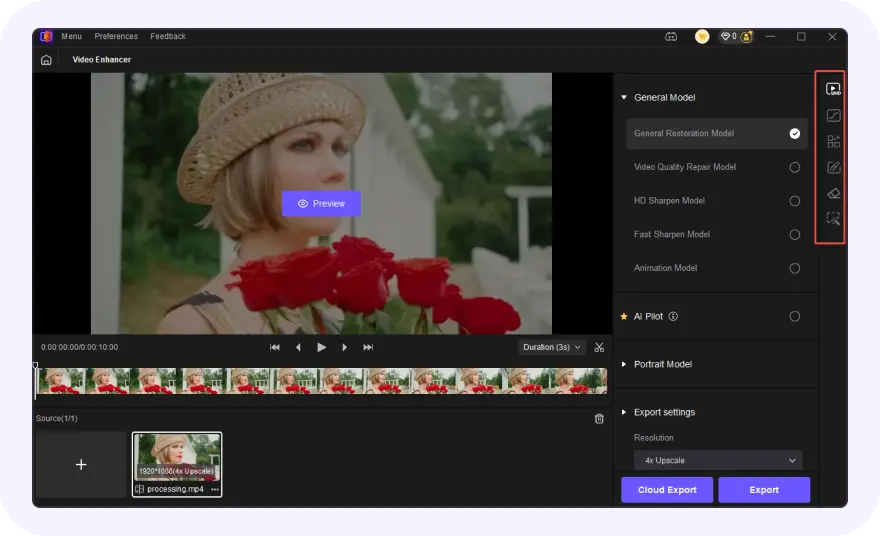
HitPaw VikPea on Windows: a parrot clip in the player and the General Model list on the right, with UHD Restoration selected above AI Generative, HD Sharpen, Fast Sharpen and Animation, then AI Pilot and the Portrait models.
Beyond upscaling to 4K or 8K, HitPaw VikPea interpolates 15 or 30 fps footage to 60 fps, stabilizes shaky clips, brightens low-light video, converts SDR to HDR, colorizes black-and-white film, repairs corrupted MP4, MOV, AVI and MKV files, and removes backgrounds and watermarks. Processing runs on your own graphics card; on a slow PC, cloud rendering sends the job to HitPaw's servers for credits. HitPaw VikPea for Mac has the same models and the 6.0 agent, and HitPaw recommends an Apple silicon Mac with 16 GB of memory for 4K work.
Where HitPaw VikPea falls short is the business around it. The free version lets you preview but not export anything, so you can't take a finished clip away before paying. The AI Generative and Portrait models, the AI Colorist and cloud rendering spend credits (the yearly plan includes 500 bonus credits, the perpetual plan 800), monthly and yearly plans renew automatically, and HitPaw refuses refunds for a change of mind, for renewals you didn't cancel, and once you've enhanced more than 5 minutes or 100 MB of video. The perpetual license gets updates only within the current major version.
Black Friday price, until November 30, 2026
Until November 30, 2026, HitPaw's code HP-BFS-30 takes 30% off: the Windows yearly plan drops from $99.99 to $69.99, the Mac yearly plan from $110.39 to $77.27, and the perpetual license from $350.39 to $245.27. The monthly plans aren't included. After that date the regular prices above apply.
What we like
- Up to 8K, with models for restoration, repair, animation and faces
- AI Enhancement Agent previews three models for you
- Colorizing, stabilization, frame interpolation and repair in the same app
- Same features on Windows and Mac
Watch out for
- Free version previews only; no free exports at all
- Credits on top of the license for several models and cloud rendering
- Auto-renewal and a strict refund policy
- Mac plans cost more than Windows plans; licenses aren't cross-platform
- Trustpilot has suspended HitPaw's rating
What reviewers and buyers say about HitPaw VikPea
DIY Video Editor tested the upscaling and found that "there has been no loss of definition and in fact the image quality overall has improved," but warned that the face model "can create some pretty bizarre effects on non-facial areas." Its verdict: "It's a solid piece of software that does what it says on the tin." Kossi Adzo at FontsArena (August 2026) liked the "Beginner-friendly interface" but noted that "Some advanced features require paid plans."
Trustpilot shows no TrustScore for hitpaw.com: the rating is unavailable for a breach of its guidelines, and Trustpilot says it removed fake reviews. Of the 2,762 reviews left, which cover all HitPaw products, 80% are 5-star and 17% are 1-star. The 1-star reviews are mostly about money, not video quality. William Yong (1 star, November 2026): "I bought the software but everytime I want to use a feature it tells me I have to buy credits." Stephen Carey (1 star, November 2026): "Beware auto payment is turned on by default."
Download HitPaw VikPea (Windows)Buy HitPaw VikPeaDownload VikPea for MacBuy HitPaw VikPea for Mac
2. Aiarty Video Enhancer: the best one-time license for restoration
- Price: $235 for the Windows Lifetime License (3 PCs, lifetime updates); $99 a year for the Mac Standard License (1 Mac)
- Platforms: Windows 10 and 11, 64-bit; macOS 13 or later on Apple silicon, or an Intel Mac with a 4 GB graphics card
- Version: 3.9 on Windows, installer dated November 6, 2026
- Best for: people with grainy, dark or soft footage who want control over the result and no credits or subscriptions
Aiarty Video Enhancer comes from Digiarty, the company behind WinX DVD Ripper and VideoProc, and it does one job in depth. Instead of a dozen models it has three, each for a kind of bad footage: moDetail-HQ rebuilds texture in daylight shots, Smooth-HQ deblurs and denoises while keeping faces natural, and superVideo vHQ is built for dark, grainy night clips. A Strength slider and a Restore Color slider pull the result back when the AI overdoes it, which is the control HitPaw's one-click models don't give you.
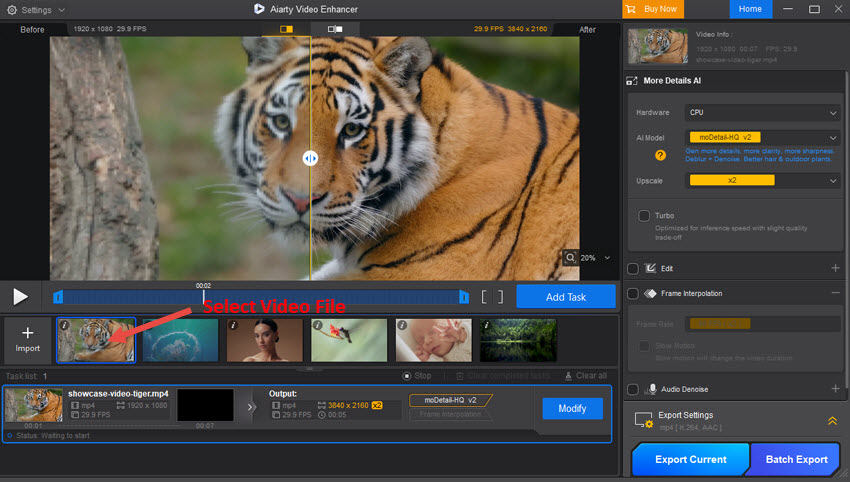
Aiarty Video Enhancer on Windows, from its user guide: a 1920 x 1080 tiger clip being upscaled 2x to 3840 x 2160 with moDetail-HQ v2, a before/after slider in the preview, the task list below and Export Current and Batch Export at the lower right.
Aiarty Video Enhancer also interpolates frames to 60, 90 or 120 fps with a slow-motion option, removes background noise from speech with its VoiceFilter model, converts SDR to 10-bit HDR, deinterlaces old camcorder captures and exports batches to MP4, MOV or MKV with H.264, H.265 or AV1. Everything runs on your own PC with no credits and no usage meter: a two-hour wedding video costs the same as a ten-second clip, only more time.
Where Aiarty Video Enhancer falls short: it tops out at 4K, it has no stabilization and no colorizer, and it needs a DirectX 12 graphics card with at least 4 GB of video memory to be pleasant. The trial processes up to 120 seconds per video with a watermark, which is enough to judge quality on your own footage. The Mac license we link is a yearly plan that renews; Aiarty sells a lifetime Mac license on its own site.
Aiarty's own store sale, through December 4, 2026
The Windows Lifetime License is $235.00 on the order page linked here. Aiarty's own buy page shows the same license at $149.00 in a Black Friday sale that runs through December 4, 2026. After that, $235 is the regular price.
What we like
- Three models for three kinds of bad footage, with Strength and Restore Color control
- Lifetime license for 3 PCs, no credits
- Audio denoise and SDR-to-HDR in the same pass
- Trial exports let you judge the result before paying
Watch out for
- Highest upfront price on Windows
- No stabilization or colorizing
- Output stops at 4K
- Needs a DirectX 12 GPU with 4 GB of video memory
What reviewers and buyers say about Aiarty Video Enhancer
Shotkit gave Aiarty Video Enhancer a "Highly Recommended" badge, with pros of "Top quality and speed", "Easy-to-use" and "Affordable", and cons of "No preview for some features", "No video colorizer" and "No video stabilization." Digital Photography School, as quoted on Aiarty's review page: "Used thoughtfully, it works well as a pre-processing step or last-resort fix when conditions weren't ideal."
Aiarty's Trustpilot page showed 3.9 out of 5 from 22 reviews across its products when we checked in October 2026. On Product Hunt, one otherwise happy reviewer reported render times "like 6 hours for 14 sec video", a reminder that speed depends on your graphics card.
For a closer look at how Aiarty compares with Digiarty's cheaper all-in-one tool, see Aiarty Video Enhancer vs Winxvideo AI.
Download Aiarty Video EnhancerBuy Aiarty Video EnhancerDownload Aiarty for MacBuy Aiarty Video Enhancer for Mac
3. Nero AI Video Upscaler Pro 2026: the cheapest route to 8K on Windows
- Price: $84.95 a year for 1 PC, renews automatically every 12 months
- Platforms: Windows 10 and 11, 64-bit only
- Version: 28.0.2.3
- Best for: home users with a gaming-class PC and a backlog of old videos who want 8K and 120 fps without learning a pro tool
Nero AI Video Upscaler Pro 2026 enlarges video 2x or 4x, up to 4K or 8K, and raises the frame rate to as much as 120 FPS. It has six models: Fast, Animation, Realistic, Versatile, Face Enhancement and the new Restoration model for fine textures in old footage. You drag in a video or a whole folder, pick a resolution and model, check the side-by-side preview and click Upscale; batch jobs run from a queue, and you can save your own presets.
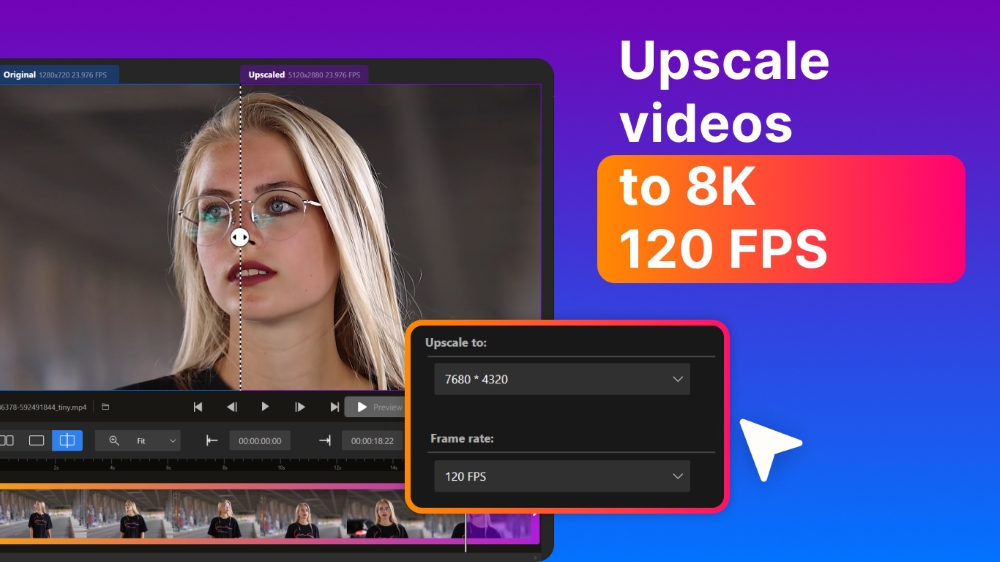
Nero's annotated promo image built on the app's preview: the original 1280 x 720 frame on the left of the divider, the upscaled 5120 x 2880 result on the right, and the Upscale to 7680 x 4320 and 120 FPS settings.
Nero AI Video Upscaler Pro has the most generous trial here: 7 days with every function, and after that you can still upscale clips shorter than 30 seconds free with four models. It's also the heaviest on hardware. Nero asks for 8 GB of RAM and a GeForce GTX 900 or Radeon 500 card with 4 GB of video memory as a minimum, recommends 32 GB and a 12 GB card for 8K, and wants 20 GB free on the system drive. HEVC, AV1, VP9 and MPEG-2 files need Microsoft's video extensions first. It has no stabilization, colorizing or audio cleanup, and there's no Mac version.
What we like
- Up to 8K and 120 FPS for $84.95 a year
- Six models, including Face Enhancement and Restoration
- 7-day full trial, then free upscaling of short clips
- Runs locally; no credits
Watch out for
- Yearly subscription only
- Windows only
- Highest hardware demands here
- No stabilization or colorizing
What reviewers and buyers say about Nero AI Video Upscaler Pro
Steve Litchfield tested it in February 2025: "The improvement is very noticeable" and "The video is cleaner and more watchable." But "The four minute test video above took around an hour on the Surface," so a laptop without a real graphics card is a poor match.
The upscaler's own Trustpilot page showed 4.6 out of 5 from 31 reviews when we checked in November 2026. Jamie (5 stars): "I have been able to upscale my old digitised VHS tapes." Terri Renneberg (1 star): "the last one took around 22 hours to upscale and both view exactly the same."
Download Nero AI Video Upscaler TrialBuy Nero AI Video Upscaler Pro
4. Winxvideo AI: the budget pick that also stabilizes and converts
Winxvideo AI (listed here as WinX HD Video Converter Deluxe)
- Price: $34.95 for a 1-year license on the order page, renewing every 12 months
- Platforms: Windows 7 to 11, 64-bit
- Version: 4.11
- Best for: budget buyers who want AI upscaling and stabilization alongside a converter, compressor and downloader
Winxvideo AI is what Digiarty's WinX HD Video Converter Deluxe grew into. Its Video AI section upscales low-quality video to 1080p or 4K with Super Resolution, interpolates to 60 or 120 fps, and stabilizes shaky phone, GoPro and drone footage with presets such as Best Stability and Minimum Crop. Image AI and Audio AI sections upscale photos and remove background noise, and the long-standing converter, compressor, downloader and screen recorder are still there.
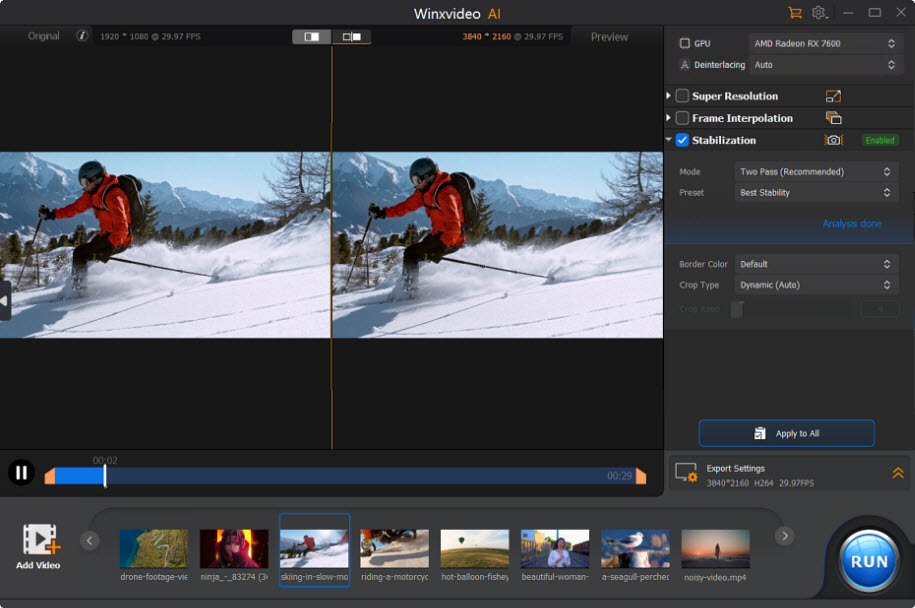
Winxvideo AI's Video AI window with Stabilization on (Two Pass mode, Best Stability preset): the original 1920 x 1080 skiing clip on the left and the 3840 x 2160 preview on the right.
Winxvideo AI runs on lighter hardware than the dedicated enhancers: Digiarty lists a GPU with Vulkan 1.2 or OpenCL support and 2 GB of RAM for the AI tools. The trade-off is simpler enhancement controls than Aiarty's, and Shotkit found that "Even with very low-grade clips, Winxvideo AI wasn't able to bring them up to HD or 4K standard," though it still improved them. The trial gives you 5 watermark-free AI exports.
What we like
- Lowest price here: $34.95 for a year
- AI stabilization as well as upscaling
- Converter, compressor, downloader and recorder included
- Runs on older Windows and modest GPUs
Watch out for
- Yearly license that renews
- Fewer model choices and controls
- Tops out at 4K
- Windows only; the Mac twin is Macxvideo AI
What reviewers say about Winxvideo AI
India Mantle at Shotkit tested the upscaler on a low-resolution clip: "Everything is sharper, from the fine fibers of the woman's coat to the edges of the iPhone in her hands and even the buttons on her collar." On stabilization: "It was able to stabilize the footage and remove motion blur without heavily cropping the content."
Digiarty's Trustpilot page, which covers all its products, showed 3.8 out of 5 from 419 reviews when we checked in October 2026. Dr. Carol Clark (1 star): "I bought the AI to help make videos better. It didn't, and in fact, the sound got worse!"
Download Winxvideo AIBuy Winxvideo AI
5. VideoProc Converter AI: a lifetime converter with AI upscaling built in
- Price: $89.95 for the Lifetime License for 1 PC on the order page
- Platforms: Windows 7 to 11, 32- and 64-bit (a Mac version is sold separately)
- Version: 8.12
- Best for: people who mostly convert, compress and rip DVDs, and want AI upscaling and stabilization on the side without a subscription
VideoProc Converter AI is another Digiarty program, built around a GPU-accelerated converter for 370+ input formats, with DVD ripping, a downloader and a screen recorder. Its AI modules are serious, though: Super Resolution upscales 2x, 3x or 4x with Gen Detail, Real Smooth and Anime models; Frame Interpolation reaches 480 fps for slow motion; Stabilization steadies handheld clips; and Image AI and Audio AI handle photos and noise.
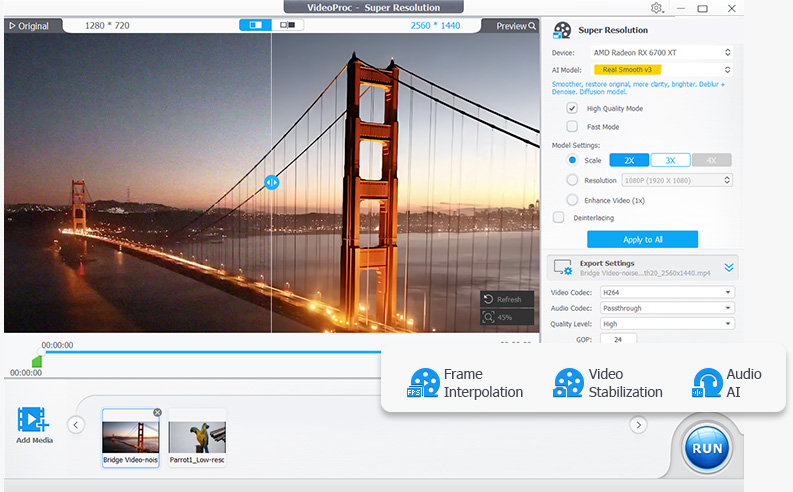
VideoProc Converter AI's Super Resolution window: a 1280 x 720 night clip upscaled 2x to 2560 x 1440 with the Real Smooth v3 model on an AMD Radeon RX 6700 XT. The Frame Interpolation, Video Stabilization and Audio AI panel at the bottom is a callout added by VideoProc.
VideoProc Converter AI's trial allows 5 watermark-free exports per AI tool, and conversions and edits of files under 5 minutes. The AI tools want a DirectX 12 or Vulkan 1.2 graphics card. Reviews of the upscaling are mixed: some buyers love it, while others say Super Resolution barely improved clarity, so test it on your own footage.
What we like
- One-time price for a converter plus AI tools
- Frame interpolation up to 480 fps and stabilization
- DVD ripping, downloader and recorder included
- Runs on 32-bit Windows too
Watch out for
- Upscaling results vary more than with a dedicated enhancer
- Busy interface with many modules
- Mac version is a separate purchase
What buyers say about VideoProc Converter AI
VideoProc's Trustpilot page showed 4.3 out of 5 from 517 reviews, for the Windows and Mac versions together, when we checked in October 2026. Gene (5 stars): "this program needs better than average hardware to properly upscale video to 4k."
nirav patel (1 star, January 2026), titled "Do not buy this if you want actual AI video correction": "the software only changes the resolution numbers without any real improvement to clarity."
Download VideoProc Converter AIBuy VideoProc Converter AI
6. Macxvideo AI: the cheapest one-time license on a Mac
- Price: $89.95 for the Lifetime License for 1 Mac on the order page
- Platforms: macOS 10.15 or later, Apple silicon and Intel
- Version: 3.16
- Best for: Mac users who want AI upscaling, stabilization and a full converter without a subscription
Macxvideo AI is the Mac counterpart of Winxvideo AI. Its Super Resolution upscales real and AI-generated video up to 4x, to a maximum of 4K, with a side-by-side preview and a Keep Original Colors option; it also stabilizes shaky clips and interpolates frames to 60, 120 or up to 480 fps for slow motion. Image AI, face restoration, photo colorizing and Audio AI come with it, along with the converter, compressor, downloader and recorder Digiarty has sold for years.
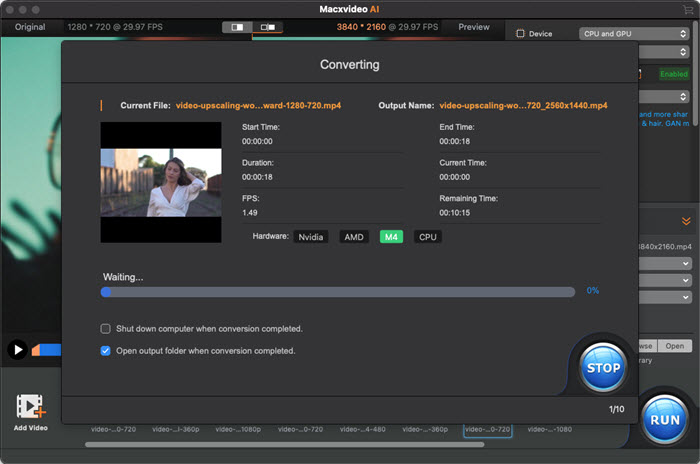
Macxvideo AI upscaling a 1280 x 720 clip: the Converting window shows the output file at 2560 x 1440, the M4 chip selected as the hardware, and 1 of 10 queued videos.
Macxvideo AI has no credits and no usage cap. Digiarty recommends an Apple silicon Mac with 16 GB of RAM and macOS 13 or later for the fastest AI, and long jobs are still slow: one Trustpilot reviewer said enhancement "takes more than 10 hours (!!!!!) to enhance a movie of less thant 1 hour 30." The trial gives 5 watermark-free AI exports.
What we like
- $89.95 once, with lifetime upgrades
- Stabilization and frame interpolation as well as upscaling
- Full converter, compressor, downloader and recorder
- Runs on macOS 10.15 and Intel Macs
Watch out for
- Simpler enhancement controls than Aiarty or VikPea
- Tops out at 4K
- Long renders on older Macs
What buyers say about Macxvideo AI
Joe Mirarchi, a verified StackSocial buyer: "This product works nicely for upscaling images that already have a decent level of detail. The face AI feature is interesting but for low-detail images, you can't expect miracles."
MacXDVD's Trustpilot page, which covers all its software, showed 4.7 out of 5 from 245 reviews when we checked in November 2026.
Download Macxvideo AIBuy Macxvideo AI
Which AI video enhancer should you choose?
HitPaw VikPea is our pick for most people who want the widest set of restoration tools in an app anyone can use, on Windows or a Mac, as long as you go in knowing about credits and auto-renewal. If you hate subscriptions, Aiarty Video Enhancer is the one to own. The table below matches the common situations.
| Your situation | Pick | Why |
|---|
| Old family tapes, faces, black-and-white film, one easy app | HitPaw VikPea / VikPea for Mac | Restoration, face, repair and colorize models, plus the AI agent that previews three models |
| You want to pay once and keep control over the result | Aiarty Video Enhancer | $235 lifetime for 3 PCs, Strength and Restore Color sliders, no credits |
| You want 8K or 120 FPS on a strong gaming PC | Nero AI Video Upscaler Pro 2026 | 8K and 120 FPS for $84.95 a year, with a 7-day full trial |
| Tight budget, shaky phone clips | Winxvideo AI | $34.95 for a year, with stabilization and a converter |
| You mostly convert and rip DVDs | VideoProc Converter AI | Lifetime converter with AI upscaling, 480 fps interpolation and stabilization |
| Mac, no subscription | Macxvideo AI | $89.95 once, with stabilization and a full toolbox |
| Mac, best restoration control | Aiarty Video Enhancer for Mac | Same three models as Windows, $99 a year |
Who should skip each one
- HitPaw VikPea: skip it if you want to test a full export before paying, or if a credit meter and automatic renewals put you off.
- Aiarty Video Enhancer: skip it if your footage is shaky or black-and-white; it neither stabilizes nor colorizes.
- Nero AI Video Upscaler Pro: skip it on a laptop with integrated graphics or on a Mac.
- Winxvideo AI: skip it if restoration quality matters more than price; its controls are basic.
- VideoProc Converter AI: skip it if you only want enhancement; you'd pay for a converter you won't use.
- Macxvideo AI: skip it on an old Intel Mac if you have long films to process; renders can take hours.
What commonly goes wrong
- Expecting true 4K from a 240p clip. Every tool here invents plausible detail; footage that was badly compressed at the source still shows blocks, just bigger. Upscale 2x first and compare before you go to 4x.
- Running on the CPU. AI upscaling on integrated graphics can take many times the length of the clip. Switch the program to your graphics card and update its driver first.
- Using a face model on whole scenes. HitPaw VikPea's face models are tuned for close-ups and, as DIY Video Editor found, can produce odd textures elsewhere.
- Previewing the easy part. Test the darkest or fastest-moving section of your clip, where models differ most.
- Forgetting the renewal. HitPaw VikPea, Nero, Winxvideo AI and the Aiarty Mac plan renew automatically. If the job is a one-off, turn renewal off right after buying.
- Running out of disk space. 4K and 8K exports are large; Nero asks for 20 GB free on the system drive.
FAQs
What is the best AI video enhancer for old VHS tapes?
HitPaw VikPea is the best fit for VHS transfers in this group, because it combines restoration, face, repair and colorize models in one app. Aiarty Video Enhancer is the better choice if you want to pay once and fine-tune how strongly the AI cleans grain, and it has a Force Deinterlace option for camcorder and TV recordings.
Can I use HitPaw VikPea for free?
HitPaw VikPea's free version lets you import videos and preview the enhancement on part of a clip, but you can't export without a paid plan. If you want free exports to judge, Aiarty Video Enhancer (120 seconds per video, watermarked), Nero AI Video Upscaler (7 days, then clips under 30 seconds) and the Digiarty tools (5 watermark-free AI exports) all allow that.
Which AI video enhancer has no subscription?
Aiarty Video Enhancer for Windows ($235 for 3 PCs), VideoProc Converter AI ($89.95) and Macxvideo AI ($89.95) are one-time purchases on the order pages linked here. HitPaw VikPea also sells a perpetual license for $350.39, with updates only within the current major version.
Which AI video upscaler can go to 8K?
HitPaw VikPea and Nero AI Video Upscaler Pro 2026 both export up to 8K. Aiarty Video Enhancer, Winxvideo AI and Macxvideo AI stop at 4K, which is plenty for most old footage on a 4K TV.
Does a HitPaw VikPea license work on both Windows and Mac?
No. HitPaw VikPea licenses are platform-specific: a Windows license won't activate VikPea for Mac, and the Mac plans cost more ($110.39 a year against $99.99). Aiarty and Digiarty also sell their Windows and Mac versions separately.
Do I need a graphics card for AI video enhancement?
In practice, yes. Aiarty Video Enhancer and Nero AI Video Upscaler Pro both ask for a graphics card with at least 4 GB of video memory, and reviewers report renders of many hours on laptops without one. Winxvideo AI is the lightest, needing a Vulkan 1.2 or OpenCL GPU and 2 GB of RAM. HitPaw VikPea can send jobs to the cloud instead, for credits.
Do these programs upload my videos?
No, not by default. Aiarty Video Enhancer, Nero AI Video Upscaler Pro, Winxvideo AI, VideoProc Converter AI and Macxvideo AI process everything on your own computer. HitPaw VikPea also runs locally, unless you choose its credit-based cloud rendering.
Can AI stabilize shaky video as well as upscale it?
Yes, in HitPaw VikPea, Winxvideo AI, VideoProc Converter AI and Macxvideo AI. Aiarty Video Enhancer and Nero AI Video Upscaler Pro don't stabilize, so shaky footage stays shaky.