Macxvideo AI: AI Video and Photo Enhancement Plus a Full Video Toolbox for Mac
Macxvideo AI is a Mac-only video toolkit from Digiarty that upscales video to 4K and photos up to 10K with AI, stabilizes shaky footage and smooths frame rates, and also converts, compresses, downloads, records and edits video. The Lifetime License for one Mac costs $89.95 at checkout. It replaces Digiarty's discontinued MacX Video Converter Pro and the old free macXvideo app, so if you used either, this is where those tools went.
The pitch is simple: you have a pile of footage that's too blurry, too shaky, too big or in the wrong format, and you'd rather fix all of it in one app than juggle five. Macxvideo AI puts the AI enhancers and the everyday converter tools behind one start screen.
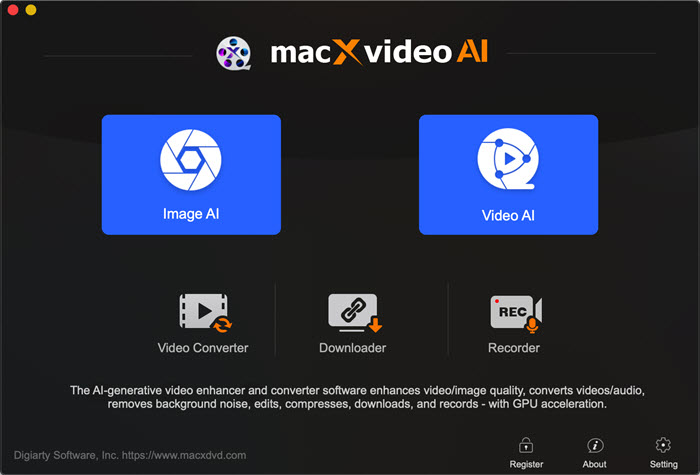
The start screen: three AI modules on top (Image AI, Video AI, Audio AI) and the classic tools below (Video Converter, Downloader, Compressor, Recorder).
Quick facts
- Version: 3.16, released September 20, 2026
- Developer: Digiarty Software, Inc. (MacXDVD)
- Platform: macOS 10.15 Catalina or later, Apple Silicon and Intel. The Windows edition is a separate product, Winxvideo AI
- Price: $89.95 for the Lifetime License (1 Mac, lifetime upgrades)
- Free trial: yes, with 5 watermark-free AI exports and a 5-minute limit in the converter, compressor and editor
- Refunds: 30 days, when the software doesn't work and support can't fix the problem
- What we checked: the installer (macxvideo-ai.dmg, 238 MB) on the vendor's server and the Lifetime License at $89.95 on the order page, both on November 3, 2026. We didn't run an AI upscale ourselves, so speed and quality come from the vendor and user reviews.
Download Free TrialBuy Now
Overview
Macxvideo AI splits into two halves. The AI half has seven tools: video super resolution, video stabilization, frame interpolation, image enhancement, face restoration, photo colorization and audio cleanup (noise suppression and a vocal remover). The toolbox half is the converter Digiarty has sold for years, now with GPU acceleration: a batch converter with 370+ input and 420+ output formats, a compressor, an online video downloader, a screen and webcam recorder, and a basic editor.
All processing happens on your Mac, not in the cloud, and there are no AI credits: the paid license gives unlimited use. The catch is hardware. AI work is heavy, and Digiarty recommends an Apple Silicon Mac with 16 GB of RAM and macOS 13 or later for the fastest results.
Features
Upscale old or low-resolution video to 4K
Macxvideo AI's Super Resolution enlarges real-world and AI-generated video up to 4x, to a maximum of 4K, while removing noise, blur and compression artifacts. A side-by-side preview shows the original next to the result before you commit to a long render, and the newest model adds a Keep Original Colors option so the upscale doesn't shift your color grade.
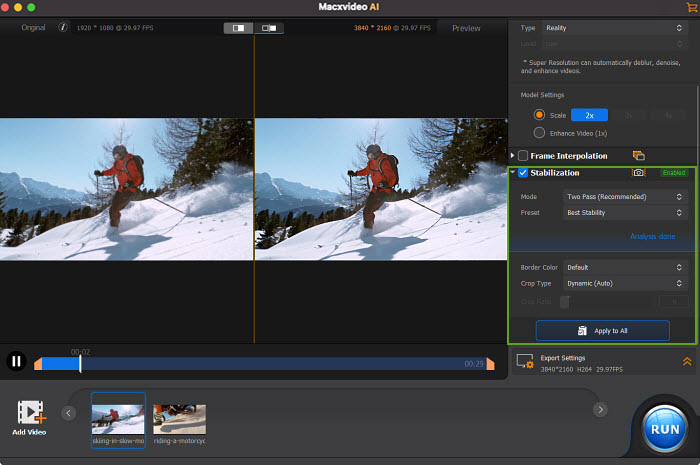
The Video AI module: original 1920 x 1080 on the left, the 3840 x 2160 preview on the right, with Stabilization set to Two Pass and Best Stability.
Steady shaky clips and smooth the frame rate
Macxvideo AI's stabilizer removes shake, jitter and wobble from GoPro, drone, phone and handheld footage, with a choice of modes, crop types and speed presets. Frame interpolation generates in-between frames to turn 24 or 30 fps footage into 60 or 120 fps, or up to 480 fps for slow motion.
Sharpen, enlarge, restore and colorize photos
Macxvideo AI's Image AI denoises, deblurs and upscales photos and AI art to 4K, 8K or 10K for printing. Face restoration rebuilds hair, skin, eyes and lips in old or damaged portraits, one face or every face in a group shot, and the colorizer turns black-and-white photos into color.
Clean up audio and split vocals from music
Macxvideo AI's Audio AI removes wind, hum, keyboard clicks and other background noise from audio and video, with adjustable suppression strength. The vocal remover keeps either the vocals or the instrumental, which is handy for karaoke tracks, remixes and voice-overs.
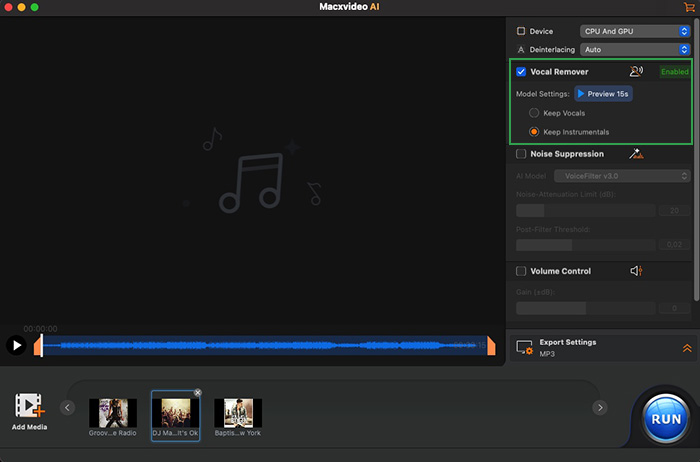
Audio AI: the Vocal Remover (Keep Vocals or Keep Instrumentals, with a 15-second preview) above the Noise Suppression and Volume Control settings.
Convert almost any video, in batches
Macxvideo AI's converter reads 370+ formats, including HEVC, AV1, multi-track MKV, MXF and DVD rips, and writes 420+ formats and device profiles, from ProRes and MOV for Final Cut Pro to MP4 for the newest iPhones. It converts whole folders at once with Nvidia, AMD or Apple GPU acceleration, and keeps every video, audio and subtitle track when it merges multi-track MKV files.
Shrink big 4K and 8K files
Macxvideo AI's compressor batch-reduces files by up to 90%, with one slider for the target size plus control over codec, resolution, bitrate and GOP length when you want it.

The Compressor with four 1080p clips queued and the "Batch compress to" slider at 31%: a 68 MB gameplay clip becomes 21 MB.
Download, record and edit
Macxvideo AI's downloader saves video, audio, playlists, live streams, subtitles and M3U8 streams from 1,000+ sites. The recorder captures the desktop, webcam, picture-in-picture, a mirrored iPhone or audio only, at up to 4K 60 fps. The editor trims, splits, crops, merges, rotates, changes speed, adds subtitles, filters and watermarks, and makes GIFs, plus extras like fisheye removal and A/V sync.
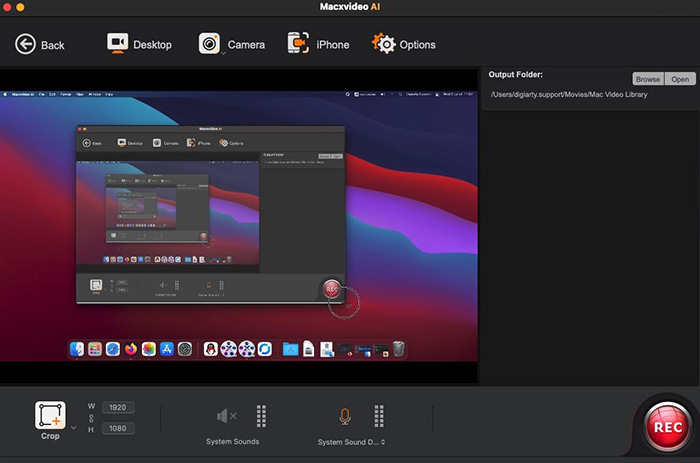
The Recorder: Desktop, Camera, iPhone and Audio Only modes, a 1920 x 1080 capture area, and system sound and microphone controls.
Benefits
- One purchase instead of several. An AI upscaler, a converter, a compressor, a downloader and a recorder usually come from different vendors. Here they share one license and one interface.
- No per-use costs. Many AI enhancers charge credits or a monthly fee. The Lifetime License has no credits and no usage cap.
- Your files stay on your Mac. Processing is local, so family videos and client footage never get uploaded.
- Built for current Macs. Unlike the Intel-only MacX Video Converter Pro it replaces, it runs natively on Apple Silicon and uses Core ML and Metal for the AI models.
Real-World Uses
- Rescuing family archives: upscale old 480p camcorder transfers, restore faces in scanned photos and colorize black-and-white prints.
- Action and drone footage: stabilize a bumpy ski run, then interpolate it to 120 fps for a slow-motion highlight.
- Getting video onto every device: batch-convert a folder of MKV and HEVC files to MP4 for an older TV or iPad, then compress them to fit.
- Tutorials and course videos: record the screen and webcam picture-in-picture, trim the mistakes and clean up the microphone hiss.
- Karaoke and covers: pull the instrumental out of a song, or isolate the vocal for a remix.
Who It's For, and Who Should Skip It
A good fit if you have an Apple Silicon Mac, a mix of video chores (converting, compressing, downloading, recording) and a backlog of old or shaky footage you'd like to improve, and you prefer paying once to a subscription.
Skip it if you're on Windows (Digiarty sells Winxvideo AI for that), if your Mac is an older Intel model with 8 GB of RAM and you mainly want long AI upscales (they'll be slow), or if you only need to convert a file now and then, where a free converter such as HandBrake is enough. Professional editors who already pay for a dedicated upscaler and an NLE won't gain much either.
Usage Guide
- Download macxvideo-ai.dmg, open it and drag Macxvideo AI into your Applications folder.
- Launch it. The start screen offers Image AI, Video AI, Audio AI, Video Converter, Downloader, Compressor and Recorder.
- To enhance a video, open Video AI, add the clip, tick Super Resolution, Frame Interpolation or Stabilization and pick the settings.
- Use the split preview to compare the original with the enhanced version, and trim the clip if you only need part of it.
- Choose the export format in Export Settings and click RUN. The progress window shows the remaining time and which hardware (Apple GPU, Nvidia, AMD or CPU) is doing the work.
- To register, click Register on the start screen and enter the license code from the order email.
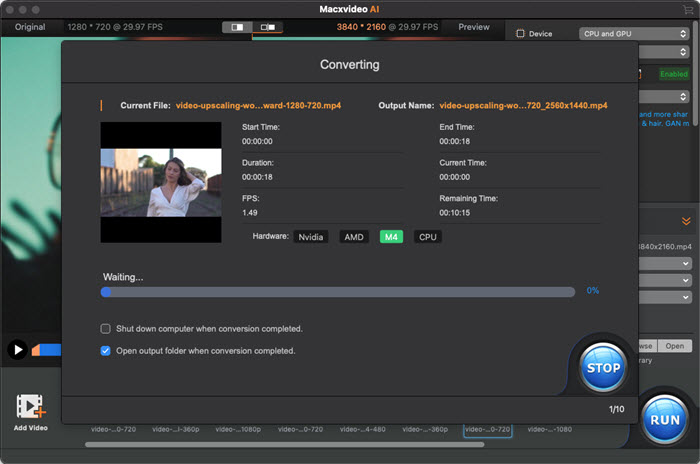
An upscale in progress: a 1280 x 720 clip going to 2560 x 1440, with the M4 chip selected as the hardware, file 1 of 10 in the batch.
Before you buy
- Use the trial on your own footage first. The trial gives 5 watermark-free AI exports, which is enough to see what the upscaler does with your worst clip. The refund policy only covers software that doesn't work and can't be fixed, not a change of mind.
- One Mac per Lifetime License. For 3 to 5 Macs, Digiarty sells a Family license.
- Check your Mac. The minimum is macOS 10.15 with a 6th-gen Core i5 or any M-series chip and 4 GB of RAM, but the AI tools run best on Apple Silicon with 16 GB and macOS 13 or later.
- Prices move a lot. Digiarty runs frequent sales and coupons on its own store, so the price you see can differ from day to day.
Where It Falls Short
- AI upscaling of long video is slow. One Trustpilot reviewer reported more than 10 hours to enhance a movie under 90 minutes long. Plan on overnight renders for feature-length files, especially on Intel Macs.
- Upscaled files get much bigger. A StackSocial buyer noted the size jump after upscaling, which is the price of higher resolution. Run the compressor afterwards if space matters.
- It can't invent detail that isn't there. As one buyer put it, face restoration on very low-detail images won't work miracles.
- Stability complaints exist. A one-star Trustpilot review describes frequent crashes and lock-ups and unanswered crash reports, and the company doesn't reply to negative reviews there.
- Trial users don't get updates. New AI models and features only reach licensed copies.
What Users Say
Independent reviews of Macxvideo AI are still scarce: most English coverage so far is deal posts and sponsored articles, which we've left out. Here is what verified buyers and Trustpilot reviewers say.
StackSocial (verified buyers, 4.7/5 from 6 reviews)
Joe Mirarchi: "This product works nicely for upscaling images that already have a decent level of detail. The face AI feature is interesting but for low-detail images, you can't expect miracles. The video downloader feature works great and allows for format conversion."
Seamus Woods: "Good product, Does significantly increase the size of the file after upscaling, which is expected I guess."
Paul Mont: "Macxvideo AI is a fantastic and useful software. At a fraction of the full price, 5 perpetual licenses can be purchased. Lifetime upgrades are guaranteed also across major versions."
Genet Wallace: "It's a great up to date way to help me convert and save video pn my Macs. I purchased it for the last few years. Great purchase."
Trustpilot (MacXDVD, 4.7/5 from 245 reviews)
These reviews cover all of MacXDVD's software and support, not only Macxvideo AI, and the text came to us through a page summarizer.
Marcus (5 stars, "Reliable Software and Excellent Support"): "have consistently found MacX Video AI reliable and easy to use."
Guilherme Degani (5 stars, "Great software for encoding/editing"): "It's worth every penny! Great features, fast encode engine, user friendly interface!"
Jean-claude Leroy (4 stars, "Great software"): the one complaint is speed, as enhancement "takes more than 10 hours (!!!!!) to enhance a movie of less thant 1 hour 30."
Jason Conners (1 star, "what a horrible piece of software"): "it constantly crashes, or just locks up and sits there," adding that he "sent in crash reports and the company never responded."
Terry Hillick (5 stars, "Lost Licsense Key"): "Contacted the company and within a day was provided with my account and the license number."
The pattern
Buyers like the range of tools, the downloader and converter, the lifetime license without a subscription, and support that recovers lost keys quickly. The recurring complaints are long AI render times, larger output files and, from a minority, crashes. The ratings are high, but the number of product-specific reviews is still small.
Comparisons
Macxvideo AI vs MacX Video Converter Pro
MacX Video Converter Pro was phased out in May 2025 and is no longer maintained. It was built for Intel Macs and relies on Rosetta, which Apple is winding down. Macxvideo AI keeps its converter, downloader, recorder and editor, runs natively on Apple Silicon, and adds the AI enhancement tools. Digiarty offers existing MacX Video Converter Pro owners a discounted upgrade.
Macxvideo AI vs the old free macXvideo
The free macXvideo editor (version 1.5) is gone: its page now leads to Macxvideo AI. The free option today is the Macxvideo AI trial, with its export and length limits.
Macxvideo AI vs Winxvideo AI
Winxvideo AI is Digiarty's Windows counterpart with a similar toolset. The two are sold and licensed separately, so a Mac license doesn't cover a Windows PC.
Editions and Pricing
| Edition | Price | Term | Macs | Notes |
|---|
| Free trial | Free | Trial | 1 | 5 watermark-free AI exports, 5-minute tool limit, watermarked recordings, downloads below 1080p |
| 1-Year Plan | $59.95 list, often on sale | 1 year, renews at $39.95/year | 3 | Full features and updates while subscribed |
| Lifetime License | $89.95 | Lifetime | 1 | Lifetime upgrades including future versions, unlimited AI use |
| Family | $159.95 list, often on sale | Lifetime | 3 to 5 | Everything in Lifetime, for a household or small team |
The Buy Now button on this page is for the Lifetime License. Every paid plan carries the same 30-day money-back guarantee and adds priority support.
FAQs
Is there a Windows version of Macxvideo AI?
No, Macxvideo AI is Mac only. Digiarty's Windows equivalent is Winxvideo AI, which is a separate purchase.
Does the Macxvideo AI Lifetime License include future major versions?
Yes. Digiarty says the Lifetime and Family licenses never expire and include all future updates and version upgrades, with no yearly fee.
Will Macxvideo AI run on an Intel Mac?
Yes, Macxvideo AI runs on Intel Macs with a 6th-generation Core i5 or newer and macOS 10.15 or later. The AI models are optimized for Apple Silicon through Core ML and Metal, so AI tasks are noticeably faster on an M-series Mac.
Does Macxvideo AI support macOS 27?
Yes. Version 3.16, released September 20, 2026, added support for macOS 27 along with conversion profiles for the iPhone 18 Pro, iPhone 18 Pro Max and iPhone Duo.
Does Macxvideo AI upload my videos to the cloud?
No. Macxvideo AI processes everything locally on your Mac, and the paid license has no AI credits or per-use limits.
I own MacX Video Converter Pro. Should I switch to Macxvideo AI?
Yes, if you plan to keep using it on new versions of macOS. MacX Video Converter Pro stopped being maintained in May 2025 and depends on Rosetta, while Macxvideo AI includes its features and runs natively on Apple Silicon.
Can I get a refund if Macxvideo AI isn't what I expected?
Only in limited cases. Digiarty's 30-day guarantee applies when the software doesn't work because of an error or bug that support can't solve, so test the free trial on your own files before buying.
How do I receive the Macxvideo AI license?
The license code arrives by email from the payment processor (Verifone) a few minutes after the order. If it hasn't arrived within 30 minutes, check spam and then contact Digiarty's sales team.
System Requirements
- Minimum: macOS 10.15 Catalina or later, Apple M1 to M4 or Intel Core i5 (6th gen) or higher, 4 GB of RAM, 8 GB of free disk space
- Recommended for AI: an Apple Silicon Mac (2020 or later), macOS 13 Ventura or later, 16 GB of RAM, 32 GB of free disk space
- Download size: 238 MB
Conclusion
Macxvideo AI is worth $89.95 if you have an Apple Silicon Mac and regularly need both kinds of help: everyday conversion, compression, downloading and recording, plus AI fixes for old, low-resolution or shaky footage. The one reason to buy it is getting all of that in one app on a one-time license with no AI credits. The main reason not to is speed: long AI upscales can take hours, and on an older Intel Mac you'll feel it. If you still use MacX Video Converter Pro, this is the supported way forward. Try your toughest clip in the free trial first.
Download Free TrialBuy Now