Nero AI Video Upscaler Pro: Sharper, Smoother Old Videos on Your Own PC
Nero AI Video Upscaler Pro 2026 is a Windows 10 and 11 (64-bit) program that uses local AI to enlarge videos up to 4K or 8K, restore faces and old footage, remove noise, and raise the frame rate to as much as 120 FPS. It costs $84.95 a year on the order page and renews automatically, and it's for anyone with old camcorder, VHS or phone clips who wants them to look better on a modern TV.
Digitized home movies usually end up 480p or 576p, soft, noisy and stuttery next to anything shot today. Upscaling them in a normal editor just makes the blur bigger. An AI upscaler rebuilds detail instead, and this one does it on your graphics card rather than in a cloud service.
Quick facts
- Developer: Nero AG
- Version: 28.0.2.3 (Nero AI Video Upscaler 2026)
- Platform: Windows 11 or 10, 64-bit only, 1 PC
- Price: $84.95 per year, renews automatically every 12 months
- Output: 2x or 4x enlargement, up to 4K or 8K; frame interpolation up to 120 FPS
- AI models: Fast, Animation, Realistic, Versatile, Face Enhancement, Restoration
- Hardware: 8 GB RAM and a 4 GB graphics card at minimum; 32 GB RAM and a 12 GB card recommended for 8K
- Trial: 7 days with full functions; clips under 30 seconds can be upscaled free with four models
- Guarantee: 30-day money-back guarantee
- What we checked: the order page price of $84.95 with a 12-month renewal, Nero's update service listing build 28.0.2.3 of AI Video Upscaler 2026 (497 MB), and the free trial button on nero.com, which serves an 8 MB web installer (NeroInstaller 3.0.2.21), all on November 13, 2026. We didn't upscale test footage.
Buy NowDownload Free Trial
Overview
The workflow is short: drag in a video (or a whole folder), pick an output resolution and an AI model, and click "Upscale video". A side-by-side preview shows the original next to the result while you adjust, and you can process only part of a clip without cutting it first. Everything runs locally, so your family videos never leave the PC; the price of that is that speed depends on your graphics card.
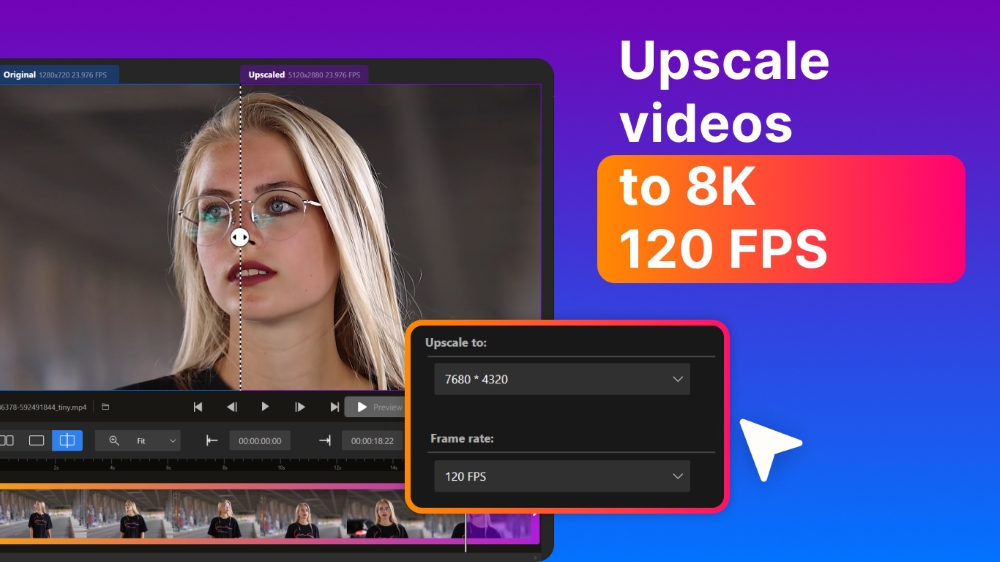
Nero's annotated screenshot: the original and upscaled preview split down the middle, with "Upscale to" set to 7680 x 4320 and the frame rate to 120 FPS.
Features
Upscale 2x or 4x, up to 4K and 8K
Nero AI Video Upscaler Pro enlarges videos two or four times, frame by frame, up to 4K or 8K, and removes noise and grain on the way. You can export at 720p, 1080p or 4K and other resolutions, in common formats.
Six AI models for different footage
Nero AI Video Upscaler Pro lets you choose the model per job: Fast for quick results, Animation for cartoons and AI-generated clips, Realistic for real camera footage, Versatile for fewer artifacts with more detail kept, Face Enhancement to recover faces in old videos, and the new Restoration model for fine textures in old or low-quality footage.
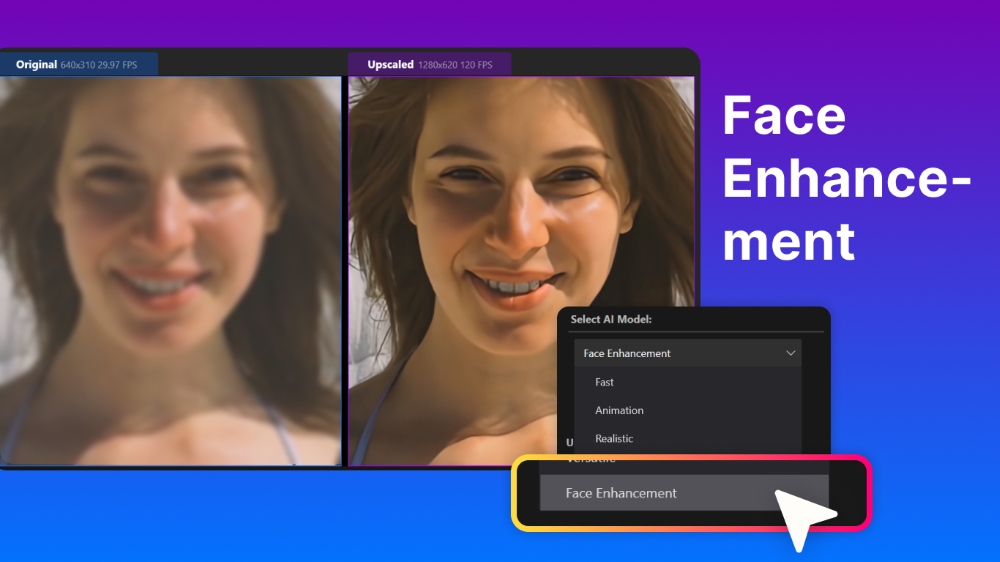
Nero's annotated screenshot: original and upscaled face side by side, with the Select AI Model menu (Face Enhancement, Fast, Animation, Realistic).
Frame interpolation up to 120 FPS
Nero AI Video Upscaler Pro generates in-between frames to turn a choppy 20 or 25 FPS clip into 60 or up to 120 FPS, or to make smooth slow motion without a high-speed camera. The highest frame rate you can pick depends on the resolution, encoder and your hardware.
Batch jobs, presets and color
Nero AI Video Upscaler Pro queues many clips or a whole folder in one job list, saves your own presets next to the factory ones, and adjusts brightness, contrast, saturation, sharpness and white balance.
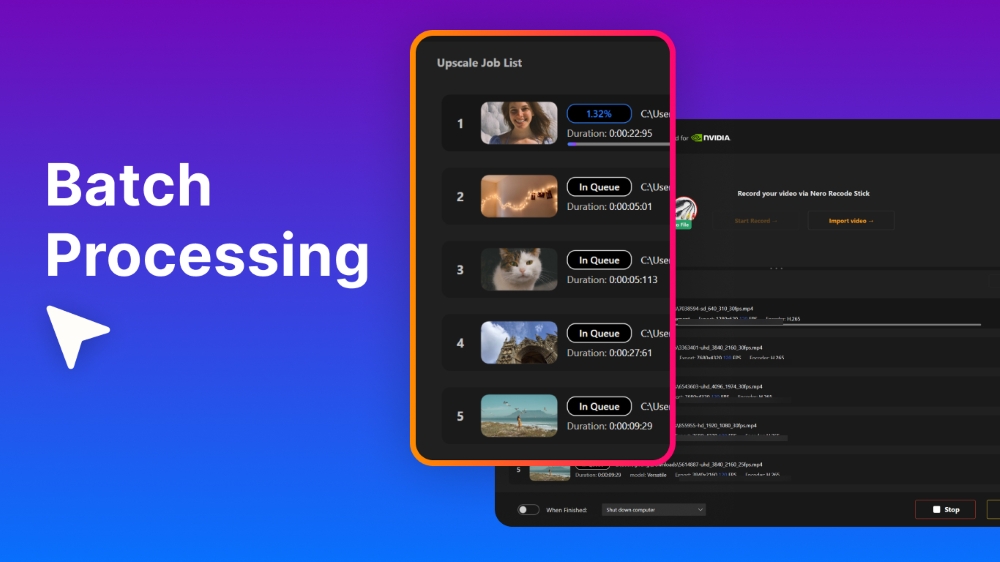
Nero's annotated screenshot of the Upscale Job List: one clip processing, four waiting in the queue.
Wide format support
Nero AI Video Upscaler Pro reads MP4, MOV, M4V, MKV, AVI, WMV/ASF, 3GP, DV, H.264, H.263, MJPEG and MPEG-4 Part 2. HEVC, AV1, VP9 and MPEG-2 work once you add Microsoft's video extensions from the Microsoft Store.
Benefits
- Private. Your footage stays on your PC; there are no uploads or per-minute cloud fees.
- Simple. Presets and named models mean you don't need to understand AI settings to get a result.
- Two fixes in one pass: resolution and frame rate, plus denoise and color.
Real-World Uses
- Digitized VHS and camcorder tapes: run the Restoration or Face Enhancement model so family faces come back.
- Old phone videos: take 480p clips from an early smartphone up to 1080p or 4K for a big TV.
- Anime and AI clips: use the Animation model, then interpolate to 60 FPS.
- Sports or action slow motion: interpolate to 120 FPS and slow it down.
- A whole archive: point a batch job at a folder and let it run overnight.
Who It's For, and Who Should Skip It
Good fit: home users with a gaming-class PC (a dedicated NVIDIA or AMD graphics card) and a pile of old videos, who want better-looking results without learning a pro tool.
Skip it if:
- Your PC has only integrated graphics or under 8 GB RAM: it'll be very slow or won't meet the minimum.
- You're on a Mac or 32-bit Windows.
- Your videos are already 1080p and look fine: the gain from 4K may not be worth hours of processing.
- You need frame-level control for professional restoration: Nero itself points such users to Topaz Labs.
- You want to pay once: this is a yearly plan.
Usage Guide
- Download the trial web installer (8 MB) from Nero and run it; it fetches the full program.
- Drag a video, several clips or a folder into the window.
- Choose the output resolution (for example 4K) and an AI model; turn on frame interpolation if you want more FPS.
- Check the side-by-side preview, and select a clip range if you only need part of the video.
- Click "Upscale video" and wait; for long videos, start before you go to bed.
Before you buy
- Use the 7-day trial on your own hardware first. Speed varies enormously with the graphics card.
- It renews automatically every 12 months at checkout.
- It's not part of Nero Platinum Suite. The suite includes the AI Image Upscaler, not this video upscaler.
- Plan for disk space: at least 20 GB free on the system drive, and 4K or 8K output files are large.
Buy NowDownload Free Trial
Where it falls short
- Slow on weak hardware. One reviewer needed about an hour for a four-minute clip on a Surface laptop, and one Trustpilot user reported about 22 hours for a single job.
- Results depend on the footage. The AI works best on what it recognizes; fast, complex motion can show artifacts, and one buyer saw no difference on his clips.
- Some formats need extras. HEVC, AV1, VP9 and MPEG-2 require Microsoft's video extensions.
- Activation. A Trustpilot reviewer had to go through Nero support because the passwords from the purchase weren't accepted.
What Users Say
The upscaler's own Trustpilot page (pcai.nero.com) shows 4.6 out of 5 from 31 reviews, 94% of them five-star, a much better picture than Nero's main company page, which is weighed down by billing complaints. The sample is small, so read the negatives too.
Trustpilot: what buyers like
- Jamie (5 stars, April 2026): "I have been able to upscale my old digitised VHS tapes"
- Steven Donald (5 stars, "Extrodinary AI upscaler", April 2026): "some clips looked sharper and cleaner after processing, especially older or lower-resolution footage"
- Simon Sütterlin (5 stars, January 2026): "The interface is clean, professional, and very easy to navigate"
- Shawn A. (5 stars, "A Fraction of the Cost", December 2024): "Nero matches its output quality while coming in at a much more affordable price point."
- Ziko (5 stars, November 2024): "they work super fast, plus the simple UI makes everything feel smooth and easy to use"
Trustpilot: complaints and caveats
- Terri Renneberg (1 star, July 2025): "the last one took around 22 hours to upscale and both view exactly the same"
- Jason Chua (4 stars, May 2025): "Limited Free Trial – The free version has restrictions, requiring a purchase for full functionality."
- Torsten (4 stars, on Nero's main Trustpilot page, March 2026), who bought Platinum Suite 2026 and AI Video Upscaler Pro 2025: "I encountered significant issues during installation because the passwords I received at the time of purchase were not accepted." Nero support resolved it.
Independent test
Steve Litchfield tested Nero AI Video Upscaler on his blog in February 2025: "The improvement is very noticeable" and "The video is cleaner and more watchable." But "The four minute test video above took around an hour on the Surface," and an older Surface Go estimated 18 hours; on a gaming PC he expected under ten minutes. He also noted the AI "works best on things it recognises" and that 1080p video is probably "good enough" without going to 4K.
The pattern: buyers with old, low-resolution footage are pleased with the quality and the ease of use. The complaints are about processing time on modest PCs and clips that didn't improve, which the 7-day trial on your own machine will show you before you pay.
Comparisons
Nero AI Video Upscaler Pro vs Topaz Labs
Nero AI Video Upscaler Pro is the simpler, cheaper option. Nero's own comparison says Topaz is the professional tool with detailed settings that takes experience, while Nero offers presets for anime to realistic footage and a lower subscription price. Pick Topaz for advanced restoration work; pick Nero for home videos.
Nero AI Video Upscaler Pro vs Nero Platinum Suite 2027
Nero Platinum Suite 2027 ($59.95 a year) includes Nero's AI Image Upscaler for photos, plus Nero Video, Burning ROM, BackItUp and more, but not this video upscaler. If your goal is sharper videos, you need AI Video Upscaler Pro; the suite doesn't replace it.
Editions and Pricing
| Edition |
Price on the order page |
License term |
| Nero AI Video Upscaler Pro 2026 |
$84.95 per year |
1 PC, renews automatically every 12 months |
FAQs
Does Nero AI Video Upscaler Pro need an NVIDIA graphics card?
No. Nero AI Video Upscaler Pro supports AMD Radeon 500 series and NVIDIA GeForce GTX 900 series cards or newer with at least 4 GB of video memory; for 4K-to-8K upscaling Nero recommends an RTX 3060 or RX 6700 XT with 12 GB.
Does Nero AI Video Upscaler Pro upload my videos to the cloud?
No. Nero AI Video Upscaler Pro processes video on your own PC with its local AI models.
What can I do with the free version of Nero AI Video Upscaler?
Nero AI Video Upscaler gives a 7-day trial with full functions, and after that you can still upscale videos shorter than 30 seconds free with four of the models.
Will Nero AI Video Upscaler Pro work on a laptop?
Nero AI Video Upscaler Pro runs on laptops that meet the minimum (64-bit Windows, a Ryzen or Core CPU released after 2017, 8 GB RAM and a 4 GB graphics card), but thin laptops without a dedicated GPU can take hours for a few minutes of video.
Can Nero AI Video Upscaler Pro open HEVC or AV1 videos?
Yes, after you install the matching video extensions from the Microsoft Store; Nero AI Video Upscaler Pro needs them for HEVC, AV1, VP9 and MPEG-2.
Is Nero AI Video Upscaler Pro a one-time purchase?
No. Nero AI Video Upscaler Pro 2026 is sold as a yearly subscription for 1 PC that renews automatically; there's a 30-day money-back guarantee.
System Requirements
- Windows 10 64-bit or Windows 11 64-bit
- AMD Ryzen or Intel Core processor released after 2017
- 8 GB RAM minimum, 32 GB recommended
- AMD Radeon 500 / NVIDIA GeForce GTX 900 series or higher with 4 GB VRAM for Full HD to 4K; Radeon RX 6700 XT / GeForce RTX 3060 with 12 GB VRAM recommended for 4K to 8K
- At least 20 GB free on the system drive
Conclusion
Nero AI Video Upscaler Pro is worth $84.95 for a year if you have a PC with a real graphics card and a backlog of old, low-resolution videos to fix: buyers restoring VHS tapes and old clips are happy with the quality, and it's far easier than pro tools. The one reason to buy it is that it does upscaling, face recovery, denoising and frame interpolation in a few clicks, privately on your PC. The main reason not to is your hardware: on a laptop with integrated graphics, jobs take hours, and it's a yearly plan you'll want to cancel once the archive is done. Run the 7-day trial on your own footage first.
Buy NowDownload Free Trial