Nero Video: a Straightforward Windows Video Editor You Pay for Once
Nero Video 2027 is a $55.95 one-time-purchase video editor for Windows 10 and 11 that turns phone, camera and drone clips into finished movies, slideshows, DVDs and Blu-ray discs, with an easy Express mode for beginners and a multi-track timeline for HD, 4K and 8K footage. It suits home-movie makers, families and hobbyists who want a capable editor without a subscription, and it isn't aimed at professional editors.
You come back from a holiday with two hundred clips on your phone, some of them vertical, and you want a ten-minute film with music and titles you can show on the TV. That's the job Nero Video is built for. It won't replace Premiere Pro, but it gets a family video from raw clips to a finished file or disc quickly, and you own the license.
Quick facts
- Developer: Nero AG, Germany
- Version: Nero Video 2027, part of Nero's 2027 release (build family 29.5; Nero's full 2027 installer is build 29.5.30000, dated October 23, 2026)
- Platform: Windows 11 and 10 only. No Mac version
- Price: $55.95 at checkout, a one-time license for one PC
- Also in: Nero Platinum Suite 2027, a yearly subscription with more than 20 Nero programs and tools
- Trial: 7 days, all features, started from the Nero Start app with a free Nero account
- Guarantee: 30-day money-back guarantee
- Internet: required to verify the license
- What we checked: the checkout on November 13, 2026 lists "Nero Video 2027" at $55.95 as a lifetime license with no renewal. The trial download on Nero's Download Center is an 8 MB web installer (file name Nero-Video-2026-3.0.2.12.exe, dated October 20, 2025) that checks for and downloads the latest version during setup, as Nero's support pages describe their online installers. We didn't install the trial or edit a project with it.
Before you buy
- The price differs by region. European visitors see €49.95 on nero.com. US buyers pay $55.95 on the order page.
- The license is "permanent" but still checks in online. Nero's system requirements say the software needs an internet connection to verify the license, so it isn't a fully offline editor.
- The trial installer is a small downloader. It pulls the rest of the program from Nero's servers, and the file contains code for a partner browser-search offer (SearchOnSite). Read each setup screen and decline anything you didn't ask for.
- Check the suite first. If you also want disc burning, backup or file conversion, Nero Platinum Suite 2027 costs $59.95 a year and includes Nero Video.
Download Free TrialBuy Now
Overview
Nero Video has been around for well over a decade, and its design shows it: it's a consumer editor first. Projects start on a home screen that splits the work into Capture & Import, Edit and Create & Export. You pick a movie, slideshow or vertical video, drop in your clips, and work in either Express Editing (a simple storyboard) or Advanced Editing (a full timeline with separate video, audio, music, subtitle and narration tracks).
Nero's page for the 2027 version leads with subtitle tools: you can import or export SRT subtitle files, or let speech recognition create the subtitles, then correct them on their own track. Alongside that are motion tracking, multi-track editing up to 8K, green screen and picture-in-picture. Nero also leans on its library of more than 1,000 movie templates and effects, which do a lot of the work if you just want a finished-looking movie fast.
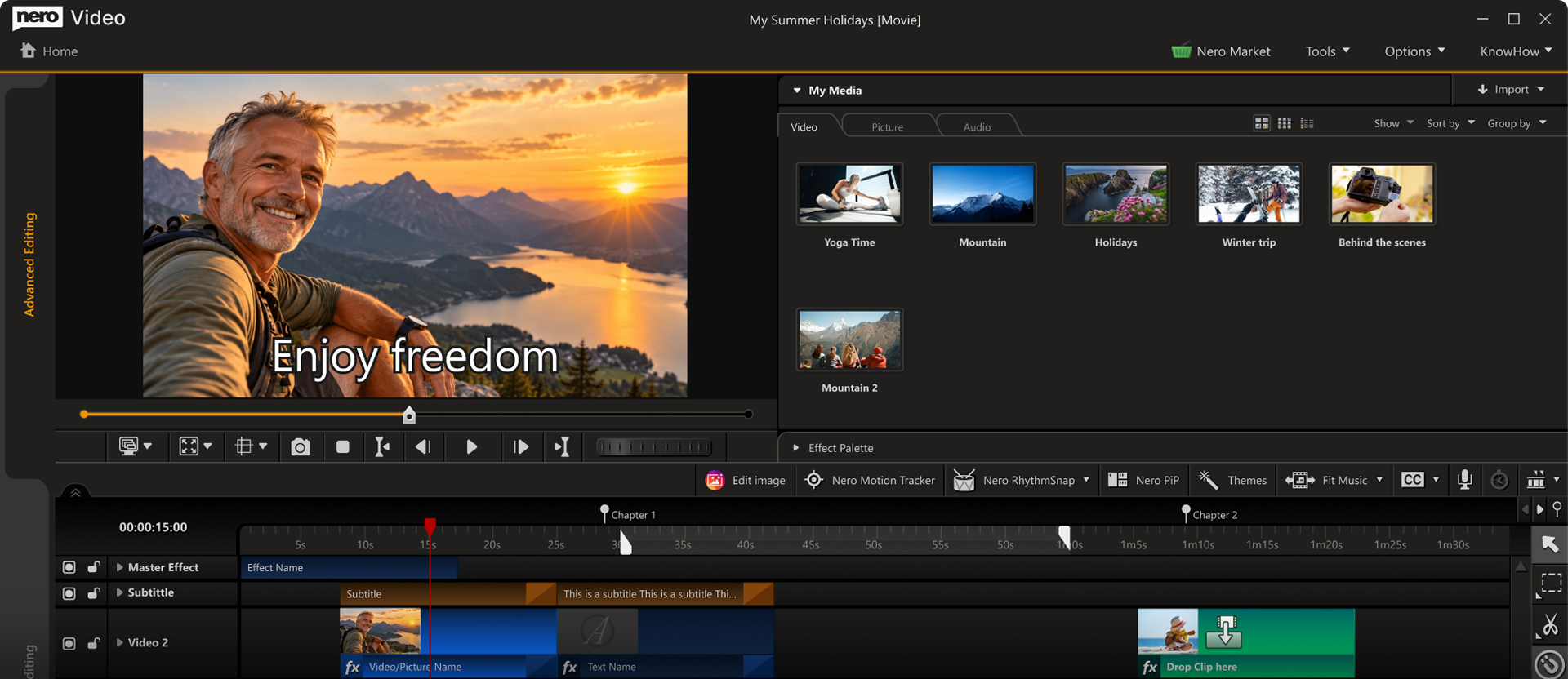
Nero Video's Advanced Editing view: the preview with a subtitle on screen, the My Media library on the right, and the timeline with Master Effect, Subtitle and Video tracks below. The toolbar holds Edit Image, Nero Motion Tracker, Nero RhythmSnap, Nero PiP, Themes and Fit Music.
Features
Two editing modes for two skill levels
Nero Video gives you Express Editing, a stripped-down storyboard for trimming clips, adding transitions and text, and Advanced Editing, a multi-track timeline where you can add video and audio tracks with a right-click, trim frame by frame in the Trim window, and animate effects with keyframes. One catch TechRadar pointed out: once a project moves from Express to Advanced, it can't go back.
Subtitles from speech recognition or SRT files
Nero Video 2027 can generate subtitles automatically with speech recognition, then lets you edit them on a dedicated Subtitle track. You can also import an existing SRT file or export your subtitles as SRT for YouTube or a media player. For travel videos, interviews or anything watched with the sound off, this saves a lot of typing.
1-Click Video Story and 1,000+ templates
Nero Video's 1-Click Video Story builds a movie or slideshow from your clips with music, effects and an intro and outro already in place. The theme templates cover family, celebrations, children, travel and action, some with "effect drop zones" you fill with your own clips. Nero RhythmSnap cuts your clips to the beat of a music track automatically.
Effects: green screen, picture-in-picture, tilt-shift and more
Nero Video includes green screen (chroma key), picture-in-picture, tilt-shift, old-movie, slow motion, keyframe animation, titles, transitions and audio filters. A 1-click bar remover deals with black bars, and vertical video templates handle portrait phone footage without letterboxing it.
Export to files, DVD and Blu-ray
Nero Video exports in 4K, Full HD and SD, and can export several scenes from a long movie in one go. Unlike most modern editors, it still authors DVD-Video and Blu-ray discs with themed menus and chapters, and Nero CoverDesigner makes the disc cover. If grandparents still watch on a disc player, that matters.
Media library, streaming and playback
Nero Video works with the Nero MediaHome library, which sorts clips by recording date, place and people, and can pull OneDrive files on demand so they don't fill your disk. The free Nero Streaming Player and WiFi Transfer apps for iOS and Android send videos to a phone, tablet or TV and move clips wirelessly between phone and PC.
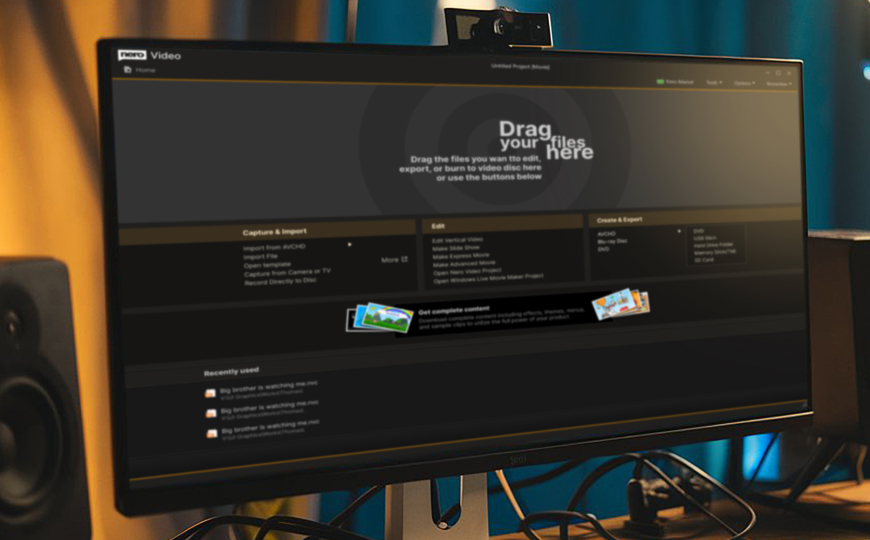
Nero Video's start screen, photographed on a monitor: a drop zone for files, Capture & Import (AVCHD, camera or TV capture), Edit (slide show, express or advanced movie, vertical video) and Create & Export (DVD, Blu-ray, AVCHD, USB stick, memory card).
Benefits
- No subscription. At $55.95 once, it costs less than a year of most subscription editors.
- Fast results for non-editors. Templates, 1-Click Video Story and RhythmSnap get a watchable movie out of you in minutes.
- Room to grow. When the storyboard feels limiting, the Advanced timeline gives you tracks, keyframes and frame-accurate trimming.
- Light on hardware. TechRadar found it handled ultra HD editing "even on older, sluggish machines".
- Discs still work. Few current editors burn menu-driven DVDs and Blu-rays.
Real-World Uses
- A holiday film. Import the week's phone clips, pick a travel template, let RhythmSnap cut to a song, and export a 4K file for the TV.
- A wedding or birthday DVD. Edit on the timeline, add chapters, and burn a DVD with a themed menu and a printed cover for relatives without a streaming setup.
- Subtitled clips for social media. Edit a vertical video, let speech recognition write the subtitles, fix the typos, and export.
- Club or school presentations. Turn a folder of photos into a slideshow with music, titles and transitions.
Who It's For, and Who Should Skip It
Good fit: Windows users making family, travel and hobby videos; people who want to burn DVDs or Blu-rays; anyone who prefers a one-time license over a monthly plan.
Skip it if: you're on a Mac (there's no version); you edit professionally or need color grading and advanced compositing, where DaVinci Resolve's free edition or Premiere Pro go further; or you need to work fully offline, since the license is verified online. If you only trim the odd clip, the free Clipchamp built into Windows may be enough.
Usage Guide
- Install and start the trial. Run the 8 MB web installer from Nero's Download Center, sign in to Nero Start with a free Nero account, and click the rocket icon on the Nero Video card to start the 7-day trial.
- Import. On the start screen, drag files onto the drop zone or use Capture & Import for a camera, AVCHD camcorder or TV capture.
- Choose a mode. Pick Make Express Movie for a storyboard, Make Advanced Movie for the timeline, or Edit Vertical Video for phone footage.
- Edit. Trim clips, then add titles, transitions, effects and music from the Effect Palette. Use Themes or 1-Click Video Story for a ready-made structure.
- Add subtitles. Generate them with speech recognition or import an SRT file, then adjust the text on the Subtitle track.
- Export. Click Export or Next, choose a file format and resolution, or pick DVD or Blu-ray and design a disc menu.
Where it falls short
- The interface looks old. TechRadar wrote that "the dated user interface wouldn't look out of place on a Windows XP machine."
- Basic effects. The green screen and effects are simpler than CyberLink PowerDirector or Corel VideoStudio, according to the same review.
- 8K export. TechRadar's 2022 test found 8K import and editing but no 8K export. Nero's 2027 page now advertises 8K editing; check export in the trial if 8K output matters to you.
- Online license checks. A Trustpilot reviewer with a boxed license complained that it needs re-verifying online about every 30 days.
- Upsells. Nero sells extra templates, content packs and other tools, and its apps promote them. Several Trustpilot reviewers complain about purchases and add-ons.
What Users Say
Independent reviews of Nero Video specifically are thin: most recent user feedback is about Nero as a company or the Platinum Suite. Here's what we found, good and bad.
TechRadar (Nero Video 2022 review, Steve Clark, July 13, 2022)
TechRadar's verdict: "Nero Video is quick, easy, and simple to use. That makes it a great piece of video editing software for beginners (and those on low-end PCs, too). But it can't match the power of industry-standards like Premiere Pro or even free video editors like HitFilm."
Reasons to buy listed: "Easy to use", "Ideal for beginners and intermediate editors", "Fair FX library and PiP options".
On the workflow: "In the video editing sphere, Nero Video is the definition of 'quick and easy'. Drag-drop-cut-done." On the extras: the green screen's chroma keying lags behind CyberLink PowerDirector and Corel VideoStudio, and "the disappointing downside, however, is a lack of 8K export options."
Trustpilot (Nero, TrustScore 3.0 from about 350 reviews, November 13, 2026)
Nero's Trustpilot page is split down the middle. The quotes below came to us through a page summarizer, so they're short excerpts.
- Pat (Canada, 5 stars, November 2026): "They update the software for the music/video customer needs."
- Kristi (5 stars, February 2026): "I am working with Nero Platinum for years and enjoy all the improvements in the last years!"
- Torsten (4 stars, March 2026, Platinum Suite 2026): "Nero Support was always friendly and was ultimately able to resolve the issues."
- Darek (3 stars, December 2025, titled "Nero Video"): "it hasn't been possible to save presentations to MP4."
- Kevin (UK, 3 stars, December 2025): thanked support for remote help recovering old Nero Video project files, after earlier updates describing repeated delays.
- James Young (Canada, 1 star, June 2026): a long-time Platinum user unhappy with how a newer Nero Video handles removed segments: "You butchered a perfectly good suite of software."
- Fi Stewart (UK, 1 star, December 2025, "Nero useless as an offline software"): "What it doesn't tell you is that you need to verify it every 30 days."
- Craig (2 stars): "Be very wary," warning about automatic renewal charges in Nero's terms (that applies to subscriptions, not to the one-time Nero Video license).
The pattern
People who like Nero Video like its speed and simplicity: it gets a home movie done with little learning. The complaints are about the dated look, effects that are basic next to competitors, the online license check, and Nero's sales practices (renewals, add-ons, slow support on orders) more than about the editor itself.
Comparisons
Nero Video vs Nero Platinum Suite 2027
Nero Video is one of more than 20 programs and tools in Nero Platinum Suite 2027, which also includes Nero Burning ROM, MediaHome, Recode, BackItUp, DuplicateManager, USBxCopy, AI Image Upscaler, AI Photo Tagger, Motion Tracker and more. The suite costs $59.95 a year at checkout and renews automatically, while Nero Video alone is $55.95 once. Buy Nero Video alone if editing is all you need and you'd rather own it. The suite makes sense if you'd use three or more of its tools and don't mind a yearly payment.
Nero Video vs free editors
DaVinci Resolve's free edition is far more powerful but much harder to learn, and Clipchamp in Windows is simpler but has no disc authoring. Nero Video sits between them: easier than Resolve, with templates and DVD/Blu-ray output that the free tools don't have.
Editions and Pricing
| Product | Price at checkout | License | What you get |
|---|
| Nero Video 2027 | $55.95 | One-time, 1 PC | The video editor only |
| Nero Platinum Suite 2027 | $59.95 per year | Subscription, renews automatically | Nero Video plus about 20 other Nero programs and tools |
FAQs
Is Nero Video a subscription?
No. Nero Video 2027 is sold as a one-time license for one PC at $55.95, shown at checkout as a lifetime license with no renewal. Only the Platinum Suite bundle is a yearly subscription.
Does Nero Video work offline?
Nero Video edits locally on your PC, but Nero's system requirements say it needs an internet connection to verify the license, and one Trustpilot reviewer reported re-verification about every 30 days. Plan for occasional internet access.
Is there a Mac version of Nero Video?
No. Nero Video runs on Windows 11 and 10 only. The only Mac item in Nero's system requirements is the WiFi Transfer app for moving files between devices.
Can Nero Video edit 4K and HEVC footage from my phone?
Yes. Nero Video edits HD, 4K and 8K video and handles vertical phone footage with its own templates. For 4K and H.265/HEVC you need 64-bit Windows, and Nero recommends at least an Intel Core i7-6700 with 8 GB RAM for HEVC.
Can I get a refund on Nero Video?
Nero advertises a 30-day money-back guarantee on its product pages. Still, use the 7-day trial on your own footage first, so you know before you pay.
Can Nero Video burn a DVD my old player can play?
Yes. Nero Video authors standard DVD-Video and Blu-ray discs with menus and chapters, which play in living-room DVD and Blu-ray players. You need a DVD or Blu-ray burner in the PC.
System Requirements
- Windows 11 or Windows 10 (64-bit needed for 4K, HEVC and 8K)
- 2 GHz AMD or Intel processor (Intel Core i7-6700 or better recommended for HEVC)
- 1 GB RAM minimum, 8 GB recommended for 8K and HEVC
- 5 GB disk space for a typical installation, up to 50 GB free for disc images and temporary files
- DirectX-compatible graphics card. NVIDIA CUDA, AMD and Intel Quick Sync acceleration need at least 256 MB of video memory
- DVD or Blu-ray recorder for burning discs
- Internet connection to verify the license
Conclusion
Nero Video 2027 is worth $55.95 if you make family and travel videos on Windows and want to own your editor. The one reason to buy it: it gets beginners from a pile of clips to a finished, subtitled movie or menu-driven DVD faster than most editors, and you pay once. The main reason not to: the interface feels dated and the effects are basic, so if you're aiming at professional-looking work, a free DaVinci Resolve or a stronger paid editor will serve you better. Run the 7-day trial on your own footage before you decide.
Download Free TrialBuy Now