VideoStudio Ultimate 2023: Easy Windows Video Editing, No Subscription
VideoStudio Ultimate 2023 is Corel's video editor for Windows home users and hobbyists: drag clips onto a timeline, add titles, transitions and effects, and export to YouTube, a file or a DVD. It's a one-time purchase at $99.99 (the Pro edition is $79.99), there's a 30-day free trial, and 2023 is still the current version.
If you film family trips, school events or a small YouTube channel and find professional editors overwhelming, VideoStudio sits in the friendly middle: simple enough to start in an afternoon, with color grading, masking and motion tracking for when you want more.
Quick facts
- Version: VideoStudio 2023 (version 26), still the current release
- Developer: Corel (now part of Alludo)
- Platform: 64-bit Windows 11, 10 or 8 only; no Mac version
- License: one-time purchase, no subscription
- Price: Ultimate $99.99, Pro $79.99 (regular prices)
- Trial: 30 days, limited in formats and support
- Guarantee: 30-day money-back
- What we checked: the order page prices for both editions and the trial installer from the free-trial page (a 7.2 MB stub dated April 3, 2023), on November 25, 2026. We didn't edit a project with it.
Download Free TrialBuy UltimateBuy Pro
Overview
VideoStudio works in three steps that match its tabs: capture (import clips, record your screen or capture from a camera), edit, and share. Editing happens on a timeline with up to 50 video tracks and 8 audio tracks, or in a simpler storyboard mode where you just put clips in order. Instant Project Templates for birthdays, weddings and travel give beginners a finished structure to drop their own footage into.
The Ultimate edition is Pro plus a set of premium effect plug-ins from NewBlueFX and proDAD, more advanced stabilization, and a few exclusive tools. Both editions include MyDVD for burning discs with menus and FastFlick for quick slideshows.
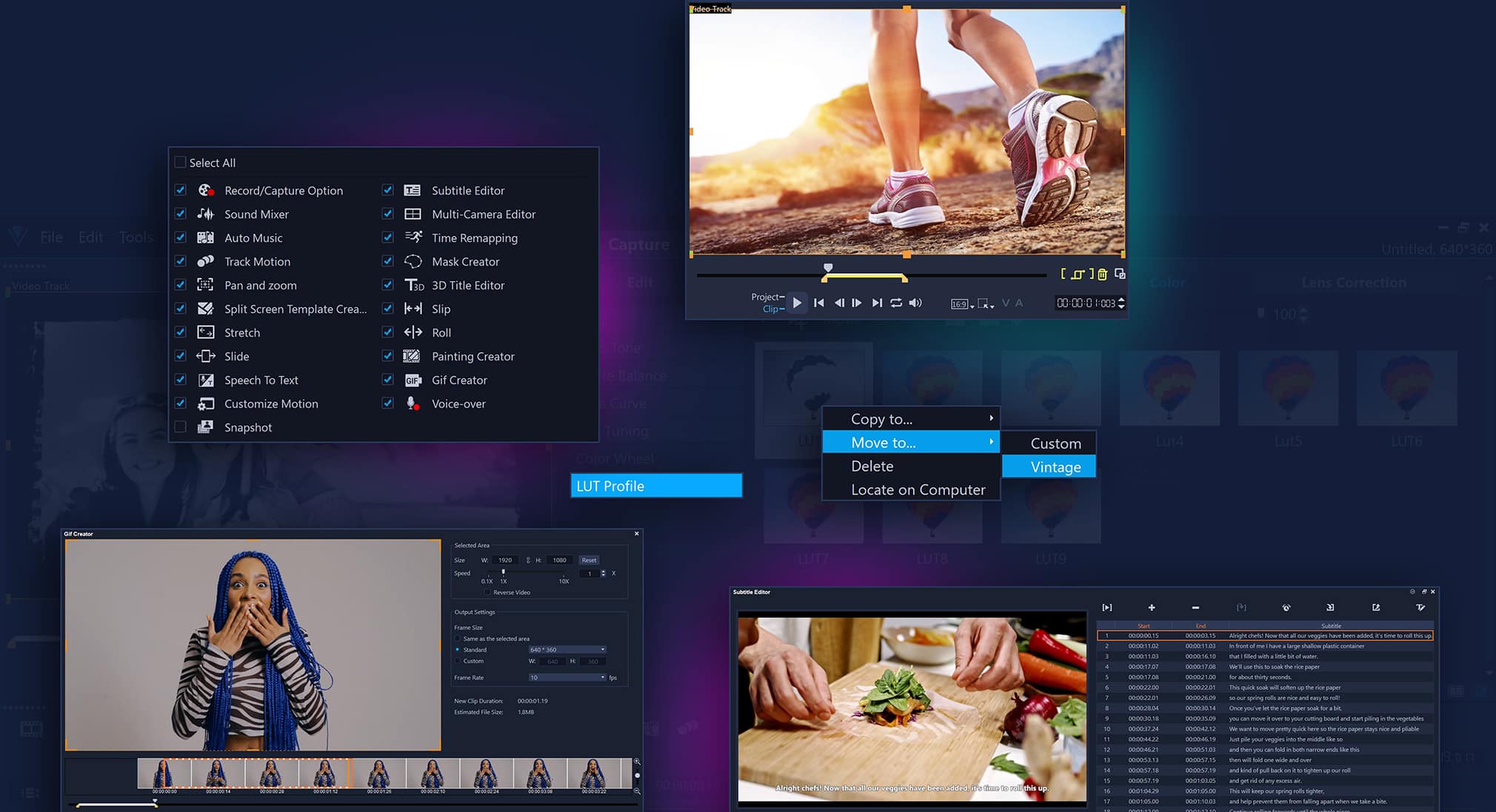
Corel's collage of VideoStudio 2023 panels: the customizable toolbar list (Subtitle Editor, Multi-Camera Editor, Mask Creator, 3D Title Editor...), the preview player, moving LUT profiles between folders, the GIF Creator and the Subtitle Editor.
Features
Drag-and-drop titles, transitions and templates
VideoStudio Ultimate 2023 lets you drop titles, transitions, overlays and graphics onto the timeline and adjust them in place. Version 2023 added Parallax, Split and Instant Color Change transitions and title motions you set separately for a title's entrance, middle and exit, plus Parallax and Kinetic title effects.
Color Grading, Mask Creator and motion tracking
VideoStudio Ultimate includes Color Grading with LUT profiles, a Mask Creator for effects on part of the frame, and motion tracking to make text follow an object or blur a face, logo or license plate. Time Remapping and Variable Speed give you slow motion, fast motion, freeze frames and reverse playback.
Subtitles from speech
VideoStudio's Speech to Text converter turns the dialog in your clip into subtitle lines with start and end times, which you then correct in the Subtitle Editor. For talking-head videos it saves most of the typing.
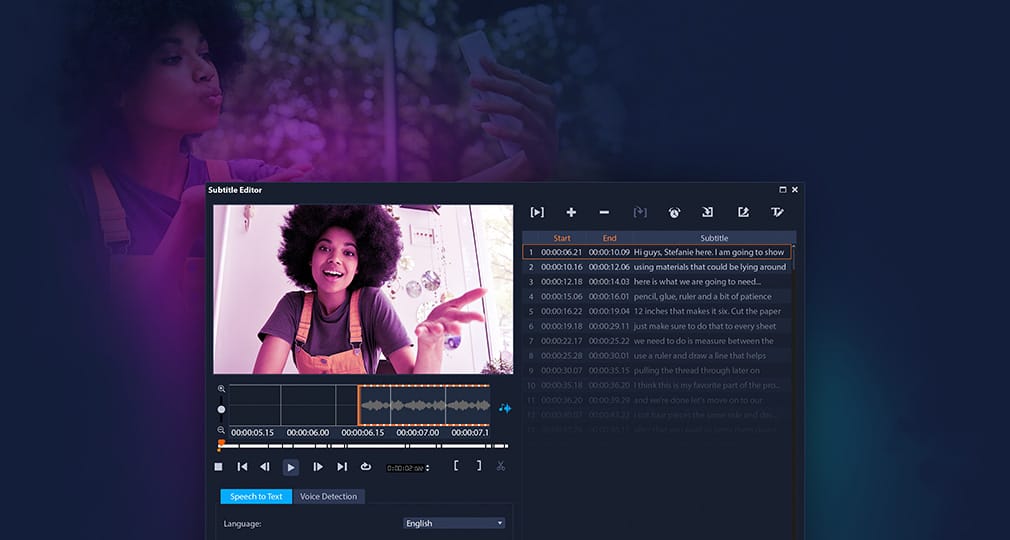
The Subtitle Editor: the clip and its waveform on the left, generated subtitle lines with start and end times on the right, and the Speech to Text tab below.
Audio Cues and the royalty-free music library (Ultimate)
VideoStudio Ultimate 2023 can set cue points on a music track, by hand or automatically, and match your clip lengths to them so cuts land on the beat. The ScoreFitter library gained more than 500 songs in this version, and tracks adjust themselves to your project's length.
Multi-camera, 360-degree and AV1 support
VideoStudio Ultimate edits up to 6 camera angles at once (Pro: 4), has a full 360-degree editor with Tiny Planet effects and conversion to flat video, imports 8K footage and encodes and decodes AV1, with hardware acceleration on recent Intel graphics.
Premium effect plug-ins (Ultimate)
VideoStudio Ultimate bundles NewBlue Titler Pro 5, 90 NewBlueFX effects (Pro gets 40), proDAD Mercalli V5 stabilization, VitaScene, Adorage animated overlays and Handscript animation. These are the main reason to choose Ultimate over Pro.
Benefits
- Pay once: no monthly fee, which is rare among video editors now.
- A gentle learning curve: templates and storyboard mode get beginners to a finished video quickly.
- Room to grow: color grading, masks and motion tracking are there when you want them.
- Discs still covered: DVD and AVCHD burning with menus, which many modern editors dropped.
Real-World Uses
- A holiday film: drop clips into a travel template, add music from ScoreFitter and export for YouTube.
- A school performance shot on three phones: sync them in the multi-camera editor and switch angles.
- A YouTube tutorial: record the screen, generate subtitles with Speech to Text and blur private details with motion tracking.
- A wedding DVD for grandparents: burn it with a menu and chapters in MyDVD.
Who It's For, and Who Should Skip It
VideoStudio Ultimate suits Windows users who make family, travel and hobby videos and want a complete editor without a subscription. It's also a fit if you still burn DVDs.
Skip it if you use a Mac (there's no Mac version), if you want an editor that gets regular new versions (2023 hasn't been followed by a 2024 or later edition), or if you plan to work professionally, where DaVinci Resolve or Premiere Pro are the norm. On an older or slow PC, try it first: heavy effects need a strong processor.
Usage Guide
- Download the trial with the download button. The small installer downloads the rest, so stay online.
- Install and start VideoStudio. The 30-day trial starts on the day you install it.
- On the Capture tab, import your clips and photos (or record your screen).
- On the Edit tab, drag clips to the timeline, trim them, then add titles and transitions from the library.
- Add music and voiceover on the audio tracks, and generate subtitles if you need them.
- On the Share tab, export to a file, YouTube or Vimeo, or burn a disc.
Before you buy
- When we checked on November 25, 2026, the order page showed a Black Friday price of $49.99 for Ultimate (with a bonus collection and WinZip 30 Pro included) and $39.99 for Pro. The site's countdown ends on November 27, 2026; after that the regular $99.99 and $79.99 apply.
- The trial is not the full program: it's limited in formats and support. Test the formats your camera records before buying.
- Installation, registration and periodic license checks need an internet connection.
- The upgrade price on VideoStudio's site requires a previous licensed VideoStudio Pro or Ultimate.
Where it falls short
- No new version since 2023: the product is sold but hasn't had a newer yearly release, so don't expect new features soon.
- Windows only, 64-bit only.
- Performance with effects: users report the editor slowing down and playback stuttering on modest PCs when many effects are stacked.
- Blu-ray burning is a paid extra.
What Users Say
Buyers at Ashampoo's store: 4.1 out of 5 from 216 reviews
Ashampoo, which also sells VideoStudio Ultimate 2023, shows an average of 4.1 stars from 216 customers. Several reviews there are machine-translated, so we summarize rather than quote: buyers praise how easy and capable it is, and the main complaints are slowdowns and stutter on weaker PCs when many effects are used.
Users quoted on VideoStudio's site
- Kevin Robinson: "The best editing software that I've found at a reasonable price with every feature I needed."
- William A Reynolds: "This product does so much, I have barely scratched the surface and I can do a ton of editing, color correcting, time lapse, and much more."
- Thomas Adler: "I enjoy the amazing power of this great software, and even after years of use I'm still learning about helpful features and possibilities."
The pattern: people like VideoStudio for its value and how much it does for a one-time price. The criticism is about speed on modest hardware and, among longtime users, the lack of a newer version.
Comparisons
VideoStudio Ultimate vs Pro
Both share the editor, templates, Speech to Text, multi-camera editing and MyDVD. Ultimate adds Color Grading, Mask Creator, the 3D Title Editor, Split Screen Template Creator, Face Indexing, Audio Cues, AV1 support, 6 cameras instead of 4, advanced stabilization, 100+ disc templates instead of 50+, and the premium NewBlueFX and proDAD plug-ins. For $20 more, Ultimate is the better buy unless you only make simple edits.
VideoStudio vs free editors
Free editors such as DaVinci Resolve cover core editing well but are harder to learn. VideoStudio's value is the templates, effects and simpler workflow for people who don't want to study an editor first.
Editions and Pricing
Regular prices on the order page, November 25, 2026. Each button orders that edition.
| Edition | Price | License | What it adds | Buy |
|---|
| VideoStudio Pro 2023 | $79.99 | One-time | The full editor, 4-camera editing, 40 NewBlueFX effects, 50+ disc templates | Buy Pro |
| VideoStudio Ultimate 2023 | $99.99 | One-time | Color Grading, masks, 3D titles, Audio Cues, AV1, 6 cameras, NewBlueFX and proDAD plug-ins | Buy Ultimate |
FAQs
Is VideoStudio a subscription?
No. VideoStudio Ultimate 2023 and Pro 2023 are one-time purchases; you keep using the version you bought.
Is there a VideoStudio for Mac?
No. VideoStudio runs only on 64-bit Windows 11, 10 and 8.
Can VideoStudio edit 4K and 8K video?
VideoStudio Ultimate 2023 edits HD and 4K and imports 8K footage. For smooth 4K editing, Corel recommends an Intel Core i7 or AMD Athlon A10 class processor and 8 GB of RAM or more.
Which formats can VideoStudio export?
VideoStudio exports AV1 (Ultimate), AVC, AVI, MOV, MPEG-4 (H.264 and HEVC), WebM, WMV, XAVC S, 3GP and GIF, uploads to YouTube and Vimeo, and burns DVD and AVCHD discs. Blu-ray burning costs extra.
Does VideoStudio need the internet?
VideoStudio needs an internet connection to install, register and periodically verify the license, and for some features. Day-to-day editing happens on your PC.
Can I get a refund on VideoStudio?
VideoStudio comes with a 30-day money-back guarantee, shown on the product and order pages.
System Requirements
- Windows 11, 10 or 8, 64-bit only
- Intel Core i3 or AMD A4 for standard video; Core i7 or AMD Athlon A10 for HD and UHD
- 4 GB RAM, 8 GB or more recommended for HD and UHD
- 1366 x 768 display, 512 MB VRAM or more for hardware acceleration
- 10 GB disk space for a full installation
- Internet connection for installation, registration and license checks
Conclusion
VideoStudio Ultimate 2023 is a friendly, well-stocked Windows video editor that you buy once, and the premium plug-ins make Ultimate worth the extra $20 over Pro. It's a good pick for family and hobby videos, especially if you also want DVD menus. The main reason to hesitate is that it hasn't had a new version since 2023, so you're buying a mature product rather than one that's moving forward. Try the 30-day trial on your own footage and PC; if it runs smoothly, it's solid value at the regular price and a bargain on sale.
Download Free TrialBuy UltimateBuy Pro