MindManager: Mind Maps That Turn Into Project Plans
MindManager is mind mapping and diagramming software from Corel for Windows, Mac and the web, built for people who want a brainstorm to end up as a real plan with tasks, dates, costs and a Gantt chart. MindManager Professional costs $179 a year per user and covers the Windows and Mac desktop apps plus the web version; there's also a $99-a-year web-only Essentials plan and a $369 one-time desktop license.
If your notes for a project are spread over a Word outline, an Excel task list, a few emails and a whiteboard photo, MindManager pulls them into one map you can rearrange by dragging, then flip into a timeline, a Kanban board or a Gantt view without retyping anything.
Quick facts
- Developer: Corel Corporation (Alludo); MindManager was originally made by Mindjet
- Latest version: MindManager 26 for Windows, version 26.0.208, released October 14, 2026 (Mac: 26.0.111)
- Platforms: Windows 11/10, macOS, web browsers, Chromebook, Microsoft Teams; MindManager Go viewer for iOS and Android
- Price: Professional $179 a year per user; Essentials (web only) $99 a year; one-time MindManager 26 desktop license $369 (Windows or Mac)
- Trial: 30 days, fully functional, no credit card, but you create a MindManager account
- Guarantee: 30-day money-back guarantee on the first purchase
- What we checked: the Windows trial download (a 3.0 MB web installer, file version 26.0.0.10, signed by Alludo/Corel Corporation), the Mac trial file name (MindManager_Mac_26.0.111.dmg), the MindManager 26 Windows release notes, and the US list prices in MindManager's own price data, all on November 15, 2026. A Black Friday sale that day took about 10% off ($159 Professional, $89 Essentials, $329 one-time). We didn't build a project in the app.
Download Free TrialBuy Now
Overview
MindManager has been around since the late 1990s, and it sits at the "get work done" end of mind mapping. A map isn't only a picture of ideas: each topic can carry a start and due date, a resource, a cost, a priority, notes, attachments and links. Because that data lives in the map, MindManager can show the same content as a map, outline, Gantt chart, schedule, Kanban board, or tag and icon views.
It also does the diagrams most offices need: flowcharts, org charts, timelines, concept maps, Venn and onion diagrams, fishbone (Ishikawa) diagrams, funnel charts and matrix diagrams, all from built-in templates. The Windows app is the flagship. The Mac app, the web version and the Teams app share the file format but not every feature.
Version 26, released in October 2026, added shape libraries for BPMN and process mapping, imported SVG graphics as topic shapes, images or backgrounds, eleven new templates (Risk Register, RACI Matrix, Work Breakdown Structure, Project Dashboard Map and more), and a shared template location on OneDrive or SharePoint.
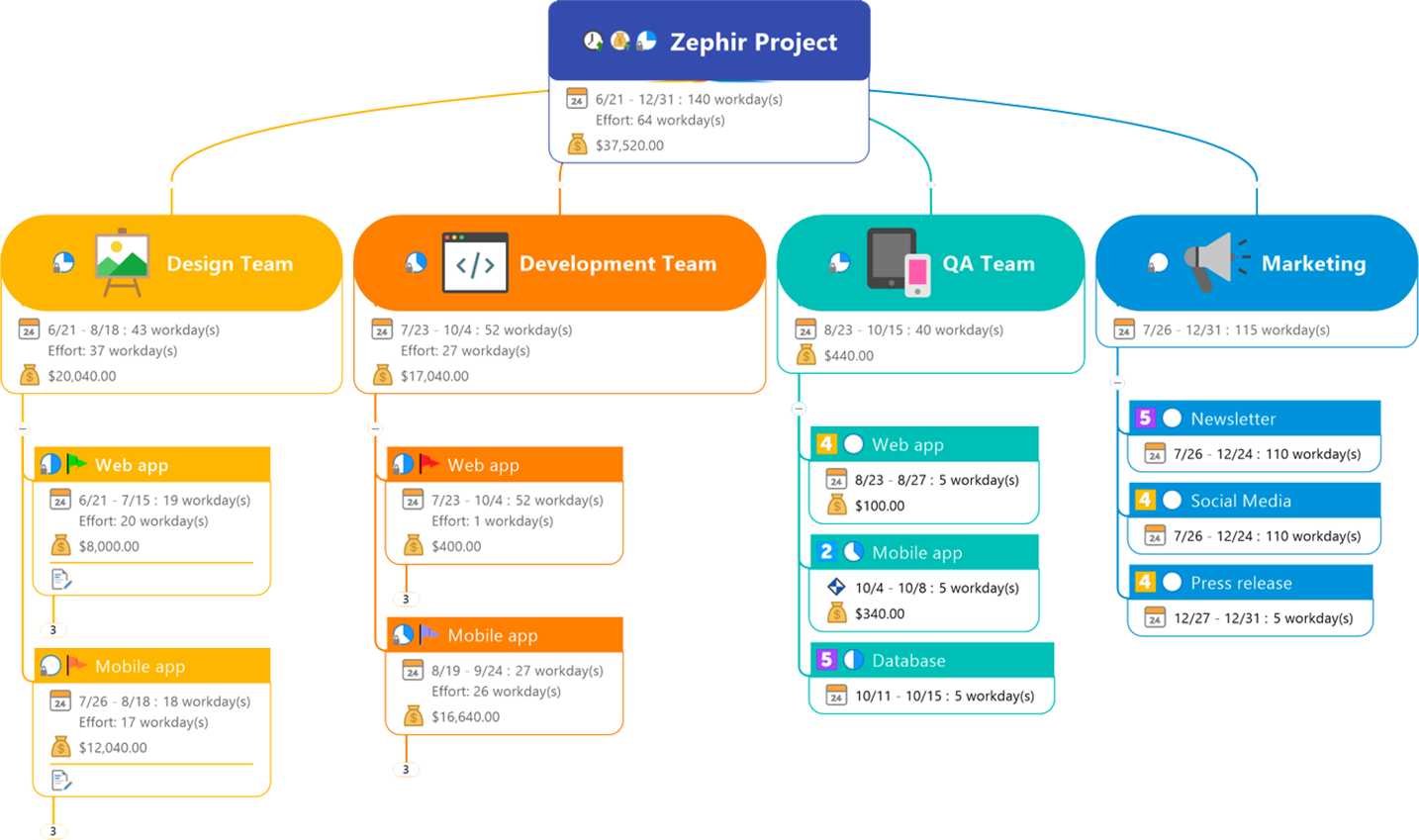
A MindManager project map: each team branch shows its date range, effort in workdays and a cost total, and the tasks below carry their own dates, priorities and budgets.
Features
Project planning inside the map
MindManager lets you give any topic dates, duration, effort, resources, progress and costs, and it rolls the numbers up the branches, so the top topic always shows the whole project's span and budget. Switch to the Gantt view to see the same tasks as bars with dependencies, publish a map in Gantt view, or export the chart as HTML5. Dependency lines can be isolated to show only one task's predecessors and successors.
Kanban boards and dynamic views
MindManager can turn a task map into a Kanban board with columns such as To Do, Doing and Done, keeping each card's priority, dates, assignee and cost. Map, outline, Gantt, schedule, icon and tag views all read the same data, so changing a date in one view changes it everywhere.
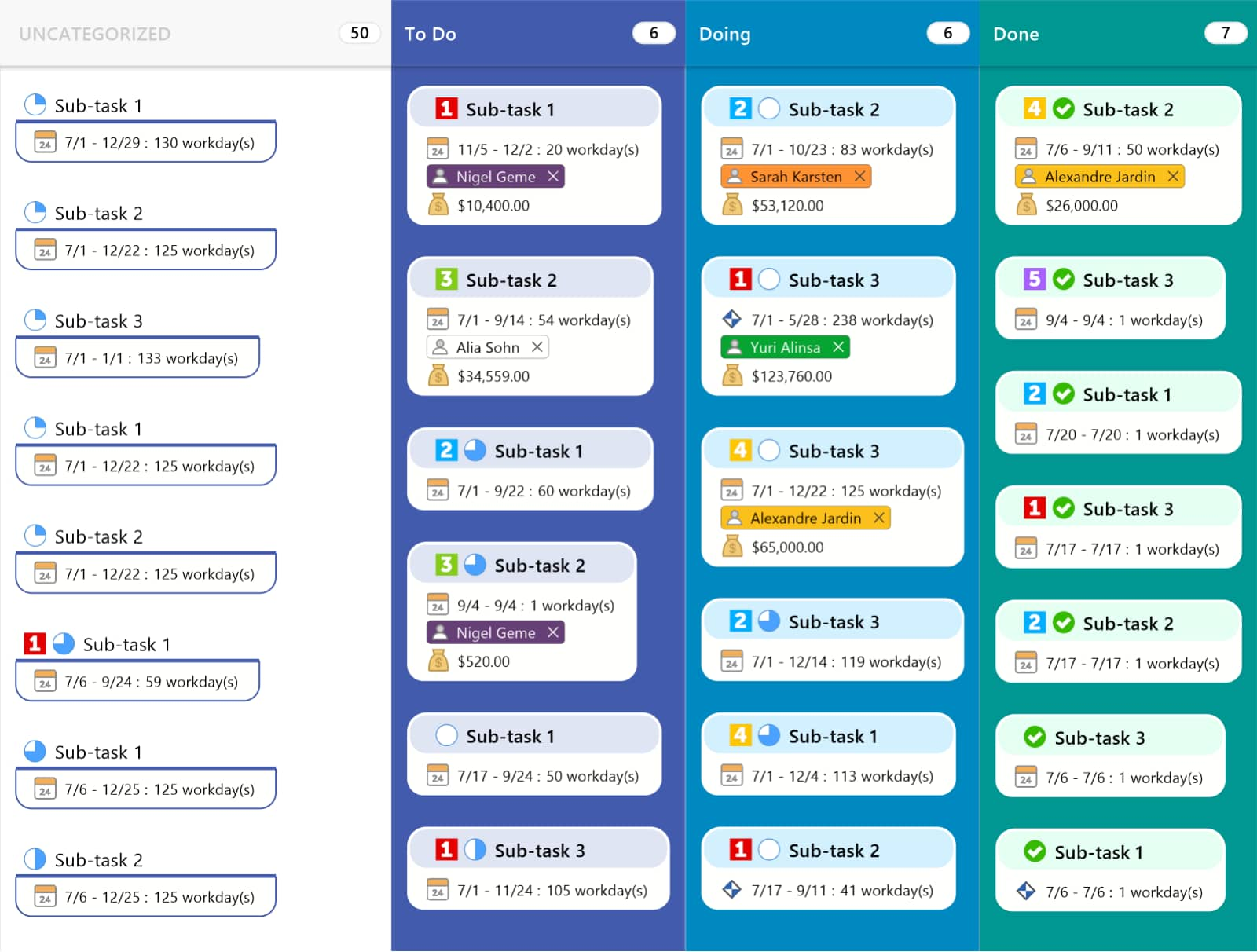
MindManager's Kanban view: tasks sorted into Uncategorized, To Do, Doing and Done columns, each card showing its priority, dates, assigned person and cost.
Flowcharts, process maps and BPMN
MindManager draws swim-lane flowcharts with decision shapes, line jumps (rounded, bridge or gap) and block arrows, chevrons, parallelograms and trapezoids. Version 26 adds ready-made BPMN and process-mapping shape libraries, and you can import your own SVG shapes. A flowchart can sit next to a map branch in the same document, so a process and its definitions stay together.
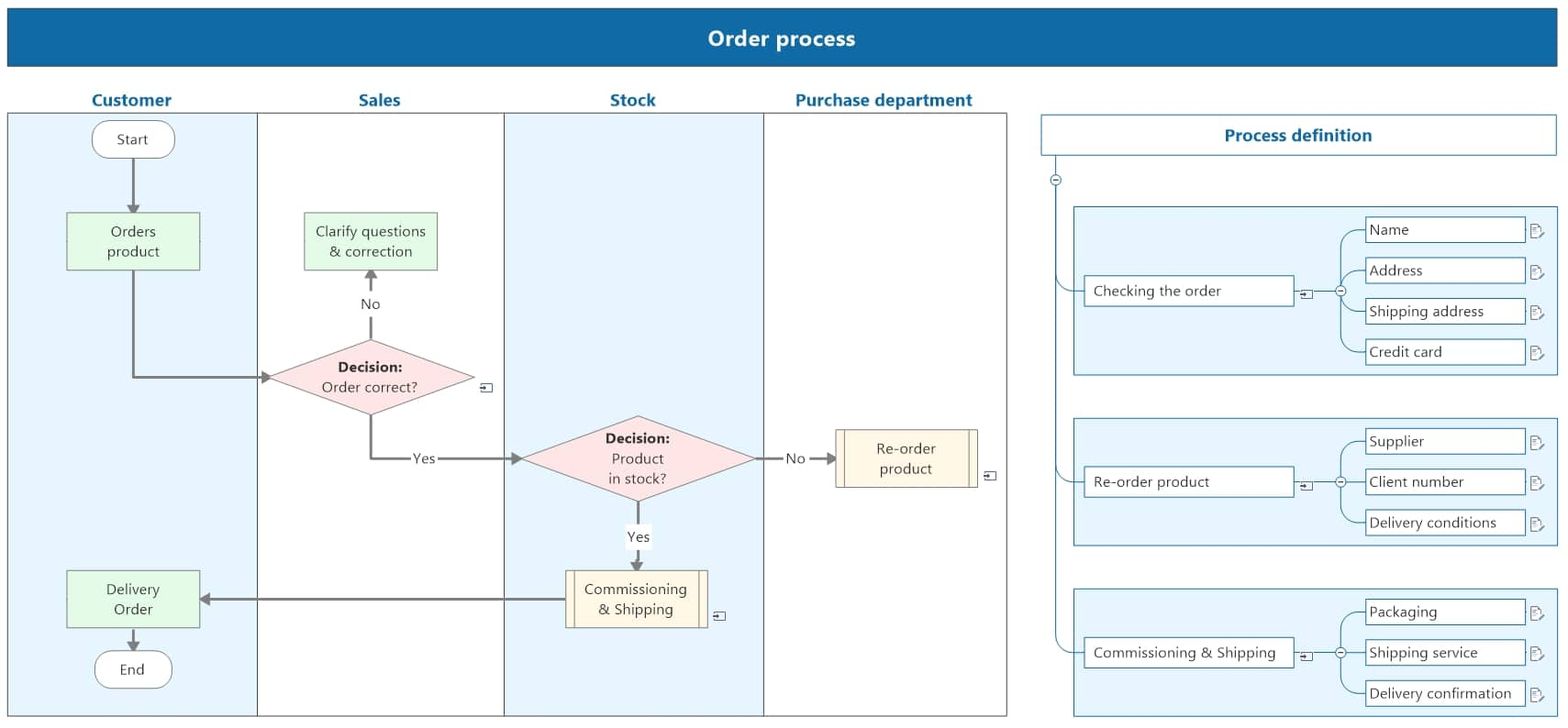
An order-process flowchart in MindManager with Customer, Sales, Stock and Purchase lanes and decision diamonds, beside a map branch that defines each step.
Microsoft 365 and Excel integration
MindManager connects with Word, Excel, Outlook, Project, SharePoint, Teams, Planner, To Do and Lists. You can import and export Word, Excel and Project files, sync tasks with Outlook, and use the Excel Data Mapper to turn spreadsheet columns into topics, resources and tags. Version 26 adds a Microsoft 365 file handler: once an admin installs it, anyone in the organization can open a map stored in SharePoint, OneDrive or Teams read-only in the browser, without a MindManager license.
Co-editing, publishing and cloud storage
MindManager Professional lets several people edit the same map at once, with each editor's name tagged on the topic they're working on. Maps can be saved to MindManager Files (its own cloud storage) or to SharePoint, OneDrive, Google Drive, Dropbox, Box or iCloud, and published as a web link with view, comment or edit access. MindManager Snap captures web content and map parts into personal or team queues to add to maps later.
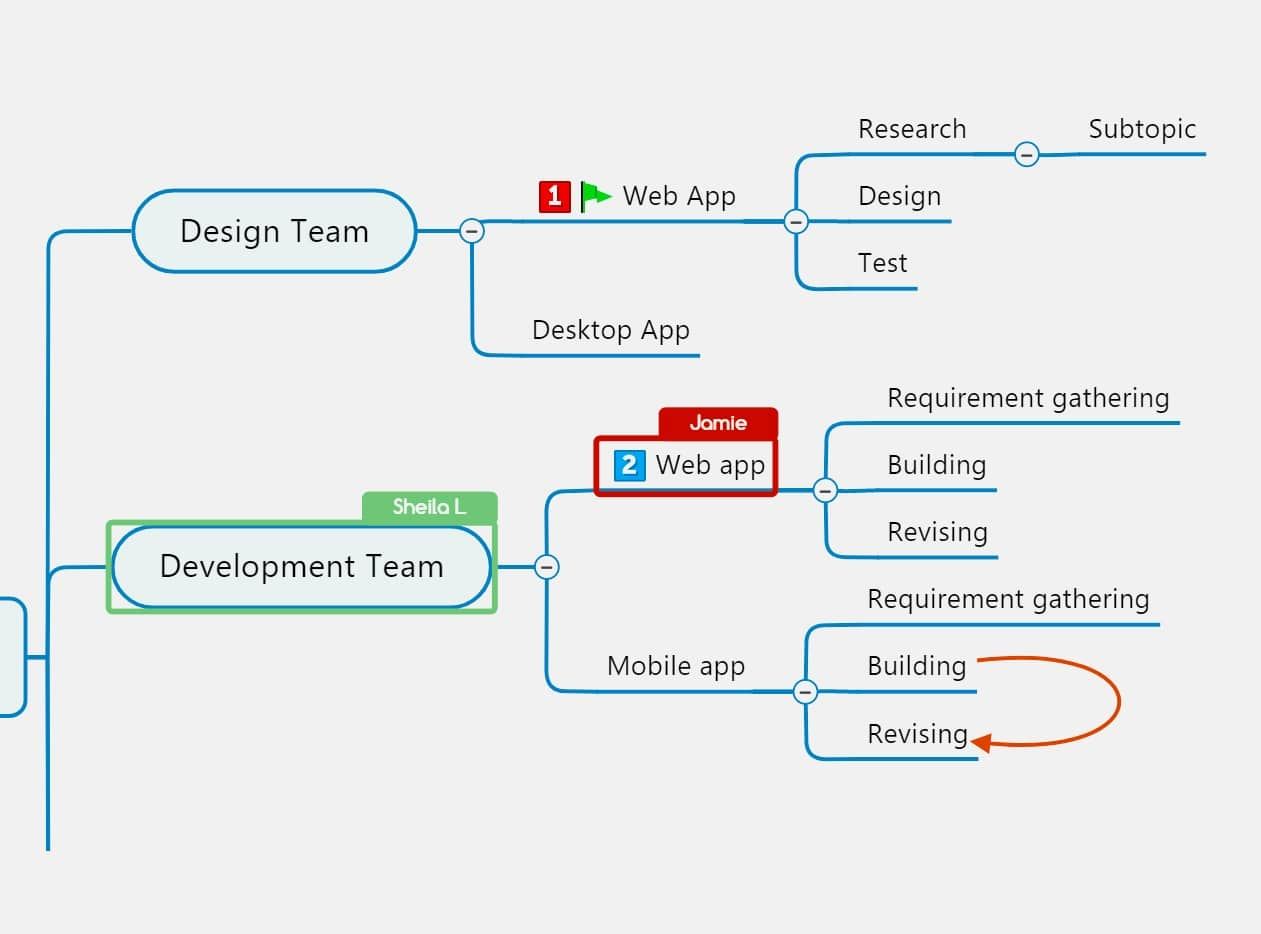
Co-editing in MindManager: the name tags "Sheila L" and "Jamie" mark the topics two people are editing at the same time.
SmartRules, formulas and filters
MindManager's SmartRules apply formatting or icons automatically when a topic meets a condition (overdue, high cost, a certain tag), and formulas calculate values from topic properties, such as totalling a property across child topics. Power filtering shows only topics with chosen priorities, tags or icons, and text accelerators add a resource or tag as you type "@" or "#".
Benefits
- One file from idea to plan. You don't brainstorm in one tool and rebuild the plan in another; the map becomes the plan.
- It fits a Microsoft office. If your work lives in Outlook, Excel, SharePoint and Teams, MindManager reads from and writes to them instead of becoming one more silo.
- Big projects stay readable. Collapsing branches, filters and roll-ups let you see a large plan at a "40,000 foot" level, then drill into one part.
- Numbers add themselves up. Costs, effort and dates roll up the branches, so a budget changes the moment a task changes.
Real-World Uses
- Project kickoff: brainstorm the work breakdown with the team in a meeting, assign owners with "@", add dates, then show the Gantt view before everyone leaves.
- Process documentation: draw an order or onboarding process as a swim-lane flowchart with BPMN shapes and keep the detailed step definitions in branches beside it.
- Strategy and risk planning: start from the Risk Register, RACI Matrix or Project KPIs template and filter by priority to see what needs attention first.
- Lecture or training notes: put a whole course on one map and reorder or skip topics as the session moves.
- Spreadsheet triage: map an Excel export of tickets or leads with the Data Mapper, then group and filter them visually.
Who It's For, and Who Should Skip It
MindManager suits project managers, consultants, analysts and team leads on Windows who plan in Microsoft 365, and anyone who wants maps that carry real task data. It's also a fit for teams that need co-editing and published maps for people without a license.
Skip it if you only want quick, pretty mind maps for notes or study: the feature set and the $179 yearly price are a lot for that, and a lighter mind-mapping app will feel faster. Mac-only users should know the Mac app lacks several Windows features (see below). And if you need to work offline for long stretches, the sign-in license can get in the way.
Usage Guide
- Install: click the trial button, choose Windows or Mac, and run the installer. On Windows the 3 MB setup file downloads the full program; on Mac you drag MindManager into Applications.
- Sign in: create a MindManager account when the app first starts. That begins the 30-day trial; no credit card is asked for.
- Start a map: choose New and pick a template (mind map, flowchart, timeline, Kanban, or one of the project templates) or a blank map.
- Add topics fast: type your ideas as topics and subtopics, then drag them around to restructure the map.
- Add task data: give topics dates, duration, resources, priority and progress; type "@name" or "#tag" in a topic to add a resource or tag.
- Change the view: switch between map, outline, Gantt, schedule and Kanban views, and use power filtering to focus.
- Share: save to MindManager Files or a cloud "Place", then invite co-editors or publish a web link.
Before you buy
- Pick the plan on the order page. The Buy Now button opens MindManager's pricing page, where you choose Professional, Essentials or the one-time license.
- Subscription renewals renew automatically. The 30-day money-back guarantee covers the first purchase, not a renewal, so cancel before the renewal date if you don't want another year.
- The one-time license is one platform and one version. It's MindManager 26 for Windows or for Mac, with no upgrades to later versions and no co-editing.
- Prices shown are per user. Enterprise licensing (5+ users, SSO, admin portal) is quoted separately.
Where it falls short
- The Mac app is behind Windows. Reviewers list Kanban boards, co-editing, Content Control, critical path tracking, MS Project integration and some Office import/export among the features the Mac version lacks, and several Windows-only features are marked on the pricing page.
- Mobile is a viewer. MindManager Go on iOS and Android is for viewing maps, not building them.
- It needs a sign-in. Activation runs through your MindManager account, so an expired token while you're offline can lock you out until you reconnect.
- Heavy for simple jobs. The ribbon full of project features can feel bloated if you just want to brainstorm.
- Stability and billing complaints exist. A few recent Trustpilot reviews report crashes and trouble cancelling a subscription.
What Users Say
MindManager scores well with business users on review sites; the vendor shows 4.5 stars from 565+ reviews, and Spotsaas, which collects G2 reviews, shows 4.67 out of 5 from 86 ratings. Trustpilot is the outlier at 2.8 out of 5 from only 4 reviews.
Independent reviews
Serious Insights (Daniel W. Rasmus, January 20, 2026, reviewing the 2025 version after years of use) calls it "a mind map that behaves like a project workspace": "MindManager's best trait is that it doesn't stop at idea capture." He adds that "For data-heavy work, Excel Data Mapper is the sleeper feature." His complaints: "While I enjoy the product, I find the UI bloated when just using MindManager for mind mapping," and "If you aren't connected to the Internet and the license token expires, then access becomes an issue." His bottom line: "MindManager is a workbench."
TechRadar (Christian Cawley, last updated July 26, 2024): "MindManager is a wonderful tool that helps you and your team manage projects and streamline ideas. It has a strong level of mind-mapping customization, and whether you're using templates or starting from scratch, MindManager supports quick and easy mapping of ideas and concepts." Its one reason to avoid: "Price point is high for some users."
G2 users (as collected by SaaSworthy and Spotsaas)
"MindManager helps to keep everything in one clear, interactive view. We use it to organize ideas, data, and documents in a single visual map. Linking to files, URLs, or images is seamless, and importing from word is easy." Verified User in Accounting, July 24, 2025
"It's a powerful tool which now includes many templates for all manner of tables and graphics. Since Corel has bought MindManager, we're beginning to see consistent improvements." But: "The MacOS version does not have the same capabilities as the flagship Windows version." Rick G, January 13, 2025
"It has by far the widest range of abilities of Mindmapping software so if you are using just one it will cover the ground. It is less appealing aesthetically than several of its competitors such as Ayoa, XMind.." John B, February 18, 2023
"The program is very intuitive, and it offers numerous templates to make organizing my thoughts even easier. I find that it helps me clarify my thoughts, which, if that alone were all it did, would still be worth it for me." Dan R, January 21, 2023
An older critical one, from a hospital user who wanted a project tool: "Limited capabilities in editing, clunky GANTT charts, lack of control in printing." User in Hospital & Health Care, November 13, 2019
Trustpilot (2.8 out of 5, 4 reviews)
"App crashes CONSTANTLY and cancelling the subscription is basically impossible. VERY shady company!" Leon, 1 star, February 20, 2026
Another 1-star review is titled "Plan to pay high subscription costs to avoid the app crashing" and begins "Used to love this product but I'm switching to another option (notion.so)". Mauricio O, 2022, updated 2023
The pattern: people who use MindManager for planning and Office-heavy work praise its range, templates and the way maps hold real data. The recurring complaints are price, a busy interface, a Mac version that trails Windows, and, from a small number of buyers, crashes and subscription cancellation.
Comparisons
Professional vs. Essentials vs. one-time license
MindManager Professional is the full product: Windows and Mac desktop apps, the web and Chromebook apps, the Teams app, the Go mobile viewer, co-editing, publishing, team Snap queues and every new version while you subscribe.
MindManager Essentials runs only in a web browser and has basic project planning and task management. There's no desktop app and no co-editing, so it suits one person making maps and diagrams online.
The one-time purchase is the MindManager 26 desktop app for Windows or Mac with advanced planning and personal Snap capture, but no co-editing, no web or Teams apps and no upgrades to future versions. It pays for itself against Professional after about two years if you don't need those extras.
Editions and Pricing
| Edition | Price (US) | Term | Platforms | What it includes |
|---|
| Professional | $179 per user | 1-year subscription | Windows, Mac, web, Chromebook, Teams, Go viewer | All features, co-editing, publishing, all new versions |
| Essentials | $99 per user | 1-year subscription | Web browsers | Diagrams, templates, basic task management |
| One-time purchase (MindManager 26) | $369 | Perpetual, current version only | Windows or Mac | Desktop app, advanced planning, no co-editing or upgrades |
| Students and Educators | $59 | 1-year subscription | As Professional | Student or educator validation required |
| Enterprise | Quote | Yearly, per user | As Professional | Volume discounts, SSO, admin portal, read-only licenses |
You choose the plan on MindManager's pricing page after clicking Buy Now. Prices were checked on November 15, 2026, when a Black Friday sale took about 10% off the first three.
FAQs
Can I buy MindManager once instead of paying every year?
Yes. MindManager sells a one-time license of MindManager 26 for $369, for Windows or for Mac. It keeps working without a subscription but doesn't include future versions, co-editing or the web and Teams apps.
Does one MindManager Professional subscription cover both Windows and Mac?
Yes. MindManager Professional includes the Windows and Mac desktop apps as well as the web, Chromebook and Teams apps for one user. The one-time license, by contrast, is for one platform.
Can people without MindManager open my maps?
Yes. MindManager can publish a map as a web link that opens in a browser, and with version 26's Microsoft 365 file handler installed by your admin, colleagues can open maps from SharePoint, OneDrive or Teams read-only without a license.
Does MindManager work offline?
MindManager's desktop apps run offline once activated, but activation and the license check go through your MindManager account, so you need to reconnect from time to time. Co-editing, cloud storage and the web version need an internet connection.
Is there a MindManager app for iPhone, iPad or Android?
MindManager Go, the mobile app included with Professional, lets you view maps on iOS and Android. For editing on a tablet, the browser-based web version is the option.
Can I get a refund on MindManager?
MindManager offers a 30-day money-back guarantee on the initial purchase. Automatic renewals aren't covered, so cancel before the renewal date if you're stopping.
Is there a student discount on MindManager?
Yes. MindManager for Students and Educators is $59 a year after validation, and schools and universities can ask for site licenses.
System Requirements
- Windows: Windows 11 or 10, 1.6 GHz or faster dual-core processor, 2 GB RAM, 1.5 GB free disk space, 1280 x 720 display, Microsoft Edge WebView2 Runtime
- Optional on Windows: Microsoft Office Professional 2016 or later and Microsoft Project 2016 or later for the Office and Project features
- Mac: MindManager 26.0.111 for macOS, 1 GB free disk space, 1280 x 800 display
- Web (Essentials and Professional): Chrome, Firefox, Edge, Opera or Safari
- Internet: needed for activation, co-editing, cloud storage and some features
Conclusion
MindManager is worth $179 a year if your mind maps are meant to become plans. Few mapping tools carry dates, costs and resources this far, or plug into Word, Excel, Outlook, Project and Teams this deeply, and version 26's BPMN shapes and project templates widen the gap for Windows users. The main reason not to buy is if you just want to sketch ideas, or you're on a Mac and need the full feature set: a simpler, cheaper mind-mapping app will serve you better. Take the free 30-day trial, build one real project in it, and you'll know which group you're in.
Download Free TrialBuy Now