WordPerfect Office Professional 2021: WordPerfect With the Paradox Database
WordPerfect Office Professional 2021 is the top edition of the WordPerfect suite for Windows: WordPerfect, Quattro Pro and Presentations plus the Paradox database, sold as a one-time purchase for offices that keep records in Paradox tables and want the legal tools and a database in one box. It lists at $399.99 for the full version and $259.99 as an upgrade, and on November 17, 2026 both were on sale for $239.99 and $154.99.
If you've ever fought Microsoft Word over a heading that refuses to change size or a numbered list that restarts for no reason, WordPerfect's answer is Reveal Codes: a pane under your text that shows every formatting code, so you can see the stray one and delete it. That feature, plus pleading paper, Bates numbering and redaction, keeps it in courts and law firms. Professional is the edition for offices that also built client lists, case logs or inventories in Paradox years ago and still need to open them.
Quick facts
- Version: WordPerfect Office 2021, build 21.0.0.194 (Update 1 with Hot Fix 1, released July 28, 2022)
- Developer: Corel (now part of Alludo)
- Runs on: Windows 11 and Windows 10 (version 20H2 or later). No Mac or mobile version
- Applications: WordPerfect, Quattro Pro, Presentations, Paradox, WordPerfect Lightning, eBook Publisher, AfterShot 3, Corel MultiCam Capture Lite
- License: one-time purchase, download version
- Price: $399.99 full version, $259.99 upgrade (on sale for $239.99 and $154.99 on November 17, 2026)
- Trial: wordperfect.com offers a free trial of the Standard edition only, so Paradox can't be tried before you buy
- Guarantee: Corel 30-day money-back guarantee on purchases made directly from Corel
- What we checked: the trial link served a 0.9 MB web installer (WordPerfectOffice2021.exe, file version 21.0.0.27, signed by Corel Corporation) that downloads the suite; the latest update and its build number on the WordPerfect patches page; and the full and upgrade prices on the wordperfect.com product page, all on November 17, 2026. We didn't run the full suite ourselves.
Before you buy
- Check the upgrade rules. The upgrade price needs a previous licensed WordPerfect Office. Academic, Home & Student, OEM and Not for Resale copies don't qualify.
- It's Windows only. There's no Mac, iPhone or Android version, and no web app for opening files away from your PC.
- Buy Professional for Paradox. The word processor, spreadsheet and presentation apps are the same as in Standard; Paradox, MultiCam Capture Lite and the SDK are the only extras, and they cost $66 more at the sale prices.
- The trial is the Standard edition. You can test WordPerfect itself, but not Paradox, before paying. The 30-day money-back guarantee covers direct Corel purchases.
- Updates have been quiet. The 2021 release's last update came out in July 2022, so treat it as a finished product rather than one that's still gaining features.
Download Free TrialBuy Full VersionBuy Upgrade
Overview
WordPerfect Office is the suite built around the word processor that ruled DOS-era offices. The 2021 Professional edition bundles WordPerfect for documents, Quattro Pro for spreadsheets, Presentations for slideshows and graphics, and WordPerfect Lightning, a digital notebook for collecting text and images from several sources, and adds the Paradox relational database, Corel MultiCam Capture Lite and a Software Developers Kit. You also get the eBook Publisher, the AfterShot 3 RAW photo editor, the Concise Oxford English Dictionary, more than 900 TrueType fonts, over 10,000 clipart images and 300+ templates.
Unlike Microsoft 365, it's a perpetual license: you pay once and keep using that version. Every application opens, edits and saves Microsoft formats (DOCX, XLSX, PPTX), and the suite reads more than 60 file types, including WordPerfect files back to version 4.2.
Features
Paradox keeps your data in searchable tables
WordPerfect Office Professional includes Paradox, a file-based relational database for storing, tracking, organizing and retrieving data in searchable tables. It's the main reason to pick Professional: offices that have run client, case or inventory databases in Paradox can keep opening and maintaining them next to their WordPerfect documents.
MultiCam Capture Lite records from several cameras at once
WordPerfect Office Professional adds Corel MultiCam Capture Lite, which captures video from several cameras, including a built-in webcam, and your computer screen, using the PC as a capture hub so all recordings are synchronized and ready to compile into one video. It suits training videos and recorded presentations.
Reveal Codes shows exactly what's formatting your text
WordPerfect's Reveal Codes window lists the hidden codes behind your document: fonts, margins, tabs, table cell and row formatting. When something looks wrong, you find the code and delete or edit it instead of guessing. In the 2021 release the window also shows font and alignment codes inside table cells, rows and columns, and you can dock it left, right or at the bottom.
Legal tools are built in
WordPerfect Office Professional includes the tools law offices ask for: pleading paper and the Pleading Expert, Bates numbering for every page of a document or a whole folder, redaction that blacks out text so it can't be recovered (saved to PDF or WPD), metadata removal that strips comments, undo history and hidden text, a legal toolbar, document review and a routing slip. Tables of Authorities can be generated too, and Corel sells Perfect Authority separately to automate citation marking.
PDF import, fillable forms and PDF/A export
WordPerfect Office Professional opens PDFs for editing, including scanned ones (2021 added JBIG support for multi-image scans), creates fillable PDF forms with text fields, check boxes and drop-down lists, and publishes any WordPerfect, Quattro Pro or Presentations file to PDF. You can password-protect the PDFs you create and save to PDF/A, the archiving format many government offices require.
Macros and automation for repeat work
WordPerfect Office Professional runs PerfectScript macros and supports VBA 7.1. The Macro Manager lists every macro in one place, where you can add descriptions, preview the code and run or edit them. Bundled macros save a document to WPD, PDF and HTML5 at once, or print a keyboard template of your function keys.
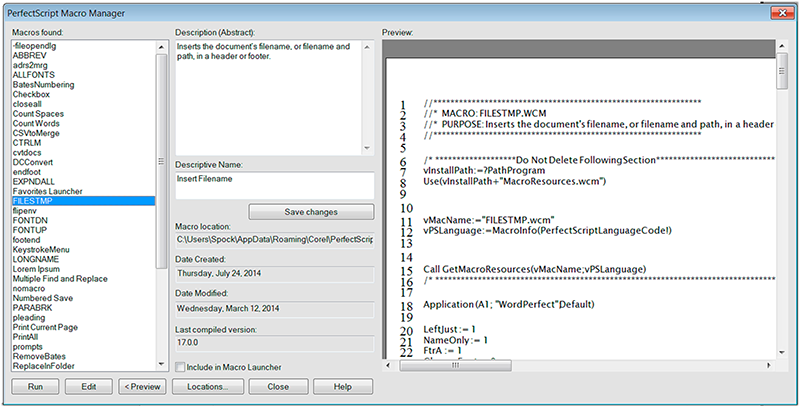
The PerfectScript Macro Manager: the macro list on the left, its description and dates in the middle and the macro code on the right (shown in an earlier WordPerfect version).
eBook publishing to EPUB
WordPerfect Office Professional can turn a document into an EPUB eBook for Kobo, Nook and similar readers. The eBook Publisher sizes fonts and graphics relative to the screen and converts footnotes into linked endnotes.

An eBook project in WordPerfect, with the eBook Publisher panel (New Chapter, Insert Image, Add Front Matter, Publish to eBook) on the left. Shown in WordPerfect X6.
Benefits
- You stop fighting hidden formatting. Reveal Codes turns "why does this paragraph look like that?" into a thirty-second fix.
- No subscription. One payment covers the version you buy, which matters if you only need a word processor that keeps working.
- Old files still open. Decades of WPD files, Quattro Pro sheets and Presentations shows stay readable without converters.
- Court-ready output. Pleadings, Bates numbers, redaction and PDF/A come in the box instead of as add-ons.
- Your Paradox data stays usable. Existing Paradox databases keep working on the same PC as the documents built from them.
Real-World Uses
- A small law practice drafts pleadings on pleading paper, Bates-numbers a folder of exhibits, redacts a client's account numbers and files the result as PDF/A.
- A paralegal gets a DOCX from opposing counsel, opens it in WordPerfect, cleans up the formatting in Reveal Codes and strips the metadata before sending it back.
- A records office keeps its long-running Paradox database of files and contacts while drafting its letters and reports in WordPerfect.
- A writer finishes a manuscript in WordPerfect and publishes it as an EPUB without buying a separate eBook tool.
- A government office builds fillable PDF forms for the public and archives the filled-in records as PDF/A.
Who It's For, and Who Should Skip It
It's for law firms, government offices and businesses that work in WordPerfect files and also depend on Paradox databases, and for long-time WordPerfect Office Professional users moving to the current version at the upgrade price.
Skip it if you use a Mac, if you co-edit documents with colleagues in real time (Google Docs or Microsoft 365 do that and WordPerfect doesn't), or if most of your files go back and forth with Word users and must keep complex formatting intact. If you only need a free suite that opens Word files, LibreOffice costs nothing. If you don't use Paradox, WordPerfect Office Standard has the same word processor and legal tools for less, and if you're a home user who doesn't need PDF forms or legal tools, Home & Student is far cheaper. A new database project is better started in a current database tool than in Paradox.
Usage Guide
- Download and install. The download is a small installer that fetches the suite (about 2.75 GB on disk). After purchase you activate it with the serial number you get with your order; an upgrade asks for the earlier version's serial if setup can't find it, and an internet connection may be needed to verify the number.
- Pick your workspace. Tools > Workspace manager switches between the default WordPerfect layout, a Microsoft Word mode that puts menus and toolbars where Word has them, WordPerfect Classic (5.1) mode with its old keystrokes, and a Legal mode that brings the pleading and case tools forward.
- Turn on Reveal Codes. Click View > Reveal Codes to show the codes pane under your document. To remove bold, for example, find the Bold code and drag it out of the pane; double-click a code to edit its settings.
- Open Word files directly. Use File > Open on any DOCX; when you're done, File > Save As lets you keep it as DOCX or save it as WPD.
- Use the legal tools. Switch to WordPerfect Legal mode in the Workspace manager, or use the legal toolbar, for pleadings, indexes, tables of contents and Tables of Authorities.
- Publish to PDF. Click File > Publish to PDF; the Settings button adds open and permission passwords on its Security tab.
Where it falls short
- Complex Word documents don't always convert cleanly. Users who swap files with Word report that heavily formatted documents can need clean-up after conversion.
- Change tracking is weaker than Word's. WordPerfect's compare and review tools work, but reviewers who live in Track Changes find them limited.
- No collaboration or cloud editing. There's no shared editing, no web version and no phone app to view files on the go.
- The interface feels dated to people coming from Word, and some settings sit several menus deep.
- Quattro Pro and Presentations trail Excel and PowerPoint in features, and they haven't changed much in years.
- Paradox is a legacy database. Long-time users note it hasn't had real updates in many years, so it's for keeping existing databases running rather than building new ones.
What Users Say
WordPerfect Office holds 4.4 out of 5 on Capterra from about 200 reviews and an 8.5 out of 10 score on TrustRadius from 31 reviews. Fans are often lawyers and long-time users who have run it since the DOS days; the critics mostly work in offices where everyone else uses Word or Google Docs.
Capterra: the praise
James C., a self-employed CPA (5/5, September 2024): "This is the most user friendly word processing software that I have ever used! I have been using WordPerfect probably for at least 30 years and I am now at the point where I will not use any other."
Mark T., a construction company vice president (March 2022): "Full featured office suite. Wordperfect is superior to MS Word and I find Quattro Pro much easier to use than Excel and it's graphing and charting better than Excel's." His complaint: "There is not a smart phone app to at least view the documents created with suite in the field, away from a connected computer."
Martina C., a paralegal (July 2023): "WordPerfect office is great to use in a lot of settings. There are still some court systems that require the use of this program." She adds the con: "In a modern world, this program is becoming obsolete due to Microsoft Word."
E. C., a self-employed creative director (July 2022): "I love the capacity to see the underlying codes and always figure out why my page has some unwanted formatting, as an example." On the downside: "It picks up gliches from time to time and stops working. So I close the program. But it has a retrieval feature that means I don't lose the work."
Capterra: the criticism
Steven S., who runs a legal services practice (February 2022): "WordPerfect is, overall, much better for formatting documents than Microsoft Word but the ability to convert complex documents between it and Microsoft Word have not improved and are usually corrupted, requiring a great deal of time to edit."
Rebecca R., an instructor (July 2023): "I find it harder and harder to us the WordPerfect program only because at work we use Google and it integrates and shares so much easier than Word Perfect."
Joel B., a pastor (2/5, November 2024), titled his review "A Decent Word Processor": "It is not as robust as other word processing programs and lacks compatibility."
Tori P., a court reporter, called it "Not worth it" (August 2022) after an upgrade didn't fix her problem: "Every time I go to save a document, it tells me the system is not responding. So, basically, I bought the upgrade version and spent $200.00 for nothing because it is still doing the same thing."
TrustRadius
Donald Wall, a lawyer (December 2023): "IMHO, WordPerfect is still the best word processing software ever made. It makes formatting easy (important for lawyers) and "reveal codes" allows the user adjust the appearance of a document much easier than Word or Google docs." His cons: "conversion from Word is problematice to put it kindly" and "track changes is compared to Word is weak".
Terry Ingoldsby, president of a small R&D firm (January 2024), likes it for long documents: "I particularly prefer WordPerfect for large documents (e.g., 50 pages). It has great capabilities for dealing with references and footnotes." He also wants better Word interoperability and says Presentations "hasn't seen significant enhancements for some time and could benefit from them."
David Reese, owner of an accounting firm (June 2021): "WP Office is much less expensive than MS Office" and "WordPerfect gives you more control over formatting than Word".
Two reviewers point at Paradox. Richard Baroniunas, owner of Baron Software Services (March 2020): "Paradox Database has not been updated in the past 9 years." Herm Harrison, a vice president at Foster Transformer Company (February 2020): "Database (does anyone use these anymore) hasn't been updated in years."
The pattern is consistent: people who format complex documents, especially legal ones, love Reveal Codes, the legal tools and the one-time price. The complaints are about living in a Word and Google world: conversion of complex files, weaker change tracking, no sharing and an aging look.
Comparisons
WordPerfect Office Standard vs Professional vs Home & Student
All three share WordPerfect, Quattro Pro, Presentations, Lightning, AfterShot 3 and the Oxford dictionary. Professional adds the Paradox database, Corel MultiCam Capture Lite and a Software Developers Kit. Home & Student leaves out the eBook Publisher, the WordPerfect Viewer, PDF import and PDF forms, metadata removal, Bates numbering, pleading tools, document review and the routing slip, Professional only makes sense if you need Paradox or MultiCam; otherwise Standard does the same document work for less.
WordPerfect Office vs Microsoft 365
Microsoft 365 is a subscription with cloud storage, real-time co-editing and apps on every platform; WordPerfect Office is a one-time Windows purchase with Reveal Codes and built-in legal tools. If your clients and colleagues all send Word files with tracked changes, Word fits better. If you control your own documents and care about precise formatting, WordPerfect costs less over a few years.
Editions and Pricing
Prices from the wordperfect.com product pages on November 17, 2026, during Corel's "Black Friday Starts Early" sale. Each is a one-time purchase of a download version.
| Edition |
Regular price |
Sale price |
What it adds or lacks |
Buy |
| Professional, full version |
$399.99 |
$239.99 |
Adds Paradox database, MultiCam Capture Lite, SDK |
Buy Full |
| Professional, upgrade |
$259.99 |
$154.99 |
Same suite, for owners of an earlier WordPerfect Office |
Buy Upgrade |
| Standard, full version |
$249.99 |
$173.99 |
Full suite with PDF, eBook and legal tools, no Paradox |
|
| Home & Student |
$99.99 |
$49.99 |
No PDF import or forms, eBook or legal tools |
|
The Buy Full Version and Buy Upgrade buttons on this page each open the Professional product page with that version already selected. Volume licensing for businesses is sold separately through Corel's licensing program.
FAQs
Is WordPerfect Office Professional 2021 a subscription?
No. WordPerfect Office Professional 2021 is a one-time purchase. You pay once for the 2021 version and can keep using it; a later major version would be a paid upgrade.
Can WordPerfect Office open and save Microsoft Word files?
Yes. WordPerfect opens and saves DOCX, Quattro Pro handles XLSX and Presentations handles PPTX. Simple documents round-trip well; long documents with complex styles, tracked changes or unusual layouts may need clean-up after conversion.
Does WordPerfect Office run on a Mac?
No. WordPerfect Office 2021 runs only on Windows 11 and Windows 10 (version 20H2 or later). Mac users would need Windows in a virtual machine.
Who qualifies for the WordPerfect Office upgrade price?
The WordPerfect Office upgrade is for owners of a previous licensed version of WordPerfect Office. Academic, Home & Student, OEM and Not for Resale copies don't qualify, so those owners need the full version.
Can I get a refund if WordPerfect Office doesn't work for me?
Corel offers a 30-day money-back guarantee on WordPerfect Office bought directly from Corel. Copies bought from another retailer follow that retailer's return policy.
Can I try Paradox before buying WordPerfect Office Professional?
No. The only WordPerfect trial on wordperfect.com is the Standard edition, which has no Paradox. If Paradox turns out not to fit, Corel's 30-day money-back guarantee applies to direct purchases.
Is WordPerfect Office 2021 still updated?
WordPerfect Office 2021's latest update is Update 1 with Hot Fix 1 (build 21.0.0.194), released on July 28, 2022. It fixed crashes in QuickWords and the Macro Manager and let WordPerfect open DOCX files made in the Office 365 web app.
System Requirements
- Windows 11 or Windows 10 (version 20H2 or later) with the latest updates
- 1 GHz or faster x86 processor, or an AMD64 processor
- 1 GB RAM (x86) or 2 GB RAM (AMD64)
- 2.75 GB of disk space for the applications
- 1024 x 768 screen resolution, mouse or tablet
- Microsoft Internet Explorer 11 or higher
- Internet connection may be needed to verify the serial number during installation
Conclusion
WordPerfect Office Professional 2021 is worth buying if you need both WordPerfect and Paradox: Reveal Codes, the legal tools and your databases come in one suite for a one-time price, $239.99 on sale. If you don't use Paradox, it's the wrong edition, because Standard does the same document work for less. And as with any WordPerfect edition, a workplace that runs on Word or Google Docs will cost you time in conversions and missing shared editing. Try WordPerfect in the Standard trial with your own documents first.
Download Free TrialBuy Full VersionBuy Upgrade