VSDC Video Editor Pro: The Paid Upgrade to a Free Windows Video Editor
VSDC Video Editor Pro is the $29.99-a-year paid edition of VSDC, a non-linear video editor for Windows from Flash-Integro LLC. It adds GPU-accelerated export, motion tracking, mask tools, video stabilization, HDR and 10-bit export and beat-synced effects to the free VSDC editor, which already exports 4K and 8K video with no watermark.
It's for the YouTuber, action-camera owner or hobby filmmaker who has outgrown basic trimming, wants to blur a moving face or pin a caption to a moving car, and doesn't want to pay Adobe Premiere Pro prices to do it.
Quick facts
- What you get: a VSDC Pro license that turns on the Pro tools in the same VSDC Video Editor program
- Price: $29.99 for one year, renewing automatically every 12 months
- Developer: Flash-Integro LLC (videosoftdev.com), which has published VSDC since 2011 and says it has more than 5 million users
- Version: 11.3 (installer build 11.3.4.765)
- Runs on: Windows only, 64-bit and 32-bit installers; VSDC recommends Windows 7 or later
- Free version: yes, with no watermark and no time limit, so it works as an unlimited trial of the editor itself
- Guarantee: 30-day money-back guarantee on direct purchases
- What we checked: the 64-bit installer from VSDC's download link (video_editor_x64.exe, file version 11.3.4.765, 126 MB, digitally signed by FLASH-INTEGRO LLC, file dated November 12, 2026), the free-versus-Pro comparison table, the refund policy, and the price on the order page ($29.99 with a 12-month renewal, no Black Friday discount) on November 24, 2026. We didn't activate a Pro license or test AI generation.
Before you buy
- It's a subscription, even where VSDC's FAQ says "one-time purchase". The order page sells VSDC Pro as a 12-month license that renews automatically at $29.99. Several Trustpilot reviewers were surprised by the renewal notice, so turn auto-renewal off in your order account if you only want one year.
- Use the free version first. It's the same program, it has no watermark, and it shows you if you can live with VSDC's interface, which is the most common complaint in reviews. Buy Pro only for a specific Pro tool you need.
- AI generation costs extra. The AI image and video generator in version 11.3 runs through your own fal.ai account and API key; VSDC shows the estimated cost before each request, and fal.ai bills it, not VSDC.
- No Mac version. VSDC for desktop is Windows only. The VSDC iOS app is a separate product.
Download Free TrialBuy Now
Overview
VSDC is a non-linear editor: every clip, title, shape, audio track and effect is an object on a multi-layer timeline, and you can place it anywhere in time and on screen. That makes it closer in spirit to a compositing tool than to a simple "drop clips in a row" editor, and it's why VSDC can do picture-in-picture, split screens, animated masks and layered effects on a modest PC.
The free version is unusually complete: 4K and 8K export, blending modes, a 360-degree editor, the screen recorder, video capture, the converter and a DVD burner, all without a watermark. Pro adds the tools that save time on harder jobs: hardware-accelerated rendering, motion tracking, mask tools, stabilization, non-linear effect curves, beat detection, HDR and 10-bit export, LUT export, inpainting, the "advanced" versions of chroma key, color correction, multicam and voice-over, plus priority support.
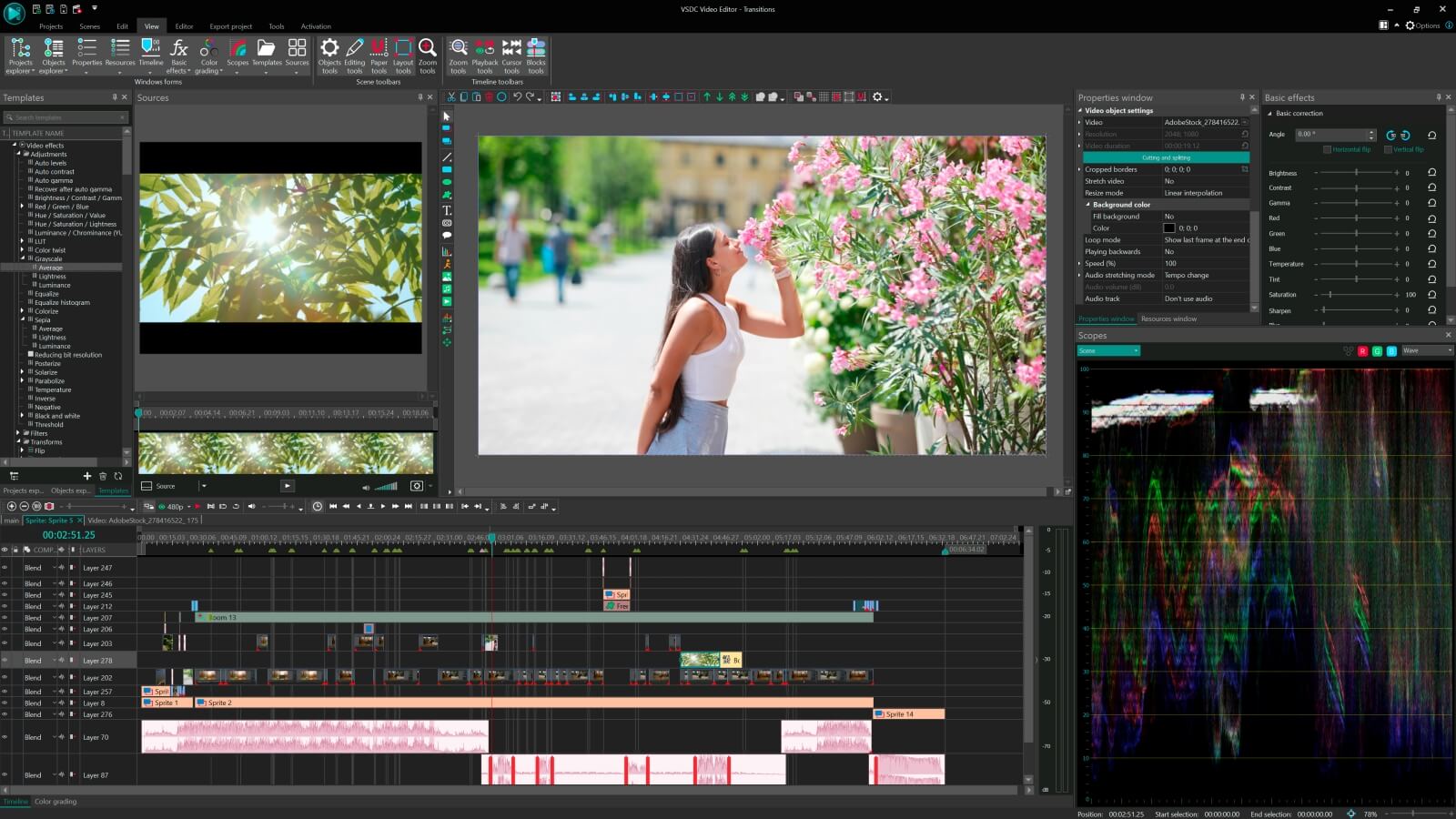
The main VSDC window: the effect template tree on the left, source and scene previews in the middle, the Properties and Basic effects panels and a waveform scope on the right, and dozens of layers on the timeline below.
Features
Faster exports with hardware acceleration
VSDC Pro turns on GPU hardware acceleration (NVIDIA NVENC, Intel Quick Sync and AMD) by default, so effect processing and the final export run much faster than in the free version, which renders on the CPU. If you shoot 4K footage and export long projects, this is the single feature most likely to pay for the license.
Motion tracking that follows a moving object
VSDC Pro's motion tracking analyzes the path of a car, a person or a drone and applies it to a text, logo, image or blur mask, so the overlay moves with the object. Typical uses are captions that follow an athlete, a blurred face or license plate in street footage, and labels pinned to moving objects. The movement map can be fine-tuned by hand when the automatic track drifts.
Masks, advanced chroma key and inpainting
VSDC Pro adds clipping, inverted and text masks, which you can combine with zoom, motion tracking and blending to build effects such as text revealed through a shape or a cloned subject. The advanced HSL chroma key removes a green or blue screen with a dropper and then lets you refine the mask by hue, saturation and lightness, and the Telea and Navier-Stokes inpainting algorithms fill in an area you remove.
Color grading with HDR and 10-bit export
VSDC Pro edits and exports HDR video in the Rec. 2020 color space (HDR10, HDR10+ and Dolby Vision footage from iPhones, GoPro and Insta360 cameras) and exports 10-bit video, which the free version can't. The advanced color correction adds lift, gamma, gain and offset wheels, RGB curves, scopes and LUT export.
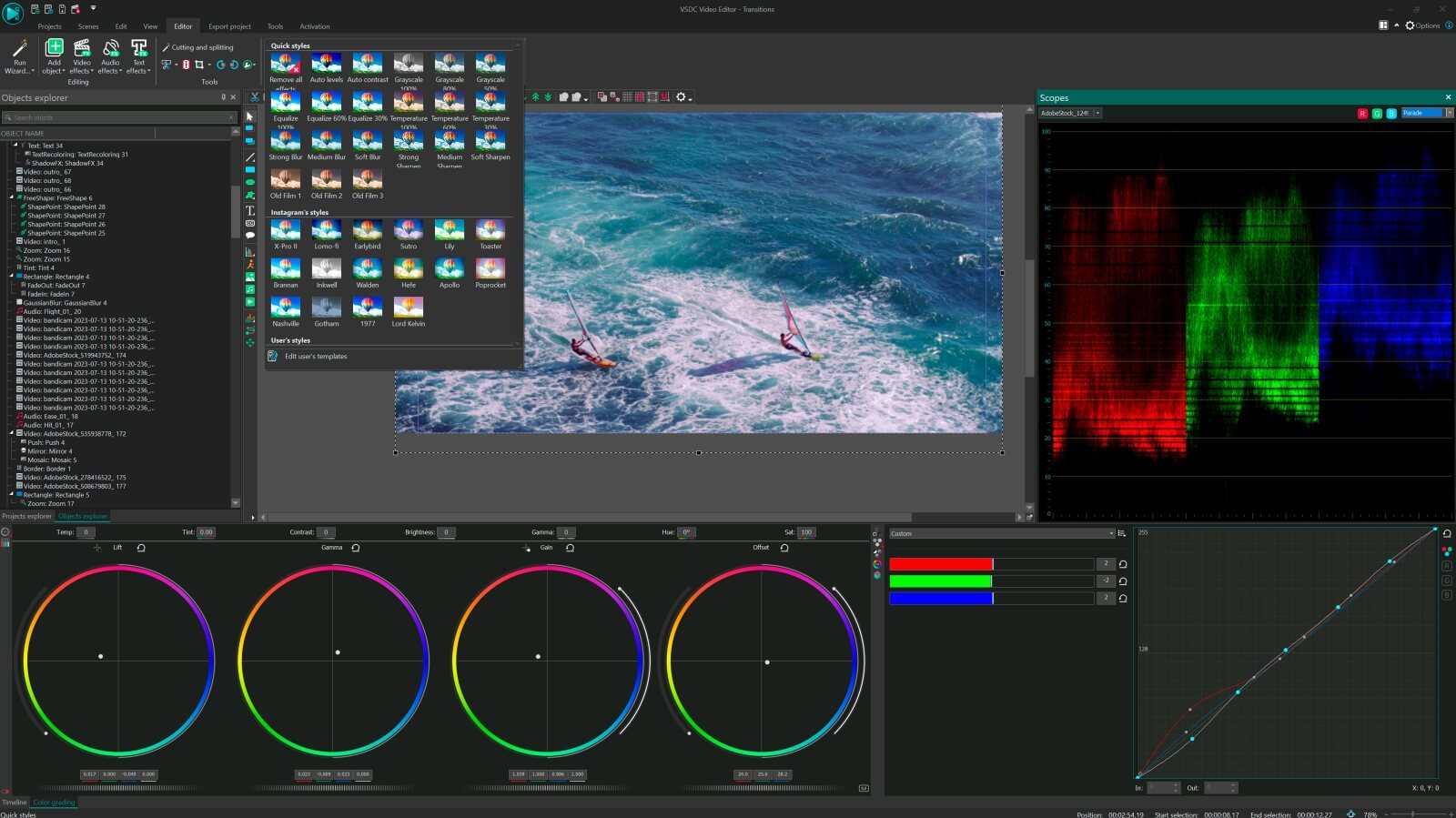
Color grading in VSDC: four color wheels and an RGB curve at the bottom, the quick-style presets open at the top, and an RGB parade scope on the right.
Non-linear effect curves and keyframes
VSDC Pro lets an effect, filter or transition change its strength over time along a curve you draw, instead of keeping one value for the whole effect. Version 11.3 made the Key Editor easier to work with: you can move several keyframes at once, drag a whole curve, select all or invert the selection, and auto-scale the graph to the window.
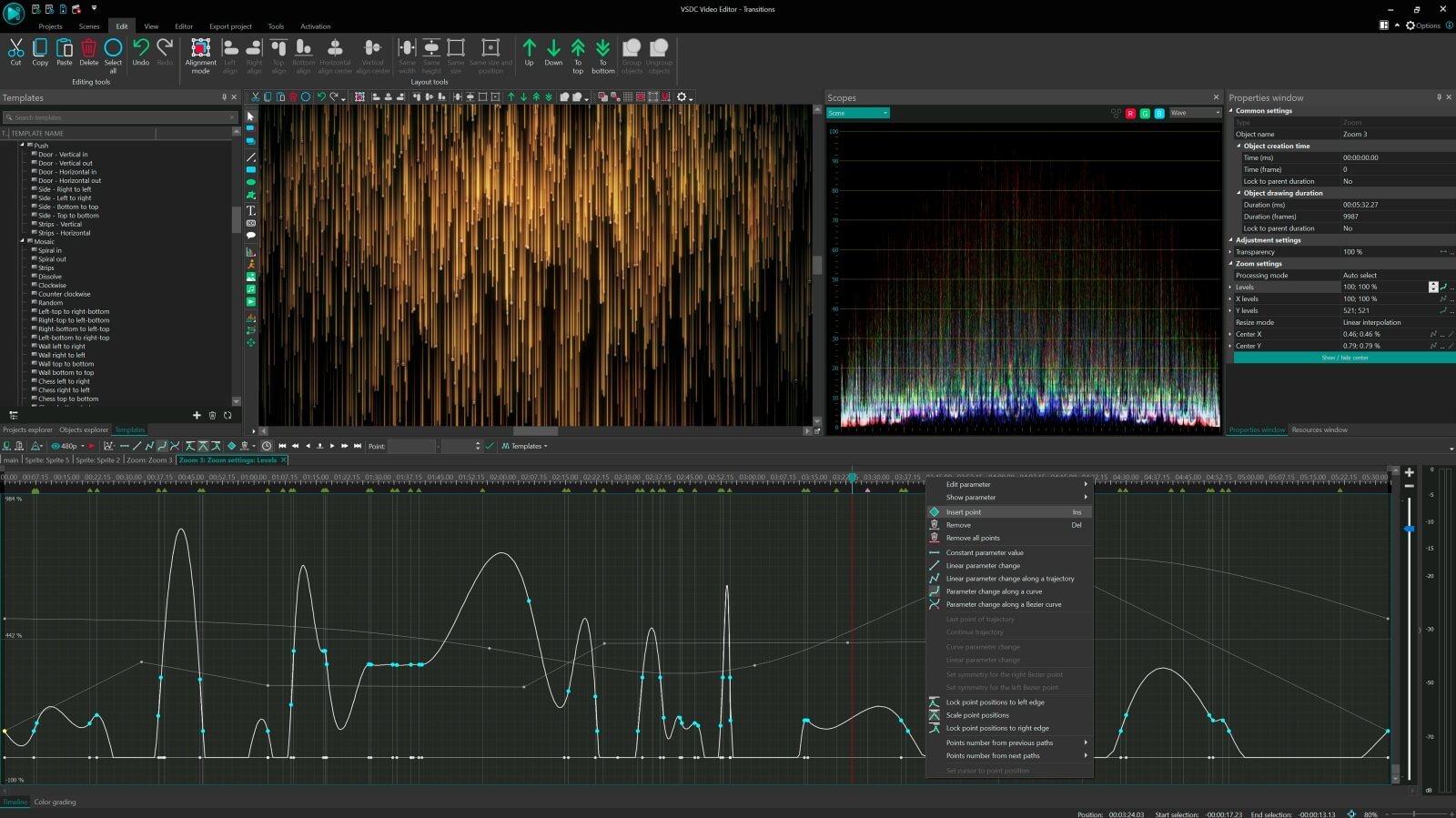
The Key Editor: a zoom effect's level changing along a curve, with the menu for inserting points and choosing linear, curved or Bezier changes.
GPS and telemetry overlays for action footage
VSDC reads GPX files and Garmin and DJI telemetry and draws speed, altitude, route maps and gauges over your footage. Version 11.3 added Garmin cadence, heart rate and compass data for Pro users, DJI route, speed and altitude, and ready-made telemetry templates. It's aimed at cyclists, motorcyclists and drone pilots who want their numbers on screen without animating each gauge by hand.
Beat-synced effects, stabilization and premium transitions
VSDC Pro's Edit the Beat detects the rhythm of a music track and animates scale, color, rotation and transparency to it, which suits music videos and Reels. Pro also adds video stabilization for shaky handheld footage and premium effects such as Paper burn, Flow transformation, Shattered glass, God rays and Matrix.
AI image and video generation inside the editor
VSDC 11.3 generates images and video clips from a text prompt and edits images with AI prompts, without leaving the editor. It works through a fal.ai account: you paste your fal.ai API key into VSDC's Internet Connection options, choose a model, and VSDC shows the estimated cost before it sends the request. The generated clip lands in your Resources window like any other file.
Benefits
- Cheap for what it does. At $29.99 a year, VSDC Pro costs a fraction of Adobe Premiere Pro or Filmora's yearly plans, and the free version covers anyone who doesn't need the Pro tools.
- Light on hardware. VSDC runs on older and mid-range Windows PCs, and reviewers repeatedly mention that it doesn't lag a laptop the way heavier editors do.
- No watermark, ever. Both editions export clean video, so you never pay just to remove a logo.
- Offline. Apart from the optional AI generation, everything runs locally with no cloud account.
Real-World Uses
- A cycling or motorbike channel: import the ride footage and the Garmin or GPX file, drop on a speed, heart rate and route template, and export in 4K with GPU acceleration.
- Street or event footage for YouTube: track a passer-by's face or a license plate and attach a blur mask that follows it through the shot.
- Green-screen tutorials: key out the background with the advanced chroma key and place yourself over a screen recording made with VSDC's own recorder.
- Music videos and Reels: let Edit the Beat pulse the scale and color of clips to the track, then add Flow transformation transitions between scenes.
- iPhone HDR clips: keep the Rec. 2020 colors instead of the washed-out look many editors give HDR footage, and export 10-bit.
Who It's For, and Who Should Skip It
Buy VSDC Pro if you already like the free VSDC editor and hit one of its walls: slow CPU exports, no motion tracking, no masks, no stabilization or no HDR export. For $29.99 a year it's one of the cheapest ways to get those tools on Windows.
Skip it if you're on a Mac (there's no macOS version), if you want a drag-and-drop editor that feels like iMovie (VSDC's object-based interface takes time to learn, and Clipchamp or Filmora are gentler), or if you need a professional finishing tool for paid long-form work, where DaVinci Resolve or Premiere Pro are the industry choice. And if the free version already does everything you need, keep using it: Pro adds tools, not quality.
Usage Guide
- Install: the Download button gets the 32-bit installer, which also runs on 64-bit Windows; a 64-bit build is on VSDC's own Pro page. Run it and follow the prompts. Pro and Free share one program.
- Activate Pro: after purchase, register your license from the Activation tab of the ribbon.
- Start a project: create a new project from the Projects tab, set its resolution and frame rate, and import your clips.
- Arrange the timeline: each file you add lands on its own layer. Drag objects in time, and use the Properties window to set position, duration and speed.
- Cut and split: open Cutting and splitting to mark regions and remove them, as in the screenshot below.
- Add effects: use the Video effects, Audio effects and Text effects menus on the Editor tab, or drag a template from the Templates window. Open the Key Editor to change an effect over time.
- Export: open the Export project tab, choose the format and quality, and export. In Pro, hardware acceleration is already on.
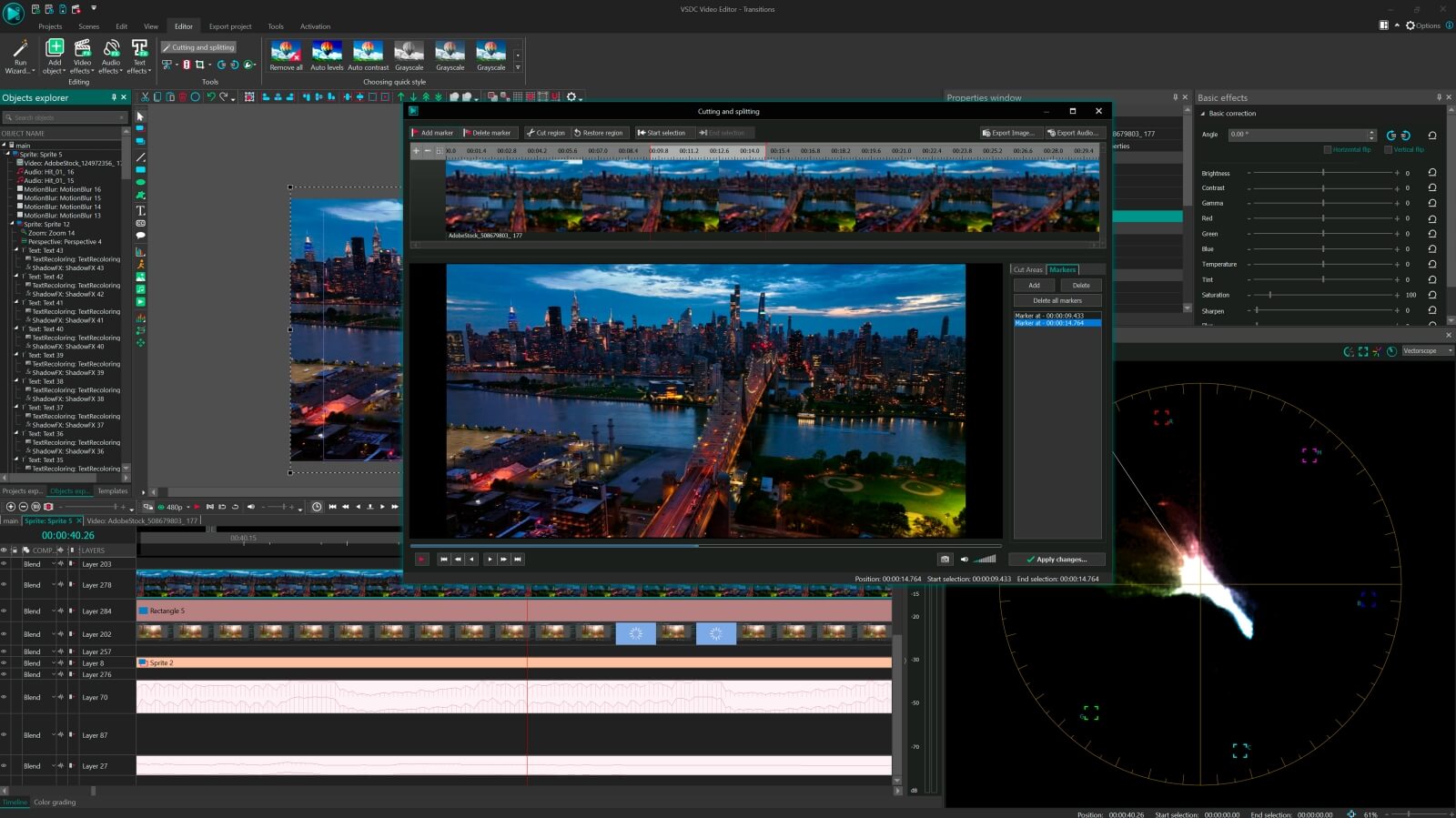
The Cutting and splitting window open over the timeline, with cut areas and markers on a drone clip and a vectorscope on the right.
Where it falls short
- The interface is the hurdle. Digital Camera World's reviewer called its workspace complex and its operating philosophy confusing, and the same complaint runs through Capterra reviews. Expect to watch a few tutorials before it feels natural.
- Stability on big projects. Some users report hangs, crashes and broken exports on large, effect-heavy projects. Save often; version 11.3 added recovery projects after an interrupted Windows shutdown, which helps.
- Subscription and refund friction. Trustpilot's one-star reviews (20% of the total) are mostly about the renewal surprise, refund requests and one disputed license, more than about the editor itself.
- The free version narrows the gap. Creative Bloq noted that the free version has almost all the Pro features, so some buyers find they paid for tools they don't use.
What Users Say
VSDC has been reviewed for years by magazines and by thousands of users, and opinion splits along a clear line: people love the price, the light footprint and the support, and dislike the learning curve and the subscription surprise.
Trustpilot (4.1 out of 5, 237 reviews)
62% of VSDC's Trustpilot reviews give five stars and 20% give one star. Recent praise:
- "it's the least resource hungry Video editing app that I have ever used" (A Team, five stars, October 2026, "VSDC is a powerhouse")
- "The Pro version is very affordable, and customer support is top-notch. Definitely recommend it!" (Vladimir, five stars, June 2026, "Amazing editor that doesn't lag my laptop!")
- "It does the jobs for free where other competitors are charging a huge amout for it!" (Raja, five stars, August 2026)
- "Installation is straightforward. It runs natively on Windows, operates offline, and does not force cloud dependency." (Rajnish Kumar Jha, five stars, February 2026)
- "The customer service is top notch; they email back quickly and are there to help you." (James P, five stars, February 2026, "Very Powerful & Affordable Video Editor")
- "The biggest asset with VSDC is their support." (Naveen Shanbhag, five stars, December 2025)
And the criticism:
- "I just got a notification that apparently my subscription will expire in a month. This was a surprise." (Hans, one star, June 2025, "Subscription surprise.")
- "It turned out that the file after export is scattered, some effects do not work." (Patrick, one star, April 2025, after a three-week project)
- "Three years of this CRAP program, $75+ in fees for pro." (Bolha Villogas, one star, December 2024, who found the interface hard to navigate)
- "I view VSDC as a group of scammers, dishonest and willing to breach their legal obligations under agreement." (Lightbearer, one star, 2026, after a license was rejected following an update)
Magazine reviews
Digital Camera World (Peter Fenech, VSDC Pro review, updated June 2020) listed the range of features and the price as reasons to buy, and a "Confusing operation philosophy", a "Complex workspace" and a "Lack of drag and drop functionality" as reasons to avoid it. Its verdict: "A solution worth exploring, but there are easier and more effective alternatives available."
Creative Bloq (Nikshep Myle, March 2021) praised "Low system requirement" and "Motion tracking and 4K support", noted that "The free version has almost all the features of the Pro version", and criticized "Slow render speed". Its summary: "VSDC is free video editing software that's easy to understand and use." Both reviews predate the 10.x and 11.x releases, which redesigned the interface and added HDR, telemetry and AI tools.
Capterra (about 4.5 out of 5, 89 reviews)
Capterra reviewers praise the breadth of features in the free version, 4K output, the stabilizer and the fact that hardware acceleration helps on low-spec computers, and several beginners found it approachable. The recurring complaints are an interface that feels dated and overwhelming at first, occasional crashes when other programs are open, a thinner effects library than paid rivals, and some of the best tools sitting behind the Pro paywall.
The pattern: VSDC earns its fans with value, low hardware demands and responsive support, while its critics trip over the interface, crashes on heavy projects and a renewal they didn't expect. Nearly all the money complaints are about the auto-renewal, so read the "Before you buy" note and you avoid the most common one.
Comparisons
VSDC Pro vs VSDC Free
Both export 4K and 8K video without a watermark, both have blending modes, the 360-degree editor, the AI Art generator, the screen recorder and the converter. Pro adds hardware acceleration, motion tracking, masks, stabilization, Edit the Beat, HDR and 10-bit export, LUT export, inpainting, the premium transitions, the advanced chroma key, color correction, multicam and voice-over, and priority support.
VSDC Pro vs DaVinci Resolve (free)
DaVinci Resolve is the more professional editor, with far deeper color grading and audio post-production, but it needs a strong GPU and has a steeper learning curve. VSDC Pro runs on weaker PCs and includes hardware-accelerated encoding for $29.99 a year, which Resolve keeps for its paid Studio version.
VSDC Pro vs Filmora
Filmora has the friendlier drag-and-drop interface, a big stock and effects library and a Mac version, but its free version watermarks exports and its paid plans cost more. VSDC gives more manual control (masks, curves, telemetry) for less money, at the cost of a harder start.
Editions and Pricing
| Edition | Price | License term | What it adds |
|---|
| VSDC Free Video Editor | $0 | Unlimited | Full editor, 4K/8K export, no watermark |
| VSDC Video Editor Pro | $29.99 | 1 year, renews automatically | GPU export, motion tracking, masks, stabilization, HDR/10-bit, priority support |
VSDC also sells optional add-ons on its own site, such as paid templates, LUT packs and a GPS + Telemetry Premium package. AI generation is paid separately to fal.ai.
FAQs
Is VSDC Video Editor Pro a one-time purchase or a subscription?
VSDC Video Editor Pro is sold as a one-year license for $29.99 that renews automatically each year at checkout. You can switch auto-renewal off after buying if you only want one year.
Can I get a refund on VSDC Pro?
Yes. VSDC offers a 30-day money-back guarantee on purchases made on its site or through its official checkout provider; support may first try to fix the problem you report. Purchases from third-party resellers follow the reseller's policy.
Does VSDC Video Editor Pro work on a Mac?
No. VSDC Video Editor is a Windows program. Mac users need a different editor; VSDC's iOS app is a separate mobile product.
Is VSDC safe to download?
The VSDC installer from videosoftdev.com is digitally signed by FLASH-INTEGRO LLC, and the company states it bundles no adware. Download it from the official site rather than from mirror sites or "Pro free" offers.
Can I use VSDC for commercial work?
VSDC's FAQ says the free edition is for personal and educational use and that commercial use requires VSDC Pro. If you edit videos for clients or a business channel, budget for Pro.
Do I need a powerful PC for VSDC Pro?
VSDC Pro runs on modest hardware, but for smooth 4K editing VSDC recommends a modern multi-core processor, 8-16 GB of RAM and a dedicated NVIDIA, AMD or Intel graphics chip for hardware acceleration.
System Requirements
- Windows 11, 10, 8.1 or 7 (the installer still starts on Windows XP SP3, but VSDC recommends Windows 7 or later)
- 64-bit installer (126 MB) and a separate 32-bit installer
- For 4K: a multi-core processor and 8-16 GB of RAM
- For hardware acceleration: an NVIDIA, AMD or Intel GPU
- Internet connection for downloading templates and for AI generation
Conclusion
VSDC Video Editor Pro is worth $29.99 a year if you already use the free VSDC editor and need one of its walls removed: GPU exports for 4K, motion tracking, masks, stabilization or HDR. Few Windows editors give that much control for that little money, and it runs well on ordinary laptops. The main reason not to buy is the interface: if the free version frustrates you, Pro won't change that, so try it first. And remember it renews every year unless you switch that off.
Download Free TrialBuy Now