Nero BackItUp 2027: Set-and-Forget File Backups for a Windows PC
Nero BackItUp 2027 is a $59.95 one-time purchase for Windows 10 and 11 that backs up your photos, videos, music and documents on a schedule to an external drive, a NAS, discs, or OneDrive and Google Drive, encrypted with AES 256-bit. It's for home users who want their files copied somewhere safe without thinking about it.
Most people know they should back up and don't, because it's one more chore. BackItUp's whole pitch is that you answer three questions once (what, where, when) and it does the rest.
Quick facts
- Developer: Nero AG
- Version: 29.0.1.6 (Nero BackItUp 2027)
- Platform: Windows 11 and Windows 10, 1 PC
- Price: $59.95, one-time (lifetime license of the 2027 version)
- Backup targets: internal or external drives, USB drives, NAS, optical discs, OneDrive, Google Drive
- Schedules: manual, daily, weekly, monthly or continuous
- Security: AES 256-bit encryption with a password, plus compression
- Guarantee: 30-day money-back guarantee
- What we checked: the order page price of $59.95 as a lifetime license, Nero's update service listing build 29.0.1.6 of BackItUp 2027 (28.5 MB), and the free trial button on nero.com, which serves an 8 MB web installer labelled BackItUp 2026 (NeroInstaller 3.0.2.15), all on November 13, 2026. We didn't run a backup or a restore.
Buy NowDownload Free Trial
Overview
Nero BackItUp is a file backup tool, not a disk-imaging tool. You pick folders, and by default it preselects the ones holding your photos, videos, music and documents, showing how many files and gigabytes that adds up to. Then you choose a target and a schedule. After that it runs on its own, and a big "Back Up Now" button covers the times you want a copy right away.
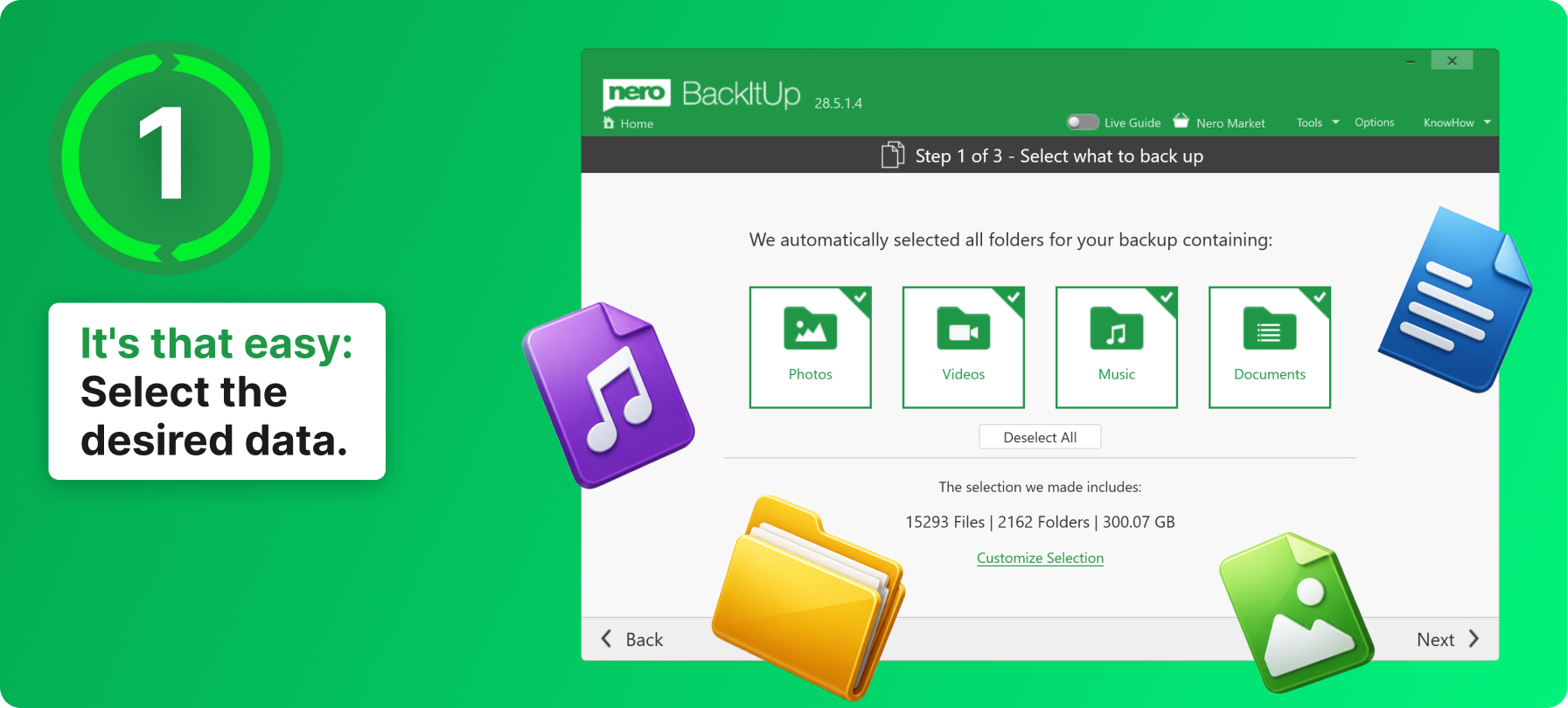
Nero's annotated screenshot (title bar shows build 28.5.1.4): step 1 of 3, with Photos, Videos, Music and Documents preselected and the file count and size of the selection.
Features
Automatic and continuous backups
Nero BackItUp runs a backup daily, weekly, monthly or at a time and date you set. Continuous backup goes further: it watches your folders and backs up new and changed files as you work.
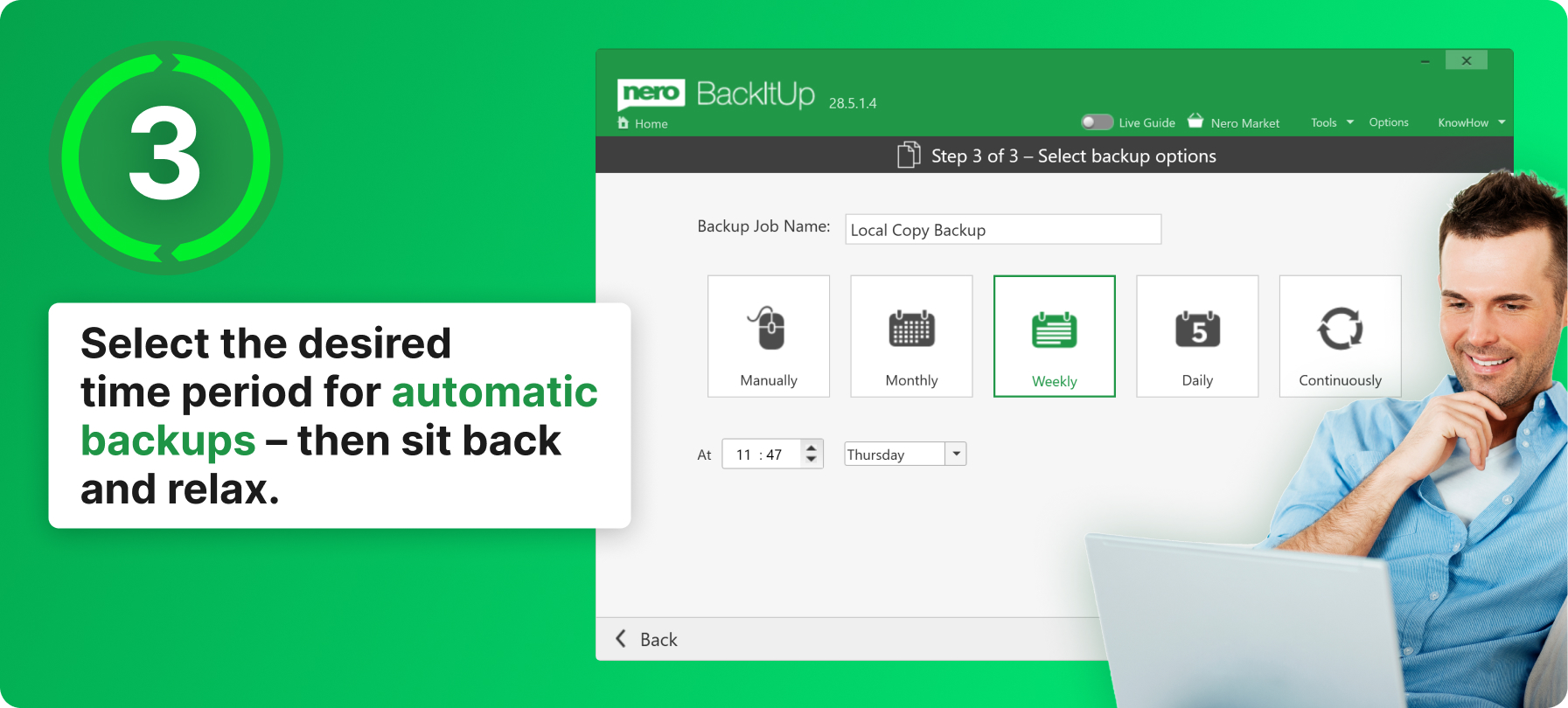
Step 3 of 3 in Nero's annotated screenshot: name the job and choose Manually, Monthly, Weekly, Daily or Continuously, with a time and weekday.
Back up to drives, NAS, discs or the cloud
Nero BackItUp writes backups to a second internal drive, an external USB drive, a NAS, or optical discs, and to OneDrive and Google Drive, from which you can also restore. Nero's Platinum Suite page also lists MagentaCLOUD, HiDrive, pCloud and QLOUD as backup targets.
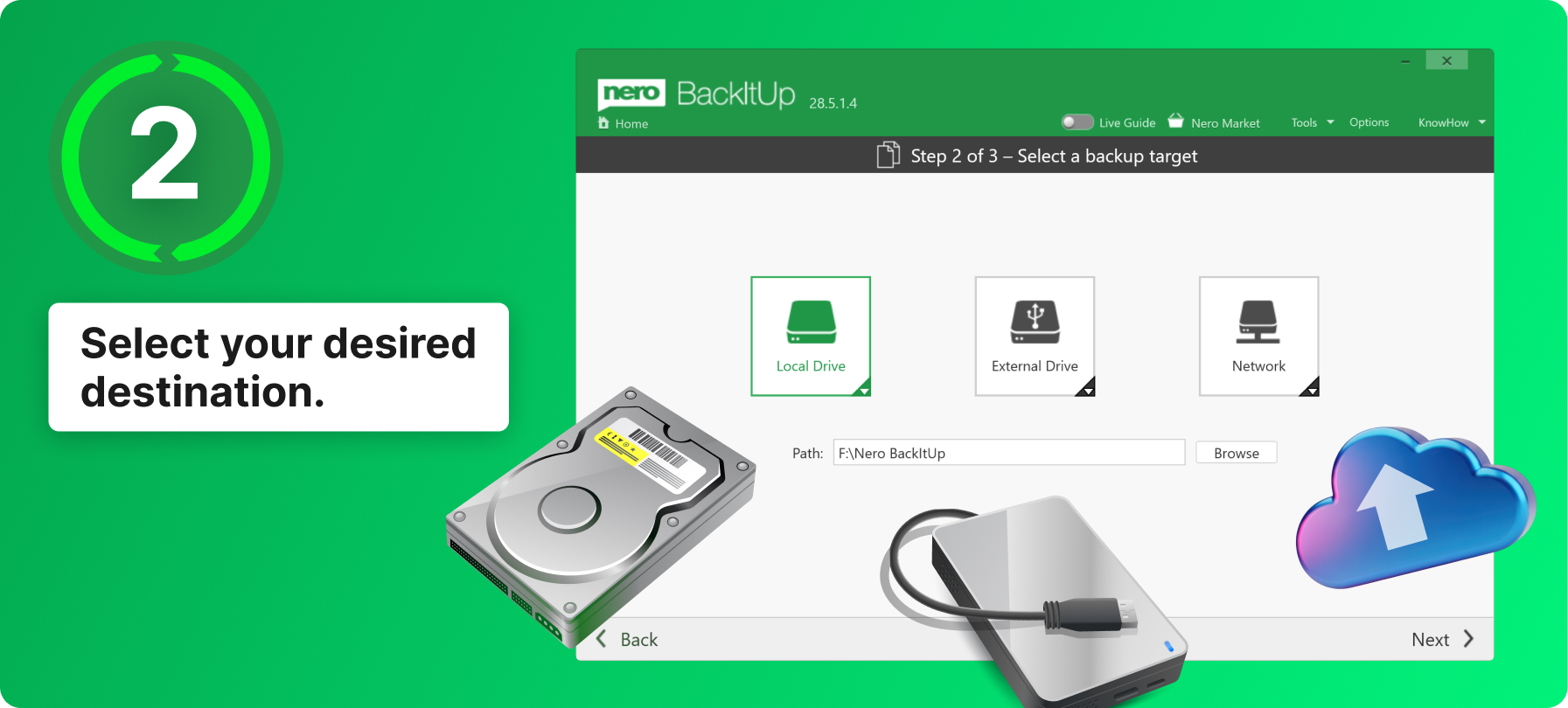
Step 2 of 3: choose Local Drive, External Drive or Network, and the target folder path.
Older versions of your files
Nero BackItUp keeps older versions of a file when you change it, not only the latest copy. If a document gets overwritten, corrupted or deleted, you can go back to an earlier version.
Encryption and compression
Nero BackItUp encrypts backups with hardware-accelerated AES 256-bit encryption behind a password you set, so a lost USB drive doesn't expose your files. Compression saves space on the target drive.
Folder synchronization
Nero BackItUp also syncs two folders three ways: merge both so they hold the same files, copy one way from left to right, or make a secondary folder mirror a primary one.
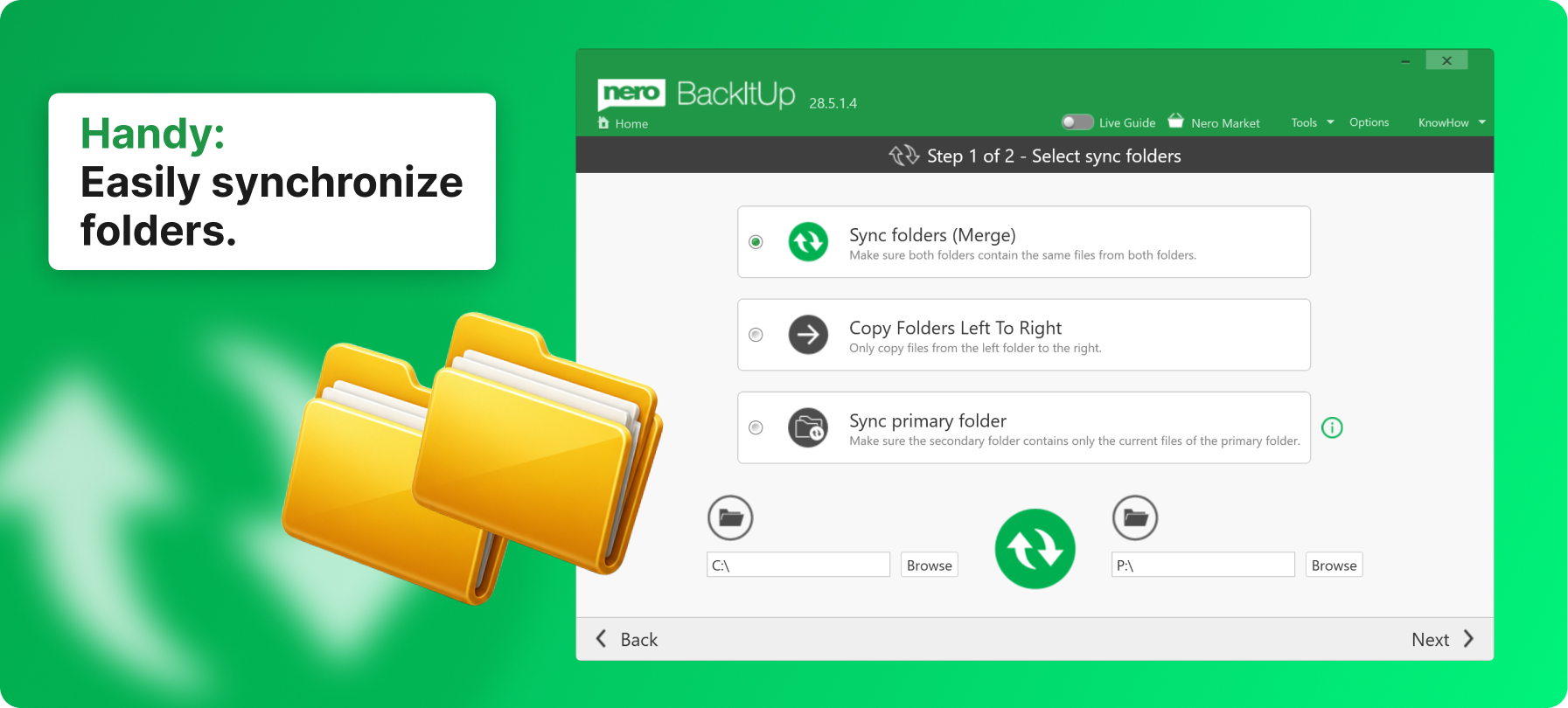
Nero's annotated screenshot of the sync options: Sync folders (Merge), Copy Folders Left To Right and Sync primary folder.
Benefits
- Backups actually happen. A schedule or continuous mode removes the "I'll do it later" step.
- Two copies, two places. Back up to a USB drive and to OneDrive, so a burglary or fire doesn't take both.
- Pay once. Many backup tools are now yearly subscriptions; this is a one-time license.
Real-World Uses
- Family photos: back up the Pictures folder every week to an external drive, encrypted.
- Home office: run continuous backup of a Documents folder to a NAS so the latest invoice is always copied.
- Off-site copy: send a second job to Google Drive or OneDrive.
- Laptop and desktop: use folder sync to keep a project folder the same on a USB stick and the PC.
Who It's For, and Who Should Skip It
Good fit: Windows home users who want their personal files copied automatically to a drive or cloud, with versions and encryption, and who prefer paying once.
Skip it if:
- You want a whole-disk image to restore Windows and your programs after a drive dies: BackItUp is built around files and folders, so a disk-imaging tool fits that job.
- You're on a Mac: Time Machine is built in, and BackItUp is Windows only.
- You'd also use Nero's burner, video editor or converter: Nero Platinum Suite 2027 includes BackItUp and about 20 other programs for $59.95 a year, the same price as BackItUp alone, though it renews.
- Your files already live in OneDrive or Google Drive with its own version history, and that's enough for you.
Usage Guide
- Download the free trial web installer (8 MB) from Nero and run it; it downloads and installs BackItUp.
- Activate with the license from your order. Nero programs need an internet connection to verify the license.
- Start a new backup. Step 1: keep the preselected folders or click Customize Selection.
- Step 2: choose Local Drive, External Drive or Network (or a cloud account) and the target path.
- Step 3: name the job, pick a schedule and set a password if you want the backup encrypted.
- To get files back, open the backup job and restore the files or an older version.
Before you buy
- Write down your backup password. Encrypted backups can't be opened without it.
- The trial installer on nero.com is still labelled 2026. It's a small web installer; the purchase is the 2027 version.
- One PC per license, activated online.
- Test a restore once after your first backup, whatever tool you use.
Buy NowDownload Free Trial
Where it falls short
- Cloud logins have broken before. Nero's own update notes for BackItUp 2024, 2025 and 2026 each fixed a problem signing in to or backing up to OneDrive, so keep BackItUp updated if you rely on the cloud target.
- No system image. It won't rebuild Windows and your installed programs after a disk failure.
- Support. Nero's Trustpilot reviews complain about slow email support, and one buyer couldn't re-download BackItUp after paying.
What Users Say
Recent independent reviews of BackItUp on its own are scarce; most coverage is of the Platinum Suite it ships in, and older BackItUp reviews describe versions with a different interface.
Trustpilot
Nero's Trustpilot page, which covers all Nero products, shows 3.0 out of 5 from about 350 reviews, with 28% five-star and 49% one-star. The criticism is mostly about the company rather than BackItUp:
- Fenton (1 star, January 2025): "I can no longer download the nero back it up I paid for the website is offline"
- Kevin Blunt (1 star, October 2025): "Customer service is shocking and if I do get a response it could take up to two weeks or more"
- eric star (5 stars, June 2025): "the products continuously improve, very nice"
- Bill Levinson (4 stars, November 2024): "None of this review reflects on the actual quality of Nero's software, which I believe is good."
The pattern: few people review a backup tool until something goes wrong. What's on record is complaints about Nero's support and downloads, not about lost backups.
Comparisons
Nero BackItUp vs Nero Platinum Suite 2027
Nero BackItUp 2027 costs $59.95 once. Nero Platinum Suite 2027 costs the same $59.95 but per year, renews automatically, and includes BackItUp plus Burning ROM, Nero Video, Recode, MediaHome, the AI photo tools and TuneItUp PRO. Buy BackItUp alone if backup is all you want and you'd rather not have a renewal; take the suite if you'd use the other programs.
Nero BackItUp vs Windows File History
Nero BackItUp adds what Windows File History doesn't: backups straight to Google Drive and OneDrive, AES 256-bit encryption with a password, compression, disc targets and folder sync. File History is free and already on your PC, so if one external drive is enough, try it first.
Editions and Pricing
| Edition |
Price on the order page |
License |
| Nero BackItUp 2027 |
$59.95 once |
1 PC, lifetime, no renewal |
FAQs
Is Nero BackItUp 2027 a subscription?
No. Nero BackItUp 2027 is a one-time purchase for 1 PC; the order page lists it as a lifetime license.
Can Nero BackItUp back up to a NAS?
Yes. Nero BackItUp lists a NAS as a backup target, through the Network option in step 2.
Does Nero BackItUp include cloud storage?
No. Nero BackItUp backs up to your own OneDrive or Google Drive account, so the storage space comes from that account.
Can Nero BackItUp restore Windows after a hard drive failure?
Nero BackItUp restores your files and folders, not a full Windows installation. Reinstall Windows and your programs first, then restore your files from the backup.
What happens if I forget my Nero BackItUp backup password?
A Nero BackItUp backup encrypted with AES 256-bit can't be opened without its password, so store the password somewhere safe outside the PC.
Is Nero BackItUp part of Nero Platinum Suite?
Yes. Nero Platinum Suite 2027 includes Nero BackItUp along with Burning ROM, Nero Video and other Nero programs, on a yearly plan.
System Requirements
- Windows 11 or Windows 10
- 2 GHz AMD or Intel processor, 1 GB RAM
- A backup target: second drive, external USB drive, NAS, disc burner, or a OneDrive or Google Drive account
- Internet connection to verify the license
Conclusion
Nero BackItUp 2027 is worth $59.95 if you want your personal files backed up automatically to a drive and a cloud account, encrypted, and you'd rather pay once than subscribe. The one reason to buy it is how little it asks of you: three steps, then it runs. The main reason not to is that it's a file backup only, and the same money buys a whole year of Nero Platinum Suite, which includes BackItUp and much more if you don't mind a renewal. If you need to restore all of Windows after a drive failure, pair it with a disk-imaging tool.
Buy NowDownload Free Trial