GoodSync: Back Up and Sync Your Files Between PCs, Drives, NAS and the Cloud
GoodSync is backup and file synchronization software that keeps folders matched between computers, external drives, network shares, NAS devices and cloud services such as Google Drive, OneDrive and Dropbox. It runs on Windows 10 and 11, Mac, Linux and NAS, and the Personal license costs $29.95 a year for up to five devices. A free version covers up to 3 jobs and 100 files.
Copying files to a backup drive by hand works until you forget, or until you can't tell which copy is newer. GoodSync compares both sides, copies only what changed, and can run on its own every time a file changes.
Quick facts
- Version: 12.11.9 for Windows, released October 6, 2026
- Developer: Siber Systems
- Runs on: Windows 10/11 (Personal), Windows Server 2016+ (Server edition), Mac, Linux, iOS, Android and NAS devices
- Connects to: Google Drive, OneDrive, SharePoint, Office 365, Dropbox, Box, Amazon S3, Backblaze B2, Azure, FTP, SFTP and WebDAV
- Price: $29.95 a year for GoodSync Personal on up to 5 devices
- Free version: home use only, up to 3 jobs and 100 files
- Guarantee: 30-day money-back
What we checked: the Windows installer we downloaded on October 13, 2026 is version 12.11.9.9 (83 MB), and GoodSync's order page listed the one-year Personal subscription for up to 5 devices at $29.95 on October 13, 2026.
Before you buy
GoodSync Personal is now a yearly subscription. In September and October 2026, several Trustpilot reviewers who had bought lifetime licenses reported that those licenses stopped working and that they were asked to pay yearly instead, and GoodSync's Trustpilot score is 1.6 out of 5. If you buy, plan on renewing every year. The free version is for home use only. Business use needs GoodSync Workstation or Server.
Download FreeBuy Now
Overview
GoodSync has been around for well over a decade and is made by Siber Systems, the company behind RoboForm. It does two jobs: backup, copying data one way to one or more destinations, and synchronization, keeping two locations identical in both directions. Jobs can run by hand, on a schedule, when files change or when a drive is connected, and as a background service when nobody is logged in. The Windows app gets frequent updates: 12.11.7, 12.11.8 and 12.11.9 all came out between September 4 and October 6, 2026.
Features
Backup and two-way sync in one tool
GoodSync creates backup jobs that copy one side to another and sync jobs that keep both sides up to date. Before copying, it analyzes both sides and shows exactly what will move in a tree view, so you can check the changes first. Block-level transfers copy only the changed parts of large files.
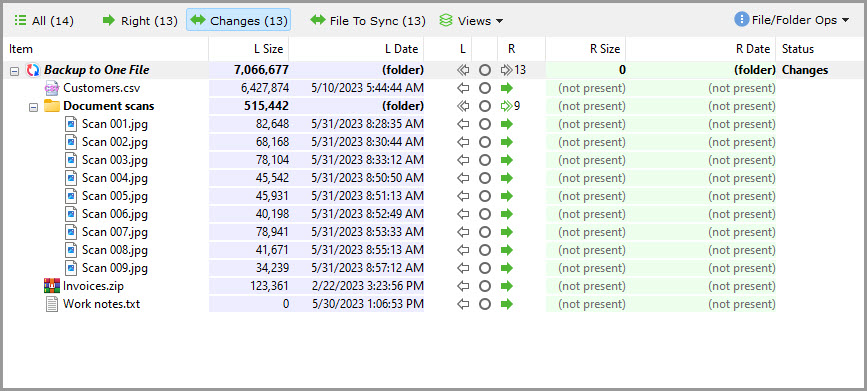
The analysis tree for a "Backup to One File" job: 13 changes to copy to the right side, with each file's size and date on the left and "not present" on the right.
Almost any destination
GoodSync works with local folders, external and network drives (SMB and AFP), FTP, SFTP and WebDAV servers, NAS boxes from Synology, QNAP, Western Digital and ASUSTOR, and cloud storage including Google Drive, OneDrive, SharePoint, Dropbox, Box, Amazon S3, Backblaze B2 and Azure.
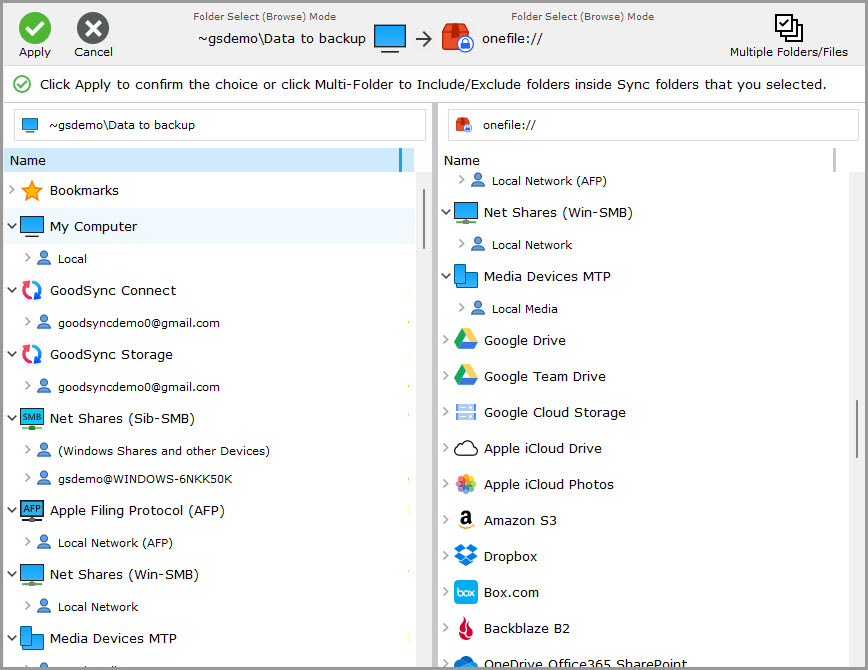
Choosing folders for a job: the local computer, GoodSync Connect and GoodSync Storage accounts and network shares on the left, and cloud services such as Google Drive, iCloud Drive, Amazon S3, Dropbox, Box and Backblaze B2 on the right.
Automation and unattended jobs
GoodSync can start a job when a file changes, when folders connect, when GoodSync starts, on a timer, at log-off or on a schedule, and can run it without the interface as a background service. Safety settings stop a sync if too many files changed at once and wait for locked files to clear.

A job's Auto options: run on file change, on folders connect, on GoodSync start, on a timer, on log-off or on a schedule, run unattended, and "Do not Sync if changed files more than 50%".
GoodSync Connect and Explorer
GoodSync Connect, included with any paid GoodSync product, registers your devices to one account and transfers data directly between them, peer to peer. GoodSync Explorer browses files on all those devices and cloud accounts from one familiar window.
Benefits
Backups that happen on their own. Once a job is set to run on change or on a schedule, you stop relying on memory.
One tool for many places. The same app handles your NAS, your cloud drives and your laptop.
Faster big-file updates. Block-level transfers move only what changed.
Real-World Uses
- Mirroring a photo library from a PC to a Synology NAS every night.
- Keeping a work folder identical on a desktop and a laptop.
- Backing up documents to OneDrive and to an external drive in one job.
- Pulling files from an FTP or SFTP server on a schedule.
Who It's For
GoodSync suits people with files spread across several computers, drives and cloud accounts who want them backed up and in sync automatically, and who are fine with a yearly subscription. Businesses need the Workstation or Server editions.
Usage Guide
- Install it. Download the Windows installer (83 MB) and approve the administrator prompt during setup.
- Create a job. Choose Backup or Synchronize and name the job.
- Pick both sides. Browse to a local folder, drive, NAS share or cloud account for each side.
- Analyze. Review what GoodSync plans to copy in the tree view.
- Sync and automate. Run it, then set the Auto options so it repeats on its own.
What Users Say
Trustpilot: 1.6 out of 5 from 34 reviews
GoodSync's Trustpilot page is dominated by one complaint, the end of lifetime licenses: 79% of reviews are one-star. In 2026, reviewers wrote:
"purchased a lifetime product, they cut me off and now want a yearly payment." sean, 1 star, October 2026
"I bought a lifetime license for GoodSync, but they suddenly cancelled it" Dan Rødgaard Andersen, 1 star, September 2026
"this suddenly stopped working without warning" Alex Dawson, 1 star, October 2026
The positive reviews are about the software itself:
"great product for doing own backups to disk" Fred Tropp, 4 stars, August 2026
"Goodsync is just a tool for backup and file synchronization." Anh-Vu Nguyen, 5 stars, "User of Goodsync since 2018", July 2025
(Trustpilot excerpts were read through a page summarizer.)
Tom's Guide
Daniel Ginn's Tom's Guide review (August 2021): "Goodsync is a backup solution you likely didn’t know existed. While it's a solid option for backing up your files and data, it lacks both innovation and stand-out features."
Reasons to buy: block-level data transfers, good value and third-party cloud integration. Reasons to avoid: no file versioning, a dated user interface and a lack of transparency on privacy.
The recurring themes: reviewers rate GoodSync as a capable, good-value backup and sync engine with very wide device and cloud support, but with a dated interface. Recent customer anger centers on licensing, not on the software working badly. Weigh that before paying, and start with the free version.
Comparisons
Free vs Personal
GoodSync Free has the same backup and sync engine, cloud and FTP support, but is limited to 3 jobs and 100 files and to home use. Personal removes those limits, includes GoodSync Connect for direct transfers between your devices, and comes with 24/7 ticket support.
Editions and Pricing
| Edition | Price | Covers |
|---|
| Free | $0 | Home use, 3 jobs, 100 files |
| Personal (sold here) | $29.95 a year | Up to 5 devices, home use |
| GoodSync Storage | From $19.99 a year (100 GB) | Online storage on GoodSync's servers, up to 8,000 GB |
Paid orders come with a 30-day money-back guarantee. Business users need GoodSync Workstation (one license per workstation) or GoodSync for Windows Server (one license per server).
FAQs
Is GoodSync free?
Yes, for home use with limits. GoodSync Free handles up to 3 jobs and 100 files. A Personal subscription at $29.95 a year removes the limits on up to 5 devices.
Does GoodSync still sell lifetime licenses?
No. GoodSync Personal is sold as a one-year subscription, and in 2026 some owners of older lifetime licenses reported they were moved to yearly billing.
Can I use GoodSync Personal at work?
No. GoodSync Personal and Free are for consumers only. Business use needs GoodSync Workstation or GoodSync for Windows Server.
Does GoodSync work with Synology or QNAP NAS?
Yes. GoodSync supports Synology, QNAP, Western Digital and ASUSTOR NAS devices, either as a destination or by running GoodSync on the NAS.
Does GoodSync keep old versions of files?
GoodSync is built for backup and sync rather than version history, and Tom's Guide listed the lack of file versioning as a drawback. If you need many past versions, check that before relying on it.
Does GoodSync run on Mac and Linux?
Yes. GoodSync has versions for Mac and Linux as well as Windows, plus iOS and Android apps.
System Requirements
- GoodSync Personal: Windows 10 or 11
- Windows Server: 2016 or later, with the Server edition
- Other platforms: Mac, Linux, NAS, iOS and Android versions
- Download: 83 MB installer
Conclusion
GoodSync is a capable, frequently updated backup and sync tool that connects to almost any drive, NAS or cloud service, with block-level transfers and flexible automation. Its interface is dated, and its move from lifetime licenses to subscriptions has angered long-time customers.
Try the free version on a small job first. If it fits your setup and a yearly $29.95 for five devices is acceptable, it's a solid choice.
Download FreeBuy Now