GoodSync for Mac: File Backup and Two-Way Sync Between Your Mac, Drives, NAS and Clouds
GoodSync for Mac is a backup and folder-sync tool from Siber Systems that copies files between your Mac and external drives, other computers, NAS boxes, FTP/SFTP servers and cloud services like Google Drive, OneDrive and Dropbox. GoodSync Personal costs $29.95 a year for up to 5 devices on Mac, Windows and Linux/NAS, and a limited free mode is available after the 15-day trial.
If you've ever kept a "Work" folder on your MacBook and a copy on a desktop or a NAS, you know the problem: you edit a file on one, forget to copy it, and a week later you don't know which version is current. GoodSync compares both sides, shows you exactly what changed, and copies only what needs copying, in one direction or both.
Quick facts
- Version: 12.11.9, released October 6, 2026
- Developer: Siber Systems, Inc. (Fairfax, Virginia), also the maker of RoboForm
- Runs on: macOS 10.13 and later, on Intel and Apple Silicon Macs
- Syncs with: local and external drives, Mac and Windows shares, NAS (Synology, QNAP, WD, ASUSTOR), FTP, SFTP, WebDAV, Google Drive, OneDrive, SharePoint, Dropbox, Box, Amazon S3, Backblaze B2, Azure, MEGA, Wasabi and GoodSync's own storage
- Price: GoodSync Personal, $29.95 per year for up to 5 devices (Windows, Mac and Linux/NAS)
- Trial: 15 days with every feature, then a free mode of 3 jobs with up to 100 files each
- Account: a free GoodSync Account is required to use the app
- Guarantee: 30-day money-back guarantee
What we checked: on October 17, 2026 we confirmed version 12.11.9 on GoodSync's Mac download page and Mac version history, the Mac installer size (64 MB), and the $29.95 one-year, 5-device price for GoodSync Personal on GoodSync's order page. We also read GoodSync's V10 end-of-life notice and the current Trustpilot reviews. We didn't run sync jobs with the Mac app ourselves.
Before you buy: it's a subscription now
GoodSync no longer sells lifetime licenses. GoodSync Personal is a yearly subscription. In a notice published in July 2026, GoodSync said perpetual licenses bought for GoodSync 10 can no longer be used for new activations or reactivations, because the old activation service no longer meets its security requirements. Owners of a purchased V10 license can claim a free GoodSync 12 Personal license from their GoodSync Account, but one Trustpilot reviewer says that replacement runs for one year only.
The change set off a wave of 1-star reviews in September and October 2026, and GoodSync's Trustpilot score is 1.6 out of 5 (34 reviews). Most of those complaints are about the licensing change rather than about how the app syncs, but if you dislike subscriptions, factor it in.
Download Free TrialBuy Now
Overview
GoodSync works with jobs. A job is a pair of folders, a Left side and a Right side, plus a direction. A Backup job copies changes one way. A Synchronize job copies changes, new files and deletions both ways. You press Analyze, GoodSync lists every difference it found with an arrow showing which way each file will go, and you press Sync when the plan looks right. Once a job works, you can put it on a schedule or let it run automatically whenever files change.
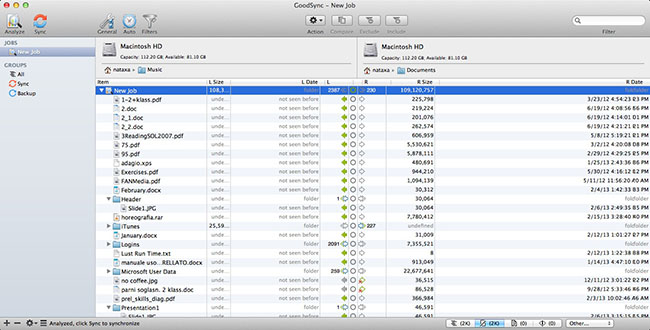
GoodSync's own Mac screenshot, from an older macOS: jobs on the left, the Left and Right folders across the top, and the file tree with sizes, dates and sync arrows below. Version 12 looks more modern but uses the same layout.
The Mac app is the same GoodSync 12 engine as the Windows version. Its version history says each Mac release includes "all common GoodSync changes" up to the matching Windows build, plus Mac fixes such as iCloud Drive and iCloud Photos sign-in. Version 12.11.3 (June 2026) added a visual sync tree for unattended jobs, with folder counters and file progress.
Features
Real two-way sync, not just backup
GoodSync for Mac keeps two folders identical in both directions. Edit a file on your laptop and a different one on the NAS, and both changes land on both sides. When the same file changed on both sides, automated conflict resolution keeps the winning version and saves the overwritten one, so nothing is silently lost. GoodSync also detects renamed and moved files and folders and repeats the move on the other side instead of copying everything again.
Runs on its own: real-time, scheduled or unattended
GoodSync can run a job when you click Sync, on a schedule, or in real time as files change. The unattended service keeps jobs running in the background with no one logged in to the app. A block-level transfer option copies only the parts of a large file that changed since the last run, which matters for big mailboxes, disk images and video projects.
One app for drives, servers and a dozen clouds
GoodSync connects natively to FTP, SFTP and WebDAV servers, Windows and Mac shares, and cloud storage including Google Drive, OneDrive, SharePoint, Dropbox, Box, Amazon S3, Backblaze B2, Azure, MEGA and Wasabi. You don't need each cloud's own sync client installed. A Personal license allows 4 simultaneous connections, and folder paths can start with a volume name so a removable drive is found wherever it's mounted.
GoodSync Connect: sync between your own devices over the internet
GoodSync Connect is GoodSync's own peer-to-peer transfer service, included with every license. Register your Mac, a Windows PC, a NAS or a phone to the same GoodSync Account and GoodSync links them directly, even across the internet, without going through a third-party cloud. The GoodSync Explorer add-on lets you browse and copy files on all of those devices and cloud accounts from one window.
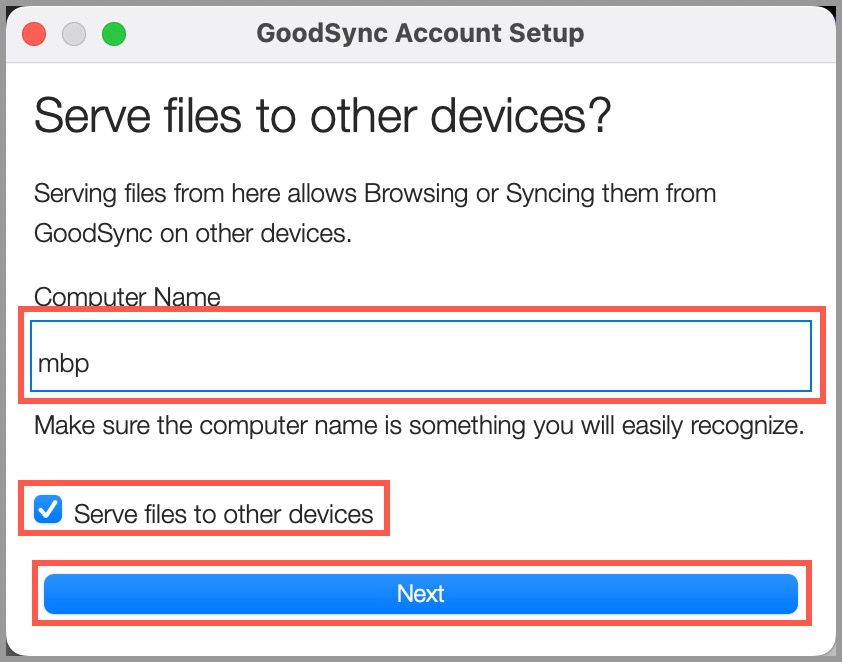
GoodSync Account Setup on a Mac: name the computer and tick "Serve files to other devices" if other GoodSync devices should be able to reach it.
Encryption, versions and checks
GoodSync applies AES-256 encryption to data in transit and at rest, keeps one or more previous versions of changed and deleted files, and can verify copies by MD5 checksum. Everything it does is written to a log and a change report, and include and exclude filters let you skip files by name, size or date.
Mac file details carried across
GoodSync for Mac copies extended attributes (where macOS stores things like custom folder icons), Unix permissions and, if you need it, file owners and ACLs. GoodSync's FAQ recommends keeping "Copy Permissions" on, because the execute bit is what makes scripts and apps runnable after a restore.
Benefits
- You see the plan before anything is copied. Analyze shows every change and its direction, which is reassuring when the other side is a client's server or your only photo archive.
- One license covers a mixed household. Five devices across Mac, Windows and Linux/NAS for one price, so the Mac, the family PC and the Synology can all run GoodSync.
- Less traffic on slow links. Block-level copying and rename detection mean a renamed 20 GB folder isn't uploaded again.
- No lock-in to one cloud. Your files go wherever you point the job, including storage you already pay for.
Real-World Uses
- Laptop and desktop in step: a two-way job between a MacBook and an iMac over GoodSync Connect, so the same project folder is current on both.
- Nightly NAS backup: a scheduled one-way backup of your Documents and Photos folders to a Synology or QNAP, keeping older versions of anything that changes.
- Offsite copy to Backblaze B2 or Amazon S3: a second job that sends the same folders to cheap cloud storage with AES-256 encryption.
- Website files: sync a local site folder with a web server over SFTP, uploading only what changed.
- Mac and Windows sharing a drive: keep a folder in sync between a Mac and a Windows PC on the same network, with GoodSync on both under one license.
Who It's For, and Who Should Skip It
GoodSync for Mac suits people who need files in the same state on several machines and storage targets: home users with a NAS, freelancers with a laptop and a desktop, and small offices mixing Macs and Windows PCs. It's at its best when you want control over exactly what goes where.
Skip it if you only need a simple full-Mac backup: Time Machine is built in and free. If you only use iCloud Drive across Apple devices, iCloud already syncs them. If a yearly fee is a deal-breaker, look at one-time-purchase backup apps instead. And if you just want to mirror one folder to one drive, GoodSync's free mode (3 jobs, 100 files each) is too small for most real folders, so it isn't a long-term free option either.
Usage Guide
- Install: download the Mac installer, open it, choose your language and click Install, then enter your Mac password when asked.
- Grant Full Disk Access: GoodSync asks for it on first launch. Click "Open Security Privacy Preferences", switch GoodSync on under Privacy & Security > Full Disk Access, and choose "Quit & Reopen".
- Sign in: log in to your GoodSync Account or create a free one. A new account needs a working email address for one-time passcodes.
- Name the Mac: choose a computer name and decide whether it should serve files to your other GoodSync devices.
- Create a job: click New Job, choose Backup or Synchronize, then pick the Left and Right folders (a local folder, a drive, a server or a cloud account).
- Analyze, then Sync: check the proposed changes and arrows, then click Sync. Turn on Auto options to run it on a schedule or on file change.
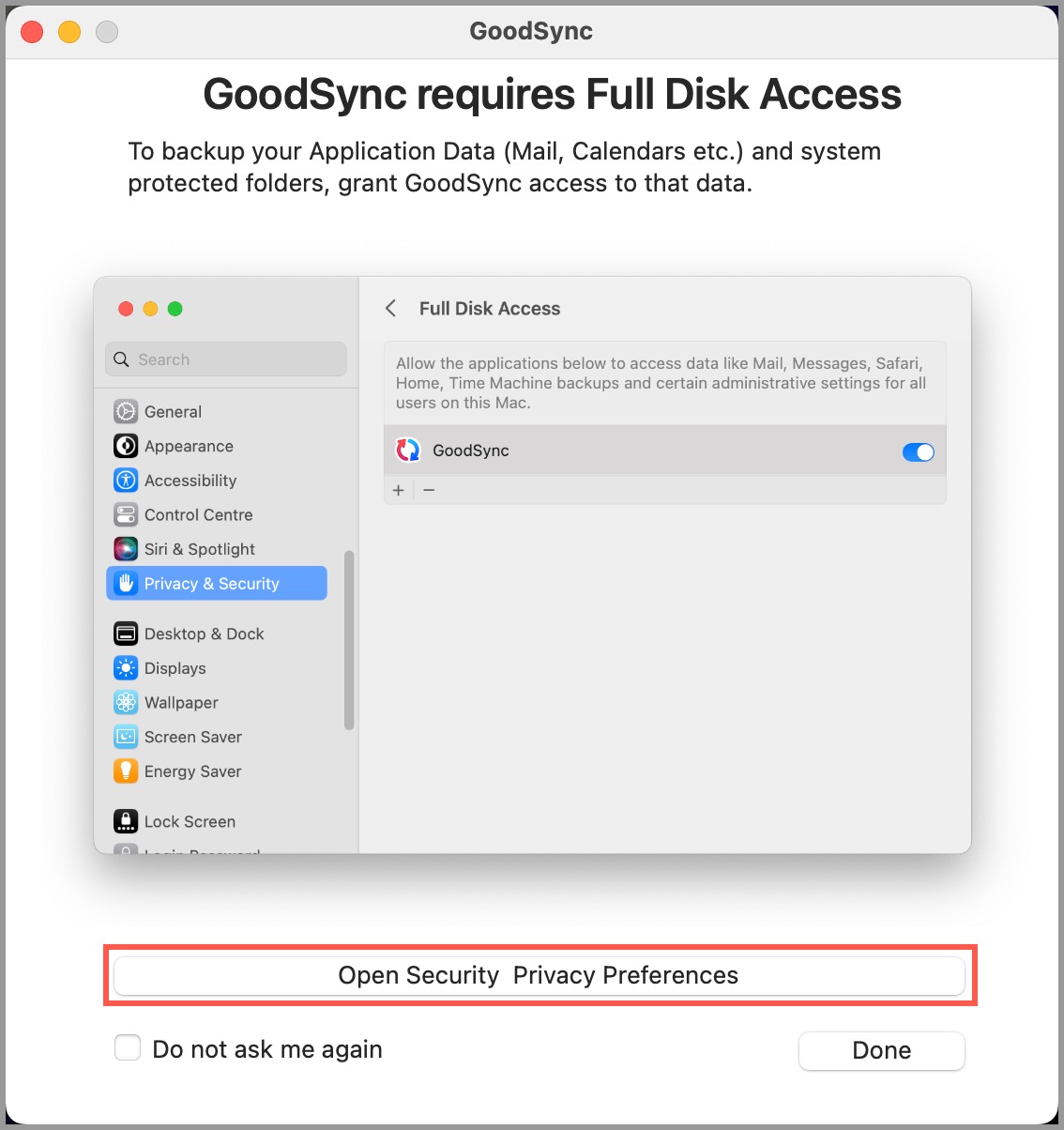
The Full Disk Access prompt on first launch. Without this permission GoodSync can't back up Mail, Calendars or other protected folders.
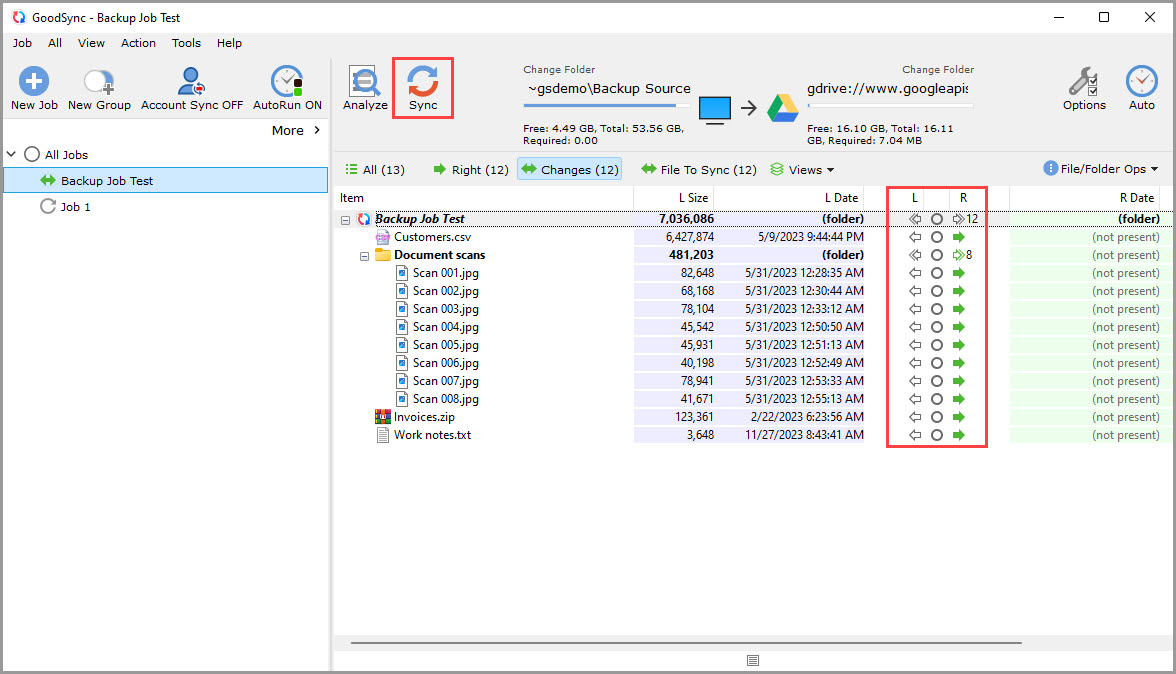
GoodSync 12's Analyze results for a backup job to Google Drive. This screenshot is from the Windows version: 12 files are queued to copy right, shown by the green arrows. The Mac app shows the same tree.
Tips
- Run Analyze and read the results before your first Sync on a two-way job, especially if both sides already contain files.
- If your Mac uses FileVault, GoodSync's background service doesn't start until someone logs in after a reboot, because the disk is still locked. Keep that in mind for an unattended Mac.
- Copying permissions only works when both sides support Mac file attributes. On a drive formatted for Windows, turn off "Copy Permissions" or format it in macOS.
- Turn on Account Sync to back up your jobs and server logins to your GoodSync Account, since the local settings file is encrypted and can't simply be copied to a new Mac.
Where it falls short
- Account required: you can't use GoodSync for Mac without signing in to a GoodSync Account, and a Trustpilot reviewer complained in 2020 that a release "won't work if your PC is not online."
- Large change sets: after Analyze, GoodSync shows only the first 5,000 changed items in the tree. You have to expand folders to see the rest.
- Mac-only errors: GoodSync's FAQ has a whole macOS section for "Operation not permitted" (missing Full Disk Access) and "Read-only file system" errors on some external drives.
- Support: several Trustpilot reviews complain about slow or unhelpful support, though others name helpful agents.
- Interface: it's a dense, technical window. A MacTech reviewer found the setup "somewhat confusing," and new users should expect a learning curve.
What Users Say
GoodSync has been around since 2009, so there's a long trail of opinion, and it splits sharply. Long-time users praise the sync engine. The recent reviews are dominated by anger over the end of perpetual licenses. The quotes below are excerpts, exactly as written.
Trustpilot: 1.6 out of 5 from 34 reviews
The newest reviews, from September and October 2026, are almost all 1-star and almost all about licensing:
- James Bulpin, 1 star, "Perpetual licenses are not perpetual" (October 2026): "The only fix is to give them more money, which isn't what "perpetual" means."
- Matt, 1 star, "Revoked my v10 license!" (September 2026): "GoodSync offered me a Version 12 license, but it is only valid for one year."
- sean, 1 star, "no forever like i purchased" (October 2026): "as other point out, purchased a lifetime product, they cut me off and now want a yearly payment."
- Alex Dawson, 1 star (October 2026): "I will not be paying a subscription for software that I don't use enough to pay a constant fee."
Trustpilot: the users who are happy with it
- Fred Tropp, 4 stars, "great product for doing own backups to disk" (August 2026): "All worked well. 5 jobs for different file types. thanks goodsync."
- Alexei, 4 stars, "Using GoodSync since 2008" (March 2024): "I can use Windows Explorer to open backed up versions of everything."
- Anh-Vu Nguyen, 5 stars, "User of Goodsync since 2018" (July 2025): "I don't understand why people dislike this product. They should put things in perspective."
- Robert Elliot, 4 stars, "Well done James" (June 2024), about support: "After such incompetent service I was finally connected to a guy named James who knew what he was talking about."
Older complaints, including on Mac
- Antoine van Diem, 1 star, "Do NOT buy GoodSync software, it is a scam!" (March 2021): "Do not buy this software: it is simply not working, certainly on a Mac!"
- Sidney, 2 stars, "Goodsync OK for windows 2 windows but issues elsewhere" (January 2020): "Goodsync iif used just for syncing between Windows systems then usually this works"
- Fabrice Voarick, 2 stars, "Awful support" (September 2020): "However, i have been using it for several years now and considering moving away despite it is a good piece of software."
MacTech and GoodSync's own testimonials
MacTech (November 2012, 7 out of 10) called GoodSync "a solid solution" for backups and keeping two Macs in sync, and liked that "Scheduled syncs and backups can be configured to run at whatever intervals work best for you." The same reviewer found that "Setting up the software was somewhat confusing." That review covers a much older version.
GoodSync's own site publishes undated user quotes. André Sartori: "Peer-to-peer is the way to go, because we avoid being enslaved by the cloud-based systems and risking having our data vulnerable." Mr. R. Brown of Halstead, Essex: "I'm using it to keep copies of around 4500 files in 25 directories in sync - brilliant tool, saved me the job of writing my own." These are hand-picked by the vendor and mostly from the Windows side.
The pattern: people who use GoodSync daily tend to like how reliably it syncs and how much it connects to. The complaints fall into three groups: the switch from perpetual licenses to a subscription (by far the loudest right now), support quality, and, in older reviews, a weaker experience on Mac than on Windows. Reviews that judge the current Mac version specifically are scarce.
Comparisons
GoodSync vs Time Machine
Time Machine backs up a whole Mac to one drive or network share, free, with almost no setup. GoodSync works folder by folder, syncs in both directions, and sends files to servers and cloud services Time Machine can't reach. Many Mac users run both: Time Machine for the full-system safety net, GoodSync for the folders that must exist in several places.
GoodSync vs cloud sync clients (iCloud Drive, Dropbox, OneDrive)
Cloud clients sync one special folder through one provider's servers. GoodSync syncs any folder to any target, including directly between your own machines with GoodSync Connect, so your files don't have to pass through a cloud at all. The trade-off is that GoodSync needs more setup per job.
Editions and Pricing
| Edition | Price | Term | Devices | What you get |
|---|
| Free | $0 | After the 15-day trial | Personal use | 3 jobs, up to 100 files each |
| GoodSync Personal | $29.95 | 1 year | Up to 5 (Windows, Mac, Linux/NAS) | Unlimited jobs and files, automation, unattended service, GoodSync Connect, mobile support, 24/7 ticket support |
| Workstation (business) | $49.95 | 1 year | 1 Windows PC or Mac | Business use, admin policies, central management option |
| GoodSync Storage (add-on) | From $29.95 | 1 year | Your account | 100 GB of online storage on GoodSync's servers (1, 2, 4 and 8 TB plans up to $1,599.95) |
The Personal edition is for consumers only. Business use needs a Workstation license, which also has its own Mac installer.
FAQs
Does GoodSync for Mac run natively on Apple Silicon (M1, M2, M3, M4)?
Yes. GoodSync for Mac supports both 64-bit Intel and Apple Silicon Macs, and needs macOS 10.13 or later.
Can I use one GoodSync license on my Mac and my Windows PC?
Yes. A GoodSync Personal subscription covers up to 5 devices across Windows, Mac and Linux/NAS. Licenses are kept in your GoodSync Account and activated on each device from the app, and removing an old device frees its license.
What happens when my GoodSync subscription ends?
GoodSync Personal is sold as a one-year subscription. Without a renewed license, GoodSync falls back to the free mode limits of 3 jobs with up to 100 files each, which is too small for most backup jobs.
Does my old GoodSync 10 license still work?
No. GoodSync says perpetual GoodSync 10 licenses can no longer be used for new activations or reactivations. If your GoodSync Account holds a purchased V10 license and no V12 Personal license, you can claim a free V12 Personal license from the Licenses tab of your account.
Can I use GoodSync Personal at work?
No. GoodSync Personal for Mac is for consumers only, with no business use. Businesses need the Workstation license ($49.95 per year per computer) or the Server and Control Center editions.
Can GoodSync for Mac back up iCloud Drive or iCloud Photos?
GoodSync for Mac can sign in to iCloud Drive and iCloud Photos: version 12.9.29 (May 2026) fixed the Apple one-time passcode prompt for both. You'll need to approve the sign-in with Apple's passcode.
Why does GoodSync for Mac show "Operation not permitted"?
GoodSync shows this when macOS hasn't given it Full Disk Access. Turn GoodSync on under System Settings > Privacy & Security > Full Disk Access and confirm with your password or Touch ID.
Is there a refund if GoodSync doesn't work for me?
Yes. GoodSync offers a 30-day money-back guarantee on purchases from its store, and the 15-day trial lets you test your real jobs first.
System Requirements
- macOS 10.13 or later
- 64-bit Intel or Apple Silicon processor
- About 64 MB for the installer download
- A free GoodSync Account and an internet connection for sign-in and activation
- Full Disk Access permission in macOS Privacy & Security
Conclusion
GoodSync for Mac is worth $29.95 a year if you need true two-way sync across several machines and storage types, especially in a home or small office that mixes Macs, Windows PCs and a NAS. The one reason to buy it is reach: a single tool, with one 5-device license, that syncs folders between drives, servers, a dozen cloud services and your own computers directly, with a preview of every change before it happens.
The main reason not to is the business model. It's a subscription only, GoodSync has cut off old perpetual licenses, and its Trustpilot score has fallen to 1.6 out of 5 as a result. If you only need a full Mac backup, Time Machine does that for free. Try the 15-day trial with your real folders before you pay.
Download Free TrialBuy Now