Short answer: buy SyncBackPro ($59.95 once) if you back up Windows PCs to drives, a NAS and your own cloud storage and want to own the license. Buy SyncBackSE ($44.95 once) if your backups never leave local drives, a NAS or an FTP server. Choose GoodSync ($39.95 a year for 3 devices) only if you need the same sync tool on Mac, Linux or a NAS as well as Windows, or direct device-to-device transfers, and you're fine paying every year.
At a glance
| Fact |
SyncBackPro |
SyncBackSE |
GoodSync Personal |
| Price | $59.95 once (V12) | $44.95 once (V12) | $39.95 a year (3 devices), $59.95 a year (6 devices) |
| License | Perpetual, 5 home PCs or 1 business install | Perpetual, 5 home PCs or 1 business install | Yearly subscription, home use only |
| Runs on | Windows 7 SP1 to 11, Windows Server | Windows 7 SP1 to 11, Windows Server | Windows 10/11, Mac, Linux, NAS, iOS, Android (Server needs a separate license) |
| Trial | 30 days, full, no registration | 30 days, full, no registration | 15 days of paid features, then free mode (3 jobs, 100 files) |
| Cloud storage (Google Drive, OneDrive, S3, B2...) | ✓ | ✗ | ✓ |
| SFTP | ✓ | ✗ (FTP and FTPS only) | ✓ |
| Versioning | ✓ with delta-copy | ✓ with delta-copy | ✓ Version History Control |
| Locked and open files | ✓ (Volume Shadow Copy) | ✓ (Volume Shadow Copy) | ✓ |
| Block-level transfer of changed parts | Delta-copy for versions | Delta-copy for versions | ✓ on every sync |
| Direct device-to-device transfers | Via SyncBack Touch on your network | Via SyncBack Touch on your network | ✓ GoodSync Connect, over the internet |
| Central management | ✓ SBMS, free with V12 | ✗ | Control Center, business licenses only |
| Refund | Within 30 days | Within 30 days | Within 30 days of purchase or renewal |
What we checked
- The price each order page charges, and what the license covers (term, devices, home or business use), from each vendor's store and license terms.
- The current version: the GoodSync Windows installer's own file version, and 2BrightSparks' download page and change log for SyncBack.
- Each product's feature comparison: GoodSync's Free vs. Paid page, and 2BrightSparks' Free / SE / Pro comparison.
- Trial terms, refund rules and what happens when a subscription or upgrade plan lapses.
- Reviews on Trustpilot, Capterra (via Software Advice), G2 and Tom's Guide.
What we checked: the GoodSync installer we downloaded on November 21, 2026 is version 12.11.14.4, and GoodSync's order page listed Personal at $39.95 a year for 3 devices and $59.95 for 6 on November 21, 2026. The SyncBack order page charged $59.95 for SyncBackPro V12 and $44.95 for SyncBackSE V12 on November 20, 2026, with version 12.1.34.0 current on November 21, 2026. We compared features, prices, trials and license terms, and didn't run a sync job or time a backup with any of them.
SyncBackPro: the one-time-purchase pick for Windows
SyncBackPro from 2BrightSparks · $59.95 once for version 12 · Windows 7 SP1 to 11 and Windows Server · 30-day full trial
Best for: Windows users and small offices backing up to drives, a NAS, SFTP servers and their own cloud storage, who'd rather pay once.
SyncBackPro is the top edition of SyncBack, a Windows backup and sync program that has been around since the first freeware release in 2003. You build profiles: a source, a destination and a job type (backup, mirror or two-way sync), then run them by hand, on a schedule, when a USB drive is plugged in or as soon as files change. Version 12.1.34.0 came out on October 22, 2026.
What Pro adds over the cheaper SE edition is reach. It backs up to and from Amazon S3 and S3-compatible storage, Google Drive, Google Cloud Storage, Azure, OneDrive (personal and Business), SharePoint, Dropbox, Box, Backblaze B2, pCloud, Cloudflare R2, WebDAV and more, plus SFTP and email servers. It also brings file integrity checks, a stop switch when too many files change at once (a common ransomware sign), S.M.A.R.T. drive-failure warnings, scripting, and the SyncBack Management System (SBMS) for pushing profiles to many PCs and seeing every result in one console.

The SyncBackPro V12 main window: five backup profiles, one ("Website") running as a simulated run with its progress, time left and file count, and the New, Modify, Run, Schedule and Restore buttons along the bottom.
Backups land as ordinary files or standard Zip and 7z archives (256-bit AES if you want it), so you can open them without SyncBack installed. The catch is the license model: V12 never expires and 12.x updates are free, but V13 will be a paid upgrade unless you keep Upgrade Assurance ($14.95 a year), and free support ends 3 months after purchase.
What we like
- One payment covers V12 for good, on up to 5 home PCs
- More than 15 cloud services plus SFTP and email backup
- Versioning with delta-copy, locked-file copying at no extra charge
- Plain-file or Zip/7z backups, no proprietary format
- SBMS central management included with V12
Watch out for
- Windows only; Macs and Android phones are reached through SyncBack Touch
- Hundreds of options and a learning curve
- Major versions are paid upgrades without Upgrade Assurance
- Files and folders only, no bootable system image
What users say
On Software Advice (Capterra's reviews), SyncBackPro scored 4.8 out of 5 from 111 reviews, and 2BrightSparks' Trustpilot page shows 4.9 out of 5 from 198 reviews.
"It has everything I need. Compression, encryption, versioning, SFTP through custom ports, incremental backup, scheduled backup, easy to use." Matthew, Translation and Localization, 5/5, Capterra, October 2023
"Initial setup and configuration is challenging with so many options and settings." Jt, Management Consulting, 5/5, Capterra, October 2023
"I've tried with 2 major initiatives, both failing miserably. Copy from file server to NAS device was so slow, the job never finished." A reviewer quoted on Software Advice
Buy SyncBackProDownload SyncBackPro Free Trial
SyncBackSE: the same engine without the cloud
SyncBackSE from 2BrightSparks · $44.95 once for version 12 · Windows 7 SP1 to 11 and Windows Server · 30-day full trial
Best for: homes and small offices whose backups go to external drives, a NAS or an FTP server.
SyncBackSE is the middle SyncBack edition, and for many home users it's the one that makes sense. It has the same profiles, scheduling, real-time and on-insert triggers, versioning with delta-copy, Volume Shadow Copy for open files, Fast Backup, compression and AES encryption as Pro. It also talks FTP and FTPS, copies to and from phones and cameras over MTP, and works with SyncBack Touch on Macs, Linux and Android devices on your network.
What SE leaves out is everything cloud (no Google Drive, OneDrive, S3 or Backblaze as a destination), SFTP, email backup, scripting, integrity checks, S.M.A.R.T. warnings and SBMS. A common workaround is to back up into the local OneDrive or Google Drive folder and let the cloud app upload it, but then the cloud copy is only as good as that app's sync.
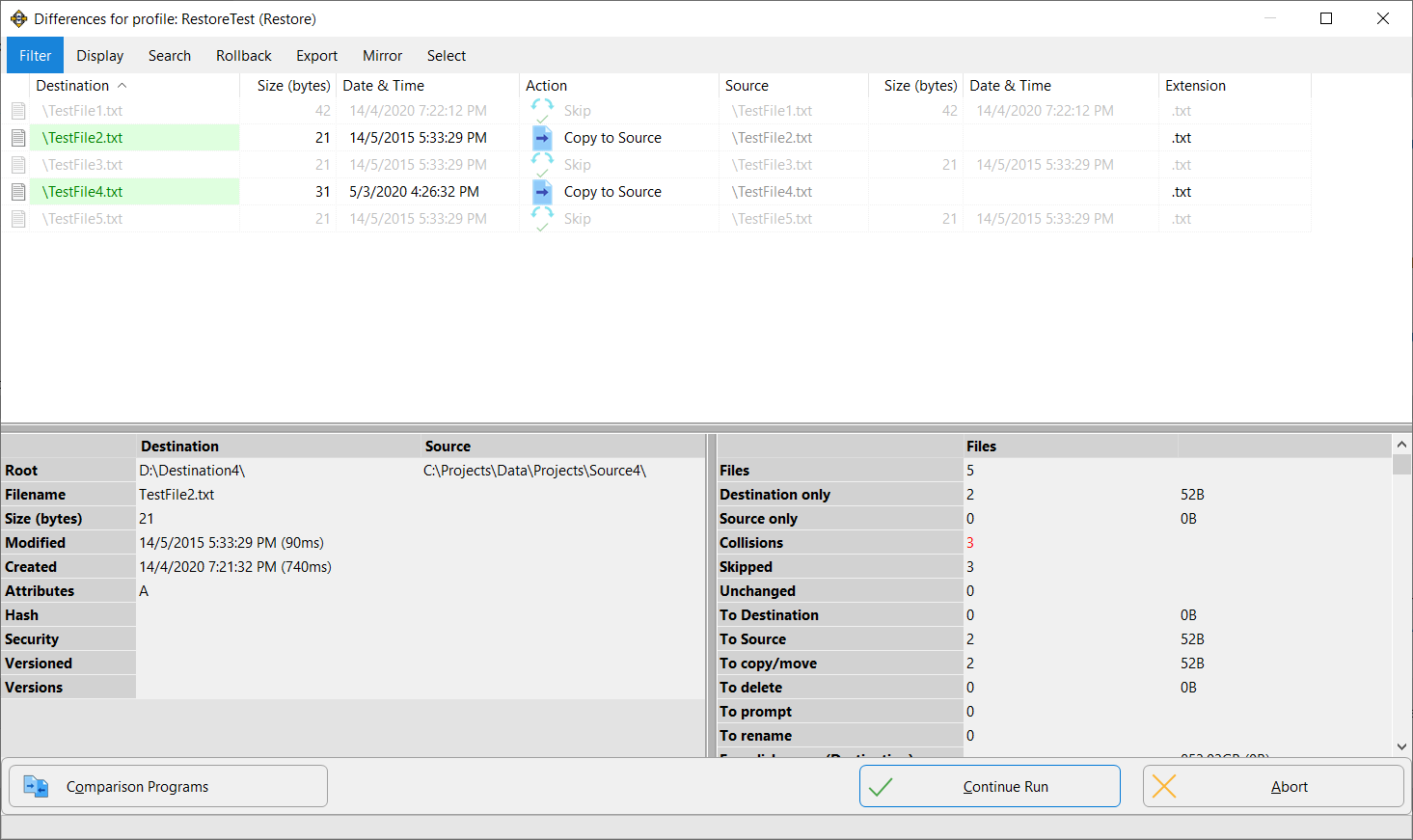
SyncBack's Differences window during a restore: two test files will be copied back to the source and three are skipped, with the file details and totals in the lower panels before you click Continue Run.
What we like
- $15 cheaper than Pro with the same local backup engine
- Versioning and locked-file copying, which SyncBackFree lacks
- Perpetual license for 5 home PCs
- Upgrade to Pro later if you need cloud storage
Watch out for
- No cloud storage and no SFTP
- Same learning curve and dated look as Pro
- Some users report slow copies over a LAN
What users say
SnapFiles users rate SyncBackSE 5 out of 5 on average from 11 reviews, most of them on older versions.
"Don't bother with the freeware version-go directly to SE,as the added features make this really worthwhile." madmik, SnapFiles, August 2012
"Tried twice. Both the time, after about 2 and half an hour aborted the operation. Then completed the action in Windows Explorer, by Drag & Drop, Within less than 3 and half a minute." just.little.dust518, SnapFiles, July 2018 (version 8.5)
Buy SyncBackSEDownload SyncBackSE Free Trial
GoodSync: the cross-platform pick, sold by subscription
GoodSync from Siber Systems · $39.95 a year for 3 devices or $59.95 a year for 6 · Windows 10/11, Mac, Linux, NAS, iOS and Android · 15 days of paid features, then a limited free mode
Best for: people syncing between Windows, a Mac, a Linux box or a NAS who want one tool on all of them.
GoodSync does one-way backup and two-way sync between local folders, network shares, NAS devices, FTP/SFTP/WebDAV servers and cloud services including Google Drive, OneDrive, SharePoint, Dropbox, Box, Amazon S3, Backblaze B2, Azure, MEGA and Wasabi. It analyzes both sides first and shows every planned change in a tree, transfers only the changed blocks of large files, and can run as an unattended background service. Version 12.11.14 came out on November 15, 2026, and updates arrive every few weeks.
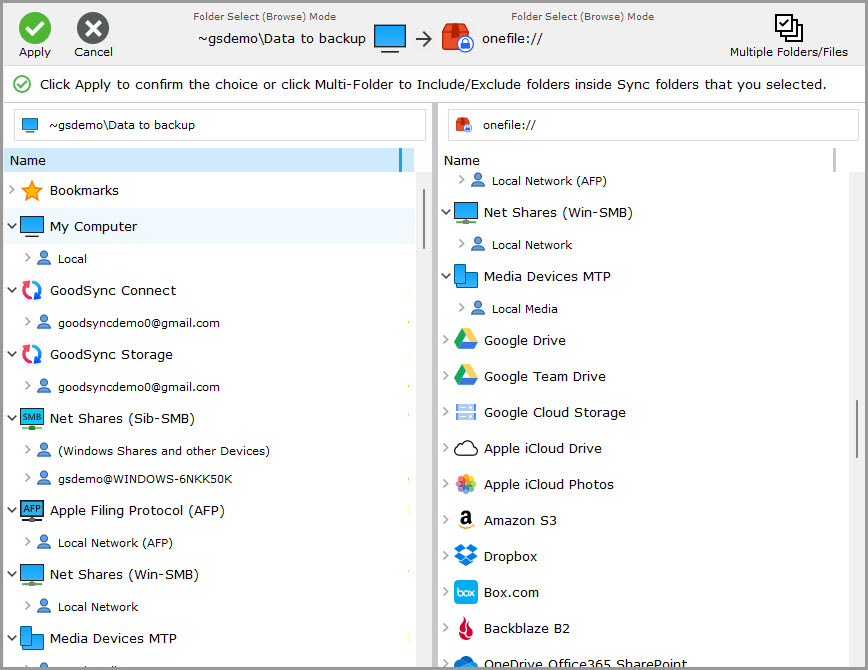
Picking the two sides of a GoodSync job: My Computer, GoodSync Connect, GoodSync Storage and network shares on the left, and destinations such as Google Drive, Apple iCloud Drive, Amazon S3, Dropbox, Box.com and Backblaze B2 on the right.
Its two real advantages over SyncBack are platforms and GoodSync Connect. GoodSync has native apps for Mac, Linux and NAS boxes (Synology, QNAP, Western Digital, ASUSTOR), and the Personal subscription covers Windows, Mac and Linux/NAS. GoodSync Connect, included with any paid license, links your own devices directly over the internet, so a laptop on hotel Wi-Fi can sync with the PC at home without a cloud service in the middle.
The downside is the business model. GoodSync Personal is a yearly subscription, the license becomes void when a payment lapses, and it's for home use only (work PCs need the Workstation or Server licenses). In September and October 2026, owners of old "lifetime" licenses flooded Trustpilot after their version 10 activations stopped working, which is why GoodSync's score there is 1.6 out of 5.
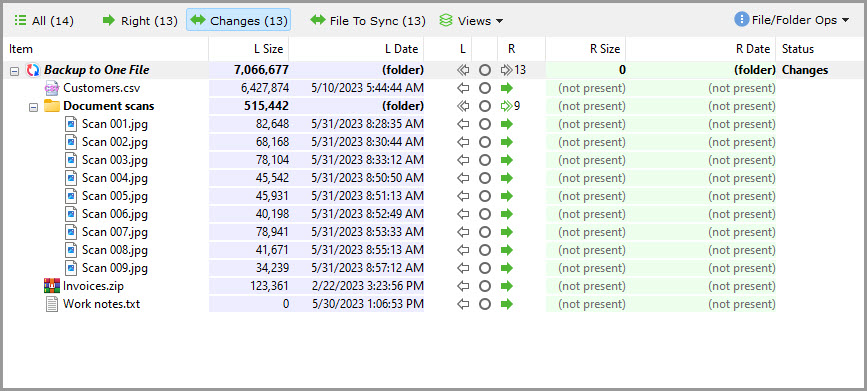
The GoodSync analysis tree for a "Backup to One File" job: 13 changes to copy to the right side, with each file's size and date on the left and "(not present)" on the right.
What we like
- Native apps for Windows, Mac, Linux, NAS and mobile
- GoodSync Connect for direct device-to-device sync over the internet
- Block-level transfers and a clear preview of every change
- Frequent updates
Watch out for
- Yearly subscription; it stops working if you stop paying
- Old lifetime licenses were cut off in 2026, and Trustpilot is 1.6 out of 5
- Personal license is for home use only
- Dated interface
What users say
GoodSync has 1.6 out of 5 on Trustpilot from 34 reviews, 79% of them one-star, nearly all about licensing rather than the software.
"The only fix is to give them more money, which isn't what "perpetual" means." James Bulpin, 1 star, Trustpilot, October 2026
"All worked well. 5 jobs for different file types." Fred Tropp, 4 stars, Trustpilot, August 2026
Tom's Guide (Daniel Ginn, August 2021): "While it's a solid option for backing up your files and data, it lacks both innovation and stand-out features."
Buy GoodSyncDownload GoodSync Free
Price and licensing: SyncBack costs less within two years
SyncBack is the cheaper buy for anyone keeping it more than a year. SyncBackPro's $59.95 is a one-time payment for version 12, while GoodSync's $39.95 recurs every year, so GoodSync costs more from the second year on, even before you add devices. SyncBack's license also covers 5 home PCs against GoodSync's 3 (or 6 for $59.95 a year).
What you pay over three years (USD, regular prices, no optional upgrade plan)
SyncBackSE (5 home PCs)$44.95
SyncBackPro (5 home PCs)$59.95
GoodSync Personal, 3 devices ($39.95 a year)$119.85
Order page prices checked on November 20 and 21, 2026. SyncBack's optional Upgrade Assurance ($14.95 a year) adds major-version upgrades and support after 3 months.
Two things narrow the gap. If you want SyncBack's next major version and ongoing support, add Upgrade Assurance at $14.95 a year, which brings SyncBackPro to $89.85 over three years, still below GoodSync. And GoodSync is running a Black Friday and Cyber Monday sale: 40% off new subscriptions ($23.95 for 3 devices, $35.95 for 6) until November 30, 2026. Renewals are charged at the regular price.
For work use, SyncBack counts each installation (a server is one), with no server surcharge. GoodSync needs a separate Workstation or Server subscription for business use, and its Server license is required on any Windows Server machine.
Features: GoodSync for platforms, SyncBackPro for control
SyncBackPro has the deeper Windows feature set; GoodSync has the wider platform reach. Both do one-way backup and two-way sync, real-time and scheduled jobs, versioning, locked-file copying, encryption, and cloud and SFTP destinations. Where they differ:
- Other operating systems. GoodSync runs natively on Mac, Linux and NAS devices. SyncBack runs only on Windows and reaches Macs, Linux and Android devices on your network through the free SyncBack Touch service, with nothing for iPhone or iPad.
- Remote devices. GoodSync Connect links your devices peer to peer over the internet. SyncBack Touch is built for devices on your own network.
- Admin and safety tools. SyncBackPro adds file integrity checks, PAR2 recovery data (with Upgrade Assurance), S.M.A.R.T. warnings, scripting, secrets-manager support and SBMS central management. GoodSync's equivalent management console is a business product.
- Large files. GoodSync's block-level transfer sends only the changed parts of a big file on every sync. SyncBack's delta-copy saves space in version history.

A GoodSync job's Auto options: sync on file change, on folders connect, on GoodSync start, on a timer, on logoff or on a schedule, run unattended, and "Do not Sync if changed files more than 50%".
Ease of use and support
GoodSync takes fewer decisions to set up; SyncBack rewards patience. A GoodSync job asks for a direction (backup or sync), two sides and an automation option, and its analysis tree makes the result easy to check. SyncBack's Easy mode is simple too, but Expert mode opens hundreds of settings, and reviewers on Capterra and G2 repeatedly mention the time it took to get the first profile right. Both interfaces look dated.
On support, 2BrightSparks' Trustpilot reviews (4.9 out of 5) are mostly thank-you notes to its support staff, while GoodSync's (1.6 out of 5) are mostly about the licensing change. GoodSync includes 24/7 ticket support while the subscription is paid. SyncBack's free support lasts 3 months, then needs Upgrade Assurance.
Trustpilot rating (out of 5)
2BrightSparks (SyncBack), 198 reviews4.9
Ratings as shown on Trustpilot in November 2026. Trustpilot notes that 2BrightSparks hasn't recently invited customers to review.
Which should you choose?
| Your situation |
Pick |
Why |
| Windows PCs backing up to a drive, NAS and cloud storage | SyncBackPro | Cloud and SFTP with a one-time price |
| Backups only go to USB drives, a NAS or FTP | SyncBackSE | Same local engine for $15 less |
| Windows and Mac (or Linux) folders kept in sync | GoodSync | Native apps on every side |
| Laptop syncing with a home PC from anywhere, no cloud | GoodSync | GoodSync Connect works over the internet |
| Small office with a Windows server and several PCs | SyncBackPro | No server surcharge, free SBMS console |
| You refuse subscriptions | SyncBackPro or SE | Perpetual V12 licenses |
Our pick for most Windows users is SyncBackPro. It does everything GoodSync does on Windows, adds stronger admin and safety tools, and costs less than two years of GoodSync. Drop to SyncBackSE if you're sure you'll never back up to a cloud service.
Who should skip each one: skip SyncBackPro and SE if you need a native Mac or Linux app, or a bootable image of your whole system (neither SyncBack nor GoodSync makes one; see our imaging tools comparison). Skip SyncBackSE if any backup should reach the cloud. Skip GoodSync if you're on Windows only, use it at work without a business license, or don't want a program that stops when a payment fails.
What commonly goes wrong
- Two-way sync spreads mistakes. A deleted or ransomware-encrypted file is synced to the other side too. Use backup or mirror jobs with versioning for protection, and keep two-way sync for working folders. GoodSync's "Do not Sync if changed files more than 50%" and SyncBackPro's changed-files limit help catch the worst case.
- Skipping the dry run. Both tools show what they'll copy or delete first (GoodSync's Analyze, SyncBack's simulated run). Check it before the first real run, especially for a mirror.
- Slow network copies. Some SyncBack users report jobs to a NAS or another PC running far slower than a copy in Explorer. Whichever tool you try, time a real job against your own NAS during the trial.
- Assuming file backup restores Windows. All three copy files and folders. None can rebuild a dead system drive.
- Never testing a restore. Restore a few files, or roll back to a date, during the trial.
FAQs
Is GoodSync better than SyncBack?
GoodSync is better only if you need it on Mac, Linux or a NAS, or want GoodSync Connect for internet syncing between your devices. On Windows alone, SyncBackPro matches its backup and sync features, adds integrity checks, scripting and central management, and costs $59.95 once instead of $39.95 every year.
Is GoodSync free?
GoodSync has a free mode for home use, limited to 3 jobs and 100 files, after a 15-day period with all paid features. GoodSync Personal removes the limits for $39.95 a year on 3 devices.
Can I still buy a lifetime GoodSync license?
No. GoodSync Personal is sold only as a one-year subscription, and in 2026 owners of old version 10 lifetime licenses reported that their activations stopped working. SyncBackPro and SyncBackSE are the perpetual alternatives.
What's the difference between SyncBackPro and SyncBackSE?
SyncBackPro adds cloud storage, SFTP, email backup, scripting, file integrity checks, S.M.A.R.T. warnings and SBMS central management to SyncBackSE's engine. Both have versioning, locked-file copying, encryption and FTP. Pro costs $59.95 and SE $44.95.
Is SyncBackFree enough?
SyncBackFree is enough for simple scheduled copies to a drive. It has no versioning, no locked-file copying and doesn't run on Windows Server, so if you want to roll back a file you overwrote last week, SyncBackSE is the step up.
Does SyncBack work on a Mac?
SyncBack runs only on Windows. A Windows copy of SyncBackSE or SyncBackPro can back up a Mac on the same network through the free SyncBack Touch service, but if the Mac needs to run the sync itself, GoodSync is the one with a native Mac app.
Can I use GoodSync Personal or SyncBack at work?
GoodSync Personal is for home use only, so a business needs GoodSync Workstation or Server licenses. SyncBackPro and SyncBackSE can be used at work with one license per installation (a server counts as one), and volume discounts start at 2 licenses.
Can I get a refund?
Both vendors refund within 30 days. GoodSync refunds Personal licenses within 30 days of purchase or renewal, but not discounted orders it negotiated or Workstation and Server licenses. 2BrightSparks refunds SyncBack within 30 days, with requests accepted from day 5 and subject to approval.