SyncBackSE: Versioned Windows Backups to Drives, NAS and FTP for a One-Time $44.95
SyncBackSE is a $44.95 Windows backup and file sync program from 2BrightSparks for home users, families and small offices. It copies, mirrors and synchronizes your folders to external drives, network shares, NAS boxes and FTP servers, keeps earlier versions of changed files, and copies files that are open or locked, all under a perpetual license that covers up to 5 home PCs.
It's the middle edition of SyncBack: a big step up from the free version (versioning, locked files, encryption, Mac and Android devices through SyncBack Touch), without the cloud storage and admin features you pay extra for in SyncBackPro.
Quick facts
- Version: 12.1.34.0, released October 22, 2026 (V12 first shipped in March 2026)
- Developer: 2BrightSparks Pte Ltd, maker of SyncBack since 2003
- Platform: Windows 11, 10, 8 and 7 SP1, plus Windows Server 2008 R2 SP1 and newer, 32-bit and 64-bit
- Price: $44.95 for a perpetual V12 license. Optional Upgrade Assurance is $14.95 a year
- License: up to 5 computers or devices at one home address, or 1 installation per license for business use
- Trial: fully featured for 30 days, no registration
- Refunds: full refund if requested within 30 days of purchase (requests are accepted from day 5, subject to approval)
- What we checked: the order page charged $44.95 for SyncBackSE V12 and $14.95 a year for Upgrade Assurance on November 20, 2026, and the vendor's download page listed SyncBackSE 12.1.34.0 on November 20, 2026. We didn't install it or run a backup ourselves
Download Free TrialBuy Now
Overview
SyncBackSE works with profiles. Each profile is a source, a destination and a job type: Backup (one-way copy), Mirror (make the destination match the source) or Synchronization (changes flow both ways). You run profiles by hand, on a schedule, when a USB drive is plugged in, at Windows startup or shutdown, or as soon as files change. Groups let you run several profiles in a row, such as "copy to the USB drive, then to the NAS".
Backups are plain files or standard Zip archives, so you can browse them in Windows Explorer. Easy mode keeps the setup to the essentials, and Expert mode opens every option.

The SyncBack V12 main window (this screenshot from the vendor's help file shows the Pro title bar): profiles with their last run and result, a progress panel for a running backup, and the New, Modify, Run, Schedule and Restore buttons.
Features
Keep previous versions of your files
SyncBackSE keeps earlier versions of files that get changed or deleted, so a spreadsheet you overwrote last week, or a folder hit by ransomware, can be rolled back. Optional delta-copy stores only the changed parts of each new version, which saves space on the backup drive. The vendor positions versioning as SE's main protection against ransomware, and the free edition doesn't have it.
Copy open and locked files
SyncBackSE uses the Windows Volume Shadow Copy Service to back up files that are in use, such as an open Outlook data file or a database, at no extra charge, even on Windows Server.
Fast, incremental and differential backups
SyncBackSE's Fast Backup skips rescanning the destination on every run, which makes nightly jobs to a NAS or FTP server much quicker. Incremental and differential backups, real-time backup when files change and backup on device insertion are included, along with continuous data protection.
Compression and encryption
SyncBackSE compresses backups (with parallel compression) and encrypts them with 256-bit AES in standard Zip or 7z formats. Version 12 adds password generators and strength checkers, and with Upgrade Assurance, a Password Backup feature that keeps a record of the passwords protecting your backups and reminds you to check them.
FTP, MTP devices and SyncBack Touch
SyncBackSE backs up to FTP and FTPS servers (SFTP is Pro-only), copies to and from phones and cameras over the Media Transfer Protocol, and works with the free SyncBack Touch service on macOS, Linux, Android and other Windows PCs. Install Touch on a laptop or phone, and a profile on your main PC can back up its photos whenever it joins your Wi-Fi.

Schedule settings: run whether or not you're logged on, repeat at an interval, wake the computer to run, and start as soon as possible after a missed run.
Benefits
- Pay once. $44.95 covers V12 for as long as you use it, on up to 5 home PCs, with free 12.x updates.
- Undo mistakes. Versioning turns a backup from a single copy into a history you can step back through.
- Your files stay readable. No proprietary backup format, so your data never depends on the program.
- Room to grow. If you later need cloud storage, 2BrightSparks offers an upgrade from SE to SyncBackPro.
Real-World Uses
- Family PCs to one NAS: a profile on each of the household's PCs backs up Documents and Pictures to a Synology share every night, with 10 versions kept.
- Phone photos without the cloud: SyncBack Touch on an Android phone lets SyncBackSE pull new photos to the PC whenever the phone is on the home network.
- A small office server: SyncBackSE on a Windows Server mirrors the shared folders, including open files, to an external drive every evening.
- Two PCs kept in step: a two-way sync keeps a project folder identical on a desktop and a laptop.
Who It's For, and Who Should Skip It
SyncBackSE fits home users, families and small offices that back up to drives, a NAS or an FTP server and want versions, locked-file copying and encryption without a subscription.
Skip it if you want to back up straight to Google Drive, OneDrive, Dropbox, S3 or Backblaze, or over SFTP: only SyncBackPro ($59.95) does that. If you only need plain copies to an external drive, SyncBackFree may be enough. And if you want a bootable image of your whole system, or a Mac app, look at an imaging tool or a Mac backup program instead.
Usage Guide
- Install. Download the 64-bit (or 32-bit) installer from the vendor's download page. There's an administrator installer and one for standard users.
- Create a profile. Click New, name it and choose Backup, Synchronization or Mirror, then pick the source folder and the destination (a drive, a network path, an FTP server or a SyncBack Touch device).
- Turn on versioning. In Expert mode, open the Versioning page and choose how many earlier versions to keep.
- Try a simulated run. A simulated run shows what would be copied or deleted, without changing anything.
- Schedule it. Click Schedule and set daily, weekly or repeating runs.
- Test a restore. Use Restore to copy files back, or roll back to a date.
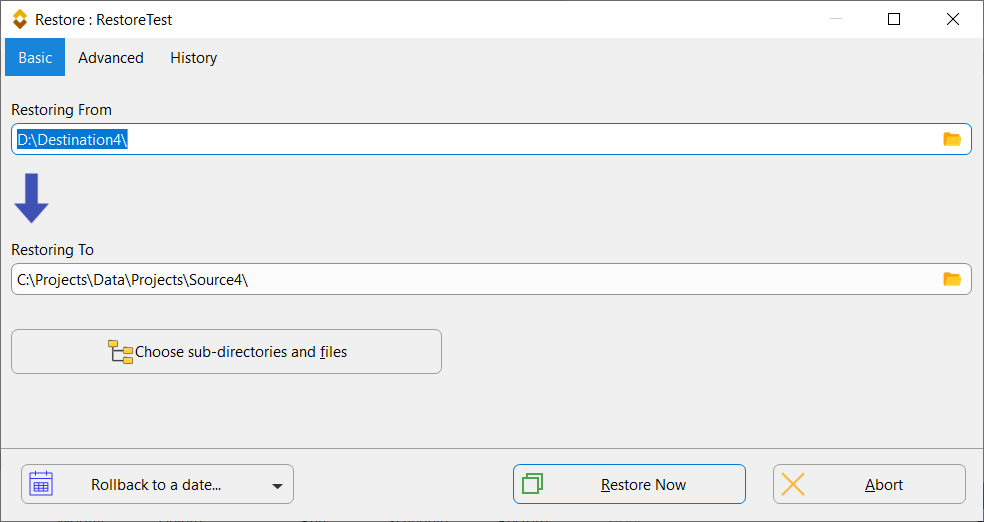
The Restore window: the backup folder at the top, the original location below it, a button to choose sub-folders and files, and "Rollback to a date..." for versioned backups.
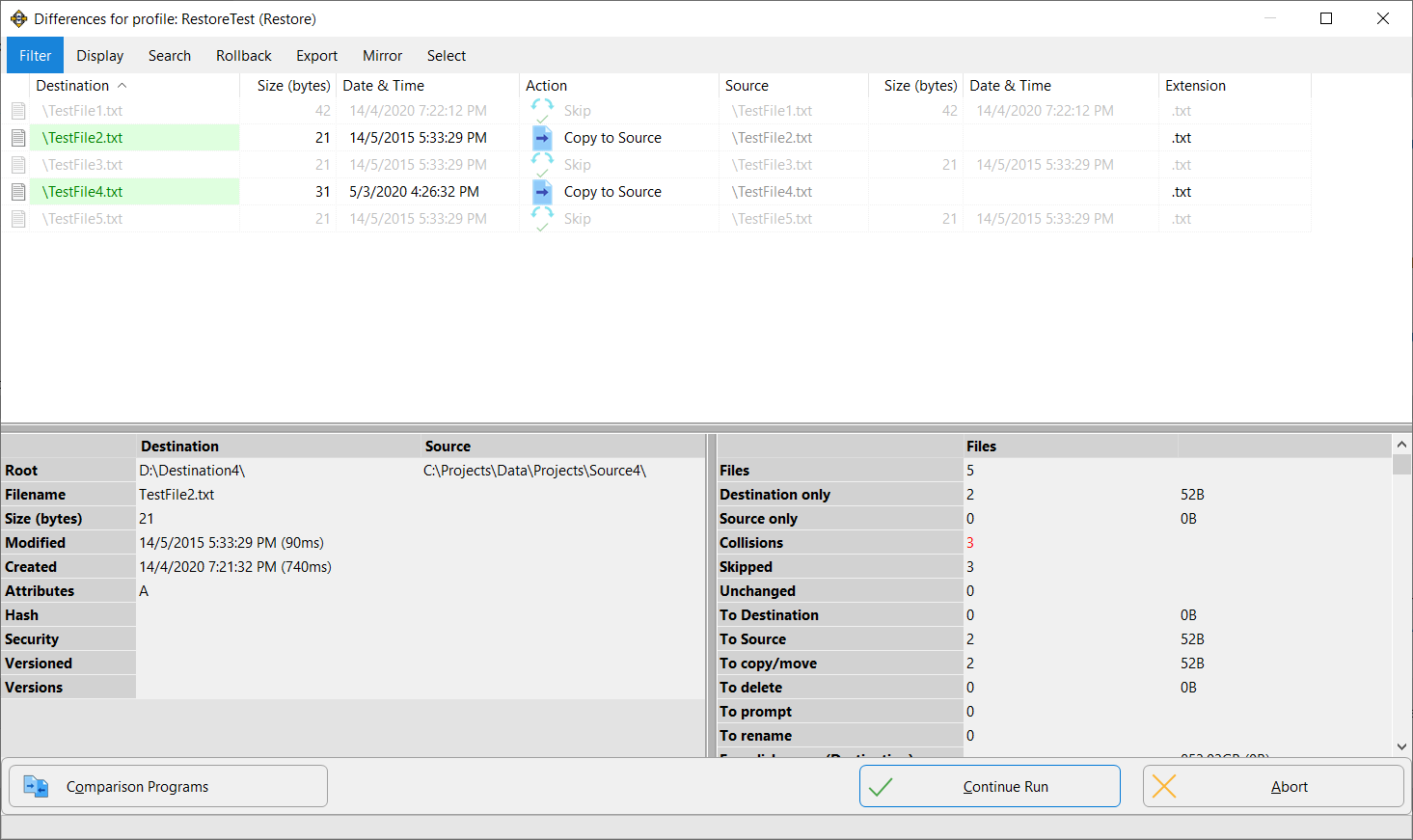
The Differences window before the restore runs: two files will be copied back to the source and three are skipped, with totals in the lower panel.
Before you buy
- The license is per major version. V12 never expires, but V13 will be a paid upgrade unless you keep Upgrade Assurance ($14.95 a year, auto-renews, cancel any time).
- Free support lasts 3 months. After that, ticket support needs Upgrade Assurance. Password Backup is an "Insider Access" feature that also needs it until the next major version.
- Home vs work. The 5-PC allowance is for personal data at one address. At work, each installation needs its own license.
- Compare first. SyncBackFree, SE and Pro install side by side, and the SE trial is complete for 30 days.
Where it falls short
- No cloud storage. SE can't back up to any cloud service directly. A workaround is to back up into a folder your cloud app already syncs.
- Lots of options. The settings are deep, and users of the SyncBack family often mention a learning curve before the first profile is right.
- Network speed can disappoint. One SnapFiles user's 1.5 GB mirror between two PCs was aborted after two and a half hours, while Explorer did it in minutes. Test your own network during the trial.
- Files, not system images. It can't restore Windows onto a new drive.
What Users Say
SyncBackSE has fewer dedicated review pages than SyncBackPro. 2BrightSparks' Trustpilot page, which covers all its products, has a TrustScore of 4.9 out of 5 from 198 reviews (Trustpilot notes the company hasn't recently invited customers to review). SnapFiles users rate SyncBackSE 5 out of 5 on average from 11 reviews (8 five-star, 3 four-star), though most are from older versions. Its sibling SyncBackPro scores 4.8 out of 5 on Capterra.
Trustpilot
J. Thomas Luter, 5 stars, April 3, 2026, "Happiness in using BrightSparks Customer Service": "I highly recommend Ms. N. and the program I most use from BrightSparks, Synchback SE (currently v. 12)."
Christopher Lee, 5 stars, July 4, 2026, "Syncback, does exactly what I want reliably": "I have been using Syncback Free for many years now and it has worked flawlessly for me." He later moved up to SE.
Bob Tabone, 5 stars, May 28, 2026, "SyncBack Support is great": "They're great and the software is wonderful!"
SnapFiles user reviews
madmik, August 14, 2012 (v6.2), "Premier backup solution": "SyncBack SE excels in all departments and surprises in some,for example its very fast backups for incremental downloads and the fact that even locked apps. like active browsers,can be backed up. Don't bother with the freeware version-go directly to SE,as the added features make this really worthwhile."
LinData, January 6, 2011, "Quite simply superb!": "There are so many options but they are kept out of view until you need them. A nice uncluttered interface, fast and not bloatware!"
just.little.dust518, July 5, 2018 (v8.5), "Slow on lan": "Tried twice. Both the time, after about 2 and half an hour aborted the operation. Then completed the action in Windows Explorer, by Drag & Drop, Within less than 3 and half a minute." He added that he hadn't tried a mirror on the same PC.
Laptop Mag
Jeffrey L. Wilson reviewed SyncBackSE in June 2008, a much older version: "Ease of use and miltary-grade encryption make this backup software stand out." He liked that it "Synchronizes files across multiple computers" and can back up to a ZIP file, and his one con was "Have to schedule backups to run".
The Trustpilot text was read through a page summarizer, since the site blocks direct downloads. The common thread: long-time users trust SyncBackSE's reliability and its support team, and many arrived from the free edition and found the paid features worth it. The complaints are slow copies over some networks and the time it takes to learn the options.
Comparisons
SyncBackSE vs SyncBackPro
SyncBackPro ($59.95) adds backup to more than 15 cloud services, SFTP, email backup, scripting, file integrity checks, PAR2 recovery data, S.M.A.R.T. drive-failure detection, secrets-manager support and central management through SBMS. For $15 more, Pro is the one to get if any of your backups go to the cloud.
SyncBackSE vs SyncBackFree
SyncBackFree is free for any use and does scheduled backup, mirror and basic sync jobs with easy restores. SE adds versioning, locked-file copying, Fast Backup, incremental and differential backups, real-time backup, stronger compression and AES encryption, MTP devices, SyncBack Touch and Windows Server support.
Editions and Pricing
| Edition | Price | License | Best for |
|---|
| SyncBackSE V12 | $44.95 | Perpetual for V12, 5 home PCs or 1 business install | Drives, NAS and FTP with versioning |
| SyncBackPro V12 | $59.95 | Perpetual for V12, same seat rules | Cloud storage, SFTP, scripting, SBMS |
| SyncBackFree | Free | Freeware | Simple copies on Windows desktops |
| Upgrade Assurance | $14.95 a year | Optional subscription, auto-renews | Free major upgrades, priority support, Insider Access |
The Buy Now buttons on this page open the 2BrightSparks store, where you pick SyncBackSE V12 (or SyncBackPro V12) and can add Upgrade Assurance. Prices are in US dollars as shown on the order page on November 20, 2026.
FAQs
Can SyncBackSE back up to OneDrive or Google Drive?
Not directly. SyncBackSE has no cloud storage support, which is SyncBackPro's job. You can still point SE at the local OneDrive or Google Drive folder, and the cloud app uploads what SE copies there.
Is SyncBackSE a one-time purchase?
Yes. SyncBackSE costs $44.95 once and the V12 license never expires. Upgrade Assurance at $14.95 a year is optional and only needed for future major versions and support after 3 months.
How many computers can I install SyncBackSE on?
SyncBackSE allows up to 5 computers or devices you own at one home address for personal use. For business use, each installation, including each virtual machine, needs a license.
Can I upgrade from SyncBackSE to SyncBackPro later?
Yes. 2BrightSparks offers an upgrade path from SE to Pro, and both programs can be installed on the same PC, so you can trial Pro before you switch.
Does SyncBackSE work on Windows Server?
Yes. SyncBackSE supports Windows Server 2008 R2 SP1 and newer at no extra cost, including locked-file copying with VSS. Server Core installs aren't supported because they have no desktop.
Can I back up my iPhone with SyncBackSE?
No. SyncBack Touch, which SE uses to reach other devices, runs on Android, macOS, Linux and Windows, but not on iOS.
Can I get a refund on SyncBackSE?
2BrightSparks gives a full refund when the request arrives within 30 days of purchase. Requests are accepted from 5 days after purchase and need management approval.
System Requirements
- Windows 11, 10, 8 or 7 with Service Pack 1, 32-bit or 64-bit
- Windows Server 2008 R2 SP1 or newer (not Server Core)
- For other devices: SyncBack Touch on macOS, Linux (Red Hat Enterprise and Ubuntu), Android or Windows
Conclusion
SyncBackSE is a good buy at $44.95 if your backups go to drives, a NAS or an FTP server and you want version history and locked-file copying without a subscription. The one reason to buy it is versioning: it turns a simple copy into protection against overwrites and ransomware, which the free edition can't give you. The main reason not to is the missing cloud support: if you want backups in Google Drive, OneDrive or S3, spend the extra $15 on SyncBackPro. Try the 30-day trial on your own network first.
Download Free TrialBuy Now