SyncBackPro: Windows Backup and Sync for Drives, Servers and 15+ Cloud Services
SyncBackPro is a $59.95 Windows backup and synchronization program from 2BrightSparks that copies, mirrors and syncs your folders to external drives, network shares and NAS boxes, FTP/SFTP servers and cloud storage such as Amazon S3, Google Drive, OneDrive, Dropbox and Backblaze B2. It's built for power users, IT staff and small businesses who want scheduled, versioned, encrypted backups they can tune down to the last option, and it's a perpetual license, not a subscription.
If your current "backup plan" is dragging folders to a USB drive when you remember, or you run a handful of PCs and a file server and need every job to run on schedule and report when it fails, SyncBackPro is the kind of tool that turns that into a set of profiles you check once a week.
Quick facts
- Version: 12.1.34.0, released October 22, 2026 (V12 first shipped in March 2026)
- Developer: 2BrightSparks Pte Ltd (the first SyncBack freeware came out in October 2003)
- Platform: Windows 11, 10, 8 and 7 SP1, plus Windows Server 2008 R2 SP1 and newer, 32-bit and 64-bit. Other devices (macOS, Linux, Android) are reached through the free SyncBack Touch service
- Price: $59.95 for a perpetual V12 license. Optional Upgrade Assurance is $14.95 a year
- License: home use on up to 5 computers, or 1 installation per license for business use
- Trial: fully featured for 30 days, no registration
- Refunds: full refund if requested within 30 days of purchase (requests are accepted from day 5, subject to approval)
- What we checked: the order page charged $59.95 for SyncBackPro V12 and $14.95 a year for Upgrade Assurance on November 20, 2026, and the vendor's download page and change log listed version 12.1.34.0 from October 22, 2026, on November 20, 2026. We didn't install it or run a backup ourselves
Download Free TrialBuy Now
Overview
SyncBack comes in three editions: SyncBackFree, SyncBackSE and SyncBackPro. All three work the same way. You create a profile (a source, a destination and a job type: backup, mirror or two-way sync), set how it should handle changes and conflicts, and then run it by hand, on a schedule, when a USB drive is plugged in, or when files change. Pro is the edition that adds cloud storage, SFTP, scripting, email backup, file integrity checks, drive-failure detection and central management through SBMS.
Backups are stored as ordinary files or standard Zip archives, so you can get your data back with Windows Explorer or 7-Zip even without SyncBack installed. Version 12 added password and secrets-manager support, PAR2 recovery data, a dark interface style and faster hashing (the October 2026 update made verification up to about 4.5 times faster).

The SyncBackPro V12 main window: a list of profiles with their type, last run and result, a progress panel for the running "Website" backup, and the New, Modify, Run, Schedule and Restore buttons along the bottom.
Features
Back up straight to cloud storage
SyncBackPro backs up to and from Amazon S3 and S3-compatible services, Google Drive, Google Cloud Storage, Microsoft Azure Blob Storage, OneDrive, OneDrive for Business, SharePoint, Dropbox, Box, SugarSync, OpenStack, Backblaze B2, OVH, Citrix ShareFile, pCloud, Cloudflare R2 and WebDAV, with parallel transfers. You link each account once in the Cloud Accounts window and pick it as a source or destination. None of the cloud services are available in SE or Free.

The Cloud Accounts window, where you authorize Office 365 mailboxes, Box, Dropbox and the other services before using them in profiles.
Versioning with delta-copy
SyncBackPro keeps previous versions of files it overwrites or deletes, so a document that got corrupted or encrypted by ransomware last Tuesday can be rolled back. Delta-copy stores only the changed parts of a file as a patch, which keeps version history from eating your backup drive. Restores can roll a whole profile back to a chosen date.
Fast Backup, incremental and differential runs
SyncBackPro's Fast Backup remembers what it copied last time, so it doesn't rescan the destination on every run, which matters on slow NAS drives, FTP servers and cloud buckets. Incremental and differential backups, real-time backup when files change, and backup on device insertion are all included. It also copies open and locked files through the Volume Shadow Copy Service at no extra charge, even on Windows Server.
Encryption, compression and secrets managers
SyncBackPro compresses backups with LZMA2 (7-Zip), LZMA, BZip2, Deflate, Deflate64 or BWT and encrypts them with 256-bit AES in standard Zip or 7z formats. Version 12 can pull passwords from a secrets manager instead of storing them in the profile: HashiCorp Vault, AWS Secrets Manager, Google Cloud Secret Manager, Azure Key Vault, Windows Credential Manager, Infisical, 1Password, Dashlane and Bitwarden.
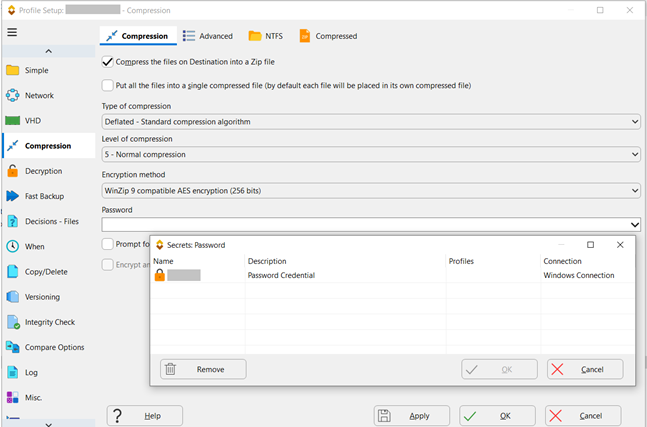
A profile's Compression page set to Zip with 256-bit AES, with the Secrets window open to pick a stored password credential instead of typing it in.
File integrity checks, ransomware and drive-failure detection
SyncBackPro can hash files and later check that backups haven't silently changed, stop a run if too many files have changed (a common sign of ransomware), and read S.M.A.R.T. data to warn you before a drive fails. With Upgrade Assurance it can also add PAR2 recovery data, which repairs damaged backup files without needing the original source.
FTP, FTPS and SFTP, plus email backup
SyncBackPro talks SFTP as well as FTP and FTPS (SE has only FTP and FTPS), with bandwidth throttling and file resuming when a connection drops. It also backs up email from POP3, IMAP and Exchange servers.
Scripting and central management with SBMS
SyncBackPro runs scripts (including JavaScript-syntax scripts with Upgrade Assurance) to change how profiles behave, logs to Syslog, and sends webhook or Pushover notifications. The SyncBack Management System (SBMS) is free with V12: install its service on a server and you can push profiles to many SyncBackPro installations, stop users from creating their own, and see every run's result and history in one console.
SyncBack Touch for Mac, Linux and Android
SyncBackPro itself runs only on Windows, but the free SyncBack Touch service installs on macOS, Linux (Red Hat Enterprise and Ubuntu), Android and other Windows PCs, so a profile on your Windows PC can back up or restore files on those devices over your network, encrypted. There's no iOS version.

Schedule settings: run whether or not the user is logged on, repeat every few hours, wake the computer, and catch up as soon as possible after a missed start.
Benefits
- You own it. $59.95 once covers V12 for as long as you use it, with free minor updates. Many cloud backup services cost that much every year.
- No lock-in. Files land as plain copies or standard Zip/7z archives, so a restore never depends on SyncBack being installed.
- Your storage, your choice. Mix a local drive, a NAS and a cloud bucket in one group of profiles, and change providers without changing software.
- Servers cost the same. There's no server surcharge, and VSS, SBMS and SyncBack Touch are included.
Real-World Uses
- A 3-2-1 backup for a home office: one profile copies Documents to an external drive every evening with versioning, a second sends an encrypted copy to Backblaze B2 overnight, and a group runs both.
- A small business file server: SyncBackPro on the server mirrors shared folders to a NAS hourly with locked-file copying, and SBMS shows the office manager each night whether every PC's backup succeeded.
- A web developer's site backups: a profile pulls a website over SFTP every night and keeps 30 versions, so a broken plugin update can be rolled back file by file.
- A photographer's card dump: a profile runs when the card reader is plugged in, copies new photos to the NAS and to Google Drive, and verifies them with hashes.
Who It's For, and Who Should Skip It
SyncBackPro suits people who like to decide exactly what gets copied, where and when: IT admins, small businesses with a server or NAS, developers and power users who back up to their own cloud storage or FTP servers.
Skip it if you only back up to a local or network drive and don't need cloud, SFTP or scripting: SyncBackSE does that for $44.95, and SyncBackFree covers basic copies at no cost. Skip it too if you want a full disk image you can boot from after a crash (SyncBack backs up files and folders, not whole-system images), or a hands-off service that stores the data for you and runs on a Mac. A dedicated imaging tool or an online backup service fits those cases better.
Usage Guide
- Install. Download the 64-bit (or 32-bit) installer from the vendor's download page. There's an administrator installer and one that standard users can run, and
winget install syncbackpro also works.
- Create a profile. Click New, name it, and choose Backup, Synchronization or Mirror. Pick the source and destination: a folder, a network path, an FTP/SFTP server or a linked cloud account.
- Choose Easy or Expert mode. Easy mode shows the main settings. Expert mode opens every page: versioning, compression and encryption, filters, Fast Backup, integrity checks and more.
- Do a simulated run. Task > Simulated Run shows what would be copied, deleted or skipped, without touching any files. Check the Differences window before the first real run.
- Schedule it. Click Schedule to create a Windows scheduled task, and tick "Run whether user is logged on or not" for an unattended backup.
- Set up alerts. Add email logs, a webhook or Pushover notifications so a failed run doesn't go unnoticed.
- Test a restore. Use Restore on the profile, or roll back to a date, before you need it for real.
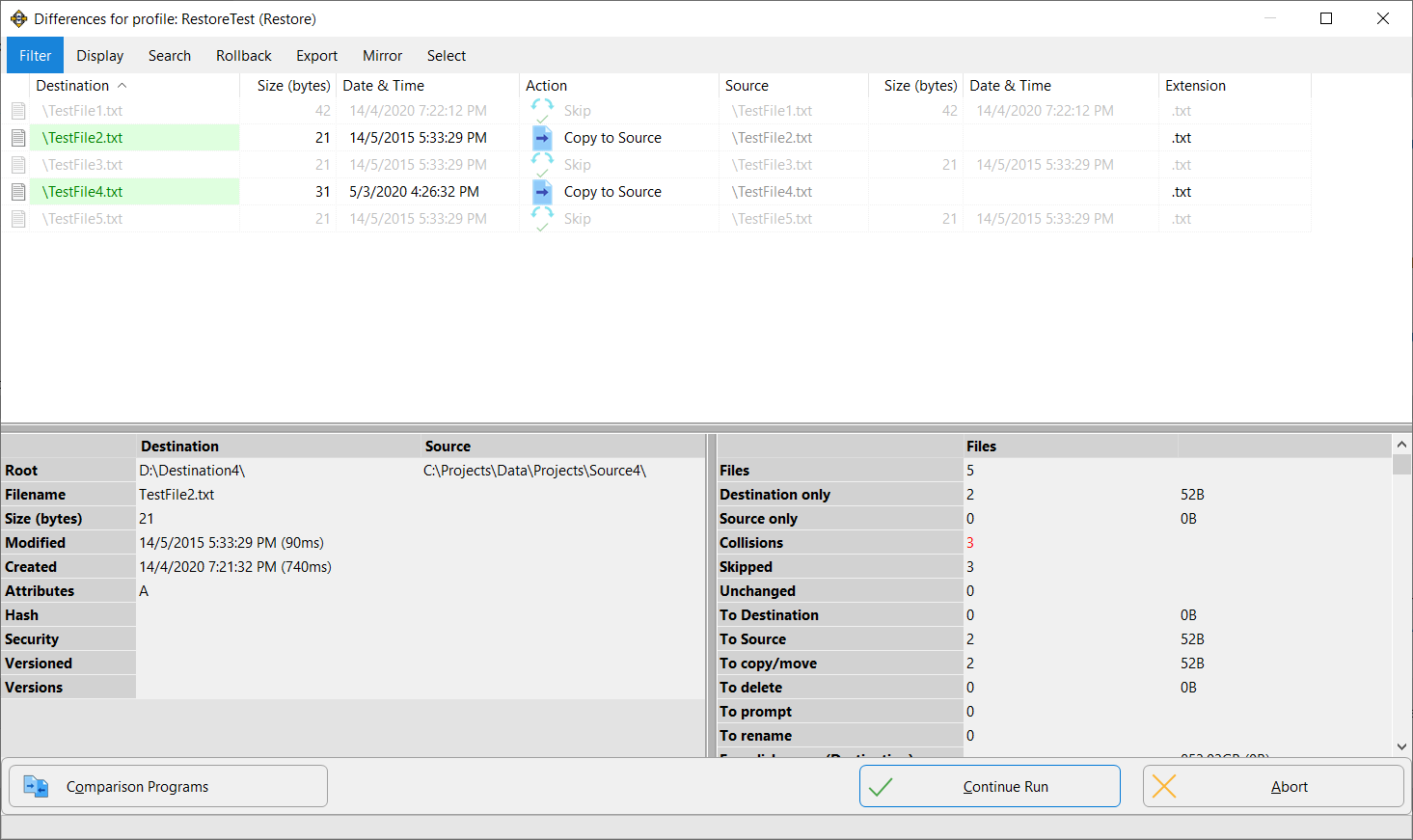
The Differences window during a restore: two files will be copied back to the source, three are skipped, and the panel below shows each file's details and the totals before you click Continue Run.
Before you buy
- The license is per major version. V12 never expires and V12.x updates are free, but V13 will be a paid upgrade unless you keep Upgrade Assurance ($14.95 a year, renews automatically, cancel any time).
- Support after 3 months needs Upgrade Assurance. Basic support is free for 3 months from purchase. The newest V12 features (PAR2, Password Backup, JavaScript-syntax scripts) are "Insider Access" features that stop working if the subscription lapses, until they're folded into the next major version.
- Business use is per installation. Home users get 5 PCs on one license, but at work each installation (including each virtual machine) needs its own license. Volume discounts start at 2 licenses, and schools and non-profits get an extra 15% off.
- Try it first. The 30-day trial is complete, and all three editions can be installed side by side to compare.
Where it falls short
- A lot of settings. SyncBackPro's power comes from hundreds of options, and reviewers keep saying that the first setup takes time to learn. Some settings even come with warnings that pull in both directions (more cloud threads are faster, too many are slower).
- A dated interface. It's functional, but users still ask for a more modern look.
- Not an imaging tool. It won't make a bootable system image or restore Windows itself.
- Windows only. Mac, Linux and Android devices are reached only through SyncBack Touch from a Windows PC, and there's nothing for iPhone or iPad.
- Speed varies. A few users report large network copies running far slower than expected, so test with your own NAS or server during the trial.
What Users Say
SyncBackPro has a long track record and a loyal user base. On Software Advice (reviews collected through Capterra) it scored 4.8 out of 5 from 111 reviews in April 2024 (90 five-star, 19 four-star, 2 three-star), with 4.5 for ease of use and 5 for support, value and functionality. 2BrightSparks' own page shows Capterra's rating as 4.8 out of 5 from 115 SyncBackPro reviews. The company's Trustpilot page has a TrustScore of 4.9 out of 5 from 198 reviews, though Trustpilot notes the company hasn't recently invited customers to review. G2 has only two reviews, both positive.
Capterra reviews (via Software Advice)
Jean Jacques, Non-Profit Organization Management, 5/5, July 2023, "A powerful backup tool": "scheduling flexibility, powerful synchronization parameters, constant improvements to take into account new technologies, very affordable price"
Matthew, Translation and Localization, 5/5, October 2023, "It just works": "It has everything I need. Compression, encryption, versioning, SFTP through custom ports, incremental backup, scheduled backup, easy to use."
Jt, Management Consulting, 5/5, October 2023, "Great, Flexible, Dependable Backup Software!": "Initial setup and configuration is challenging with so many options and settings."
Manlio, Design, 5/5, May 2023: "When I started use of SyncBack I found peace of mind. The program has a great possibility to be tuned to your needs and works always." His con: "The configuration job is not always simple"
Nicolas, Media Production, 5/5, August 2022, "The swiss knife": "every night there're many To of pictures and videos who are synchronize from our NAS to our Cloud storage solutions." His con: "I can't find how to print reports directly from the software"
Terry, Medical Practice, 3/5, January 2020, "Customer support s***ks!": "It will not recognize the code sent by Microsoft to verify the setup for OneDrive. Consequently, I cannot fully evaluate the program." The vendor replied that his last message on the ticket had said "The program appears to be working fine now."
Criticism highlighted on Software Advice
"I've tried with 2 major initiatives, both failing miserably. Copy from file server to NAS device was so slow, the job never finished."
"For instance, in Cloud > Advanced, there are settings for number of threads. It says to use more than the default and it also says that too many will degrade performance."
An anonymous long-time user (5/5, November 2018) added that a feature had moved from Free to Pro so "i had to upgrade to pro", and that it was "kind of clunky using windows task manager + permissions to get it to work smoothly".
G2
A verified small-business user (4.5/5, June 2022), "Robust and reliable -- my go-to back up solution for many years": "In the 12+ years that I've been using SyncBackPro for daily file synchronization and backups of mission-critical data, it has never let me down." The same reviewer's dislike: "The user interface could use a revamp to keep up with contemporary UX."
Another G2 reviewer: "Once your specific backup requirements are selected and tested/run successfully, you can literally forget about it," while admitting "it took me some time to properly learn what I was doing in setting up my specific backup/file syncing requirements."
Trustpilot (support experiences)
Jos Schaars, 5 stars, November 10, 2026, "Local backup of SharePoint data.": "2BrightSpark guided me through the steps correcting the issue until the backup finally ran."
Marty Mohr, 5 stars, August 28, 2026, "Great Support!": "I was having problems with SyncBackPro V12, and I contacted support for assistance."
Robv. S., 5 stars, November 3, 2026: "Great software and excellent customer support!"
The Trustpilot text was read through a page summarizer, since the site blocks direct downloads. The pattern is clear: people praise SyncBackPro's reliability once a profile is set up, its range of destinations and its support team. The complaints are about the learning curve, an interface that looks its age, occasional slow network jobs, and the paid major-version upgrades.
Comparisons
SyncBackPro vs SyncBackSE vs SyncBackFree
SyncBackSE ($44.95) has the same backup, mirror and sync engine, versioning with delta-copy, locked-file copying, compression and encryption, FTP/FTPS, MTP devices and SyncBack Touch. It lacks everything cloud, SFTP, email backup, scripting, file integrity checks, S.M.A.R.T. detection and SBMS. If your backups stay on local drives and a NAS, SE saves you $15.
SyncBackFree costs nothing for home and business use and handles simple backup, mirror and basic sync jobs with scheduling and restore, but it has no versioning, no locked-file copying, only FTP and basic Zip encryption, and it doesn't support Windows Server.
Editions and Pricing
| Edition | Price | License | Best for |
|---|
| SyncBackPro V12 | $59.95 | Perpetual for V12, 5 home PCs or 1 business install | Cloud, SFTP, scripting, central management |
| SyncBackSE V12 | $44.95 | Perpetual for V12, same seat rules | Local, network and FTP backups with versioning |
| SyncBackFree | Free | Freeware, no limit on installs | Simple scheduled copies on Windows desktops |
| Upgrade Assurance | $14.95 a year | Optional subscription, auto-renews | Free major upgrades, priority support, Insider Access |
The Buy Now buttons on this page open the 2BrightSparks store, where you pick SyncBackPro V12 (or SyncBackSE V12) and can add Upgrade Assurance. Prices are in US dollars as shown on the order page on November 20, 2026.
FAQs
Is SyncBackPro a subscription?
No. SyncBackPro is a one-time $59.95 purchase that never expires for version 12, with free 12.x updates. The only subscription is the optional Upgrade Assurance, which covers future major versions and support after the first 3 months.
Can I use one SyncBackPro license on several computers?
SyncBackPro allows one person to install a license on up to 5 computers for personal home use. For business data, each installation needs its own license, and a server counts as one installation.
Does SyncBackPro run on a Mac?
SyncBackPro runs only on Windows. A Windows copy can back up files on Macs, Linux machines and Android phones on your network through the free SyncBack Touch app, but there's no native Mac edition and no iOS support.
Can SyncBackPro make a full system image of my C: drive?
No. SyncBackPro backs up files and folders (including open and locked files), not bootable disk images, so it can't restore Windows itself onto a new drive. Pair it with an imaging tool if you need bare-metal recovery.
Do I need SyncBack installed to get my files back?
Not necessarily. SyncBackPro writes ordinary files or standard Zip and 7z archives, so you can open a backup in Windows Explorer or an archiver. SyncBack's own Restore window is still the easiest way to roll back to an earlier version.
What happens when SyncBackPro V13 comes out?
Your V12 license keeps working indefinitely. Moving to V13 costs an upgrade fee unless your Upgrade Assurance is active when it's released. 2BrightSparks no longer supports V11 and earlier.
Can I get a refund on SyncBackPro?
2BrightSparks gives a full refund when the request arrives within 30 days of purchase. Requests are accepted from 5 days after purchase and need management approval, and after 30 days refunds are at the company's discretion.
Is there a discount for several licenses?
Yes. SyncBackPro volume discounts apply automatically in the store from 2 licenses, 2BrightSparks quotes special rates from 300 licenses, and educational and non-profit organizations get an extra 15% off.
System Requirements
- Windows 11, 10, 8 or 7 with Service Pack 1, 32-bit or 64-bit
- Windows Server 2008 R2 SP1 or newer (not Server Core, which has no GUI)
- Cloud, FTP and SFTP destinations need an internet connection and an account with that service
Conclusion
SyncBackPro is worth its $59.95 if you want one Windows tool to back up to drives, servers and your own cloud storage, on a schedule, with versions and encryption. The one reason to buy it is reach: few one-time-purchase programs cover this many destinations plus central management for free. The main reason not to is the learning curve. If you'll never touch cloud storage or SFTP, SyncBackSE does the same local job for less, and if you need a bootable system image, look elsewhere. Run the 30-day trial against your real NAS or bucket first.
Download Free TrialBuy Now