Short answer: for most Windows 11 PCs, get EaseUS Todo Backup Home ($39.95 a year, or $59.95 once): it images Windows, backs up files on a schedule, clones your drive to a new SSD and boots a rescue USB when Windows won't start, all from the easiest window in this group. If you'd rather pay once and pay less, Hasleo Backup Suite Home V6 does the imaging, cloning and restore-to-new-hardware jobs for $34.95.
For a household with several PCs, TeraByte Drive Image Backup and Restore Suite 4 covers up to five home computers for $49.98 and checks every backup byte for byte. AOMEI Backupper Professional has the most features per dollar ($79.95 once for 2 PCs) but read its security note first, and R-Drive Image ($44.95) is the one that sends full disk images straight to OneDrive or Google Drive.
At a glance
| EaseUS Todo Backup Home | Hasleo Backup Suite Home V6 | AOMEI Backupper Professional | TeraByte Drive Image Suite 4 | R-Drive Image |
|---|
| Price | $39.95 a year, $59.95 once | $34.95 once | $79.95 once | $49.98 once | $44.95 once |
| Computers per license | 1 | 1 (home use) | 2 | Up to 5 in one household | 1 |
| Renews automatically | Yearly plan ✓, perpetual ✗ | ✗ | ✗ | ✗ | ✗ |
| Clone a drive to a new SSD | ✓ | ✓ | ✓ | ✓ | ✓ |
| Restore to different hardware | ✓ | ✓ | ✓ | ✓ (OSD Tool Suite) | Not advertised |
| Full images to OneDrive or Google Drive | ✗ (files only) | ✗ | ✗ | ✗ | ✓ |
| Trial | 30 days, full Home edition | Trial converts with a key | 30 days | 30 days | 30 days, all features |
| Refunds | 30 days, technical problems only | 30 days, technical problems only | 90 days | None | None |
| Windows on ARM | ✓ | ✓ | Not listed | ✓ | Not listed |
How we picked
- We started from every backup and imaging tool listed on this site that's still sold and updated, and kept the ones that do the three jobs a Windows 11 PC needs: a full system image, scheduled file backups and a bootable rescue disk to restore from.
- We read each order page for the price in US dollars and the license terms (term, number of PCs, upgrades), and each vendor's refund policy.
- We checked each product's current version on the vendor's own download or changelog page and the size of its installer.
- We collected expert test results (PCWorld, TechRadar, gHacks) and user reviews (Trustpilot, AlternativeTo, Eleven Forum, the vendors' feedback pages), including the complaints.
What we checked: checkout prices of $79.95 (AOMEI Backupper Professional, 2 PCs, lifetime), $34.95 (Hasleo Backup Suite Home V6) and $49.98 (TeraByte Drive Image Suite 4), EaseUS's order page at $39.95 a year, $59.95 perpetual and $79.95 with lifetime upgrades, R-Drive Image at $44.95 on R-Tools' store, and R-Drive Image 7.3 build 7315 dated November 5, 2026 on its download page, all on November 20, 2026. We compared features, prices, trials and published tests, and didn't time a backup or restore a failed PC ourselves.
Start free: what Windows 11 already does
Windows 11 already ships three backup tools, and they're worth knowing before you spend anything. Each one covers part of the job, and none of them clones a drive.
- Windows Backup (the app in the Start menu) saves your Desktop, Documents and Pictures folders, settings, the list of installed apps and Wi-Fi passwords to your OneDrive account. It's handy for setting up a new PC, but it isn't a system image: the programs themselves have to be reinstalled, and the free OneDrive plan holds only 5 GB.
- File History (Control Panel) copies versions of the files in your user folders to an external drive every hour. It's good protection against a deleted or overwritten document, but it can't bring back Windows or your programs.
- Backup and Restore (Windows 7), also in Control Panel, still makes a full system image. Microsoft no longer develops it, and a restore runs from Windows' own recovery environment, with no cloning or restore to different hardware. It's a fair free stopgap until you choose a real tool.
The free editions of the paid tools below go further. EaseUS Todo Backup Free makes system, disk and file images and a WinPE rescue disk, but doesn't clone. Hasleo Backup Suite Free images Windows, but won't clone the system disk, and its V6 release allows only one backup schedule. AOMEI Backupper Standard backs up, restores and syncs, but System Clone and differential backups are Pro features. Where the paid editions earn their price is the day you replace a drive or a whole PC.
EaseUS Todo Backup Home
EaseUS Todo Backup Home: best for most home users
- Price: $39.95 a year for 1 PC, $59.95 perpetual (no major upgrades), $79.95 with lifetime upgrades; $59.95 a year adds 1 TB of EaseUS Cloud
- Version: 18.1, sold as Todo Backup 2026, dated July 27, 2026
- Runs on: Windows 11, 10, 8.1, 8 and 7, including Windows on ARM
- Trial: the full Home edition for 30 days
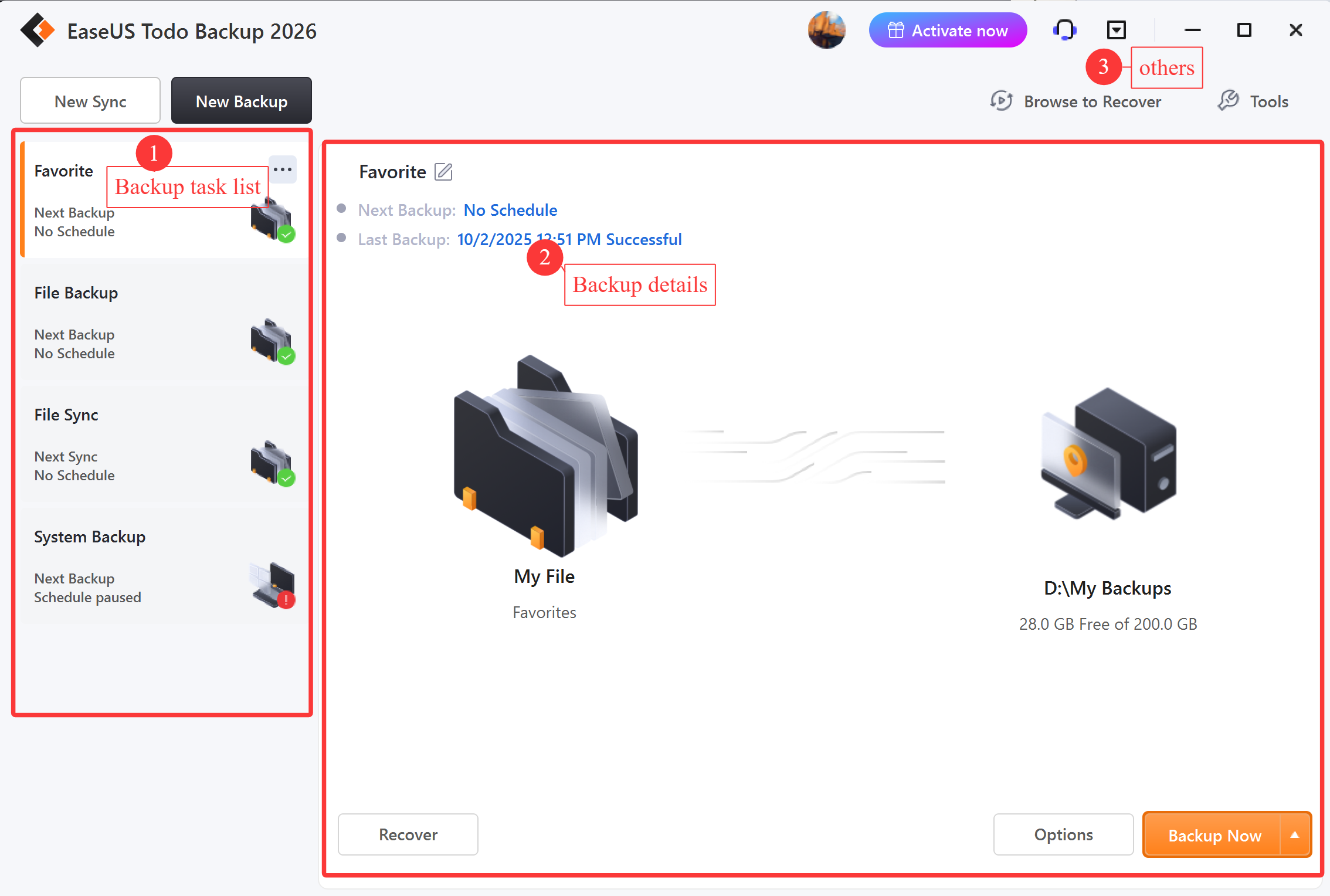
The Todo Backup 2026 main window, annotated by EaseUS: (1) the backup task list, (2) the selected task's next and last backup, (3) the account, support and menu buttons.
EaseUS Todo Backup Home is the easiest tool here to set up and leave running. Every backup starts with one question (File, Disk, OS or Apps data), and the OS choice picks the Windows and boot partitions for you. Each task can run full, incremental or differential, daily, weekly, monthly or at shutdown, and an image reserve rule deletes old images so the backup drive doesn't fill up.
Home earns its price over the free edition with disk and system cloning (larger to smaller drives work as long as the used space fits), System Transfer to put an image onto a PC with different hardware, a hidden, password-protected Security Zone partition that ransomware can't see as a drive letter, Smart Backup of chosen folders every half hour, and backups of Outlook mail, Chrome settings and game saves. TechRadar called it "the fastest backup app we've tested", and PCWorld timed a 700 GB image at around 13 minutes.
The weak spot is the cloud. Full system and disk images can go to a local or network drive, FTP or EaseUS's own paid cloud, but not to OneDrive, Dropbox or Google Drive, which take file and mail backups only. PCWorld also hit non-fatal bugs in the sync module, and the yearly plan renews automatically until you cancel it.
What we like
- Simplest interface of the five
- Fastest in TechRadar's tests
- Clone, System Transfer and Security Zone in one program
- Full-featured 30-day trial
Watch out for
- Full images can't go to OneDrive or Google Drive
- Yearly plan auto-renews; perpetual $59.95 gets no major upgrades
- Upgrade pop-ups and sync bugs mentioned by reviewers
- Refunds only for technical problems support can't fix
What reviewers say
PCWorld (Jon L. Jacobi, August 11, 2026): "Super capable, and super easy to use, Todo Backup 2026 is still one of our favorite backup suites - despite some non-fatal bugs in the sync module and the occasional interface oddity."
TechRadar: "EaseUS Todo Backup is the fastest backup app we've tested, and it's got a good range of features, too." Against: "Business options get pricey", "Constant popups", "Limited customer support".
On Trustpilot, the Todo Backup reviews are mostly about licenses. Tony L (1 star, November 16, 2026): "I used to have the Lifetime Home edition, but during software updates, I was backed down to the basic version." Others say live chat reset their license quickly after a new PC.
EaseUS's Black Friday code BF2026 takes the yearly Home plan to $11.98 and the lifetime plan to $47.97 until December 2, 2026. After that, the regular prices above apply.
Download EaseUS Todo Backup Home TrialBuy EaseUS Todo Backup Home
Hasleo Backup Suite Home V6
Hasleo Backup Suite Home V6: best one-time price
- Price: $34.95 once for 1 home PC; $54.95 with free lifetime upgrades
- Version: 6.0.2.0, released October 30, 2026
- Runs on: Windows Vista through Windows 11, natively on x86, x64 and ARM64
- Trial: yes; entering a key turns it into the full version
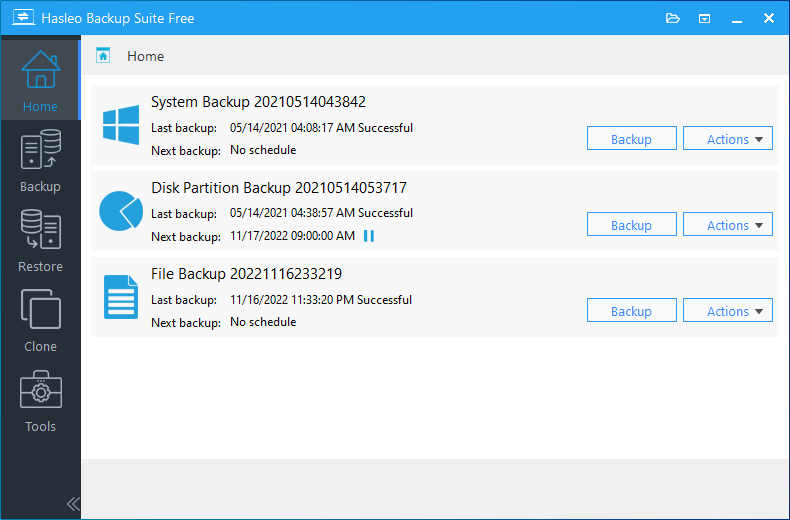
The Hasleo Backup Suite Home screen with a system, a disk partition and a file backup task, each with its last and next run. The vendor's screenshot shows the Free edition, which has the same window as Home, before V6.
Hasleo Backup Suite Home V6 is the cheapest way here to own a full imaging and cloning tool outright. It backs up the system, disks, partitions and files (full, incremental or differential), clones the system drive to a new SSD, and its Universal Restore puts a backup onto a PC with different hardware so it still boots. It can also restore BitLocker-encrypted partitions with the encryption intact, and restore or clone Windows to a USB drive.
It's fast for the money: TechRadar's Mike Jennings found its media-file time "one of the best we've recorded across this latest slate of backup apps – nearly twenty tools in all". Several Trustpilot reviewers say they moved to Hasleo after Macrium Reflect went subscription-only.
What you give up is polish and support. There's no cloud target, help is by email and forum only, and the change log shows a fix release every few weeks from July to October 2026. A few users report lost backups or a USB drive that wasn't recognised. V6 is also brand new: one forum user's image mounting failed until he restarted Windows after installing it.
What we like
- $34.95 once, with no subscription
- System clone, Universal Restore and BitLocker-aware restore
- Native Windows on ARM support
- Among the fastest in TechRadar's tests
Watch out for
- No cloud backup target
- Email and forum support only
- Home use only; future major versions need the $54.95 plan
- Some reports of failed backups
What reviewers say
TechRadar (3.5 out of 5, testing the Free edition): "Hasleo Backup Suite Free offers a rock-solid core range of backup features alongside good speed".
Trustpilot (4.1 out of 5 from 32 reviews, all Hasleo products): "Works as good or better than Macrium X and without having to pay a fee every year to use it." (Psycho Guy, June 2026). On the other side, Clay Zaccaglini (4 stars, August 2026): "It does not estimate size of backup and verify that the target has enough space."
gHacks (Martin Brinkmann, version 3.0): "it backed up and restored the system partition and non-system partitions without issues."
Download Hasleo Backup Suite TrialBuy Hasleo Backup Suite Home V6
AOMEI Backupper Professional
AOMEI Backupper Professional: most features per dollar, with a security caveat
- Price: $79.95 once for 2 PCs with lifetime upgrades; AOMEI's store also sells a $39.95 yearly plan for 1 PC
- Version: 8.5.1, released October 19, 2026
- Runs on: Windows 11, 10, 8.1, 8 and 7 (no Windows Server)
- Trial: 30 days; 90-day money-back guarantee
Read this first: AOMEI's update servers were hacked
Attackers used AOMEI Backupper's own update and notification features to put a backdoor on some users' PCs between April and July 2026, as reported in October 2026. AOMEI released version 8.5.1 on October 19, 2026, moved its update service to a new server and added signature checks, and it advises earlier users to run its AOMEI Security Scanner, update, run a full antivirus scan and change their Windows password. AOMEI hasn't said how the attackers got in. AOMEI says updates now carry signature checks, but for software with full access to your disks, it's a fair reason to choose another vendor.
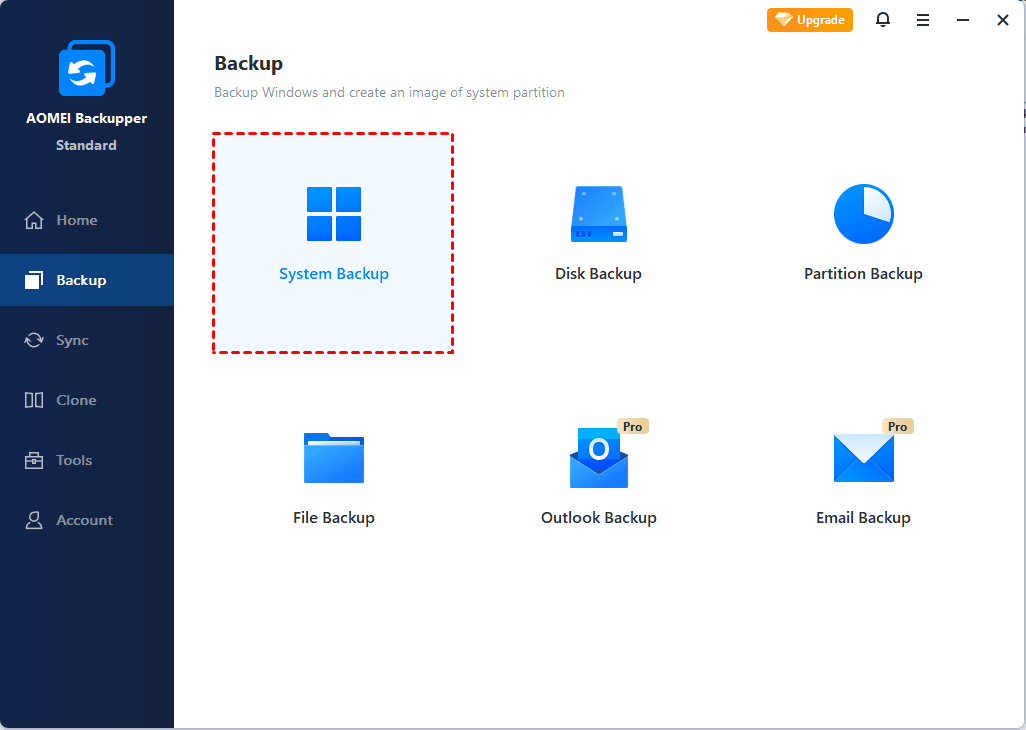
AOMEI Backupper's Backup page, shown in the free Standard edition: System, Disk, Partition and File Backup, with Outlook and Email Backup marked Pro.
AOMEI Backupper Professional packs in the most: system, disk, partition and file images, System Clone to a new SSD, real-time, mirror and two-way folder sync, Outlook backup, and restore to different hardware. The $79.95 lifetime license covers two PCs, so per computer it's the cheapest perpetual license with upgrades here, and its 90-day money-back guarantee is the most generous of the five.
Two practical warnings besides the incident. PCWorld reported that "neither the Linux or Windows PE recovery media that Backupper Professional created would boot properly on real machines" in its Backupper 7 test, so build yours and test-boot it before you rely on it. And automatic updates are switched off in 8.5.1, so you'll need to check AOMEI's site for new versions yourself.
What we like
- 2 PCs and lifetime upgrades for $79.95
- Backup, clone and real-time sync in one tool
- 90-day money-back guarantee
Watch out for
- The 2026 update-server compromise
- Rescue media failed to boot in PCWorld's test
- No VHD/VHDX support
- Manual updates in 8.5.1
What reviewers say
PCWorld (Jon L. Jacobi, Backupper 7, July 29, 2025): "With the addition of online storage, Aomei Backupper 7 can now compete with other premium offerings." He also found that "Backupper performed both quickly and without error."
Trustpilot (4.9 out of 5 from 2,595 reviews): most are about support and license resets, such as Rene Rasmussen (October 10, 2026): "I had no problem getting Kamlee Kamlee from AOMEI support to reset my activation." TechRadar found it slower than EaseUS in its tests.
Download AOMEI Backupper TrialBuy AOMEI Backupper Professional
TeraByte Drive Image Backup and Restore Suite 4
TeraByte Drive Image Backup and Restore Suite 4: best for a household of PCs
- Price: $49.98 once; a home license covers up to 5 computers in one household
- Version: 4.13, released September 21, 2026
- Runs on: Windows 7 SP1 to Windows 11 and Windows Server, on x86, x64 and ARM64
- Trial: 30 days; no refunds after purchase

Image for Windows, the suite's main program: Backup, Restore, Validate and Copy. TeraByte's guide shows version 3.30, and version 4 keeps the same wizard.
TeraByte Drive Image Backup and Restore Suite 4 is the choice for people who care most about whether the backup will actually restore. Image for Windows validates every byte of an image, and the same backup can be restored from Image for DOS, Image for UEFI or Image for Linux boot media, so you're never stuck needing a working Windows to restore Windows. The OS Deployment Tool Suite in the box prepares an image for a PC with different hardware.
The value is in the license: $49.98 covers up to five home computers, and updates within version 4 are free. The cost is the interface, a Windows 7-era wizard with many options, and the fact that restoring the running Windows partition means rebooting into the boot media. There are no refunds, so use the 30-day trial and do a test restore first.
What we like
- Up to 5 household PCs for $49.98
- Byte-for-byte validation of every image
- DOS, UEFI, Linux and Windows restore environments
- ARM64 support
Watch out for
- Dated, option-heavy wizard
- No refunds
- Next major version is a paid upgrade
- Few formal reviews
What users say
TeraByte has no Trustpilot or G2 profile; its reputation comes from long-time users. On Eleven Forum, Stigg: "I've probably done more than one hundred Image For Windows restores over the years without a single failure."
pewa (August 2025): "I am using Image for Windows on my wife's pc. Excellent backup software. Very reliable."
Download TeraByte Drive Image TrialBuy TeraByte Drive Image Suite 4
R-Drive Image
R-Drive Image: best for images in the cloud and scripted jobs
- Price: $44.95 for the standard license on R-Tools' store
- Version: 7.3 build 7315, released November 5, 2026
- Runs on: Windows 11 back to Windows 2000, and Windows Server
- Trial: 30 days with all features; no refunds after purchase
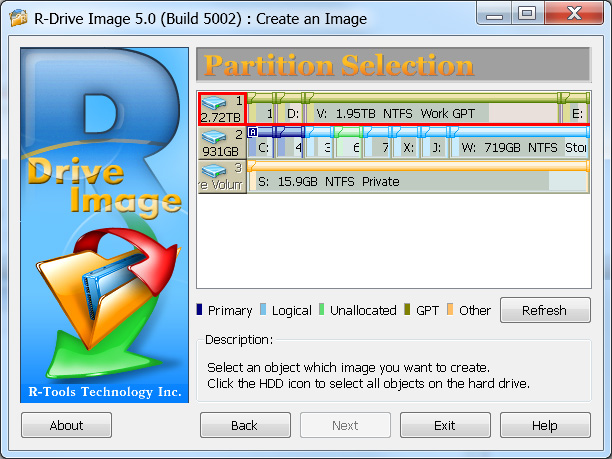
R-Drive Image's Create an Image wizard on the Partition Selection step, from an older version 5.0 screenshot; the current version keeps the same wizard style.
R-Drive Image is the only tool here that sends a full disk image straight to Google Drive, OneDrive, Dropbox or Amazon S3, as well as to FTP, SFTP and WebDAV servers. It images Windows while you work, compresses, encrypts and verifies images, mounts them as read-only drives so you can pull out a single file, and clones a disk to a new SSD with partition resizing along the way. A scheduler, rotation schemes and a command line suit people who like to script their backups.
Its startup version (Linux- or WinPE-based, with UEFI support) restores a PC that won't boot, though scheduled actions and scripts don't run from it. It has no restore-to-different-hardware feature, the installer is a hefty 128 MB, and like TeraByte, R-Tools doesn't issue refunds for downloaded software, so the full-featured trial is how you decide.
What we like
- Full images to the major cloud services
- Scheduler, rotation schemes and command line
- All features in the 30-day trial
Watch out for
- No restore to different hardware
- No refunds
- Wizard style feels old
R-Drive Image's own feedback page shows a 4.6 out of 5 rating from 72 reviews, such as John Reid: "Dependable, easy; it just plain works!" One user there notes the help file's names no longer match the current interface.
Download R-Drive Image Trial
Price and size compared
Price of a license you keep, one PC (USD)
Hasleo Backup Suite Home V6 (1 PC)$34.95
AOMEI Backupper Professional ($79.95 for 2 PCs)$39.98 per PC
TeraByte Drive Image Suite 4 (1 PC; up to 5 in a household)$49.98
EaseUS Todo Backup Home (perpetual, no major upgrades)$59.95
One-time prices on the order pages, checked on November 20, 2026. EaseUS's yearly plan is $39.95. A five-PC household pays about $10 per PC with TeraByte.
Full installer size (MB, smaller is better)
Hasleo Backup Suite (trial)42 MB
EaseUS Todo Backup (full installer)174 MB
AOMEI Backupper Professional (trial)191 MB
TeraByte Drive Image Suite (GUI trial)199 MB
Sizes of the vendors' current installers, checked between October 29 and November 20, 2026. EaseUS's trial link downloads a 3.2 MB web installer that fetches the rest.
Which should you choose?
| Your situation | Pick | Why |
|---|
| One Windows 11 PC, you want it easy | EaseUS Todo Backup Home | Simplest setup, fastest in TechRadar's tests, clone and rescue USB included |
| You hate subscriptions and want the lowest price | Hasleo Backup Suite Home V6 | $34.95 once for imaging, system clone and Universal Restore |
| Three to five family PCs | TeraByte Drive Image Suite 4 | One $49.98 license covers up to 5 home computers |
| Two PCs and you want sync too | AOMEI Backupper Professional | 2 PCs, lifetime upgrades and real-time sync for $79.95, once you're comfortable with the incident |
| You want the image itself in the cloud | R-Drive Image | Full images to Google Drive, OneDrive, Dropbox or S3 |
| A Snapdragon (ARM) laptop | EaseUS Todo Backup Home or Hasleo | Both list native Windows on ARM support |
| You only need your documents safe | Windows' File History or Windows Backup | Free and already installed |
Who should skip each one: skip EaseUS if you want full images on OneDrive or Google Drive, or hate yearly renewals and don't want the $59.95 perpetual plan. Skip Hasleo if you want live chat or phone support rather than email and a forum. Skip AOMEI if the 2026 server compromise worries you. Skip TeraByte if a dated interface will put you off ever testing a restore. Skip R-Drive Image if you'll be restoring onto a new motherboard, since R-Tools doesn't advertise a restore-to-new-hardware feature.
What commonly goes wrong
- The rescue USB is never tested. PCWorld found AOMEI's media wouldn't boot on real machines. Whatever you buy, boot your rescue USB once on the PC it's meant to save.
- Backups on the same disk. An image on drive D: of the same SSD dies with that SSD. Use an external drive, a NAS or the cloud, and keep one copy unplugged against ransomware.
- The target fills up. Set a retention rule (EaseUS's image reserve strategy, rotation schemes in R-Drive Image), or a full drive quietly stops your schedule. One Hasleo reviewer found it doesn't check the free space before it starts.
- Old images and new versions. TeraByte images made with 4.06 or later need 4.06 or later to restore, so rebuild the rescue media after every major update.
- License surprises. Licenses are tied to one PC (two with AOMEI's), and some EaseUS reviewers found theirs tied to a version after an update. Keep your order email, and contact support before you move to a new computer.
If your drive has already failed and there's no backup, backup software can't help. Our guides to data recovery software under $50 and recovering data from an external hard drive cover that case. More tools are in our Backup & Restore category.
FAQs
What is the best free backup software for Windows 11?
The best free option is the free edition of a paid tool: EaseUS Todo Backup Free or Hasleo Backup Suite Free both make full system images and a rescue disk at no cost. Windows 11's own File History and Windows Backup protect your files but don't make a system image you can restore Windows from, and the old Backup and Restore (Windows 7) image tool is no longer developed.
Can backup software clone my Windows 11 drive to a new SSD?
Yes. EaseUS Todo Backup Home, Hasleo Backup Suite Home, AOMEI Backupper Professional, TeraByte's Image for Windows and R-Drive Image all copy a disk to a new SSD. In the free editions, cloning is either missing (EaseUS) or limited to non-system disks (Hasleo), and AOMEI's System Clone is a Pro feature.
Is a system image better than a file backup?
A system image is better for getting a broken PC working again, because it brings back Windows, programs and settings in one restore. A file backup is better for frequent, small copies of your documents. EaseUS Todo Backup Home, Hasleo and AOMEI do both, so the usual setup is a weekly image plus a daily file backup.
Which backup software can store a full image on OneDrive or Google Drive?
R-Drive Image is the one in this list that saves full disk and system images to Google Drive, OneDrive, Dropbox and Amazon S3. EaseUS Todo Backup Home sends only file, Smart and mail backups to those services, and keeps full images on local, network, FTP or EaseUS's own cloud storage.
Is AOMEI Backupper safe to use now?
AOMEI Backupper 8.5.1, released October 19, 2026, moved updates to a new server with signature checks, and AOMEI says the compromise affected short windows between May and July 2026. If you installed an earlier version, run AOMEI's Security Scanner, update to 8.5.1, scan with your antivirus and change your Windows password. AOMEI hasn't explained how the attackers got in, which is a fair reason to pick another tool.
Do I need a subscription for Windows backup software?
No. Hasleo Backup Suite Home V6 ($34.95), AOMEI Backupper Professional ($79.95 for 2 PCs), TeraByte Drive Image Suite 4 ($49.98) and R-Drive Image ($44.95) are one-time purchases, and EaseUS Todo Backup Home has a $59.95 perpetual license next to its $39.95 yearly plan.
Can I get a refund if the backup software doesn't suit me?
AOMEI Backupper offers 90 days' money back. EaseUS and Hasleo refund within 30 days only for technical problems their support can't fix, not a change of mind, and TeraByte and R-Tools don't refund at all. Use each trial on your own PC first, including a test boot of the rescue media.
How often should I back up a Windows 11 PC?
A common pattern is an incremental system image once a week and a file backup of your documents every day, with one full image kept on a drive that's unplugged between backups. EaseUS Todo Backup Home's Smart Backup goes further, copying changed files in chosen folders every half hour.